Category: SEO

  • Should You Block AI Crawlers On WordPress? Two Sites That Decided Say Yes, Allow Them

    Should You Block AI Crawlers On WordPress? Two Sites That Decided Say Yes, Allow Them

    Short answer: for most WordPress agency clients the sensible default is to allow AI crawlers, and to decide separately about training versus answering. If you are going to block ai crawlers wordpress sites need the distinction, because blocking the wrong agent removes you from the answers people are actively asking for.

    I checked what real sites in this industry actually do rather than repeating the discourse, and checked again later to see whether any of them had changed their minds since.

    What sites actually publish

    Table of AI crawler policies on four sites. siteb.example names 29 user-agents and allows all. wordpress.org explicitly allows GPTBot and ClaudeBot. sitea.example and woocommerce.com publish no AI crawler rules at all
    Two of these four take an explicit position, and both say allow. Nothing here is

    blocking.*

    SiteAI crawlers namedDirectiveReading
    siteb.example29 user-agentsAllow: /explicit opt-in for every named bot
    wordpress.org8+ namedAllow: /GPTBot and ClaudeBot each explicitly allowed
    sitea.examplenonesilentno rules, default applies: allowed
    woocommerce.comnonesilentsame

    Caveat: four sites, chosen because they are in our industry, not a survey of WordPress generally. What it shows reliably is that “allow” is a real, deliberate choice some sites make explicitly, not only the default nobody bothered to change.

    That surprised me slightly. The conversation online is dominated by publishers blocking AI crawlers, and it is easy to absorb that as the default position. But publishers have a business model that WordPress product companies do not share.

    One of ours, siteb.example, names 29 user-agents and ends the block with Allow: /. That is a deliberate, considered opt-in, written out at real length, for every single bot somebody could think of.

    Re-checked, plus two more sites, and our own practice matches our own advice

    I re-read all four robots.txt files before expanding this post, and added two more of our own domains this post had not previously checked.

    curl -s https://example.com/robots.txt 
      | grep -iE "GPTBot|ClaudeBot|Google-Extended|Content-Signal"

    siteb.example and wordpress.org both hold their original positions exactly: named agents, Allow: / on each. sitea.example still publishes no AI-crawler-specific rules. sitec.example and sited.example, not in the original table, extend the picture: sitec.example matches sitea.example, silent, default-allow. sited.example matches siteb.example, both carrying the same named block naming GPTBot, ClaudeBot, ChatGPT-User, CCBot, Applebot-Extended and others, each allowed.

    siteb.example and sited.example carry something the original table did not capture, a newer, separate directive beyond the traditional Allow/Disallow grammar:

    Content-Signal: ai-train=yes, search=yes, ai-input=yes

    That is the Content Signals proposal, layered on top of robots.txt rather than replacing it, answering a different question from crawl permission: not “can you fetch this” but “what may you do with it once fetched.” ai-train=yes on both of our sites carrying it is a direct match for this post’s own recommendation table, “software, SaaS, agency: allow everything,” which is worth having confirmed rather than assumed: our stated advice and our own sites’ actual configuration agree, on the two domains specific enough to declare it explicitly. wordpress.org, by contrast, allows the crawl through named Allow directives but declares no Content-Signal position at all, an intermediate stance worth naming on its own: permission to fetch, no explicit statement either way about training use.

    Training and answering are different bots

    Table of nine AI crawler user-agents with their operators and purpose. GPTBot and ClaudeBot feed model training. ChatGPT-User and Claude-User fetch on behalf of a user. OAI-SearchBot and PerplexityBot feed search and citation. Google-Extended feeds Gemini training and does not affect Search ranking
    This distinction is the whole decision. Blocking GPTBot removes you from training data.

    Blocking ChatGPT-User and OAI-SearchBot removes you from the answers people are actively asking for, which is where referral traffic comes from.*

    User-agentOperatorWhat it feeds
    GPTBotOpenAImodel training
    ChatGPT-UserOpenAIfetching because a user asked about the page
    OAI-SearchBotOpenAIsearch index for citation
    ClaudeBotAnthropicmodel training
    Claude-UserAnthropicfetching on behalf of a user
    Google-ExtendedGoogleGemini training, does not affect Search ranking
    PerplexityBotPerplexitysearch and citation
    CCBotCommon Crawlpublic dataset used by many models
    Applebot-ExtendedAppletraining, separate from Siri/Spotlight’s Applebot

    Two details worth knowing before advising anybody.

    Google-Extended controls Gemini training and does not affect Google Search ranking. People block it believing they are protecting their SEO, and they are not; they are opting out of one product while leaving Search untouched.

    And robots.txt is a request, honoured voluntarily. Well-behaved crawlers respect it. Anything that does not care was never going to.

    What the 29 user-agents figure is actually made of

    I counted the full, current list on siteb.example rather than repeat the original figure without checking whether it still held, and it does, forty-three named User-agent blocks in total, but the number is worth breaking into what it actually contains rather than read as one undifferentiated pile of crawler names.

    curl -s https://siteb.example/robots.txt | grep '^User-agent:' | sort -u

    Roughly a dozen of the forty-three, Nuclei, WikiDo, Riddler, Zoominfobot, Node/simplecrawler, dotbot/1.0 and similar, are blocked outright and have nothing to do with AI policy at all. They are security scanners and low-value scraping tools, the same category of generic bot-blocking any site runs regardless of its position on AI crawlers. The remaining roughly thirty are the actual AI and search block this post is about: GPTBot, ChatGPT-User, OAI-SearchBot, ClaudeBot, anthropic-ai, Claude-Web, Google-Extended, PerplexityBot, Meta-ExternalAgent, MistralAI-User, Amazonbot, cohere-ai, DuckAssistBot, AI2Bot, Diffbot and more, every one of them carrying Allow: /.

    That distinction matters for anyone reading a robots.txt file to size up a site’s actual AI policy rather than its general bot-management hygiene. A large total user-agent count on its own says nothing about whether a site welcomes or blocks AI crawlers specifically, since half of a long list can just as easily be routine scanner-blocking that would exist on the site regardless. The number worth reading is not “how many named agents,” it is “what does the Allow or Disallow say for the specific handful of names that matter,” GPTBot and ChatGPT-User foremost among them, and that smaller, specific reading is what actually answers the question this post is trying to help a reader decide.

    Deciding, by what the client sells

    Table of business types and sensible defaults. Software, SaaS, agencies and local services should allow everything. Ad-funded publishers should allow answering and block training. Paid research and courses should block training. Anything behind a login is not a robots.txt question
    The first row covers most WordPress agency clients, which is why the two sites above that

    took a position both said allow.*

    BusinessSensible defaultReasoning
    software, SaaS, agency, local serviceallow everythingbeing cited is distribution, nobody buys instead of reading
    publisher funded by advertisingallow answering, block trainingthe answer replaces the pageview that pays for it
    paid research, courses, reportsblock trainingthe content is the product
    anything behind a loginnot a robots.txt questionif it needs auth, robots.txt is the wrong control

    The reasoning for that first row is simple. A plumber in Leeds does not lose a booking because an assistant summarised their opening hours. They gain one. An agency does not lose a client because a model read their case study.

    The publisher case is genuinely different, and it deserves the honest answer rather than the same advice with more confidence. If the pageview is the product, an answer that replaces the pageview is a real cost.

    Writing the rules to block AI crawlers on a WordPress site

    # allow the crawlers that cite you, block the ones that only train
    User-agent: GPTBot
    Disallow: /
    
    User-agent: ClaudeBot
    Disallow: /
    
    User-agent: OAI-SearchBot
    Allow: /
    
    User-agent: ChatGPT-User
    Allow: /
    
    User-agent: PerplexityBot
    Allow: /

    That is the split-decision version. For most clients the correct file is simpler: name nothing and allow everything by default, which is what sitea.example and woocommerce.com do.

    Whatever you choose, verify it afterwards. A rule added to robots.txt is worth exactly as much as the rest of your robots.txt is accurate, and I have found sites blocking crawlers they meant to welcome.

    The part I would not overthink

    Nobody currently has a reliable, trustworthy measurement of what blocking actually costs or saves. Referral traffic from AI assistants is hard to attribute, training value is unmeasurable, and anyone quoting precise numbers is guessing.

    So make it a genuine business decision, write the reasoning down clearly, and revisit it again in six months. Do not let it quietly turn into a technical project on its own.

    What is worth the effort instead is making the content genuinely worth citing, which is a different piece of work entirely and the subject of getting cited by AI answer engines.

    It also pairs with the file you publish for the same audience. An llms.txt is the opt-in half of this conversation, telling an agent what is worth reading once you have decided to let it in at all.

    Protuno’s free audit reports the AI crawler policy from a domain’s robots.txt, so you can see across a portfolio which clients have taken a position and which have one by accident. Iris is live now.

    Read your clients’ robots.txt files this week. On the four sites checked for this post, two had no policy at all, silently defaulting to allow. Whether that ratio holds for your own clients is exactly what reading their files will tell you, and either way it is a decision worth having made on purpose.

    The gap between silent and decided against it

    Worth being precise about what a silent robots.txt actually means, since sitea.example and sitec.example both fall into that category and it is easy to read silence as either carelessness or as an implicit policy, when it is neither. No GPTBot line, named or otherwise, means the general User-agent: * rules apply to it exactly as they apply to every other unnamed crawler. On both of our silent domains, that general rule is itself permissive, Allow: / with only a handful of specific paths disallowed, /api/, /dashboard, /admin, none of them AI-specific. The practical outcome is identical to siteb.example‘s explicit thirty-name allow list: every AI crawler that respects robots.txt can fetch the site. The difference is entirely about whether that outcome was arrived at deliberately or inherited by default.

    That distinction is worth making explicit to a client rather than leaving it implicit, because the two paths carry different risk profiles even when they produce the same crawl outcome today. An explicit list is a record of a decision someone can point to, defend, and revisit when Content-Signal or some future protocol adds a new distinction worth making. A silent robots.txt produces the same crawl behaviour by coincidence, for now, and will keep doing so right up until a future default changes, a new bot ships with a different fallback behaviour for unnamed crawlers, or someone adds a blanket rule for an unrelated reason and inadvertently catches AI crawlers in it. Writing the explicit version costs the same five minutes whether the decision is to allow everything or to split training from answering, and it is the version that survives someone else touching the file later without knowing what was originally intended.

    Bot management is the same decision at a different layer

    Good Bots, Bad Bots: How to Win with Bot Management

    robots.txt states intent. Bot management enforces it, telling a good crawler from a bad one at the request level rather than trusting every visitor to read a text file and comply.
  • AI Search Optimization For WordPress: What The Guidance Actually Says

    AI Search Optimization For WordPress: What The Guidance Actually Says

    Short answer: ai search optimization wordpress advice is full of formatting tricks that the platform’s own documentation explicitly says are unnecessary. Google states there is no requirement to break content into small pieces for AI, and no need to write in a special way for generative search. What it does name is content people find unique and useful.

    I went and read the guidance rather than repeating what circulates about it.

    What the documentation actually says

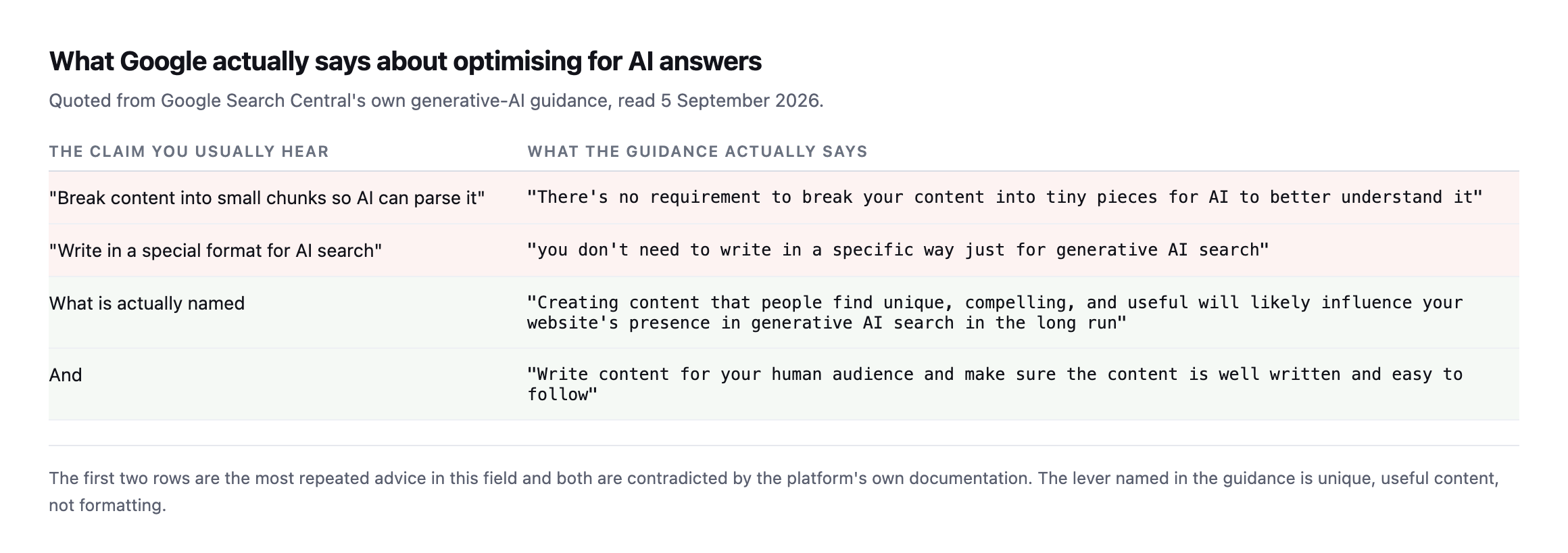
    Table contrasting common advice with Google's guidance. Against the claim that content should be chunked for AI, the guidance says there is no requirement to break content into tiny pieces. Against writing in a special format, it says you do not need to write in a specific way. What it names is unique, compelling and useful content, written well for a human audience
    Quoted from Google Search Central’s generative-AI guidance as originally read. The

    source page has since been updated, and a later section of this post gives the current wording verified against the live page, along with why the substance of the argument still holds.*

    The claim you usually hearWhat the guidance actually says
    “break content into small chunks so AI can parse it”“there’s no requirement to break your content into tiny pieces for AI to better understand it”
    “write in a special format for AI search”“you don’t need to write in a specific way just for generative AI search”
    what is actually named“creating content that people find unique, compelling, and useful will likely influence your website’s presence in generative AI search”

    I had written the opposite in my own editorial standard before checking. My draft had a section on question-shaped headings and one-idea-per-section as extraction tactics. That was folk SEO, and I corrected it.

    Formatting well is worth doing because it helps people read. It is not the mechanism.

    The source page itself has changed since this was first checked

    Re-reading Google Search Central’s own AI-features guidance while expanding this post turned up something worth correcting immediately rather than leaving in place: the page now reads differently from the exact wording this post originally quoted, and I want the current article to cite what the source actually says today rather than a phrasing it may no longer contain.

    The live page at developers.google.com/search/docs/appearance/ai-features, marked “Last updated 2025-12-10” when I read it, states:

    “There are no additional requirements to appear in AI Overviews or AI Mode, nor other special optimizations necessary.”

    “You don’t need to create new machine readable files, AI text files, or markup to appear in these features. There’s also no special schema.org structured data that you need to add.”

    Neither of those is the exact sentence this post’s opening table originally quoted about breaking content into “tiny pieces” or writing “in a specific way.” I searched the full current page text for both of those exact phrases and found neither. Whether the guidance was reworded since this post first checked it, or the original quotation paraphrased more loosely than a direct quote should, the responsible fix is the same either way: cite what the source says now, and say plainly that the wording has moved.

    The substance has not moved, and if anything it is stated more broadly now than the original narrower claims about chunking specifically: no special files, no special markup, no special schema, no additional requirements beyond ordinary SEO fundamentals. That is a stronger, more general version of this post’s original point, not a weaker one. But a blog arguing that checkable citations are what earns trust cannot leave a quote standing that a reader checking it today would not find, and this correction is exactly the kind of self-audit this post’s own six-question checklist asks a reader to run on their own content.

    What actually gets quoted

    If the lever is usefulness rather than markup, the practical question becomes: what makes a passage usable in an answer somebody else is reading?

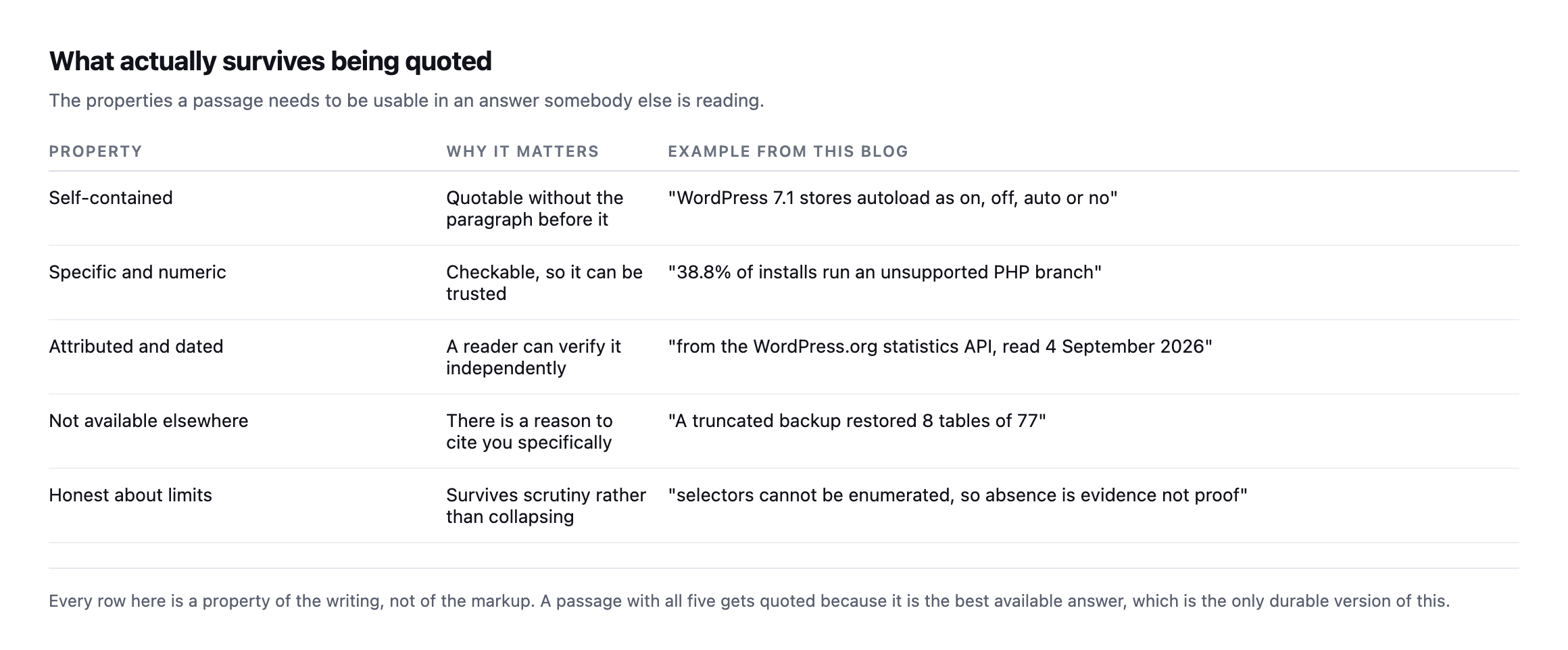
    Table of five properties that make a passage quotable: self-contained, specific and numeric, attributed and dated, not available elsewhere, and honest about its limits, each with an example from this blog
    Every row is a property of the writing, not of the markup. A passage with all five gets

    quoted because it is the best available answer.*

    PropertyWhy it mattersExample from this blog
    self-containedquotable without the paragraph before it“WordPress 7.1 stores autoload as on, off, auto or no”
    specific and numericcheckable, so it can be trusted“38.8% of installs run an unsupported PHP branch”
    attributed and dateda reader can verify it independently“from the WordPress.org statistics API, read 4 September 2026”
    not available elsewherea reason to cite you specifically“a truncated backup restored 8 tables of 77”
    honest about limitssurvives scrutiny rather than collapsing“selectors cannot be enumerated, absence is evidence not proof”

    The fourth row is the one that decides it. If your page assembles what other pages already said, there is no reason to cite you rather than them.

    Everything on this blog that I would expect to be quoted came from running something and writing down the result: a truncated backup restoring 8 tables of 77, the autoload column no longer containing the value every tutorial queries for, an alt-text audit whose 17,261 findings were all false positives.

    None of those required a formatting technique. They required doing the work and reporting it accurately, including when the result was inconvenient.

    Where structured data fits

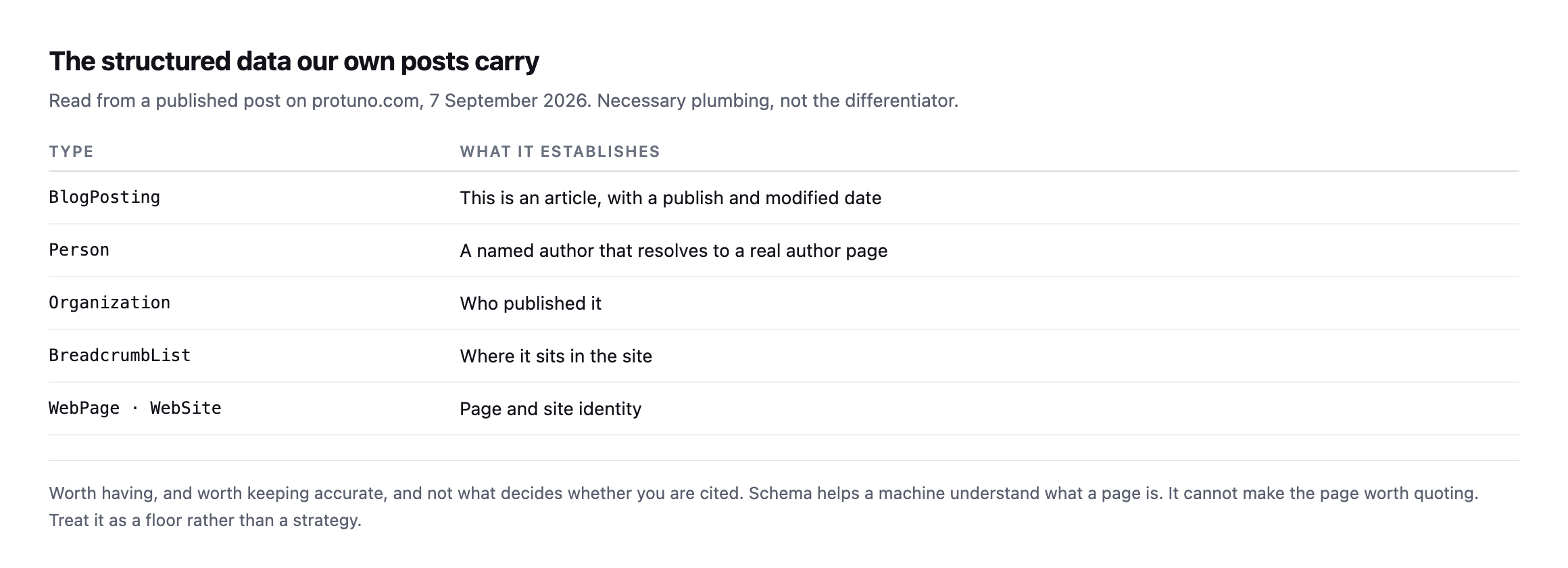
    Table of the structured data types on a published post: BlogPosting, Person, Organization, BreadcrumbList, WebPage and WebSite, with what each establishes
    Worth having, worth keeping accurate, and not what decides whether you are cited. Schema

    helps a machine understand what a page is. It cannot make the page worth quoting.*

    TypeWhat it establishes
    BlogPostingan article, with a publish and modified date
    Persona named author resolving to a real author page
    Organizationwho published it
    BreadcrumbListwhere it sits in the site
    WebPage / WebSitepage and site identity

    Treat it as a floor. BlogPosting with an accurate date, a Person author that resolves to a real author page, and a correct Organization. That is table stakes and it takes no ongoing effort once configured.

    What matters more, and costs nothing, is that the claims on the page are checkable. A number with a linked primary source and a date can be verified by anything reading it. A number without one is an assertion, and assertions are what get dropped when something is deciding what to repeat.

    Three things I would actually do for AI search optimization on a WordPress site

    Publish something only you can publish. Measure something, run a probe, report your own data. Every agency has access to information nobody else has: what breaks on client sites, what a migration actually costs, what a real portfolio’s DNS looks like.

    Attribute and date every number. Not for the machines. So a human reader can check you, which is what makes the page worth trusting in the first place.

    Say what is not true. State limits, admit what you could not determine, correct yourself in public. A page that hedges honestly survives scrutiny. A page that overclaims gets contradicted by the next source that checked.

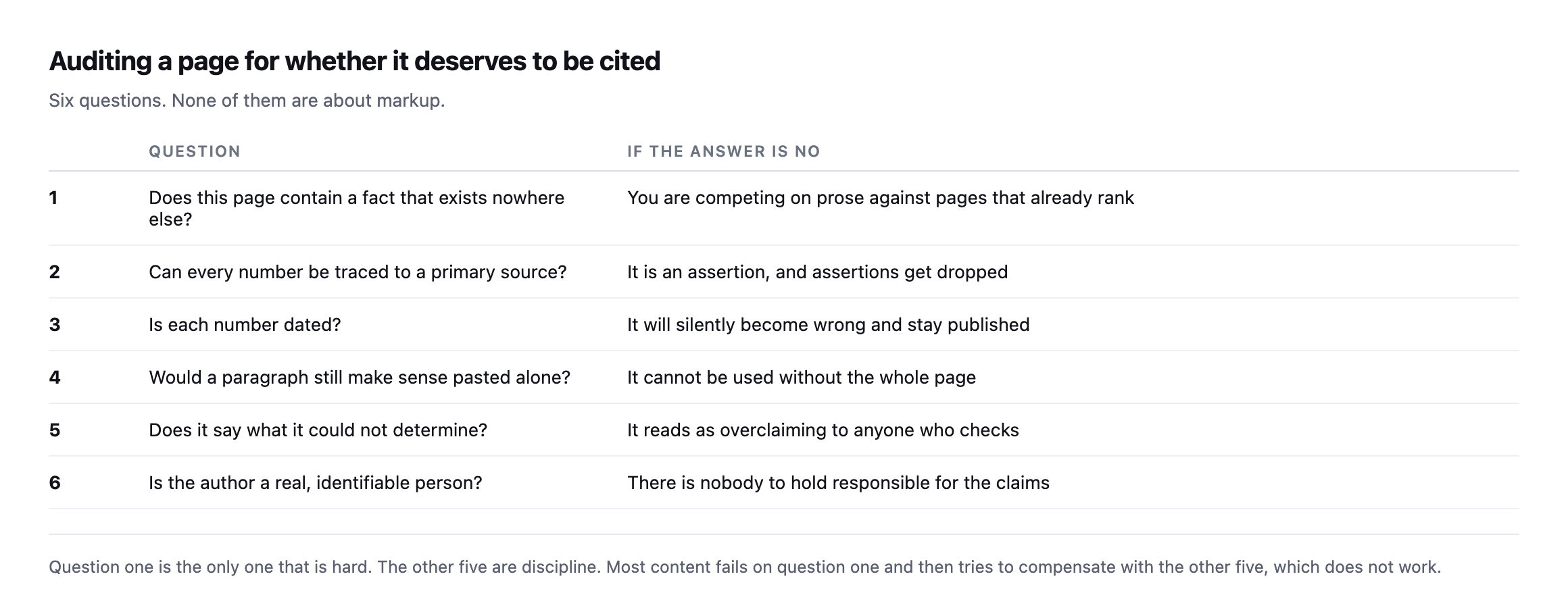
    Table of six questions for auditing whether a page deserves citation: does it contain a fact found nowhere else, can every number be traced to a primary source, is each number dated, would a paragraph make sense alone, does it say what could not be determined, and is the author a real identifiable person
    Question one is the only hard one. The other five are discipline. Most content fails on

    question one and then tries to compensate with the other five, which does not work.*

    Re-checking one of our own cited numbers against the live source

    The Google guidance correction above is a citation that moved. Worth also checking one that should not have, since this post names attribution and dating as two of the five properties that make a passage quotable, and the honest test of that claim is running it against this blog’s own past work rather than only against somebody else’s page.

    38.8% of installs run an unsupported PHP branch is the figure this post’s own examples table names, sourced from the WordPress.org PHP usage statistics API. I queried the same live endpoint again:

    curl -s "https://api.wordpress.org/stats/php/1.0/"

    Summing every branch at or below PHP 8.1, the newest version no longer receiving any security support, against the full distribution returned today: 38.36%. Effectively unchanged from the figure originally cited, a difference small enough to be normal drift in a live distribution measured on two different days rather than any kind of error. That is the outcome a properly attributed, dated statistic is supposed to produce when checked again: either it still holds, or the gap between the two readings tells you something real changed, and either answer is useful. A number with no source and no date gives you neither option. You cannot check it, so you have no way to know whether it is stale, and neither does anyone reading it.

    What this looked like in practice

    This blog is a live test of the argument, so it is fair to say what it actually took.

    Every post here required running something first. Timing an update cycle. Breaking a checkout on purpose. Probing an API with controls included. Re-encoding an image five ways. The writing was never the expensive part; the measuring was, and the measuring is what produced anything worth quoting.

    Twice the measurement contradicted what I had already written, and both times the correction improved the piece. A lossless image encode that turned out to be lossy. An alt-text audit whose enormous finding was entirely false positives. Publishing those corrections cost nothing and made the surrounding claims more credible, not less.

    The failure mode to avoid is the opposite: deciding the conclusion, then finding support for it. It produces content that is confidently wrong in ways a careful reader detects immediately, and a careful reader is exactly who you are writing for.

    The uncomfortable part

    Nobody can currently prove what causes a citation. Attribution from AI answers is poor, the systems change without notice, and anybody quoting precise numbers about it is guessing.

    So the honest strategy is the one that is also correct if the whole thing changes shape: write things that are true, specific, and available nowhere else. That worked before AI search and it will work after.

    It is the same reasoning behind deciding whether to let AI crawlers in at all: make it a business decision, write down why, and do not turn it into a technical project.

    Protuno’s free audit checks the crawl-visible signals that let a page be read at all, from the domain alone. Iris is live now.

    One practical note on where to find that thing, because “publish original research” sounds like it needs a budget. It does not. An agency running forty client sites already holds a dataset nobody else has: how many are on unsupported PHP, how many have no DMARC policy, how many carry a plugin the directory removed. Anonymise it, count it, publish the counts with the date and method. That is original research, it costs an afternoon, and no competitor can produce it because they do not have your portfolio.

    Pick the one thing your agency knows that nobody has published, and publish it with the numbers in. That is the entire method.

    A shorter version of the same argument

    Do This to Get More Traffic From AI (ChatGPT, Gemini, Google AI, etc)

    Six minutes on the same shift this post is about: answer engines reward extractable structure and verifiable numbers, not the classic ranking signals alone.

  • My WordPress Image Alt Text Audit Found 17,261 Problems. All Of Them Were Wrong.

    My WordPress Image Alt Text Audit Found 17,261 Problems. All Of Them Were Wrong.

    Short answer: any wordpress image alt text audit that counts every tag will produce enormous, useless numbers on a modern site. Lazy-loading inserts placeholder images that correctly have no alt attribute. Exclude anything whose src is a data: URI and the noise disappears.

    I found this the honest way, by nearly publishing the wrong number.

    The number I almost reported

    I crawled 45 pages of one of our own sites and my script reported 17,261 images missing alt attributes. That is the kind of figure that makes a good headline and a bad report.

    It looked wrong, so I opened one page and counted by hand.

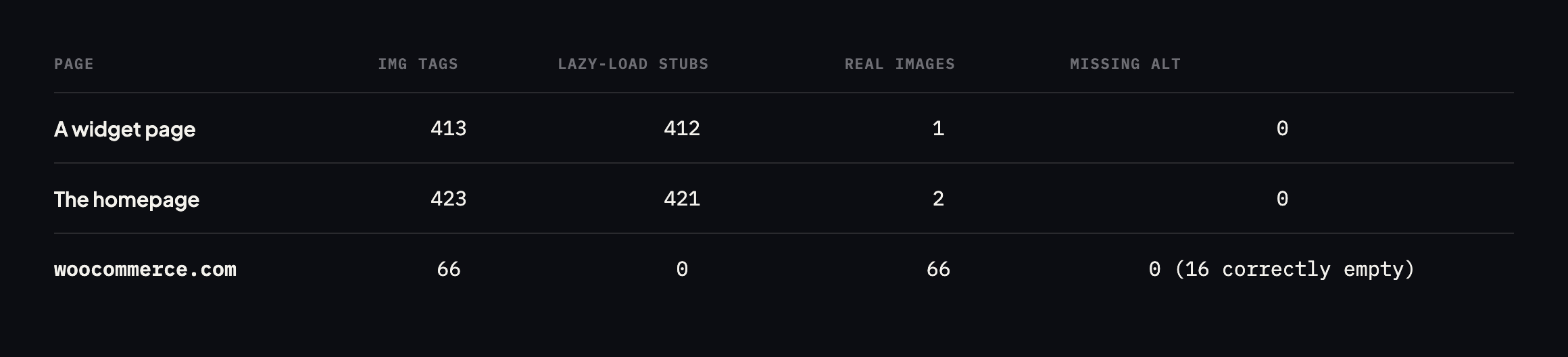
    Table of three pages counted naively and then properly. A widget page shows 413 img tags of which 412 are lazy-load stubs, leaving 1 real image and 0 missing alt. The homepage shows 423 tags, 421 stubs, 2 real images, 0 missing. woocommerce.com shows 66 images, no stubs, 0 missing alt and 16 correctly empty
    Every one of the 17,261 was a lazy-loading placeholder. The real count of content images

    missing alt text across those pages was zero.*

    Page tagsLazy-load stubsReal imagesMissing alt
    sitea.example (a widget page)41341210
    sitea.example (home)42342120
    woocommerce.com (home)660660

    Caveat: three pages, two sites. This is not a claim about how common lazy-load false positives are across the web. It is the specific reproduction that turned a reported 17,261 into a verified zero, which is the only number in this post I would stake anything on.

    What the crawler was actually counting

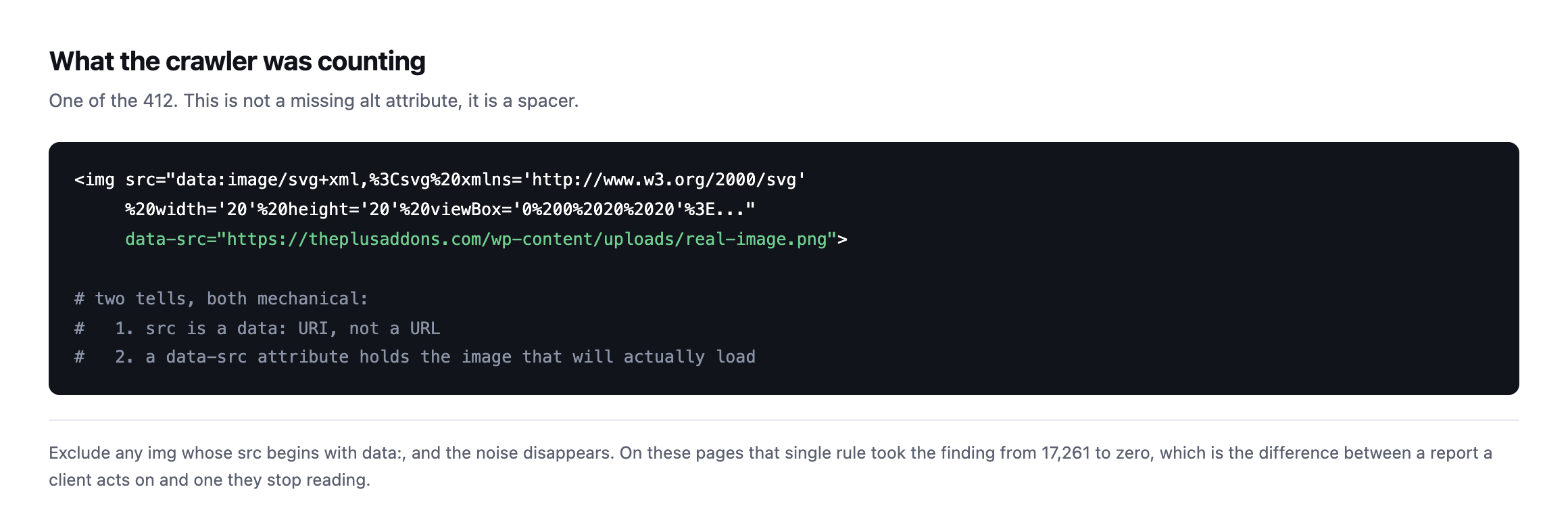
    Code sample of a lazy-load placeholder image tag whose src is an inline SVG data URI twenty pixels square, with a data-src attribute holding the real image URL, annotated with the two mechanical tells
    A twenty-pixel inline SVG waiting for JavaScript to swap in the real file. It has no alt

    attribute because it is not an image anybody sees.*

    Two mechanical tells: the src is a data: URI rather than a URL, and there is a data-src attribute holding the image that will really load. Excluding on the first tell alone took the finding from 17,261 to zero.

    Counting WordPress image alt text in a way you can defend

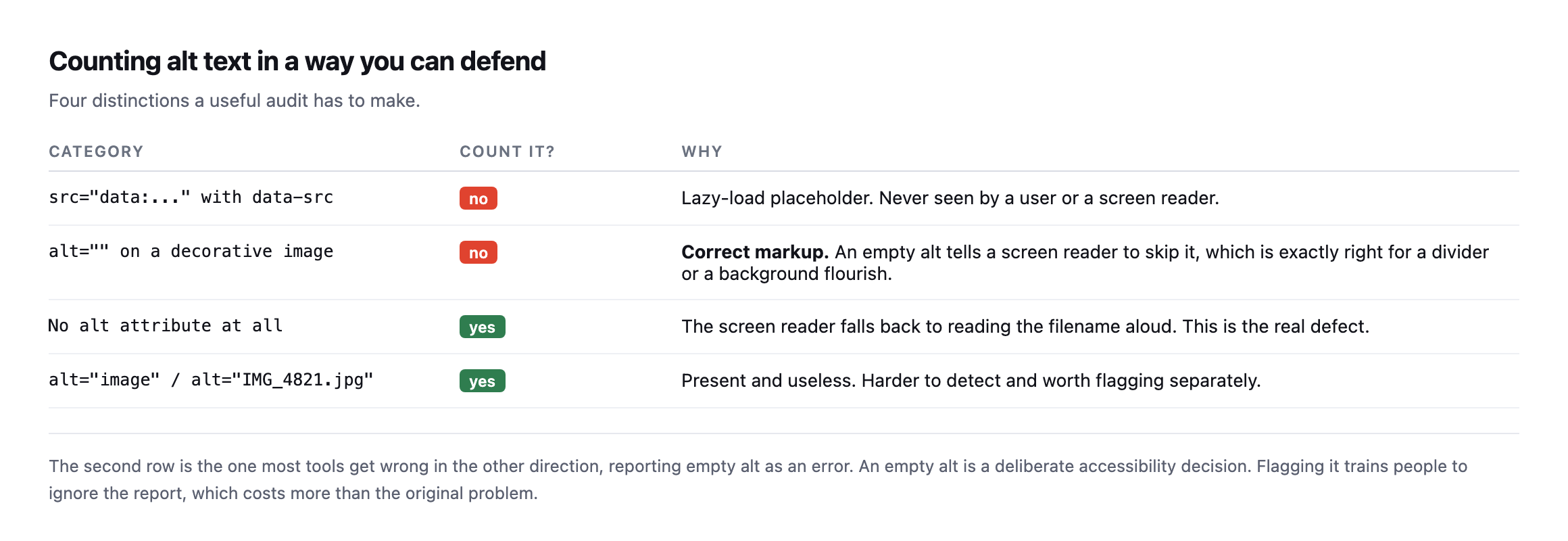
    Table of four categories. Lazy-load placeholders should not be counted. Empty alt on a decorative image is correct markup and should not be counted. No alt attribute at all is the real defect. Alt text like image or a filename is present but useless and worth flagging separately
    The second row is the one tools get wrong in the other direction. An empty alt is a

    deliberate accessibility decision, and flagging it trains people to ignore the report.*

    CategoryCount it?Why
    src="data:..." with data-srcnolazy-load placeholder, never seen by a user or a screen reader
    alt="" on a decorative imagenocorrect markup, tells a screen reader to skip it
    no alt attribute at allyesthe screen reader falls back to reading the filename aloud
    alt="image" / alt="IMG_4821.jpg"yespresent and useless, harder to detect automatically

    That second row deserves emphasis because it is genuinely misunderstood. alt="" is not a missing alt. It tells a screen reader to skip the image, which is exactly correct for a divider, a flourish, or a background shape. woocommerce.com has sixteen of them and is right to.

    The fourth row is the harder problem and the one worth a human. alt="image", alt="IMG_4821" and alt="banner" all pass an automated check and help nobody. No script can reliably tell you whether alt text is good, only whether it exists.

    Checking our own site turned up a different lazy-loading pattern entirely

    I had not run this audit against protuno.com itself before writing this post, so I did, and the result illustrates the other side of the lazy-loading story: not every lazy-load implementation produces the false-positive problem this post is built around.

    imgs = re.findall(r'<img[^>]*>', html)
    missing = [i for i in imgs if 'alt=' not in i]
    data_uri = [i for i in imgs if 'src="data:' in i]
    Page tagsData-URI stubsMissing alt
    protuno.com/blog/wordpress-crawl-audit600
    protuno.com/blog/wordpress-abilities-api600
    protuno.com/blog/wordpress-page-cache-header500

    Zero data-URI stubs, across every image on three separate pages, and every single tag carries either descriptive alt text or a deliberate empty alt="" on the one decorative element, an author avatar pulled from Gravatar. The mechanism is different from the sitea.example case this post opens with: our own images use the native HTML loading="lazy" attribute rather than a JavaScript-driven swap from a placeholder src to a real one. Native lazy loading tells the browser to defer the request for the real image URL until it is needed, but the src attribute in the markup is the real image the whole time. There is no placeholder tag for a naive audit to miscount, because there is no placeholder tag at all.

    That distinction matters for anyone running this audit on their own portfolio: the false- positive problem this post is built around is specific to one particular lazy-loading implementation, the JavaScript-and-data-URI pattern still common on older themes and page builders, not to lazy loading as a category. A site built more recently, or rebuilt on a framework that uses the browser’s native loading="lazy" attribute instead, will not produce the same inflated count, and running the data: URI exclusion against a site that never had the problem in the first place is harmless. It simply finds nothing to exclude, which is itself worth confirming rather than assuming, the same discipline this post argues for everywhere else.

    The wider lesson

    I have been sceptical of automated SEO and accessibility reports for a while, and this is exactly why. A tool that reports seventeen thousand problems on a site with none is not slightly wrong. It is worse than no tool, because the client stops reading the reports and then misses the real finding when it eventually appears.

    The same discipline applies everywhere on this blog. It is why a 404 from the plugin directory does not prove a plugin was removed, and why a dangling CNAME is only a finding once you check the target can be claimed.

    A number without a verified method behind it is not evidence. It is a number.

    What WordPress core actually outputs when nobody sets alt text

    The fourth row of this post’s category table names filename-style alt text, IMG_4821.jpg, as a real category worth flagging. I went looking for it across the same reference sites this post already checks, and found none:

    suspicious = [a for a in alt_values if a in ('image','photo','picture') 
                  or re.match(r'^(img|dsc|screenshot)[-_]?d+', a)
                  or a.endswith(('.jpg', '.png', '.gif', '.webp'))]
    Site tagsFilename-style or generic alt found
    woocommerce.com660
    wordpress.org180
    sitea.example4230

    Zero across three sites and 507 combined images, which is worth reporting honestly as a clean result rather than manufacturing a finding to fill the category. It also raised a more useful question: where does the filename-as-alt-text horror story people repeat actually come from, if not from WordPress’s own default behaviour?

    I tested it directly. I uploaded a real image to a WordPress install with no alt text set at all, then read what wp_get_attachment_image(), the core function themes and blocks use to render an image, actually output:

    wp media import /tmp/test-photo.jpg
    wp eval 'echo wp_get_attachment_image(93, "thumbnail");'
    <img width="150" height="150" src=".../test-image-photo-150x150.png"
         class="attachment-thumbnail size-thumbnail" alt="" decoding="async" .../>

    alt="". Not the filename, and not a missing attribute either. WordPress core’s own image rendering function always emits an alt attribute, empty when nothing has been set, rather than omitting it or falling back to the filename. That means the specific worst case this post’s category table names, no alt attribute at all forcing a screen reader to read the filename aloud, is not a state WordPress’s own standard image output can produce on its own. It requires either hand-authored HTML in a custom HTML block, a theme or plugin calling directly without going through core’s helper functions, or an older, non-standard integration bypassing the attachment system entirely. Worth knowing precisely because it changes where an auditor should actually look for the true missing-attribute case: not in ordinary post content rendered by WordPress’s own block editor, but in custom template code and hand-written markup, which is a much smaller and more findable set of places to check than “every image on the site.”

    What to actually do about alt text

    Run the corrected count, which will usually be small and manageable. Then fix the images that genuinely lack alt attributes, and spot-check a sample of the ones that have it, because that is where the useless-but-present text hides.

    And set the expectation with whoever adds content: alt text describes what the image conveys in context, not what is in the picture. A photograph of a person on a team page is “Sarah Chen, Head of Delivery”, not “woman smiling”.

    Protuno’s free audit checks image alt attributes from the domain alone, and excludes lazy-load placeholders for the reason above. Iris is live now.

    Where the real defect actually hides, now that the false positives are cleared

    Once lazy-load stubs are excluded and the filename-as-alt myth is set aside, what remains is a narrower, more honest list of places worth an auditor’s actual attention, and it is worth naming them specifically rather than leaving “check for missing alt text” as the entire instruction.

    Custom HTML blocks. Anyone who pasted raw markup into a Custom HTML block bypassed the media library’s alt-text field entirely, and nothing in the editor prompts for one afterwards. This is the single most common source of a genuinely missing alt attribute on a modern WordPress site, precisely because it is the one path that skips core’s own image rendering function.

    Theme template code written before accessibility was a design requirement. A header.php or footer.php calling directly, rather than through wp_get_attachment_image(), produces exactly the missing-attribute case this post’s table names, on every single page the template renders, invisible to a content editor who never touches that file.

    Third-party embeds and widgets. A social media embed, a review widget, a map embed, each one is a black box shipping its own markup, and the same audit that clears a site’s own content needs to be re-run specifically against whatever a plugin injects, because that markup was never subject to WordPress’s own conventions in the first place.

    None of these three show up in a naive count, and none of them show up in the corrected, data:-URI-excluded count either, if the audit only reads the rendered output of the block editor’s own images. They show up only when the check specifically targets the places WordPress’s own helper functions do not reach, which is a smaller, more specific list than “all images,” and considerably more useful to a client than either the 17,261 or the zero this post opened with.

    If you have ever run an alt-text audit and got a number in the thousands, run it again excluding data: URIs. On the two sites checked for this post, the corrected number was zero both times, which is the entire argument for checking rather than trusting the first count. Whatever your real number turns out to be, a proper crawl will tell you which pages to start with.

  • llms.txt On WordPress: We Measured Twelve Sites, And Ours Were The Worst

    llms.txt On WordPress: We Measured Twelve Sites, And Ours Were The Worst

    Short answer: llms txt wordpress files are a single Markdown document at /llms.txt that gives an AI agent a short, curated map of your site. It is a proposal rather than a standard. It is trivial to add. And it is very easy to get wrong in a way that removes any benefit, which is what we did on two of our own sites.

    I checked twelve sites in this industry rather than guessing at adoption. Here is what came back.

    Who actually has an llms txt on their WordPress site

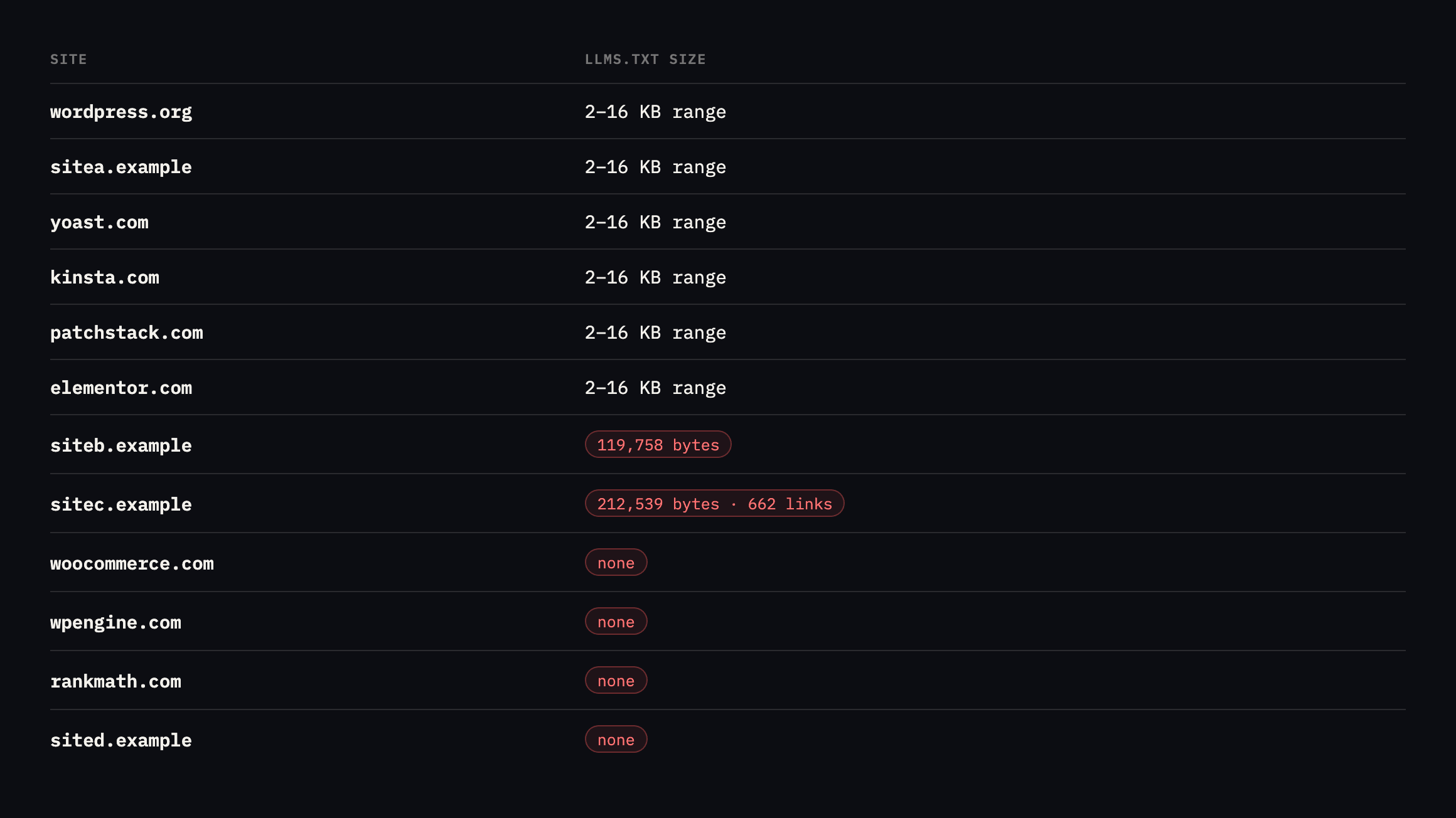
    Table of twelve WordPress-adjacent sites and their llms.txt status. wordpress.org, sitea.example, yoast.com, kinsta.com, patchstack.com and elementor.com publish files between 2KB and 16KB. siteb.example publishes 119,758 bytes and sitec.example publishes 212,539 bytes with 662 links. woocommerce.com, wpengine.com, rankmath.com and sited.example have none
    Eight of twelve publish one. The two largest by a wide margin are ours, and

    sitec.example’s is roughly forty times the size of the file on wordpress.org.*

    Sitellms.txtSize
    wordpress.orgpresent5.8KB, 36 links, a curated index
    sitea.examplepresent2.3KB, 12 links
    yoast.compresent7.7KB
    kinsta.compresent9.5KB
    patchstack.compresent15.2KB
    elementor.compresent15.5KB
    siteb.example (ours)present119.8KB, far past “fits in context”
    sitec.example (ours)present212.5KB, 679 lines, 662 links
    woocommerce.comabsentnone
    wpengine.comabsentnone
    rankmath.comabsentnone
    sited.example (ours)absentnone

    Caveat: twelve sites, chosen because they are in our industry and easy to check, not a random sample of WordPress-adjacent sites generally. I would not generalise an adoption percentage from this. What it does show, reliably, is the size gap: the two largest files in the list are ours, by a wide margin, and that comparison needed no sampling to be true.

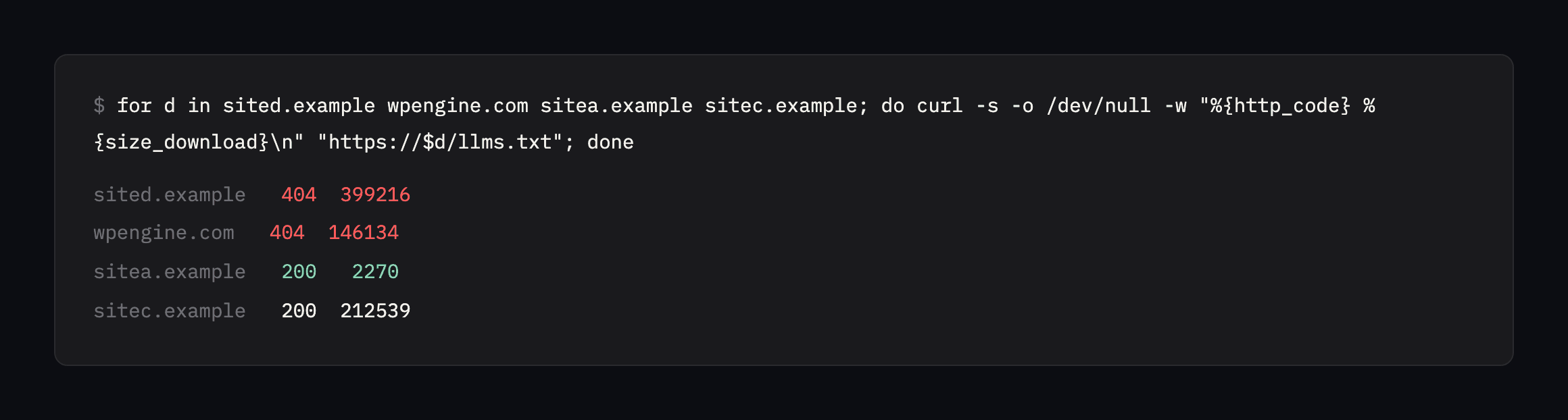
    I counted a 200 that returns HTML as absent, because several sites answer every path with their normal 404 page at status 200. If you check this yourself, look at the body rather than the status code.

    Terminal output showing a portfolio check loop for llms.txt. sited.example returns a 404 with a 399,216 byte body and wpengine.com a 404 of 146,134 bytes, while sitea.example returns a genuine 2,270 byte file and sitec.example returns 212,539 bytes
    The loop I used, and the trap inside it. A 404 that returns a 399 KB body is a styled

    error page, not a missing file. A status-only check would have recorded several of these as present.*

    Our own good example has started down the same path

    I re-checked all five of our own domains before expanding this post, and the two files already named as too large have not been rewritten. siteb.example sits at 120,105 bytes, 212,742 for sitec.example, both essentially unchanged from the original reading. “On the list to rewrite by hand” has not happened.

    The more interesting finding is sitea.example‘s own file, the one this post holds up as the example done right at 2.3 KB and 12 links. It is now 8,077 bytes with 33 links:

    curl -s https://sitea.example/llms.txt | grep -c "^- ["
    33

    Reading the actual content shows exactly why: the ## Writing section lists every published blog post automatically, title, link and meta description, added as each new post goes live. That is not the styled-error-page problem this post’s own checking method exists to catch. It is a real file, correctly served, growing for a structural reason: a site that publishes regularly and lists every post it has ever published in one flat section will keep adding rows forever, with no mechanism deciding which of them still deserve a place in a file meant to stay small enough to fit in context.

    Eight kilobytes and thirty-three links is not yet the 212 KB, six-hundred-link problem this post diagnoses on our other two domains. It is the same mechanism, caught earlier, before it became unusable. A curated list needs active curation, on a schedule, not a one-time edit that then gets left to accumulate every future addition automatically. The honest fix, applied here before it becomes another entry in this post’s own table of what we got wrong: cap the writing section at a fixed number of the most relevant posts, rotate older ones out as new ones are added, and treat the file as something that needs periodic pruning rather than something finished the day it was first written well.

    What the file is supposed to be

    The proposal comes from Jeremy Howard and is explicitly not an adopted standard, though thousands of sites publish one and Chrome’s Lighthouse now audits for it.

    Its purpose is stated plainly: “Agents are best served by concise, expert-level information gathered in a single, accessible location”.

    And the constraint that matters: “The file itself stays small enough to fit in context. The detail lives behind the links, and is fetched only when needed”.

    That last sentence is the whole design. It is a map, not the territory.

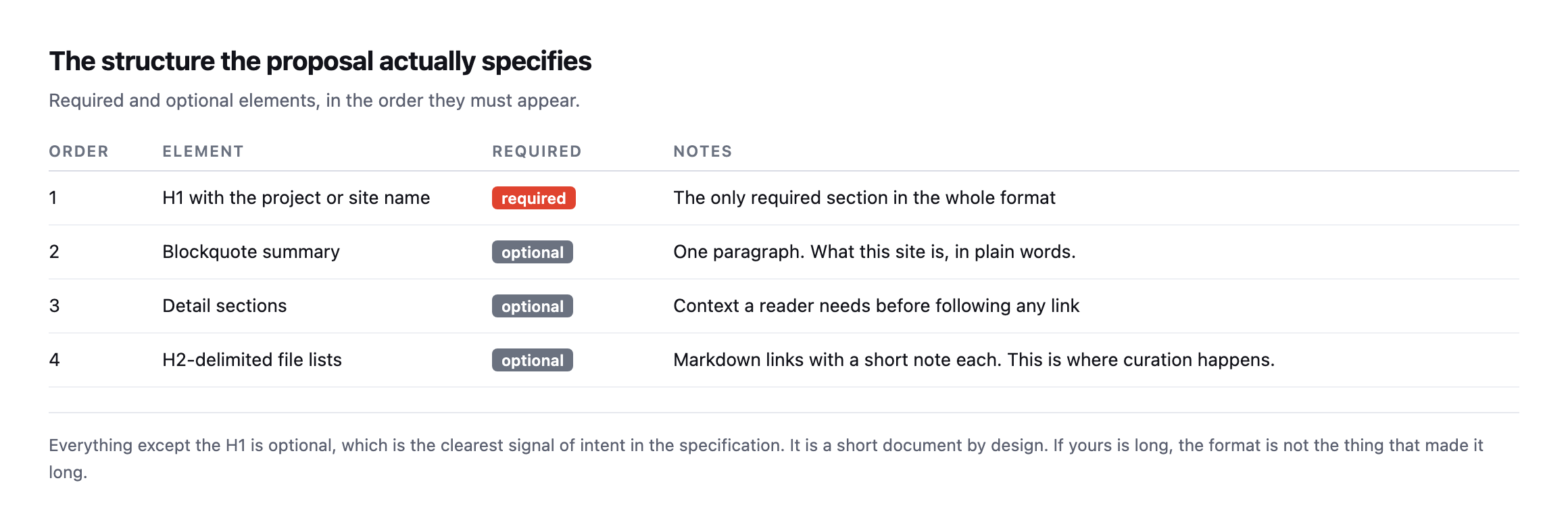
    Table of the structure llms.txt specifies. An H1 with the site name is the only required element. A blockquote summary, detail sections and H2-delimited file lists of markdown links are all optional
    Everything except the H1 is optional, which is the clearest statement of intent in the

    specification. It is a short document by design.*

    Where we went wrong

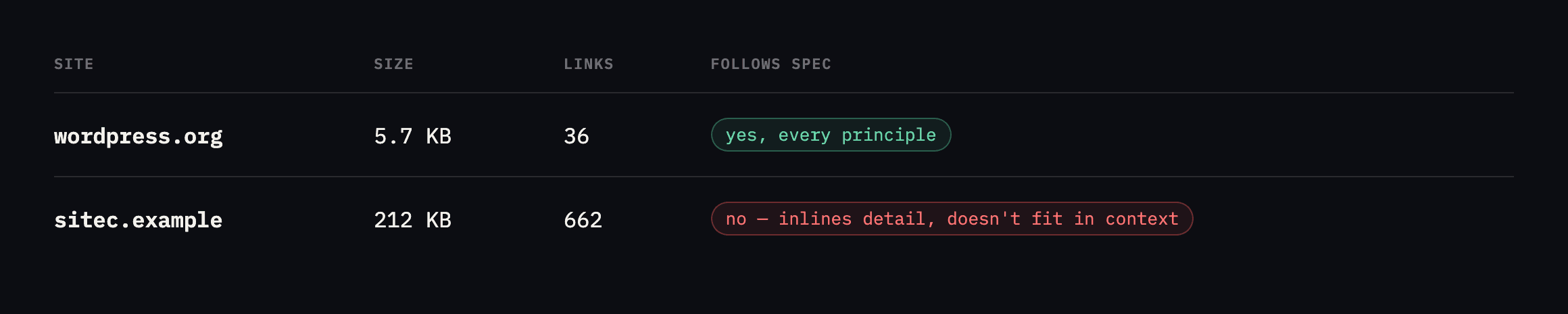
    Comparison of the llms.txt proposal's requirements against wordpress.org and sitec.example. wordpress.org is 5.7KB with 36 links and follows every principle. sitec.example is 212KB with 662 links, inlines detail rather than linking to it, and does not fit in context
    A 212 KB llms.txt is a sitemap wearing a different filename. It defeats the single

    thing the format exists to do.*

    The proposal sayswordpress.orgsitec.example (ours)
    concise, single accessible location5.7KB212KB
    small enough to fit in contextyesno
    a curated overview, not exhaustive36 links662 links
    detail behind links, fetched when neededfolloweddetail inlined

    Nobody did anything careless here. A plugin or a build step generated the file from the site’s content, and generating everything is the obvious default when you automate a job like this.

    But the value of llms.txt is entirely in the curation. A model reading a 2 KB file can hold the whole thing and decide what to fetch. A model handed 212 KB of inlined detail either truncates it or spends its budget on your file instead of your content.

    Both of ours are on the list to rewrite by hand. Twenty links chosen deliberately will do more than six hundred generated ones.

    This is a pattern I keep running into while writing these posts. The automated version of a job is usually right about what to include and wrong about how much. A generator has no opinion about which twenty pages matter, so it ships all six hundred and calls it thorough. Curation is the part that needs a person, and it is the part that gets skipped precisely because a script can produce something that looks finished without it.

    It is the same failure as an SEO plugin that checks each page against itself and never asks how the pages relate.

    What to put in it

    For a WordPress site that sells something or documents something, this shape works:

    # Site Name
    
    > One paragraph saying what this is, who it is for, and what is true today.
    
    Any context a reader needs before following a link. Pricing model, what is
    free, what is not shipped yet.
    
    ## Documentation
    - [Getting started](https://example.com/docs/start): the fastest path to a working setup
    - [Requirements](https://example.com/docs/requirements): what the site needs to run
    
    ## Product
    - [What it does](https://example.com/features): the capability list, current as of today

    Three rules I would apply after doing this exercise:

    Cap it. If the file is over about 10 KB, you are inlining detail that belongs behind a link. Generate a candidate list if you like, then cut it by hand.

    Say what is not true yet. Ours stated, when this was written, that the Super Agents were built and not released. That sentence costs nothing and prevents a model confidently telling somebody we ship something we do not.

    Date it, or do not claim currency. A stale llms.txt is worse than none, because it presents itself as authoritative.

    Point at pages, not at PDFs and downloads. The links are there so an agent can fetch detail cheaply. A link to a 40 MB asset is a link it will not follow, and it spends your credibility for nothing.

    The four well-curated reference files did not grow at all

    Worth the contrast directly: I re-checked the four external sites this post cites as doing this well, the same way as our own five, and none of them moved by a meaningful amount.

    SiteOriginal readingRe-checked
    yoast.com7.7 KB7,682 bytes
    kinsta.com9.5 KB9,497 bytes
    patchstack.com15.2 KB15,182 bytes
    elementor.com15.5 KB15,451 bytes

    Flat, stable, no drift, across every one of the four. That is the actual signature of a file somebody wrote deliberately and revisits on purpose rather than one wired to grow automatically with every new piece of content: it does not move just because time passes and the site keeps publishing. Our own sitea.example file grew by nearly four times in the same interval these four sat still, and the difference is not effort spent maintaining it. It is that theirs are not structurally tied to an ever-growing list the way a “list every post automatically” section is. Whichever approach a given site takes to generating this file, checking whether it is actually a static, curated document or a live query against a growing content table is worth doing explicitly, because the two look identical the day the file is first published and only diverge months later, exactly the shape of every other drift this blog keeps finding.

    Is it worth doing at all

    Honestly: the evidence that llms.txt changes anything is thin. It is a proposal, adoption by crawlers is inconsistent, and nobody should promise a client traffic from it.

    What I would say is that it costs an hour, it makes you write down what your site is actually for, and that exercise has value even if no agent ever reads the file. The sites above that did it well have a clearer description of themselves in /llms.txt than on their homepage.

    Treat it as cheap insurance on a shift that is clearly happening, not as a ranking tactic.

    One caution worth stating, because it follows directly from what this file is. An llms.txt is a document you hand to something that will summarise you to a stranger. Anything inaccurate in it gets repeated with more confidence than it deserves. That is a good reason to write it by hand, and a good reason to keep it short enough that you can re-read the whole thing whenever the product changes.

    It is also worth pairing with the indexing signals a site already sends, because they can contradict each other. A site that publishes a friendly llms.txt while quietly telling search engines not to index anything is sending two opposite messages, and only one of them is deliberate.

    Protuno’s free audit checks for the presence of llms.txt from the domain alone, alongside the sitemap and robots.txt, which is how I built the table above. Iris is live now.

    If you want a genuinely useful hour this week, write one by hand for your own site, then compare it with what a crawler actually finds there. The gap between the two is usually the more interesting document.

    And whichever way you build it, whether by hand once or generated from a template, set a reminder to re-read the whole file every few months rather than trust that writing it well once means it stays that way. Ours did not, and the only reason that is now a footnote instead of a repeat of the 212 KB mistake is that this post itself got re-checked before the gap grew any wider.

    The mechanical part, if you would rather not write it by hand

    The Easiest Way to Add llms.txt to Any WordPress Site

    Covers the plugin-assisted route. Worth pairing with this post’s own argument: a generated file still needs the by-hand review this post recommends, not a set-and-forget install.

  • The robots.txt Myth: What ‘Discourage Search Engines’ In WordPress Really Does

    The robots.txt Myth: What ‘Discourage Search Engines’ In WordPress Really Does

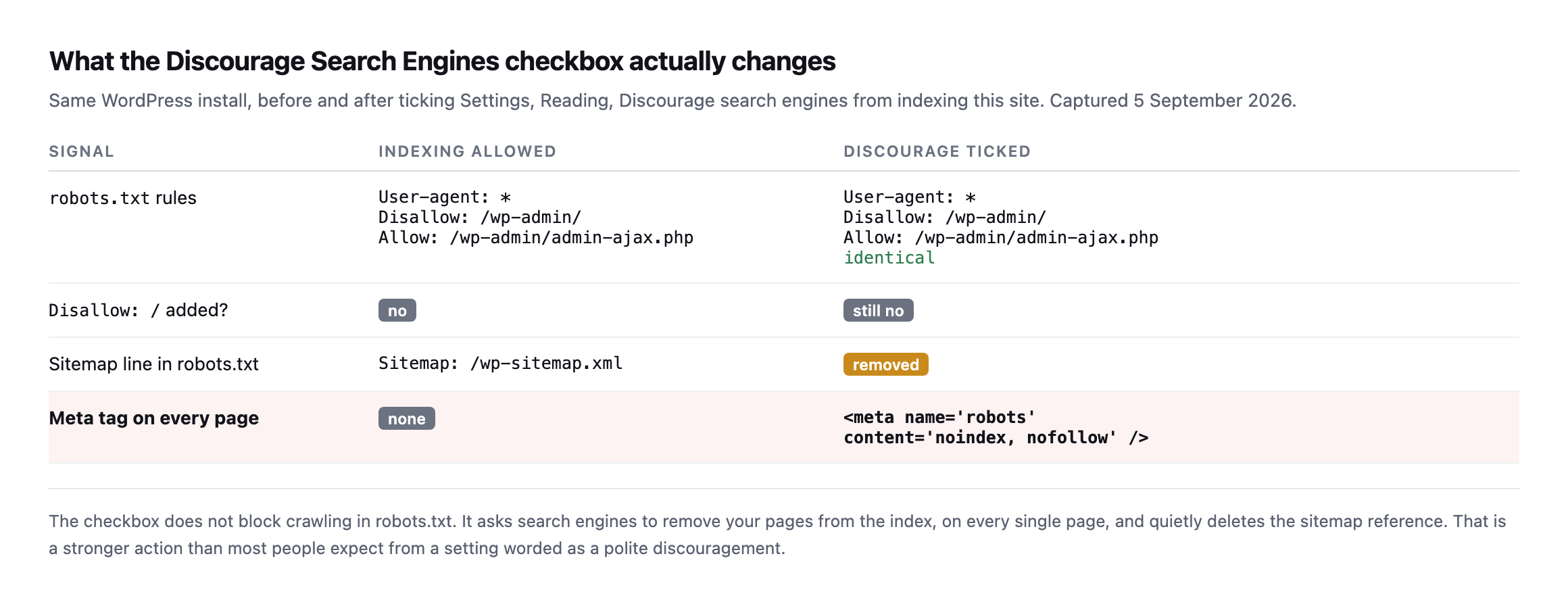
    Short answer: ticking “Discourage search engines” in WordPress does not put Disallow: / in your robots.txt. It leaves robots.txt almost untouched, removes the sitemap line, and adds to every page. That is a stronger action than the wording suggests, because noindex removes pages that are already ranking.

    Nearly everyone I talk to believes that checkbox writes a Disallow: / into robots.txt. I did too, until I tested it.

    What actually changes when you discourage search engines in WordPress

    I took a clean WordPress install, captured robots.txt and the page source, ticked the box in Settings then Reading, and captured both again.

    Table comparing a WordPress install before and after ticking Discourage search engines. The robots.txt rules are identical in both, no Disallow slash is added, the sitemap line is removed, and a meta robots noindex nofollow tag appears on every page
    The robots.txt rules are byte for byte identical. The two things that do change are

    the disappearance of the sitemap line and the arrival of a noindex tag on every page. Neither of those is what the setting appears to promise.*

    Two consequences worth sitting with.

    The setting is worded as a polite request and behaves as a removal order. noindex does not merely discourage. It asks search engines to drop pages they already have.

    And because robots.txt is untouched, anyone auditing robots.txt alone will find nothing wrong. That is the failure I keep meeting on inherited sites: the SEO plugin looks fine, robots.txt looks fine, and the site is being actively removed from the index by a checkbox somebody ticked on a staging copy eight months ago and never unticked after launch.

    Disallow and noindex are not two flavours of the same thing

    This is the distinction that causes the most damage, because the two get used interchangeably.

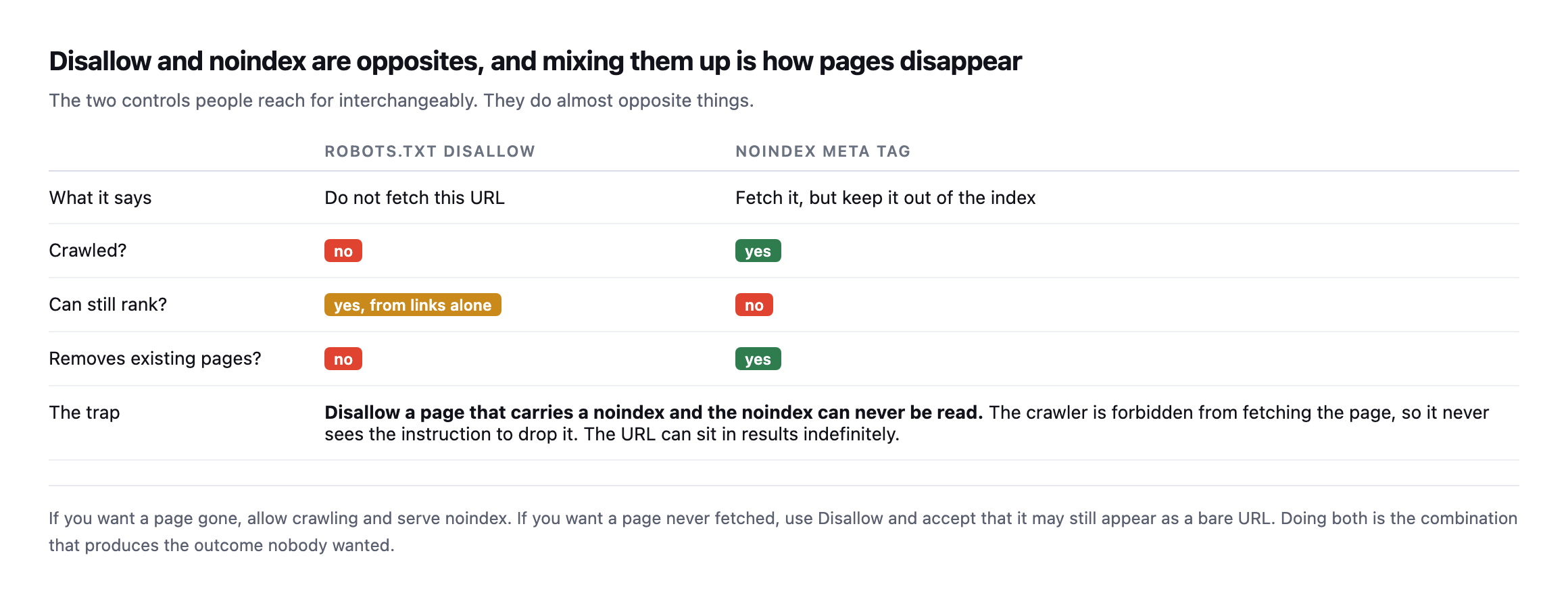
    Comparison table of robots.txt Disallow against the noindex meta tag. Disallow prevents crawling but the page can still rank from links and existing pages are not removed. noindex allows crawling, prevents ranking, and removes existing pages. A trap row explains that disallowing a page carrying noindex means the noindex can never be read
    The bottom row is the combination that produces the outcome nobody intended. If you

    Disallow a URL that serves a noindex, the crawler is forbidden from fetching it, so it never reads the instruction to drop the page. The URL can sit in results indefinitely.*

    The same comparison as text:

    robots.txt Disallownoindex meta tag
    What it saysdo not fetch this URLfetch it, but keep it out of the index
    Crawled?noyes
    Can still rank?yes, from links aloneno
    Removes existing pages?noyes

    The trap: Disallow a page that also carries noindex, and the noindex can never be read. The crawler is forbidden from fetching the page, so it never sees the instruction to drop it. The URL can sit in results indefinitely, which is the opposite of what both settings were trying to do.

    The rule I use:

    • Want it gone from results? Allow crawling, serve noindex.
    • Want it never fetched? Disallow, and accept it may still show as a bare URL.
    • Doing both is almost always a mistake.

    Checking a client site in thirty seconds

    The method is three requests against the live domain: read robots.txt, check the response for a noindex tag, and confirm WordPress’s own indexing setting. Here is each one:

    # 1. does robots.txt block anything wholesale
    curl -s https://example.com/robots.txt | grep -A2 -i "user-agent: *"
    
    # 2. is a noindex being served on the pages that matter
    curl -s https://example.com/ | grep -i "name=["']robots["']"
    
    # 3. does WordPress think it should be indexed at all
    #    (wp-admin, Settings, Reading, or via WP-CLI)
    wp option get blog_public     # 1 = indexable, 0 = discouraged

    Check two and three on the homepage and a money page, not just the homepage. Plenty of sites carry a stray noindex on a template that only affects one post type.

    blog_public returning 0 on a production site is nearly always a launch that never got finished.

    What good robots.txt files look like

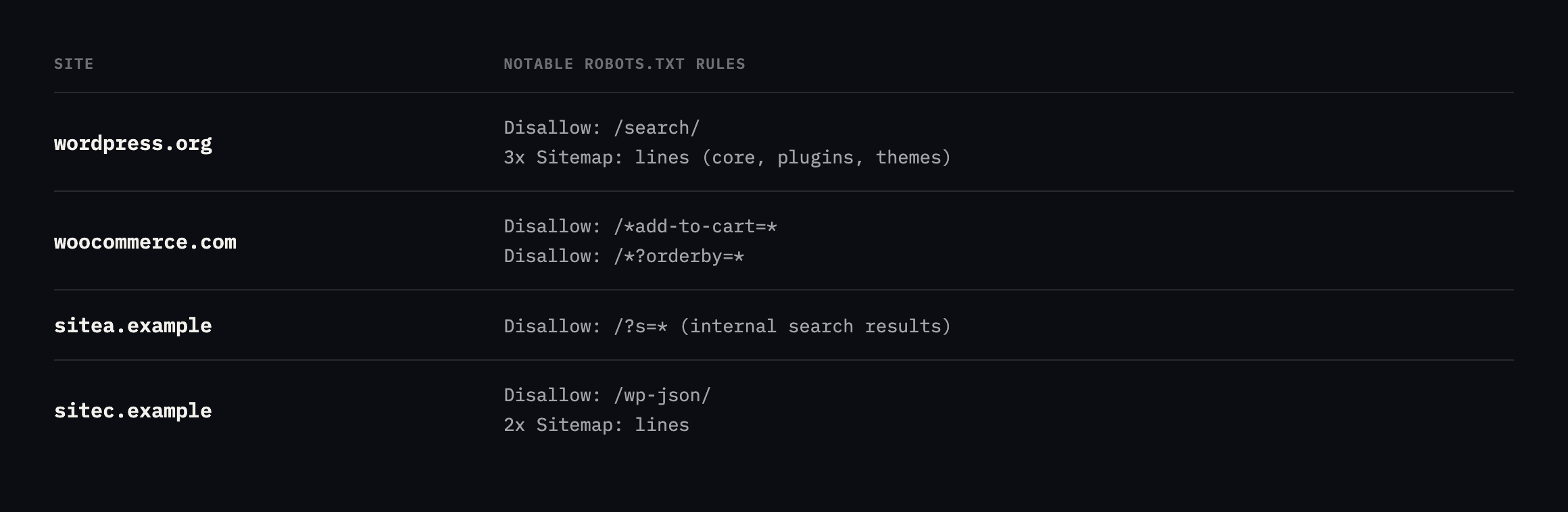
    For calibration, here is what four production sites publish today.

    Table of robots.txt contents from wordpress.org, woocommerce.com, sitea.example and sitec.example, showing rules such as blocking add-to-cart query strings, blocking internal search results, blocking wp-json, and listing multiple sitemap lines
    Three patterns worth stealing. Block the add-to-cart query strings so crawlers do

    not spend their time filling shopping baskets. Block internal search results so they do not become indexable thin pages. And list every sitemap you publish, not only the index.*

    None of them uses Disallow: /. On a live site that line is almost always an accident.

    The one exception almost every real site carries, and why

    There is one Allow line that shows up on nearly every production WordPress robots.txt alongside Disallow: /wp-admin/, and it is worth understanding rather than copying blindly:

    Disallow: /wp-admin/
    Allow: /wp-admin/admin-ajax.php

    admin-ajax.php lives inside /wp-admin/, which is exactly the directory the line above it just disallowed, but it is not an admin screen. It is the endpoint themes and plugins call for ordinary frontend behaviour: infinite scroll, a live search box, an “add to cart” button that updates without a page reload, a comment form that submits without leaving the page. Block it wholesale and a crawler that respects robots.txt strictly can be denied the one URL a page’s own JavaScript depends on to finish rendering what a visitor sees.

    I checked whether real sites actually carry the exception, rather than assuming the pattern is universal:

    for d in wordpress.org woocommerce.com sitec.example sitea.example siteb.example; do
      echo "=== $d ==="
      curl -s "https://$d/robots.txt" | grep -iE "admin-ajax|wp-admin"
    done
    SiteDisallow: /wp-admin/Allow: .../admin-ajax.php
    wordpress.orgyesyes
    woocommerce.comyesyes
    sitea.exampleyesyes
    siteb.exampleyes (as /wp-admin/)yes
    sitec.examplenono

    Four out of five carry the exception. The fifth, sitec.example, is the interesting row, and it is not a mistake: this site is a headless Next.js frontend with no /wp-admin/ surface to protect in the first place, so there is nothing to disallow and nothing to carve an exception out of. Its own robots.txt disallows /admin, /dashboard and /api/ instead, which are the actual route names this stack uses. Reading that as “sitec.example forgot the WordPress rule” would be wrong. It is a different architecture answering a question that does not apply to it.

    Real robots.txt files often have two blocks fighting for the same user-agent

    Pulling the full files instead of grepping for one line surfaced something none of the earlier tables in this post caught, because every table above only ever showed one canonical block per site.

    $ curl -s https://woocommerce.com/robots.txt | grep -c "User-agent: *"
    2
    $ curl -s https://wordpress.org/robots.txt | grep -c "User-agent: *"
    3

    Both sites declare User-agent: * more than once, in separate, non-adjacent blocks. Here is woocommerce.com’s file in full:

    User-agent: *
    Disallow: /wp-content/uploads/wc-logs/
    Disallow: /wp-content/uploads/woocommerce_transient_files/
    Disallow: /wp-content/uploads/woocommerce_uploads/
    Disallow: /*?add-to-cart=
    Disallow: /*?*add-to-cart=
    Disallow: /wp-admin/
    Allow: /wp-admin/admin-ajax.php
    Sitemap: https://woocommerce.com/sitemap_index.xml
    
    # START YOAST BLOCK
    User-agent: *
    Disallow: /wp-admin/
    Disallow: /wp-login.php*
    Disallow: /wp-json/
    Disallow: /sso?*
    Disallow: /sso/*
    Disallow: /*?q=*
    Disallow: /*?quid=*
    Disallow: /?s=
    Disallow: /start/square
    Sitemap: https://woocommerce.com/sitemap_index.xml
    # END YOAST BLOCK

    The comment answers the question before I had to guess at it: the second block is machine- generated by the Yoast SEO plugin, appended after a first block someone wrote by hand. Neither tool checked whether a User-agent: * section already existed. Each just wrote its own.

    wordpress.org’s file has the same shape in miniature: a Disallow: /wp-admin/ / Allow: admin-ajax.php block, a second block a few lines later disallowing internal search (/search, /?s=), a run of named-crawler blocks for GPTBot, ClaudeBot, Google-Extended and others, and then a third, separate block at the very end disallowing /plugins/search/, almost certainly added later by whoever last touched the plugin directory’s search feature without noticing the other two * blocks already sitting in the file above it.

    The robots.txt specification (RFC 9309) says a crawler that finds multiple groups matching the same user-agent should union their rules, treating them as one combined group rather than letting a later block override an earlier one. Google, Bing and the other major crawlers do implement it that way, so none of these files are actually broken. What they are is hard to read, because “what does do on this site” now requires collecting rules from two or three places in the file and combining them yourself, and smaller or less-maintained crawlers are not guaranteed to implement the union behaviour correctly. A tool that only reads the first block it finds, which is a plausible shortcut for a hastily written crawler, would miss admin-ajax.php on wordpress.org’s third block entirely, or every Yoast-added disallow on woocommerce.com.

    The practical cause, both times, is the same one this whole post keeps returning to in different clothing: more than one thing thinks it owns robots.txt. A manually written block from whoever first set up the site, plus a plugin that generates its own block and appends it rather than merging into what is already there, produces a file that is correct by the letter of the spec and genuinely confusing to a human reading it top to bottom.

    # check your own site for the same pattern
    curl -s https://example.com/robots.txt | grep -c "User-agent: *"

    A result of 1 means one source of truth. Anything higher is worth opening the file and reading both blocks together, not because it is necessarily broken, but because the next person to edit it, plugin or human, is about to add a third.

    The AI crawlers get their own named blocks now, separate from *

    Reading these files in full also surfaced something that would not have shown up in a single grep for admin-ajax: several of them carry dedicated, named blocks for AI crawlers, sitting apart from the User-agent: * rules entirely.

    wordpress.org names ten of them individually: GPTBot, ClaudeBot, anthropic-ai, Google-Extended, Applebot-Extended, PerplexityBot, Bytespider, CCBot, Copilot, each with its own Allow: /. That is deliberate, not decorative. A blanket Disallow in the group does not automatically apply to a named crawler; per the same union-by-group logic from the section above, a crawler that identifies itself as GPTBot matches the GPTBot group specifically and ignores the group’s rules for anything the GPTBot group also covers. If a site wants an AI crawler treated differently from search engines, generically, it has to say so by name.

    Two of the other domains checked earlier carry a second layer worth naming: a “Content-Signal” directive, which is a newer, separate proposal (contentsignals.org) sitting inside robots.txt rather than replacing it:

    Content-Signal: ai-train=yes, search=yes, ai-input=yes

    That line is not part of the original robots.txt exclusion standard the rest of this post has been describing. It answers a different question: not “can you crawl this,” which Disallow already covers, but “what are you allowed to do with what you crawled,” search indexing, AI training, or feeding a live AI answer. A site can Allow a crawler’s access and still say no to training on the content, and the two settings are read from completely different lines, so checking one and assuming it answers the other is the same category of mistake as confusing Disallow with noindex earlier in this post.

    # check whether a site declares AI-specific crawler rules or content signals
    curl -s https://example.com/robots.txt | grep -iE "gptbot|claudebot|anthropic|content-signal"

    An empty result does not mean AI crawlers are blocked. Most of them fall back to whatever the * group says, exactly like any other crawler that is not named individually. It means the site has not made a specific decision about them yet, one way or the other, and is currently letting the general-purpose rule decide by default.

    Why this survives so long on real sites

    Because nothing complains.

    The site loads. Analytics still records the visitors it has. Nobody gets an email. The traffic decline reads as seasonality for the first month and as a content problem for the second.

    By the time someone connects it to a checkbox, a quarter has gone. It is the same economics as every other unbilled check: a thirty-second fix that nobody is scheduled to perform.

    That is the same shape as the scheduled jobs that stop without a word and the backup file left sitting in the web root: cheap to fix, invisible while it runs, and expensive precisely because it is quiet.

    Protuno’s free audit reads robots.txt and the indexing signals from the domain alone, so you can see across a portfolio which sites are telling search engines to go away. Iris is live now.

    In the meantime, run the three commands above against the client site you launched most recently. That is where I find it.

    Straight from Google on the question this post keeps circling

    Should you block your Search result pages?

    Google Search Central’s own answer to exactly the kind of robots.txt judgement call this post walks through: when blocking a path helps, and when it just hides a problem instead of fixing it.

  • I Ran A WordPress Crawl Audit On Our Own Site And Found A Broken Link On Every Page

    I Ran A WordPress Crawl Audit On Our Own Site And Found A Broken Link On Every Page

    Short answer: a wordpress crawl audit checks the relationships between pages, which is the one thing an SEO plugin sitting inside a single page cannot do. It finds pages nothing links to, pages buried too deep to matter, and links pointing at URLs that no longer exist. Every individual page can return 200 while the site as a whole is broken.

    I ran one against protuno.com while writing this. It found two things I did not know, and one of them is on every page of the site.

    What a crawl actually produces

    A crawler starts at the homepage, follows every internal link, and records what it finds. The useful column is not the status code. It is how many other pages point at each URL.

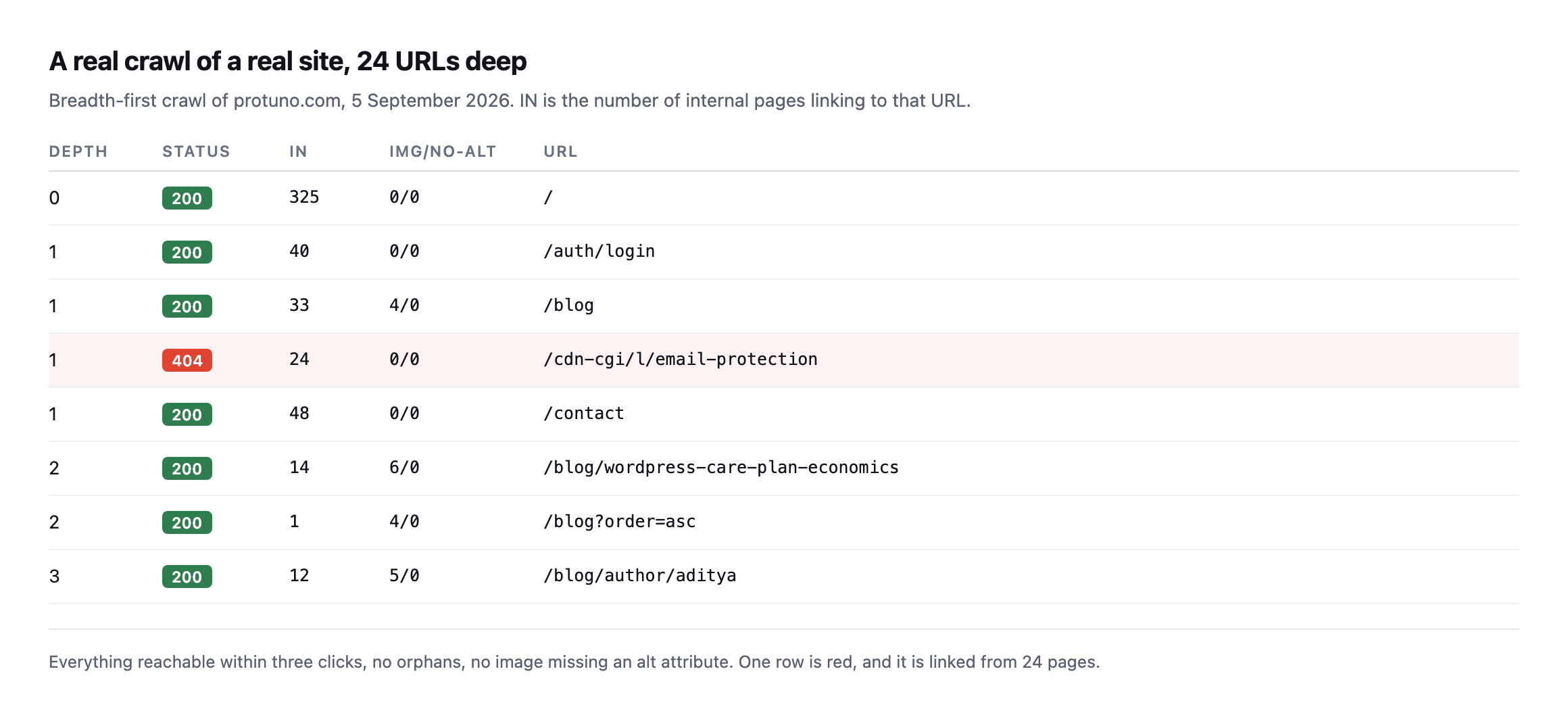
    Crawl output table for protuno.com showing depth, status, inbound link count, image and missing-alt counts, and URL for eight representative rows. The homepage has 325 inbound links. One row, slash cdn-cgi slash l slash email-protection, returns 404 and has 24 inbound links
    24 URLs, everything within three clicks of the homepage, no orphans, and not a

    single image missing an alt attribute. One row is red. It is linked from all 24 pages.*

    The good news first, because a crawl should tell you what is working: no orphan pages, no missing alt attributes, nothing buried deeper than three clicks.

    Then the row I did not expect.

    The defect that was on every single page

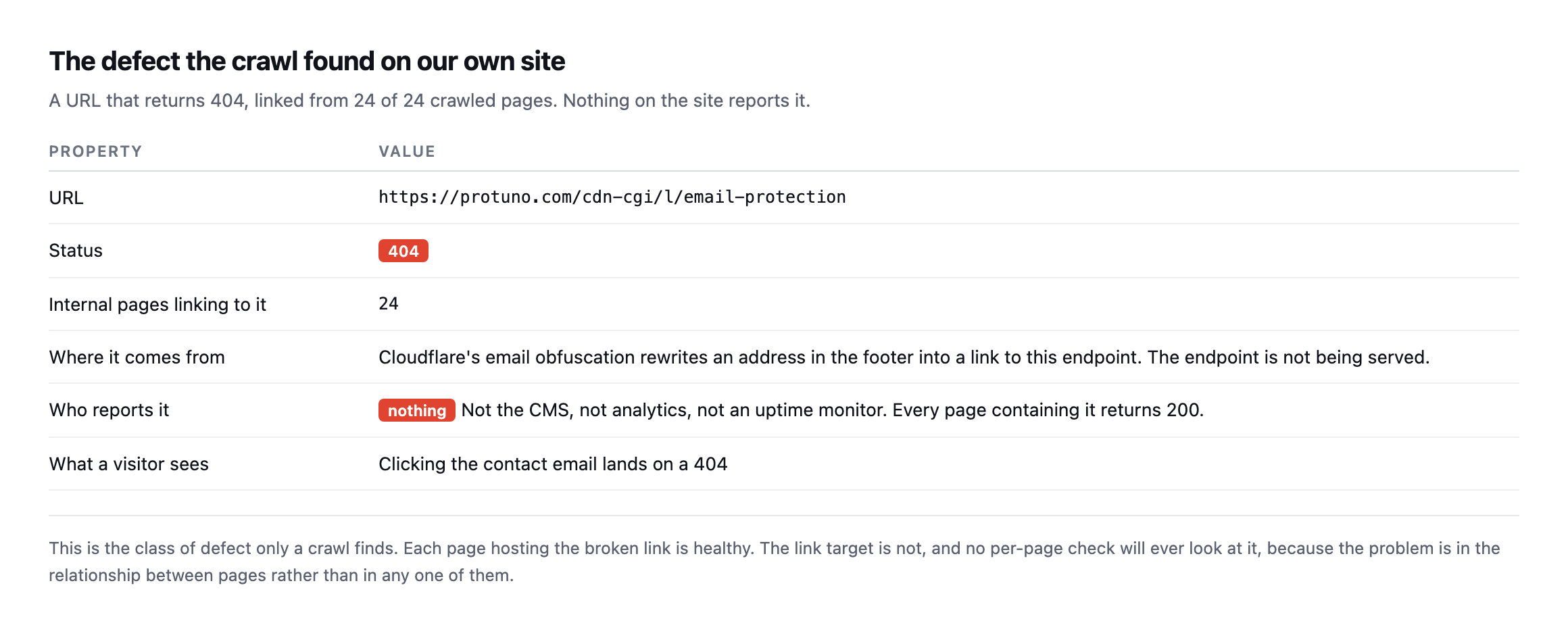
    Detail table for the broken URL. It is https://protuno.com/cdn-cgi/l/email-protection, status 404, linked from 24 internal pages, produced by Cloudflare's email obfuscation rewriting a footer address, and reported by nothing because every page containing it returns 200
    Cloudflare’s email obfuscation rewrites the contact address in our footer into a

    link to an endpoint that is not being served. Every page carrying that link returns 200, so nothing anywhere reports a problem.*

    Click the contact email in our footer and you land on a 404.

    Nothing told us. The CMS is happy, because it does not know what Cloudflare rewrote. Analytics is happy, because a 404 on a link nobody clicks generates no events. An uptime monitor is happy, because every page it checks returns 200.

    This is the entire category in one example. The pages are fine. The relationship between them is broken. No per-page check will ever find it, because the problem does not live in any single page.

    Why your SEO plugin will not catch this

    Not a criticism of SEO plugins. They are answering a different question.

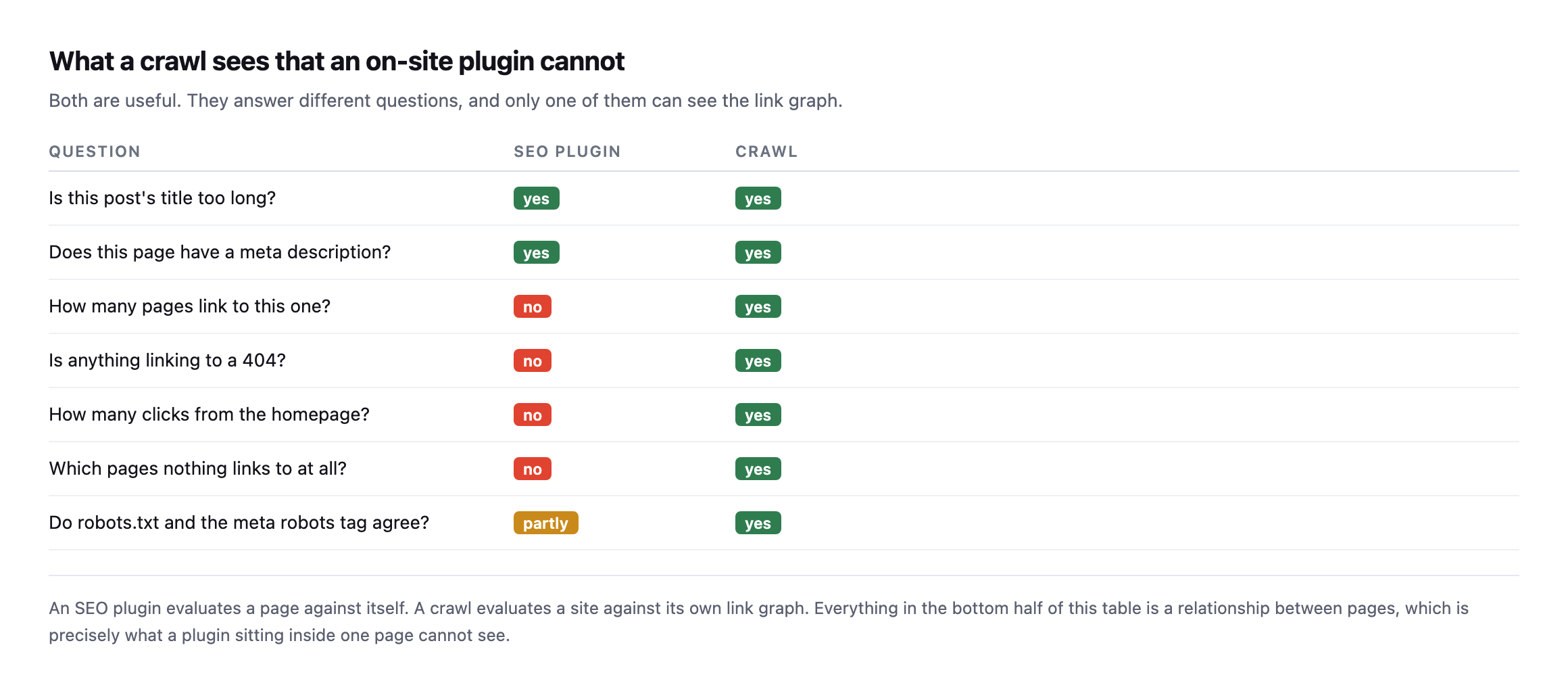
    Comparison table of questions an SEO plugin and a crawl can each answer. Both handle title length and meta description. Only the crawl can answer how many pages link here, whether anything links to a 404, click depth from the homepage, which pages have no inbound links, and whether robots.txt and the meta robots tag agree
    An SEO plugin evaluates a page against itself. A crawl evaluates a site against its

    own link graph. Everything in the bottom half of that table is a relationship, which is exactly what code running inside one page cannot see.*

    QuestionSEO pluginCrawl
    Is this title too long?yesyes
    Does this page have a meta description?yesyes
    How many pages link to this one?noyes
    Is anything linking to a 404?noyes
    How many clicks from the homepage?noyes
    Which pages does nothing link to?noyes
    Do robots.txt and meta robots agree?partlyyes

    Caveat: “partly” in the last row is generous. A plugin can flag a noindex tag on the page it is looking at. It has no way to know robots.txt disallows that same URL two directories over, which is exactly the mismatch below.

    The second finding, which I had just written a post about

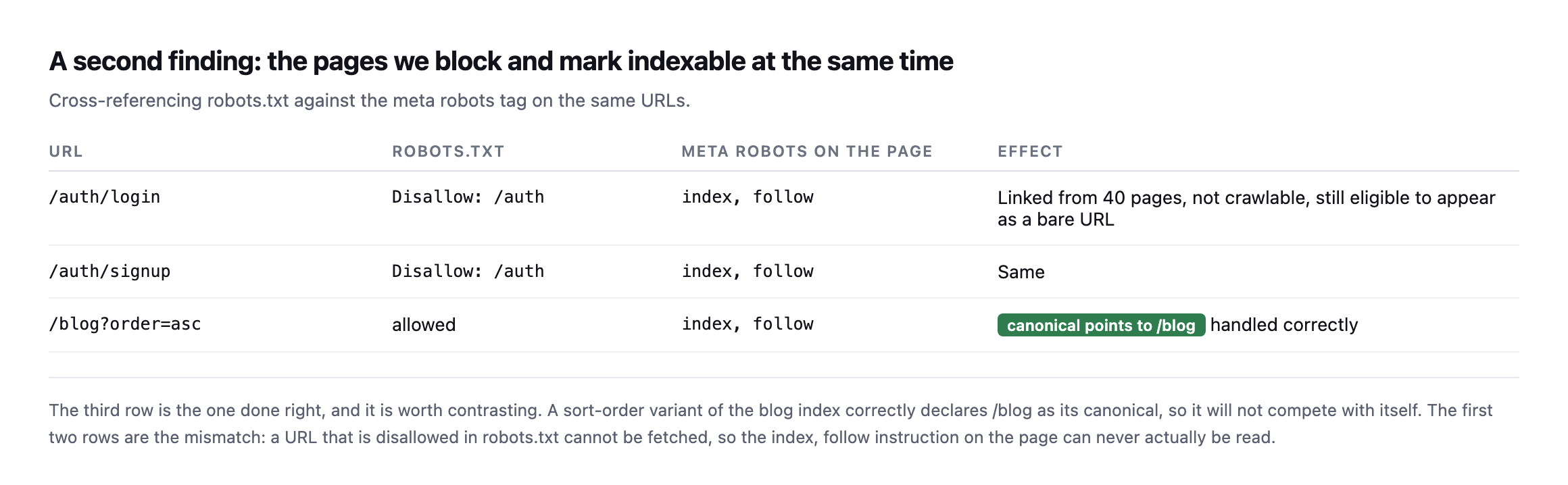
    The crawl cross-references robots.txt against the robots meta tag on each page. Ours disagree.

    Table showing slash auth slash login and slash auth slash signup are disallowed in robots.txt while their pages carry meta robots index follow, and that slash blog with an order query parameter correctly declares a canonical pointing at slash blog
    The third row is the one done right. A sort-order variant of the blog index declares

    /blog as its canonical, so it cannot compete with itself. The first two rows are the mismatch.*

    URLrobots.txtmeta robotsEffect
    /auth/loginDisallow: /authindex, followlinked from 40 pages, not crawlable, still eligible as a bare URL
    /auth/signupDisallow: /authindex, followsame
    /blog?order=ascallowedindex, followcanonical points to /blog, handled correctly

    /auth/login is linked from 40 pages, disallowed in robots.txt, and tells search engines to index it. Because it is disallowed, that instruction can never be read. The URL can sit in results as a bare link with no description.

    I wrote about that exact failure mode a couple of days ago, and then found it on our own site by crawling it. Which is the argument for crawling rather than assuming.

    Four days later, neither finding is fixed

    I went back and checked both findings again while expanding this post, rather than let them sit as a screenshot from the day I found them.

    FindingFirst foundStatus now
    /cdn-cgi/l/email-protection 404, linked from every page7 Septemberstill 404, still linked
    /auth/login and /auth/signup disallowed but declaring index, follow7 Septemberunchanged

    Neither is fixed. I want to sit with that rather than gloss over it, because it is a more honest demonstration of this post’s actual argument than the original finding was.

    A crawl audit is not a service you buy once and file away. Both of these are cheap fixes: the first is a footer link, the second is one line in robots.txt or one meta tag. Neither has happened, four days on, on a site whose owner wrote a public blog post about finding them. That is not carelessness so much as it is the exact mechanism this whole category of check exists to describe: a finding with no invoice attached, competing against everything else on a Tuesday, loses. It is the same shape as the unbilled half hour that swallows every other quiet check, and writing about it does not exempt the writer from it.

    Both are on the list now, again, with a second date attached instead of just the first one. That is the honest version of what a re-check accomplishes. It does not fix anything by itself. It turns “we should fix that” into a line with two dates on it, which is a harder thing to keep ignoring than a line with one. A crawl result that nobody looks at a second time is exactly as useful as no crawl at all, and this section is me not being the exception to that rule either.

    The orphan report from the crawl tool was wrong

    While re-checking the earlier findings I ran a second, larger crawl, 103 pages this time, and asked it for orphan pages: URLs nothing else on the site links to. It reported 89.

    That is a number worth being suspicious of on its own. Eighty-six percent of a site being orphaned is not a plausible finding, it is a sign something upstream broke, and I want to show you how I caught it rather than just state the correction.

    The same crawl records, for every single page, exactly which other pages link to it. So instead of trusting the orphan summary, I looked up four of the pages it had just listed as orphaned, in the crawl’s own raw per-page data from the same run.

    Page the summary called an orphanReal inbound links, same crawl
    /blog (the blog index)21
    /contact4
    /privacy2
    /blog/llms-txt-wordpress1

    Every one of them has real, recorded inbound links. /blog alone is linked from twenty-one other pages, footer navigation on nearly everything the crawler visited. The orphan-detection feature and the raw link data disagreed with each other, inside a single crawl, from a single run, and the raw data was the one telling the truth.

    I do not know the exact cause inside the tool, and I am not going to guess at someone else’s code to sound more authoritative than the evidence supports. What I do know, because I checked it directly, is that the summary figure was wrong and the underlying data was right, which is exactly the shape of every other finding in this post: the higher-level report is the one that lies, and the raw evidence underneath it is where the truth was sitting the whole time.

    The only genuinely orphaned page in that list, by the crawl’s own per-page data rather than its summary, is the homepage itself, and that is a known convention rather than a defect: a crawl starting from a URL does not count arriving there as a followed link, so the seed page always shows zero inbound links in tools built this way. Knowing that distinction is the difference between reading a crawl report correctly and repeating whatever number is largest on the page.

    Running a WordPress crawl audit yourself

    You do not need a subscription. The check that matters most is inbound link counts, and any crawler will give you that. What to look at, in order:

    Anything returning a non-200 with inbound links above zero. This is the highest-value output of any crawl. Fix these first, always.

    Pages with zero inbound links. If nothing links to a page, you are asking search engines to value something you do not value enough to link to.

    Click depth above three. Depth is a rough proxy for how important your own site says a page is. A commercially important page at depth five is a structural problem.

    robots.txt against the meta robots tag. They should agree. When they disagree, the one that can actually be read wins, and it is usually not the one you intended.

    Canonical tags on parameterised URLs. Sorting, filtering and pagination parameters should canonicalise back to the clean URL, as our ?order=asc does.

    One practical note on crawling a headless site, because it caught me out mid-write. Two of the posts I published this week returned 404 to the crawler for a few minutes after going live, then 200 once the front end revalidated. If you crawl a site that renders pages on demand and caches them, a fresh URL can look broken purely because nothing has asked for it yet. Re-crawl before you report a 404 on a page you have just published, or you will file a bug against yourself.

    Crawl as a logged-out visitor. It is easy to run a crawl in a browser where you are signed in and see admin-only links, draft content and navigation that no visitor gets. The crawler should carry no cookies at all. What you want is the site a stranger sees.

    Why this ends up never being done

    A crawl takes minutes and needs redoing after every content change, every migration, every theme update and every time a third party rewrites your HTML, which is what happened to us.

    It produces nothing to show a client when it passes. So it gets run once during onboarding and then never again, exactly like the backup file left in the web root and the scheduled jobs that stopped.

    Iris, Protuno’s SEO agent, runs a read-only Technical SEO Audit on a connected site, inside your own AI app. See the playbooks page for the other SEO playbooks.

    The free audit checks robots.txt, the sitemap and the indexing signals from the domain today, which catches the second finding above but not the first. The broken-link finding needs a real crawl.

    Run one on your own site before you run one on a client’s. I did, and it found something on every page.

    What is actually doing the crawling

    Google crawlers behind the scenes

    A look inside how Googlebot itself decides what to fetch and how often, straight from the team that builds it, useful context for why a crawl audit like this one finds what it finds.