Category: Performance

  • The WordPress Page Cache Header Lies. Here Is What To Check Instead.

    The WordPress Page Cache Header Lies. Here Is What To Check Instead.

    Short answer: do not trust the plugin. Request the page normally, then request it again with a random query string so no cache can serve it, and compare the times. A working page cache shows a gap of several times. If the two are the same, nothing is being cached, whatever the dashboard says.

    The wordpress page cache header is worth reading too, but it comes second, and on a lot of WordPress stacks it is not there at all.

    The install that taught me to stop trusting settings

    I set up a WordPress site this week with a caching plugin on it and went through the usual list. Everything checked out.

    Then I looked for evidence the cache had ever stored anything.
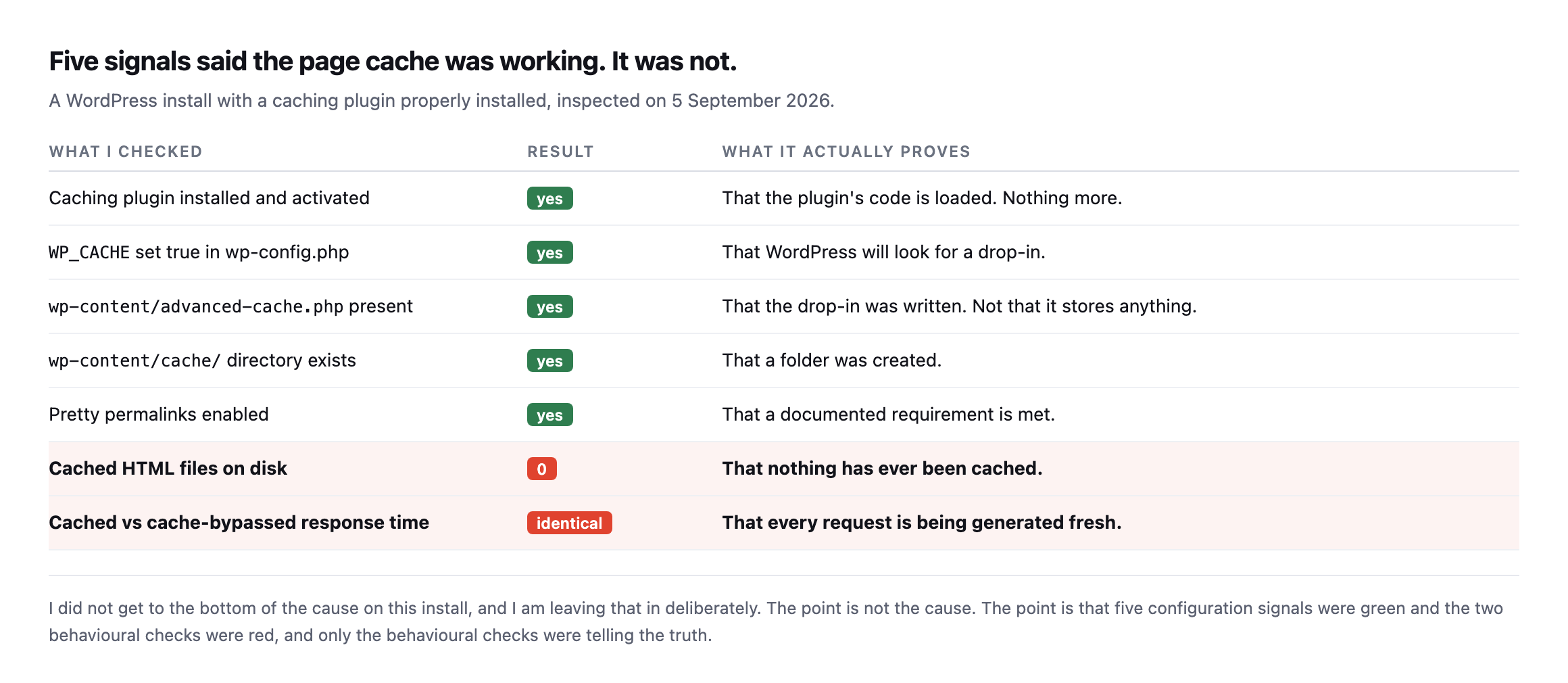
    Table listing five configuration checks that all passed: plugin activated, WP_CACHE true, advanced-cache.php present, cache directory exists, pretty permalinks enabled. Below them two behavioural checks failed: zero cached HTML files on disk, and identical cached versus bypassed response times
    Five green signals and two red ones. The five green ones are what a dashboard shows

    you. The two red ones are what a visitor experiences. I never did work out the cause on this install, and I have left that in on purpose, because the lesson is not the cause.*

    Every configuration check passed. The cache had never written a single file.

    If I had reported on that site from the admin screens, I would have told a client their caching was fine. It was not fine. It was absent.

    The test that cannot be fooled

    Two requests. The second one carries a query string nothing has ever requested, so no cache can have a copy.

    # as a normal visitor
    curl -s -o /dev/null -w '%{time_starttransfer}\n' https://example.com/
    
    # same page, cache bypassed
    curl -s -o /dev/null -w '%{time_starttransfer}\n' "https://example.com/?n=$RANDOM"

    Run each three times, because one sample is noise.
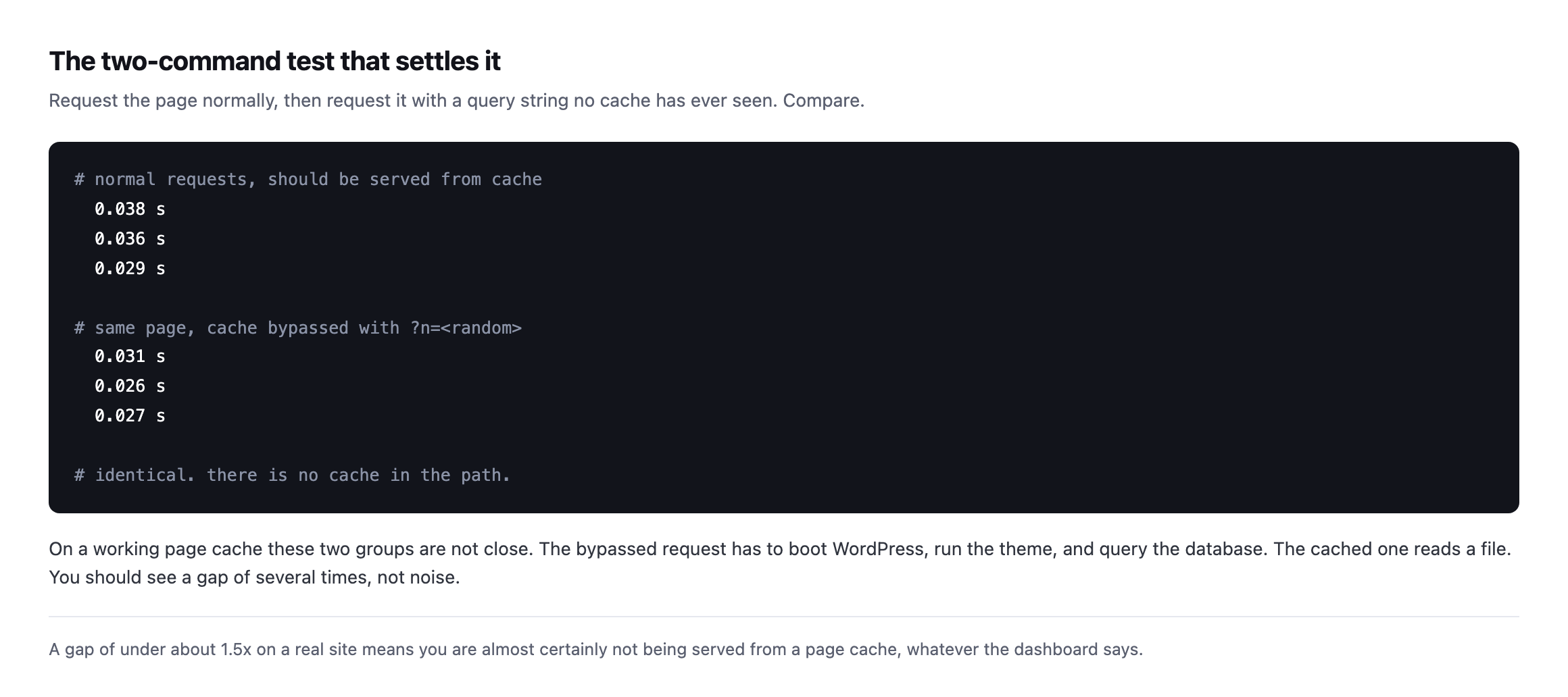
    Terminal output showing three normal requests at 0.038, 0.036 and 0.029 seconds, then three cache-bypassed requests at 0.031, 0.026 and 0.027 seconds, with a comment noting the times are identical so no cache is in the path
    The two groups are indistinguishable. On a working page cache they are not close,

    because the bypassed request has to boot WordPress, run the theme and hit the database, while the cached one reads a file off disk.*

    What you are looking for is a gap. Several times over, not a few milliseconds.

    Under roughly 1.5x on a real site and I stop believing there is a page cache in front of it.

    Reading the WordPress page cache header, and knowing its limits

    Headers are quicker than timing when they exist. The catch is that plenty of WordPress page caches, especially disk-based plugin caches, emit nothing to identify themselves.

    curl -sI https://example.com/ | grep -iE 'x-cache|cf-cache-status|age|x-litespeed-cache'

    A hit looks like x-cache: HIT, or cf-cache-status: HIT, or an age value above zero.

    One header to be careful with: cache-control. Your own site writes that one. It says what you would like caches to do, and proves nothing about what any of them did.

    I found a live example of that gap while measuring for the companion piece on TTFB. Our own marketing site sends a one-year s-maxage and Cloudflare still answers DYNAMIC. The instruction is being sent. It is not being followed.
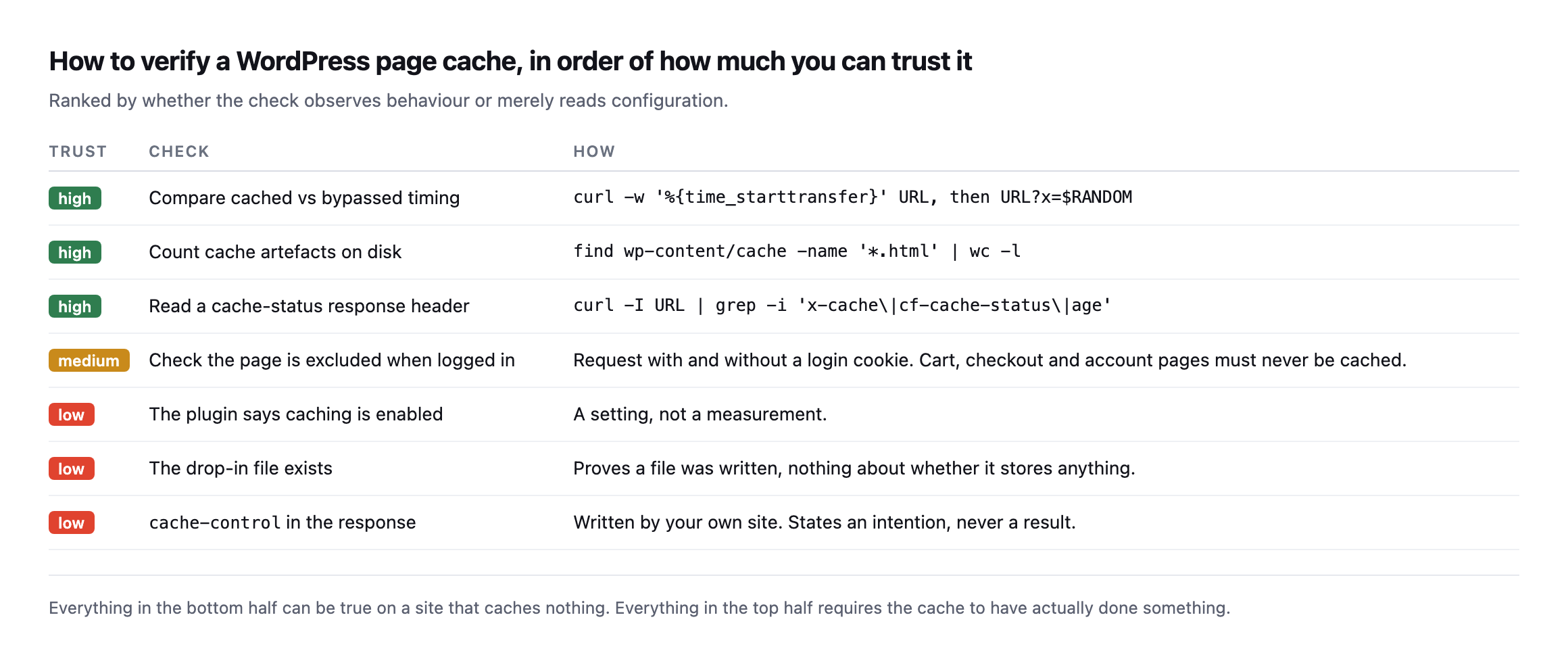
    Ranked table of ways to verify a WordPress page cache. High trust: compare cached versus bypassed timing, count cache files on disk, read a cache-status header. Medium trust: confirm logged-in requests bypass the cache. Low trust: the plugin says caching is enabled, the drop-in file exists, cache-control is present
    Sorted by whether the check observes behaviour or reads configuration. Everything in

    the bottom half can be true on a site that caches nothing at all, which is exactly the site I had in front of me.*

    The same ranking as text, so a runbook can link to it instead of an image:

    TrustCheckHow
    HighCached vs bypassed timingcurl -w '%{time_starttransfer}' on the URL, then on URL?x=$RANDOM
    HighCount cache files on disk`find wp-content/cache -name ‘*.html’ \wc -l`
    HighRead a cache-status header`curl -I URL \grep -i ‘x-cache\cf-cache-status\age’`
    MediumLogged-in requests bypass the cacherequest with and without a login cookie
    Low“Caching enabled” in the plugina setting, not a measurement
    LowThe drop-in file existsproves a file was written, nothing about whether it stores anything
    Lowcache-control in the responsewritten by your own site, states an intention, never a result

    Caveat: the failed-cache install earlier in this post is one site, not a survey. I am not claiming a percentage of WordPress installs silently fail to cache. The claim is narrower and checkable on your own sites today: the five configuration signals everyone trusts can all be green while the two behavioural ones are red, and only the behavioural ones tell you the truth.

    What age tells you that HIT does not

    cf-cache-status: HIT and its equivalents answer one question: was this response served from cache. They do not tell you how stale that cached copy is, and the two are worth checking together rather than trusting a bare HIT on its own.

    I checked one of our own sites live rather than assuming the header tells the whole story:

    cache-control: public, max-age=300, stale-while-revalidate=86400
    age: 11863
    cf-cache-status: HIT

    The site’s own Cache-Control header asks for a five-minute lifetime, max-age=300. The age header, which the cache adds to report how long it has held the object, reads 11863 seconds, just under three and a quarter hours. The cache answered HIT, correctly, and it is serving content roughly forty times older than the freshness window the origin asked for.

    That is not necessarily broken. stale-while-revalidate=86400 explicitly permits serving stale content for up to a day while a fresh copy is fetched in the background, and a busy cache can reasonably fall behind on revalidation under load. But it is exactly the gap this whole post keeps returning to: a passing signal, HIT, sitting on top of a number that tells a completely different story once you read it. HIT says the mechanism worked. age says what it actually served, and only one of those two is the number worth checking before you tell a client their homepage reflects the change they just published.

    The practical version: whenever you check cf-cache-status or x-cache, read age in the same breath. A HIT with age: 4 is fresh. A HIT with age in the thousands, on a page that changes often, is a cache doing its job technically while quietly showing visitors something old.

    The cache-busting header that actually works, and the older one that does not

    There is a piece of received wisdom worth testing rather than simply repeating to a client: that sending Pragma: no-cache or Cache-Control: no-cache as a request header forces a fresh copy from the origin. Only one of those two did anything at all, tested against the same stale cache found in the section above.

    Request header sentResult
    none (normal request)cf-cache-status: HIT, age: 11918
    Cache-Control: no-cachecf-cache-status: DYNAMIC, origin hit fresh
    Pragma: no-cachecf-cache-status: HIT, age: 11920, no effect

    Pragma: no-cache is an HTTP/1.0-era header, kept alive mostly by old advice and some legacy tooling, and this CDN simply ignores it. Cache-Control: no-cache is the modern, correctly specified way to ask a cache to revalidate, and it worked exactly as intended: the response came back marked DYNAMIC, meaning the request reached the origin rather than being served from the stale cached copy.

    This matters beyond curiosity. It is also what a browser’s hard refresh sends, and it is why a developer hitting Ctrl-Shift-R sees the fresh page while a client hitting an ordinary refresh, or worse, describing the problem over the phone without refreshing at all, keeps seeing the old one. If you are debugging a “the change isn’t showing” ticket, test both headers before concluding the cache itself is broken. One of them proves the cache can be bypassed correctly, which narrows the actual problem down to why it is not happening for an ordinary visitor.

    It is also worth explaining this distinction to a client the next time “just refresh the page” does not fix what they are describing. Most people’s mental model of a stale page is that their own browser has an old copy, so they refresh, and a normal refresh does nothing to a shared cache sitting between them and the origin. Telling them to hard-refresh, or giving them the two header names above to pass to whoever is debugging it, saves a round of “I already tried refreshing” that goes nowhere because the two kinds of refresh are solving different problems.

    The same test is worth running as part of onboarding any new client site, alongside the behavioural checks earlier in this post. Confirming that a cache-busting request actually reaches the origin, rather than assuming it does because it did on the last site, is a five second addition to a check you were already running, and it is the difference between telling a client “try a hard refresh” with confidence, backed by a header you actually checked, and repeating advice you picked up somewhere and never tested against the site actually sitting in front of you today, which is the entire difference this post has been arguing for, quietly, from the very first paragraph onward.

    Caveat: one CDN, one site, one test. Different caches honour different subsets of the cache-control request directives, and I would verify this on the specific stack you are debugging rather than assume every provider treats Pragma identically. What generalises is the method: send both, compare the cache-status header, and let the response tell you which one your specific cache actually listens to.

    The one that costs real money

    There is a second failure that runs the other way, and it is worse.

    A cache that is working, on a page that should never be cached.

    Cart, checkout and account pages have to be excluded, or one customer sees another customer’s basket. Most cache plugins exclude WooCommerce pages by default, and most of the time that default survives.

    It does not always survive a hosting migration, a new CDN rule, or somebody adding a page-rule that was meant to fix something else.

    Test it by requesting a cart URL with and without a login cookie, and confirming you never get a cached response on either.

    Why this ends up on the never-done list

    The check takes a minute. It needs redoing after every hosting change, every CDN change and every cache plugin update, on every site you look after.

    So it gets done once and then trusted forever, which is the same trap as the scheduled jobs nobody notices have stopped and the backup file left in the web root.

    Protuno’s free audit reads the caching headers from the domain today, so you can see at a glance which sites in a portfolio are announcing a cache and which are not. Dash is live now.

    The two curl lines above are the whole method in the meantime. Run them on the client site you are most confident about. That is the one worth checking.

    The header rules that most often get this wrong

    Stop Breaking Your CDN! Practical Caching for Developers

    Covers Cache-Control, Vary and the specific ways a CDN cache miss happens even when a header is present, the mechanism underneath the pass/fail check this post walks through.

  • WordPress TTFB: The Number Everyone Quotes And Almost Nobody Measures Properly

    WordPress TTFB: The Number Everyone Quotes And Almost Nobody Measures Properly

    Short answer: wordpress ttfb is not a measure of your server. It is DNS, plus a TCP connection, plus a TLS handshake, plus however long the server took to think. Only the last part is yours. And if you measured it as an ordinary visitor, you may have measured a cache rather than the site at all.

    I do this measurement often at POSIMYTH, usually when somebody sends me a number and asks whether it is bad.

    The honest answer is almost always: I cannot tell yet.

    What the number is actually made of

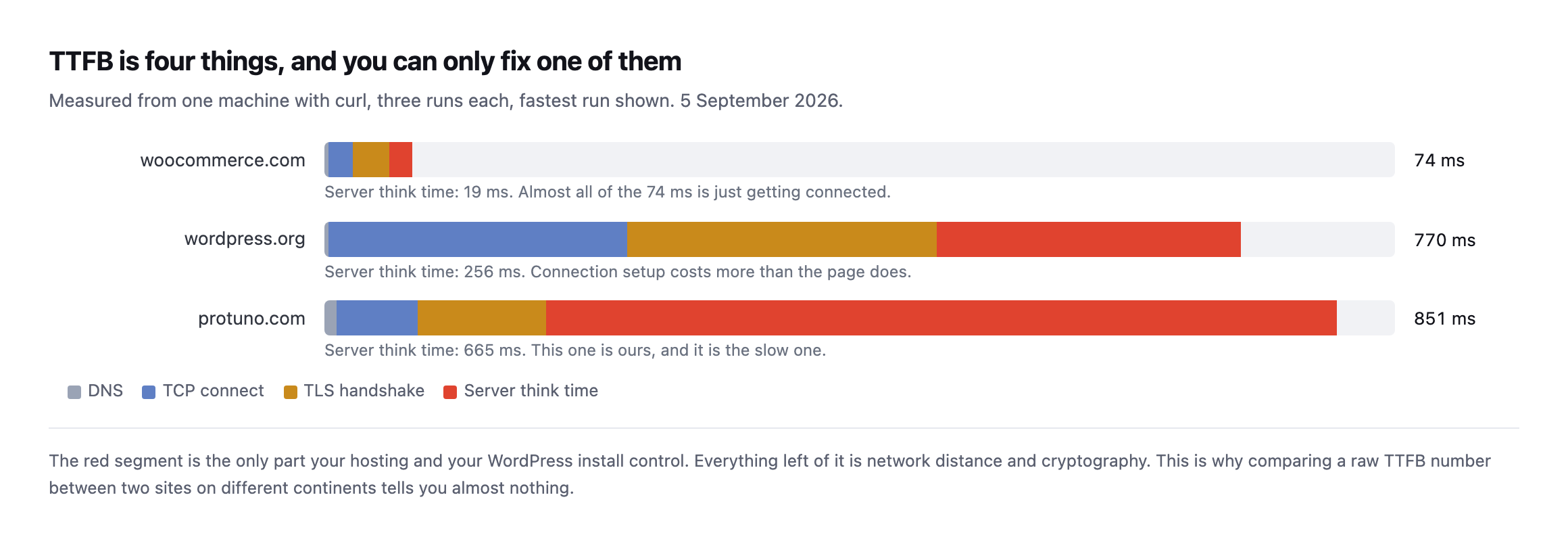
    Here are three real sites measured from the same machine, minutes apart, with the time split into its parts.

    Stacked bar chart showing TTFB broken into DNS, TCP connect, TLS handshake and server think time for three sites. woocommerce.com totals 74ms with 19ms server think. wordpress.org totals 770ms with 256ms server think. protuno.com totals 851ms with 665ms server think
    Measured with curl from one location, three runs each, fastest run shown. The red

    segment is server think time, and it is the only segment your hosting and your WordPress install control. Yes, the slowest one is ours.*

    Look at woocommerce.com. Total 74ms, of which the server spent 19ms.

    The other 55ms was getting a connection open. No amount of caching plugin will change that part, because it is the speed of light and some certificate maths.

    Now look at ours. 851ms total, 665ms of it server think time.

    That is a genuinely different problem from wordpress.org’s 770ms, where the server accounted for 256ms and the connection setup for the rest. Two similar totals. Two unrelated causes.

    This is why a bare TTFB comparison between two sites is close to meaningless. A site in Frankfurt measured from Mumbai will lose to a worse-built site next door.

    The mistake that makes the number a lie

    Here is the part I care most about, because it is the one that produces confidently wrong client reports.

    When you load a site normally, you may be talking to a cache. So you are measuring the cache.

    Append a query string nobody has ever requested and the cache has to go to the origin:

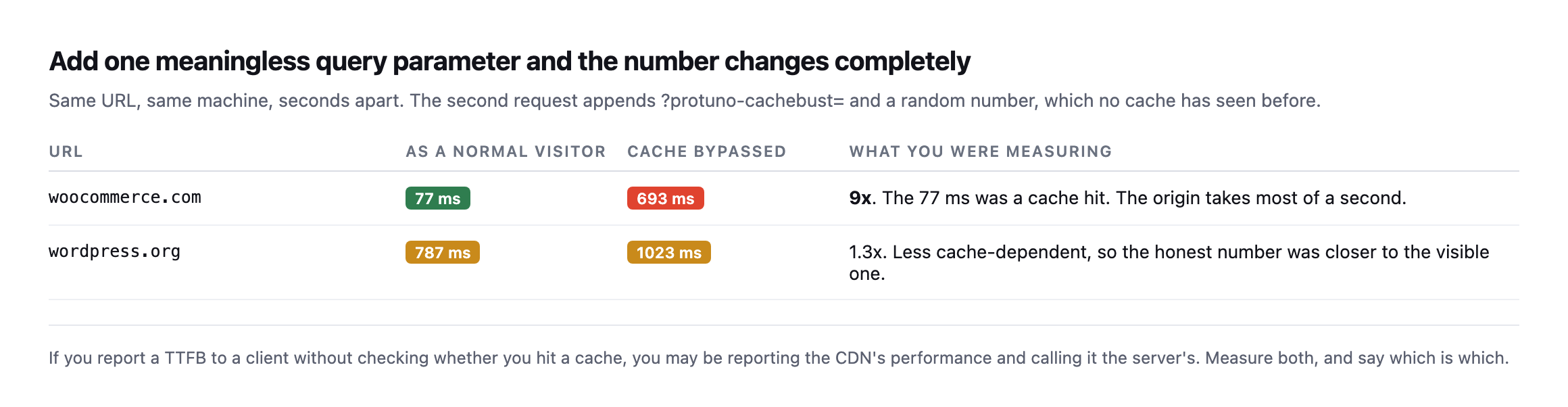
    Table comparing normal requests against cache-bypassed requests. woocommerce.com returns 77ms normally and 693ms with a cache-buster, a 9x difference. wordpress.org returns 787ms normally and 1023ms bypassed, a 1.3x difference
    Same URL, same machine, seconds apart. woocommerce.com is nine times slower once you

    stop letting it answer from cache. That 77ms was real for visitors and completely wrong as a description of the server.*

    Nine times.

    Both numbers are true. They answer different questions. The cached number tells you what a visitor experiences. The bypassed number tells you what happens when the cache misses, which is exactly what happens to the first visitor after every deploy, every purge, and every uncached page like a cart or a checkout.

    If you only ever measure the first one, you will be surprised by the second one on a Friday.

    The same comparison as text:

    URLAs a visitorCache bypassedWhat you were measuring
    woocommerce.com77ms693ms9x. The 77ms was a cache hit; the origin takes most of a second.
    wordpress.org787ms1023ms1.3x. Less cache-dependent, so the visible number was closer to honest.

    Caveat: two sites, one machine, one point in time. This is not a claim about what percentage of WordPress sites hide a slow origin behind a cache. It is a demonstration that the gap can be nine times, which is reason enough to check your own site before quoting a visitor-facing number as if it described your server.

    How to measure WordPress TTFB properly, in one command

    curl -s -o /dev/null \
      -w 'dns=%{time_namelookup}  tcp=%{time_connect}  tls=%{time_appconnect}  ttfb=%{time_starttransfer}\n' \
      https://example.com/

    Read it as differences, not as four separate numbers:

    • DNS is time_namelookup
    • Connect is time_connect minus DNS
    • TLS is time_appconnect minus time_connect
    • Server think time is time_starttransfer minus time_appconnect

    That last subtraction is the whole trick, and it is the number worth writing down.

    Then run it again with ?cachebust=$RANDOM on the end and write down both.

    Run it three times, take the fastest, and note where you measured from. A single sample from a café wifi is not a measurement.

    The number a browser actually experiences is not this one

    Every TTFB figure so far, including the ones in the chart above, describes one fresh request: new DNS lookup, new TCP handshake, new TLS negotiation. That is the honest number for the first resource a visitor’s browser requests. It is not what happens to the second one.

    I requested two pages from the same host in a single connection, so the second request reused the TCP and TLS session the first one had already paid for, and measured both.

    SiteRequestConnectTLSTTFB
    wordpress.orgfirst (fresh connection)299ms661ms1,012ms
    wordpress.orgsecond (same connection, reused)0ms0ms353ms
    protuno.comfirst (fresh connection)86ms166ms823ms
    protuno.comsecond (same connection, reused)0ms0ms292ms

    Measured with curl’s connection reuse across two requests in a single invocation, 7 September 2026.

    On both sites, the second request landed at roughly a third of the first one’s TTFB, because connect and TLS both dropped to zero. This is not a trick or an optimisation anybody configured. It is what HTTP keep-alive does by default, and it is exactly what a real browser does when it loads a page and then fetches a second resource, a stylesheet, a font, an API call, from the same origin.

    Caveat: two sites, one connection-reuse test each. The percentage improvement will vary by how expensive that particular site’s TLS handshake is; the mechanism does not. Any TTFB measurement tool that opens a brand new connection for every single request, which is most of them by default, is reporting the worst case a visitor experiences, not the typical one.

    The practical consequence: a synthetic monitor’s TTFB number is almost always the pessimistic end of what real visitors feel, because most monitors measure exactly once per check, cold. A returning visitor, or a visitor loading a second page in the same session, experiences something closer to the reused-connection row. Neither number is wrong. They are answers to different questions, and a report that only shows one of them is quietly picking which question to answer.

    There is a practical use for this beyond understanding the number, and it is the reason I built the test this way rather than settling for the single-request chart earlier in this post. If you want to know how much of a site’s slowness is connection overhead versus origin slowness, the reused-connection measurement isolates it directly, cleanly, without guessing, and without touching a single line of the site’s own code, and without needing credentials, server access, or anything beyond a terminal and the domain name itself. Subtract the reused TTFB from the fresh one, and what is left over is almost entirely TCP and TLS setup cost, the part no amount of WordPress optimisation touches. On wordpress.org that gap was 659ms out of 1,012ms, well over half the total, and on protuno.com it was 531ms out of 823ms, close enough to the same proportion that I would not treat the exact percentage as a universal constant, only as a reliably large share. A site spending most of its measured TTFB on connection setup needs a CDN or a server closer to its visitors, not a caching plugin, and this two-request test is how you find out which one you are looking at before you spend a weekend on the wrong fix. Optimising a plugin queue on a site whose real problem is a TLS handshake three time zones away wastes an afternoon and changes nothing a visitor notices, and this test tells you which weekend you are actually signing up for, in under a minute, before you commit to either one.

    Read the headers before you believe anything

    Before diagnosing, find out whether a cache was involved at all.

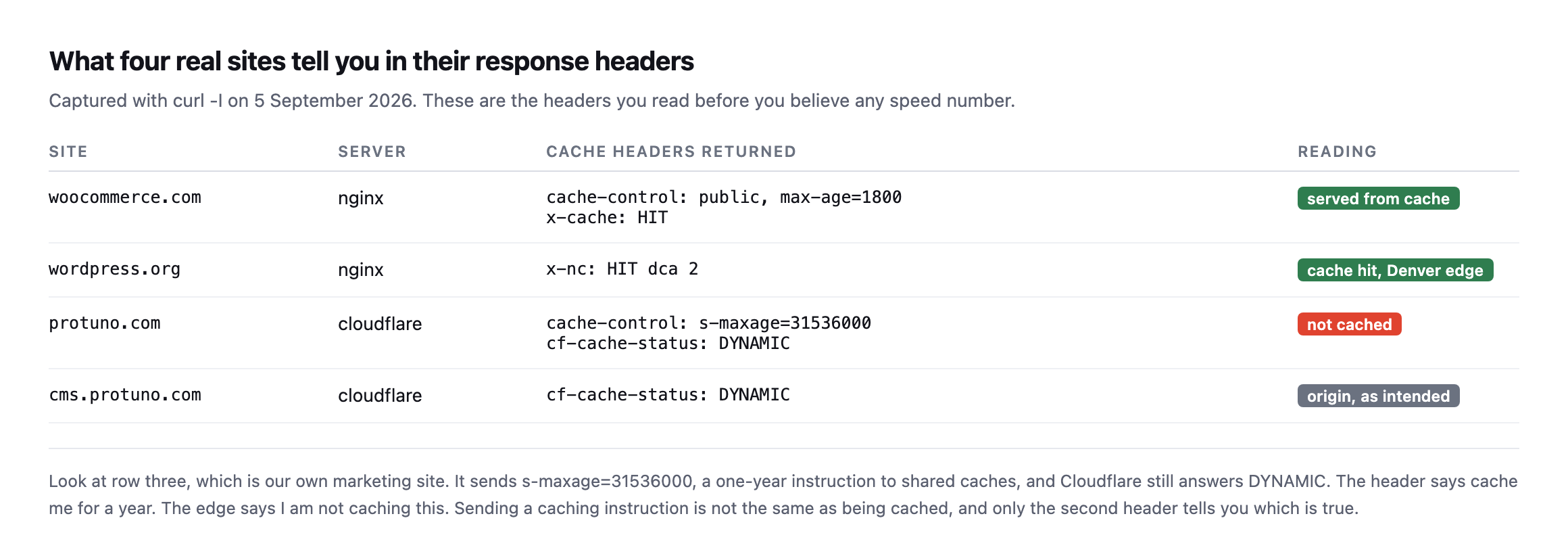
    Table of cache headers from four real sites. woocommerce.com returns x-cache HIT. wordpress.org returns x-nc HIT. protuno.com returns cache-control s-maxage of one year but cf-cache-status DYNAMIC. cms.protuno.com returns cf-cache-status DYNAMIC
    Row three is our own marketing site. It sends a one-year caching instruction and

    Cloudflare answers DYNAMIC, meaning it is not being cached at the edge at all. I did not go looking for that. It turned up while measuring for this post, which is rather the point of measuring.*

    That gap between “what the site asks for” and “what the cache did” is where most performance confusion lives.

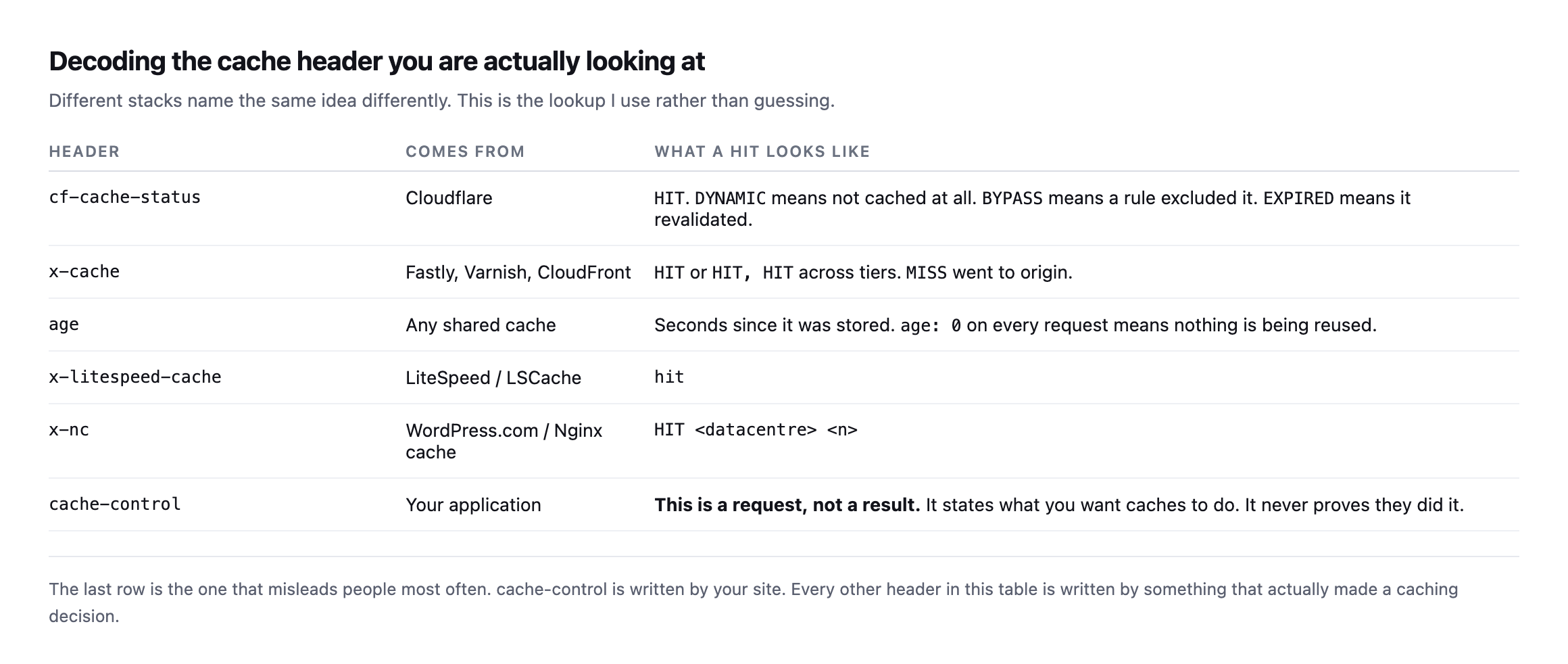
    Reference table decoding cache headers by stack: cf-cache-status for Cloudflare, x-cache for Fastly Varnish and CloudFront, age for any shared cache, x-litespeed-cache, x-nc, and cache-control marked as a request rather than a result
    The last row is the one that catches people. cache-control is written by your own

    site and only states an intention. Every other header here was written by something that actually made a decision.*

    HeaderComes fromWhat a hit looks like
    cf-cache-statusCloudflareHIT. DYNAMIC means not cached at all, BYPASS a rule excluded it
    x-cacheFastly, Varnish, CloudFrontHIT, sometimes HIT, HIT across tiers
    ageany shared cacheseconds since stored; age: 0 on every request means nothing is reused
    x-litespeed-cacheLiteSpeed / LSCachehit
    x-ncWordPress.com / Nginx cacheHIT
    cache-controlyour own applicationa request, not a result; never proves anything happened

    So what do you do with a slow number

    Work in this order, because it goes cheapest to most disruptive.

    Confirm which number is slow. Cached and bypassed both slow is an origin problem. Only bypassed slow means your cache is working and your origin is weak, which is survivable but fragile.

    Check the server think time specifically. If time_starttransfer minus time_appconnect is under about 200ms, your PHP is not the problem and you should stop optimising it.

    If connection setup dominates, the fix is geography, not code. A CDN in front, or hosting nearer the audience.

    Only then look at WordPress. Slow plugins, an unindexed query, a bloated autoload table, a theme calling an external API on every page load. A plugin that stopped being maintained is a common culprit here, because nobody has profiled it in years.

    Most of the WordPress performance advice on the internet starts at step four. On a lot of the sites I look at, the answer was in step three, and somebody spent a weekend on step four.

    The part that does not scale

    None of this is hard. It is two commands and a subtraction.

    The problem is that it is two commands per site, and the answer changes every time hosting changes, a CDN rule is edited, or a plugin starts calling something slow on every request.

    You will do it thoroughly during onboarding, and then not again until a client complains. That is the same shape as the unbilled half hour that every other check falls into.

    Protuno’s free audit does run a server response check today, from the domain alone, alongside the caching headers described above.

    Until the rest ships, the curl line is genuinely enough. Put it in whatever runbook you keep, next to the check for scheduled jobs that quietly stopped.

    And measure your own site first. I did, and it is the slowest one in the chart.