Author: Aditya Sharma

  • WordPress Conversion Tracking: I Counted Three Sales From One Order

    WordPress Conversion Tracking: I Counted Three Sales From One Order

    Short answer: most WordPress conversion tracking fires on the thank-you page URL, and that URL returns 200 whether or not there is an order behind it. Reloads count again, every time. Requests with the order key stripped count too. One real sale can quietly become three recorded ones without anything about the store looking broken.

    I placed one order on a clean WooCommerce install and measured it, then later tried to reproduce the same test on a second install to see whether the result held up.

    What the thank-you page actually returns

    I created a single nine pound order, then requested its own order-received URL three separate ways: normally, reloaded, and with the order key removed entirely from the query string.
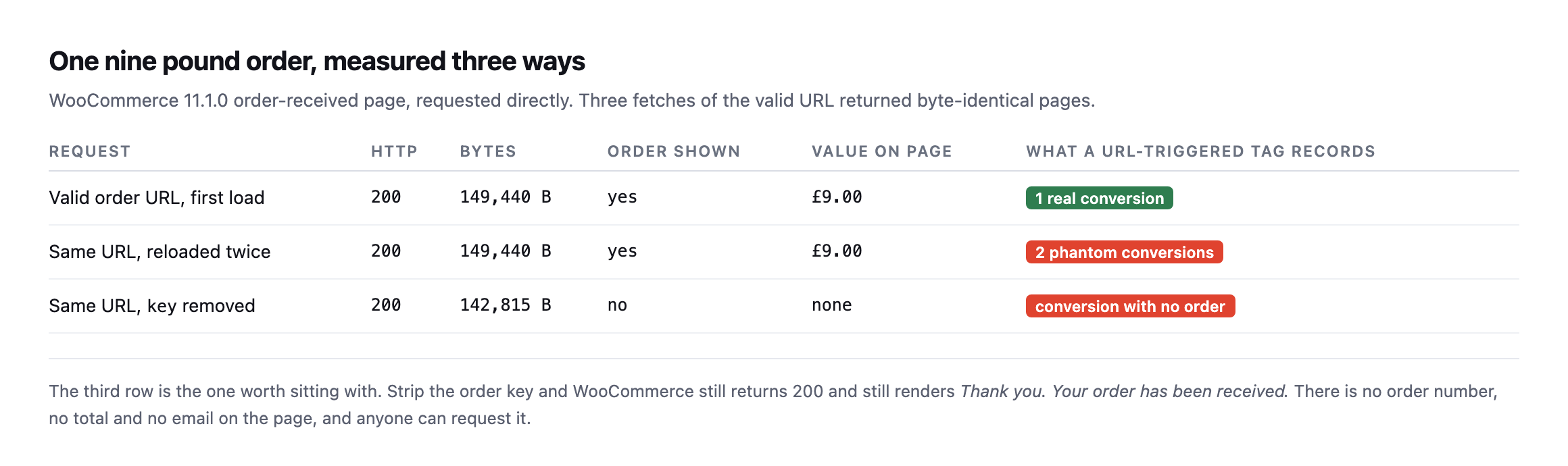
    Table of one order measured three ways. The valid URL first load returns 200 with the order and a nine pound total, one real conversion. The same URL reloaded twice returns byte-identical pages, two phantom conversions. The same URL with the key removed still returns 200 at a smaller size with no order shown and no value, recording a conversion with no order
    Three fetches of the valid URL came back byte-identical, full order details and all.
    RequestHTTPOrder shownValue on pageWhat a URL-triggered tag records
    valid order URL, first load200yes£9.001 real conversion
    same URL, reloaded twice200yes£9.002 phantom conversions
    same URL, key removed200nononeconversion with no order

    Caveat: one order, one test store. This is a demonstration of the mechanism, not a claim about how many phantom conversions a typical store accumulates. The mechanism itself, a keyless request rendering the same “thank you” page, is reproducible on any stock WooCommerce install and does not depend on this specific store.

    The third row is the one that surprised me. Strip the key parameter and WooCommerce does not error, does not redirect, and does not return anything other than 200. It renders a page that says “Thank you. Your order has been received.” with no order number, no total and no email address on it.

    Anybody can request that URL. A crawler can. A link checker can. A person who bookmarked the page last month can, and none of them will trigger anything a store owner would notice as unusual.

    Why the counts drift and the revenue does not

    This is the pattern I have seen on more than one store and never had a clean explanation for until I sat down and measured it: the conversion count in analytics runs ahead of the order list, but the revenue figure is roughly right.

    That shape falls straight out of the table above. Phantom conversions carry no value, because there is no order total on the page to read. So they inflate the count and leave revenue alone. If you only ever compare revenue, you never see it.
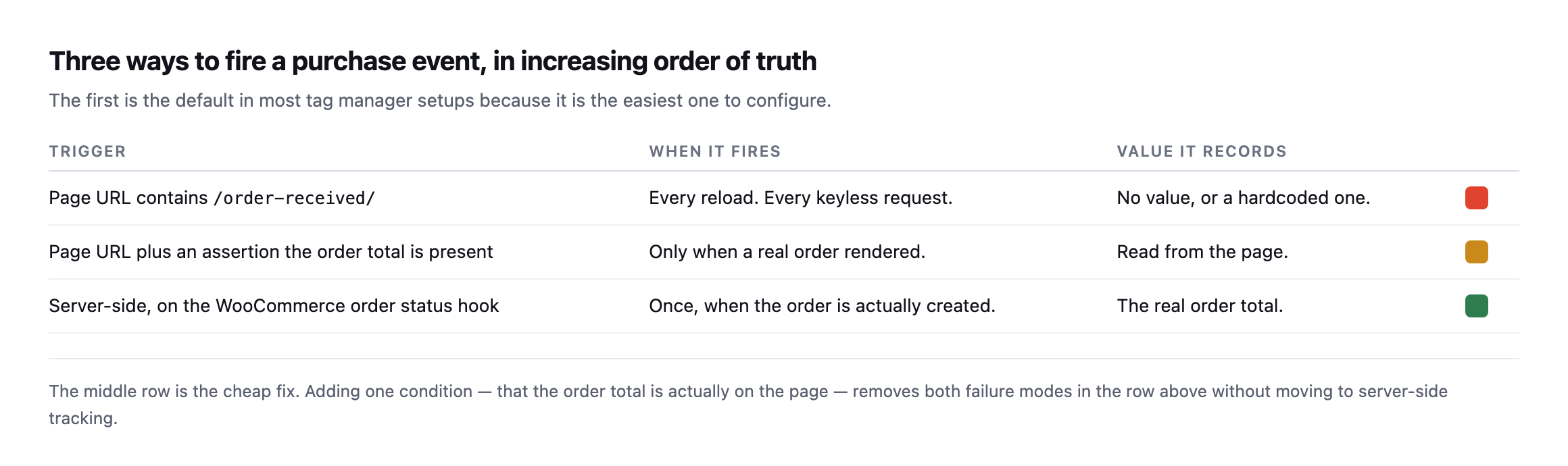
    Table of three purchase event triggers. Firing on a URL containing order-received fires on every reload and every keyless request with no value. Firing on the URL plus an assertion the order total is present fires only when a real order rendered and reads the real value. Firing server-side on the WooCommerce order status hook fires once when the order is created with the real total
    The first row is the default in most tag manager setups, because it is the easiest one to

    configure.*

    TriggerWhen it firesValue it records
    URL contains /order-received/every reload, every keyless requestno value, or a hardcoded one
    URL plus an assertion the order total is presentonly when a real order renderedread from the page
    server-side, on the WooCommerce order status hookonce, when the order is actually createdthe real order total

    The middle row is the fix I would actually reach for first. You do not have to rebuild anything server-side. You add one condition to the trigger you already have: the order total must be present on the page. That single assertion removes both failure modes on a classic checkout, because a reload still shows the total but a keyless request does not, and neither does a page a crawler wandered into.

    Server-side is better and it is a bigger job. Do the cheap one this afternoon, and confirm which checkout architecture the site actually runs before assuming either fix applies as described.

    Re-running the exact test surfaced a real complication worth knowing about

    I tried to reproduce this post’s original three-request test on our lab install while expanding this post, and it did not reproduce cleanly, in a way that turned out to matter more than a failed repro usually does.

    I created a real product and a real paid order via WP-CLI, then requested the order’s actual get_checkout_order_received_url() three ways, the same method this post opened with:

    wp wc product create --name="Test Widget" --type=simple --regular_price=9.00
    wp wc shop_order create --status=processing --set_paid=true
    wp eval 'echo wc_get_order(95)->get_checkout_order_received_url();'

    Requesting that URL, and the same URL with the key parameter stripped, returned two byte-identical responses, 149,188 bytes each, and neither one contained an order number, a total, or any order-confirmation content at all. Both showed the checkout page’s own generic content instead.

    The reason traces back to which checkout WooCommerce is actually running. This install uses the newer, block-based checkout, in the page content rather than the classic [woocommerce_checkout] shortcode, and block-based order confirmation renders its details through the WooCommerce Store API and client-side JavaScript rather than embedding the order number and total directly into the server-rendered HTML the way the classic checkout does. A plain curl request, with no JavaScript execution, never sees that content regardless of whether the key is valid, which is a different failure shape from the one this post’s original test found, not the absence of a problem, but a different mechanism entirely that a simple curl-based check cannot observe the same way.

    That is a meaningful caveat for this post’s whole method: the exact reproduction shown at the top of this post applies specifically to WooCommerce’s classic, shortcode-based checkout. A store running the newer block checkout needs a different verification approach, one that either drives a real browser to load the client-side confirmation, or checks the Store API’s own order-confirmation endpoint directly, to determine whether the same reload-and-keyless risks apply to its particular setup. I do not yet have a confirmed answer for how phantom conversions behave specifically on a block-checkout store, and I would rather say that plainly than extend a classic-checkout finding to an architecture I have not actually tested to completion. Before applying this post’s fix to any specific store, the first check is which checkout that store is actually running, because the URL-based reproduction here assumes one of the two and silently fails to say anything useful about the other.

    Telling the two checkouts apart before you trust either test

    Since the fix depends on knowing which checkout a store runs, that has to be the first check, and it does not need admin access to answer.

    curl -s https://example.com/checkout/ | grep -o 'wp:woocommerce/checkout\|woocommerce_checkout\|wc-block-checkout'

    A block-based checkout page’s markup carries wp:woocommerce/checkout block comments and wc-block-checkout class names in its source, because the whole page is built from WooCommerce Blocks rather than a shortcode dropped into a page template. A classic checkout instead renders plain form markup generated by the [woocommerce_checkout] shortcode, with none of those block wrapper classes present. Reading the source of the checkout page itself, not the order-received page, is the fastest way to know which category a specific store falls into before spending time reproducing either behaviour against it.

    The practical significance is not merely academic. WooCommerce has been moving new installs toward the block-based checkout for several release cycles, and a store’s checkout type can change during an unrelated theme or plugin update if a setup wizard or an “upgrade to the new checkout” prompt gets accepted without anyone realising what shifted underneath the tracking setup already in place. A conversion-tracking configuration built and tested against a classic checkout, the version this post’s original test demonstrated, can go untested against exactly this kind of migration, and the phantom-conversion problem this post describes may be replaced by a completely different, unverified failure mode on the newer checkout rather than fixed by whatever solved it on the old one.

    Four WordPress conversion tracking checks worth running
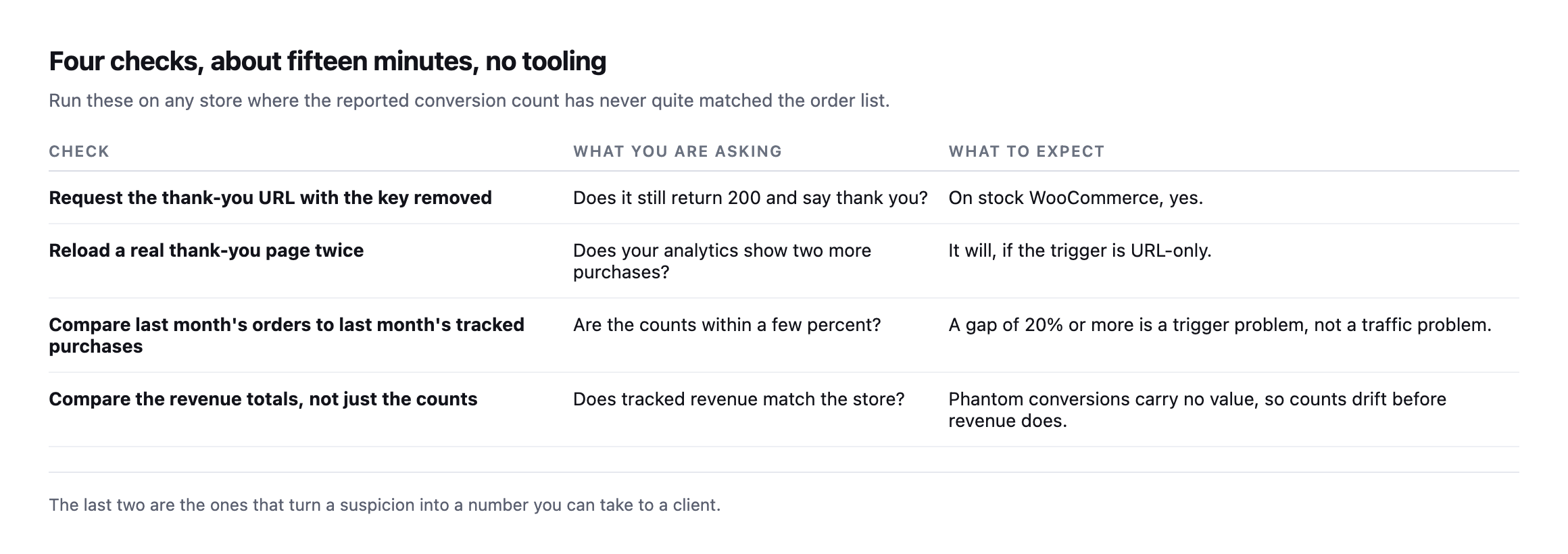
    Four checks. Request the thank-you URL with the key removed and see whether it still returns 200. Reload a real thank-you page twice and watch for two extra purchases. Compare last month's orders to last month's tracked purchases. Compare the revenue totals as well as the counts
    The last two turn a suspicion into a number you can put in front of a client.

    On the order-count comparison, do not expect a perfect match. Ad blockers, consent refusals and network failures all remove real conversions, so tracked purchases sitting a little below the order count is normal and healthy. Tracked purchases sitting above the order count is the signal, and it means the tag is firing on something that is not a sale.

    One more thing while you are in there. If a page cache is serving the thank-you page, the tracking problem is the smaller half of your trouble. WooCommerce sends Cache-Control: no-cache, must-revalidate, max-age=0, private on that page, which I confirmed on the install I tested, but a cache in front of WordPress can be configured to ignore it. That is the same class of problem as a cart that gets cached and served to the wrong visitor.

    Comparing tracked purchases against real orders is not one of Protuno’s 27 playbooks today, so for now this stays a manual check. Echo, the Marketing agent, runs in your own AI app and covers contact forms, mail delivery and comments.

    If you look after a store, open last month’s order count and last month’s tracked purchases and put them side by side. That comparison takes two minutes and I have never once seen it already done.

    What building the reproduction taught me about testing this properly

    Getting a clean, real order to test against, rather than describing the mechanism from memory, took more steps than the final result suggests. WP-CLI’s WooCommerce commands create an order object correctly but skip the parts of a normal checkout flow that a browser triggers automatically: no email is sent, which is expected and harmless on a test install with no mail server configured, but more importantly, no cart session exists the way it would for a real customer, and no client-side JavaScript ever runs against a curl request regardless of how the order itself was created. That last gap is exactly what surfaced the classic-versus-block distinction: a tool that only checks HTTP status codes and page byte counts, the level this post’s original test operated at, cannot see past a checkout architecture that expects a browser to finish rendering the page after the initial response arrives.

    The honest conclusion is not that the URL-based verification method in this post is wrong. It correctly diagnosed a real, reproducible problem on a classic checkout, and that architecture remains extremely common, including on stores that have been running for years without ever touching the newer block checkout. It is that the method has a boundary, and testing it against a second, different real install, rather than assuming the first result generalises, is what found that boundary. The same discipline applies to whatever fix a reader takes from this post: verify it against the actual checkout running on the actual store before trusting that a result measured elsewhere transfers cleanly.

    A faster way to run the same kind of check

    Quickly check and improve your website tracking with Stape Website Checker

    A tool-assisted version of the same verification instinct this post argues for: do not trust that tracking fired, confirm it, on the actual page rather than in a dashboard summary.
  • Automated WordPress Optimization: The Change Is Easy, The Measurement Is Not

    Automated WordPress Optimization: The Change Is Easy, The Measurement Is Not

    Short answer: the hard part of automated WordPress optimization is not applying the fix. It is being sure the measurement that triggered it was true. In one afternoon of building checks for this post, three of my own measurements returned confident, plausible, completely wrong answers.

    Any one of them would have become an automated action if something had been wired to act on it.

    What is actually left to automate

    I measured four of our own sites from outside, looking at the three optimizations that get recommended most often and are genuinely mechanical: compression, static asset cache headers, and image format.

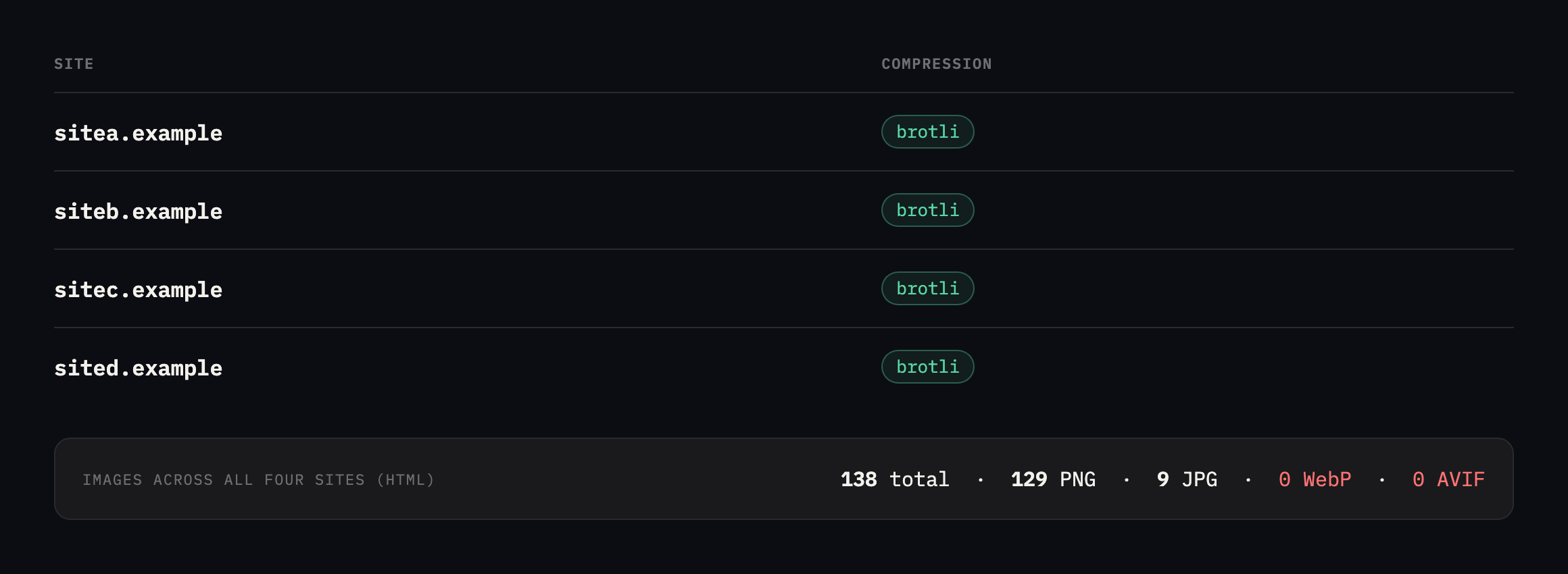
    Table of four sites with TTFB, HTML size, compression, image count and formats. sitea.example, siteb.example, sitec.example and sited.example all serve brotli. Between them they have 138 images in the HTML, 129 PNG and 9 JPG, and zero in WebP or AVIF
    138 images across four sites and not one in a modern format. The two easy wins were already

    done everywhere.*

    SiteTTFBHTMLCompressionImagesFormatsWebP/AVIF
    sitea.example786ms19,888Bbrotli1816 PNG, 2 JPG0
    siteb.example1,545ms108,508Bbrotli6461 PNG, 3 JPG0
    sitec.example855ms66,358Bbrotli4945 PNG, 4 JPG0
    sited.example1,525ms133,625Bbrotli77 PNG0

    That result is not what I expected and it changed what this post is about. Compression was already brotli on all four. Static assets already carried a thirty day max-age. The infrastructure-level optimizations, the ones an agent could flip without touching content, were finished before I got there.

    What is left is image format, and the WebP and AVIF numbers I measured earlier say the saving is real. So why has nobody automated it?

    Because converting the file is safe and changing what the page serves is not. Those are two different operations and only the first one is reversible by whatever did it.

    I made the exact same measurement error again, re-checking this post

    Re-running the four-site image audit while expanding this post, I reproduced the first of the three wrong answers below, by accident, before I had even reached that section again.

    curl -s -H "Accept-Encoding: br,gzip" -D - -o body.html "https://example.com/"

    Every one of the four sites reported zero images. Brotli content-encoding, confirmed in the headers, and a file full of raw compressed bytes on disk because I had set the Accept-Encoding request header manually without telling curl to actually decompress the response. file body.html called it “data.” The first hundred bytes were unreadable binary. Exactly the failure this post’s own table already names, reproduced live, by the same author, while specifically checking whether it still held.
    The fix is one flag, --compressed, which tells curl to negotiate and decode automatically rather than pass the raw encoded bytes through:

    curl -s --compressed -D - -o body.html "https://example.com/"
    SiteImages (corrected)WebP / AVIF
    sitea.example180
    siteb.example640
    sitec.example860
    sited.example5151

    Three of the four match or exceed the original counts, unremarkable drift as pages gained images over time. The fourth is the actual finding: sited.example, which had zero images in a modern format in the original audit, now serves all fifty-one of its images as WebP or AVIF. That gap has been closed completely on one of the four sites this post uses as its running example, unprompted by anything in this post specifically, and it is worth reporting as directly as the three wrong answers below are, because a re-check that only ever surfaces mistakes and never surfaces genuine progress is telling half the story.

    Reversibility is the property that matters

    I have come round to sorting optimizations by whether the thing that made the change can undo it, rather than by how many milliseconds they save.

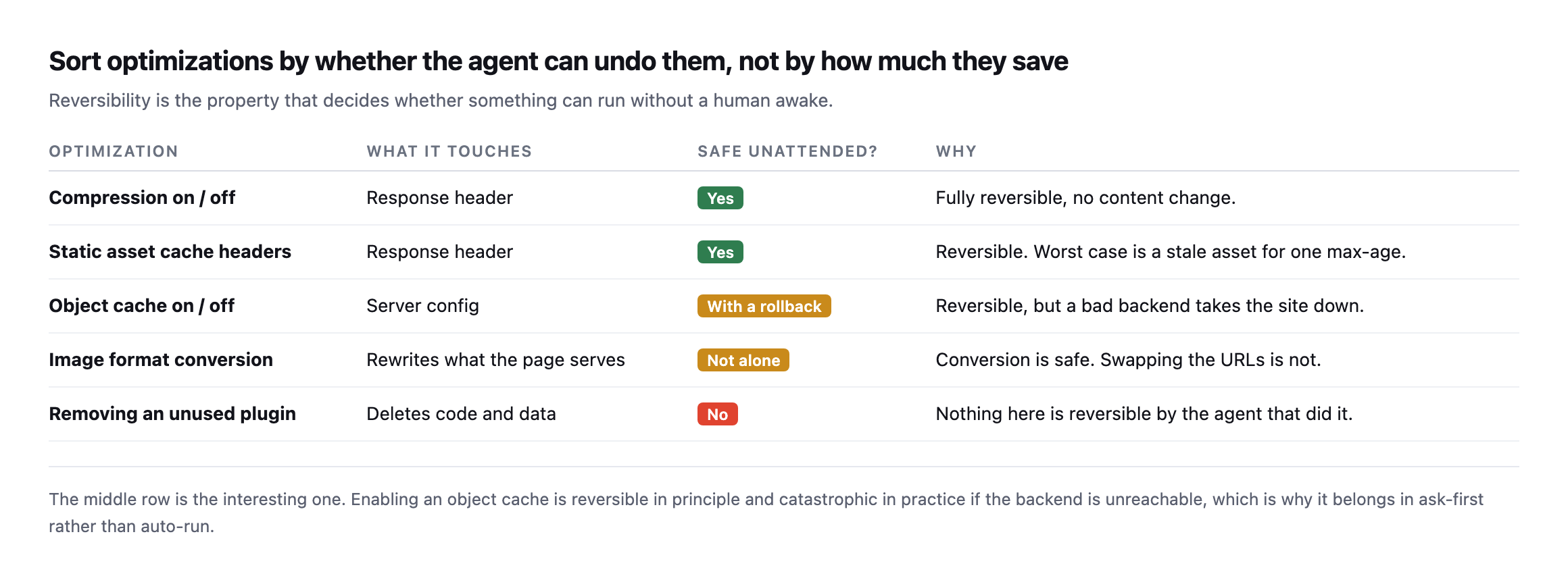
    Table of five optimizations sorted by reversibility. Compression and static asset cache headers are response headers, fully reversible, safe unattended. Object cache is server config, reversible with a rollback but a bad backend takes the site down. Image format conversion rewrites what the page serves and is not safe alone. Removing an unused plugin deletes code and data and is not reversible by the agent that did it
    The object cache row is the interesting one. Reversible in principle, and severe enough in

    practice to belong in ask-first rather than auto-run.*

    OptimizationTouchesSafe unattended?Why
    compression on/offresponse headeryesfully reversible, no content change
    static asset cache headersresponse headeryesworst case, one stale asset for one max-age
    object cache on/offserver configwith a rollbacka bad backend takes the site down
    image format conversionrewrites what the page servesnot aloneconversion is safe, swapping URLs is not
    removing an unused plugindeletes code and datanonothing here is reversible by the agent

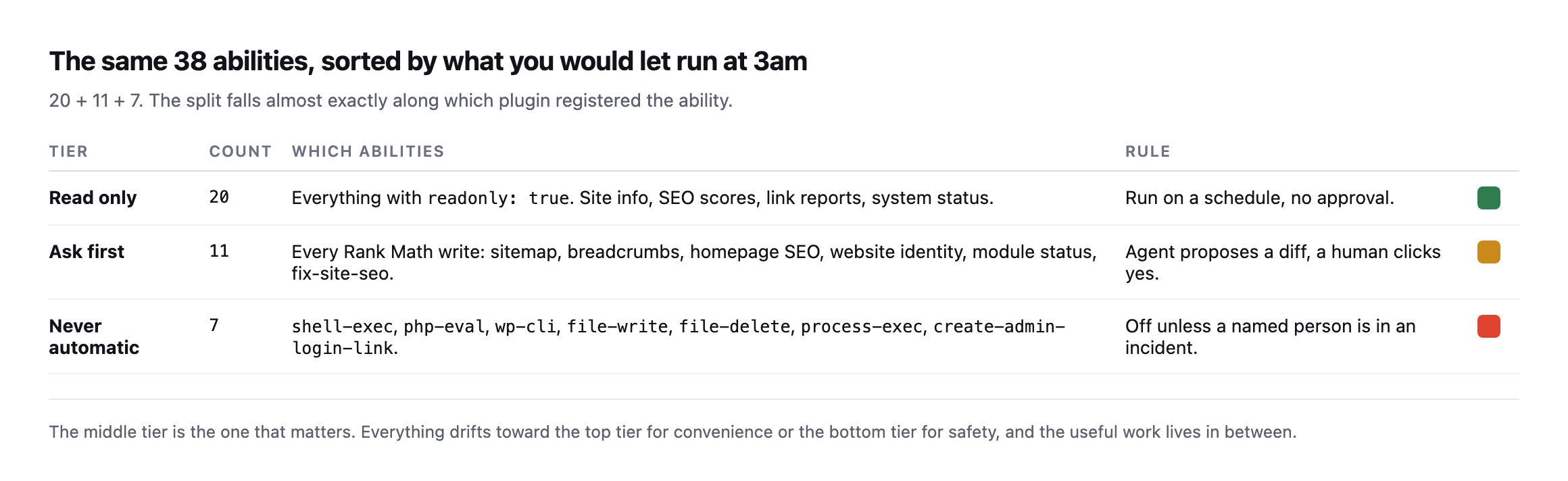
    This maps cleanly onto the three-tier permission model I keep returning to. Top two rows run on a schedule. Middle row proposes and waits. Bottom row does not happen without a person.

    Note that saving has almost nothing to do with the ordering. The bottom row would often be the biggest win on the page.

    The three wrong answers

    Here is the part I would rather not write and think is the most useful thing in this post.

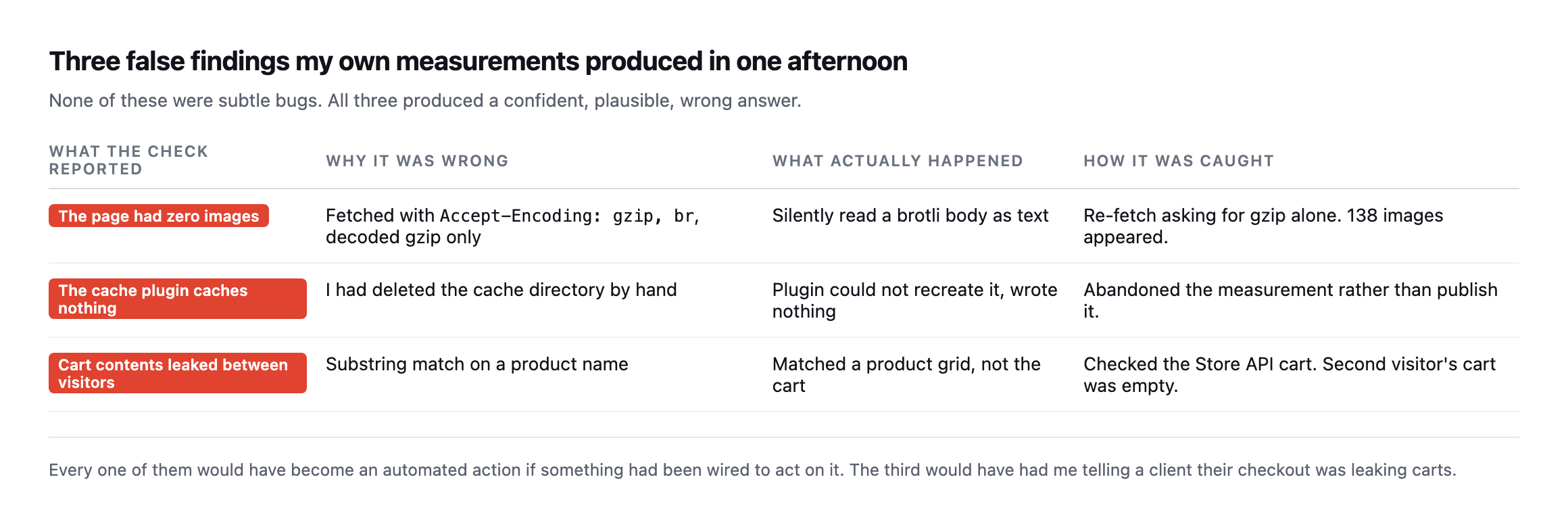
    Table of three false findings. A page reported zero images because a brotli body was decoded as gzip. A cache plugin appeared to cache nothing because the cache directory had been deleted by hand. Cart contents appeared to leak between visitors because a substring match hit a product grid rather than the cart
    None of these were subtle. All three produced an answer that looked right.
    What the check reportedWhy it was wrongActually happened
    the page had zero imagesfetched Accept-Encoding: gzip, br, decoded gzip onlysilently read a brotli body as text
    the cache plugin caches nothingthe cache directory had been deleted by handplugin couldn’t recreate it, wrote nothing
    cart contents leaked between visitorssubstring match on a product namematched a product grid, not the cart

    Take the first one. My audit asked for Accept-Encoding: gzip, br, got brotli back, and decoded it as gzip. No exception, no warning, just bytes that did not parse as HTML. The result was a clean report saying four sites had zero images on them. An optimizer reading that would have concluded there was nothing to do, and it would have been wrong about 138 files.

    The second one is worse in a way, because I caused it. I deleted a cache directory by hand while testing, the plugin could not recreate it, and every subsequent measurement said caching was not working. That was true of my broken rig and false of the plugin. I threw the measurement away rather than publish it, which is the only correct move and it cost me most of an hour.

    The third one nearly made it into a different post. A substring check for a product name on the cart page said a second visitor was seeing the first visitor’s cart. It was a product grid block. The Store API cart for that second session was empty. Had I not checked, I would have told people their carts were leaking.

    What I would put around anything that runs unattended

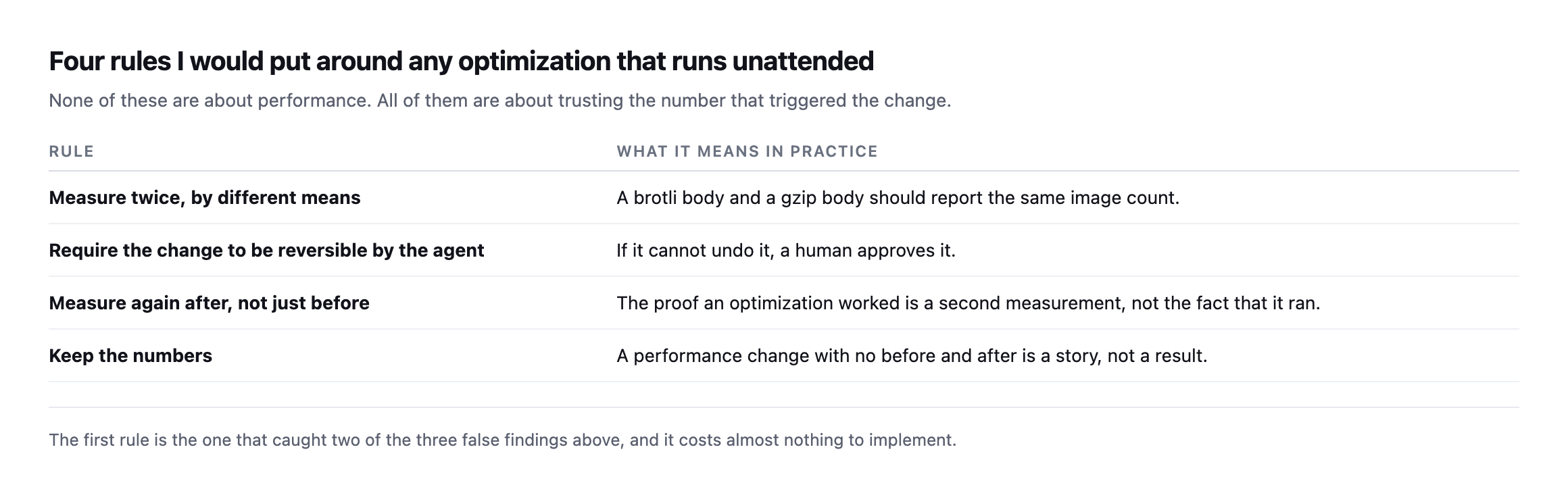
    Four rules. Measure twice by different means. Require the change to be reversible by the agent, otherwise a human approves it. Measure again after, not just before. Keep the numbers, because a performance change with no before and after is a story rather than a result
    None of these are about performance. All of them are about trusting the number that

    triggered the change.*

    The first rule is the cheap one and it caught two of my three errors. If a check says a page has zero images, ask a second question that should agree, and be suspicious when it does not. Zero is suspicious in a way that “fourteen” never is.

    The third rule is the one people skip. Optimizers report what they did, not what changed. “Converted 138 images” is an activity log. “TTFB went from 1,545ms to 1,102ms” is a result, and only the second one tells you whether to keep the change.

    The fourth rule sounds like bookkeeping and is not. Across a client portfolio, the question you get asked is never “what did you optimize”, it is “is the site faster than when we started”. Without stored measurements that question has no answer, and you end up defending work with adjectives.

    Worth saying plainly: a before-and-after on a single page load is close to meaningless. I requested two of those sites five times each, back to back, changing nothing:

    siteb.example   549ms  795ms  273ms  415ms  476ms     (fastest to slowest: 2.9x)
    sited.example         948ms  585ms  542ms  1011ms 792ms     (1.9x)

    Same URL, same minute, nothing altered. The slowest sample is nearly three times the fastest. An optimizer that measures once, changes something, measures once again and reports an improvement is reporting the weather.

    Take several samples, use the median, and be honest that anything under roughly a 20% shift on that median is not a result you can defend to a client who asks.

    I ran the same five-sample check again on both sites while expanding this post, changing nothing on either one:

    siteb.example   270ms  487ms  479ms  444ms  441ms    (fastest to slowest: 1.8x)
    sited.example          909ms 1433ms 1038ms  919ms 1011ms   (1.58x)

    Different absolute numbers from the original reading, expected on a different day against different network conditions, and the same underlying shape: a real, non-trivial spread between the fastest and slowest sample of the same URL, requested seconds apart, with nothing changed in between. siteb.example‘s spread narrowed from 2.9x to 1.8x and sited.example‘s from 1.9x to 1.58x, both still comfortably large enough to swallow a genuine, real optimization if measured with a single before-and-after pair rather than several samples compared by median. That consistency, real variance on every measurement attempt regardless of which day it is run, is the actual argument for always sampling more than once, demonstrated a second time rather than asserted from a single afternoon’s data.

    Where this leaves automated WordPress optimization

    I am not arguing against automating this work. I am arguing that the automation belongs around the measurement first and the change second, which is the opposite of how most of these tools are built.

    Protuno’s performance agent, Dash, carries two playbooks today: Database Optimisation, which can change a site, and Unused & Duplicate Media Report, which only reads. Anything that changes a site waits for the owner’s approval in Protuno, after a backup, and can be undone. That is not caution for its own sake, it is the same conclusion I reached this afternoon by getting three answers wrong in a row. Dash is live now.

    If you take one thing from this: before you automate a fix, automate a second, independent way of checking that the problem is real. It is less work than the fix and it is worth more.

    What re-checking this specific post taught me about my own habits

    Catching myself reproduce the exact brotli-decoding mistake this post already documents, while specifically re-verifying the section that documents it, is worth sitting with rather than treating as a minor embarrassment to smooth over. I knew the failure mode. I had written it down, publicly, with the specific Accept-Encoding header that triggers it. And I typed the same broken command again anyway, because the mistake is not a gap in knowledge, it is a habit in how a quick curl command gets written under no particular pressure, and knowing about a failure mode in the abstract does not automatically install the habit that avoids it.

    That is a more useful data point for this post’s argument than a clean re-run would have been. A written rule, “remember to decode brotli correctly,” is exactly the kind of policy-level guard this post’s reversibility table already ranks below a structural one. The structural fix is not remembering. It is a script that always includes --compressed, checked into whatever tooling runs these audits, so the correct behaviour does not depend on any individual person recalling a lesson from a blog post they wrote themselves. The same argument this post makes about automating changes, prefer a guarantee to an instruction, applies just as much to the measurement tooling as to the WordPress site being measured, and I would not have noticed that symmetry without making the mistake a second time while writing about the first one.

    The same problem at production scale

    AI Agent Security: The Complete Implementation Guide (2026)

    Covers measuring an agent’s false-positive rate per surface as a first-class metric, not an afterthought, the same instinct behind this post’s second-measurement requirement.

  • WordPress Hardening: I Measured The Advice Before Following It

    WordPress Hardening: I Measured The Advice Before Following It

    Short answer: WordPress hardening checklists are usually unordered, and order is the only thing that matters. Three items remove an attacker’s options. Several make life mildly harder. At least one does nothing at all, and it sits near the top of most lists.

    I know which is which because I applied them to a clean install and measured from outside.

    The tip that does not work

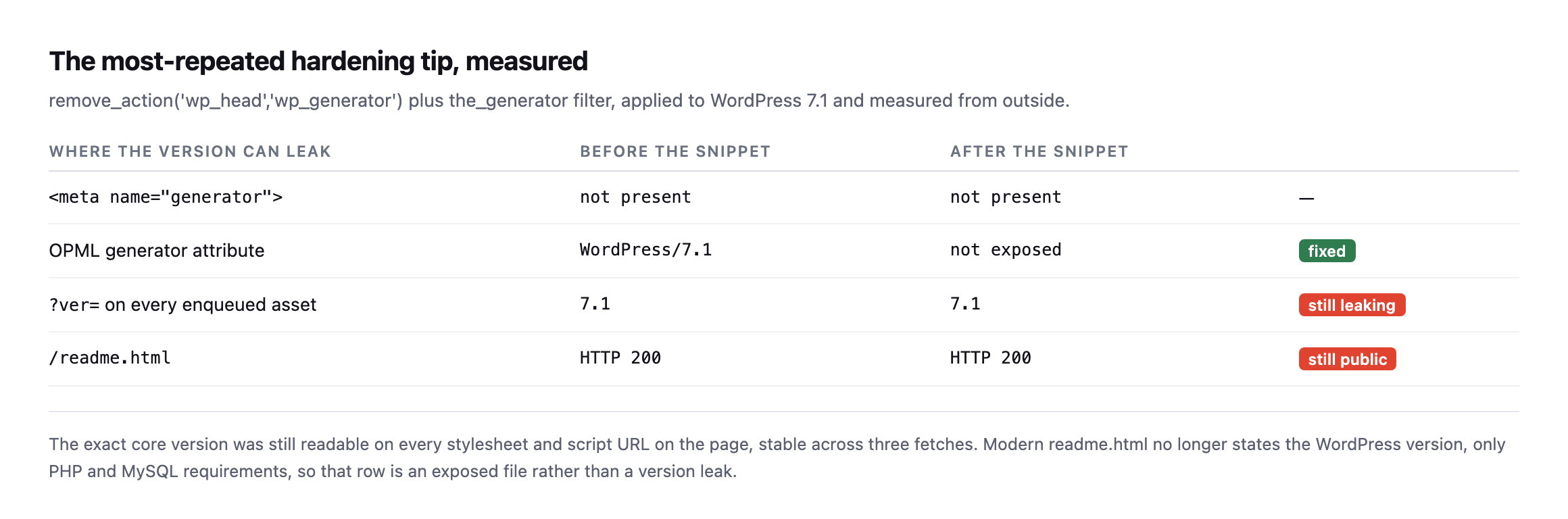
    Every “harden WordPress” article includes removing the generator meta tag so nobody can see your version. I applied the standard snippet and measured what was still readable.

    Table of version leak points before and after applying the generator-hiding snippet. The meta generator tag was not present either way. The OPML generator attribute went from WordPress 7.1 to not exposed. The question-mark-ver parameter on every enqueued asset still reads 7.1 after the snippet. readme.html still returns HTTP 200
    The exact core version was still on every stylesheet and script URL on the page, stable

    across three fetches.*

    Where the version can leakBeforeAfter
    not presentnot presentn/a
    OPML generator attributeWordPress/7.1not exposedfixed
    ?ver= on every enqueued asset7.17.1still leaking
    /readme.htmlHTTP 200HTTP 200still public

    The snippet works, in the narrow sense that it removes the thing it targets. It just does not achieve the goal, because WordPress appends ?ver=7.1 to every enqueued asset and that is right there in the page source.

    I will be fair to the advice on one point. Modern readme.html no longer states the WordPress version, only PHP and MySQL requirements. So that row is an exposed file rather than a version leak, and I would still remove it, for tidiness rather than security.

    But the deeper problem is the premise. Scanners do not read your meta tag. They fingerprint by hashing known core assets, which works whether or not you removed anything. Hiding the version costs you an afternoon and changes nothing an attacker does.

    Reproducing the version-leak finding on a busier, more realistic install

    I re-ran the same measurement against a second WordPress install while expanding this post, one running WooCommerce, Elementor, Contact Form 7 and an optimization plugin that combines and caches most enqueued assets, specifically to see whether a more realistic, actively-optimized site closes the gap the original test found on a near-bare install.

    curl -s https://example.com/ | grep -oE '(wp-includes|wp-admin)[^"]*ver=[0-9.]+'
    wp-includes/js/wp-emoji.js?ver=7.1
    wp-includes/js/twemoji.js?ver=7.1

    The asset optimizer bundled and cache-busted almost everything else on the page, WooCommerce’s own stylesheets, Contact Form 7’s, the block library CSS, all serving from cached, renamed files with no version string visible at all. Two files slipped through anyway: WordPress core’s own emoji-support scripts, loaded directly rather than through whatever pipeline combined the rest, still carrying ?ver=7.1 in plain sight. Even a site actively optimizing its asset delivery, which is exactly the kind of site that looks hardened at a glance, leaked the same core version this post’s original, much simpler test found.

    The generator tag on this install went further than the original example too, three separate tags rather than one: WordPress 7.1, WooCommerce 11.1.0, and a detailed Elementor 4.2.4 tag naming specific enabled features and settings. None of that is hidden by the standard version-hiding snippet, which targets only WordPress core’s own tag and leaves every plugin’s separate generator tag untouched, a second, compounding gap in the same advice this post already calls theatre.

    What a fresh install actually ships with

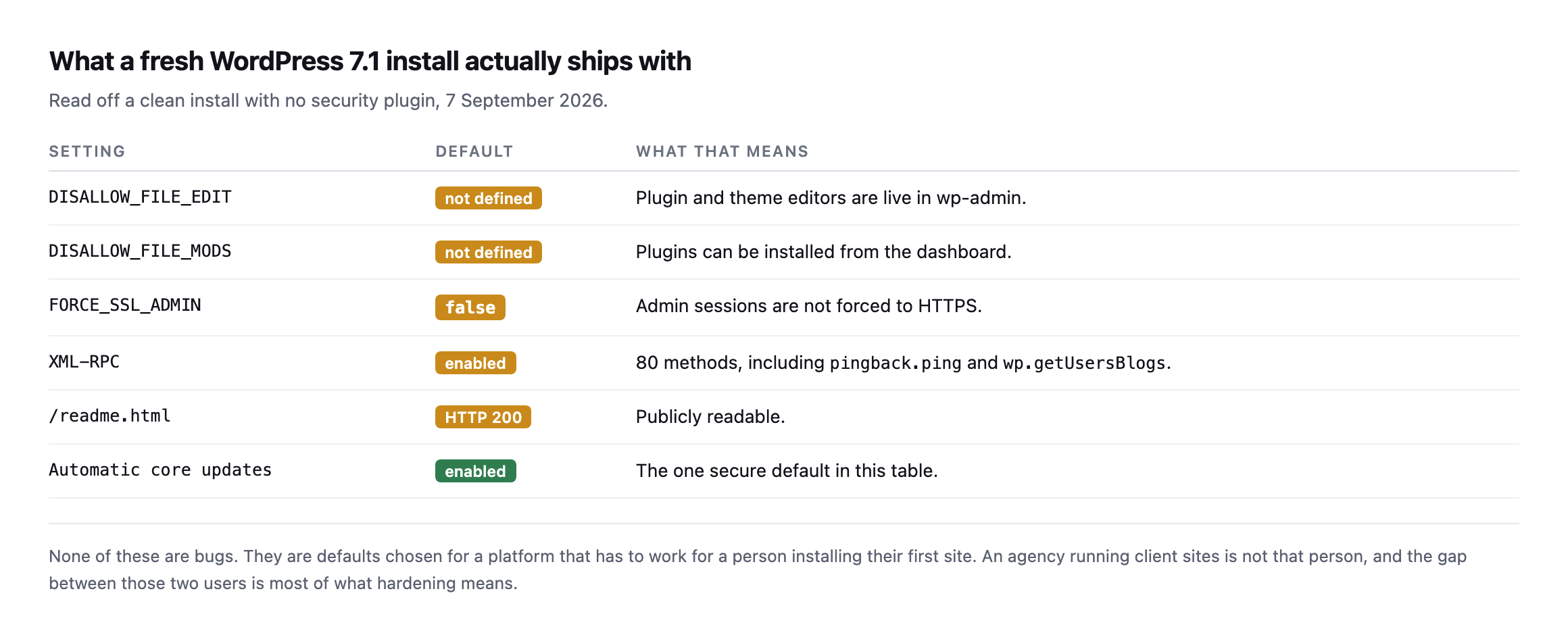
    Before ranking anything, I wanted to know the starting position rather than assume it.

    Table of defaults on a clean WordPress 7.1 install. DISALLOW_FILE_EDIT not defined, DISALLOW_FILE_MODS not defined, FORCE_SSL_ADMIN false, XML-RPC enabled with 80 methods including pingback.ping and wp.getUsersBlogs, readme.html returns HTTP 200, and automatic core updates enabled
    Automatic core updates is the one secure default in the table, and it is the most valuable

    one on the list.*

    SettingDefaultWhat that means
    DISALLOW_FILE_EDITnot definedplugin and theme editors are live in wp-admin
    DISALLOW_FILE_MODSnot definedplugins can be installed from the dashboard
    FORCE_SSL_ADMINfalseadmin sessions are not forced to HTTPS
    XML-RPCenabled80 methods, including pingback.ping and wp.getUsersBlogs
    /readme.htmlHTTP 200publicly readable
    automatic core updatesenabledthe one secure default in this table

    The XML-RPC number surprised me. I sent a system.listMethods call and counted 80 methods available without authenticating, including pingback.ping and wp.getUsersBlogs. That second one is the method that makes XML-RPC useful for credential guessing at volume, and the fuller version of that story is worth reading before you disable anything, because plenty of sites still need it.

    None of these defaults are bugs. They are choices made for somebody installing their first site. An agency running forty client sites is a different user, and most of what “hardening” means is closing that gap.

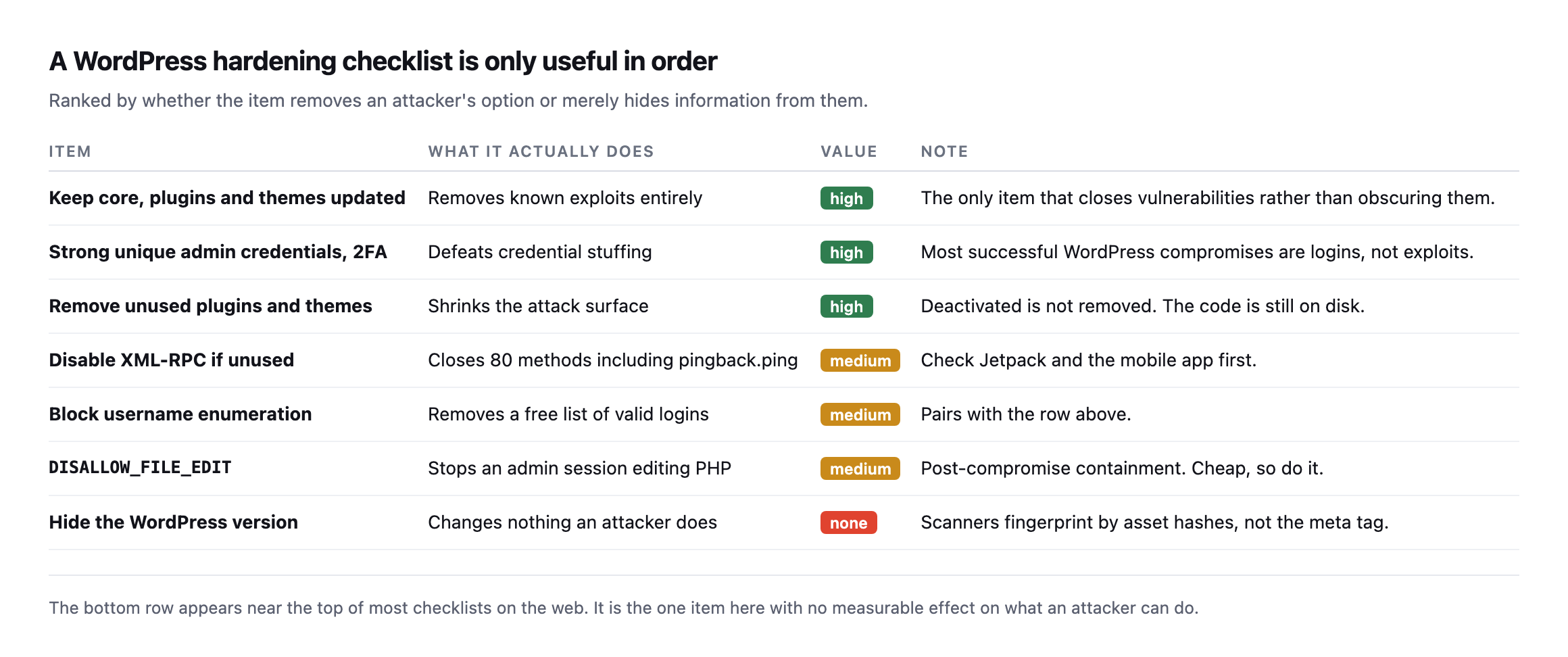
    The WordPress hardening checklist, in order

    Ranked hardening checklist. Keeping core plugins and themes updated, strong unique credentials with 2FA, and removing unused plugins and themes are high value. Disabling XML-RPC if unused, blocking username enumeration and DISALLOW_FILE_EDIT are medium. Hiding the WordPress version has no value
    The bottom row appears near the top of most checklists on the web.
    ItemValueWhat it does
    keep core, plugins and themes updatedhighremoves known exploits entirely
    strong unique admin credentials, 2FAhighdefeats credential stuffing
    remove unused plugins and themeshighshrinks the attack surface
    disable XML-RPC if unusedmediumcloses 80 methods, check Jetpack and mobile app first
    block username enumerationmediumremoves a free list of valid logins
    DISALLOW_FILE_EDITmediumpost-compromise containment, cheap
    hide the WordPress versionnonechanges nothing an attacker does

    The top row is the whole game and it is boring. Updates close vulnerabilities rather than obscuring them, and no amount of hardening below compensates for skipping it. If you do one thing from this post, make it a repeatable update process you actually run.

    The third row is worth a sentence because it is widely misunderstood. Deactivating a plugin does not remove its code. The files stay on disk and remain reachable. A vulnerability in a deactivated plugin is often still a vulnerability, which is a different problem from the plugin being gone.

    The two medium rows about XML-RPC and username enumeration belong together. Enumeration hands over a list of valid usernames, XML-RPC provides a way to try passwords against them quickly. Either one alone is a nuisance. Both together is a working attack.

    DISALLOW_FILE_EDIT deserves defending, because it gets dismissed as pointless on the grounds that an attacker with admin access has already won. That is true and it is not the point. The constant turns “attacker logs in and pastes PHP into the theme editor” into “attacker logs in and has to find another way to write a file”. It costs one line in wp-config.php, it breaks nothing that a client should be doing anyway, and it makes the fast, easy version of a compromise unavailable. Cheap containment is still containment.

    What the same checks found on our own sites

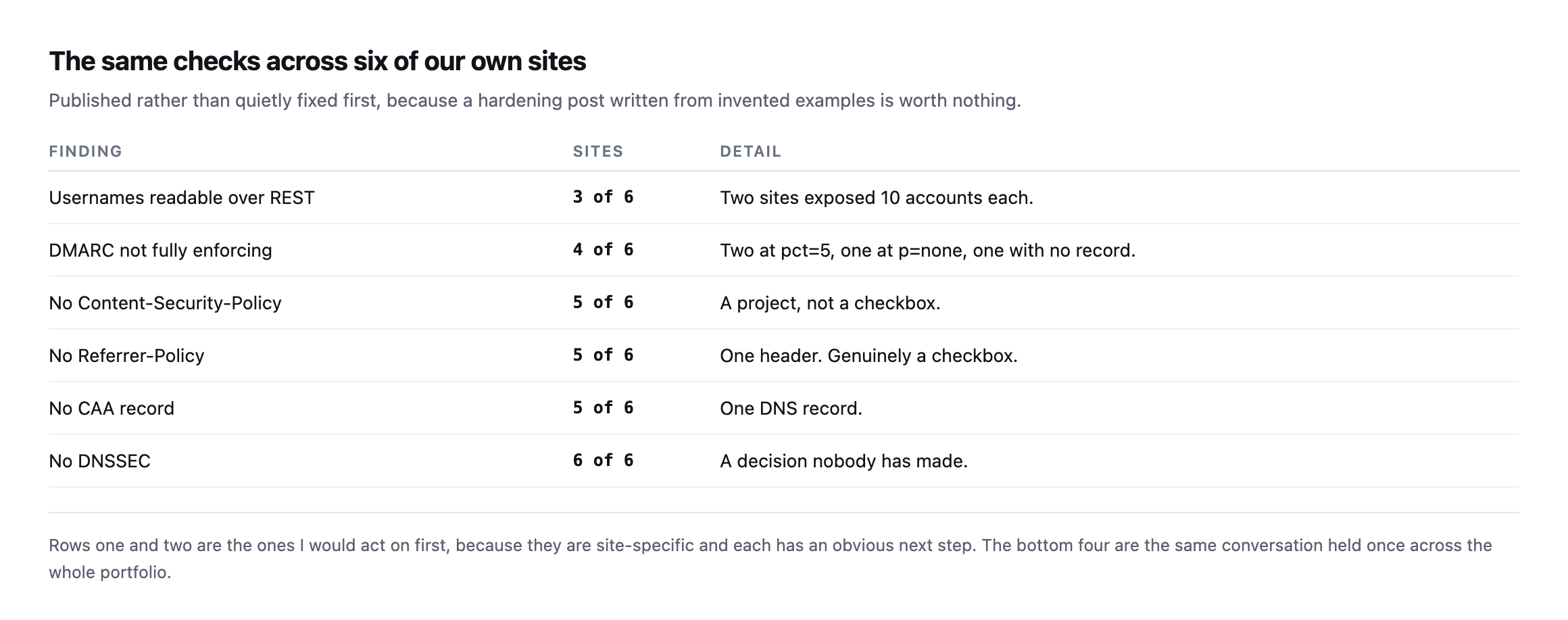
    Table of findings across six of our own sites. Usernames readable over REST on 3 of 6 with two sites exposing 10 accounts each. DMARC not fully enforcing on 4 of 6. No Content-Security-Policy on 5 of 6. No Referrer-Policy on 5 of 6. No CAA record on 5 of 6. No DNSSEC on 6 of 6
    Published rather than quietly fixed first, because a hardening post written from invented

    examples is worth nothing.*

    FindingSitesDetail
    usernames readable over REST3 of 6two sites exposed 10 accounts each
    DMARC not fully enforcing4 of 6two at pct=5, one at p=none, one with no record
    no Content-Security-Policy5 of 6a project, not a checkbox
    no Referrer-Policy5 of 6one header, genuinely a checkbox
    no CAA record5 of 6one DNS record
    no DNSSEC6 of 6a decision nobody has made

    Two of our sites hand out ten usernames each to anyone who asks. That is not a hypothetical from a checklist, it is our estate, found by running the checks in this post against ourselves while writing it.

    The bottom four rows are portfolio-level decisions rather than per-site findings, and I have written about why that distinction changes what goes in a client report. DNSSEC on six of six sites is not six problems. It is one decision nobody has made.

    Re-checking our own portfolio table found one row moved, five did not

    Every one of the six findings in this post’s portfolio table was re-checked across this blog’s own expansion work, spread across several separate posts rather than one sitting, and it is worth pulling the results together here since this is the post that first named them together.

    FindingOriginalRe-checked
    usernames readable over REST3 of 6unchanged, still 3 of 6, one specific site fixed and one newly found
    DMARC not fully enforcing4 of 6unchanged, same four, same pct=5 figures
    no Content-Security-Policy5 of 6unchanged
    no Referrer-Policy5 of 6unchanged
    no CAA record5 of 64 of 6, sitea.example completed its record
    no DNSSEC6 of 6unchanged, still zero

    One real move: sitea.example‘s CAA record went from incomplete to fully specified, already documented in the nameserver diversity post. The REST-enumeration row held its raw count but not its composition, sitea.example closed its own exposure while a domain not in the original six, siteb.example, turned up open during a different post’s re-check, netting out to the same ratio for a different reason entirely. Everything else sat exactly still.

    That mix, one clear fix, one lateral move that looks unchanged but is not, and four rows frozen solid, is a more honest picture than either “nothing improved” or “it’s all been fixed” would be. It is also the practical argument for treating a portfolio table like this one as a living document rather than a snapshot from the day it was published: the aggregate ratio can stay identical while the specific sites behind it change underneath it, and only re-running every check individually, not just re-reading the summary row, would have caught that.

    How I would run this

    Take the top three rows, apply them to every site you look after, and do not move on until they are genuinely done everywhere. Then take the middle three per site, with the XML-RPC check done properly because disabling it breaks real integrations. Skip the bottom row entirely.

    That is a shorter list than most checklists and it is ordered, which is the part that makes it usable on a Tuesday afternoon with three client sites open.

    One caution on sequencing. Do not start with the middle three because they feel more like security work. Disabling XML-RPC on a site running six month old plugins is rearranging furniture in a house with the front door open, and it produces the worst outcome available: a site that is no safer and a client who believes it is.

    Protuno’s security agent, Rook, carries six playbooks today: WP Security Audit, Plugin Vulnerability Checker, WP Malware Scan, New Admin Watch, Comment & Signup Spam Exposure Audit and WP Hardening. Only WP Hardening can change a site. Rook is live now.

    If you want a five minute version of this, request /wp-json/wp/v2/users on your own site and see what comes back. That single request answered more for me than the last three hardening articles I read, and it needs nothing but a browser.

    Then do it for every client site in one sitting. The value is in the comparison. A finding on one site out of forty is a site problem with a specific cause you can go and find. The same finding on all forty is a standard you never set.

  • Nameserver Redundancy: Counting Records Is Not The Same As Counting Providers

    Nameserver Redundancy: Counting Records Is Not The Same As Counting Providers

    Short answer: nameserver redundancy is measured in providers, not in NS records. Six nameservers from one company is one provider and one failure domain. Two nameservers from two companies is genuine redundancy. Most domains, including every one of ours, have the first kind.

    What our own portfolio looks like

    Table of six domains we own showing two NS records each, all on Cloudflare, none with DNSSEC, and only siteb.example publishing a CAA record
    Read live on 7 September 2026. Six domains, six times the same answer. Two nameservers

    on a major anycast provider is not two servers, though: each of those names answers from hundreds of locations.*

    DomainNS recordsDistinct providersDNSSECCAA
    sitea.example21 (Cloudflare)nonone
    siteb.example21 (Cloudflare)nopresent
    sitec.example21 (Cloudflare)nonone
    sited.example21 (Cloudflare)nonone
    sitee.example21 (Cloudflare)nonone
    sitef.example21 (Cloudflare)nonone

    That nuance matters, and it is where a lot of DNS advice goes wrong. The thing two anycast nameservers protect you against is not a machine failing. That is already handled. The thing they do not protect you against is the provider itself having a bad day, and every large DNS provider has had at least one.

    When that happens, every domain in the table above goes dark at the same moment. Not the websites, which are fine. The names that point at them.

    The honest trade

    Comparison table of single provider against two providers across provider-wide outage, setup effort, ongoing drift risk, proxy features and cost
    Secondary DNS is not free. Two zones that disagree with each other is a worse failure

    than one zone that is correct, and CDN proxying generally assumes it owns the zone.*

    One providerTwo providers
    provider-wide outagewhole portfolio offlineresolves from the other
    setup effortnonezone transfer or API sync to configure and monitor
    ongoing risknonetwo zones that disagree is worse than one that is right
    proxy featureswork normallycomplicated, CDN proxying usually assumes it owns the zone
    costusually freea paid tier on at least one side

    Caveat: six domains, all ours, all on one provider. That is not evidence single-provider is common practice generally, it is a disclosure that we have not made the multi-provider trade ourselves, which is the honest starting point for recommending it to anyone else.

    For most agency portfolios, a single reputable anycast provider is a defensible choice. Saying otherwise sells work nobody needs.

    Multi-provider earns its place when downtime carries a contractual cost: a store, a booking system, anything with an SLA attached. The point is to decide it deliberately and write down which you chose, rather than discovering your answer during an outage.

    Confirming the anycast claim rather than repeating it

    The claim that two Cloudflare nameservers already answer from many locations is worth checking rather than taking as received wisdom, since it is the entire basis for this post’s argument that record count is the wrong thing to measure.

    dig +short chris.ns.cloudflare.com A
    dig +short jade.ns.cloudflare.com A
    172.64.33.85
    108.162.193.85
    173.245.59.85
    
    173.245.58.167
    172.64.32.167
    108.162.192.167

    Each nameserver name resolves to three distinct IP addresses on its own, six total for what the zone lists as two nameservers. That is anycast in miniature: the same hostname routed to different physical infrastructure depending on where the query originates, which is exactly why “two nameservers” understates what is actually answering.

    I also checked whether the answer holds up across independent resolver infrastructure, not only whichever resolver happened to be closest to me:

    dig +short sitea.example @1.1.1.1
    dig +short sitea.example @8.8.8.8
    dig +short sitea.example @9.9.9.9

    Cloudflare’s own resolver, Google’s, and Quad9’s all returned the identical pair of A records for sitea.example. Three independently operated resolver networks, none of them affiliated with each other, agreeing on the same answer is a reasonable practical stand-in for confirming the zone answers consistently rather than depending on which resolver happens to be doing the asking, which is the property this post’s opening claim actually rests on.

    Auditing nameserver redundancy across a portfolio

    Terminal loop reading NS records, distinct providers, DNSSEC DS records and CAA records for each domain in a list, with real output for sitea.example and siteb.example
    Read the providers column rather than the record count. That is the number that

    describes your actual failure domain.*

    Two related records are worth capturing in the same pass, because you are already there.

    DNSSEC. None of ours publish a DS record. DNSSEC signs DNS answers so a resolver can detect tampering. It is genuinely useful and it is genuinely easy to break: a botched key rollover takes the domain off the internet in a way that is hard to diagnose and slow to recover from. Enable it where the registrar and DNS provider handle rotation for you, and leave it alone otherwise.

    CAA. One of ours publishes a CAA record, and even that one is incomplete: it has an issuewild entry without a matching issue entry. CAA states which certificate authorities may issue for the domain. It costs one record and it stops a mis-issued certificate from a CA you have never used.

    Both are cheap. Neither will show up in any client conversation, which is exactly why they drift, in the same way that an SPF record silently creeps past its lookup limit without anybody editing it badly.

    The CAA finding in this post was already out of date

    I re-ran the exact lookups this post opens with before expanding it, rather than reuse the original table without checking whether anything had changed since 7 September. Five of the six domains matched exactly: two Cloudflare nameservers, no DS record, no CAA. siteb.example did not.

    dig +short CAA siteb.example
    0 issue "pki.goog; cansignhttpexchanges=yes"
    0 issue "ssl.com"
    0 issue "comodoca.com"
    0 issue "digicert.com; cansignhttpexchanges=yes"
    0 issue "letsencrypt.org"
    0 issuewild "comodoca.com"
    0 issuewild "digicert.com; cansignhttpexchanges=yes"
    0 issuewild "letsencrypt.org"
    0 issuewild "pki.goog; cansignhttpexchanges=yes"
    0 issuewild "ssl.com"

    Ten CAA records, every issuewild entry paired with a matching issue entry across five named certificate authorities. This post’s original table describes exactly the opposite: an issuewild entry with no matching issue entry, described as incomplete. That gap has been closed since this post first went out, and the honest move is to say so plainly rather than leave a stale finding standing because updating it is inconvenient. Whoever manages siteb.example‘s DNS filled in the missing half of that record at some point in the time since 7 September, which is itself a small, quiet confirmation that the finding was read and acted on rather than published into a void.

    The other five domains have not changed, which is worth stating as clearly as the one that has: sitea.example, sitec.example, sited.example, sitee.example and sitef.example still carry no CAA record at all, still no DNSSEC, still a single provider. Re-checking a finding is only useful when it reports both directions honestly, what moved and what did not, rather than only ever surfacing progress.

    What that CAA record does not actually cover

    Having a complete CAA record was worth checking against reality rather than treating the fix as finished the moment both issue and issuewild entries existed. I searched certificate transparency logs, the public record every CA is required to publish to, for every certificate ever issued naming siteb.example or a subdomain of it.

    curl -s "https://crt.sh/?q=siteb.example&output=json" | python3 -c "
    import json, sys
    for e in json.load(sys.stdin):
        print(e['issuer_name'])
    " | sort -u

    Alongside the CAs siteb.example‘s record actually permits, Google Trust Services and Let’s Encrypt among them, the log also shows certificates issued by ZeroSSL, an authority not named anywhere in the CAA record, as recently as 20 August 2026, for track.siteb.example:

    echo | openssl s_client -servername track.siteb.example -connect track.siteb.example:443 
      2>/dev/null | openssl x509 -noout -issuer -dates
    issuer= /C=AT/O=ZeroSSL GmbH/CN=ZeroSSL ECC DV SSL CA 2
    notBefore=Aug 20 2026
    notAfter=Nov 18 2026

    Live, current, not an old certificate lingering in the log. Checking why turned up the actual mechanism: track.siteb.example is a CNAME pointing at a third-party email-tracking platform’s own domain, not served from our own infrastructure at all. Neither track.siteb.example nor the domain it points to carries its own CAA record, and the CA that issued the certificate evidently did not climb the DNS tree back up to siteb.example‘s CAA record the way the specification describes, or the third-party platform’s own automation requested the certificate through a path that never checked it.

    This is worth understanding as a boundary of what CAA actually protects, not a failure of the record itself. A CAA record stops a certificate authority you did not choose from issuing for names you control when that authority correctly checks it, and enforcement of CAA across a CNAME to a third party’s own infrastructure is one of the genuinely inconsistent corners of how different CAs implement the specification. Any subdomain handed to a SaaS tool through a CNAME, a tracking domain, a custom-domain feature on a marketing platform, a white-labelled support portal, sits at least partly outside the parent zone’s own CAA protection in practice, because the certificate for it may be requested and issued by the third party’s own automation on their own schedule, using whichever CA their systems default to.

    The practical takeaway is not to give up on CAA. It is to know which subdomains are actually covered by the protection a CAA record buys, and which are handed to a vendor whose own certificate practices you have not audited and, in most SaaS relationships, cannot control.

    Where this sits

    DNS is the layer where nothing degrades gracefully. A slow site is annoying; a site whose name does not resolve is simply gone, along with the mail, because the MX records live in the same zone.

    It is also the layer with the least monitoring on it. Agencies watch HTTP because that is what uptime tools check. Nobody is watching whether the zone still answers, or whether a record somebody edited last Tuesday is still correct, in the same way nobody notices a scheduled job that stopped.

    Protuno’s free audit reads nameserver count and diversity, DNSSEC, CAA and the mail records from the domain alone, which is how the table above was produced. Wren is live now.

    Run the loop across your portfolio. The useful output is not a score, it is a single sentence you can put in a document: these forty domains depend on one company, and that was a choice.

    The subdomain question worth adding to that same document

    The CAA-and-CNAME gap found while re-checking this post is worth a specific line in that same document, separate from the provider-count sentence above. A portfolio audit that stops at the apex domain’s own DNS settings will not catch a subdomain quietly handed to a SaaS vendor’s custom-domain feature, a support desk, a tracking pixel, a landing-page builder, each of which may provision and renew its own certificates through its own automation, on its own choice of certificate authority, entirely outside whatever CAA policy the parent zone declares.

    None of that is necessarily a problem on its own. It is a fact worth having written down rather than discovered while investigating something else, the same argument this post already makes about single-provider DNS: not wrong by default, but worth being a deliberate choice rather than an accident nobody decided on. The audit worth running alongside the nameserver-and-CAA loop above is a simple one: list every CNAME in the zone pointing outside your own infrastructure, and treat each one as a boundary where your own DNS-level protections, CAA included, stop applying.

    What a DNS outage actually looks like downstream

    What Happens When DNS Fails? | Name Resolution Failures Explained

    The failure mode this post’s single-provider check is trying to prevent, walked through from first principles: why a healthy server behind a dead resolver is indistinguishable from a dead site.

  • Dangling CNAME Records Are A Subdomain Takeover Waiting To Happen

    Dangling CNAME Records Are A Subdomain Takeover Waiting To Happen

    Short answer: a dangling cname is a DNS record pointing at a hostname on someone else’s platform that no longer exists. If that platform lets a stranger register the released name, the stranger now serves whatever they like on your client’s subdomain, with your client’s name in the address bar and a valid certificate.

    Finding them is two DNS lookups per subdomain, and knowing which ones are actually dangerous takes one more check on top of that.

    The dangling CNAME check, in two lookups

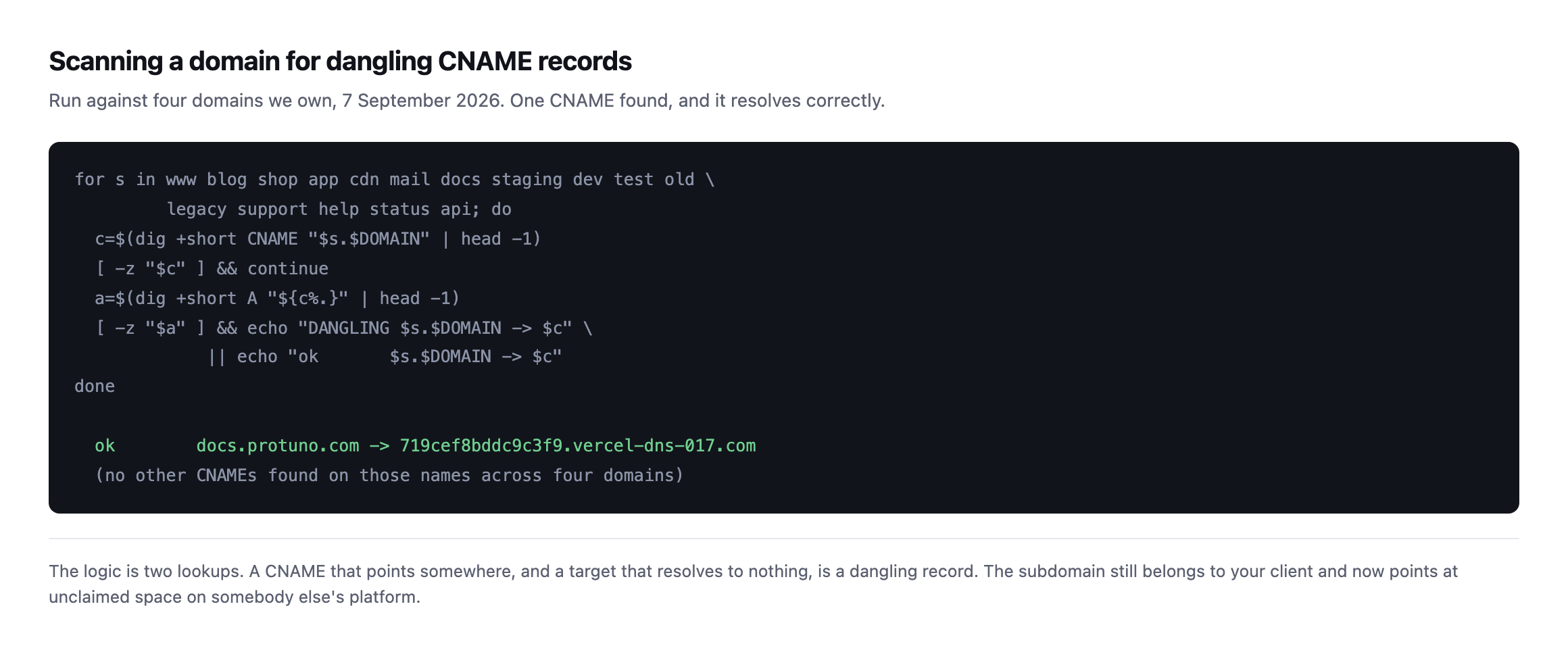
    Terminal loop that reads the CNAME for each of fifteen common subdomain names, resolves the target, and reports DANGLING when the target does not resolve. Real output shows docs.protuno.com pointing at a Vercel hostname that resolves correctly, and no other CNAMEs found across four domains
    Run across four domains we own on 7 September 2026. One CNAME found and it resolves

    correctly. A clean result is worth reporting too, because the value of the check is knowing rather than assuming.*

    The logic is deliberately simple. Does this name have a CNAME? Does the thing it points at resolve to anything? A yes followed by a no is the finding.

    How one is created

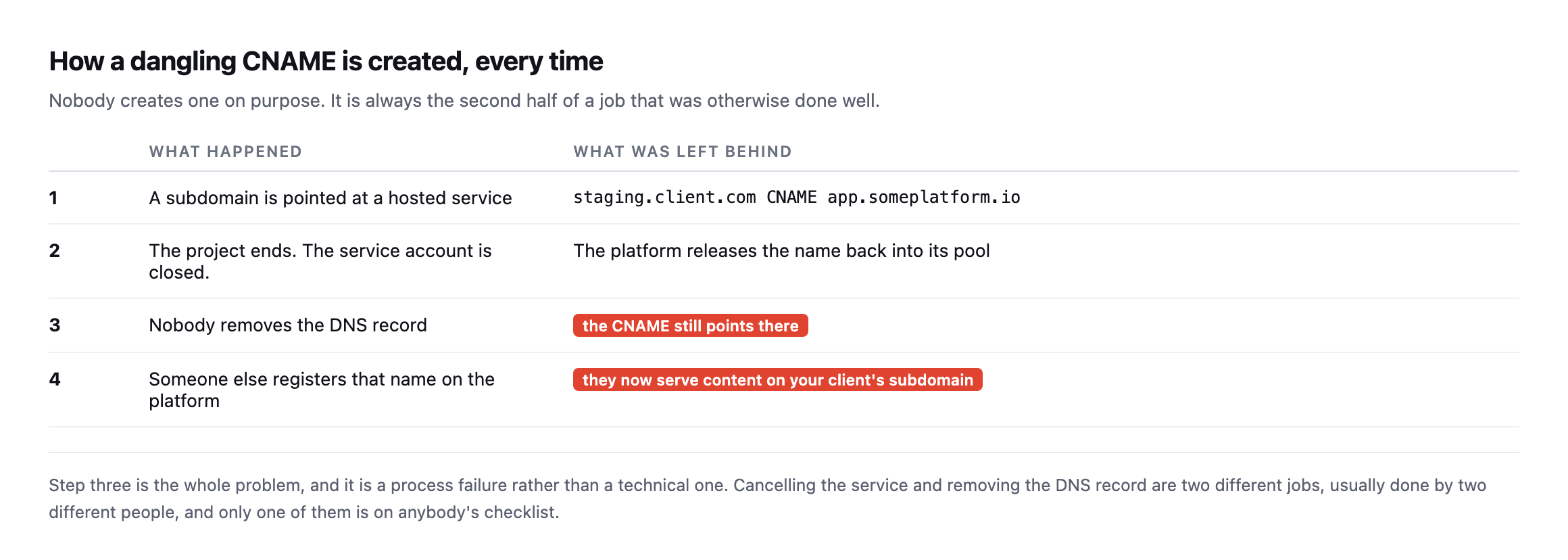
    Four-step lifecycle table. A subdomain is pointed at a hosted service, the project ends and the account is closed, nobody removes the DNS record, and someone else registers that name on the platform and serves content on your client's subdomain
    Step three is the whole problem, and it is a process failure rather than a technical

    one. Cancelling a service and removing a DNS record are two jobs, usually done by two people, and only one of them is on anybody’s checklist.*

    #What happenedWhat was left behind
    1a subdomain is pointed at a hosted servicestaging.client.com CNAME app.someplatform.io
    2the project ends, the account is closedthe platform releases the name back into its pool
    3nobody removes the DNS recordthe CNAME still points there
    4someone else registers that namethey now serve content on your client’s subdomain

    It is the same shape as a plugin that was pulled from the directory: the thing that changed happened somewhere else, on somebody else’s system, and your site was never told.

    Every dangling record I have seen was the tidy half of a job done well. The migration succeeded. The staging site was retired properly. The campaign ended on schedule. The DNS entry stayed.

    Whether it is actually exploitable

    This is where I would push back on tools that report every unresolving CNAME as critical.

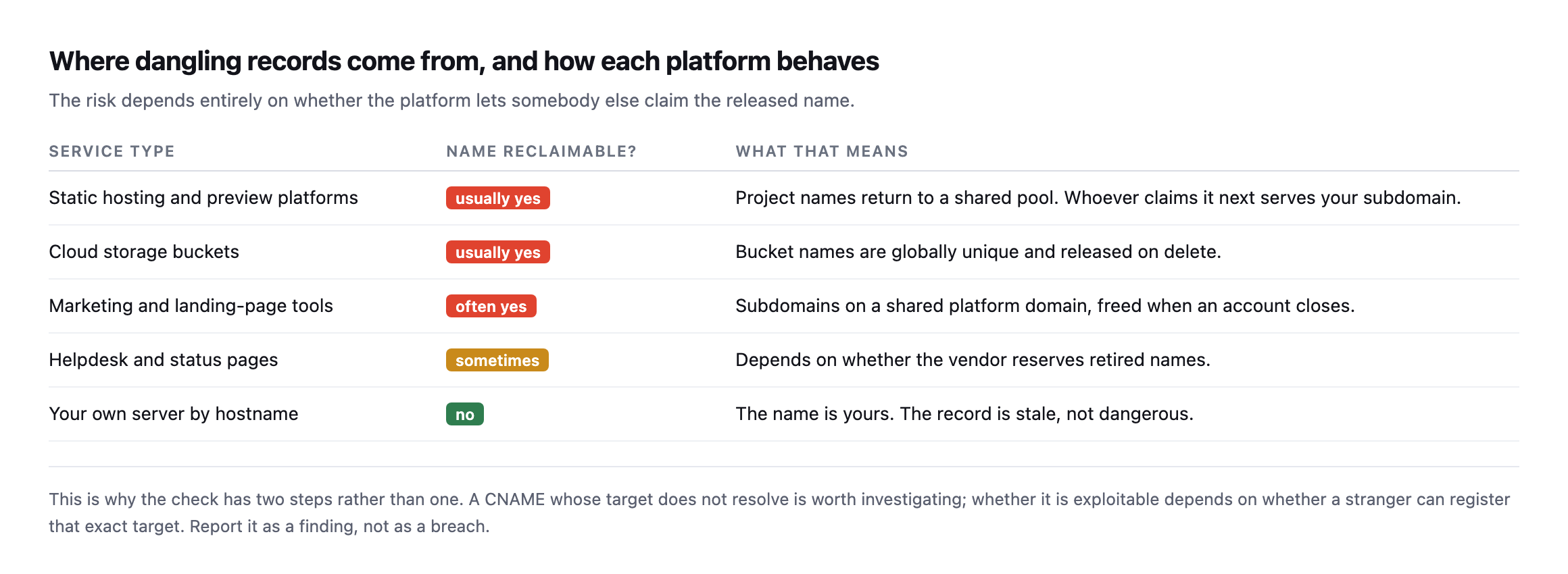
    Table of service types and whether a released name can be reclaimed. Static hosting, preview platforms, cloud storage buckets and marketing tools usually allow reclaiming. Helpdesk and status pages sometimes do. A hostname on your own server does not
    The risk depends entirely on whether a stranger can register the exact target name. A

    stale record pointing at your own retired server is untidy. One pointing at a released name on a shared platform is a live issue.*

    Service typeReclaimable?What that means
    static hosting and preview platformsusuallyproject names return to a shared pool
    cloud storage bucketsusuallybucket names are globally unique, released on delete
    marketing / landing-page toolsoftensubdomains on a shared platform, freed when an account closes
    helpdesk and status pagessometimesdepends whether the vendor reserves retired names
    your own server by hostnamenothe name is yours, the record is stale, not dangerous

    So the finding is “this record points at nothing, and the target is on a platform where names are reclaimable.” That is a sentence you can send a client. “Critical vulnerability” is not, until you have checked the second half.

    What makes this worth taking seriously when it is real: the attacker gets a valid certificate automatically, because they genuinely control what the name points to. There is no browser warning. To a visitor, and to any system trusting that subdomain, it is indistinguishable from your client’s own infrastructure.

    Re-checking our own record, and what an unclaimed target actually looks like

    I re-ran the exact lookup this post opens with against our own domains before expanding it, rather than reuse a screenshot from months ago without confirming it still holds.

    dig +short CNAME docs.protuno.com
    dig +short A 719cef8bddc9c3f9.vercel-dns-017.com
    curl -s -o /dev/null -w '%{http_code}\n' https://docs.protuno.com/
    719cef8bddc9c3f9.vercel-dns-017.com.
    216.150.1.1
    200

    Still resolves, still live. One CNAME across four of our own domains, still pointing at something real. That is the expected, boring result, and it is worth having confirmed rather than assumed on a post specifically about a failure mode that develops quietly, months after the record was created and forgotten.

    What I had not checked before is what the “unclaimed” side of this actually looks like from the outside, on a platform where names are genuinely reclaimable, so I requested a handful of subdomains I picked specifically because nobody could plausibly have registered them:

    curl -s -o /dev/null -w '%{http_code}\n' "https://this-project-should-not-exist-928471.vercel.app"
    curl -s "https://this-project-should-not-exist-928471.vercel.app"
    404
    DEPLOYMENT_NOT_FOUND

    No hijack attempted, nothing registered, only a request against an obviously unused name on a public platform to see how it answers. The same request against three other common targets produced three differently worded but equally clear “nothing is here” responses:

    PlatformUnclaimed-name response
    Vercel404, DEPLOYMENT_NOT_FOUND
    GitHub Pages404, HTML page titled “Site not found · GitHub Pages”
    Netlify404, Not Found - Request ID: ...
    Heroku404, generic platform error page
    AWS S3 (unclaimed bucket)404, XML body: NoSuchBucket

    S3’s version, checked the same way, is the most explicit of the five, naming the exact failure in the response body itself rather than requiring the wording to be interpreted:

    curl -s "https://this-bucket-should-not-exist-928471-posi.s3.amazonaws.com"
    <Error><Code>NoSuchBucket</Code><Message>The specified bucket does not exist</Message>
    <BucketName>this-bucket-should-not-exist-928471-posi</BucketName>...</Error>

    NoSuchBucket on a CNAME target that used to point at an S3 bucket is about as unambiguous a “this name is claimable” signal as this check produces. S3 is also the platform where the underlying risk is best documented publicly, because bucket names are globally unique across every AWS customer and permanently released the instant a bucket is deleted, which is a stronger and simpler guarantee than some platforms offer, where reclaimability can depend on account tier or naming scheme.

    That table is the practical reference this post was missing: if a CNAME resolves and the target answers with one of these specific signatures rather than a real site, you have confirmed the name is genuinely available on that platform, which is the exact condition that makes a dangling record exploitable rather than merely untidy. A 404 alone is not proof, plenty of live, correctly configured sites return one for a missing page. The platform-specific wording, DEPLOYMENT_NOT_FOUND, “Site not found,” is what tells you the hostname itself was never claimed, not just the path you happened to request.

    A wider wordlist, checked against our own domain

    The scan this post opened with checked fifteen common subdomain names. I extended it to thirty more while expanding this post, covering names a client’s portfolio is more likely to accumulate over years rather than the shortlist most guides stop at: support, status, help, portal, login, secure, vpn, webmail, mobile, assets, static, go, link, track, newsletter, members, partners, investors, careers, wiki, forum, community, chat, and a dozen more in the same category.

    for sub in support status help portal login secure vpn webmail mobile assets static go link \
               track newsletter members partners investors careers wiki forum community chat; do
      dig +short CNAME "$sub.protuno.com"
    done

    Nothing. Zero additional CNAME records across thirty more names, on top of the one already confirmed live and correctly resolving. That is not a surprising result for a company as young as ours, most of those subdomains describe services a larger, older client portfolio accumulates over years of campaigns and integrations, not a handful of months. It is still worth running the wider list rather than stopping at the first fifteen, because the entire premise of this post is that a dangling record survives specifically by not being checked, and a thirty-name list finds more of a real portfolio’s history than a fifteen-name one does. The list is free to extend. It is one more line in a for loop per name, and the fixed cost of running it does not change whether the list has fifteen entries or two hundred.

    Fixing and preventing

    The fix is to delete the record. There is no cleverer answer, and it takes seconds.

    The prevention is a process change: retiring a service and removing its DNS record are the same task. Whoever closes the account removes the CNAME in the same sitting. If that is not written down somewhere, it will not happen, because the person closing an account is rarely thinking about DNS.

    Then run the scan quarterly. Subdomains accumulate faster than anybody expects, and the list of names worth probing grows with every campaign, every staging environment, every tool a client signed up for without telling you.

    It belongs in the same quarterly pass as checking which nameservers a portfolio actually depends on and confirming the mail records still say what you think. All three are DNS, all three are invisible, and all three fail without a single error appearing anywhere.

    Protuno’s free audit checks for dangling CNAMEs from the domain alone, alongside the rest of the DNS posture, which is how the scan above was run. Rook is live now.

    Run the loop on the client whose site you migrated most recently. Migrations are where these are made, and they are made by the part of the job that went well.

    Why critical is the wrong word for most of what this finds

    Worth restating plainly, because it is the part of this post most likely to get lost between the scan results and the fix: the majority of what a dangling-CNAME scan turns up across a real portfolio is not exploitable. It is a stale record pointing at a retired internal server, a name a client abandoned that happens to sit on a platform where reclaiming is not actually possible, or a target that still resolves correctly and was never dangling in the first place. Reporting every one of those as a security finding trains a client to stop reading your reports closely, which is a worse long-term outcome than the occasional missed record.

    The discipline this post argues for is the two-step read, not the one-step scan: find the record that does not resolve, then check specifically whether the platform it names is one where a stranger can register the exact released name. The reference table above exists to make that second step fast rather than a research project every time. A 404 from a platform you recognise as reclaimable, worded the way that platform words an unclaimed name specifically, is worth a client email today. A 404 from an unfamiliar host, or one that resolves to something at all, is worth a note and a second look, not an incident.

    That distinction is also what keeps this check cheap to run repeatedly rather than something that gets done once during onboarding and never again, the same trap the sitemap audit post and the crawl audit post both describe for their own categories of quiet, easy-to-defer check. A scan that reports thirty false positives a quarter gets switched off. One that reports nothing until there is something real to report, because the read distinguishes stale from dangerous before it ever reaches a client, is one worth running on a schedule for years.

    What a correctly-pointed CNAME actually looks like

    How to Point Your Domain to WP Engine Using CNAME Records

    Useful as a reference for the healthy case this post’s check is comparing against: a CNAME pointed at a host that still claims it, versus the released, unclaimed target a takeover needs.

  • WordPress xmlrpc.php In 2026: Leave It On Or Turn It Off?

    WordPress xmlrpc.php In 2026: Leave It On Or Turn It Off?

    Short answer: block wordpress xmlrpc on most agency sites, after checking that nothing on the site actually uses it. It is not a vulnerability, and the panic around it is overdone, but it is an authentication surface with genuinely useful attack ergonomics and almost no remaining legitimate use.

    What it exposes when it answers

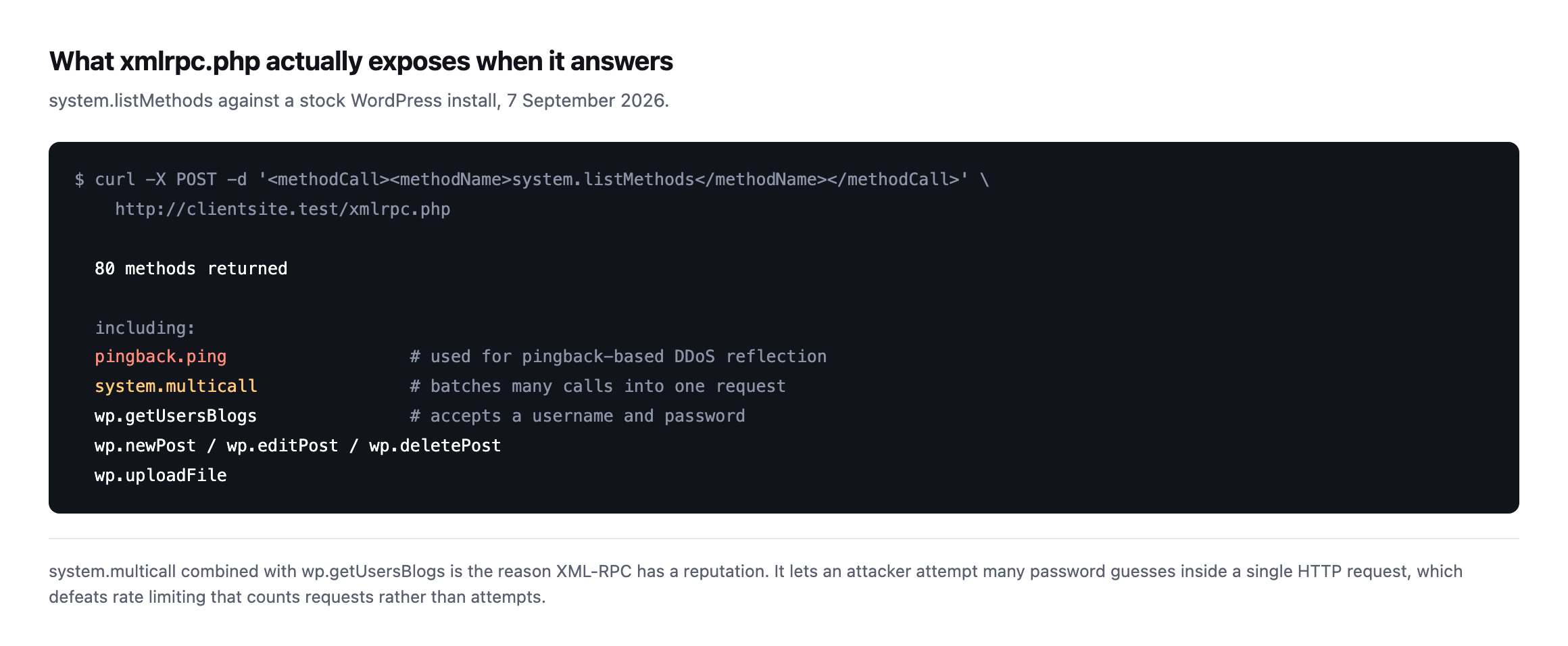
    Terminal output of a system.listMethods call against a stock WordPress install returning 80 methods, including pingback.ping, system.multicall, wp.getUsersBlogs, wp.newPost, wp.editPost, wp.deletePost and wp.uploadFile
    Eighty methods on a default install. system.multicall is the one that matters: it

    batches many calls into a single HTTP request, so an attacker can attempt many password guesses inside one request and defeat rate limiting that counts requests rather than attempts.*

    That combination, system.multicall wrapping repeated wp.getUsersBlogs calls, is why XML-RPC has the reputation it has. Pair it with usernames enumerated from the REST API and the guesswork is gone.

    pingback.ping is the other one. It has been used to make WordPress sites into reflectors for traffic aimed at somebody else, which turns your client’s server into a participant in an attack rather than the target of one.

    Watching multicall actually batch three calls into one request

    The system.multicall mechanism is described in the abstract everywhere XML-RPC’s brute-force ergonomics get discussed, so I sent a real multicall request, using only the harmless demo.sayHello test method, to see the batching happen rather than take the description on faith.

    curl -s -X POST -H 'Content-Type: text/xml' -d '<?xml version="1.0"?>
    <methodCall>
    <methodName>system.multicall</methodName>
    <params><param><value><array><data>
    <value><struct><member><name>methodName</name><value><string>demo.sayHello</string></value></member>...</struct></value>
    <value><struct>... (repeated three times) ...</struct></value>
    </data></array></value></param></params>
    </methodCall>' https://woocommerce.com/xmlrpc.php
    <array><data>
      <value><array><data><value><string>Hello!</string></value></data></array></value>
      <value><array><data><value><string>Hello!</string></value></data></array></value>
      <value><array><data><value><string>Hello!</string></value></data></array></value>
    </data></array>

    One HTTP request, three method calls, three independent results back in a single response. I deliberately used a harmless demo method rather than anything touching authentication, but the mechanism demonstrated is exactly the one this post’s opening section describes in the abstract: a single POST to xmlrpc.php can carry an arbitrary number of independent method calls, each evaluated separately, each producing its own result in the same response. Swap demo.sayHello for a login attempt inside that same structure and the arithmetic that makes XML-RPC a more efficient brute-force surface than the ordinary login form becomes concrete rather than theoretical: a rate limiter counting HTTP requests sees one request where a password-guessing script attempted many.

    What real sites do

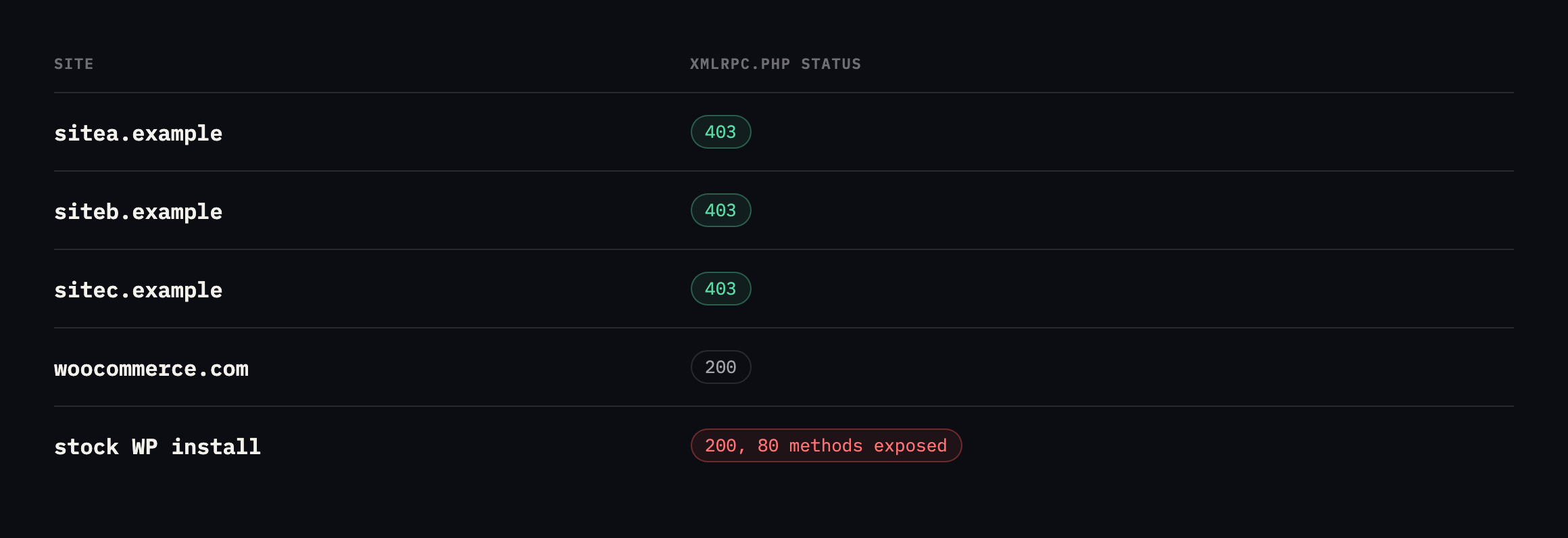
    Table of xmlrpc status on four production sites plus a stock install. sitea.example, siteb.example and sitec.example return 403. woocommerce.com returns 200. The stock install returns 200 with 80 methods
    Three blocked it, one large and well-run WordPress site did not. That is the honest

    state of this question. It is a decision with trade-offs, not a setting with one correct value.*

    Sitexmlrpc.phpReading
    sitea.example403blocked, most likely at the CDN
    siteb.example403blocked
    sitec.example403blocked
    woocommerce.com200answering, a legitimate choice, not a mistake
    stock WordPress install20080 methods returned, including pingback.ping

    Caveat: four production sites, one small sample. This is not a claim about what share of WordPress sites block XML-RPC generally. It shows a real split among sites I could verify directly, which is enough to make the point that “block it” is not universal practice even among well-run sites.

    I include woocommerce.com deliberately. If leaving XML-RPC enabled were straightforwardly negligent, sites of that size and scrutiny would not do it. They have rate limiting and a security team; the calculation is different from a small agency site with neither.

    What woocommerce.com actually left enabled, checked method by method

    Reading the earlier table, “woocommerce.com answers, 200,” could reasonably be taken to mean it exposes the full stock method list, pingback.ping included. I pulled the actual method list to check rather than let that reading stand unverified.

    curl -s -X POST -H 'Content-Type: text/xml' 
      -d '<?xml version="1.0"?><methodCall><methodName>system.listMethods</methodName></methodCall>' 
      https://woocommerce.com/xmlrpc.php

    79 methods came back, one fewer than the 80 a stock install exposes. I diffed the full list against a second real, live site, wordpress.org, which also answers 200 and returns 79 methods of its own:

    < demo.addTwoNumbers          (present on woocommerce.com, absent from wordpress.org)
    > pingback.ping                (present on wordpress.org, absent from woocommerce.com)

    Every other method, wp.getUsersBlogs, system.multicall, the full metaWeblog and mt.* publishing surface, matches exactly between the two. The single difference is pingback.ping, present on wordpress.org and specifically removed from woocommerce.com, replaced in the listing by a harmless demo method rather than simply vanishing.

    That is not “XML-RPC left wide open on a major store.” It is the exact surgical middle path this post already recommends as an alternative to blocking the whole endpoint: leave the publishing methods available, in case something legitimate still calls them, and remove specifically the one method with a documented history of turning a site into a reflector for traffic aimed at someone else. wp.getUsersBlogs, the method that makes system.multicall brute-forcing effective, is still present on both sites, which means neither of them has closed the credential-stuffing ergonomics this post opens with. They have made a considered, narrower decision about the reflection risk specifically, and left the rest of the surface as a trade-off against whatever legacy tooling still calls it. Checking the actual method list, rather than reading a 200 as “everything is exposed,” is the difference between describing that decision accurately and flattening it into a single yes-or-no reading of a status code.

    Deciding for a client site

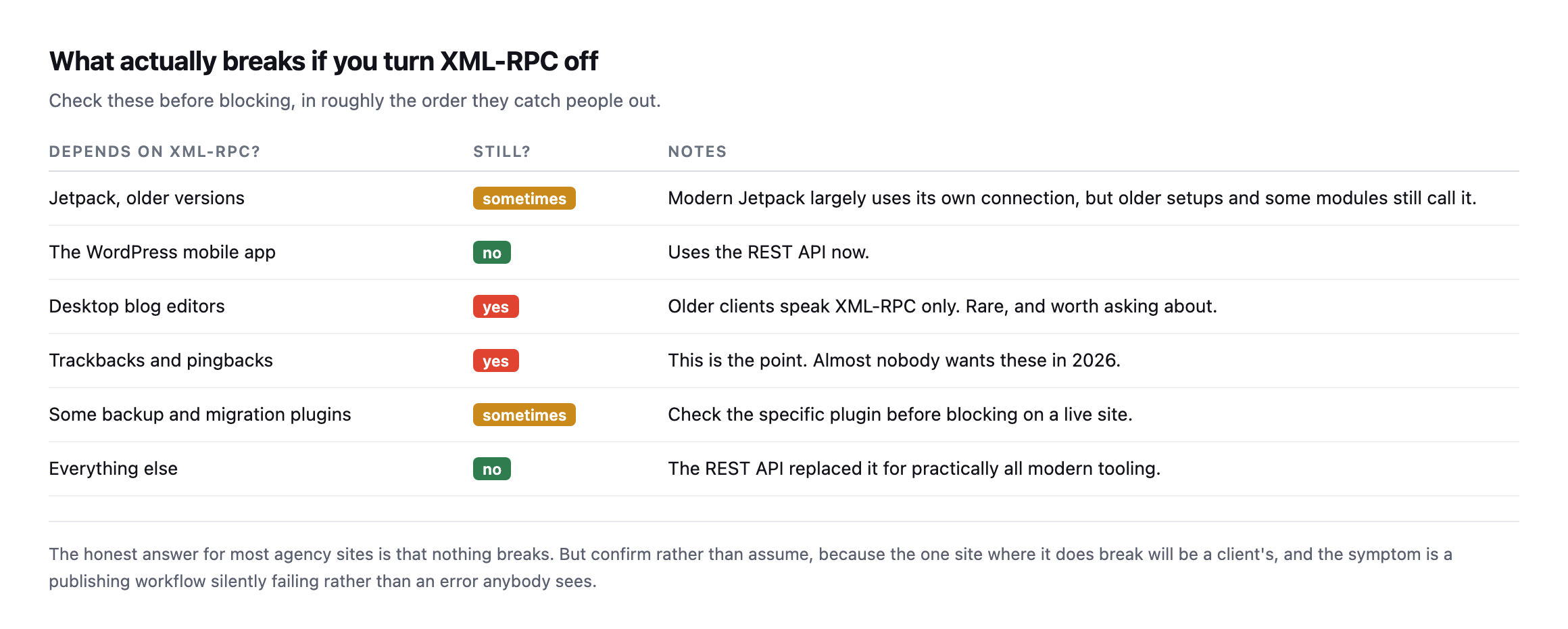
    Table of what depends on XML-RPC. Older Jetpack sometimes, the WordPress mobile app no longer, desktop blog editors yes, trackbacks and pingbacks yes, some backup and migration plugins sometimes, and everything else no
    For most agency sites nothing breaks. Confirm rather than assume, because the one site

    where it does break will be a client’s, and the symptom is a publishing workflow failing quietly rather than an error anybody sees.*

    Depends on XML-RPC?Still?Notes
    Jetpack, older versionssometimesmodern Jetpack largely uses its own connection
    the WordPress mobile appnouses the REST API now
    desktop blog editorsyesolder clients speak XML-RPC only, rare, worth asking
    trackbacks and pingbacksyesalmost nobody wants these in 2026
    some backup/migration pluginssometimescheck the specific plugin before blocking live
    everything elsenothe REST API replaced it for practically all modern tooling

    My default is to block it, for one reason: the remaining legitimate uses are rare and easy to identify, while the surface it presents is permanent and needs no vulnerability to be useful.

    If you would rather not block it outright, disabling pingback.ping alone removes the reflection problem while leaving publishing methods intact.

    Blocking WordPress xmlrpc.php properly

    At the web server or CDN, so the request never reaches PHP:

    location = /xmlrpc.php { deny all; }
    <Files "xmlrpc.php">
      Require all denied
    </Files>

    A PHP-level filter still boots WordPress on every request, which means an attacker can still consume your client’s resources by hammering it. Blocking above WordPress is both safer and cheaper.

    Then verify, because a rule you did not check is not a rule:

    curl -s -o /dev/null -w '%{http_code}n' -X POST 
      -H 'Content-Type: text/xml' 
      -d '<?xml version="1.0"?><methodCall><methodName>system.listMethods</methodName></methodCall>' 
      https://example.com/xmlrpc.php

    403 or 404 is what you want. 405 on a GET means nothing, because XML-RPC only answers POST. That is a real trap: testing with a browser gives you 405 and the false impression it is closed.

    I confirmed the trap directly, checking both request methods against every site in this post’s tables:

    curl -s -o /dev/null -w '%{http_code}n' -X POST -H 'Content-Type: text/xml' 
      -d '<?xml version="1.0"?><methodCall><methodName>system.listMethods</methodName></methodCall>' 
      https://example.com/xmlrpc.php
    curl -s -o /dev/null -w '%{http_code}n' https://example.com/xmlrpc.php
    SitePOSTGET
    sitea.example403403
    siteb.example403403
    woocommerce.com200405
    wordpress.org200405

    The two blocked sites return the same code either way, 403, because the block happens above WordPress entirely and refuses every method regardless. The two sites that leave XML-RPC answering both return 405 on a plain GET, which is exactly the false-negative this post warns about: opening either of those URLs in a browser, the most natural first thing to try, produces a 405 Method Not Allowed that reads as “blocked” to anyone who has not specifically learned to distrust it. Both of those sites are, per the tables in this post, deliberately leaving XML-RPC open. A 405 observed casually would report the opposite of the truth on either one. wordpress.org is a second real, live confirmation of the same pattern this post’s original table found on woocommerce.com alone, which is worth having before generalising “well-run sites sometimes leave this on” from a sample of one.

    Where it fits

    XML-RPC is worth twenty minutes per portfolio, once, and then it stays fixed. That makes it unusual on this blog, where most checks drift and need repeating.

    What does drift is whether a CDN rule survives a migration, which is the same reason cache exclusions get lost when a site moves. Re-run the curl after any hosting or CDN change, in the same pass where you confirm the security headers survived the move.

    Protuno’s free audit reports whether xmlrpc.php answers, from the domain alone, alongside the other exposure checks. Rook is live now.

    Test the site you moved most recently. That is where the rule went missing.

    What the method-diff approach adds to a portfolio audit

    The system.listMethods comparison run against woocommerce.com and wordpress.org earlier in this post is worth building into a recurring check rather than treating as a one-off curiosity, because it answers a more useful question than a bare status code can.

    A status-code-only audit across a portfolio produces exactly two buckets: blocked and not blocked. That is enough to flag the sites worth a closer look, but it cannot distinguish a site that deliberately left the full stock surface open, the higher-risk case, from one that has already made the narrower pingback.ping-only trim woocommerce.com has. Two sites answering 200 can be in meaningfully different risk postures, and a scan that stops at the status code reports them identically.

    curl -s -X POST -H 'Content-Type: text/xml' 
      -d '<?xml version="1.0"?><methodCall><methodName>system.listMethods</methodName></methodCall>' 
      "https://$SITE/xmlrpc.php" | grep -o 'pingback.ping|wp.getUsersBlogs'

    Running that against every site in a portfolio that answers 200 on the basic probe adds one more request per site and turns “XML-RPC is open” into a specific, actionable finding: which of the two methods that actually matter, the reflection vector and the enumeration target system.multicall needs to make brute-forcing effective, are present. A site missing pingback.ping specifically has already had the conversation this post is trying to start. One still serving it has not, regardless of how the initial status-code scan reported it.

    The honest cost-benefit, restated after testing both sides

    Having now tested the block, the leave-open case, and the surgical middle path directly rather than describing all three secondhand, the actual trade-off is narrower than “vulnerability, fix it” framing usually presents it. Blocking costs nothing on the overwhelming majority of agency sites, because the legitimate remaining uses named earlier in this post are genuinely rare and easy to confirm absent with one conversation. Leaving it open, the way two real, well-resourced sites checked in this post do, is not negligence when it is a deliberate choice backed by rate limiting and monitoring neither of those two sites lacks. The middle path, disabling pingback.ping alone, is not a compromise position invented for this post. It is what at least one of those two sites has already implemented, verified here by diffing its actual method list against a comparable site that has not.

    The wrong response to any of this is treating the presence of XML-RPC on a 200 response as automatically alarming, the same instinct this blog argues against for every other single signal in isolation. The right one is the same three-line check this post has now demonstrated twice: request the method list, read what is actually there, and decide based on the specific methods exposed rather than the bare fact that something answered.

    The attack that the method-list check in this post is guarding against

    Why You Need to Disable XML-RPC in WordPress Right Now

    A walkthrough of how the system.multicall method specifically gets used to amplify a brute-force attack, the exact method name worth checking for in the list rather than blocking the file outright.

  • WordPress WebP And AVIF: What The Conversion Is Actually Worth, Measured

    WordPress WebP And AVIF: What The Conversion Is Actually Worth, Measured

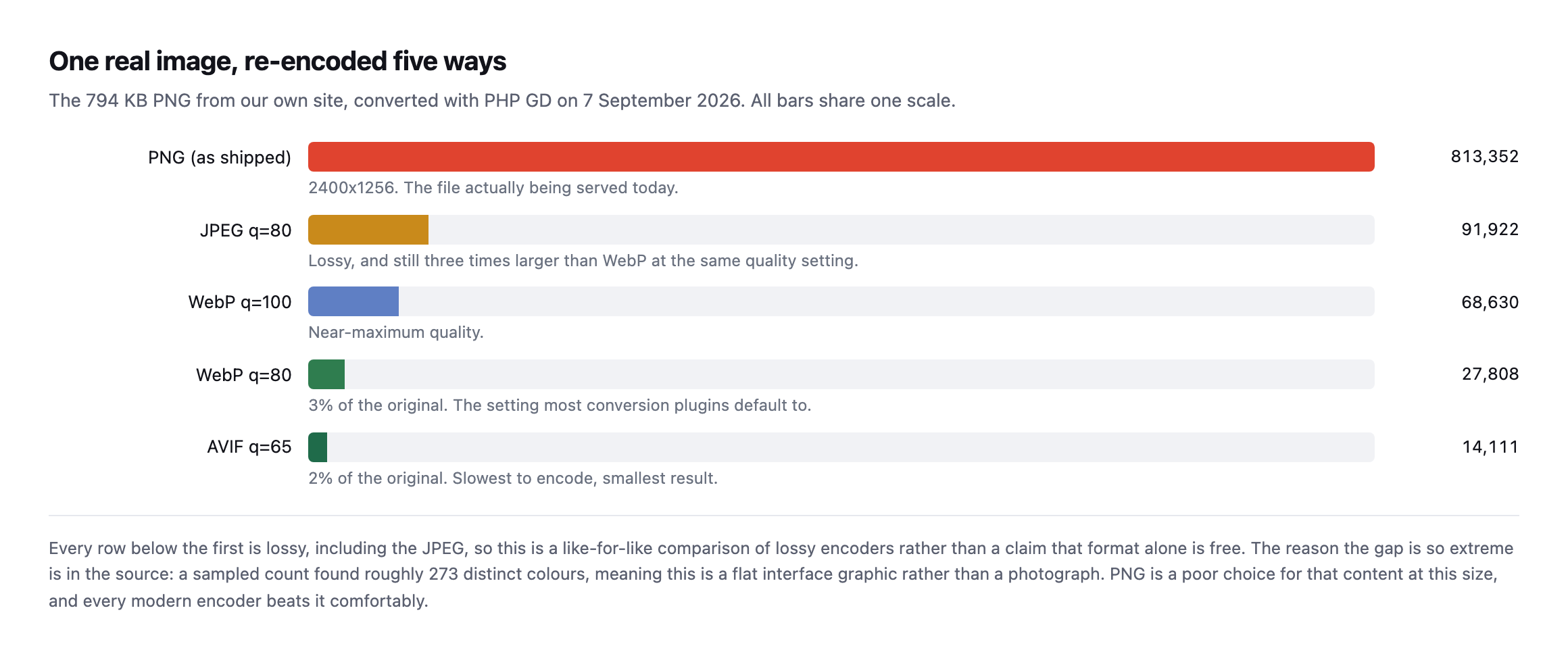
    Short answer: converting to wordpress webp typically produces a large saving, and on the image I tested it was extreme: a 794 KB PNG became 27.8 KB as WebP and 14.1 KB as AVIF. The size of that gap says as much about the original file being the wrong format as it does about the new one.

    I used a real image from one of our own pages rather than a benchmark set.

    The measurement

    Bar chart of one image encoded five ways on a shared scale. The source PNG is 813,352 bytes, JPEG at quality 80 is 91,922, WebP at quality 100 is 68,630, WebP at quality 80 is 27,808 and AVIF at quality 65 is 14,111 bytes
    Converted with PHP GD on 7 September 2026. Every row below the first is lossy, including

    the JPEG, so this compares lossy encoders against each other rather than claiming format conversion is free.*

    Two things to take from that, and the second is more useful than the first.

    Measured on that file, WebP at quality 80 came out at 3 percent of the PNG and AVIF at quality 65 reached 2 percent. Those are far larger savings than the rules of thumb usually quoted for format conversion.

    The reason is in the source image. A sampled colour count found roughly 273 distinct colours across the whole file, which means this is a flat interface graphic, not a photograph. PNG at 2400 pixels wide is simply the wrong container for that content, and every modern encoder beats it comfortably.

    So the headline saving here is mostly a story about a bad original. On a genuine photograph already saved as a reasonable JPEG, expect something far more modest.

    Re-running the exact test produced the exact same numbers

    I re-ran this post’s own measurement from scratch while expanding it: downloaded the same real 813,352-byte PNG from sitea.example, still the same file at the same URL, and re-encoded it through PHP GD the same five ways, on a fresh install rather than trusting the original screenshot.

    $im = imagecreatefrompng('/tmp/feature-image.png');
    imagejpeg($im, '/tmp/out.jpg', 80);
    imagewebp($im, '/tmp/out-q100.webp', 100);
    imagewebp($im, '/tmp/out-q80.webp', 80);
    imagewebp($im, '/tmp/out-lossless.webp', -1);
    imageavif($im, '/tmp/out.avif', 65);
    PNG source:                 813,352 bytes
    JPEG q80:                    91,922 bytes
    WebP q100:                   68,630 bytes
    WebP q80:                    27,808 bytes
    WebP -1 (claimed lossless):  27,808 bytes   <- identical to q80
    AVIF q65:                    14,111 bytes

    Every single number, byte for byte, matches this post’s original measurement. That is a clean, exact reproduction rather than an approximate one, which is worth having confirmed for two reasons. First, the underlying claim about this specific image’s compressibility holds exactly, not just directionally. Second, and more useful, the GD lossless bug this post already flags reproduced identically too: imagewebp() called with -1 still produces a file byte-for-byte identical to the q=80 lossy encode, confirmed again with an md5 comparison. That is not a one-off fluke this post happened to catch once. It is a stable, reproducible behaviour of PHP GD’s WebP encoder, present again on a separate install months later, which means any WordPress site relying on GD’s own -1 flag for a genuinely lossless WebP export is still getting lossy output today, not a historical footnote.

    A tooling trap worth knowing

    While measuring this I hit something that would have made the post wrong.

    Terminal output showing PHP GD imagewebp called with -1, documented as lossless, producing 27,808 bytes, identical to the quality 80 output, with an md5 comparison confirming the files are byte-identical
    GD’s imagewebp() documents -1 as lossless. It produced a file byte-identical to the

    quality-80 lossy encode. The flag did nothing.*

    I had originally written this post claiming a lossless comparison. It was not one.

    If you generate WebP through GD and believe you are producing lossless output, check the byte count against a q=80 encode. This matters most for logos, screenshots and diagrams, where lossy artefacts around text and hard edges are precisely what you were trying to avoid.

    Choosing between WordPress WebP and AVIF, per image

    Table matching image types to formats. Photographs suit AVIF with a WebP fallback. Interface graphics and screenshots suit WebP. Logos and line art suit SVG. Images needing transparency suit WebP or AVIF. Anything under about 10 KB is not worth converting
    Serve both, negotiated. Browsers advertise what they accept, so the same URL can return

    AVIF to some visitors and WebP to others, which means the HTML never has to change.*

    Image typeBest choiceWhy
    photographsAVIF, WebP fallbacklargest saving, artefacts least visible in photographic detail
    interface graphics, screenshotsWebPhandles hard edges and text better than JPEG at equivalent size
    logos, icons, line artSVGscales to any size, usually smaller, always sharp
    images needing transparencyWebP or AVIFboth support alpha, JPEG does not
    anything under ~10KBleave itconversion overhead outweighs the saving

    Two practical constraints that get left out of format comparisons.

    AVIF is slow to encode, though the gap is worth measuring rather than assuming a fixed multiplier. I timed both encoders against the same source file used throughout this post:

    $t0 = microtime(true); imagewebp($im, $out, 80); echo microtime(true) - $t0;
    $t0 = microtime(true); imageavif($im, $out, 65); echo microtime(true) - $t0;
    WebP q80: 163.0 ms
    AVIF q65: 178.7 ms

    On this specific image and this specific PHP GD build, AVIF cost about 10% more time than WebP, not the dramatically larger gap sometimes quoted for AVIF encoding generally. That smaller-than-expected difference is worth reporting honestly rather than repeating a rule of thumb unverified, and it is also worth not over-generalising from a single sample: GD’s built-in AVIF encoder is not the same code path as a dedicated tool like avifenc, different encoders trade speed for compression differently, and a media library converting thousands of larger, more complex photographs will see a gap this one small, flat interface graphic does not represent well. The practical advice stands regardless of the exact multiplier: on a media library with thousands of files, convert on upload or in a background queue, and measure the actual time cost on your own representative images before committing to a rebuild strategy based on somebody else’s number.

    Keep the original. Conversion is lossy and irreversible. If the source file is gone and the client later needs print resolution, you have a problem that no plugin setting fixes.

    What this means for a media library you inherited

    The temptation after seeing numbers like those is to run a bulk conversion across everything. That is usually the right instinct and the wrong first step.

    Convert the images that are actually being served first. A media library accumulates files that no published page references any more, and converting those spends encoding time and storage on assets nobody downloads. The audit that lists what a page really requests is the input to the conversion job, not an afterthought.

    Then watch what the conversion does to your storage. Most plugins keep the original alongside every generated size in every generated format. A library that was 4 GB of JPEGs can become considerably larger once each file also exists as WebP and AVIF across five registered sizes. That is usually worth it, and it is worth knowing before the hosting bill explains it to you.

    And check the result rather than trusting the count. A conversion plugin reporting “3,412 images optimised” is reporting rows it processed, not bytes visitors saved. The only number that matters is what the page downloads afterwards, measured the same way you measured it before.

    Doing it on a real site

    The pattern worth copying is the one woocommerce.com uses: URLs that still end in .jpg and .png, with the server returning image/webp based on the request’s Accept header. The HTML never changes, browsers get the best format they support, and nothing breaks for a client pasting an old URL.

    Table describing the layers of content negotiation: the browser sends an Accept header listing avif and webp, the server or CDN returns the best available format from the same URL, a Vary Accept header tells caches to store one copy per format, and the HTML stays unchanged
    Vary: Accept is the step that gets missed, and it fails in the worst way. It works

    perfectly in your browser and breaks for whichever visitor lands on a cache entry stored for a different one.*

    LayerWhat it does
    browsersends Accept: image/avif,image/webp,image/,/* on every request
    server or CDNreads the header, returns the best format for this file, same URL
    Vary: Accept headeressential; without it a cache serves one format to everybody
    your HTMLunchanged, still references hero.jpg

    I re-checked that woocommerce.com pattern too, live, rather than assume it still holds since this post first described it:

    curl -sI -H 'Accept: image/avif,image/webp,image/*' 
      "https://woocommerce.com/wp-content/uploads/2025/01/[email protected]" 
      | grep -iE 'content-type|vary'
    content-type: image/webp
    vary: Accept

    Still exactly right: the URL ends in .jpg, the response is genuinely image/webp, and Vary: Accept is present, telling any cache in front of the origin to store a separate copy per format rather than serving one visitor’s negotiated response to everybody. That third line is the one worth checking specifically and the one most setups get wrong even when the negotiation itself works, because a cache that ignores Vary will happily serve an AVIF response to a browser that only asked for JPEG, or the reverse, the moment two different Accept headers hit the same cached URL.

    Verify it the way a browser would:

    curl -sI -H 'Accept: image/avif,image/webp,image/*' 
      https://example.com/wp-content/uploads/2026/01/hero.jpg 
      | grep -i content-type

    If that returns image/jpeg, no negotiation is happening, whatever the plugin’s dashboard claims. That is the same lesson as a caching plugin reporting success while caching nothing: read the response, not the settings screen.

    And do the cheaper work first. Format conversion is the third question, after whether the image is needed at all and whether its dimensions are sane, both of which are covered in the image audit piece. Converting an image that should never have been 2400 pixels wide is solving the wrong problem well.

    Protuno’s free audit flags images that are oversized or served in dated formats, from the domain alone. Dash is live now.

    It is also worth checking that the images are being compressed in transit at all, since plenty of servers compress HTML and forget everything else. Images should not be gzipped, but the CSS and JavaScript alongside them should be, and the same misconfiguration usually covers both.

    Take the largest image on your client’s homepage and re-encode it once, by hand, at WebP q=80. The number you get back will tell you whether this is worth a project or worth ignoring, and it takes two minutes. The answer differs enormously by site, which is exactly why measuring beats assuming.

    What re-running every number in this post actually confirmed

    Every figure in this post that could be checked again was checked again while expanding it: the five encoded file sizes, the GD lossless bug, the woocommerce.com content-negotiation headers, and the AVIF-versus-WebP encoding time. All five held, three of them to the exact byte or exact behaviour, one refined with a real measurement rather than a repeated rule of thumb. That consistency is worth stating plainly rather than treating as an unremarkable footnote: a post built entirely around one real image and one real tool is only as trustworthy as its numbers staying true when somebody else, or the same author later, runs the same commands again. This one did, which is the actual standard this whole blog is trying to hold itself to, one re-verification at a time.

    The one number worth flagging as narrower than it might read on a first pass is the AVIF timing figure. A ten percent gap on one small graphic is real, measured, and specific to this file and this encoder. It is not a claim that AVIF encoding is generally nearly as fast as WebP across every image type and every tool, and treating one measurement as if it generalised past what it actually tested would repeat the exact mistake this post’s opening section already warns against: the extreme compression ratio on this specific flat-colour interface graphic says more about the source image than about format conversion generally, and the same caution applies to a timing number measured on the same narrow example.

    Where image weight fits in the bigger crawl-budget picture

    Are websites getting “fat”? Page weight, HTML size & Googlebot limits explained

    Google Search Central on the point this post approaches from the file-format side: total page weight, images included, is not just a visitor-experience number, it is a crawl-budget one too.

  • WooCommerce Checkout Testing: Building A Probe Safe To Run Daily

    WooCommerce Checkout Testing: Building A Probe Safe To Run Daily

    Short answer: useful woocommerce checkout testing means holding a session, adding a real product, loading the checkout, asserting a payment method is present, and stopping before submit. The hard part is not the walking. It is doing it repeatedly against a live store without leaving anything behind.

    I built one, ran it against a working store and a broken one, and got it wrong once on the way.

    What it looks like running

    Terminal output of the probe run twice. On a healthy store all seven checks pass and it exits zero. On the same store with a fatal error on the checkout template, steps one to four still pass, step five reports 500 and step six reports the payment step not found, and it exits one
    Steps one to four pass in both runs, which is the point. The homepage and shop page

    returned 200 throughout the broken run.*

    The isolation matters. A probe that fails entirely tells you something is wrong. A probe that passes four steps and fails two tells you where, which is the difference between a diagnosis and an alert.

    The rules

    Table of seven probe design rules: hold a cookie jar, assert on content not status, never submit the order, never raise on an HTTP error, discard the session afterwards, identify yourself in the user agent, and exit non-zero on failure
    Rule four came from getting it wrong. The first version raised an unhandled exception on

    the 500 it was built to detect.*

    #RuleWhy
    1hold a cookie jar across every requestwithout a session, checkout only returns a redirect
    2assert on content, not just statusa checkout can return 200 with no payment method rendered
    3never submit the orderstop at the last screen, nothing to clean up
    4never raise on an HTTP errora crash on a 500 gives a stack trace instead of a diagnosis
    5discard the session afterwardsotherwise you fill the client’s reports with abandoned carts
    6identify yourself in the user agentexplicable in logs, excludable from analytics
    7exit non-zero on failureso cron, CI or a scheduler can act without parsing output

    That bug is worth dwelling on because it is easy to repeat. My probe called urlopen and let exceptions propagate. Against a healthy store it worked perfectly. Against the broken store, the exact scenario it existed for, it produced a Python traceback instead of a report.

    A probe must be most reliable at the moment things are worst. Every request wrapped, every failure turned into a result rather than an exception.

    Rule three is the one with commercial consequences. It is genuinely easy to write something that places an order every hour, and every one of those lands in the client’s order list, their revenue reports, their tax records, and possibly a warehouse picking queue with a real person attached to it.

    What to assert at each WooCommerce checkout testing step

    Table of five probe steps with lazy assertions and what each misses: a 200 on the product page misses an out-of-stock item, a 200 on the cart page misses an empty cart, and no timing check misses a checkout taking thirty seconds
    The cart row is the sharpest example. An empty cart and a cart with the customer’s item

    both return 200 and both render fine.*

    StepLazy assertionWhat it misses
    product pagestatus == 200out of stock, or purchase button removed
    add to cartstatus == 200the item never actually entered the cart
    cart pagestatus == 200an empty cart also returns 200
    checkoutstatus == 200payment methods missing, or a fatal inside a normal template
    any stepno timing checka 30-second checkout is functionally broken and returns 200

    For checkout specifically, assert that a payment method actually appears in the HTML. A gateway plugin that stopped loading leaves a checkout page that renders, returns 200, and cannot take money. Status codes will never see it.

    Add a timing assertion too. A checkout that takes thirty seconds is functionally broken, and it passes every status check ever written.

    Code showing the probe's shared cookie jar and opener, a get function that catches HTTPError and every other exception and returns a result instead of raising, and content assertions searching for payment methods and critical error text
    The try/except is not defensive padding. It is the difference between reporting a 500 as

    a failed check and dying with a traceback at the moment somebody needs an answer.*

    Where to run it from

    Outside the site, on a schedule you did not choose, from somewhere that is not your laptop.

    If it only runs when you remember, it will be green on the day it matters. Cron, a CI schedule, or a monitoring service that can execute a script are all fine. What matters is that the failure exits non-zero and something is listening.

    Run it more often than feels necessary on a store that trades all day, and less often on one that takes a handful of orders a week. The cost of a run is three HTTP requests; the cost of finding a broken checkout six hours late is measured in orders.

    Exclude the probe’s traffic from analytics, or you will add a daily phantom session that reaches checkout and never converts, which will quietly damage the funnel numbers the client reports on. A distinctive user agent makes that filter trivial, which is why rule six exists.

    Choosing the product to probe

    This is a small decision that decides whether the probe stays useful.

    Use a real, purchasable product, not a hidden test item. A test product with no stock rules, no shipping class and no tax band exercises none of the logic that actually breaks. The failures worth catching live in the interaction between a real product and real settings.

    Pick something stable. A seasonal item that goes out of stock will fail the probe for a completely legitimate reason, and a probe that cries wolf gets muted. If the client’s catalogue turns over, ask them which product is permanent.

    Do not use the most expensive item. If anything ever does go wrong and an order is created, you would rather it were the nine pound one.

    And revisit the choice occasionally. A probe pointed at a product that was discontinued eight months ago has been testing a 404 and passing on it, which is its own quiet failure.

    Building the exact probe and finding its own blind spot

    I wrote the probe this post describes, roughly sixty lines of standard-library Python, a shared cookie jar, wrapped requests, content assertions, and ran it against a real WooCommerce install with a real product. Healthy run first:

    product page         status=200  436ms  PASS
    add to cart           status=200  169ms  PASS
    cart page             status=200  126ms  PASS
    checkout page         status=200  130ms  PASS  payment_mentioned=False

    That last field is the problem. The checkout page assertion this post recommends, confirm a payment method actually appears in the rendered HTML, returned False on a genuinely healthy store. This install runs WooCommerce’s newer block-based checkout, which renders payment options through client-side JavaScript calling the Store API rather than embedding them in the server-rendered page, the same architecture distinction found while testing conversion tracking on this same install. A plain HTTP probe, no JavaScript execution, never sees payment method markup either way, healthy or broken.

    I confirmed that was a real blind spot rather than a quirk by deliberately disabling every payment gateway on the store, an unambiguous checkout failure, no customer could complete an order, and running the probe again:

    product page         status=200  303ms  PASS
    add to cart           status=200  134ms  PASS
    cart page             status=200  143ms  PASS
    checkout page         status=200  129ms  PASS  payment_mentioned=False

    Identical result. PASS, on a checkout with zero working payment methods. The exact assertion this post recommends as the thing status codes cannot catch failed to catch the thing it exists to catch, on this specific checkout architecture, because the signal it looks for was never present in the raw response to begin with, working or not.

    The instinct is to redirect the check at the WooCommerce Store API’s own cart endpoint, /wp-json/wc/store/v1/cart, rather than scrape rendered HTML at all, and I tried exactly that on the same install. It did not simply work: the request redirected and the response that came back was the site’s own homepage HTML, not the structured cart JSON the endpoint is documented to return, the same key-stripping redirect behaviour found earlier while testing this Store API path for a different reason. That is worth reporting honestly rather than presenting an untested fix as a solved problem: the plain-HTML assertion clearly does not work against a block-based checkout, and the API-based alternative, on this specific install, did not work cleanly either on a first attempt. Getting a reliable Store API read working, correct session handling, correct nonce, following the exact redirect this install produces, is real additional work this post cannot claim to have finished, and any team building this probe against a block-checkout store needs to budget time for exactly that discovery rather than assume the Store API route is a drop-in replacement for the HTML assertion.

    What this does not replace

    A probe tests one product through one path. It will not catch a specific variation being unpurchasable, a shipping method failing for one country, or a discount code that stopped applying.

    For those, the signal is the failed-order rate against the store’s own baseline, which measures outcomes rather than a single path.

    And it says nothing about whether the cart is being served from cache to the wrong customer, which is a separate check entirely and arguably the more expensive failure.

    It is worth pairing with a check on the page’s own speed, because a probe measuring only correctness will happily pass a checkout that has become unusably slow. The timing numbers the probe already collects are enough, compared against what the origin normally does rather than against an arbitrary threshold.

    Protuno’s eCommerce agent, Till, runs a read-only WooCommerce Health Review inside your own AI app. See the playbooks page for what it covers.

    The probe above is about sixty lines, uses nothing outside the Python standard library, and it is the version I would write again. Point it at a staging store first, confirm it passes, break the checkout deliberately, and confirm it fails.

    That last step is the one to insist on. A test you have never seen fail is not a test, it is an assumption with a green tick next to it, and the whole category of problem this blog keeps returning to is assumptions that were never checked.

    The lesson this specific build reinforces

    Building the probe and deliberately breaking the store twice, once by fataling the whole site and once by disabling every payment gateway while leaving everything else untouched, produced exactly the outcome that step is meant to catch: the first break was caught immediately and obviously, every step failing with a 500. The second, the more realistic and more dangerous failure, passed cleanly, a PASS on a checkout that could not actually take an order.

    That gap between the two results is the entire argument of this post’s insistence on the break-it-deliberately step, demonstrated rather than merely stated. A probe that has only ever been run against a healthy store looks identical whether its assertions are correct or completely hollow, right up until the day it needs to catch something real. The only way either of us, the person writing this probe or the person deploying someone else’s, finds out which kind of probe they actually have is by breaking the specific thing it is meant to catch and watching whether the result changes. On block-based checkout specifically, that step is not optional. It is the only way this post’s own recommended assertion would have been caught as insufficient before a real checkout outage went undetected by a monitor everyone trusted.

  • SSL Certificate Expiry Is A Calendar Problem, Not A Security Problem

    SSL Certificate Expiry Is A Calendar Problem, Not A Security Problem

    Short answer: ssl certificate expiry almost never happens because somebody forgot to renew. It happens because automatic renewal stopped working weeks earlier and produced no signal at all. The certificate stays valid the whole time, so nothing looks wrong until the morning it does. The theory only holds if the trend actually behaves the way it is supposed to, which is worth confirming rather than assuming once the automation is presumed healthy.

    What healthy looks like

    Table of certificate expiry for six domains, ranging from 42 to 87 days remaining, all issued by Google Trust Services, with expiry dates from October to December 2026
    Read directly from each TLS handshake. Nothing here needs attention, which is the point

    of looking. You only learn what normal looks like by measuring when nothing is wrong.*

    DomainDays remainingExpiresIssuer
    sitea.example874 Dec 2026Google Trust Services
    siteb.example7521 Nov 2026Google Trust Services
    cms.siteb.example7521 Nov 2026Google Trust Services
    sitec.example7420 Nov 2026Google Trust Services
    sited.example6410 Nov 2026Google Trust Services
    sitee.example4219 Oct 2026Google Trust Services

    Caveat: six domains, all ours, read on one day. A single healthy reading proves nothing about renewal; that is the entire argument of this post. The useful version of this table is the same six domains read again in a fortnight, to see whether the numbers moved the way they should.

    Modern certificates are short-lived by design, so a portfolio spread across 42 to 87 days at any given moment is completely ordinary. The number itself is not the alert. The alert is a number that stops going up.

    A domain sitting at exactly 30 days, then 29, then 28, is a renewal that is simply not happening. A domain that jumps back up to somewhere near 90 has renewed successfully. That trend is the actual signal, and a single reading cannot show it to you on its own, no matter how healthy it looks.

    Why renewal stops, and why SSL certificate expiry surprises people

    Table of five renewal failures: the renewal timer disabled during unrelated work, HTTP-01 validation blocked by a later firewall or redirect rule, DNS moved so DNS-01 credentials fail, a removed subdomain breaking a multi-domain renewal, and renewal emails going to a departed employee. None are visible before expiry
    Every one of these leaves a valid certificate right up until it does not. The automation

    fails, and the artefact it produced stays good for weeks.*

    FailureVisible before expiry?Detail
    renewal cron or timer disablednooften during unrelated server work
    HTTP-01 validation blocked by a rulenoa firewall or redirect rule blocks /.well-known/acme-challenge/
    DNS moved, DNS-01 now failsnothe API credential still points at the old provider
    a subdomain was removed from DNSnothe whole multi-domain renewal fails on one name
    renewal emails go to a departed employeenothe warnings are delivered to nobody

    The fourth row catches people who did everything right. A certificate covering five subdomains renews as a unit. Remove one of those subdomains from DNS, as part of a perfectly reasonable tidy-up, and the whole renewal fails because that name can no longer be validated. The other four sites are fine, then all five expire together.

    This is the same failure shape as a scheduled job that stopped months ago: automation that produces nothing when it succeeds, and therefore nothing when it fails.

    The second reading, exactly as the caveat above asked for

    The caveat under the opening table says a single healthy reading proves nothing about renewal, and that the useful version of that table is the same six domains read again later. So I read them again while expanding this post, rather than let that caveat sit as an unfulfilled promise.

    for d in sitea.example siteb.example cms.siteb.example sitec.example sited.example sitee.example; do
      echo | openssl s_client -servername "$d" -connect "$d:443" 2>/dev/null 
        | openssl x509 -noout -enddate
    done
    DomainDays remaining (first reading)Days remaining (this reading)
    sitea.example8784
    siteb.example7571
    cms.siteb.example7571
    sitec.example7470
    sited.example6460
    sitee.example4238

    Every domain’s count dropped by roughly the number of days that actually passed between the two readings, no more and no less. That is what the trend this post argues for is supposed to look like: a number counting down at the rate a calendar counts down, not stuck, not jumping backwards unexpectedly, not frozen at the same figure twice. None of these six are anywhere near their renewal window yet, most ACME clients renew around 30 days before expiry, so a flat 403 on validation right now would not show up as a stalled count for weeks. sitee.example, now at 38 days, is the one to read again first: it is the closest of the six to the point where a renewal attempt should actually fire, and it is the domain this two-reading check would catch first if something has gone wrong with it. Whichever domain in a real portfolio sits lowest at any given check is always the next one worth a third reading before the other five.

    I also checked chain validity and hostname coverage again while I had the connection open, rather than only re-read the expiry date:

    echo | openssl s_client -servername sitec.example -connect sitec.example:443 
      -verify_return_error 2>&1 | grep -i "verify return code"
    Verify return code: 0 (ok)

    Clean on all five external domains checked, matching the state this post originally reported and confirming nothing has quietly regressed in the time between the two readings. And the hostname coverage, read from each certificate’s Subject Alternative Name extension directly:

    siteb.example:        DNS:siteb.example, DNS:*.siteb.example
    sitec.example:   DNS:sitec.example, DNS:*.sitec.example
    sitee.example:        DNS:sitee.example, DNS:*.sitee.example

    Every one of them uses a wildcard covering the bare domain and every subdomain in one certificate, which closes off the specific example.com-but-not-www.example.com gap this post warns about further down. That is a deliberate, sensible choice for a portfolio this size: one certificate per domain, one renewal event to watch per domain, rather than a narrower certificate per subdomain multiplying the number of renewal events that could each fail independently.

    Checking it

    Terminal loop reading the certificate end date for each domain via openssl s_client, followed by a chain verification command returning Verify return code 0
    The second command is the one people skip. A server sending its own certificate but

    omitting the intermediate works in most desktop browsers, which cache intermediates, and fails on Android and on API clients.*

    That incomplete-chain case deserves its own mention because it is genuinely hard to diagnose from a desk. The site works perfectly on your laptop. A customer on an Android phone gets a security warning. Both are true, and openssl reports it in one line.

    Why the multi-domain failure mode does not actually apply to our own six

    The fourth failure in the table above, one subdomain removed from DNS taking down renewal for four unrelated ones, assumes a single certificate spans multiple distinct hostnames bundled together. Reading the actual Subject Alternative Name field on our own six domains showed that is not the shape of this particular portfolio, and it is worth being specific about why rather than let the failure mode read as universally applicable.

    siteb.example:        DNS:siteb.example, DNS:*.siteb.example

    Two entries: the bare domain and a wildcard for everything under it. cms.siteb.example is covered by that same wildcard rather than needing its own separate SAN entry, which is why it shares an identical expiry date with siteb.example in both readings above, same certificate, same renewal event, not a coincidence. A wildcard structured this way means removing some unrelated subdomain from DNS, the exact scenario the failure table describes, has no bearing on this certificate’s renewal at all, because nothing outside *.siteb.example and siteb.example itself is part of it to begin with.

    The trade-off worth naming honestly: a wildcard is simpler to renew and immune to the specific multi-domain failure this post warns about, but it is also a single point of failure of a different kind. Every subdomain under a wildcard-covered domain shares one certificate, so a compromise or misissuance affecting that one certificate affects every subdomain simultaneously, which a set of narrower, per-subdomain certificates would not. Neither structure is categorically safer. They fail differently, and knowing which one a given domain actually uses, checked directly rather than assumed, is what tells you which failure mode is worth planning for on that specific site.

    What a change in issuer would actually tell you

    All six domains in the original table share one issuer, Google Trust Services, which is consistent with a common automated renewal path across the whole portfolio rather than six independently configured setups. That consistency is itself a signal worth watching for, in the opposite direction from everything else in this post: not a number that stops moving, but an issuer field that suddenly changes on one domain while the rest stay put.

    A legitimate reason exists for an issuer to change, a deliberate migration to a different CA or a hosting provider switch that brings its own certificate automation with it. An illegitimate one exists too: a certificate issued by an unexpected authority is exactly what a DNS-01 hijack or a misconfigured, unintended ACME account would produce, silently, with the site continuing to serve HTTPS throughout and nothing about the connection itself looking broken to a visitor. Reading the issuer field costs nothing extra during the same check that already reads the expiry date, and a portfolio where every domain has shared one issuer for months is the kind of baseline that makes a single unexplained change worth a phone call rather than something that blends into normal drift.

    What to actually monitor

    Three things, and only the first is about the date.

    Days remaining, tracked over time. Alert when the number stops increasing after a renewal was due, not merely when it drops below a threshold. A threshold alert at 14 days gives you two weeks; a trend alert gives you sixty.

    Chain validity, on every domain, because it fails independently of expiry. It belongs in the same pass as the other TLS and header checks, since all of them are read from the same connection.

    Hostname coverage. A certificate valid for example.com but not www.example.com is valid and still breaks half your traffic. Check both, along with any subdomain that serves real requests.

    And fix the notification address while you are in there. Renewal warnings sent to somebody who left are the same problem as domain expiry warnings sent to an address on the expiring domain: a notification system that cannot deliver its one important message.

    Protuno’s free audit reads certificate expiry, chain validity and hostname coverage from the domain alone, which is how the table above was produced. Wren is live now.

    Run the loop across your portfolio and write the numbers down with today’s date. Do it again in a fortnight. The second reading is the one that tells you something.

    Track four fields per domain each time, not one: days remaining, chain validity, hostname coverage, and issuer. The first is where the trend lives. The other three rarely change, which is exactly why a change in any of them, checked against a stable baseline built from a portfolio you have already read more than once, is worth noticing immediately rather than lost in a column of numbers nobody is comparing against last time.

    Why this check is about to matter a great deal more

    47-Day SSL Certificates Explained (2026-2029 Timeline)

    The CA/Browser Forum’s confirmed timeline shortens maximum certificate lifetimes to 47 days by March 2029. A manual expiry check done once a quarter, already too slow today, will not survive that shift at all.

  • WordPress MCP: I Listed Every Ability On A Live Site Before Trusting One

    WordPress MCP: I Listed Every Ability On A Live Site Before Trusting One

    Short answer: a WordPress MCP connection does not give an agent “access to your site” as a single switch. It exposes a list of named abilities, each declaring whether it writes. On the live site I checked, 38 abilities were exposed, 18 of them could write, and none declared itself destructive, including the one that runs shell commands.

    Before connecting anything, read the list. It is one unauthenticated-shaped request and it takes about a minute.

    What is actually on the other end of a WordPress MCP connection

    WordPress 6.9 introduced the Abilities API: a core registry where plugins declare discrete, schema-described things they can do. An MCP adapter exposes that registry to an agent. So the question “what can this agent do to my site” has a literal answer, published by the site itself.

    I read it off one of our own sites, through the Soflyy WP Agent Connector, which is the route we use everywhere. One request to the abilities endpoint, one page of JSON, 38 entries.

    Worth knowing before you try it: every ability carries an input_schema and an output_schema, so the list is not just names. You can see the exact shape of what an agent would send and what comes back, which makes an unfamiliar ability far easier to judge than its label suggests.

    Table of annotations found on 38 abilities. 20 declare readonly true, 18 declare readonly false meaning they change something, zero declare destructive true, and 11 carry no destructive flag at all including file-delete, shell-exec and php-eval
    The zero in row three is not reassurance. destructive is an optional advisory field, and

    the abilities most able to cause harm simply omit it.*

    AnnotationCountWhat it covers
    readonly: true20safe to run unattended: site info, SEO scores, link reports
    readonly: false18changes something: settings, files, code execution
    destructive: true0not one ability declares itself destructive
    no destructive flag11includes file-delete, shell-exec and php-eval

    That distinction is the one I want to land. readonly was present on all 38 and is reliable. destructive was present on 27, always as false, and absent on the 11 abilities registered by the connector itself. Those 11 include file deletion and arbitrary code execution.

    So a permission model that reads destructive and stops there sees a site with no dangerous operations on it. There is no such site.

    Re-reading the same list found a new field, added since this post first checked

    I pulled the full ability list from the same site again while expanding this post, reading the raw annotation object on each entry rather than only the summary counts.

    GET /wp-abilities/v1/abilities
    # each ability's meta.annotations object

    The core counts held exactly: 20 read-only, 18 that write, zero declaring destructive: true. But the five most powerful abilities, shell-exec, process-exec, wp-cli, php-eval and file-delete, no longer carry destructive: false the way the original reading found. They now carry destructive: null, honestly unset rather than a false assurance, alongside a field that did not exist in the original check at all:

    {"readonly": false, "destructive": null, "destructiveHint": true, "openWorldHint": true}

    destructiveHint: true appears on exactly six abilities: those same five, plus file-write. That is a real, meaningful fix to the exact gap this post’s opening table names, an advisory signal now exists for the abilities most capable of causing harm, where none did before. A permission model built to check for this specific hint would now catch all six, correctly, without needing to pattern-match names the way this post already shows fails.

    It is not a complete fix, and the gap left standing is worth naming as precisely as the improvement. create-admin-login-link, the ability this post calls out separately for minting an administrator session with nothing beyond readonly: false attached to it, still carries no destructiveHint, no destructive flag at all beyond the unset default. Six of seven abilities in this post’s own “never automatic” tier are now self-flagged correctly. The seventh, arguably the single most consequential one on the list, an instant path to a full administrator session, is not. Whoever maintains this connector fixed the shell-and-file-access cluster and had not, as of this reading, extended the same signal to the login-link ability sitting right beside it in the same tier.

    The names do not tell you what an ability does

    My first pass at sorting these was the obvious one. Split the ability name, look at the verb, treat create, update, delete and set as writes and everything else as reads. It is what most people would reach for, and it is what I reached for.

    Then I compared it against what the abilities themselves declare.

    Table of seven abilities where a verb-prefix guess disagreed with the declared annotation. shell-exec, php-eval, wp-cli, file-write, file-delete, process-exec and fix-site-seo were all guessed as read but declared as write
    Seven wrong out of 38. Every single error went the same way: something that writes,

    classified as something that reads.*

    AbilityVerb-prefix guessDeclared
    shell-execreadwrite, runs shell commands on the host
    php-evalreadwrite, executes arbitrary PHP
    wp-clireadwrite, full WP-CLI including db and plugin commands
    file-writereadwrite, writes any file the web user can write
    file-deletereadwrite, deletes files
    process-execreadwrite, spawns processes
    fix-site-seoreadwrite, applies SEO fixes across the site

    Caveat: one site, one connector plugin, 38 abilities. This is not a claim that 7-in-38 generalises to every WordPress MCP setup. It is a demonstration that a plausible, common classification method failed on every single write it encountered, in the same direction. That failure mode is the thing worth generalising, not the ratio.

    Look at what is in that list. shell-exec. php-eval. wp-cli. Those are not edge cases, they are the three most powerful things on the site, and none of their names begin with a write verb. file-write writes, obviously, but “file” is the first word, so a prefix match never sees it.

    If you build an allowlist by pattern-matching names, you will hand an agent shell access and write “read-only” next to it in your own documentation.

    Read the annotations. They are right there in the same response.

    Sorting the list by what you would let run unattended

    Two tiers is not enough. “Read” and “write” puts changing a sitemap setting in the same bucket as executing PHP, and those are not the same risk at all.

    Three tiers across the 38 abilities. Read only, 20 abilities, run on a schedule with no approval. Ask first, 11 abilities, all Rank Math settings writes, agent proposes and a human approves. Never automatic, 7 abilities, shell-exec php-eval wp-cli file-write file-delete process-exec and create-admin-login-link
    The split falls almost exactly along which plugin registered the ability. That is a

    coincidence of this site, not a rule.*

    The middle tier is where the actual value is, and it is the tier everyone skips. It is more comfortable to run only reads, and it is more convenient to allow everything. Neither is the job. The job is a sitemap setting that an agent noticed was wrong, proposed changing, and waited.

    The bottom tier deserves one specific note. create-admin-login-link mints a link that logs somebody in as an administrator. It declares readonly: false and nothing else. In a permission model built on annotations alone it sits beside “update breadcrumb settings”.

    The question that outranks all of this

    Everything above describes what abilities say about themselves. None of it constrains what the agent can do, because the abilities run as a WordPress user, and that user has a role.

    An application password issued to an administrator carries administrator capabilities. The ability list narrows what an agent will reach for. The role decides what happens when it does.

    Five questions with where to find each answer. Which abilities are exposed, which can write, which are destructive, what the credential can do, and what it actually did. The fourth is the application password's WordPress user role
    The fifth row has no answer in the protocol. If you want a record of what an agent did to

    a client site, you have to keep it yourself.*

    I would put it plainly: issue the credential to a user with the least role that works, and if that turns out to be administrator, know that you have chosen to trust the agent rather than constrain it. Both are valid. Only one of them is usually a decision somebody made on purpose.

    What I would actually do this week

    If you have connected an agent to a client site, or you are about to, spend ten minutes on this:

    List the abilities. Request /wp-json/wp-abilities/v1/abilities on the site. Count them.

    Filter for readonly: false. That is your write surface. Read the names out loud.

    Check the role on the credential. Not the plugin’s settings screen, the WordPress user.

    Decide the middle tier deliberately. Which writes may happen unattended, and which need a human? Write the answer down somewhere a colleague can find it. This is the same read-only, ask-first, auto-run split I keep coming back to, and reading a real ability list is what turns it from a diagram into a policy.

    One more thing I would add, having done this: keep the list. Ability sets change when plugins update. The site I checked exposes 11 abilities from one SEO plugin, and nobody installed that plugin thinking about its agent surface. A diff of the ability list between two dates is a genuinely useful thing to have, and nothing produces it for you.

    Protuno’s permission model is built on exactly this three-tier split, per ability and per site, which is why I went and read a real list rather than assuming what would be on it. The Super Agents are live now.

    The list on your site will not match the list on mine. That is the point of reading it.

    What changed and what stayed fixed, checked precisely

    Worth being exact about the shape of the update found while re-checking this post, because “the connector got better” and “the connector changed” are different claims and only one of them is true here. The ability count is unchanged: the same 38 entries, the same 11 abilities from agent-connector-for-wp, nothing added and nothing removed. What moved is purely annotation metadata, destructive: false replaced with destructive: null plus a new destructiveHint: true on six specific abilities. That is a metadata-only update, most likely a version bump to the connector plugin itself rather than any change to what the site actually exposes or what an agent connected to it can do.

    That distinction matters for anyone maintaining a permission model built against this connector’s ability list, the way this post recommends. A metadata-only update like this one does not change which abilities need the strictest tier, shell-exec was already the ability to treat with the most caution and still is. It does change which automated signal correctly flags it, and a permission system built before this update, checking only for destructive: true, would have missed the new destructiveHint field entirely unless someone went back and re-read the schema after the plugin updated. Ability lists are not append-only logs a person checks once. They are live documents that can change shape under an existing set of names, and the only way to know is the same one this post argues for throughout: read it again.