Author: Aditya Sharma

  • Your wp-config.php Is Fine. The Exposed File Next To It Is Not.

    Your wp-config.php Is Fine. The Exposed File Next To It Is Not.

    Short answer: a wp-config exposed to the internet is almost never wp-config.php itself. PHP executes that file and sends nothing. The problem is wp-config.php.bak, wp-config.php~, wp-config.txt and their relatives, which the web server does not recognise as code and therefore hands over as plain text, database password included.

    I have been on the POSIMYTH side of enough support tickets to know how these files get there.

    Nobody is careless.

    Somebody was about to do something risky, took a copy first, fixed the thing, and moved on. That is good instinct. The copy is what stays behind.

    Why one file is safe and its twin is not

    WordPress does not protect wp-config.php by hiding it. It is protected by being executed.

    The server sees .php, hands it to PHP, PHP runs it, and the constants become variables in memory. Nothing is printed. The response body is empty.

    Change the extension and that entire chain stops.

    .bak is not mapped to a handler, so the server falls back to what it does with any unknown file. It reads it and sends it.

    Here is the same install answering both requests:
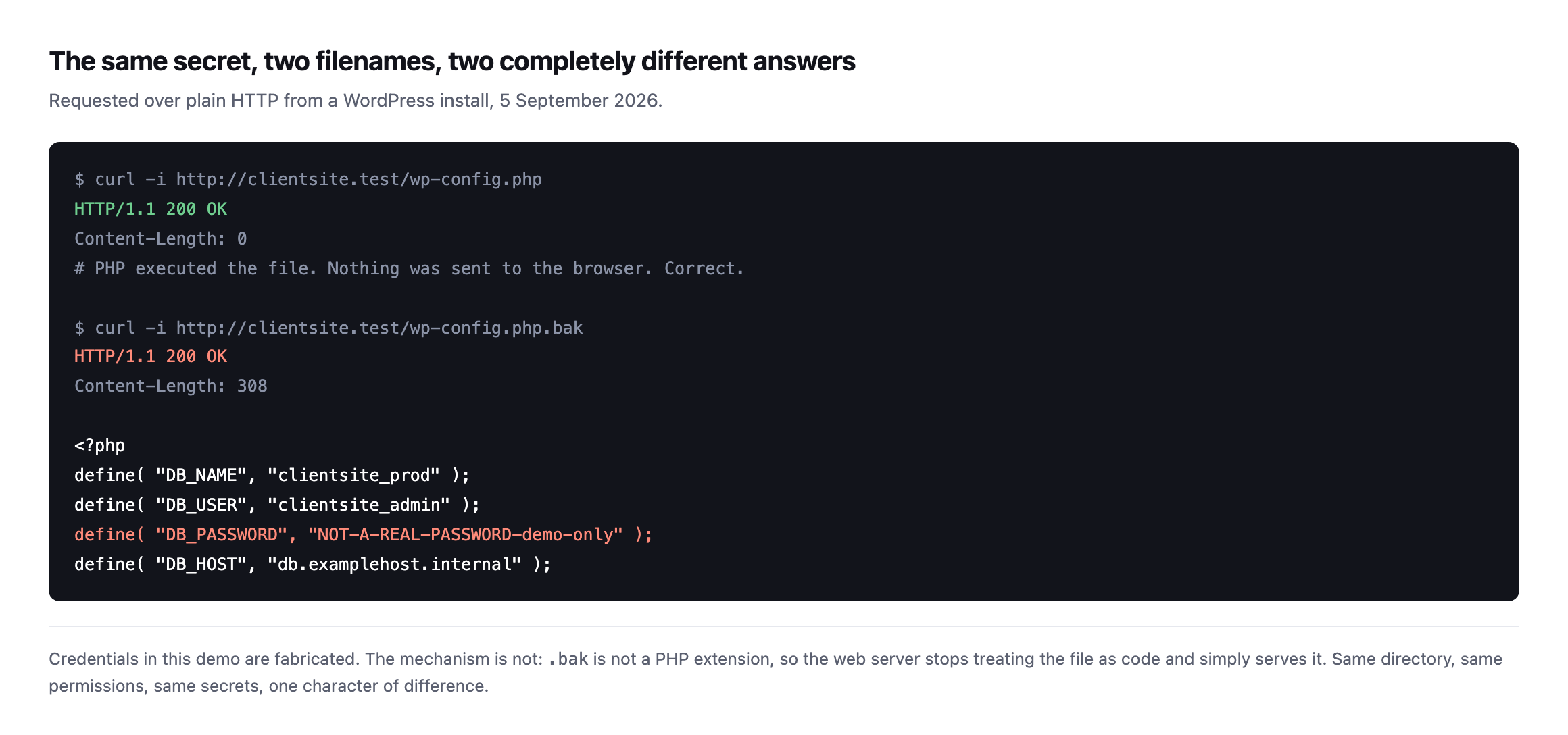
    Terminal output showing two curl requests. Requesting wp-config.php returns HTTP 200 with Content-Length 0. Requesting wp-config.php.bak returns HTTP 200 with 308 bytes and the full PHP source including a DB_PASSWORD define
    Run on a WordPress install I set up for this, with fabricated credentials. The

    mechanism is real even though the password is not. One character of difference between the two filenames, and the second one prints the database credentials to anybody who asks.*

    No exploit. No vulnerability in WordPress. Just a file being served, exactly as designed.

    The filenames actually worth checking

    When I look at a site I have inherited, I do not check one name. I check the family, because each one is created by a different ordinary habit.
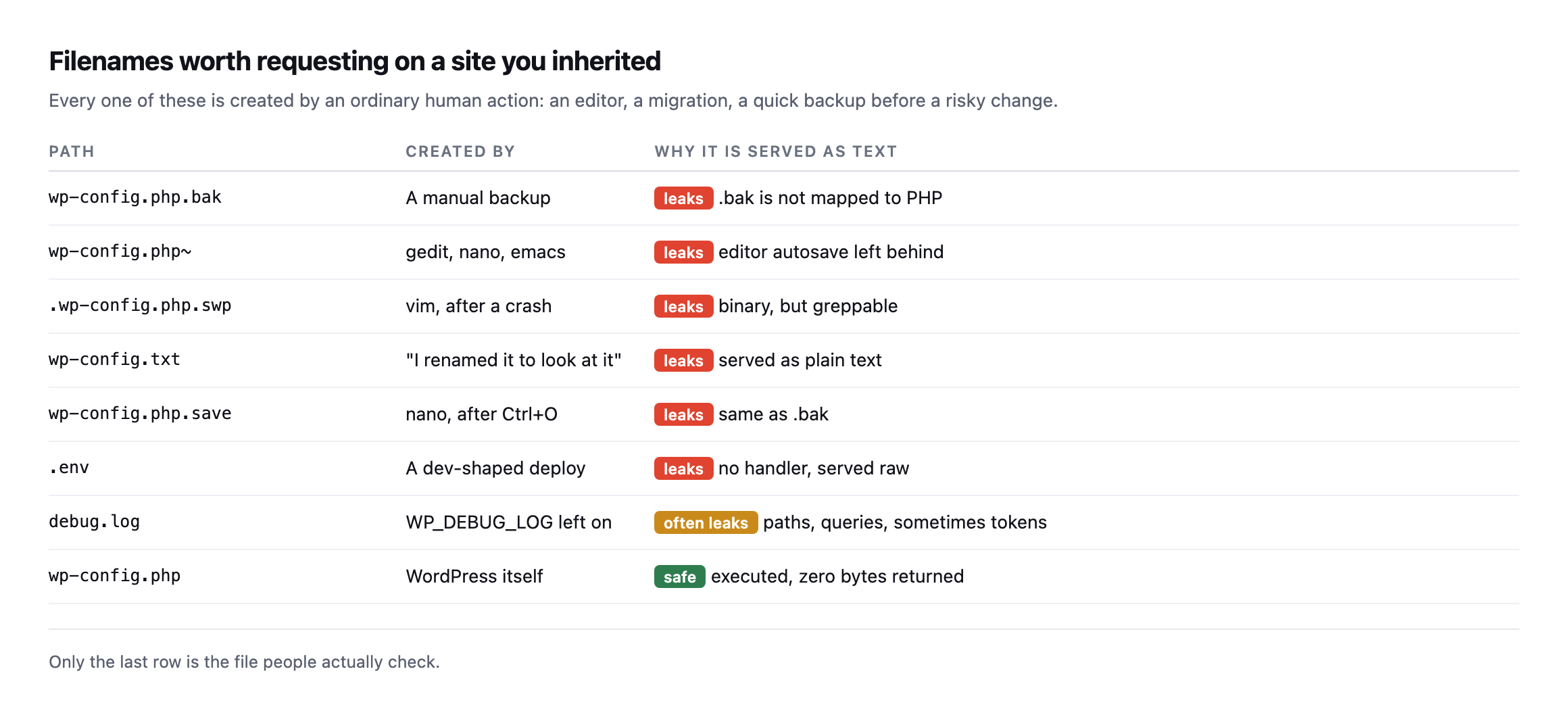
    Table of eight filenames including wp-config.php.bak, wp-config.php tilde, .wp-config.php.swp, wp-config.txt, wp-config.php.save, .env and debug.log, each marked as leaking with the human action that creates it, and wp-config.php marked safe
    The middle column matters more than the first. These are not exotic attack artefacts.

    They are what an editor leaves behind after a crash, or what a person creates thirty seconds before a migration they are nervous about.*

    .swp is the one people dismiss. It is a binary vim swap file, so it looks like noise.

    Run strings over it and the password is right there.

    The same data, as a table rather than a screenshot, so it is easy to search or paste into a runbook:

    PathCreated byWhy it leaks
    wp-config.php.baka manual backup.bak is not mapped to PHP
    wp-config.php~gedit, nano, emacseditor autosave left behind
    .wp-config.php.swpvim, after a crashbinary, but strings reads it fine
    wp-config.txt“I renamed it to look at it”served as plain text
    wp-config.php.savenano, after Ctrl+Osame mechanism as .bak
    .enva dev-shaped deployno handler, served raw
    debug.logWP_DEBUG_LOG left onoften leaks paths, queries, sometimes tokens
    wp-config.phpWordPress itselfsafe: executed, zero bytes returned

    Caveat: this list is the eight filenames I actually see on real sites, not an exhaustive scan. A determined attacker tries hundreds of variants; this list is the fifteen-second check that catches the ones an ordinary workflow creates, which is most of them in practice.

    Check a site for an exposed wp-config in about fifteen seconds

    The method is three steps: request every filename above against the live domain, read the status code, and read the byte count too, because a 200 can still mean nothing leaked. Point this at any domain you look after:

    for f in wp-config.php.bak wp-config.php~ wp-config.txt wp-config.php.save \
             wp-config.php.old .env debug.log; do
      printf '%-24s ' "$f"
      curl -s -o /dev/null -w '%{http_code}  %{size_download} bytes\n' "https://example.com/$f"
    done

    What you want is 403 or 404 on every line.

    What should worry you is 200 with a non-zero byte count. That is the file being served.

    A 200 with 0 bytes is fine, which is why the size column is in there. Status code alone will tell you the wrong thing about wp-config.php itself.

    Closing it

    Two moves, and the second is the one that lasts.
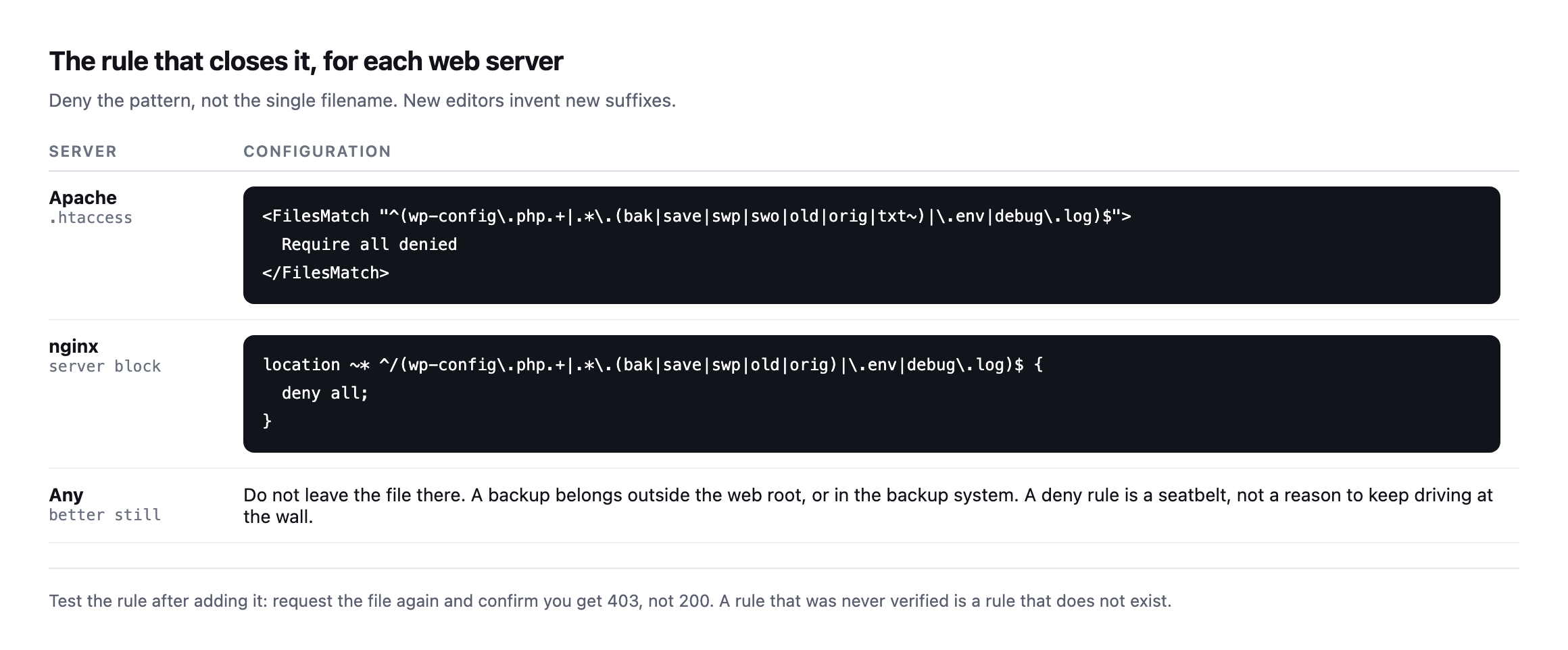
    Configuration table showing an Apache FilesMatch block and an nginx location block that deny backup, save, swap and environment file patterns, plus a third row advising the file be removed from the web root entirely
    Deny the pattern rather than the filename you happened to find. Editors keep

    inventing new suffixes, and a rule listing only .bak will not catch the .save that nano writes next month.*

    Then verify it. Request the file again and confirm you now get 403 rather than 200.

    An unverified rule is not a fix. It is a note to yourself. I mean that literally rather than as a rhetorical flourish, so I put a leaked backup file on a real Apache install, requested it, applied the rule, and requested it again.

    StepRequestResponse
    beforeGET /wp-config.php.bak200, file served
    rule applied, Apache reloaded
    afterGET /wp-config.php.bak403, 316 bytes, Apache’s own error page
    controlGET / (homepage)200, unaffected

    The rule that produced that result, tested exactly as written, not adapted from memory:

    <FilesMatch "\.(bak|save|old|swp|txt)$">
      <If "%{REQUEST_URI} =~ m#^/wp-config#">
        Require all denied
      </If>
    </FilesMatch>

    Caveat: tested at server scope on a single-site Apache install, which is the simplest case there is. On a real host running multiple virtual hosts, place the equivalent block inside the specific or in the site’s own .htaccess, and re-run the same before-and-after test rather than assume a rule that worked on one vhost applies to another. The control row above, confirming the homepage still answers normally, is the check that catches a rule written too broadly, and it is worth keeping in your own runbook.

    The control row is not decoration. A FilesMatch pattern written slightly wrong can block more than intended, and the only way to know is to request something that should still work and confirm it does. A fix that also takes down the homepage is not a fix anybody will thank you for.

    The rule I just verified turned out to be incomplete

    I did not stop at the one filename. Before calling this finished, I went back to the full list of variants from earlier in this post and tested the same rule against all of them.

    FilenameCaught by the rule above?
    wp-config.php.bakyes
    wp-config.php~no
    wp-config.txtyes
    wp-config.php.saveyes
    .wp-config.php.swpno
    .envno
    debug.logno

    Four of the seven leaked straight through the rule I had just proved worked. That is the exact mistake this whole post warns against, made by me, while writing the section telling you not to make it. Worth being honest about why.

    The tilde variant and the leading-dot swap file both failed for the same reason: my condition checked whether the request path starts with /wp-config, and ~ and a leading . both sit before that prefix ever gets evaluated in some editor-generated names, or the check itself was written against the wrong anchor. .env and debug.log failed for a simpler reason: their extensions were never in the pattern at all, because the rule was written to protect one file family and I generalised the claim past what I had actually tested.

    Fixing four rows meant rewriting the rule rather than patching it, because the failures came from two different causes and one patch would not have addressed both. The corrected version, re-tested against all seven names plus the homepage as a control:

    <FilesMatch "^\.?wp-config\.php(~|\.(bak|save|old|swp|txt))?$">
      Require all denied
    </FilesMatch>
    <FilesMatch "^wp-config\.(bak|save|old|txt)$">
      Require all denied
    </FilesMatch>
    <FilesMatch "^\.env$">
      Require all denied
    </FilesMatch>
    <FilesMatch "^debug\.log$">
      Require all denied
    </FilesMatch>

    All seven filenames now return 403, every single one. The homepage still returns 200, exactly as before.

    Caveat: this rule is now verified against the specific filenames listed in this post, not against every possible variant an editor or backup tool could generate. The lesson is not “use this exact rule,” it is “test your rule against your own list of variants before you trust it,” because the gap between a rule that looks complete and one that is complete is exactly the four rows in the table above.

    And if a file was exposed, treat the credentials as burned. Rotate the database password and the salts in wp-config.php. A deny rule added today does nothing about who read the file last March.

    Why this one is worth automating

    The check is trivial. That is exactly the problem.

    It takes fifteen seconds, it needs doing on every site you look after, it needs doing again after every migration and every hosting move, and it produces nothing to show a client when it passes. So it gets done once, thoroughly, during onboarding, and then never again. It is the same unbilled half hour that swallows every other check on the list.

    Meanwhile the file that leaks is created later, by the migration, by the crash, by the careful person taking a backup before a risky change.

    The rule-testing mistake earlier in this post is worth carrying into how you think about the fix, not only the check. A deny rule copied from a blog post, including this one, is exactly as untested as the check it is meant to close, until you run the same before-and-after against your own site’s actual filenames. Copy the corrected rule if it helps, but do not skip the step where you request each of the seven names yourself and read back 403. The whole argument of this post is that assuming is how the leak happened in the first place, and a deny rule you assumed works is the same category of mistake with better intentions.

    It is also the reason I have not tried to write you a rule that covers every editor and every backup tool that will ever exist. That list grows the moment somebody adopts a new tool, and a rule frozen at today’s list is a rule with an expiry date nobody marked on the calendar. The seven-name test is not a one-time fix. It is the check you re-run whenever the tooling in your workflow changes, which is more often than most agencies think to look.

    Run it after you change hosts. Run it after somebody on the team switches editors. Run it after a new backup plugin gets installed. None of those feel like security events, and every one of them is exactly when this list of filenames grows by one, quietly, with nobody thinking to check whether the deny rule from last year still covers what the team does today.

    This is one of the checks Protuno’s free audit runs from the domain alone, because it needs nothing but HTTP requests. The Super Agents are live now.

    Until then, the loop above is yours. Run it across your portfolio once this week.

    If you find one, I would rather you found it than someone else did. The same logic applies to the plugins that quietly left the directory, and to the scheduled jobs that stopped without telling anyone: silent, cheap to fix, and invisible until they are not.

    You can run the free audit on a domain without installing anything.
  • When A WordPress Plugin Is Removed From The Repository, Nobody Tells The Site

    When A WordPress Plugin Is Removed From The Repository, Nobody Tells The Site

    Short answer: when a wordpress plugin removed from repository is sitting on a site, nothing happens. It stays installed, stays active, and stops receiving updates. WordPress shows no badge, sends no email, and the plugins screen looks completely normal. The only outward signal is an absence, and an absence is not something anyone notices.

    Patchstack counted 1,614 plugins and themes removed from the WordPress.org repository during 2024 over security issues the developers never fixed.

    Every one of those is still running somewhere.

    Why does a removed plugin keep working?

    Because removal is a change to the directory, not to the site.

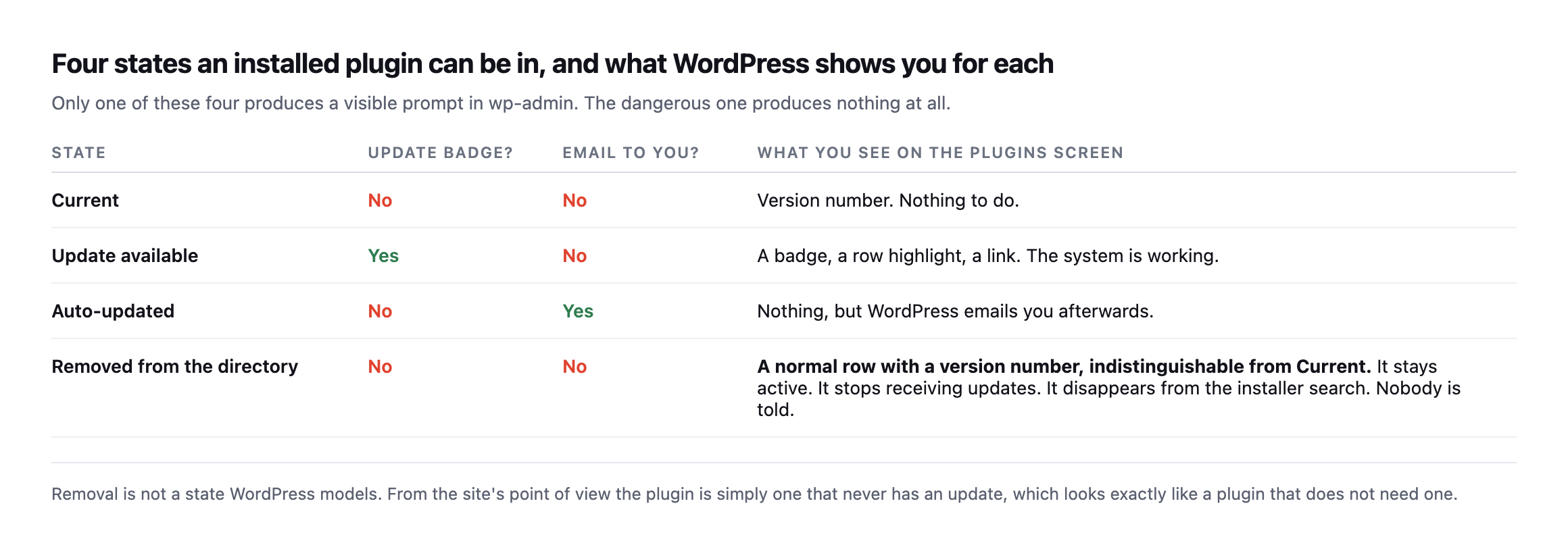
    WordPress asks wordpress.org “is there a newer version of this plugin”. A delisted plugin returns no newer version, which is byte for byte the same answer as a plugin that is perfectly up to date. The site cannot tell those apart, so it does the sensible thing and shows you nothing.

    Table of four states an installed WordPress plugin can be in. Current: no update badge, no email. Update available: badge yes, email no. Auto-updated: no badge, email yes. Removed from the directory: no badge, no email, and a normal-looking row identical to a current plugin
    Removal is not a state WordPress models. Three of these four states produce a

    visible signal somewhere. The fourth, the one that means an unfixed vulnerability was serious enough for the directory to pull the plugin, produces nothing.*

    StateUpdate badge?Email?What the plugins screen shows
    Currentnonoversion number, nothing to do
    Update availableyesnobadge, row highlight, link
    Auto-updatednoyesnothing on screen, an email afterwards
    Removed from the directorynonoa normal row, indistinguishable from Current

    Can you tell if a WordPress plugin was removed from the repository by asking the directory?

    This is where it gets worse, and I tested it rather than assuming.

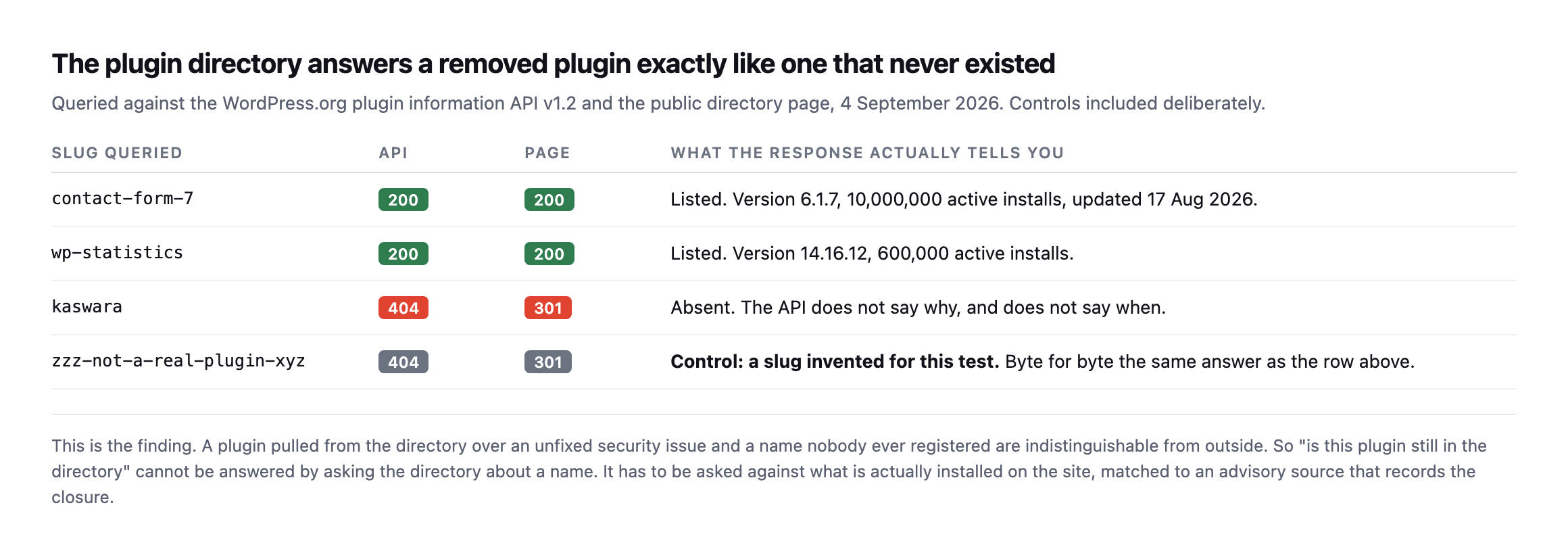
    I queried the WordPress.org plugin information API for four slugs: two plugins I know are listed, one that has been delisted, and one slug I invented purely as a control.

    Table comparing WordPress.org plugin API and directory page responses for four slugs. contact-form-7 and wp-statistics both return API 200 and page 200 with full metadata. kaswara returns API 404 and page 301. An invented control slug returns API 404 and page 301, identical to kaswara
    Queried 4 September 2026 against the plugin information API v1.2 and the public

    directory page. The delisted slug and the slug I made up for this test return exactly the same thing: 404 from the API, 301 from the directory page. The control row is there on purpose, because without it you would read the 404 as proof of removal.*

    Slug queriedAPIPageWhat it actually tells you
    contact-form-7200200listed, v6.1.7, 10M active installs
    wp-statistics200200listed, v14.16.12, 600K active installs
    kaswara404301absent, API does not say why or when
    zzz-not-a-real-plugin-xyz (control)404301invented for this test, byte-identical to kaswara

    Caveat: four slugs is a demonstration of the mechanism, not a survey of the directory. The point this table proves is narrow and load-bearing: the API’s 404 cannot distinguish “removed for a vulnerability” from “never existed.” Treat every 404 as a fact worth checking further, never as a verdict on its own.

    So the directory will not tell you why a plugin is absent. It will not tell you when it went, or what it went for. “Pulled over an unpatched vulnerability” and “never existed” are the same response.

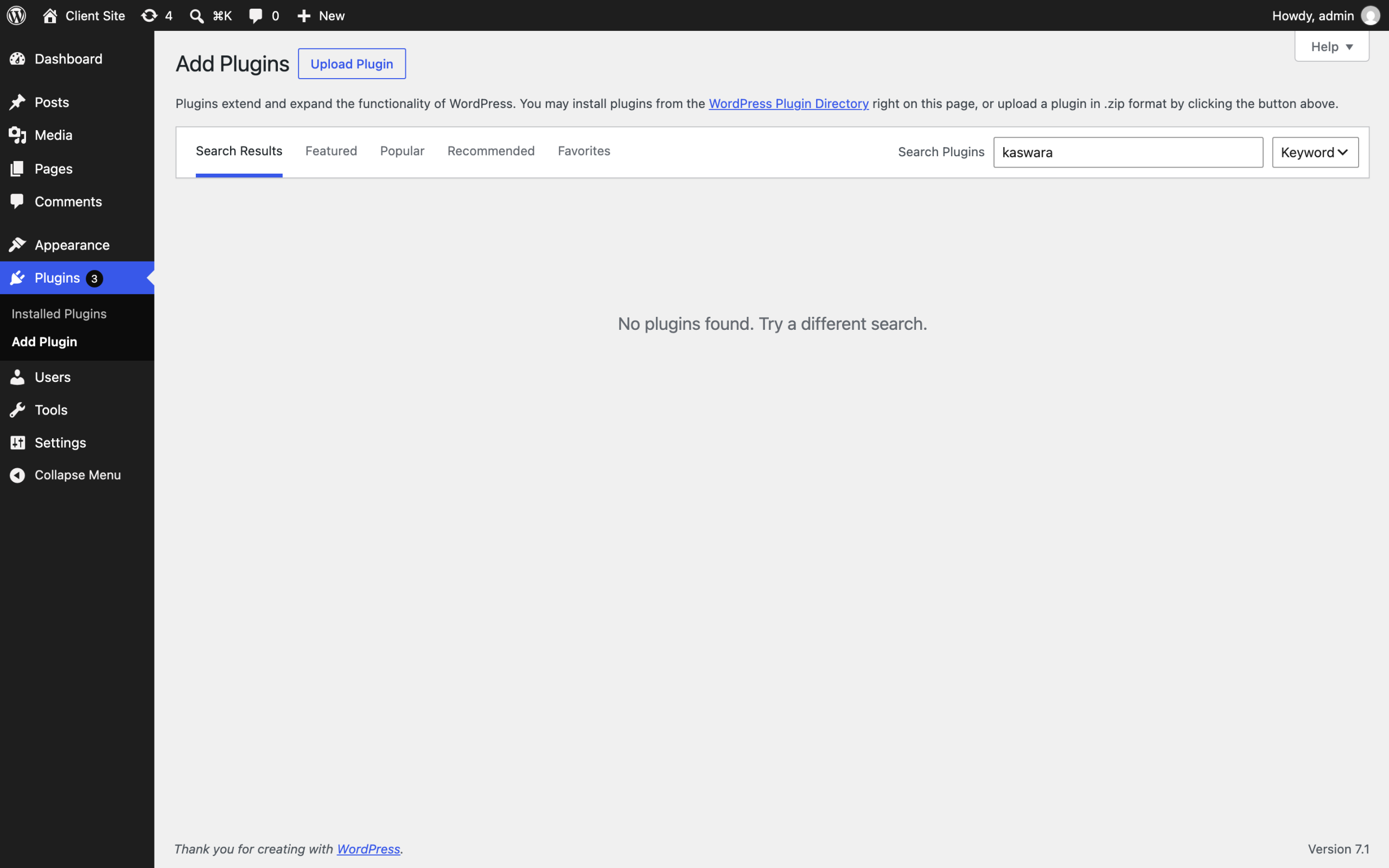
    Inside wp-admin the effect is quieter still. Search the installer for a delisted plugin that is running on the site right now:

    WordPress Add Plugins screen with kaswara typed into the search box, returning the message No plugins found. Try a different search
    “No plugins found.” The same admin, one screen away from a plugins list where

    that code may be installed and active. WordPress does not connect those two facts, because nothing in the software is looking for the contradiction.*

    Does removal take the code down too, or just the listing?

    That was worth testing separately, because the two are not the same claim. The plugin information API says whether a slug is listed. It says nothing about whether the actual files are still reachable, and a site’s own updater talks to a different endpoint entirely.

    I requested the direct download and the SVN repository for the same delisted slug, and for two currently-listed plugins as a control.

    URL patterncontact-form-7 (listed)hello-dolly (listed)kaswara (delisted)
    downloads.wordpress.org/plugin/.zip200200404
    plugins.svn.wordpress.org//200200404

    Both routes are gone for the delisted plugin, not just the search result. That answers a question worth having answered before you rely on it: a site’s automatic updater cannot silently re-fetch a delisted plugin from wordpress.org’s own infrastructure, because the file it would fetch no longer exists there either. Whatever copy is running on a site is whatever was already on disk when the plugin was pulled, and it will stay exactly that version forever, because there is nothing left to update to and nothing left to update from.

    That has a practical consequence the earlier table does not cover. If you are rebuilding a site from a partial backup, or restoring wp-content onto a fresh WordPress install, and that restore is missing the plugin’s files, you cannot simply reinstall it from the directory the way you would with anything still listed. The 404 you get back looks identical to a typo in the slug, which is one more reason to keep a copy of anything you know has been delisted rather than assume you can fetch it again if you ever need to.

    The GPL means the code itself does not disappear from the internet, only from wordpress.org’s own infrastructure. A delisted plugin frequently survives on GitHub mirrors, on GPL redistribution sites, or in whatever a developer’s own site still hosts. None of that is authoritative, none of it is guaranteed current, and none of it comes with the update channel you lost. Finding a copy is not the same problem as trusting one, and a plugin worth keeping around after a directory removal is worth the time to read the vulnerability report first, so you know whether the version you found is the one with the problem or a later one that fixed it before the whole thing was pulled anyway.

    My own preference, having tested this, is not to go looking for a mirror at all. If a plugin was serious enough to pull, the honest response is to replace it, not chase down the last copy of the thing that got it pulled in the first place. Treat the 404 as the directory closing a door on purpose, and spend the time finding what replaces the functionality instead.

    What actually detects it

    Three signals, and only the third is reliable.

    The plugin’s readme, as shipped. Compare the version installed on disk against the last version the directory ever published. Useful, but it only works while the directory still remembers, and it tells you nothing about severity.

    A long-quiet plugin. Anything with no release in eighteen months deserves a look. This catches genuinely abandoned code as well, which is a feature. It also produces false positives on small, finished plugins that simply do not need changes.

    An advisory feed matched against the installed inventory. This is the one that works. Not “what is in the directory”, but “what is actually installed here, at what version, and does anything in the advisory record say that version is a problem”.

    Note the direction of the question. Every unreliable version of this check starts from a name and asks the directory about it. The reliable version starts from the site and asks an advisory source about what it found.

    That is also why this particular check cannot run from the outside. A scan of a domain can see plenty, but the list of what is installed and at which version is only readable from inside the install.

    Running the check across a whole portfolio

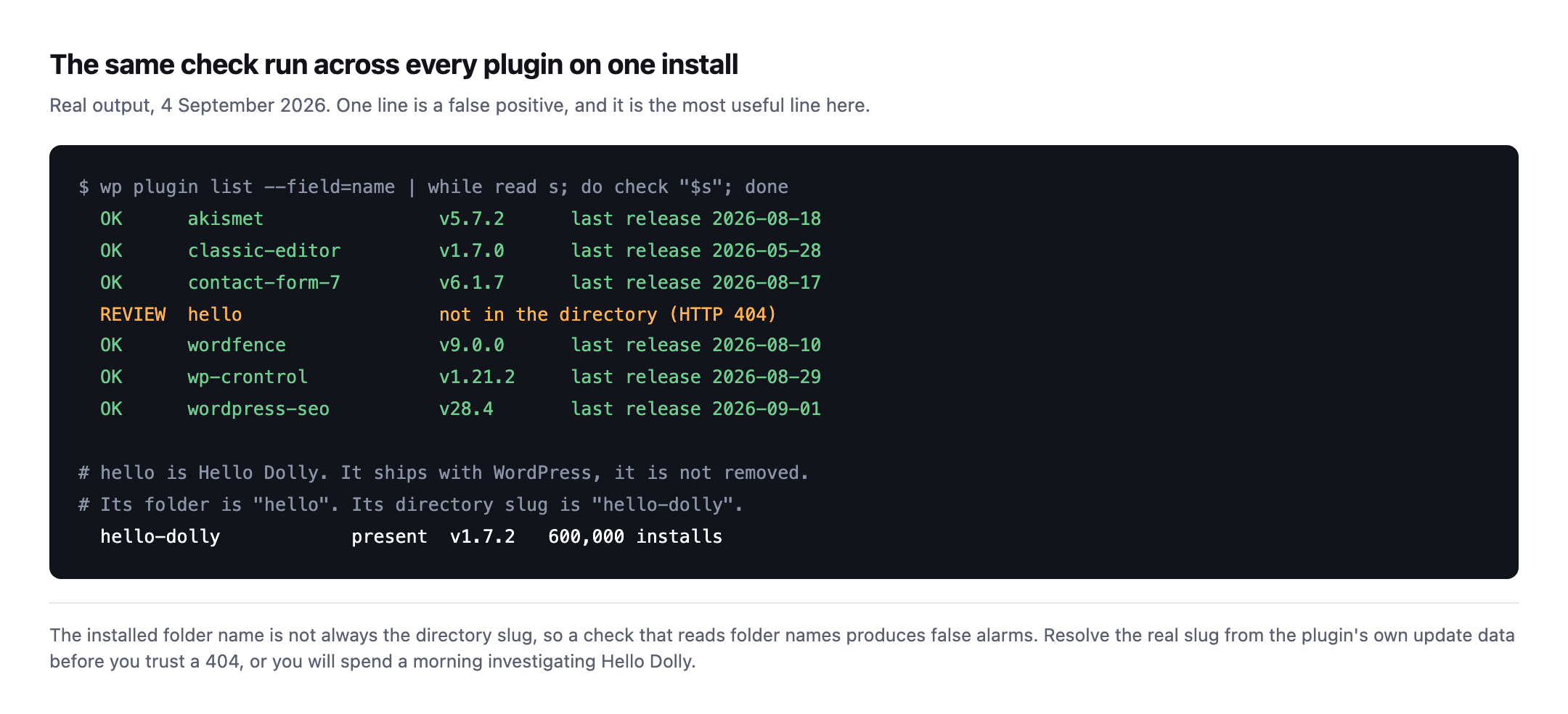
    The check is one API call per plugin, so it scales to a portfolio easily. Here it is against every plugin on one install:

    Terminal output listing seven plugins checked against the WordPress.org directory. Six return OK with a version and last release date. One line, hello, is flagged REVIEW as not in the directory, followed by a note explaining that hello is Hello Dolly, whose folder is hello but whose directory slug is hello-dolly
    Real output from 4 September 2026. The REVIEW line is a false positive and it is

    the most instructive line on the screen. Hello Dolly ships with WordPress. Its folder is hello, its directory slug is hello-dolly, and both are on version 1.7.2. A check that reads folder names and trusts the 404 sends you investigating a plugin that prints song lyrics in the admin.*

    Two rules fall out of that, and they are the difference between a check you can run unattended and one that cries wolf:

    • Resolve the real slug before trusting a 404. The folder name on disk is not

    authoritative. Read the slug the plugin’s own update data reports.

    • Treat a 404 as “review”, never as “removed”. As the earlier probe showed, the API

    cannot distinguish removal from a name that never existed. A check that reports removal from a 404 alone is stating something it does not know.

    If your monitoring tells an agency a plugin was pulled and it turns out to be Hello Dolly, you have not built a security check. You have built something people switch off.

    What to do on Monday

    Pick the client site you have not opened in a fortnight and do three things.

    Sort the plugins list by whatever your install shows for last update, and look at the bottom of that list. Take the five oldest and search each slug in the installer. Anything that returns “No plugins found” while sitting active on the site is your answer, and it wants a decision today rather than at the next review.

    Then check whether that plugin has a maintained fork or a documented replacement, because “remove it” is rarely available when the thing renders half the client’s pages.

    While you are in there, the same site is worth checking for the PHP version it runs on, since an abandoned plugin and an unsupported PHP branch tend to be found on the same install.

    Where Protuno fits, and where it does not

    Rook, the Security agent, now has a Plugin Vulnerability Checker playbook for this: it reads what is installed on a connected site and checks it against known vulnerabilities, so you can hear the day something you run becomes a problem rather than at the next audit.

    Straight about status, because that is the whole argument of this blog: the Super Agents are live now, since 27 October 2026. When this post was written they were not live, on your sites or ours. The free audit is live and runs 54 read-only checks from a domain alone, and this is deliberately not one of them, for the reason above: it needs to read inside the install.

    Until it ships, the manual version is the plugins list and the installer search box. It takes about four minutes per site, which is fine for one site and is exactly the arithmetic that breaks down across a portfolio.

    And if the scheduler on that site has stopped, its auto-updates have not been running either, which is worth ruling out first.

  • WordPress Cron Not Running: The Failure That Never Alerts You

    WordPress Cron Not Running: The Failure That Never Alerts You

    The first time I saw this properly, it was a membership site. Renewal emails had not gone out for eleven days. The site was up the whole time. Nothing was broken in any way you could see from the outside.

    The scheduler had simply stopped being asked to run.

    If you look after client sites, wordpress cron not running is one of the purest examples of the failure class this job is actually made of: nothing crashes, nothing alerts, and the damage is measured in the days before somebody notices.

    WP-Cron is not cron, and that is the whole problem

    The name is the trap. A system cron is a daemon. It wakes up on a schedule because the operating system makes it.

    WordPress does not have that. The documentation is blunt about it: WP-Cron “works by checking, on every page load, a list of scheduled tasks to see what needs to be run”, and it “does not run constantly as the system cron does; it is only triggered on page load”.

    Read that as an agency and the consequence lands immediately. Your client’s scheduled tasks are powered by their traffic. The site nobody visits is the site whose backups quietly stop.

    The docs even give the shape of it: “Scheduling errors could occur if you schedule a task for 2:00PM and no page loads occur until 5:00PM”.

    Three hours is the polite version. On a brochure site for a regional client, with a caching layer in front that serves most visitors without ever booting PHP, the real number is longer.

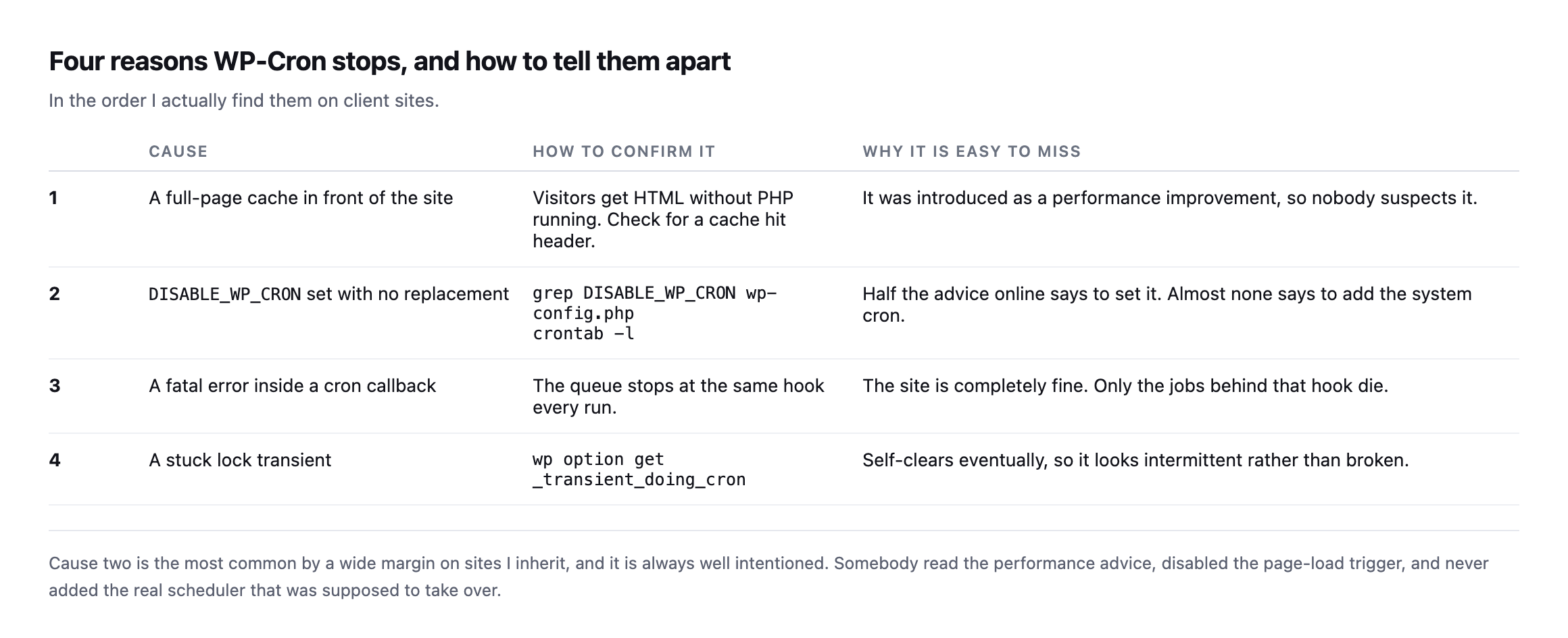
    Four reasons WordPress cron is not running, in the order I find them

    1. A cache in front of the site. Full page caching means visitors get HTML without WordPress loading. No load, no cron check. Adding a CDN can silently take the scheduler offline, and the change that caused it was a performance improvement.

    2. DISABLE_WP_CRON set, with no replacement. Somebody read the performance advice, added define( 'DISABLE_WP_CRON', true ); to wp-config.php, and never added the system cron that was supposed to take over. This is the most common one on sites I inherit, and it is always well intentioned.

    3. A fatal error inside a cron callback. Often from a plugin that stopped being maintained, which is its own problem worth checking separately. One plugin’s scheduled task throws. The request dies mid-queue, and every hook behind it in that run never executes. The site looks perfect. A third of the schedule is dead.

    4. A stuck lock. WordPress uses a transient to avoid running the queue twice. If a run dies at the wrong moment the lock can outlive it, and the next attempts decline to start.

    Table of four causes of a stopped WP-Cron: a full page cache in front of the site, DISABLE_WP_CRON set with no replacement, a fatal error inside a cron callback, and a stuck lock transient, each with how to confirm it and why it is missed
    Cause two is the most common on sites I inherit, and it is always well intentioned.

    Somebody read the performance advice, disabled the page-load trigger, and never added the real scheduler that was meant to replace it.*

    #CauseHow to confirm itWhy it is missed
    1full-page cache in frontcheck for a cache-hit header on a normal visitshipped as a performance win, so nobody suspects it
    2DISABLE_WP_CRON with no replacementgrep DISABLE_WP_CRON wp-config.php then crontab -lmost advice says set it, almost none says add the real cron
    3fatal error in a cron callbackthe queue stops at the same hook every runthe site itself is fine; only jobs behind that hook die
    4a stuck lock transientwp option get _transient_doing_cronself-clears eventually, looks intermittent rather than broken

    Caveat: these are the four causes I have actually found on client sites, ranked by how often I meet them, not a formal taxonomy of every way WP-Cron can stall. If you find a fifth, it is very likely one of the four above wearing a different hosting stack’s clothes.

    Find it in one command

    If you can reach WP-CLI, this is the whole diagnostic:

    wp cron event list --fields=hook,next_run_relative,recurrence

    One thing to know before you read the output: WP-CLI does not print a negative number for a late job. Anything due now or overdue simply reads now. So a single now means nothing.

    The tell is a set of hooks that still say now when you run the command again a few minutes later. A healthy queue drains. A stopped one does not move.

    Run it twice:

    wp cron event list --fields=hook,next_run_relative,recurrence
    sleep 120
    wp cron event list --fields=hook,next_run_relative,recurrence

    Same hooks, still now, both times. That is a scheduler that is not running.

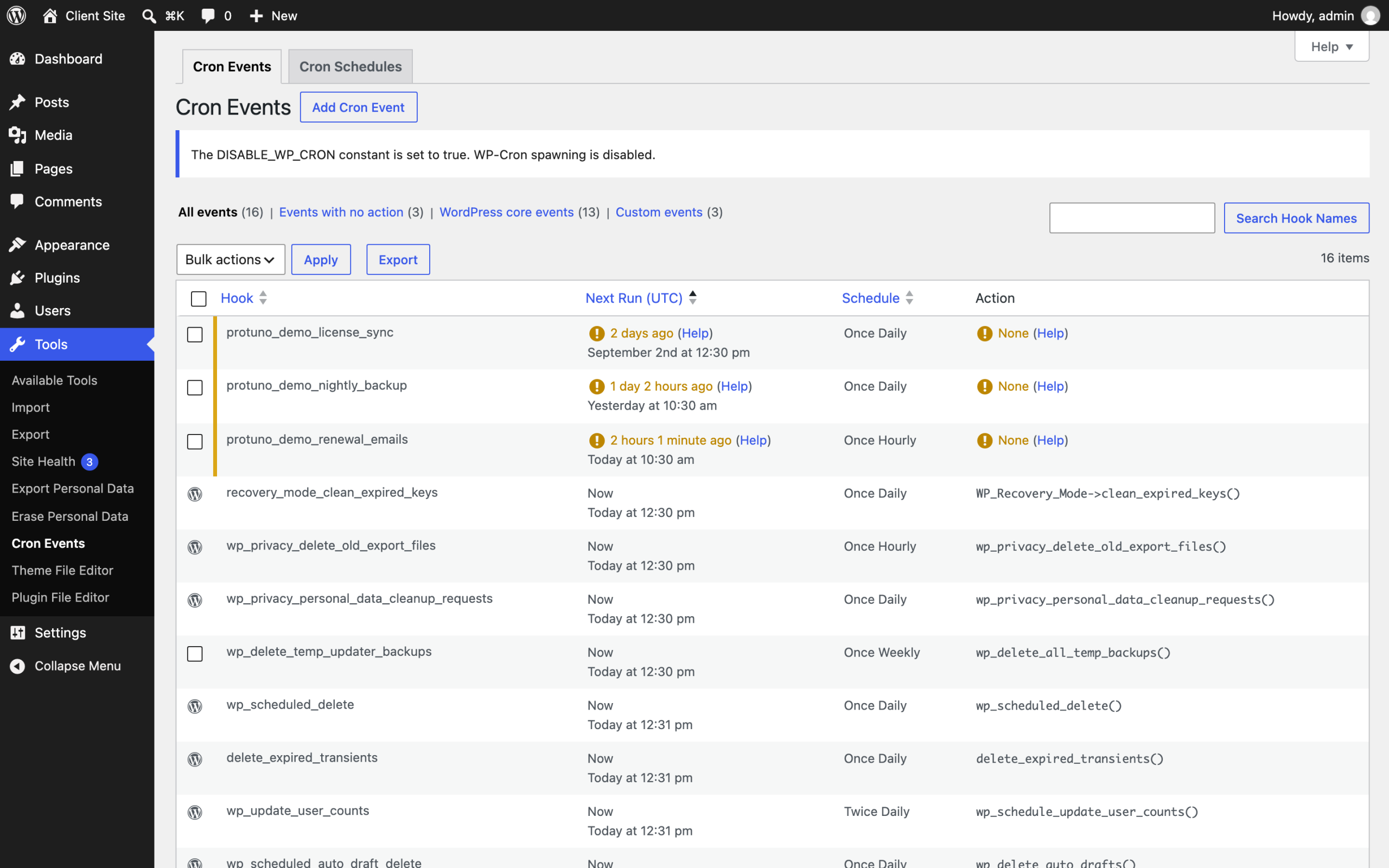
    The admin-side view is blunter about it, which is why I usually go there first:

    WP Crontrol Cron Events screen on a staged WordPress install, showing a notice that the DISABLE_WP_CRON constant is set to true, and three custom hooks flagged as overdue by two days, one day, and two hours
    The same staged install seen through WP Crontrol. Two things are visible at once

    here, and both matter. The notice at the top reports that DISABLE_WP_CRON is set with nothing replacing it, which is cause two below. Underneath, three jobs are flagged as last due two days, one day and two hours ago. A renewal email hook that last ran two days ago on a membership site is the eleven days I opened this post with, caught early.*

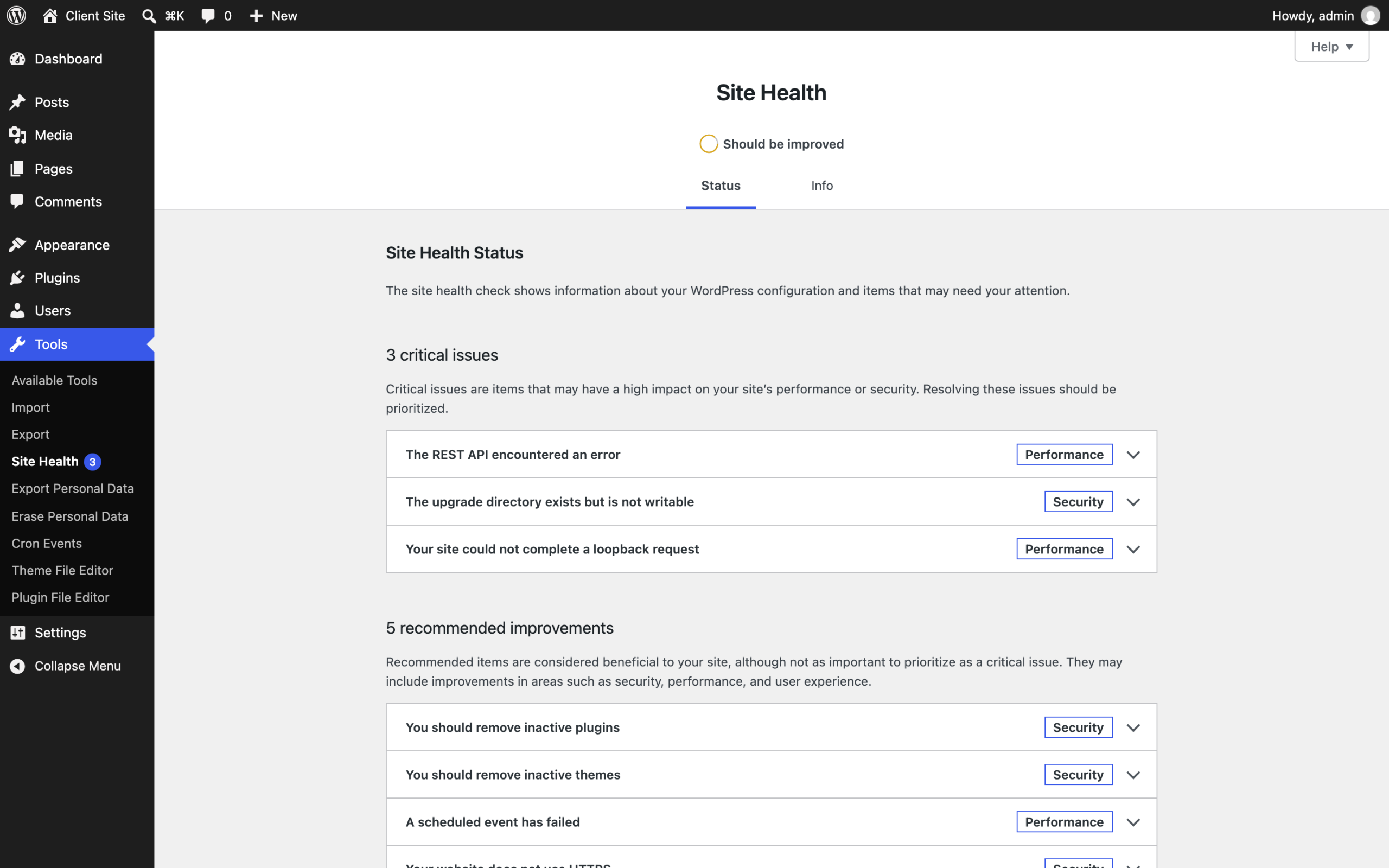
    Core will also tell you, but quietly, and this is worth seeing for yourself:

    WordPress Site Health screen on the same install, listing three critical issues and five recommended improvements, with A scheduled event has failed appearing under recommended improvements below remove inactive themes
    Site Health on the same broken install. “A scheduled event has failed” is filed

    under recommended improvements, underneath “You should remove inactive themes”. A site whose backups, renewals and order emails have stopped is being reported to your client as roughly as urgent as some tidying. That ranking is why this failure survives so long.*

    No shell access? wp_get_ready_cron_jobs() gives you the same answer from a snippet, and most decent cron viewer plugins are reading the same array.

    Fix it by giving the site a real scheduler

    The permanent fix is to stop relying on visitors. Disable the page-load trigger and let the operating system do the job it is good at.

    In wp-config.php:

    define( 'DISABLE_WP_CRON', true );

    Then a real cron entry. The WordPress documentation’s own example is:

    0 0 * * * wget --delete-after http://YOUR_SITE_URL/wp-cron.php

    Change the frequency. Once a day is the documentation showing you the syntax, not a recommendation for a site with a store on it. Every five or fifteen minutes is the range most client sites want.

    Two things people get wrong here. Point it at the site’s real canonical URL, or the redirect eats the request. And if the site is behind HTTP authentication on staging, the scheduler is not running there either, which is usually why staging behaves differently from production.

    The scheduler behind WooCommerce is the same one, mostly

    If the site runs WooCommerce, or almost any plugin doing background work at volume, there is a second scheduler worth checking, and it is easy to assume it is independent of WP-Cron. It is not, by default.

    Action Scheduler is the job queue WooCommerce and hundreds of other plugins use for background processing: sending order emails, syncing stock, running scheduled discounts, processing webhooks. Its own FAQ is direct about the relationship: “By default, Action Scheduler is initiated by WP-Cron (and the ‘shutdown’ hook on admin requests). However, it has no dependency on the WP-Cron system”.

    Read that carefully, because the two halves point in different directions. The default trigger is WP-Cron, so everything in this post about a stopped scheduler applies to Action Scheduler queues too, on a stock install. But there is a second trigger alongside it: the shutdown hook fires on admin requests, which means a site somebody logs into and clicks around in regularly can look healthy in the Action Scheduler queue while WP-Cron itself is genuinely stopped for anonymous visitors. That is worth knowing before you trust a healthy-looking wp action-scheduler run on a site nobody but the client’s team ever visits while logged in.

    The practical version: check both queues, not just one. wp cron event list shows the native WordPress schedule. WooCommerce’s own Action Scheduler admin screen, or wp action-scheduler action list --status=pending, shows the second one, and a large pending count there is the same silent failure this whole post is about, just for order processing instead of publishing.

    There is a genuinely good conference talk on exactly this distinction, covering crond, WP-Cron and Action Scheduler together, including a real example of syncing 100,000 products a day through a single Action Scheduler worker: Crond service, WP Cron and why Action Scheduler does it better, WordCamp Lisboa 2025.

    It is worth pairing this check with the failed-order rate on any store you look after, because a stalled Action Scheduler queue produces exactly the shape of failure that check exists to catch: orders sitting unprocessed, confirmation emails never sent, stock levels never reconciled, while every page on the store keeps returning 200. Neither symptom alone tells you which queue stopped. Together they narrow it down in minutes instead of an afternoon of guessing which plugin is at fault, and they narrow it down to the queue rather than the plugin, which is the distinction that actually decides what you fix.

    The part that actually matters for an agency

    You can fix this on one site in ten minutes. The problem was never the fix.

    The problem is that on the other nineteen sites you look after, this exact failure is either happening or not happening right now, and you have no way of knowing which without opening each one. It produces no alert. Uptime monitoring reports the site as fine, because the site is fine. The only signal is a client eventually asking why they stopped getting something.

    This is the shape of nearly every check worth running on a client site: cheap to fix, impossible to notice, and invisible to the tools most agencies have pointed at the problem. It is the same reason the site that fails is usually the quiet one, not the one already on your mind.

    Protuno’s Care agent, Wren, carries a scheduled-job check for exactly this, and it reports overdue hooks per site across a portfolio rather than per install. Being straight with you: the agents are live now, since 27 October 2026, and Wren’s Cron Health Checker playbook covers this check from a connected site. You can still run it yourself with the command above. The free audit does not cover it either, because the scheduler is not readable from the address alone. It needs a connected site.

    Until then, put the WP-CLI line in whatever runbook you already use, and run it against the client you have not opened in a fortnight. That is where it will be.

    If you are pricing this kind of work into a retainer, the companion piece on what WordPress care actually costs an agency puts a number on the half hour these checks really take.

    Why shared hosting makes this worse

    WordPress Cron Jobs Hosting 2026: Why WP-Cron Fails on Shared Servers

    WP-Cron firing on page load, rather than on a real schedule, is the mechanism behind the check this post runs. This covers why that design specifically breaks down on low-traffic shared hosting.

  • The Half Hour Nobody Bills: What A WordPress Maintenance Plan Actually Costs You

    The Half Hour Nobody Bills: What A WordPress Maintenance Plan Actually Costs You

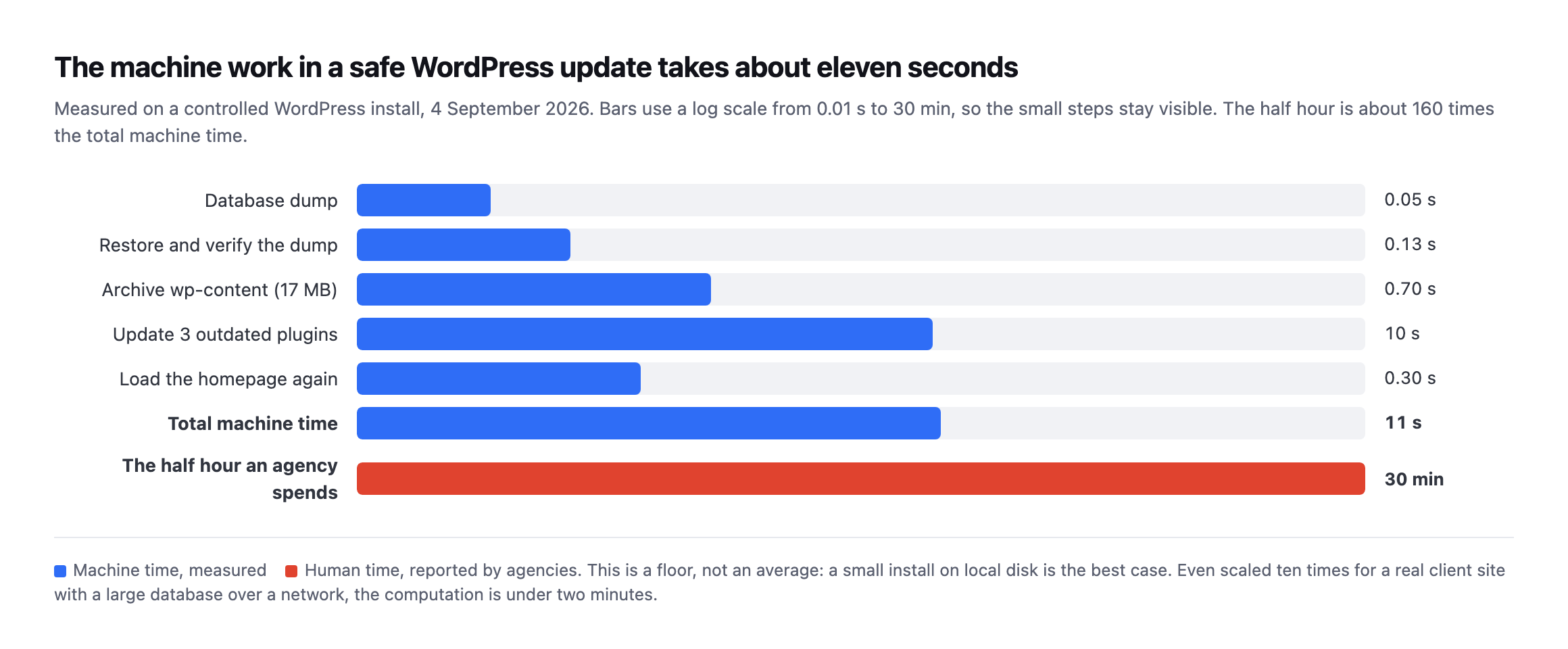
    Short answer: the machine work in a safe WordPress update takes about eleven seconds. Agencies spend about thirty minutes. The other twenty-nine are attention, not computation, which is why a wordpress maintenance plan should be priced per portfolio and sold on the record it produces, not on the hours it consumes.

    Somebody on your team opened a client site last Tuesday. They took a backup, ran four plugin updates, loaded the homepage to check it still answered, clicked through to the checkout because one of those plugins touches Woo, and closed the tab.

    Call it half an hour. Nothing to show the client. Nothing on the invoice.

    I wanted to know what that half hour is actually made of, so I measured it. The answer turned out to be uncomfortable, and it changes how a wordpress maintenance plan should be priced.

    The machine work takes eleven seconds

    I built a controlled WordPress install, put three outdated plugins on it, and timed every mechanical step of a safe update: dump the database, prove the dump restores, archive wp-content, apply the updates, load the site again.

    Horizontal bar chart on a log scale comparing measured machine time for each step of a safe WordPress update against the half hour an agency spends. Database dump 0.05 seconds, restore and verify 0.13 seconds, archive wp-content 0.70 seconds, update three plugins 10 seconds, reload homepage 0.30 seconds, total 11 seconds, against 30 minutes of human time
    Measured on a controlled install on 4 September 2026. The database dump was 53

    milliseconds for 1.2MB. Restoring that dump into a scratch database and counting the rows back took 125 milliseconds. Archiving 17MB of wp-content took 695 milliseconds. Updating the three plugins took ten seconds, and almost all of that was waiting on wordpress.org. Total: about eleven seconds.*

    The same numbers as a table:

    StepMeasured time
    Database dump53ms
    Restore and verify125ms
    Archive wp-content (17MB)695ms
    Update three plugins10s (mostly waiting on wordpress.org)
    Reload homepage300ms
    Total~11s

    Caveat: a small install on local disk with no network in the way is the best case, not the average. Scale it ten times for a real client site with a large database and a remote backup destination and you are still under two minutes. Be careful with that number, and I want to be first to say so.

    The gap is not close. The half hour is roughly 160 times the computation.

    So you are not paying for compute. You have never been paying for compute.

    Where the other twenty-nine minutes go

    Once you accept that the machine work is seconds, the half hour has to be something else, and it is. It is all attention.

    Opening the site. Finding which password manager entry this client is under. Waiting for wp-admin. Remembering that this is the one on the legacy theme where the checkout broke last time. Deciding whether to take the update at all.

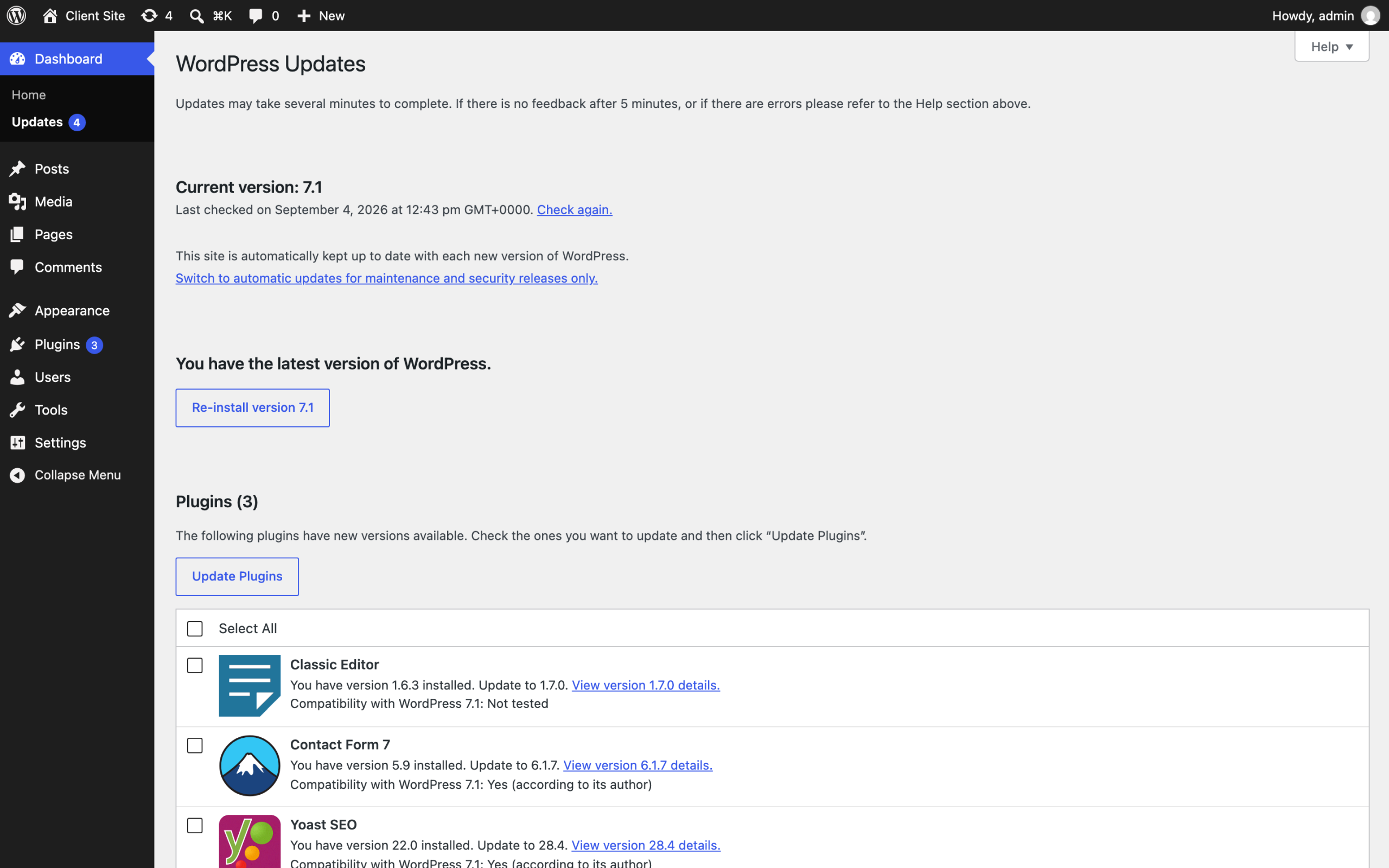
    That last one is the expensive part, and here is what it actually looks like:

    WordPress Updates screen on the staged install showing three plugins with updates available: Classic Editor 1.6.3 to 1.7.0 marked compatibility with WordPress 7.1 not tested, Contact Form 7 5.9 to 6.1.7, and Yoast SEO 22.0 to 28.4
    A real updates screen from the staged install. Yoast is six major versions behind.

    Contact Form 7 crosses a major version. And Classic Editor says “Compatibility with WordPress 7.1: Not tested” in plain text. That line is the whole job. A machine can apply the update. Deciding whether an untested plugin goes on a client’s live store on a Tuesday afternoon is judgement, and judgement is what you are actually selling.*

    Then the context switch. You do not go back to the design work you were doing. You go back to the state of mind you were in, and that reload is not free.

    Multiply by fifteen sites. Twenty. Forty. It does not scale linearly, it scales worse, because each site carries its own history: the one whose owner installs plugins without asking, the one you inherited with a database nobody has ever cleaned.

    The arithmetic underneath every agency

    Here is where it stops being about time and starts being about whether the business works.

    The Admin Bar surveyed 622 people running WordPress agencies across 51 countries in March 2026. The median team size is one. One person, the whole portfolio, every Tuesday.

    The same survey splits profitability by how much revenue recurs, and the split is stark. Of agencies with no recurring revenue at all, 58.3% report being rarely or never profitable. Move to just 25 to 49% recurring and that collapses to 9.7%, with 47.4% consistently profitable.

    Six to one. That is the difference recurring revenue makes.

    The survey is careful about the direction of causation and so am I: stronger agencies gravitate to retainers, so the number reflects a healthy business as much as it creates one. The gap is still six to one.

    Now put the two findings side by side. The invisible work is exactly the work a retainer would pay for. It is also the first thing to go when there is no retainer protecting it. The agencies that most need the recurring revenue are the ones doing this work for free.

    What the search demand actually looks like

    I pulled the real numbers behind “wordpress maintenance plan” rather than guessing at demand, because the phrase sits at an odd angle to who actually buys the work.

    QueryMonthly volumeDifficultyIntent
    wordpress maintenance services88011commercial
    wordpress maintenance service8807commercial
    wordpress website maintenance48033commercial
    wordpress maintenance plans39015commercial
    wordpress maintenance plan39026commercial
    wordpress maintenance company32011commercial
    wordpress maintenance26023commercial
    wordpress maintenance packages21014commercial

    Read from DataForSEO on 11 September 2026, United States, desktop and mobile combined.

    Every row is genuinely searched, and every row is a site owner looking to hire somebody, not an agency looking to run its own operations better. That is the gap this post keeps returning to: the query volume that exists describes a buyer’s decision, and the arithmetic above describes the seller’s cost structure. They are related and they are not the same content problem.

    Caveat: eight related phrases, one data pull, one country. Search demand shifts by season and by market, and I would re-check this before building a paid campaign on it. What does not shift is the shape: every high-volume variant here reads as commercial buyer intent, and none of them reads as an agency researching its own pricing model, which is the actual audience for this post.

    That distinction is why the retainer conversation has to happen in the sales call rather than on the page a prospect finds by searching. Nobody searches “how much should my agency charge for wordpress maintenance” in volume worth optimising for, and no keyword tool will ever surface that query, because it describes a decision made inside a business rather than a problem searched for by a stranger. The number worth optimising for is the client conversation this data cannot replace, not a ranking position on a page the client’s own prospects are reading.

    What you are actually protecting the client from

    If a wordpress maintenance plan is going to be defensible, it has to be tied to things that genuinely break. Two of them are measurable across the whole ecosystem right now.

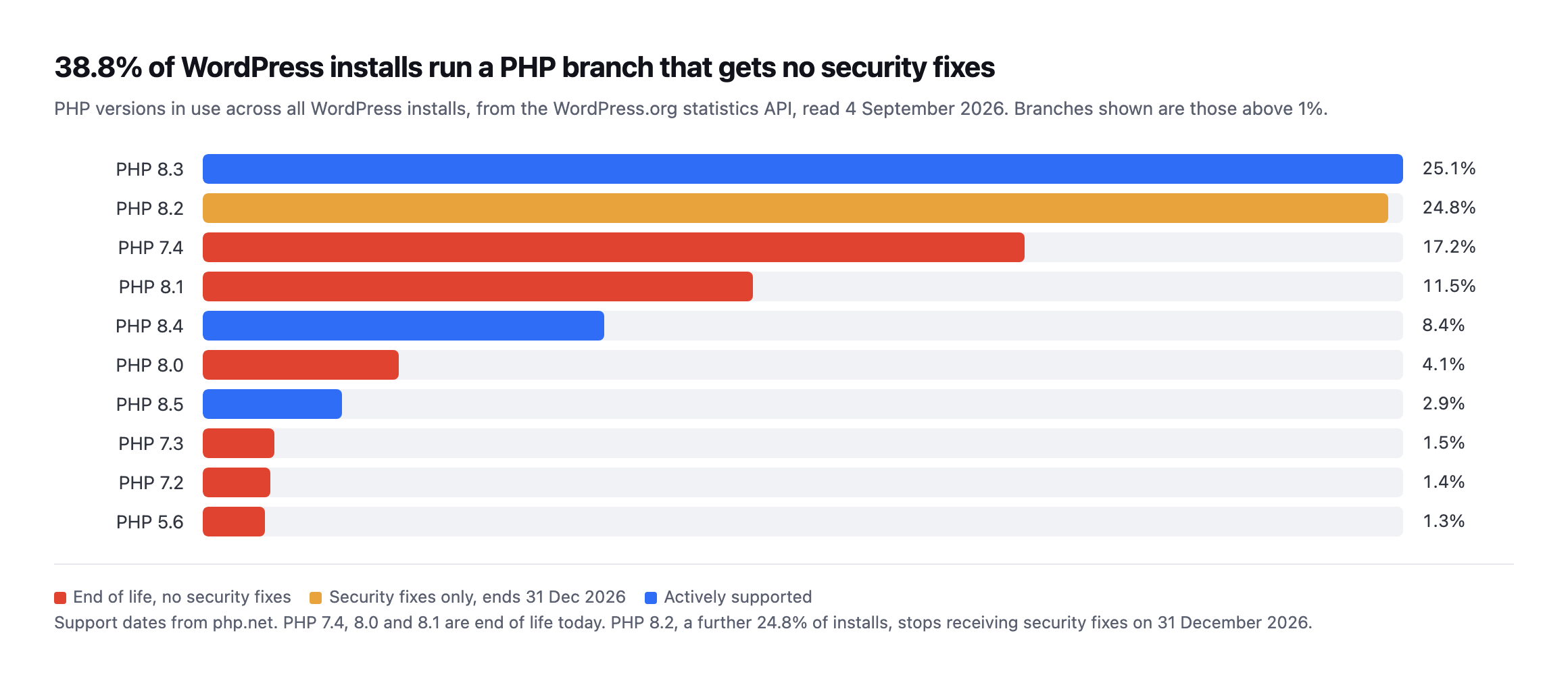
    Horizontal bar chart of PHP versions in use across all WordPress installs, read from the WordPress.org statistics API on 4 September 2026. PHP 8.3 at 25.1 percent and 8.2 at 24.8 percent lead, with 7.4 at 17.2 percent and 8.1 at 11.5 percent marked end of life
    Generated directly from the WordPress.org statistics API so the chart and the

    source cannot drift. Red bars are branches that receive no security fixes at all. PHP 7.4 alone is 17.2% of all WordPress installs.*

    38.8% of WordPress installs run a PHP branch that is past end of life, because php.net lists 7.4, 8.0 and 8.1 as no longer supported. There is a second wave behind it: PHP 8.2 is another 24.8% of installs and its security support ends on 31 December 2026. On New Year’s Day, on today’s numbers, roughly six in ten WordPress sites will be running PHP that nobody patches.

    The plugin side is worse because it is silent. Patchstack counted 1,614 plugins and themes removed from the WordPress.org repository during 2024 over security issues the developers never fixed. A removed plugin does not uninstall itself. It stops receiving updates, it stops appearing in the search box, and nobody gets an email. We probed the directory API to see what a site can actually detect about that, and the answer is less than you would hope.

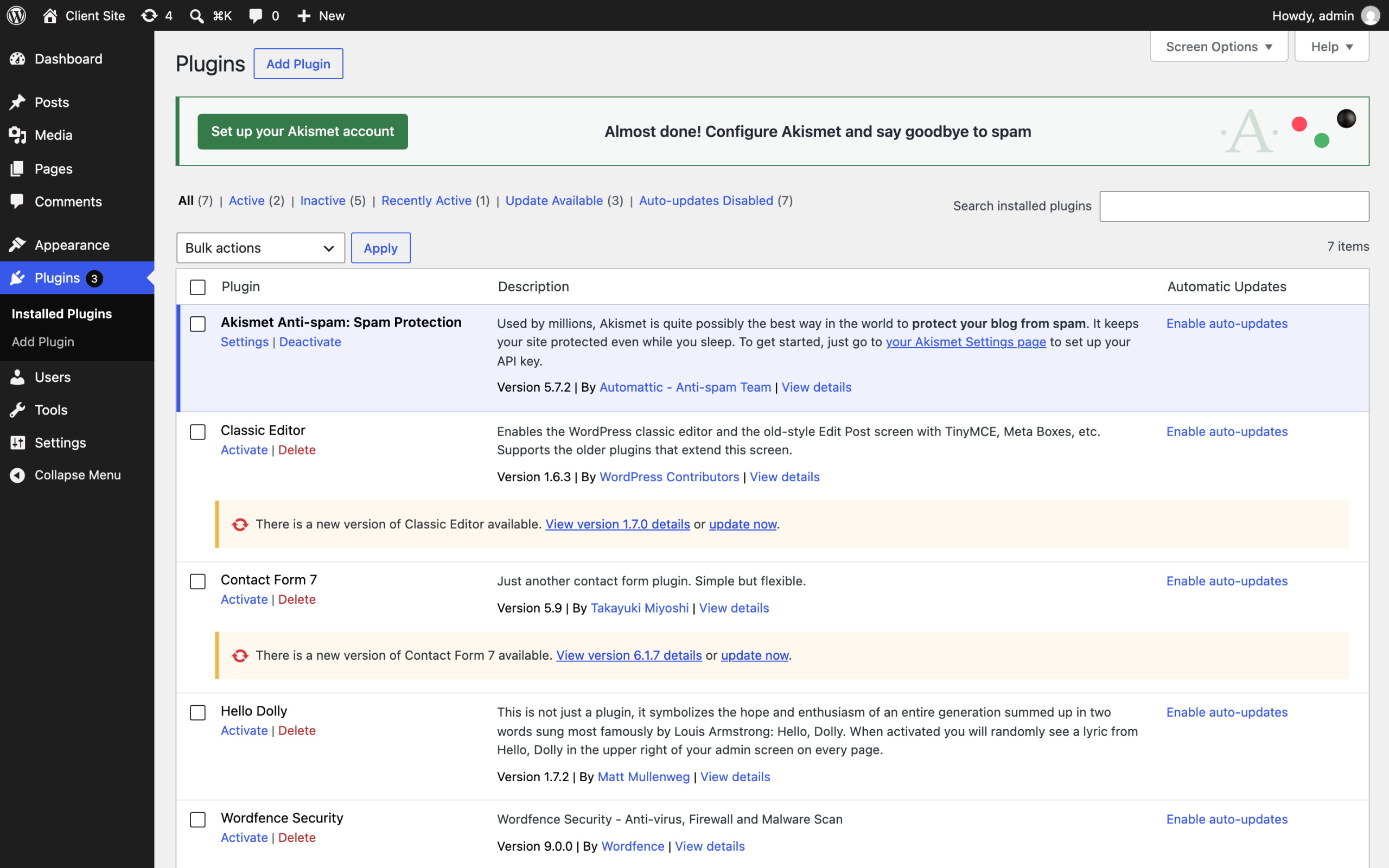
    WordPress plugins screen on the staged install showing the installed plugin list with active and inactive plugins and their version numbers
    The plugins screen tells you what is installed and what version it is on. It does

    not tell you that a plugin was pulled from the directory in March, or that the version you are pinned to has a published advisory. That check has to come from outside the site, matched against what is actually installed here.*

    How should you price a WordPress maintenance plan?

    The mistake is pricing the half hour, because the half hour is not the product. If it were, the correct price would be eleven seconds of compute and everybody would be out of business.

    What the client is buying is the standard being met whether or not anyone got to it, and the evidence that it was.

    Three things follow.

    Price the portfolio, not the site. Your cost per additional site is nearly flat once the mechanical work is automated. Per-site pricing punishes you for the exact efficiency you should be building.

    Sell the record, not the activity. An agency that can show a client what was checked, when, and what was done about it wins work from one that cannot. Talent has nothing to do with it. Proof does.

    Charge for judgement explicitly. “Compatibility: Not tested” is a decision somebody has to own. That is a professional service. The backup and the update are logistics.

    The honest version of where this goes

    I run marketing at POSIMYTH and we are building Protuno, so treat this next part as interested rather than neutral.

    Our bet is that the mechanical eleven seconds should run whether or not anybody opened the site, on every site, at the same standard, with a backup that has been checked underneath it, and, for plugin updates, an automatic rollback if the site stops answering. The person moves up a layer: reading what happened, deciding what to allow, handling the case that genuinely needs a human.

    Being straight about status, because the whole argument here is that you should be able to trust software near a client site: the free audit is live and runs 54 read-only checks from a domain alone. The Super Agents are live now, since 27 October 2026. When this post was written they were not running on anyone’s sites, including ours.

    What is useful to you right now costs nothing. Take the client you have not opened in a fortnight, look at their PHP version against the php.net dates, and check whether anything installed has quietly left the directory. If your answer to “is the site alright” is built from instinct rather than evidence, that is the gap this whole category exists to close.

    And if the scheduler on that site has stopped, none of your backups ran either. That one is worth checking before you do anything else.

    You can run the free audit on a real client domain without installing anything. Do not use a demo site. Use one you actually look after.
  • Introducing Protuno – Your Agency Automated the Wrong Half of the Job

    Introducing Protuno – Your Agency Automated the Wrong Half of the Job

    A client asks you a question once a year, usually over email, usually in a sentence that sounds casual. Is the site alright?

    You answer yes. You are almost always right. But be honest about what that yes is made of: you opened the site last Tuesday, it loaded, nothing has come in on support, and the last time anything went wrong you found out within a day.

    It is a good guess built from good instincts. It is still a guess.

    The uncomfortable version of the question is the one nobody asks out loud.

    Will this site crash? Not today.

    Some Sunday, on a certificate you did not know had 9 days left, on a plugin that was pulled from the directory in March, on a PHP version that went end of life while you were busy shipping someone else’s redesign.

    None of those three is a hypothetical.

    Patchstack counted 1,614 plugins and themes removed from the WordPress.org repository during 2024 over security issues the developers never fixed, and a removed plugin stays installed and active until somebody notices.

    A removed plugin does not uninstall itself. It stops receiving updates, it stops appearing in the search box, and nobody on your side gets an email about any of that.

    The PHP one is worse, because it is not even a secret. 39.0% of WordPress installs are running PHP 8.1 or older, all of which are past end of life, with 7.4 alone accounting for 17.3%.

    And php.net publishes every one of those dates years in advance. Nobody reads them.

    Protuno exists because that question deserves an answer made of evidence instead of instinct.

    The unbilled half hour on every client site

    Every agency runs on work that never makes it onto an invoice.

    The design goes on the invoice.

    The build goes on the invoice.

    The other thing does not: the half hour on a Tuesday when somebody opens a client site, takes a backup, runs four plugin updates, loads the homepage to check it still answers, clicks through to the checkout because one of those plugins touches Woo, and closes the tab.

    Nothing to show a client, nothing to bill. Skip it for three weeks and one day it stops being a half hour and becomes a Saturday.

    Now multiply it.

    Fifteen sites, twenty, forty.

    The work does not scale linearly; it scales worse, because each site accumulates its own history: the one on a legacy theme, the one whose owner installs plugins without asking, the one you inherited with a database nobody has ever cleaned.

    And in most agencies there is nobody to hand the work to. The Admin Bar surveyed 622 people running WordPress agencies and found the median team size is one. One person, the whole portfolio, every Tuesday.

    That same survey found that of agencies with no recurring revenue at all, 58.3% report being rarely or never profitable, which is the arithmetic underneath everything else in this post: the invisible work is exactly the work a retainer would pay for, and it is the first thing to go when there is no retainer protecting it.

    Agencies reporting they are rarely or never profitableBy how much of their revenue recurs
    The survey is careful about this and so are we: stronger agencies gravitate to retainers, so the model reflects a healthy business as much as it creates one. The gap is still six to one.

    The Admin Bar, 2026 agency survey, 622 respondents across 51 countries.

    It is not a niche service either. In the previous year’s survey, of 1,233 web professionals, 93.1% said they sell this work, which made it the single most-offered service on the entire list.

    Almost everyone sells it. Almost nobody has the hands to deliver it at the standard they described while selling it.

    Why the site that fails is the quiet one

    Ask anyone who looks after twenty client sites how they decide which one to open. The honest answer is that they open the noisy one. The client who emails. The site that broke last month, so it feels owed.

    The one they touched most recently, because it is already in a tab.

    That is a reasonable way for a person to triage and a terrible way to run a portfolio. The site that fails is almost never the one on your mind. It is the quiet one.

    The client who never writes. The install you inherited two years ago and have not thought about since.

    You cannot fix that by being more disciplined. Fifteen sites times a real check is more hours than the retainer pays for, and everybody in this industry has quietly agreed to price the work as though it does not take that long.

    The standard slipped, and dashboards did not stop it

    Nobody decided this. It happened one busy week at a time.

    Checks that used to be weekly became monthly. Backups exist, but nobody has restored one, so nobody actually knows whether they work. Uptime is monitored on the homepage only, so a broken checkout on a store can run for a week without tripping anything.

    The certificate renews automatically, until the automation breaks quietly and nobody is watching the thing that was supposed to be watching.

    You can see the drift in public data, which is the uncomfortable part, because it means it is not only your portfolio. 24.3% of WordPress sites are running 6.8 or older. That is not one forgotten install in a corner.

    It is close to a quarter of the most-used CMS on the web sitting several releases behind, looked after by people who would tell you, sincerely, that they keep their sites up to date.

    The tools most agencies use are, if you look at them plainly, dashboards. Very good at telling you something is wrong. Not built to do anything about it.

    So the alert arrives, and the alert becomes a task, and the task waits for a human with enough context to act on it.

    Detection was never the bottleneck. The half hour afterwards was, and it still is.

    WordPress core is moving slowly, and saying so

    WordPress core has spent the last year building the plumbing for exactly this: an Abilities API that lets a site declare what it can do, and an MCP adapter that lets software ask.

    And the people building it are being careful in public. Read access shipped. Write access was deferred. The contributors arguing for caution are the ones closest to the code.

    That is the right instinct, and it is the same one this product is built on. Reading a site is safe. Changing one is not, and anything that changes a site should have to say so first.

    How the free site audit works

    Put a domain in the box on the homepage. There is no step two. No plugin, nothing installed, and you do not have to own the site to run it.

    54 checks run against what the address can tell us from the outside, across certificates, security, performance, SEO, mail and DNS, commerce. Every one is read-only. Nothing is written, nothing is changed, and the site does not know it is being looked at any more than it knows a visitor arrived.

    What comes back is a score, and underneath it the findings that produced it. Not only a grade. A certificate expires in 9 days rather than Security: B minus. Every one is written so you can forward it to a client without reading it first, because a report you have to translate is a report you will not send.

    The full list of what it checks, and what changes once a site is connected, is in the documentation.

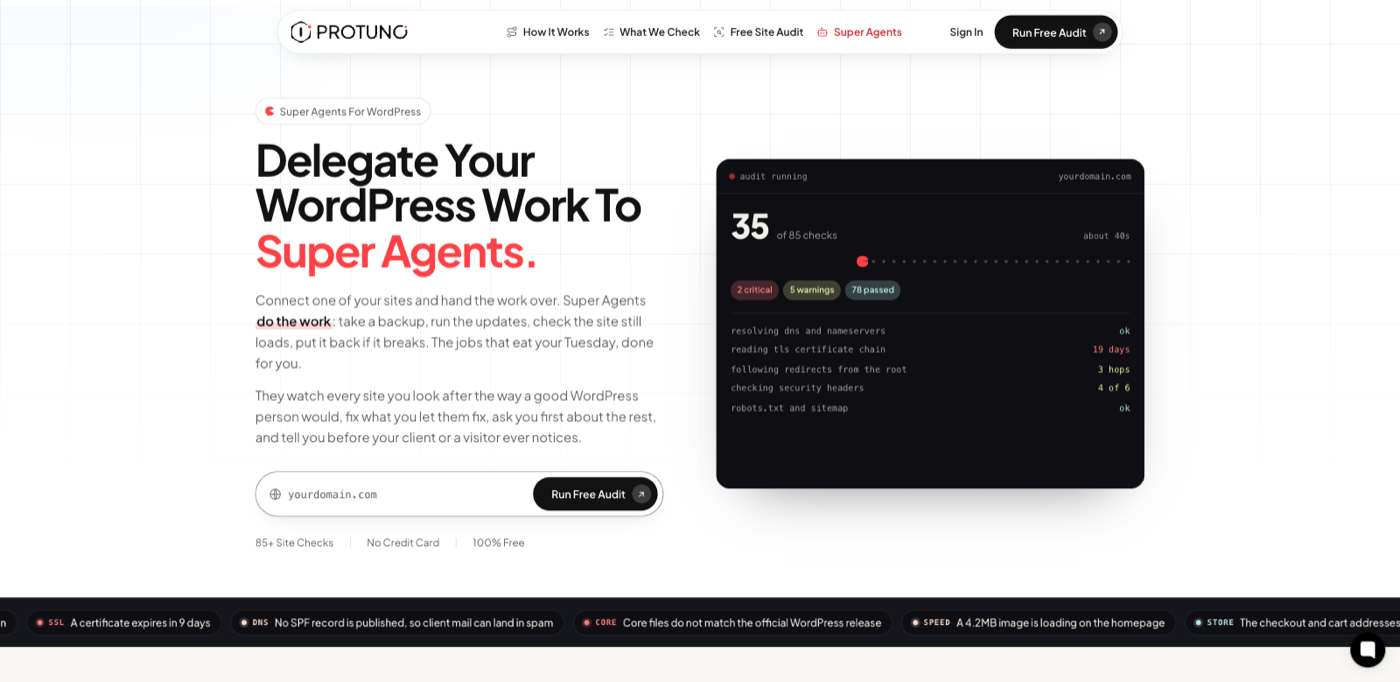
    The Protuno homepage with the free site audit input
    The audit takes a domain and nothing else. This is deliberately the lowest-commitment thing in the product, because it is also the fastest way to prove the rest is worth your attention.

    Connecting a site, playbooks, and Super Agents

    An address only tells you so much. Connecting a site adds 31 checks that can only be read from inside the install: which plugins are actually active, what version of PHP is really running, whether the debug log is writing to a file anyone can download.

    It takes about two minutes and the whole of it is: install a free connector, look at the list of things the site says it can do, and paste a credential your own WordPress created. The plugin keeps no copy. You can revoke it from your user profile at any moment, without asking us, and the connection dies immediately.

    The three steps are written out here.

    Playbooks: a fixed sequence of steps

    A playbook is one job, written out step by step before it ever runs. Take a backup. Check the backup is sound. Apply these updates. Load the site. Walk the checkout. If the site stops answering, put it back.

    The steps are fixed before the run. Your own AI app carries them out one at a time, and a step that changes a site waits for your approval in Protuno. You can read the entire sequence before you allow it, and it does the same thing on Tuesday that it did last Tuesday. There are 27 playbooks today, each switchable per site: 17 only read a site and 10 can change it.

    That determinism is the point. An agency cannot audit a vibe. It can audit a list of steps.

    Super Agents: named agents that own a group of playbooks

    A Super Agent is a named agent that owns a group of playbooks. It has a name and an area it looks after. Wren takes Care, Rook takes Security, Dash takes Performance, Iris takes SEO, Till takes eCommerce, Echo takes Marketing.

    They are live now, since 27 October 2026. They run inside your own AI app, on your own plan there. When this post was first written, on 31 August, none of them had shipped, and the post said so.

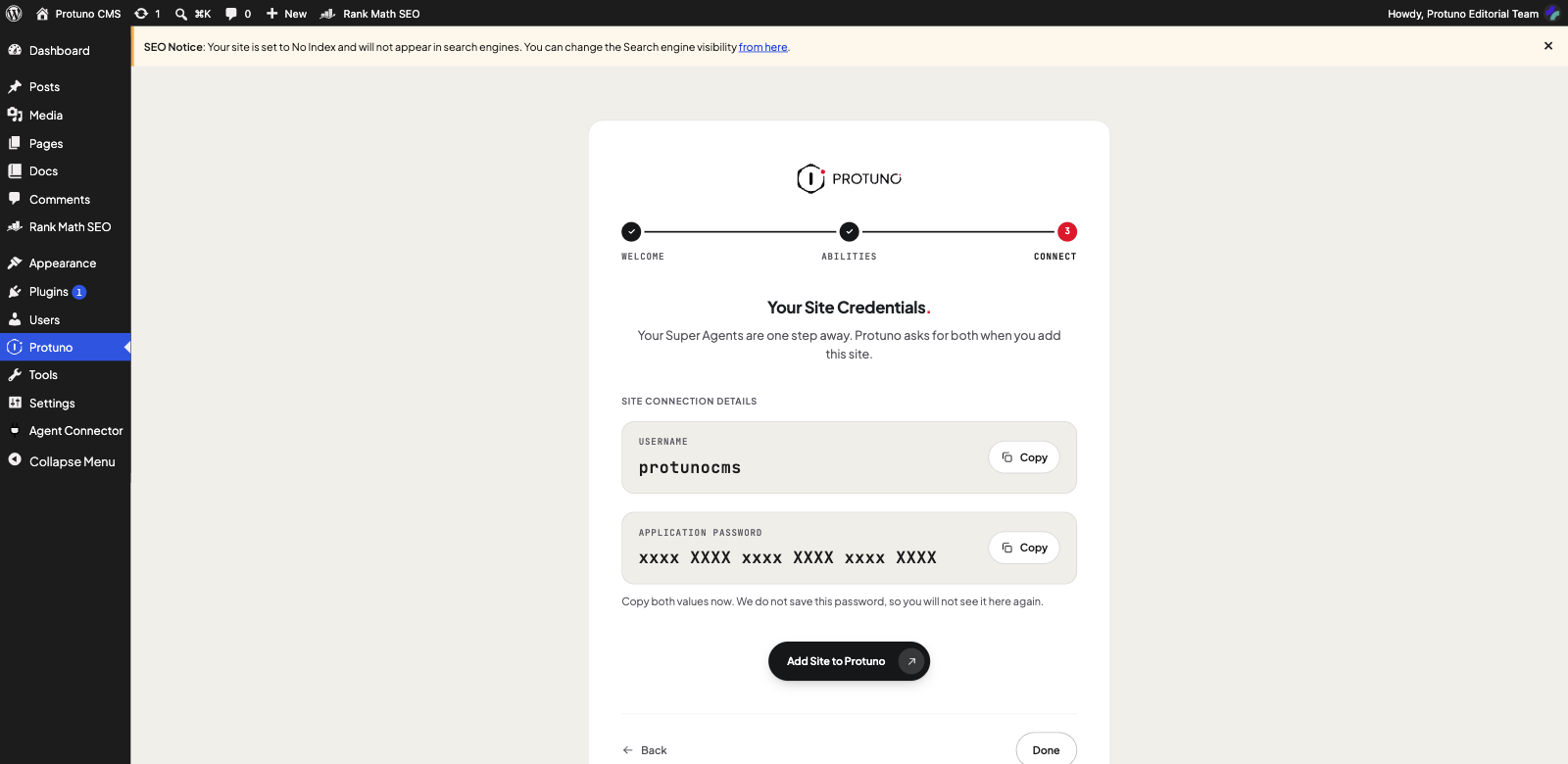
    The Protuno connector showing a username and an application password, with copy buttons
    Step three inside WordPress. The plugin mints the application password, shows it once, and keeps no copy. The password here is masked for publication; on your own site it is a real value you copy and then never see again.

    How permission and rollback are enforced

    The part we care most about is also the part that took the longest.

    It is not hard to build something that logs into a WordPress site and changes things. It is hard to build something an agency will actually let near a client site.

    Those are different problems, and most of this category solves the first one and hopes you do not notice.

    So the design rule is one sentence: nothing writes to a client site because a machine felt confident.

    Permission is set per site, and there are two settings. Read Only: it analyses and reports, and never changes the site. Execute: it may change files, the database and settings. Every site starts in Read Only, and only the owner can turn Execute on, in Protuno and never from the AI app.

    On top of that, each agent has a trust level on each site: Read, Ask or Auto. A new agent starts at Ask.

    Underneath that sit three structural guarantees, and they are structural on purpose rather than promised:

    A backup is taken before every fix. Taking one is not the same as proving one, and a backup nobody has restored is a hope with a filename, which is why every fix can also be undone from its run report.

    A change can be undone. Undo is on the run report. It is not an incident response you page someone for.

    On a site set to Read Only, the tools that could change anything are taken out of the run before it starts. The vulnerability watch reports rather than patches. An instruction is a policy. Taking the tool away is a good deal stronger than a policy.

    Run history: the record of what happened

    Every run across every site lands in one place, newest first. A playbook started on four sites is four runs, each with its own report.

    This is the least exciting screen in the product and possibly the most important commercially.

    An agency that can show a client what was checked, when, and what was done about it is going to win work from one that cannot.

    Talent has nothing to do with it.

    Proof does.

    No credits to watch

    Protuno does not sell or spend AI credits. The AI runs in your own AI app, on your own plan there, so there is no credit balance to watch. Protuno has three plans: Free, Pro and Agency.

    Free covers 3 sites and all 27 playbooks. Pro covers up to 10 sites and Agency up to 25, and both add routines and white-label reports.

    What is live today, and what is not

    We would rather you heard this here than found it yourself after signing up.

    Live today. The free audit. Put in a domain, get 54 read-only checks back across certificates, security, SEO and performance, with the literal finding written out.

    It works now. It is the part of this you can use in the next two minutes.

    Also live. The connector plugin, the abilities check, the credential flow and the dashboard. You can connect a site today and it stays connected.

    Also live, since 27 October 2026. The Super Agents.

    Wren, Rook, Dash and the rest now run inside your own AI app, with 27 playbooks between them.

    When this post was first written, on 31 August, they were not running on anyone’s sites, including ours, and the post said so.

    We could have written this post in the present tense and left you to work out after signing up which agents actually run. Plenty of launches do.

    But the entire argument above is that you should be able to trust software near a client site, and a company that overstates its own release dates has already answered the question of whether it can be trusted with a backup.

    The shipping order, from least risk to most

    The sequence is chosen for blast radius, not for demo value. This is the order we planned on 31 August, kept as written because it explains why the safest jobs came first. Many of these playbooks are now live in your own AI app, and the current list is on the playbooks page.

    First: the playbooks that only read, and the updates behind a backup that has been checked.

    Plugin updates on a schedule.

    A vulnerability watch that runs every morning and reads what is actually installed against the advisory feeds, telling you the morning something you run becomes a problem.

    Reading a feed every morning is a machine’s job. It always was.

    Then: database cleanup, uptime and certificate watch. The first group where the before and after is measurable, which is our bar for charging for something.

    Then connectors. One integration layer, released once, rather than four integrations on four dates. You point it at something you already run, or paste an API or MCP server address, see what it can do, and grant only the parts you want.

    Then the silent failures: deliverability, the backup verifier, licence expiry. A form that says thank you and throws the message away. A backup nobody has ever restored. A licence that lapsed and quietly stopped the security updates.

    Last: the malware cleaner and WPDoctor. The two with the widest brief and the most to get wrong. They ship after the rollback path has been proven by the simpler agents, because the correct order to earn trust in is the boring one.

    It would have been faster to ship the impressive playbooks first and add the safety net later. It also would have been the wrong product. An agency does not need software that is usually right about a client site.

    What changes for the person doing the work

    The interesting change is not that a machine does the updates. It is what happens to the person.

    Right now the skilled part of your job and the mechanical part are welded together. The same person who can architect a migration is also the person clicking update, because it has to be somebody they trust.

    The most expensive judgement in the building gets spent on the cheapest task on the list.

    Pull those apart and the day changes shape. The mechanical work runs whether or not anyone got to it, on every site, at the same standard.

    The person moves up a layer: reading what happened, deciding what to allow, handling the one case that genuinely needs a human, and talking to the client before the client notices anything.

    That is a better job. It is also a better business, because it is the first time the fifteenth site costs roughly what the first one did.

    We think that is where this whole category goes. Software does not replace the agency. It lets an agency carry more sites without proportionally more people, and finally get paid for work that was always invisible.

    And the answer to the question at the top of this page stops being a guess.

    Will this site crash? Probably not, and here is the certificate expiry, the backup that was restored to prove it works, the update that was applied on Tuesday and the checkout that was walked afterwards.

    Not a feeling.

    A record.

    Who is building Protuno

    Protuno is built by POSIMYTH.

    Our products run on more than 500,000 WordPress installs, which means we have spent years on the receiving end of the thing this product exists to fix: the support ticket that starts with an update nobody watched, on a site nobody opened.

    We are not arriving at WordPress operations from the outside with a general-purpose agent and a hope. We already know what breaks, because for a decade it has been breaking on installs that run our code.

    Claim your free site audit

    Do not use a demo site. Use a real one you look after and have not opened in a fortnight. The pitch is that plain: we think it will find something, and we think you would rather know.

    Claim your free site audit on protuno.com