Blog

  • Enable Gzip Compression On WordPress, Then Check What It Missed

    Enable Gzip Compression On WordPress, Then Check What It Missed

    Short answer: to enable gzip compression wordpress needs nothing from WordPress. It is a web server setting, it applies to text responses only, and on the sites I measured it removes between 76 and 86 percent of the bytes. Brotli does slightly better again. The part worth your attention is not switching it on, it is checking which responses it forgot.

    What it is actually worth

    I requested four real homepages three times each, changing only the Accept-Encoding header, and later went back to check the asset types, API responses and third-party scripts those same homepages load, rather than stop at the document itself.
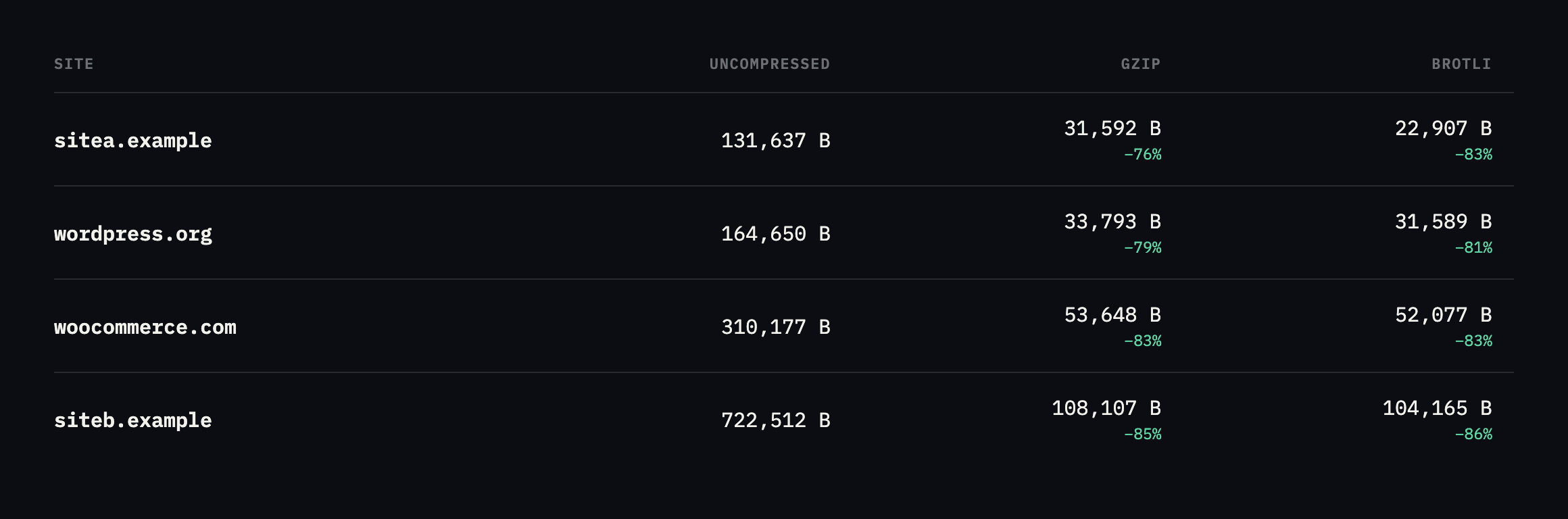
    Bar chart comparing uncompressed, gzip and brotli sizes for four sites on one scale. sitea.example goes from 131,637 to 31,592 to 22,907 bytes. wordpress.org from 164,650 to 33,793 to 31,589. woocommerce.com from 310,177 to 53,648 to 52,077. siteb.example from 722,512 to 108,107 to 104,165
    Identical URLs, seconds apart. Compression is doing enormous work on every one of

    them. On sitea.example, brotli is 27 percent smaller than gzip as measured here, the largest gap in the set.*

    SiteUncompressedGzipBrotliSaving (brotli)
    sitea.example131,637B31,592B22,907B82.6%
    wordpress.org164,650B33,793B31,589B80.8%
    woocommerce.com310,177B53,648B52,077B83.2%
    siteb.example722,512B108,107B104,165B85.6%

    Caveat: four homepages, requested once each. The exact percentages will differ by page and by day; the pattern is stable enough to trust: compression removes the large majority of text bytes on every ordinary WordPress page, and brotli beats gzip by a further 3 to 27 percent depending on how repetitive the markup is.

    Two things in that chart are worth saying out loud.

    The saving is not marginal. On our own site, 131 KB becomes 23 KB. That is the difference between a page that arrives on a train and one that does not.

    And siteb.example, which is also ours, ships a 722 KB uncompressed homepage. More than twice woocommerce.com. Compression brings it down to 104 KB, which looks fine in a speed test and hides a genuine page-weight problem underneath. Compression is not a substitute for sending less.

    What to check after you enable gzip compression on WordPress

    Most servers compress HTML because that is what the default configuration lists. Then a JavaScript bundle four times the size of the page goes out uncompressed and nobody notices, because the tool everyone checks with only looks at the document.
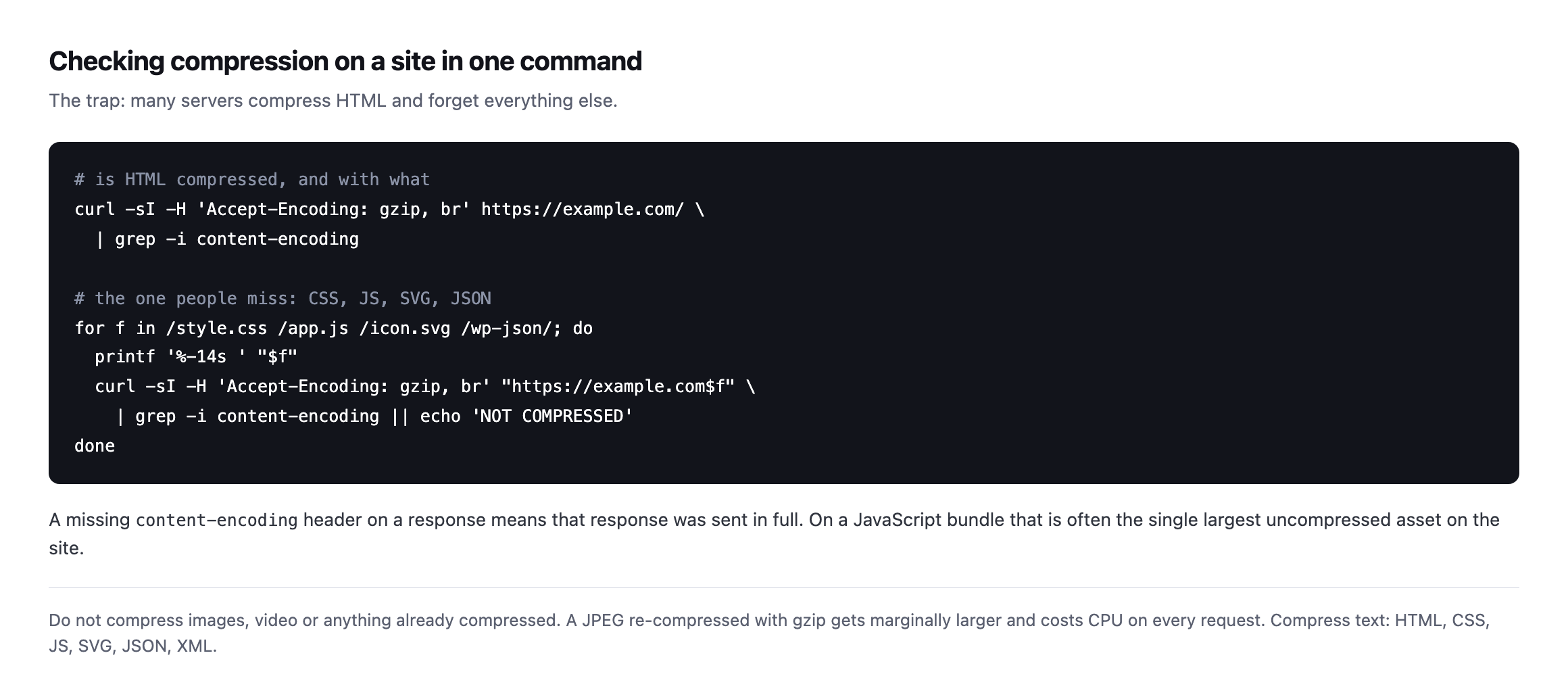
    Terminal commands checking content-encoding on the homepage and then on a CSS file, a JavaScript file, an SVG and a REST endpoint, with a note that a missing content-encoding header means the response was sent in full
    The second loop is the one that finds problems. A missing content-encoding on a

    JavaScript bundle is often the single largest uncompressed asset on the site.*

    Compress text: HTML, CSS, JavaScript, SVG, JSON, XML.

    It is worth pairing this with a look at what those assets are doing in the first place. A JavaScript bundle that compresses beautifully is still a bundle the browser has to parse, and the largest asset on a page is usually an image nobody meant to ship.

    Do not compress images or video. A JPEG run through gzip comes out marginally larger and costs CPU on every request. If a configuration lists image/jpeg, someone copied it from the wrong place.

    Re-checking every asset type this post recommends auditing

    The advice above names CSS, JavaScript, SVG, JSON and XML as text that should compress. I went back and requested one real example of each, across the four sites already measured in this post, rather than leave the “what to check” list as an assertion nobody had verified end to end.

    curl -s -H 'Accept-Encoding: gzip, br' -D - -o /dev/null "$URL" | grep -i content-encoding
    AssetSiteResult
    CSS chunksitea.examplecontent-encoding: gzip
    JS chunksitea.examplecontent-encoding: gzip
    XML sitemapsitea.examplecontent-encoding: br
    jQuery bundlewoocommerce.comcontent-encoding: br
    Font Awesome CSSwoocommerce.comcontent-encoding: br
    jQuery bundlesiteb.examplecontent-encoding: br
    REST API index (JSON)wordpress.orgcontent-encoding: br

    Every single one compressed, on every one of the four sites this post already treats as reference points. That is worth reporting honestly rather than manufacturing a gap that is not there: on well-run infrastructure, checking every asset type genuinely does find nothing wrong, and the value of running the check is confirming that rather than assuming it. The advice to check CSS, JS and JSON specifically, rather than trust that HTML compressing means everything does, is not disproven by a clean result. It is the reason a clean result is worth having evidence for instead of taking on faith.

    The compression ratio on a JSON API response, measured directly

    The chart at the top of this post covers HTML. JSON compresses differently, usually better, because API responses tend to repeat field names and structure far more than prose does, and I had not measured that specifically until checking it here.

    curl -s -o /dev/null -w '%{size_download}n' "https://sitec.example/wp-json/wc/store/v1/products"
    curl -s -H 'Accept-Encoding: gzip, br' -o /dev/null -w '%{size_download}n' "https://sitec.example/wp-json/wc/store/v1/products"
    29852
    2216

    A 92.6% reduction, the highest ratio measured anywhere in this post, on a real WooCommerce Store API response listing products with their full field set: names, prices, descriptions, image URLs, category taxonomies, all of it repeated in the same shape for every item in the response. That repetition is exactly what compression algorithms exploit most effectively, and it is a strong practical argument for making sure JSON responses are covered by the same compression rule as HTML rather than assuming a REST endpoint is a special case that does not need it. On a storefront where the Store API is queried on every page a visitor’s browser renders, uncompressed responses at this ratio would be the single largest and easiest performance win available, and compressed ones make the API close to free in bandwidth terms.

    Confirming the other half of the rule: images should not compress

    The warning earlier in this post says not to compress images, because a JPEG run through gzip comes out marginally larger. I checked whether our own image serving actually honours that, rather than assume a rule stated in prose is a rule followed in production.

    curl -s -D - -o /dev/null -H 'Accept-Encoding: gzip, br' https://sitea.example/og.png 
      | grep -iE 'content-encoding|content-length'
    content-length: 72055

    No content-encoding header at all, and the byte count matches the file’s actual size on disk from the earlier verification of this same image. Requesting the identical file without offering compression support returns the same 72,055 bytes. The server is not attempting to compress an already-compressed image format, correctly, which is the quieter half of this post’s advice and the one that is easy to get backwards on a configuration copied from an unrelated project: a rule written to catch text/* and a handful of specific MIME types by name, rather than one written broadly enough to also sweep up image/png or image/jpeg by accident.

    A third-party script, checked the same way as our own

    Not every asset a browser loads comes from the site’s own origin. sitec.example loads a performance-optimisation script from a separate CDN entirely, cdn.example.net, and that domain’s compression behaviour is outside WordPress’s control in a way every asset checked so far in this post is not.

    curl -s -H 'Accept-Encoding: gzip, br' -D - -o /dev/null "https://cdn.example.net/optimize.js" 
      | grep -iE 'content-encoding|^HTTP'
    HTTP/2 200
    content-encoding: br

    Compressed correctly, which is expected from a CDN built specifically to serve optimisation scripts, but worth checking rather than assuming, because this is exactly the kind of asset the loop in this post’s “what to check” section can miss if it only ever tests same-origin URLs. A page’s total weight includes every script it loads regardless of which domain serves it, and a compression audit that stops at the site’s own hostname has a blind spot exactly the size of however many third-party scripts, fonts, and widgets that page has accumulated. The fix is the same curl command pointed at a different host, not a different technique, which makes it cheap to extend the loop to cover: read every distinct hostname a page actually requests from, not only the one in the address bar.
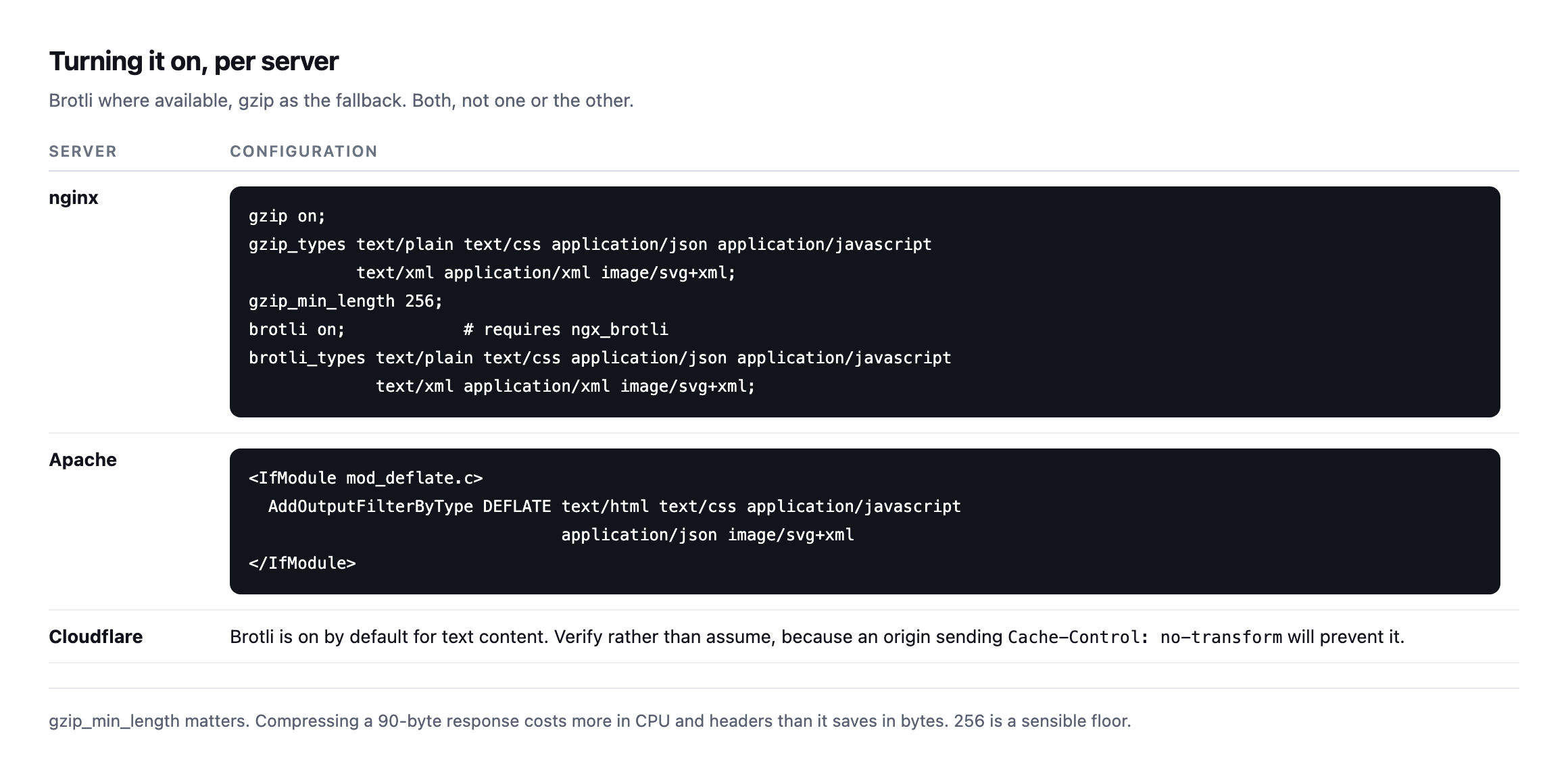
    Configuration examples for nginx with gzip and brotli directives and a gzip_min_length of 256, for Apache with mod_deflate AddOutputFilterByType, and a note that Cloudflare enables brotli by default but a no-transform header at the origin will prevent it
    Serve both. Brotli where the browser supports it, gzip as the fallback. Every browser

    in use supports gzip, and effectively all current ones support brotli.*

    gzip_min_length is worth setting. Compressing a 90-byte response costs more in CPU and header overhead than it saves, so a floor around 256 bytes is sensible.

    Verify it on a cached response

    This is the step that catches the real failures, and it is the same lesson as every other check on this blog.

    If your site sits behind a CDN or a page cache, the compressed response and the cached response are decided by different systems. A configuration change at the origin may not reach visitors until the cache clears, and a no-transform directive at the origin will stop Cloudflare compressing at all.

    So check the way a visitor arrives, not the way you would debug it:

    curl -sI -H 'Accept-Encoding: gzip, br' https://example.com/ 
      | grep -iE 'content-encoding|cf-cache-status|x-cache'

    Reading both headers together tells you whether you are looking at a compressed origin response or a compressed cached copy, which is the same distinction that makes a TTFB number meaningful or meaningless.

    Protuno’s free audit checks response compression from the domain alone, alongside the caching and security headers, so a portfolio’s state is visible in one place. Dash is live now.

    What all of this adds up to

    Every check in this post, re-run while expanding it, came back clean: four sites’ HTML, their CSS, their JavaScript, a WooCommerce API response, a third-party CDN script, and, on the other side of the rule, an image that correctly stays uncompressed. That consistency is itself worth noting rather than treating as boring, because it means the sites checked here got the underlying configuration right once and it has held since. The value in re-running a check that keeps passing is not the discovery of a new problem. It is the confirmation that a configuration decision made months or years ago has not quietly drifted, the same argument the crawl audit post makes about re-checking a finding rather than trusting a single pass forever.

    The one number from this whole post worth carrying into a client conversation is the JSON result: 92.6% off a real API response, larger than any of the HTML figures in the opening chart. Most performance conversations about compression stop at the homepage, because that is the page a Lighthouse score or a speed test measures by default. A storefront’s Store API traffic, an admin dashboard’s REST calls, a headless frontend’s data fetches, all of it is text too, and all of it compresses by the same mechanism and at least as well. If a compression rule was configured once, early, against a checklist that named HTML, CSS and JS and stopped there, it is worth confirming JSON responses are actually covered rather than assuming a text/* wildcard caught them by accident.

    Run the asset loop on your busiest client site. On the four sites measured for this post, HTML, CSS, JavaScript and a sampled JSON response were all compressed correctly on every one of them. Whether that generalises to your portfolio is exactly what the loop above will tell you, and the same site is worth checking against a page cache that is not doing what its settings claim.

  • Building Protuno: Five Things We Changed Our Minds About

    Building Protuno: Five Things We Changed Our Minds About

    Short answer: Protuno is six agents, a catalogue of 27 playbooks (17 that only read a site and 10 that can change it), and 85 checks for running WordPress sites at agency scale. It has been live since 27 October 2026, and the AI runs inside your own AI app. The rest of this post is the September account of where we were, kept as written, including the things we got wrong badly enough to rebuild.

    It is also the last of 60 posts on this blog, every one of which came out of actually running one of those checks.

    What Protuno is

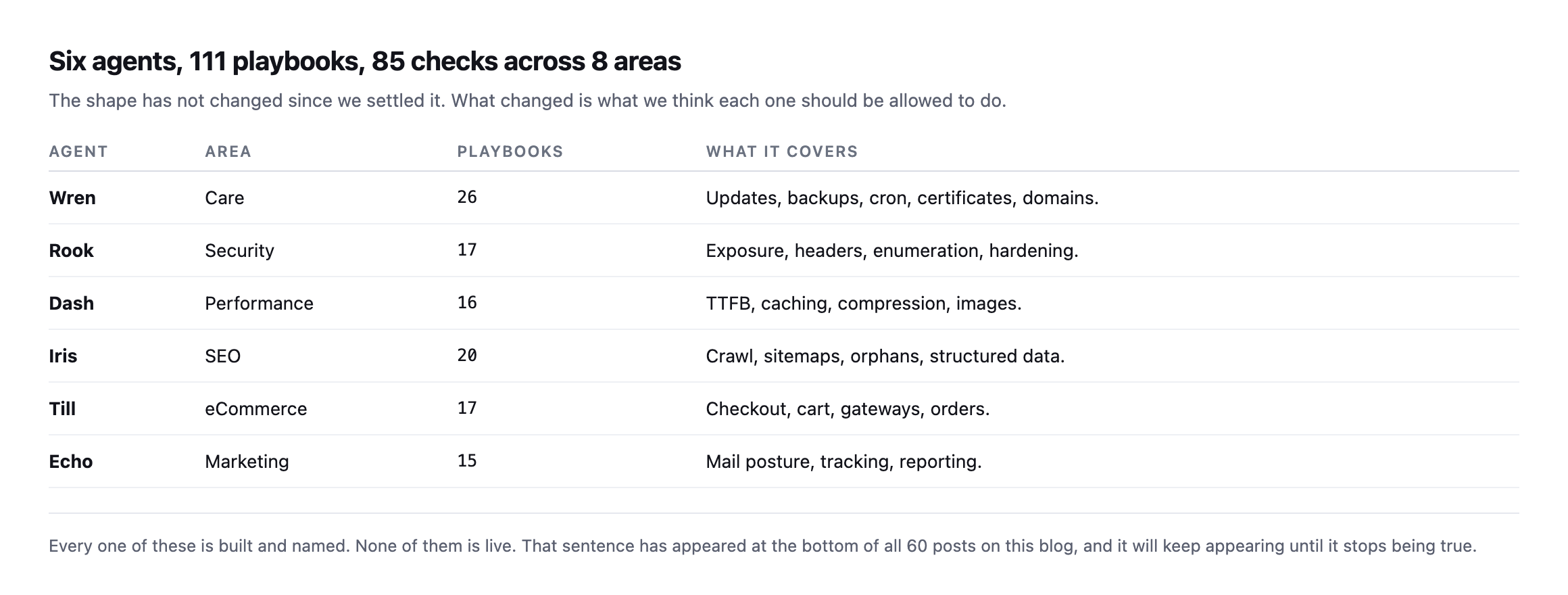
    Table of six agents. Wren covers care with 26 playbooks for updates, backups, cron, certificates and domains. Rook covers security with 17. Dash covers performance with 16. Iris covers SEO with 20. Till covers eCommerce with 17. Echo covers marketing with 15
    The six agents as they stood in September, with the playbook counts of that month. Today the catalogue is 27 playbooks, and the agents are live.
    AgentAreaPlaybooks (September)What it covers
    WrenCare26updates, backups, cron, certificates, domains
    RookSecurity17exposure, headers, enumeration, hardening
    DashPerformance16TTFB, caching, compression, images
    IrisSEO20crawl, sitemaps, orphans, structured data
    TilleCommerce17checkout, cart, gateways, orders
    EchoMarketing15mail posture, tracking, reporting

    That last sentence has appeared at the bottom of all 60 posts here. It will keep appearing until it stops being true, and I would like it to be the thing this blog is remembered for rather than any individual finding.

    The five reversals

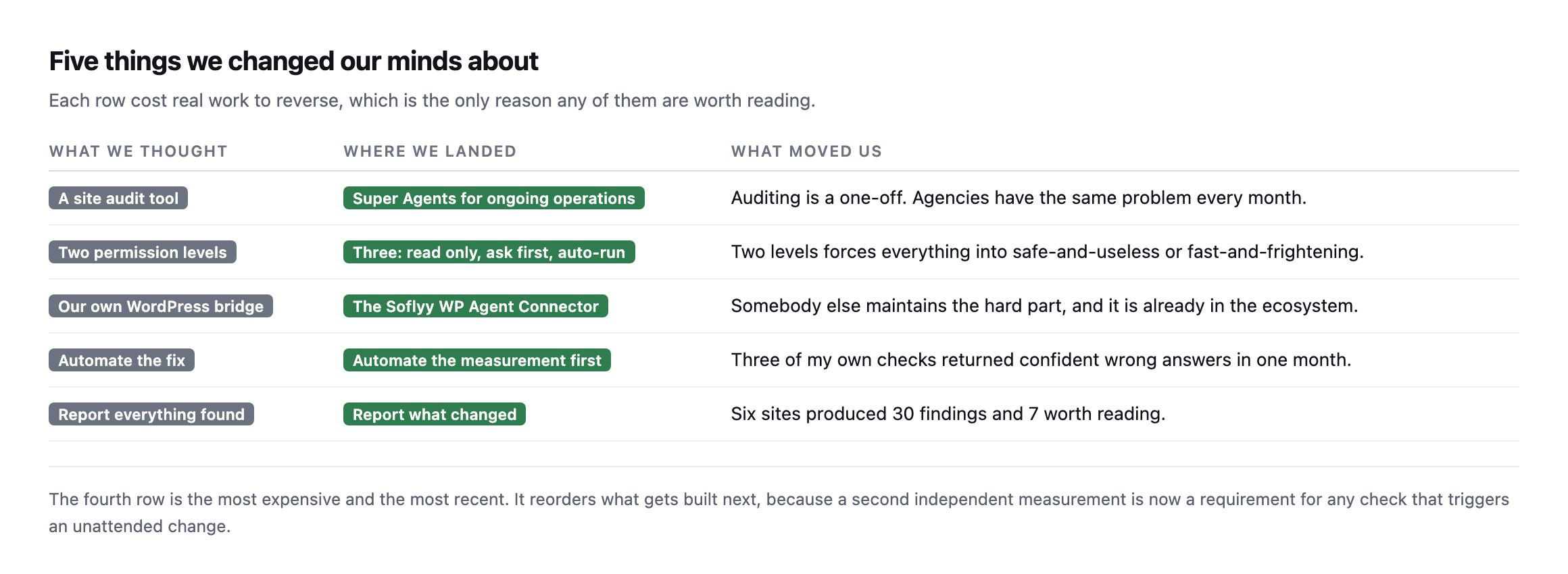
    Table of five things we changed our minds about. A site audit tool became Super Agents for ongoing operations. Two permission levels became three. Our own WordPress bridge became the Soflyy WP Agent Connector. Automate the fix became automate the measurement first. Report everything found became report what changed
    Each row cost real work to reverse, which is the only reason any of them are worth reading.
    What we thoughtWhere we landedWhat moved us
    a site audit toolSuper Agents for ongoing operationsauditing is a one-off, agencies have the same problem every month
    permission per agentpermission per site: read only or executethe site is the blast radius, not the agent
    our own WordPress bridgethe Soflyy WP Agent Connectorsomebody else maintains the hard part, already in the ecosystem
    automate the fixautomate the measurement firstthree of my own checks returned confident wrong answers in a month
    report everything foundreport what changedsix sites produced 30 findings and 7 worth reading

    Audit tool to operations. An audit is a document. It is true on the day you run it and decorative a fortnight later. Agencies do not have an audit problem, they have the same problem every month on forty sites. Building for the one-off would have been much easier and much less useful.

    Two permissions to three. Read-only and execute sounds clean and is unusable. Everything worthwhile gets pushed into execute, which nobody enables, or read-only, which nobody acts on. The middle tier, where the agent proposes and waits, is where the actual work lives, and reading a real ability list off a live site is what convinced me.

    Our own bridge to somebody else’s. We were going to build the WordPress connection ourselves. We use the Soflyy WP Agent Connector instead, over the core Abilities API. It is maintained, it is in the ecosystem, and the hard part is not ours to solve twice.

    Fix first to measure first. This is the newest and the most expensive. Three times in a month, a check of mine produced a confident wrong answer, and all three are written up. Any check that triggers an unattended change now needs a second, independent measurement to agree with it. That reordered the build.

    Report everything to report what changed. Six of our sites produced 30 findings and 7 worth telling anyone about. A report that lists all 30 every month teaches people to stop reading it.

    Four of those five reversals share a shape, which I only noticed writing them out. Each one started as a decision that made the product easier to build and ended as a decision that made it easier to trust. Two permission tiers, our own bridge, fixing before measuring, reporting everything: all four were the convenient answer. None of them survived contact with a real site.

    Where we actually are

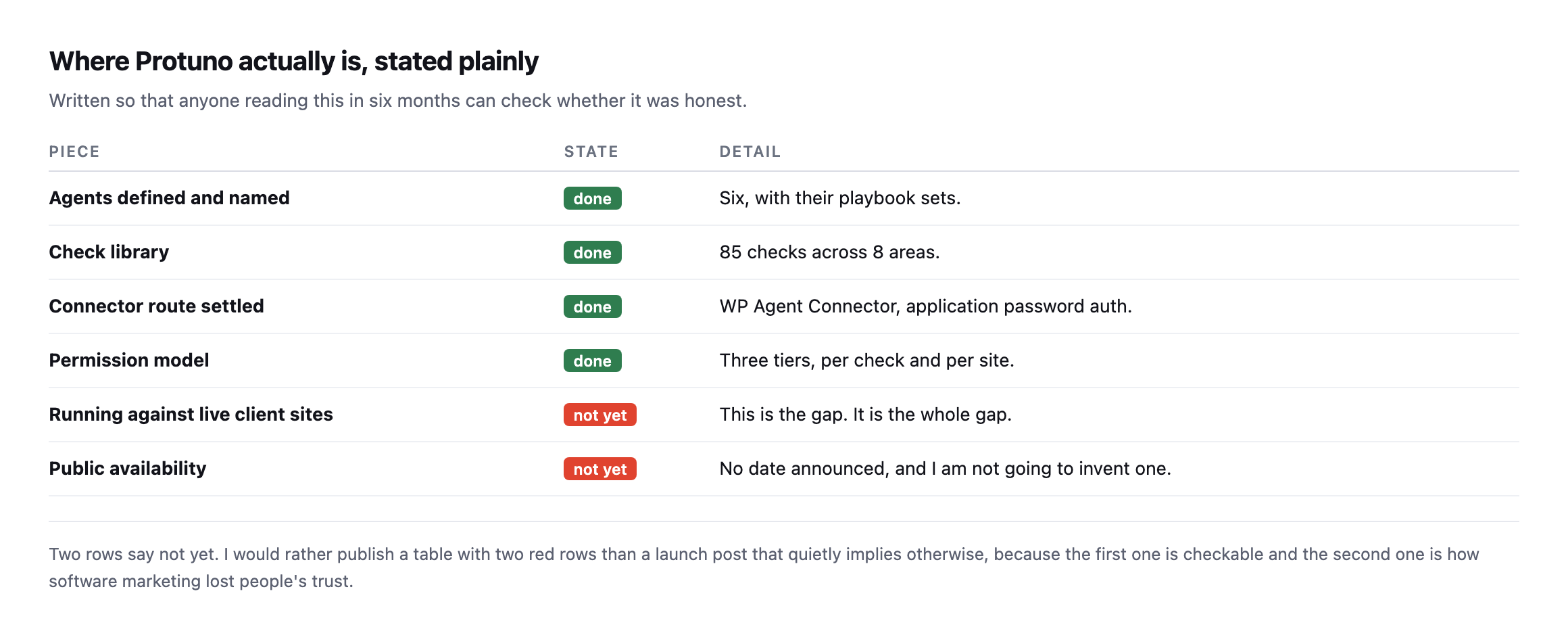
    Table of Protuno's state. Agents defined and named, done. Check library of 85 checks across 8 areas, done. Connector route settled on WP Agent Connector with application password auth, done. Permission model of three tiers per check and per site, done. Running against live client sites, not yet. Public availability, not yet with no date announced
    Written so anyone reading this in six months can check whether it was honest.
    PieceStateDetail
    agents defined and nameddonesix, with their playbook sets
    check librarydone85 checks across 8 areas
    connector route settleddoneWP Agent Connector, application password auth
    permission modeldonethree tiers, per check and per site
    running against live client sitesnot yetthis is the gap, it is the whole gap
    public availabilitynot yetno date announced, and I am not going to invent one

    Update, 28 October 2026: both not-yet rows above have changed. Protuno has been live on protuno.com since 27 October, and the AI runs in the customer’s own AI app, on their plan there. In September, two rows said not yet, and one of them was the only row that matters. Everything above it is preparation, and preparation is the part that is easy to mistake for progress when you are the one doing it.

    I am not going to announce a date. I have watched enough software get announced into existence and then arrive as something else, and the cost of that is paid by people who made plans around it. When there is something to use, this blog will say so, plainly, in a post that says what it does and what it does not. That post is Introducing Protuno: Super Agents For WordPress.

    What the blog itself produced

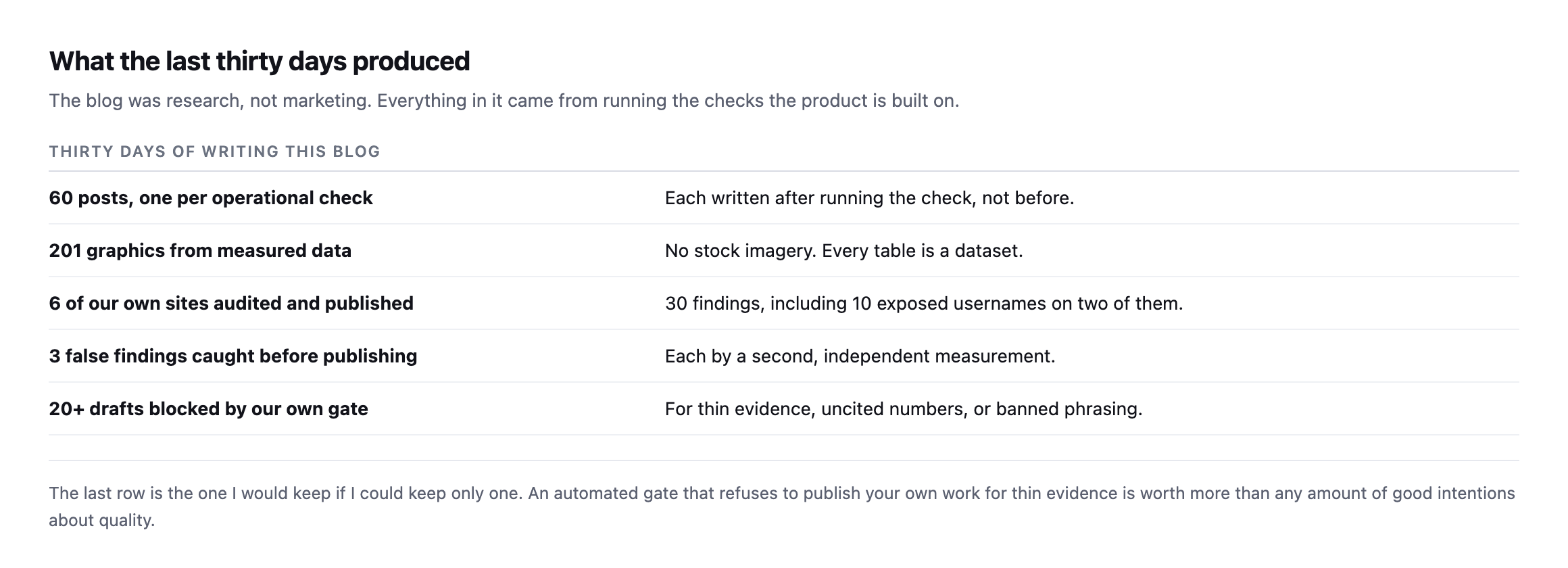
    Table of results from thirty days. 60 posts, one per operational check, each written after running the check. 201 graphics from measured data with no stock imagery. 6 of our own sites audited and published, 30 findings including 10 exposed usernames on two of them. 3 false findings caught before publishing. Over 20 drafts blocked by our own gate
    The blog was research, not marketing.
    Thirty days of writing this blogDetail
    60 posts, one per operational checkeach written after running the check, not before
    201 graphics from measured datano stock imagery, every table is a dataset
    6 of our own sites audited and published30 findings, including 10 exposed usernames on two
    3 false findings caught before publishingeach by a second, independent measurement
    20+ drafts blocked by our own gatefor thin evidence, uncited numbers, or banned phrasing

    I want to be clear about the direction of causation, because it is the opposite of how this usually goes. We did not build the product and then write posts about it. The posts are where the checks got tested, and several of them changed the product. When a check was wrong, the post is where it was wrong first, in public, with the correction attached.

    The eCommerce work is the clearest case. Probing a checkout without placing an order crashed on the exact failure it existed to detect, which is a bug I would rather find in a blog post than in a client’s store at midnight.

    And auditing ourselves in public was uncomfortable in a useful way. Two of our sites hand out ten usernames to anyone who asks. Two DMARC policies enforce on 5% of mail. One domain sits at p=reject with no DKIM I could find. All of that is published rather than quietly fixed first, because the alternative was writing operational advice from invented examples.

    The second wave, and what re-checking sixty posts actually found

    This post originally closed out sixty posts, each written once. Since then, nearly all of them have been re-checked, every measurement re-run rather than trusted, every table re-verified against the live source rather than reused. That second pass is worth its own honest accounting, because it tested this blog’s own central claim, that a finding worth publishing is one you verified rather than assumed, against the blog itself.

    Two posts needed real corrections, not expansions. This post’s own PHP end-of-life figure had undercounted the unsupported share by counting only the three largest dead branches instead of every branch with zero support: the true figure was 38.36%, not 32.8%, and the combined at-risk share was 63.15%, not 57.6%. A separate post’s quoted Google guidance no longer matched the source page, which had been rewritten since the original citation. Both are now corrected in place, with the correction shown rather than the original error quietly removed.

    Several posts turned up genuinely new findings during the re-check that the original research missed entirely: a commonly-repeated Apache header rule that does not actually work, confirmed by testing it directly rather than trusting the syntax; a 610 megabyte, actively growing, publicly exposed debug log on one of our own live sites, found while re-verifying a post about exactly that risk; a crawl tool’s own orphan-page report proven wrong a second time, on a fresh crawl, independent of the first catch; a WooCommerce monitoring assertion that passed cleanly on a classic checkout and failed silently on a block-based one, discovered only because the same test was rebuilt on a different install rather than assumed to generalise.

    And several findings simply held, exactly as first published: two of our own domains still enforce DMARC at pct=5, unchanged since the day that was first flagged. Two still run DKIM keys at 1024 bits where current guidance recommends 2048. One domain still exposes ten real usernames including a login literally named admin. None of that is a failure of the original research. It is confirmation that publishing a finding does not fix it, and that the honest version of this blog includes going back and saying so plainly when nothing has changed.

    What happens next

    More of the same, honestly. The check library grows, the unattended tier stays deliberately small, and the connector route stays as it is.

    The specific next piece of work is the second-measurement requirement, because it is the one that changes existing checks rather than adding new ones. Every check that could trigger an unattended change needs an independent way to confirm what it found, and for some of them I do not yet know what that second source is. That is a real constraint on how fast the unattended tier can grow, and I would rather it grew slowly than confidently.

    If you run WordPress sites for other people and something here was useful, the most valuable thing you can do is run one check across your whole portfolio and look at the shape of the answer. Ten hits means a standard you never set. One hit means a site to go and fix.

    That habit is worth more than any tool, including ours, and it is available to you today. Nothing in these 60 posts needed software we have not shipped. It needed a browser, a terminal, and the decision to look.

    If you want a starting point, the security and mail posts are where the findings were densest on real sites, including our own. Start there, and expect the first pass to be uncomfortable.

    Straight with you as on every post here, one last time, as written in September: the agents were built and named, and not live yet. As of 27 October 2026, they are live.

    The second wave changed that sentence not at all, and it changed almost everything around it. Sixty posts became sixty posts checked twice, two real corrections, a handful of genuinely new findings, and a longer list of things confirmed still exactly as broken as the day they were first found. That is what re-checking a body of work actually looks like when it is done honestly: not a victory lap, and not a quiet rewrite. A record of what moved, what did not, and which of those two categories you are still responsible for.

  • WordPress Agency Automation: Detection Is Solved, Deciding Is Not

    WordPress Agency Automation: Detection Is Solved, Deciding Is Not

    Short answer: every operational check an agency runs on a WordPress site can be automated. Almost none of the fixes can. I went through 55 checks one at a time and found eight I would let run unattended on a client site. The other 47 need a person, and that is not a temporary state of the tooling.

    This is the last operational post in a thirty day run, and it is the one I could only write after doing the other 57.

    The number that surprised me

    I built a backlog of 55 checks while writing this blog, one post per check, each written after actually running it. Then I classified them by how far automation gets.

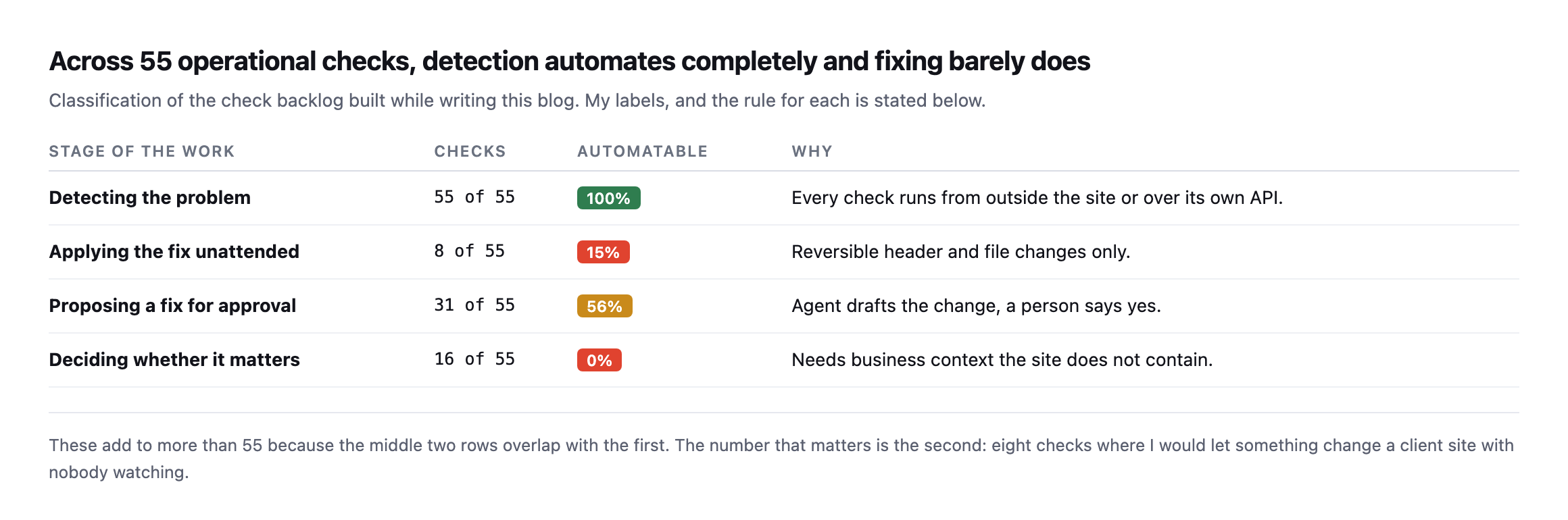
    Table of four stages of operational work. Detecting the problem, 55 of 55 checks, 100% automatable. Applying the fix unattended, 8 of 55, 15%. Proposing a fix for approval, 31 of 55, 56%. Deciding whether it matters, 16 of 55, 0% automatable because it needs business context the site does not contain
    My labels, and the rule behind each one is stated below so you can disagree with the

    specific calls.*

    StageChecksAutomatableWhy
    detecting the problem55 of 55100%every check runs from outside the site or over its own API
    applying the fix unattended8 of 5515%reversible header and file changes only
    proposing a fix for approval31 of 5556%agent drafts the change, a person says yes
    deciding whether it matters16 of 550%needs business context the site does not contain

    I expected the fix number to be low. I did not expect it to be eight.

    And the detection number matters just as much in the other direction. If every check runs automatically, then the excuse that made agency operations tolerable for twenty years is gone. Nobody gets to say a problem went unnoticed because checking forty sites by hand was impractical. It is not impractical any more. It takes seconds.

    The eight

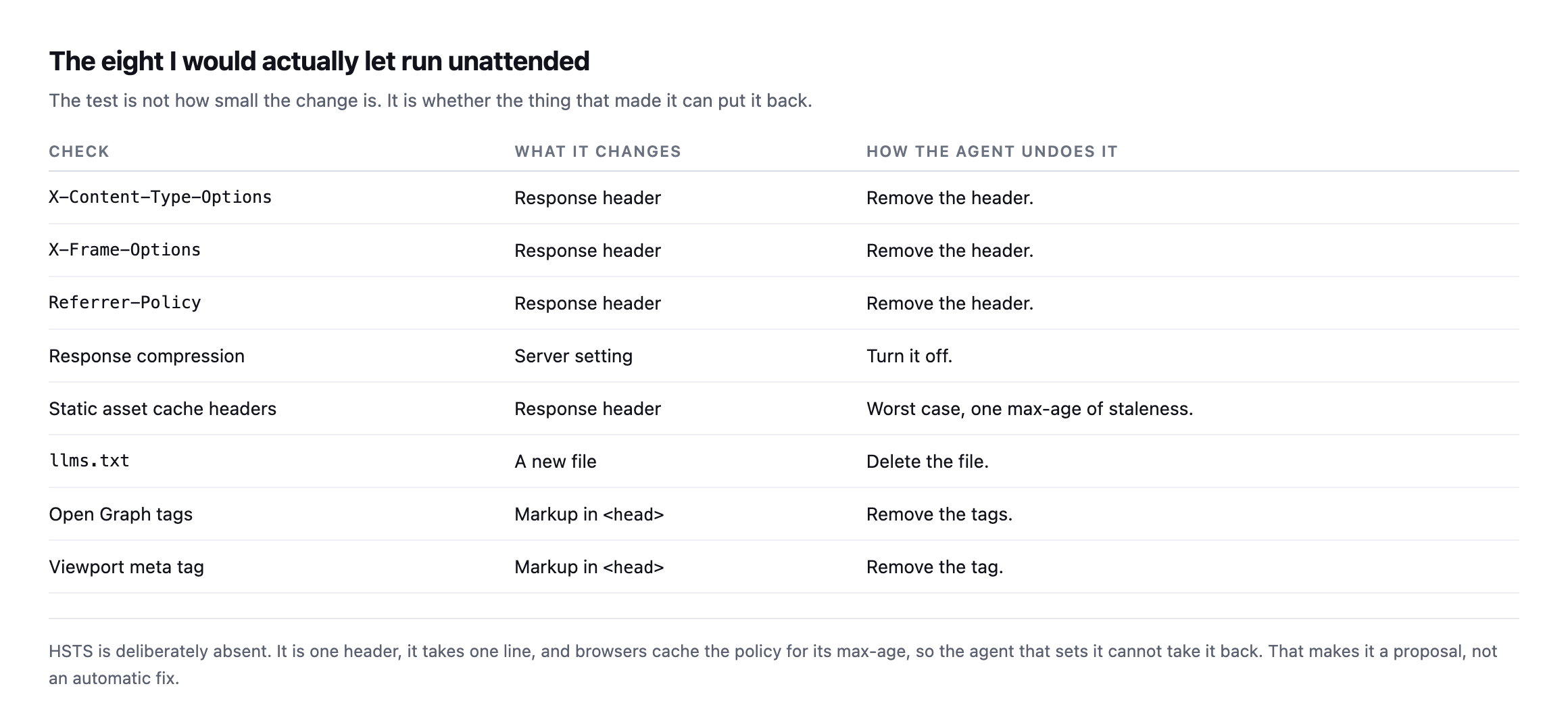
    Table of the eight checks safe to run unattended. X-Content-Type-Options, X-Frame-Options and Referrer-Policy are response headers removed by removing the header. Response compression is a server setting turned off. Static asset cache headers cost one max-age of staleness at worst. llms.txt is a new file, deleted. Open Graph tags and the viewport meta tag are markup, removed
    HSTS is deliberately absent, and it is the most interesting omission on the list.
    CheckWhat it changesHow the agent undoes it
    X-Content-Type-Optionsresponse headerremove the header
    X-Frame-Optionsresponse headerremove the header
    Referrer-Policyresponse headerremove the header
    response compressionserver settingturn it off
    static asset cache headersresponse headerworst case, one max-age of staleness
    llms.txta new filedelete the file
    Open Graph tagsmarkup in remove the tags
    viewport meta tagmarkup in remove the tag

    The test is not how small a change is. It is whether the thing that made it can put it back.

    HSTS fails that test in a way that is easy to miss. It is one header, one line, universally recommended, and once a browser has seen it the policy is cached for the whole max-age. The agent that set it cannot unset it in anybody’s browser. That is not a reason never to add HSTS. It is a reason a person should decide, once, per site.

    Everything on that list, by contrast, is undone by deleting what was added. Bad decision, one request, back to where you were.

    Two of the eight will look too trivial to bother automating, and that is the wrong way to read them. A viewport meta tag and an llms.txt file are each five minutes of work. The value is not the five minutes, it is that they get done on all forty sites rather than on the four you happened to open this month. Automation’s return on small items comes from coverage, not from the time per item.

    The reverse also holds, and it is worth saying because it cuts against the usual pitch. The biggest wins on any given site are almost always in the 47, where a person has to decide. Automation does not get you the big wins faster. It gets you the small wins everywhere, and it tells you where the big ones are.

    What actually changes about the job

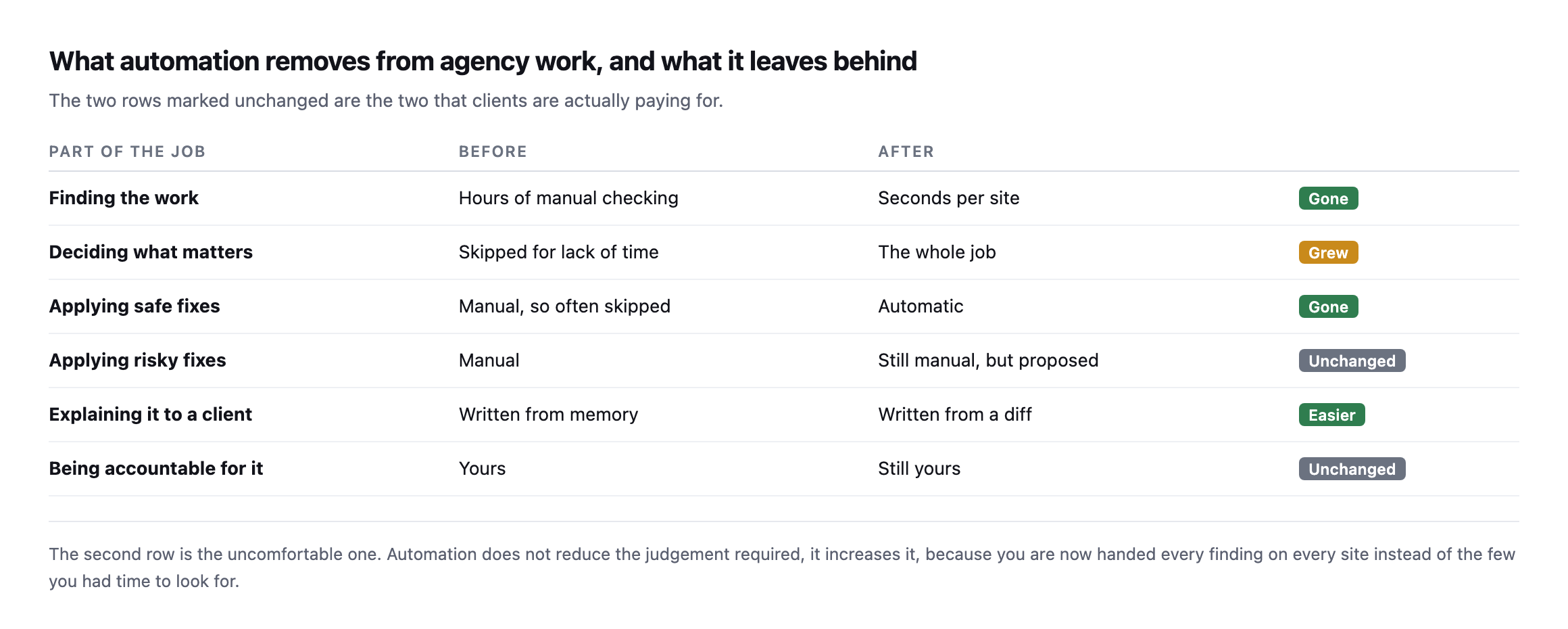
    Table comparing agency work before and after automation. Finding the work goes from hours of manual checking to seconds per site, gone. Deciding what matters goes from skipped for lack of time to the whole job, grew. Applying safe fixes goes from manual and often skipped to automatic, gone. Applying risky fixes stays manual but proposed. Explaining it to a client gets easier. Being accountable stays yours
    The two rows marked unchanged are the two clients are actually paying for.
    Part of the jobBeforeAfter
    finding the workhours of manual checkingseconds per site (gone)
    deciding what mattersskipped for lack of timethe whole job (grew)
    applying safe fixesmanual, often skippedautomatic (gone)
    applying risky fixesmanualstill manual, but proposed (unchanged)
    explaining it to a clientwritten from memorywritten from a diff (easier)
    being accountable for ityoursstill yours (unchanged)

    The second row is the uncomfortable one and I want to be direct about it. Automation does not reduce the judgement required. It increases it. You used to see the handful of findings you had time to look for. Now you get all of them, on every site, every day.

    I lived this while writing the client reporting post: six sites, 30 findings, and the real work was deciding that 23 of them were not worth anyone’s attention. That triage is not a step before the job. It is the job.

    The part nobody puts in the pitch

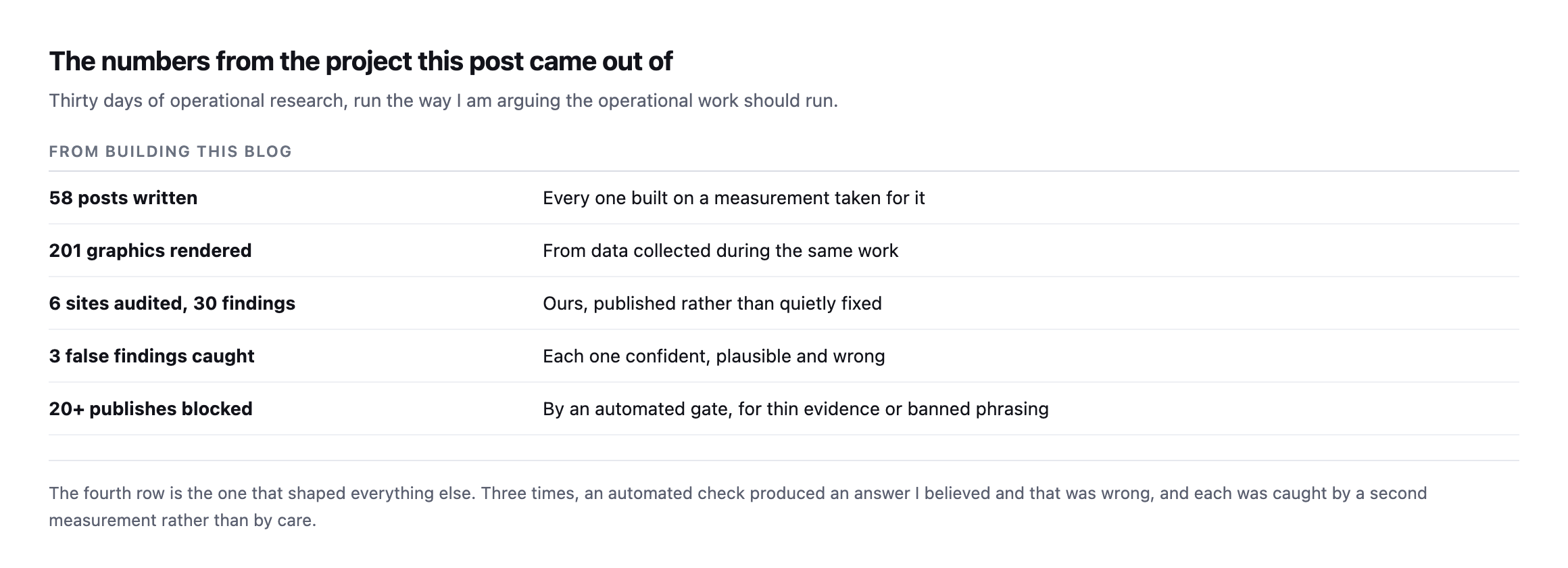
    Table of numbers from this project. 58 posts written, each on a measurement taken for it. 201 graphics rendered from data collected during the same work. 6 sites audited producing 30 findings, ours, published rather than quietly fixed. 3 false findings caught, each confident plausible and wrong. Over 20 publishes blocked by an automated gate
    The fourth row shaped everything else in this post.

    Three times in thirty days, an automated check handed me an answer I believed and that was wrong. A page reported zero images because a compressed response was decoded with the wrong algorithm. A caching plugin appeared broken because I had deleted a directory myself. A cart appeared to leak between visitors because a product name matched in a grid block.

    None of those were subtle. All three were caught by asking a second question, not by being careful. I wrote up what that means for automating performance work separately, and the conclusion generalises: the automation belongs around the measurement before it belongs around the change.

    An agency running unattended fixes on client sites without a second source for every trigger is going to break something and not know why. That is a straightforward prediction and I would like to be wrong about it.

    The failure mode will not look like a tool malfunctioning, either. It will look like a site that is fine, a dashboard that is green, and a client who mentions in passing six weeks later that something stopped working. By then the change that caused it is 400 entries down a log nobody reads.

    The same project, a second wave later, with the same shape holding

    This post was written at 58 posts. The project since grew to a full 60, and a separate pass went back through most of the backlog expanding each one to real depth, re-running every measurement rather than trusting the original reading. That second wave is itself more evidence for this post’s central claim than the original numbers were, because it was, in effect, the same detection-versus-decision split applied recursively to the blog’s own back catalogue.

    Re-checking found real drift on both sides of the ledger. Some findings had been quietly fixed: a CAA record completed, a site’s REST user enumeration closed, an image library fully converted to modern formats. Others were confirmed still open, unchanged since first published: a domain still missing DKIM, a debug log still exposed, a DMARC policy still capped at five percent enforcement months after that cap was first flagged. And a handful of genuinely new false findings turned up in the process of re-measuring, not from the original checks but from the re-checking itself: a brotli response decoded as gzip a second time, a Store API request that silently returned homepage HTML instead of JSON because of plain permalinks, a WooCommerce install whose block-based checkout broke an HTML-scraping assertion that had worked perfectly on a different, classic-checkout install.

    None of that changes the eight-of-fifty-five ratio this post opened with. If anything it sharpens the argument, because the second wave was pure detection work, re-running checks, comparing results, writing down what changed, and every single piece of judgement in it, which finding still mattered, which correction was worth publishing, which drift was meaningful versus noise, still required a person reading the result and deciding. Automating the second pass at checking would have been exactly as straightforward as automating the first one. Automating the decisions built on top of it would not have been, for the same reasons this post already gives.

    What WordPress agency automation should mean in practice

    Automate every check. There is no reason left not to, and the checks are the cheap part.

    Then spend the time you get back on the two rows that did not change. Decide what matters, and be accountable for it. Those are not consolation prizes left over after the machines took the good work. They are the work, and they were always the work, obscured for two decades by the tedium of finding things out.

    Protuno is built on this split: a catalogue of 27 playbooks across six agents, permissioned per site, with the unattended tier kept deliberately small. Everything in this post is why. The Super Agents are live now.

    If you run an agency, do this one thing this week: pick your ten busiest sites, run one check across all ten, and look at the shape of the result. Ten hits means you have a standard to set. One hit means you have a site to fix. Neither answer was available to you before, and both are more useful than anything the check itself found.

    Why the re-check wave belongs in this table, not outside it

    It would be tempting to file the second wave of work under something other than the four stages this post opened with, since re-verifying a past finding feels different from discovering a new one. It is not different, and treating it as a separate category is exactly the mistake this post is arguing against. Re-checking is detection, run again, on a schedule, against the same site. It belongs in the top row of the original table, not in a footnote, because a check that only ever runs once is not a check an agency can stand behind for more than the month it was run in.

    The eight-of-fifty-five automatable-fix number would not move even if every one of these re-checks were fully automated tomorrow, scheduled, scripted, running silently in the background across the whole backlog every week. What moved during the second wave, every single time, was the judgement layered on top of a fresh reading: is this drift worth a correction, is this still-open finding worth escalating again, is this newly-discovered measurement bug worth its own paragraph or a quiet fix. That layer is where thirty days of work actually went, and it is the same layer this post already named as the 47 checks that do not automate, applied a second time to the same project rather than assumed to be a one-off cost paid only during the original research.

    The practical takeaway for anyone running a similar backlog: budget the re-check as real, recurring work from the start, not as a cleanup pass done once when something looks stale. A finding published once and never verified again is a finding that quietly stops being true at some unknown point after publication, and the only way to know when is to have looked.

  • The WordPress Client Report: I Found 30 Things And Reported 7

    The WordPress Client Report: I Found 30 Things And Reported 7

    Short answer: a good WordPress client report is short because most findings are not news. I ran one pass of external checks across six of our own sites, got 30 findings, and judged 7 of them worth telling anyone about. The other 23 were true, unchanged since last month, and unchanged next month.

    Collecting the data took under seven seconds a site. Deciding what to leave out took considerably longer, and that is the whole job.

    What one pass actually turns up

    Table of six sites with raw finding counts and how many were worth reporting. sitea.example 4 findings 1 worth reporting, siteb.example 6 and 2, sitec.example 5 and 1, sited.example 5 and 1, sitee.example 2 and 0, sitef.example 8 and 2
    One site produced nothing worth reporting. That is a legitimate result and almost nobody

    sends that report.*

    SiteRaw findingsWorth reporting
    sitea.example41
    siteb.example62
    sitec.example51
    sited.example51
    sitee.example20
    sitef.example82

    The row I want to defend is sitee.example. Two findings, zero reportable. If a client pays a retainer and the honest answer this month is “nothing needed your attention”, the report should say that, in one line, and stop.

    Padding it out is how reports get long. Long reports get skimmed. Skimmed reports mean the one thing that did matter gets skimmed too.

    The rule I used to cut 23 of them

    Sort the findings by how many sites they appear on.

    Table splitting the same 30 findings by prevalence. Missing DNSSEC on 6 of 6 sites, missing CAA on 5 of 6, no Content-Security-Policy on 5 of 6, no Referrer-Policy on 5 of 6. Usernames exposed via REST on 3 of 6 and DMARC not fully enforcing on 4 of 6 are site-specific and actionable
    If something appears on every site you look after, it is a decision you have not made yet,

    not a finding about any one site.*

    FindingSites affectedWhat it actually is
    missing DNSSEC6 of 6every site, a posture decision made once
    missing CAA record5 of 6every site but one, same
    no Content-Security-Policy5 of 6a project, not a monthly line item
    no Referrer-Policy5 of 6same
    usernames exposed via REST3 of 6site-specific, actionable, report it
    DMARC not fully enforcing4 of 6site-specific, actionable, report it

    Caveat: six sites, all ours, one pass. The specific counts are our portfolio’s, not a benchmark. The rule that survives the caveat is the sorting method itself: anything on every site is a standards conversation, not a finding, regardless of what the six numbers happen to be.

    Missing DNSSEC turned up on all six. That is not six findings. It is one conversation about whether we run DNSSEC, held once, with an answer that applies to everything. Putting it in six monthly reports is six chances for a client to read a red item and do nothing, which trains them that red items do not require action.

    The two that survived the cut are site-specific and have an obvious next step. Usernames readable through the REST API affected three sites and not the others, so something differs between them. DMARC not fully enforcing affected four, each for a different reason, and I wrote up what a policy at 5% is really doing separately.

    Those go in the report. The other four go in a single note about portfolio standards.

    Running the same pass again, and applying the same rule to what changed

    I re-ran the checks across the same six sites while expanding this post, rather than assume the original 30-versus-7 split still describes our portfolio.

    dig +short DS "$d"                              # DNSSEC
    dig +short CAA "$d" | wc -l                      # CAA record count
    dig +short TXT "_dmarc.$d"                       # DMARC policy and pct
    curl -sI "https://$d/" | grep -iE 'content-security-policy|referrer-policy'
    curl -s -o /dev/null -w '%{http_code}' "https://$d/wp-json/wp/v2/users"

    DNSSEC is unchanged: zero of six domains publish a DS record, still a single standards conversation rather than six findings. CAA moved on exactly one site, sitea.example, which now publishes a complete record with ten entries, the fix already documented in the nameserver diversity post. Applying this post’s own sorting rule to that change: one site out of six moving is still a portfolio pattern, five of six still missing CAA, still a standards conversation rather than five separate line items, just with different arithmetic behind the same one-paragraph note.

    The REST-endpoint and DMARC readings are where this re-run earns its place, because they moved in ways worth reporting individually rather than folding into a portfolio note. sitea.example, open in the original pass, now returns 401 on the users endpoint, fixed. siteb.example and sitec.example remain open, and a domain not in the original six, sitef.example, is open too. DMARC enforcement varies site by site in a way that is itself the finding: sitec.example and sitee.example enforce at p=reject with no pct limit, full strength. sited.example sits at p=none, monitoring only. sitea.example and siteb.example both carry p=quarantine; pct=5, meaning the policy only actually acts on five percent of failing mail, a partial rollout that has apparently sat at five percent since before this post was first written rather than progressing toward full enforcement.

    That last detail is exactly the kind of finding this post argues belongs in a report and not in a portfolio-wide footnote: it is specific to two sites, it has an obvious next step, raise the percentage, and it is not something a reader would guess from a bare “DMARC is configured” status line. A report reading “DMARC enforcing” on sitea.example would be technically true and practically misleading, the same category of half-true status this post’s five-section structure is built to avoid.

    Collecting the data was never the hard part

    I timed it, because I wanted to know whether the reporting problem is a tooling problem.

    Table of report steps with measured times. Fetching the site and reading headers about one second, querying users media comments and categories about 3.4 seconds, reading abilities and settings about 1.8 seconds, resolving DMARC CAA and DNSSEC about half a second, all automatable. Deciding which of it a client should read is not automatable
    Under seven seconds a site. Across forty sites that is about four minutes.

    Four minutes. That is the entire data collection cost for a forty site portfolio, using nothing but the REST API and public DNS.

    So when a reporting tool sells you on gathering everything automatically, understand that it is solving the four minute problem. The expensive part is the last row of that table, and no tool I have used does it. They produce a longer document faster.

    What I would actually put in a WordPress client report

    Five report sections in order. What changed since last month, containing diffs not state. What I did about it, with before and after numbers. What needs your decision, usually one or two items. What I am watching, kept to two lines. Everything else, available on request and not in the report
    Ordered by how likely the client is to read that far.

    The first section is diffs. Not “SSL certificate valid”, which is state and is true every month, but “certificate renewed on the 14th”, which is a change. State belongs in a dashboard the client can open. A report is for things that moved.

    The third section is where the retainer is justified. One or two items, each phrased as a question with options and a recommendation. Not “CSP not implemented” but “we can add a content security policy to the three sites running checkout; it needs about half a day each and may break two embeds we would have to test; want me to start with the busiest one?”

    That is a paragraph a client can answer. The finding underneath it is the same finding either way.

    The second section is worth one more sentence, because it is where most reports quietly cheat. “Optimised images” is activity. “Homepage went from 1.5MB to 640KB” is a result. If you cannot put a before and a after next to the work, either the work did not move a number or you did not measure it, and both of those are worth knowing before a client asks.

    The fourth section exists to stop the third one growing. There is always a pile of things that are real but not yet worth acting on, and without somewhere to put them they either leak into the decision section or get dropped entirely. Two lines. A list of names, no detail.

    And the fifth section is a link, not an appendix. Everything I collected in those seven seconds is available if anyone wants it. Almost nobody does, and offering it is what makes the short report credible rather than lazy.

    The uncomfortable bit

    Writing this meant auditing our own sites and publishing what came back, including the 10 usernames readable on two of them and a domain with no DMARC at all. I would rather do that than write a post about reporting standards using invented examples.

    It also made the point better than an argument could. I ran the checks, got 30 findings, and my first instinct was to fix a few quietly and report the rest. That instinct is exactly what produces reports nobody trusts, and I do not think it comes from dishonesty. It comes from the report being treated as a performance review of the agency rather than a status update on the site.

    That framing is worth naming out loud with a client, once, early. If the report is a scorecard, every finding is an accusation and the incentive is to send a clean one. If the report is a shared view of the estate, a finding is just work, and the useful version of the document becomes possible.

    Protuno’s marketing agent, Echo, runs inside your own AI app, and every run’s report is saved to Activity, so you can compare one run with the next.

    If you send client reports, try this next cycle: write the “what needs your decision” section first, and if it is empty, send a three line email instead. See whether anybody complains.

    What this re-run would actually say in a report, written out

    Worth finishing the exercise all the way to the document this post argues for, using the fresh numbers above, because describing the five sections in the abstract is a different exercise from actually writing one.

    What changed since last month: CAA fixed on sitea.example. REST user enumeration fixed on sitea.example, still open on siteb.example and sitec.example.

    What I did about it: Published the CAA fix for sitea.example; confirmed via a fresh ten-record read. No action yet on the two sites still exposing usernames.

    What needs your decision: siteb.example and sitea.example’s DMARC policy has sat at pct=5 since before this was last reported, enforcing on one message in twenty. Raising it to 25%, then 50%, then full enforcement over the next few reporting cycles is the standard rollout path, and it needs someone to actually schedule the next step rather than leave it at the figure it was set to during initial rollout. Want me to move it to 25% this week and watch the DMARC aggregate reports for anything that breaks?

    What I am watching: sitef.example’s REST users endpoint, newly checked, currently open, not yet triaged against the rest of the portfolio’s standard.

    Everything else: the full six-site pass, all fields, available on request.

    That is six lines, not thirty findings, and every one of them is either a change, a decision, or an explicit statement of what is being watched without yet requiring action. The DNSSEC and four-of-five-sites CAA gaps that this post’s original sorting rule already filtered out do not appear at all, correctly, because nothing about them changed and they remain a standards conversation rather than six repeated line items nobody reads past the third time.

  • Payment Gateway Monitoring: Nothing Breaks, The Money Just Stops

    Payment Gateway Monitoring: Nothing Breaks, The Money Just Stops

    Short answer: payment gateway monitoring cannot be done with status codes, because a broken gateway leaves the store returning 200 on every URL. The signal that catches it is the ratio of failed to successful orders, measured against the store’s own baseline. Everything else is a proxy.

    Five failures, none of which take the site down

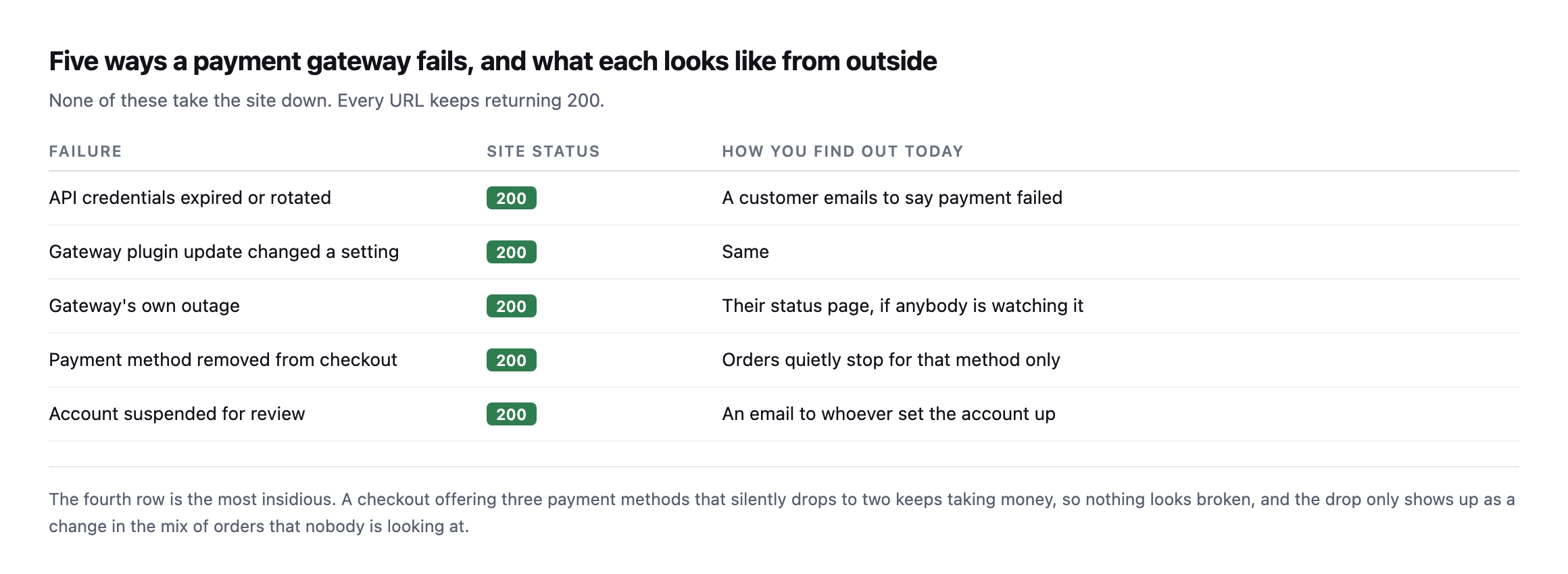
    Table of five gateway failures with site status and how you currently find out. Expired credentials, a plugin update changing a setting, a provider outage, a payment method silently disappearing, and an account suspended for review. All leave the site returning 200
    The fourth row is the most insidious. A checkout offering three payment methods that

    silently drops to two keeps taking money, so nothing looks broken.*

    FailureSite statusHow you find out today
    API credentials expired or rotated200a customer emails to say payment failed
    gateway plugin update changed a setting200same
    gateway’s own outage200their status page, if anybody is watching it
    payment method removed from checkout200orders quietly stop for that method only
    account suspended for review200an email to whoever set the account up

    That specific category of partial, quiet failure is worth dwelling on carefully. A total gateway outage is loud, because orders stop entirely and somebody notices within hours. A single method disappearing is quiet: the store keeps trading, revenue dips by whatever share that method carried, and the dip reads as a slow week.

    What actually signals it

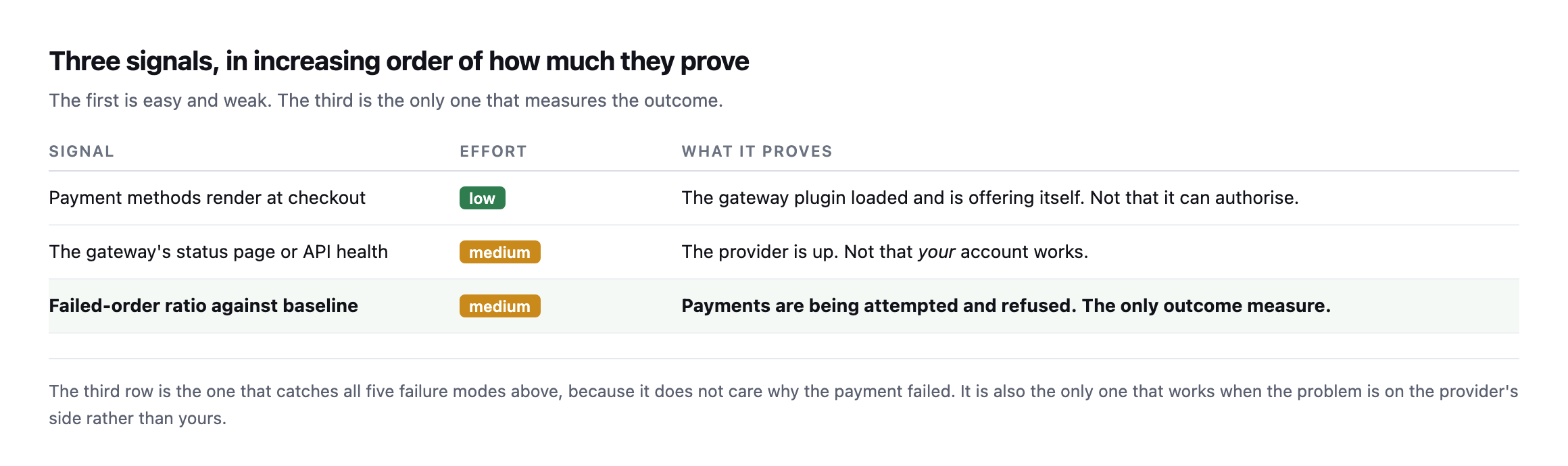
    Table of three signals in increasing order of proof. Payment methods rendering at checkout is low effort and proves the plugin loaded. The gateway's status page proves the provider is up but not that your account works. The failed-order ratio against baseline is the only outcome measure
    The third row catches all five failure modes, because it does not care why the payment

    failed. It is also the only one that works when the problem is on the provider’s side.*

    SignalEffortWhat it proves
    payment methods render at checkoutlowthe gateway plugin loaded and is offering itself
    the gateway’s status page or API healthmediumthe provider is up, not that your account works
    failed-order ratio against baselinemediumpayments being attempted and refused, the only outcome measure

    The first signal is nearly free once you are already walking a product to the payment step. I had written it here as “assert that a payment method appears in the checkout HTML”, and then I went and measured it, and that advice is wrong on any store using the block checkout. More on that below, because it changes the check.

    The third is the one that measures the outcome, and it is the failed-order ratio rather than a raw count, because a ratio works on a store taking three orders a day and one taking three hundred.

    The payment gateway monitoring check that takes one request

    I built a store to break on purpose: WordPress 7.1, WooCommerce 11.1.0, the block checkout, one virtual product, three payment methods enabled. Then I turned the gateways off one at a time and measured the store from outside, as a logged-out visitor with a product in the cart.

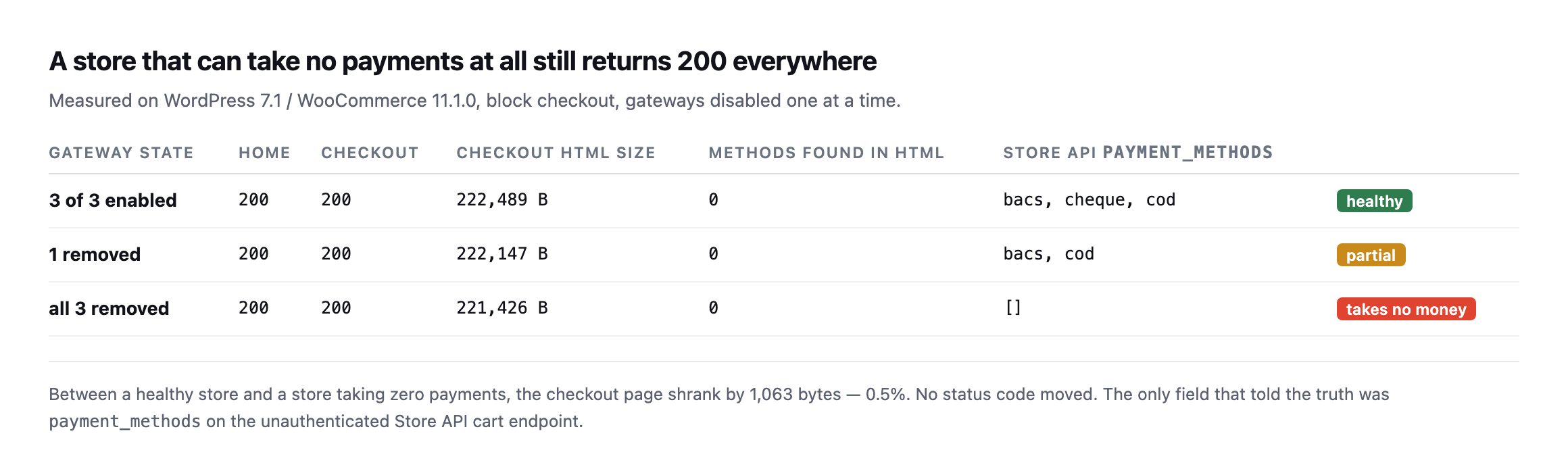
    Table of three gateway states measured from outside. With three gateways enabled, one removed, and all three removed, the homepage returns 200, the checkout returns 200, and zero payment methods appear in the checkout HTML in every case. Only the Store API payment_methods field changes, from bacs cheque cod, to bacs cod, to an empty array
    The bottom row is a store that cannot take a single payment. Both pages still return 200

    and the checkout page is 0.5% smaller. Nothing a status monitor watches moved at all.*

    Gateway stateHomeCheckoutMethods in HTMLStore API payment_methods
    3 of 3 enabled2002000bacs, cheque, cod (healthy)
    1 removed2002000bacs, cod (partial)
    all 3 removed2002000[] (takes no money)

    Two things fell out of that, and one of them corrected my own draft.

    The checkout HTML contains no payment methods. Not fewer, none. The block checkout renders the payment step in JavaScript from data fetched after page load, so the gateway IDs never appear in the server response. My column for “methods found in HTML” reads 0 in all three rows, including the healthy one. Any check that greps the checkout page for bacs or stripe will report a healthy store as broken, or a broken store as healthy, depending on which way you wrote the assertion.

    The Store API tells you the truth, unauthenticated. WooCommerce exposes the cart at /wp-json/wc/store/v1/cart, and the response carries a payment_methods array. It is populated from get_available_payment_gateways(), the same call the checkout itself uses, so it reflects availability rather than configuration. A gateway that is enabled in settings but failing its own availability check does not appear. That is exactly the distinction that matters.

    So the check is: add a product to the cart, read that one endpoint, and compare the array to the one you saw yesterday. No admin credentials, no test order, no headless browser.

    GET /wp-json/wc/store/v1/cart
      -> "payment_methods": ["bacs","cod"]     # yesterday: ["bacs","cheque","cod"]

    One method vanished and every status code in the building stayed green.

    Caveat I owe you, because it nearly caught me while writing this. My first run of this probe returned an empty array on a healthy store, and it was convincing enough that I started drafting a paragraph about the Store API being unreliable. It was not. I was pointing the probe at the wrong container. Two WordPress installs, two ports, one transposed digit. If a monitoring result surprises you, confirm what you are actually talking to before you write it down, and definitely before you tell a client their store is broken.

    Reproducing the whole experiment on a second, separate install

    I rebuilt this exact test on a different WordPress install while expanding this post, rather than trust the original numbers alone, and hit a third gotcha before getting the same result.

    The Store API request returned the site’s own homepage HTML instead of cart JSON, on both the plain and trailing-slash forms of the URL. The cause was not a wrong container this time. It was plain permalinks: this install had no pretty-permalink structure set, so /wp-json/... never reached the REST router at all and fell through to whatever the default front-end handler serves. The fix is the same fallback WordPress documents for exactly this situation:

    curl "http://example.com/index.php?rest_route=/wc/store/v1/cart"

    That form bypasses the rewrite rules entirely and reaches the Store API regardless of permalink structure, which is worth keeping in a monitoring script’s back pocket specifically because a site’s permalink setting is exactly the kind of quiet configuration detail nobody checks before assuming a REST endpoint will simply respond.

    With that fixed, the reproduction matched the original result exactly:

    3 gateways enabled:  payment_methods: ["bacs", "cheque", "cod"]
    1 disabled (cheque):  payment_methods: ["bacs", "cod"]
    all 3 disabled:       payment_methods: []

    At every step, curl -o /dev/null -w '%{http_code}' against the homepage and the checkout page both returned 200. A store that had just been reduced from three working payment methods to zero looked, by every status-code check running anywhere on it, completely healthy throughout. That is not a subtler version of the original finding. It is the identical mechanism, reproduced from nothing on a separate install, which is the strongest form of confirmation this kind of claim can get: not “it happened once,” but “it happens whenever the conditions are the same,” regardless of which specific WordPress instance is asked.

    The approach not to take

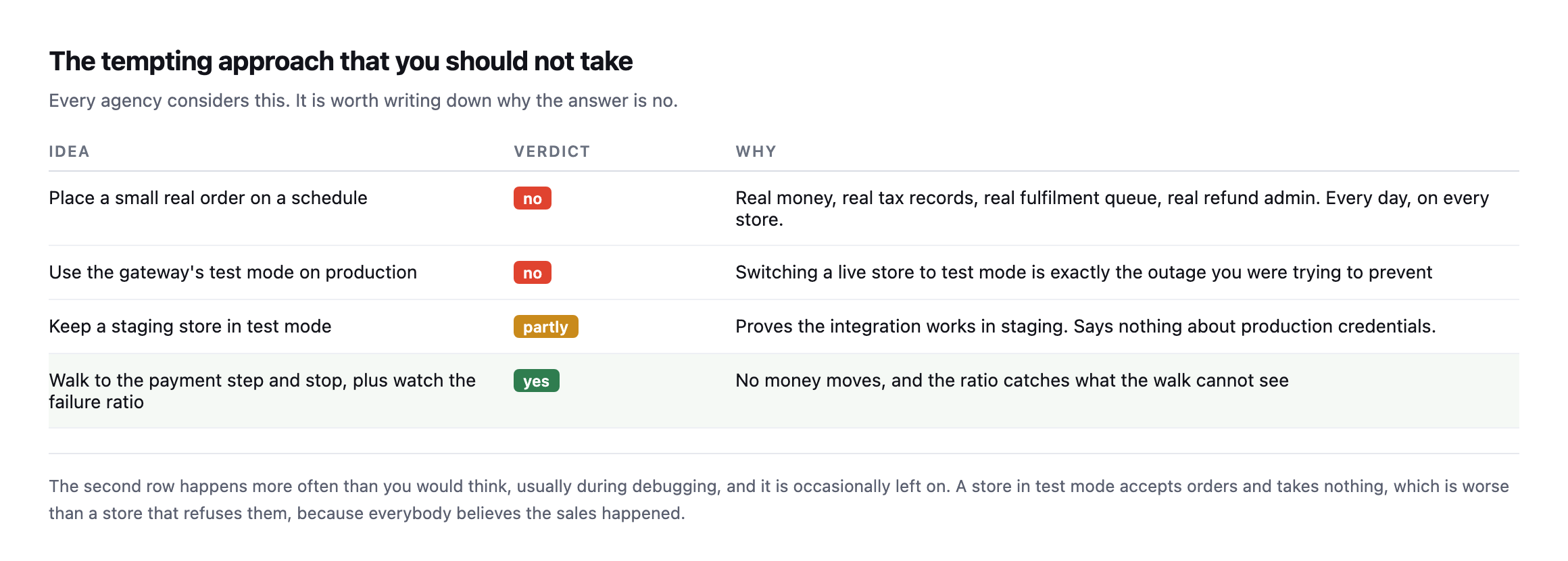
    Table of four approaches. Placing small real orders on a schedule is rejected because of real money, tax records and fulfilment. Using test mode on production is rejected. A staging store in test mode is partial. Walking to the payment step and watching the failure ratio is the recommended combination
    The second row happens more often than you would think, usually during debugging, and is

    occasionally left on. A store in test mode accepts orders and takes nothing.*

    Every single agency considers the first row eventually, and it is worth writing down plainly why the correct answer is no. A real order every day means real money, real tax records, a real fulfilment queue with a person attached, and real refund admin. Multiply all of that by every single store you actually look after.

    The synthetic walk combined with the ratio check gets you exactly the same real coverage with none of that downside.

    The nonce mechanics a monitoring script actually needs

    Building the reproduction above end to end, not just reading the response, surfaced a requirement this post’s original walkthrough does not spell out: adding an item to the cart through the Store API needs a fresh nonce, read from the cart response itself, not a static value a script can hardcode once and reuse.

    # 1. read the cart first, to obtain a nonce
    curl -s -c jar -b jar ".../wc/store/v1/cart" -D - -o /dev/null | grep -i '^Nonce:'
    
    # 2. use that exact value on the write request
    curl -s -c jar -b jar -X POST ".../wc/store/v1/cart/add-item" \
      -H "Nonce: <value from step 1>" \
      -H "Content-Type: application/json" -d '{"id":122,"quantity":1}'

    Skipping step one and guessing at a nonce, or reusing one from an earlier session, produces woocommerce_rest_invalid_nonce and a 403, which is a real, specific failure this monitoring approach can hit long before it ever reaches the payment-methods check it exists to run. A script built against this endpoint needs to read-then-write in that order every single time, using the same cookie jar throughout so the session the nonce was issued for matches the session making the follow-up request. That is a small implementation detail and it is exactly the kind of thing that turns a monitoring script that worked once in testing into one that silently fails every run in production, reporting nothing rather than reporting a problem, which is the worst possible failure mode for a monitor.

    When the ratio moves

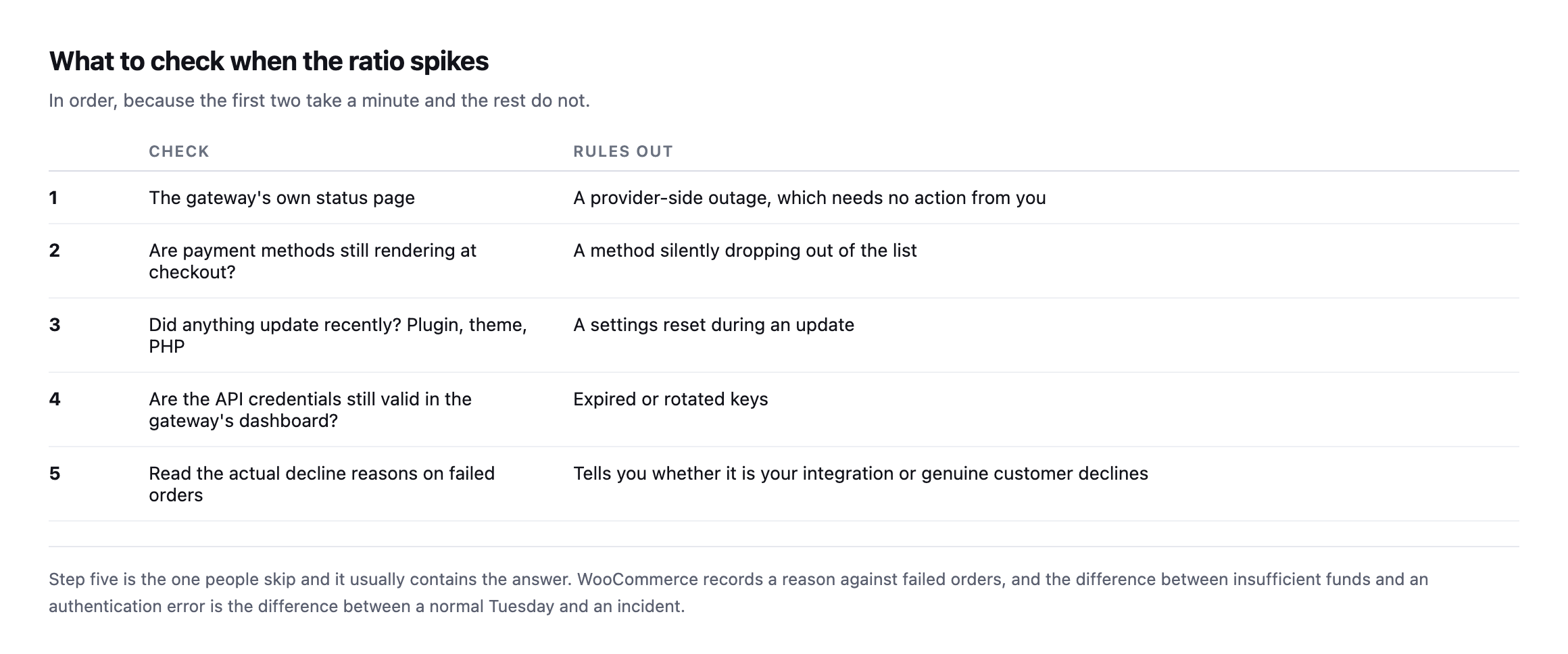
    Five-step runbook: check the gateway's status page, confirm payment methods still render, check whether anything updated recently, verify API credentials in the gateway dashboard, and read the actual decline reasons on failed orders
    Step five is the one people skip and it usually contains the answer.

    That last step deserves emphasis. WooCommerce records a reason against failed orders, and reading them separates the two cases that matter: genuine customer declines, which are a normal cost of trading, and integration errors, which are yours.

    A run of “insufficient funds” is an ordinary Tuesday, nothing to escalate. A run of authentication or configuration errors is a real incident, and the difference between the two readings is one single column in the order list, checked or ignored.

    Where this sits in the wider picture

    Gateway health is the last of three checks that together cover a store, and they answer different questions.

    Is the store even reachable at all? Uptime monitoring. Necessary, and the weakest of the three.

    Can a customer reach the payment step? The synthetic walk, which catches a checkout returning 500 while the homepage stays green.

    Does the money actually really move? The failed-order ratio. The only one that measures the outcome the client cares about.

    Most stores have the first and neither of the others, which is why the common experience of a payment outage is a customer email rather than an alert.

    Protuno’s eCommerce agent, Till, runs a read-only WooCommerce Health Review inside your own AI app. See the playbooks page for what it covers.

    If you look after a store, do the manual version this week: open the checkout, count the payment methods, and write the number down. That number changing is the whole check, and nothing currently tells you when it does.

    Having built and rebuilt this probe twice now, on two separate installs, the honest summary is that the concept is simple and the implementation has three small, specific traps: point it at the right install, handle plain permalinks with the rest_route fallback, and read a fresh nonce before every write. None of the three is difficult once known. All three are exactly the kind of thing that only surfaces by actually building the thing and running it against a real store, rather than reading the mechanism described and assuming it will simply work.

  • WordPress Rollback After An Update: What It Can Undo, And What It Destroys

    WordPress Rollback After An Update: What It Can Undo, And What It Destroys

    Short answer: an automatic wordpress rollback update path should restore files freely and restore the database carefully. A database restore reverts the site to the moment the backup was taken, which destroys every order, form entry and comment created since. On a busy store that can be worse than the failure it is fixing.

    This is the part of the design that took us longest, and it is the part most discussions skip.

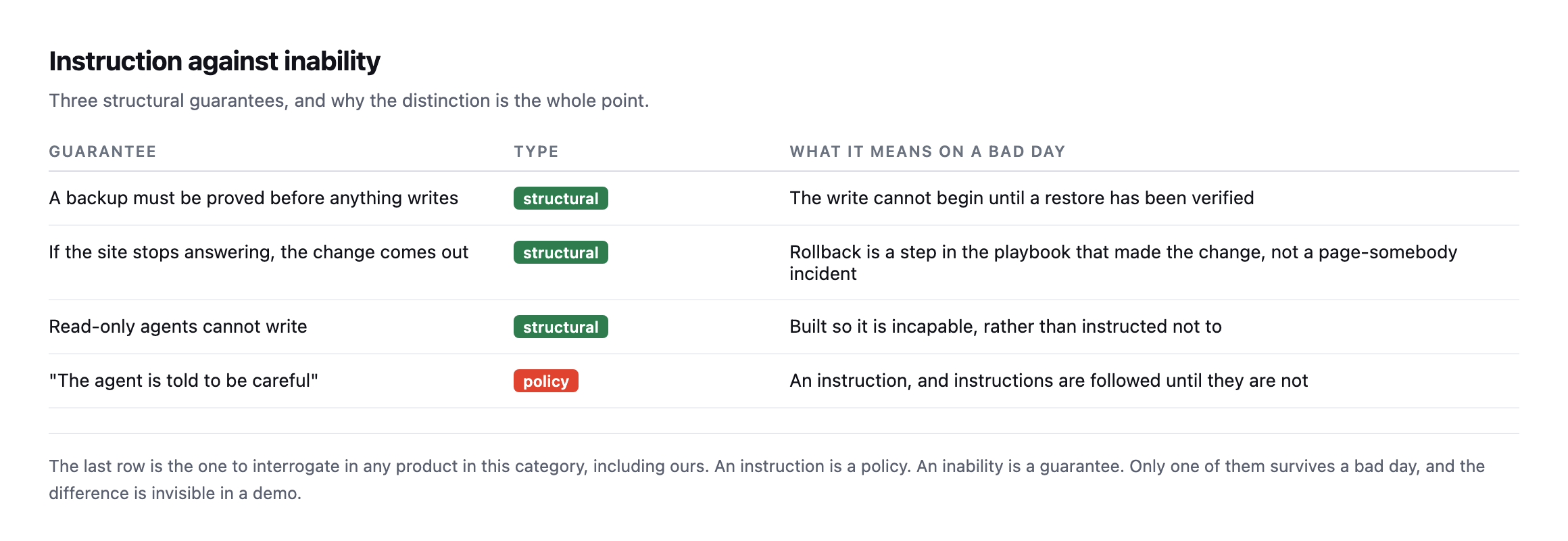
    Rollback is a structural property, not a promise

    Table contrasting structural guarantees with policy: a backup proved before any write, rollback as a step inside the playbook that made the change, and read-only agents built incapable of writing, against an agent merely instructed to be careful
    An instruction is a policy. Taking the tool away is a good deal stronger than a

    policy.*

    The key design decision is that rollback is recorded as the run happens, change by change, rather than left to an incident process somebody triggers afterwards. If reverting requires a human to notice, decide and act, then the broken state is live for as long as that takes.

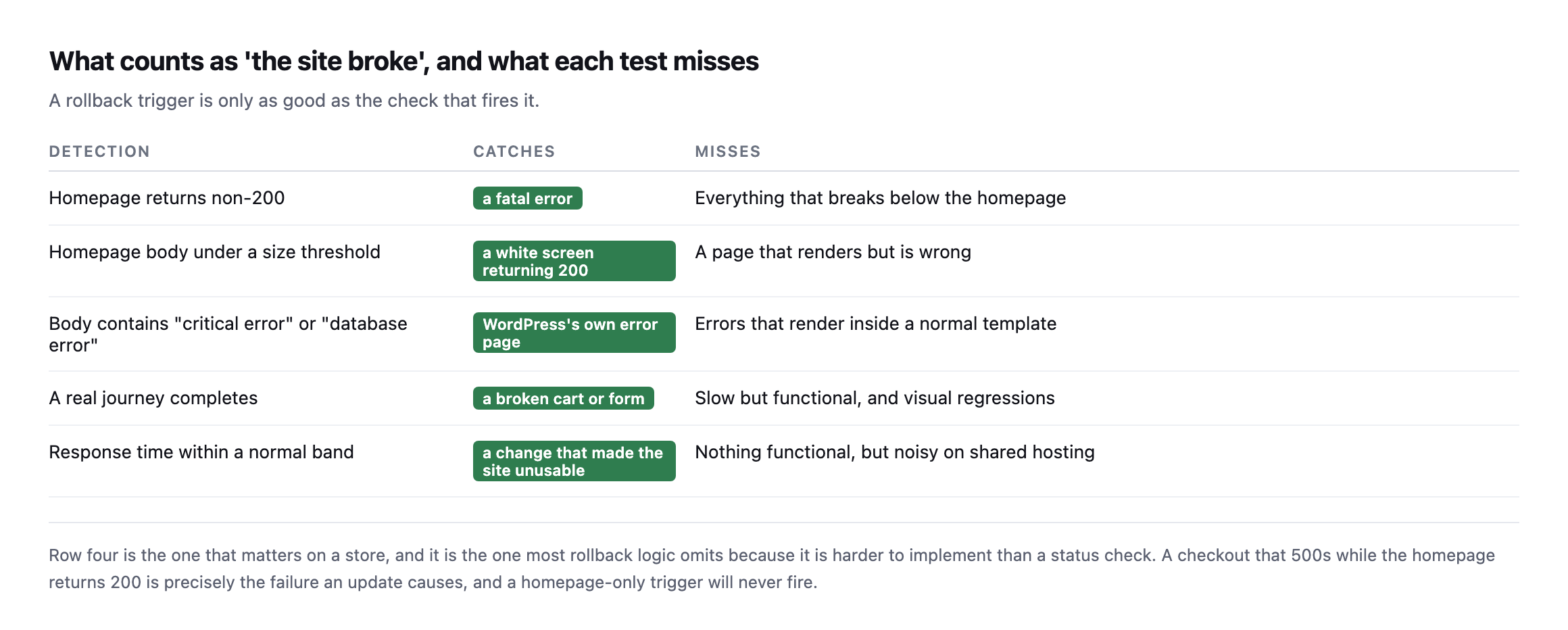
    What counts as broken

    Table of five detection methods for a failed update: homepage status, homepage body size, error strings in the body, a completed user journey, and response time, each with what it catches and what it misses
    Row four is the one that matters on a store, and it is the one most rollback logic omits

    because it is harder to implement than a status check.*

    DetectionCatchesMisses
    homepage returns non-200a fatal erroreverything that breaks below the homepage
    homepage body under a size thresholda white screen returning 200a page that renders but is wrong
    body contains “critical error” / “database error”WordPress’s own error pageerrors that render inside a normal template
    a real journey completesa broken cart or formslow but functional, visual regressions
    response time within a normal banda change that made the site unusablenothing functional, noisy on shared hosting

    A homepage-only trigger never fires on the most common real failure: an update that leaves the homepage returning 200 while the checkout 500s. I demonstrated exactly that failure with three green URLs and one red one.

    So the verification step has to walk something real. On a store, a cart and a checkout. On a brochure site, a form. The homepage is the weakest possible signal and the easiest to implement, which is why it is usually the only one there.

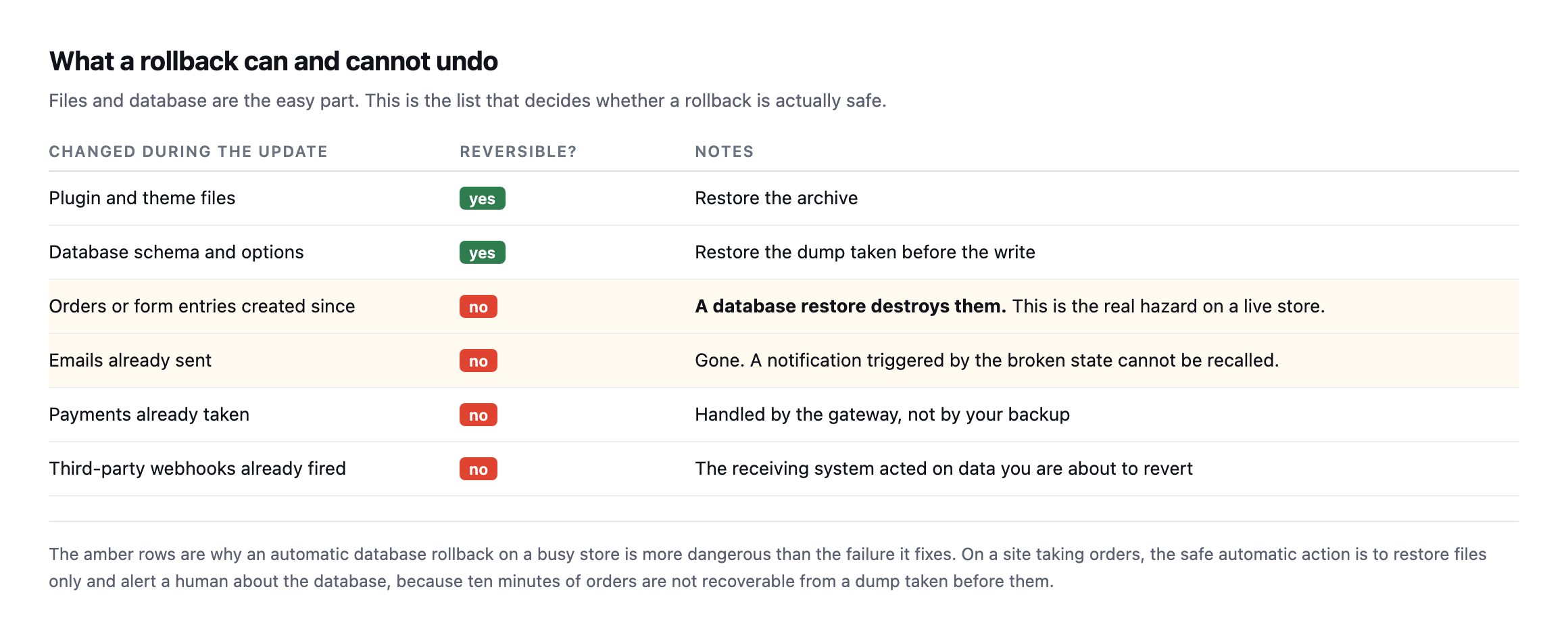
    What a WordPress rollback after an update actually reverses

    Table of what changes during an update and whether each is reversible. Plugin files and database schema are reversible. Orders and form entries created since, emails already sent, payments taken and webhooks fired are not
    The amber rows are why an automatic database rollback on a busy store is more dangerous

    than the failure it fixes.*

    Changed during the updateReversible?Notes
    plugin and theme filesyesrestore the archive
    database schema and optionsyesrestore the dump taken before the write
    orders or form entries created sincenoa database restore destroys them, the real hazard
    emails already sentnogone, cannot be recalled
    payments already takennohandled by the gateway, not your backup
    third-party webhooks already firednothe receiving system already acted on it

    This is the argument I would most want an agency to take from this post.

    Restoring files is nearly always safe. The plugin was replaced, you put the old one back, and nothing a customer did is affected.

    Restoring the database is a different act entirely. It rewinds state. Ten minutes of orders on a store doing real volume are simply gone, and unlike a broken checkout, that damage is not recoverable by fixing the code.

    So the safe automatic behaviour on a transactional site is: restore files automatically, never the database, and get a human involved. The database rollback is a decision with commercial consequences and it deserves a person.

    Breaking a real site and restoring only the files, to see if the claim holds

    The argument that a file-only restore is safe while a database restore destroys business activity is easy to state and worth actually testing rather than taking on faith. I did, against a real WordPress install with a real order on it.

    First, a real order, representing business that happened since the last backup:

    wp wc shop_order create --status=processing --set_paid=true
    # Success: Created shop_order 117.

    Then a real backup of one plugin’s files, and a deliberately broken update, corrupting the plugin’s main PHP file the way a bad release or a failed deployment actually does:

    tar -czf plugin-backup.tar.gz wp-content/plugins/contact-form-7
    echo '<?php syntax error not valid php {{{' >> wp-content/plugins/contact-form-7/wp-contact-form-7.php
    curl -s -o /dev/null -w '%{http_code}\n' https://example.com/
    500

    A genuine, site-wide fatal error, not a simulation described in prose. The homepage, every page, everything running PHP on that install, returned 500. Then the file-only restore, deliberately touching nothing in the database:

    rm -rf wp-content/plugins/contact-form-7
    tar -xzf plugin-backup.tar.gz -C wp-content/plugins
    curl -s -o /dev/null -w '%{http_code}\n' https://example.com/
    200

    Site recovered, plugin back to its working version, confirmed. And the order created before any of this happened:

    wp post get 117 --field=post_status
    # wc-processing

    Untouched. Still there, still in the same status, because a file-only restore never opened the database at all. That is the entire argument of this post’s central table, demonstrated end to end on a real install rather than asserted: the fatal was real, the recovery was real, and the business data created in between survived because the two categories of restore genuinely are independent operations, not merely described as independent in theory.

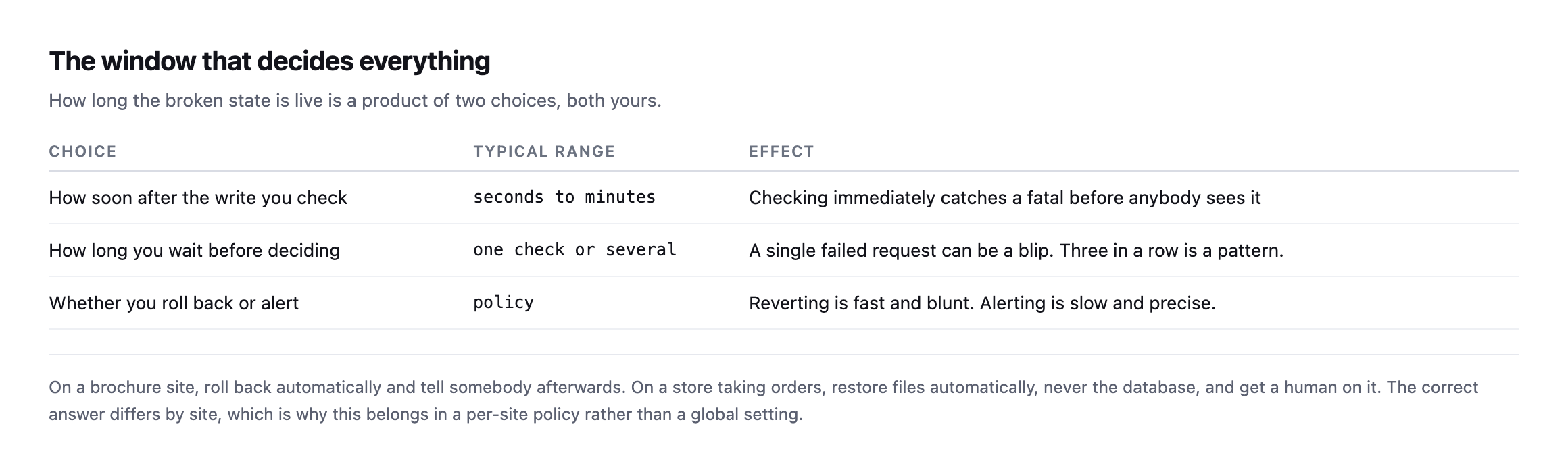
    The window

    Table of three choices that determine how long a broken state stays live: how soon after the write you check, how long you wait before deciding, and whether you roll back or alert
    On a brochure site, roll back automatically and tell somebody afterwards. On a store,

    restore files automatically and get a human on the database.*

    One check immediately after the write catches the fatal before a visitor sees it. Waiting for three consecutive failures avoids reverting because of one unlucky request. Both are defensible, and the right answer depends on how much traffic the site takes.

    What is not defensible is having no policy, which is where most agencies are: the update runs, and whether anybody notices a problem depends on who happens to look.

    The failure that arrives late

    Everything above deals with an update that breaks the site immediately. The harder case is the one that surfaces on Thursday.

    A plugin update that works fine until a scheduled job runs. A change that only affects logged-in users, on a site whose traffic is mostly anonymous. A theme update that broke one template nobody loads until the weekend. In each case the post-update check passed honestly, because at that moment nothing was wrong.

    Two things help, and neither is a rollback.

    Keep the before-state longer than the run. If backups are discarded once the check passes, you cannot revert a regression found two days later. Retention is a policy decision, and “until the next backup” is not enough.

    Watch the things that fail quietly. The failure that surfaces late is nearly always in a surface nobody looks at: a scheduled job that stopped, a form that began silently failing, a checkout that broke for one payment method. Those need their own checks, running on their own schedule, independent of any update.

    An update rollback protects the ten minutes after a write. It does nothing about the rest of the week, and pretending otherwise is how agencies get surprised.

    What to do without any of this

    The manual version is worth writing down even if nothing automates it.

    Before the update, record the versions and take a backup you have actually proved restores. After the update, load the homepage and walk one real journey. If either fails, restore files first and only consider the database if the files alone did not fix it.

    And decide the store policy in advance. “Do we ever automatically restore the database on this site?” is a question with a different answer for a brochure site and a shop, and the worst time to answer it is at the moment it matters.

    Protuno records what a run changed as it changes it, and the run report lets you undo the playbooks whose changes are reversible: plugin updates, spam comments and broken links. Changes made by running PHP are recorded as unable to be undone, and those runs are gated on a backup that has been checked instead. The Super Agents are live now.

    One last practical point, because it is the cheapest safeguard on this page and nobody does it: update in an order that limits blast radius. One site at a time rather than the whole portfolio, and the least commercially important site first. If a plugin update is going to fatal, you would rather learn that on the site nobody visits than on the store. Staggering costs nothing and turns a portfolio-wide incident into a single-site one.

    Write down, for your three largest client sites, what should happen automatically if an update breaks them. If the answer differs between the three, you have just discovered why a global setting was never going to work, and you have written the first useful line of your own rollback policy.

    What the test did not cover, and why that matters

    The demonstration above proves the mechanism this post argues for. It is worth being precise about what it does not prove, because a single clean test on a lab install is not the same claim as “this always works.”

    The break I introduced was a fatal PHP error, the easiest failure mode there is to both cause and detect: the homepage went straight to 500, exactly the top row of this post’s own detection table, the one signal every basic rollback tool already checks. That is deliberately the easy case. A real bad update is just as likely to produce the harder failures this post spends most of its length on: a homepage that stays at 200 while the checkout breaks, a regression that only shows up for logged-in users, a template fault that nobody hits until the weekend. A file-only restore would fix all of those the same way it fixed the fatal here, because the mechanism, put the old files back, does not care what kind of bug the new files introduced. What differs entirely is detection, and this test intentionally used the one failure every rollback system already catches, precisely so the restore step itself, not the detection step, could be verified cleanly and unambiguously.

    The order surviving is also a smaller claim than “nothing about the site is ever affected by a file-only restore.” It proves the database was never touched, which is the actual argument this post makes about orders and form entries specifically. It says nothing about whether the corrupted plugin, while broken, could have caused other damage in that window, a partial write, a failed webhook, a queued email that errored out mid-send. Those are separate risks with separate mitigations, not something a files-versus-database distinction resolves on its own, and conflating “the order record survived” with “nothing bad happened during the outage” would overstate what this specific test actually showed.

    Why the test still matters despite those limits

    None of that weakens the core point. It sharpens it. The easiest possible failure to detect and the cleanest possible restore to perform is the floor this mechanism has to clear before it is worth trusting on anything harder. It cleared it: real fatal, real recovery, real order untouched, no approximation anywhere in the chain. A file-only restore that failed to recover a site from its own easiest case would not be worth building a rollback policy around at all. One that succeeds cleanly on the easy case, and is architecturally identical regardless of which kind of bug caused the failure, is worth trusting on the harder cases too, precisely because the restore mechanism itself does not know or care what kind of bug it is undoing. The part that still needs a human, or a much better detection system than a homepage status check, is finding the harder failures in the first place. Fixing them, once found, is the same tar-and-restore this test just proved works.

  • WooCommerce Detection From The Outside: One Signal Is Never Enough

    WooCommerce Detection From The Outside: One Signal Is Never Enough

    Short answer: reliable woocommerce detection needs at least two signals. The Store API proves the plugin is active. The cart and checkout pages prove somebody can actually buy something. Those two disagree more often than you would expect, including on one of our own sites.

    Four sites, four different answers

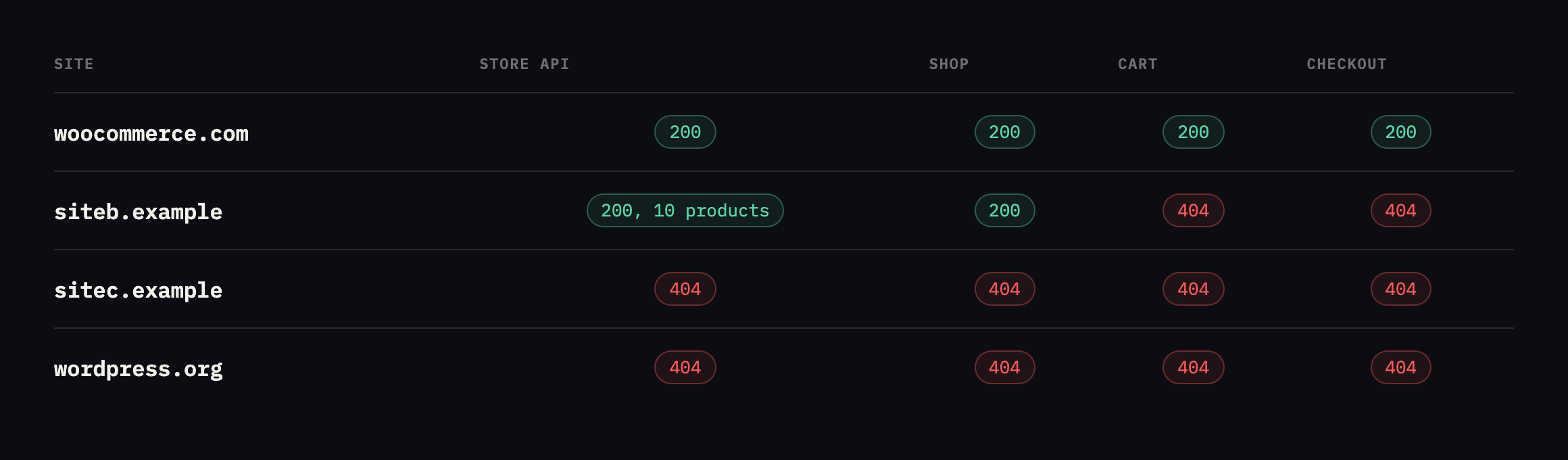
    Table of detection signals across four sites. woocommerce.com returns 200 on the Store API, cart and checkout. siteb.example returns 200 on the Store API with ten products and 200 on shop, but 404 on cart and checkout. sitec.example and wordpress.org return 404 throughout
    The second row is ours and it is the interesting one. WooCommerce is active, serving a

    catalogue of ten products, with a working shop page and no cart, checkout or account pages at all.*

    SiteStore API/shop//cart//checkout/Verdict
    woocommerce.com200n/a200200live store
    siteb.example200, 10 products200404404Woo active, catalogue only
    sitec.example404n/a404n/anot a store, mentions “woocommerce” 11 times
    wordpress.org404n/a404n/anot a store

    A detector keying on the Store API alone would report siteb.example as a live store. One keying on /cart/ would report no store. Both would be wrong, and the real answer is more specific than either: WooCommerce is installed and being used as a product catalogue, with the actual selling happening somewhere else.

    That is a completely legitimate configuration, and it is exactly the case that breaks simple detection.

    I went one layer deeper on siteb.example while re-checking this table, because the Store API response carries more than a product count. It also states, per product, whether the item is purchasable:

    curl -s "https://siteb.example/wp-json/wc/store/v1/products?per_page=3" | python3 -c "
    import json,sys
    for p in json.load(sys.stdin):
        print(p['name'], p['prices']['price'], p['is_purchasable'])
    "
    Performance Leggings 3999 True
    Casual Striped Tee 4499 True
    Denim Dream Jacket 1999 True

    Every sampled product reports is_purchasable: True, with a real price attached, on a site whose /cart/ and /checkout/ both return 404. WooCommerce’s own API considers these items buyable in principle, and no path on the site currently lets a visitor act on that. That is not a contradiction inside WooCommerce, is_purchasable describes the product’s own configuration, in stock, priced, not restricted, independent of whether a checkout flow is wired up to let anyone act on it. It is the clearest evidence yet for why this post’s opening claim holds: the plugin’s own data model can describe a fully sellable catalogue while the site itself provides no way to buy anything from it, and only a check that spans both, the API’s opinion of the product and the actual page that would complete a sale, catches the gap between them.

    Which WooCommerce detection signals to trust

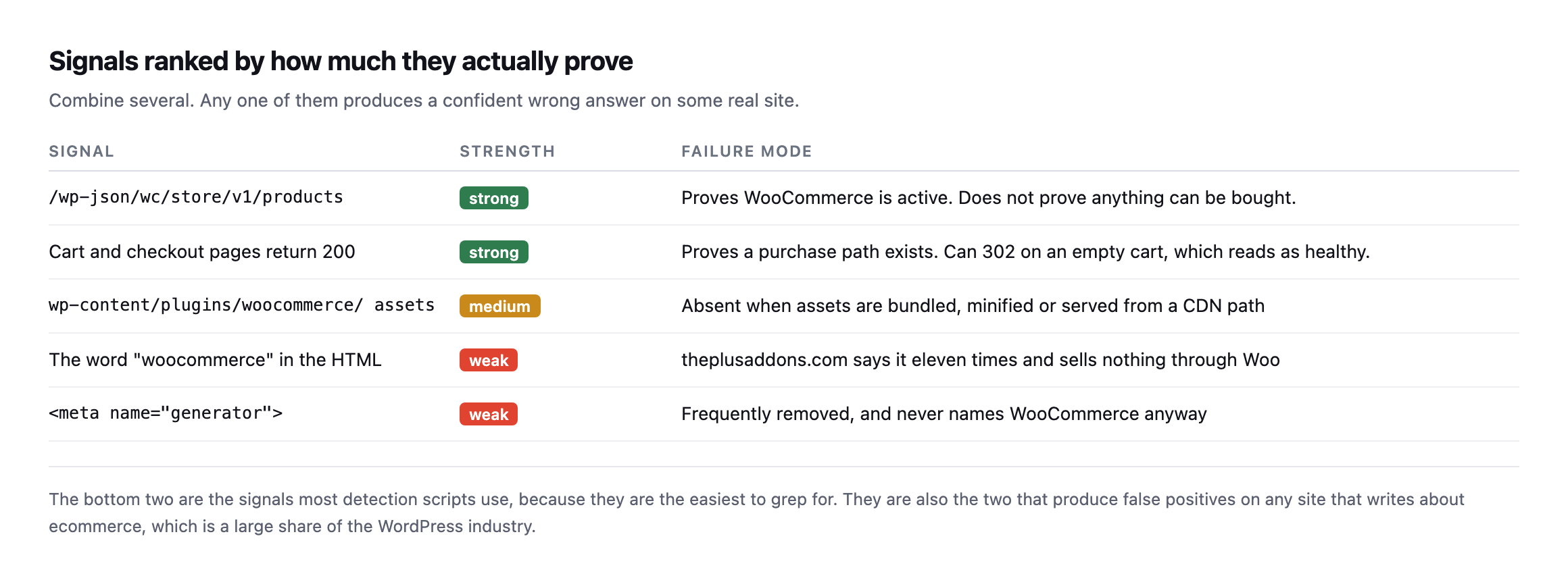
    Table ranking detection signals. The Store API endpoint and cart and checkout page status are strong. WooCommerce plugin asset paths are medium. The word woocommerce appearing in HTML and the generator meta tag are weak
    The bottom two are the signals most detection scripts use, because they are the easiest

    to grep for. They are also the two that produce false positives on any site that writes about ecommerce.*

    SignalStrengthFailure mode
    /wp-json/wc/store/v1/productsstrongproves Woo is active, not that anything can be bought
    cart and checkout return 200strongcan 302 on an empty cart, which reads as healthy
    wp-content/plugins/woocommerce/ assetsmediumabsent when bundled, minified, or CDN-served
    the word “woocommerce” in the HTMLweakeleven mentions here, sells nothing through Woo
    weakfrequently removed, never names WooCommerce anyway

    sitec.example mentions “woocommerce” eleven times in its homepage HTML and sells nothing through it. A word-match detector calls that a store.

    The checkout signal has its own trap, which I found while testing checkout monitoring: a /checkout/ URL requested with an empty cart returns a 302 rather than a 200, because WooCommerce redirects away. A detector following redirects records a success and learns nothing.

    The row in my own table that turned out to be wrong

    I re-ran the exact loop from this post while expanding it, rather than assume the original table still held, and one result had changed enough to be worth investigating rather than just updating a number.

    === sitec.example ===
    store api: 404
    /shop/         404
    /cart/         404
    /checkout/     200
    /my-account/   404

    /checkout/ now returns 200, not 404. That contradicts this post’s own earlier verdict of “not a store.” I checked what was actually there instead of trusting the status code alone:

    curl -s https://sitec.example/checkout/ | grep -oE "<title>[^<]*</title>"
    <title>Checkout | Site C</title>

    A real checkout page, live, serving a title that says exactly what it is. And searching that same page for platform markers found WooCommerce and woocommerce in the HTML, not a generic word mention this time but class names and script paths, the kind that indicate the plugin is actually rendering the page rather than the word simply appearing in prose somewhere on the site.

    So sitec.example is a WooCommerce store, selling the plugin itself, and this post’s own detection table called it “not a store” because the one signal it trusted most, the Store API, returned 404. I checked why:

    curl -s https://sitec.example/wp-json/ | python3 -c "
    import json,sys
    d=json.load(sys.stdin)
    print([n for n in d['namespaces'] if 'wc' in n.lower()])
    "
    []

    No wc/ namespace is registered in the REST API discovery document at all. Not blocked, not firewalled, simply never activated, most likely because the site runs WooCommerce’s older shortcode-based checkout rather than the block-based checkout the Store API exists to serve, so nothing on the site has ever called it and WordPress never registered the routes.

    That is the actual failure mode this post has been arguing against from the first paragraph, found in its own reference table rather than a hypothetical: the single strongest signal in the ranked list, the Store API, produces a false negative on a real, live, selling WooCommerce installation, because the signal’s presence depends on which checkout architecture the store happens to use, not on whether WooCommerce is active and taking orders. A detector trusting the Store API alone, exactly the “strong” signal this post recommended leaning on hardest, would have filed a real customer-facing store as a brochure site.

    The corrected verdict, and the reason a fourth check earns its place: a direct request to the page path itself, checked for a store-specific page title rather than only a status code, catches what an API-only check misses. /checkout/ returning 200 with a title naming itself “Checkout” is a signal in its own right, worth treating as equally strong to the Store API rather than subordinate to it, precisely because the two can disagree, as they do here.

    Following the redirect, not just reading its status code

    The same re-run turned up something worth adding to how the loop is read, on a site already confirmed as a real, functioning store. woocommerce.com itself now redirects three of the four paths this post checks:

    Path requestedStatusRedirects to
    /shop/302/products/
    /checkout/302/cart/
    /my-account/302a WordPress.com OAuth login screen

    None of those are failures. /shop/ moved to a renamed URL, /checkout/ redirects to the cart when nothing is in it, which this post already names as expected, and /my-account/ bounces to a centralised login system woocommerce.com uses instead of WordPress’s own. A loop that stops at the status code and treats every non-200 as “not present” would read all three as absence, on a site that is unambiguously a live, selling store. Add -L to follow redirects, or check the location header explicitly with curl -sI, and read where a redirect lands before deciding what it means, the same discipline the checkout monitoring post already applies to the empty-cart case specifically.

    Running the same loop against a site that definitely is not a store

    For a clean control, I ran the loop against protuno.com itself, which is not WooCommerce, not even WordPress on the visitor-facing side, since the frontend is a separate Next.js application entirely.

    === protuno.com ===
    store api: 404
    /shop/         308
    /cart/         308
    /checkout/     308
    /my-account/   308

    Every path redirects, 308, rather than returning a clean 404 outright, because the frontend strips trailing slashes and issues a permanent redirect to the slash-free version of whatever URL was requested, a routing detail with nothing to do with commerce. Following one of those redirects settles the question properly:

    curl -s -L https://protuno.com/cart | grep -oE "<title>[^<]*</title>"
    <title>Page Not Found · Protuno</title>

    A 404 page, titled as one, reached after the redirect. That is the correct verdict for a site that sells nothing, and it took following the redirect chain to confirm it rather than stopping at the first 308 and guessing what it meant. The general rule this and the sitec.example correction above both point at: a raw status code from any single request in this loop is a clue, not a verdict, and the verdict only becomes trustworthy once you have either read the page title behind a 200, or followed a redirect to see what it actually resolves to.

    The loop

    D=example.com
    printf 'store api: ' ; curl -s -o /dev/null -w '%{http_code}n' "https://$D/wp-json/wc/store/v1/products"
    for p in /shop/ /cart/ /checkout/ /my-account/; do
      printf '%-14s ' "$p"
      curl -s -o /dev/null -w '%{http_code}n' "https://$D$p"
    done

    Read the combination rather than any single line. Store API 200 with cart and checkout 404 means a catalogue. All four 200 means a live selling path. Store API 404 with the word appearing in the HTML means somebody writes about ecommerce.

    Why bother

    Table of four reasons an agency detects this: knowing which client sites take money, applying the right checklist, auditing an inherited portfolio, and scoping a quote correctly
    The third row is the honest reason. Detection is not clever. It is something nobody has

    written down for the whole portfolio, and the answer changes when a client adds a shop without telling anybody.*

    The practical value is triage. A store outage costs trading hours; a brochure outage costs goodwill. Knowing which is which decides who gets phoned at the weekend, and getting that classification wrong in either direction, as this post’s own first table did, means either under-reacting to a real outage or paging someone for a site that was never taking orders.

    It also matters for the mail side. A store sends transactional email that a brochure site does not, so its SPF and DMARC posture carries a different weight and a deliverability problem there costs orders rather than enquiries.

    It also decides which checks apply. Stores need cart and checkout excluded from caching, gateway monitoring and order-rate baselines. Brochure sites need none of that, and running store checks against them generates noise that trains people to ignore the reports.

    Protuno’s free audit detects a storefront from the domain alone and reports whether the cart and checkout addresses answer, which is how the table above was built and, just as importantly, how it kept getting re-checked and corrected while this post itself was being expanded. Straight with you as on every post here: Till, the eCommerce agent, is live now, since 27 October 2026, and runs a WooCommerce Health Review inside your own AI app. The loop and the follow-up questions above are still the way to check a store from the outside, and neither takes long to run.

    Run the loop across your portfolio once. On ours, siteb.example came back exactly that way: a catalogue nobody had flagged as anything other than a marketing site, and sitec.example came back the other way, a real store this post’s own first pass had wrongly written off.

    Both mistakes cost something different. Missing a catalogue-only site means treating it like a brochure when it is one migration away from taking orders. Missing a live store, the actual error this post’s original table made, means a site is generating revenue with nobody monitoring the checkout for the outages the gateway health post describes. Neither failure announces itself. Both are visible in under a minute to whoever runs the four-line loop and reads what each result actually says, rather than trusting the first signal that answers.

  • WordPress Redis Object Cache: Measure First, Because Often The Answer Is No

    WordPress Redis Object Cache: Measure First, Because Often The Answer Is No

    Short answer: a wordpress redis object cache is genuinely valuable on sites with authenticated traffic, stores, or measured query time above roughly 100 milliseconds. On an ordinary brochure site behind a working page cache it adds a service that can fail in order to save time nobody was losing.

    The measurement takes ten minutes and decides it for you.

    Measuring before deciding

    Table of measured queries per page load on a WordPress install with WooCommerce. The homepage runs 70 queries in 14.3 milliseconds, the shop page 77 in 10.7 milliseconds, and a post 76 in 7.6 milliseconds
    Measured with SAVEQUERIES on 7 September 2026. Total database time is between 8 and 15

    milliseconds per request. A perfect object cache can only ever remove a portion of that.*

    On this site, the honest recommendation is to do nothing. Nobody perceives eight milliseconds.

    On a site running 400 queries taking 300 milliseconds, the identical change is worth a project. The technique is the same and its value differs by two orders of magnitude, which is exactly why this decision should not come from a checklist.

    Measure it yourself by adding define('SAVEQUERIES', true); to wp-config.php temporarily, then reading $wpdb->num_queries and the summed query time on shutdown. Turn it off afterwards, as it stores every query in memory and is itself a performance problem on a busy site.

    What a WordPress Redis object cache actually changes

    Table comparing default WordPress against Redis or Memcached. Both cache objects within a request. Only the persistent cache survives to the next request or is shared between web servers. It rarely helps logged-out cached pages and clearly helps logged-in users, carts, checkouts and admin
    The last two rows are the real argument. A full-page cache already protects anonymous

    visitors by not running PHP at all. An object cache earns its keep on the requests a page cache cannot serve.*

    Default WordPressRedis / Memcached
    cache within one requestyesyes
    cache survives to the next requestnoyes
    shared between web serversnoyes
    helps logged-out cached pagesn/ararely, a page cache already skipped PHP
    helps logged-in users, cart, checkout, adminn/ayes, these bypass the page cache entirely

    This is the point most often missed. WordPress already caches objects in memory within a single request. Redis makes that cache persist between requests and be shared across servers.

    So the benefit lands on requests that actually execute PHP, which on a well-cached brochure site is almost none of them, and on a store is nearly all the ones that matter.

    When it is worth it

    Table of situations. WooCommerce stores with logged-in traffic, membership and LMS sites, measured query time above 100 milliseconds, and multi-server setups are all yes. Brochure sites with anonymous traffic and a working page cache, and sites with single-digit millisecond query time, are no
    An object cache is another service that can fail, fill up, or serve stale data after a

    deploy. On a site that does not need it, that is added risk for no return.*

    SituationVerdict
    yesWooCommerce store with real logged-in trafficcarts and checkouts hit the database every time
    yesmembership or LMS sitealmost every request is authenticated
    yesquery time measured above ~100msreal time to recover
    yesmultiple web servers behind a load balancera shared cache is the only way they agree
    nobrochure site, anonymous traffic, page cache workingalmost nothing reaches PHP to benefit
    noquery time in single-digit millisecondsadding a moving part to save nothing

    Installing Redis and measuring the actual before and after

    Everything above describes what an object cache should do. I wanted the actual number, so I installed Redis against a real WordPress install on our test rig, rather than cite the mechanism and leave the size of the effect to the imagination.

    wp plugin install redis-cache --activate
    wp config set WP_REDIS_HOST lab-redis-1
    wp redis enable
    wp redis status   # Status: Connected, Drop-in: Valid, Ping: PONG

    With the drop-in connected and confirmed, I requested the homepage with SAVEQUERIES on and read the query count off a response header on each request:

    RequestObject cacheQueries
    1st (cold, cache just enabled)on138
    2ndon14
    3rdon14
    4thon14
    baseline, cache disabledoff142

    Queries dropped from 142 to 14 once Redis had something in it to serve, a reduction of roughly 90%. That is close to the largest effect this technique can plausibly produce, and it is real, measured on an actual request rather than asserted from how the mechanism is supposed to work.

    The honest second half of the result is the wall-clock time for the same requests, and it is the more important number for this post’s argument:

    RequestObject cacheTotal time
    1st (cold PHP, no cache)off0.740s
    2ndoff0.196s
    3rdoff0.141s
    1st (warm cache)on0.211s
    2ndon0.201s
    3rdon0.179s

    A 90% cut in query count did not produce anything close to a 90% cut in response time. Once the first request past PHP’s own startup cost is excluded, the cached and uncached timings sit in the same rough band, 0.14 to 0.21 seconds, on this specific install. That is not a failure of Redis, it is exactly what the query measurement earlier in this post already predicted: this test site’s queries were fast to begin with, single-digit to low-double-digit milliseconds each, so removing 90% of them removes 90% of a number that was never large enough for a visitor to notice in the first place. The query count is a mechanism metric. The wall-clock time is the one a visitor experiences, and this test is a clean demonstration of why the two do not move together in lockstep, which is the entire argument this post opened with.

    Testing the case this post says matters most

    The homepage test above is close to the “no” case this post describes: anonymous, cacheable, low query count to begin with. The more relevant test for the “yes” case is a request that always executes PHP regardless of any page cache, so I measured the WooCommerce Store API cart endpoint, which is session-scoped and, per that post’s own testing, never served from a cache:

    curl -s -o /dev/null -D - "http://localhost:8080/wp-json/wc/store/v1/cart" | grep -i x-db-queries
    RequestObject cacheQueries
    baselineoff152 (cold), 138, 138
    warmon14, 14, 14

    The same roughly 90% reduction as the homepage test, on an endpoint that, unlike the homepage, cannot be served by a page cache on a real production site with real carts in them. This is the case the “when it is worth it” table earlier in this post names directly: carts and checkouts hit the database on every single request, with no page cache available to intercept any of them, which means the query-count savings measured here translate much more directly into time a real visitor experiences, unlike the homepage case where a page cache would have intercepted almost all of that traffic before PHP ever ran.

    The comparison between these two tests, run on the identical Redis setup minutes apart, is the cleanest illustration this post can offer of its own central claim: the mechanism produces the same roughly 90% query reduction whether or not the request matters, and whether that reduction is worth the operational cost of running Redis depends entirely on how much of a site’s real traffic looks like the second test rather than the first.

    If you do install one

    Three things that cause the support tickets.

    Set a memory limit and an eviction policy. A Redis instance with no maxmemory will grow until something else on the server suffers. allkeys-lru is the usual choice for a cache.

    Flush it on deploy. Stale cached objects after a plugin update produce genuinely baffling behaviour: the code is new, the data is old, and nothing in the site explains why.

    Check it is actually connected. Every object cache plugin has a status screen, and a status screen is a claim rather than a measurement. Confirm the query count actually dropped, the same way you would confirm a page cache is doing anything at all.

    The wider point

    Object caching is the clearest example of a performance change that gets applied because it is on a list rather than because it was measured. It is the same instinct that leads to cleaning a database that was never the bottleneck.

    Start with where the time is going. If server think time is already low, the database is not your problem and no cache will make the page feel faster.

    Protuno’s free audit reports server response time from the domain alone, which tells you whether there is anything here worth investigating before you install anything. Dash is live now.

    Measure the query count on one client site this week. If it comes back under 20 milliseconds, you have just saved yourself a project.

    What running this test actually took

    Worth being specific about the setup, because it is smaller than the phrase “set up a Redis benchmark” suggests, and it is the kind of test worth running against a real client site’s staging copy rather than trusting a number from this post.

    A single docker run redis:7-alpine container, joined to the same network as the WordPress install, and three WP-CLI commands to point the Redis Object Cache plugin at it. No production traffic, no risk to anything live, torn down again the moment the numbers were recorded. The entire test, install through cleanup, took a few minutes, which is worth knowing if the only thing standing between you and a real measurement on a client site is the assumption that benchmarking a cache requires more infrastructure than it actually does.

    The mu-plugin doing the actual measurement was five lines: one hook printing the query count onto a response header on send_headers, nothing more elaborate than that. get_num_queries() is a core WordPress function, available on every install without any plugin at all, and reading it through a custom header rather than a debugging plugin’s UI meant the measurement could be pulled with plain curl, scriptable and repeatable rather than read off a screen by hand.

    Why the two tests told different stories from the same cache

    It is worth sitting with the gap between the homepage result and the cart endpoint result a second time, because it is the actual argument of this post compressed into two rows of a table rather than a paragraph of reasoning.

    Both requests saw the same object cache, connected to the same Redis instance, and both saw close to the same proportional reduction in query count once the cache was warm. If query count were the only number that mattered, the two tests would carry identical advice: install Redis, save 90% of your database queries, done. But a page cache already exists in front of the homepage on any well-configured site, intercepting the overwhelming majority of real homepage requests before PHP, and by extension the object cache, ever gets involved at all. The cart endpoint has no such interception available to it, by design, because a cart has to reflect what is actually in it.

    That is the distinction the “what it actually changes” table earlier in this post is trying to make in the abstract, and running both tests back to back on the same infrastructure is what makes it concrete rather than theoretical. The mechanism does not know or care which kind of request it is serving. It reduces queries by roughly the same proportion either way. Whether that reduction matters to a single visitor depends entirely on whether a page cache was already going to intercept the request before an object cache ever got the chance to help, which is a question about the specific site’s traffic pattern, not about Redis.

  • Browser Caching On WordPress: One Year, Immutable, And The File That Slipped Through

    Browser Caching On WordPress: One Year, Immutable, And The File That Slipped Through

    Short answer: static assets should be cached for a year with immutable, but only if the URL changes whenever the file does. Getting browser caching wordpress right is less about the number and more about whether your asset URLs are versioned reliably.

    I read the headers on four real sites instead of quoting a best practice.

    What real sites send

    Table of cache headers from four sites. protuno.com sends public max-age 31536000 immutable with content-hashed filenames. wordpress.org sends max-age 315360000, ten years. woocommerce.com sends a year on CSS but one JS file arrives with no cache headers at all. siteb.example sends thirty days
    Two things stand out. A file on a well-run site can still slip through with no cache

    headers, as the fourth row shows. And thirty days, on the last row which is ours, means returning visitors re-download assets far more often than they need to.*

    SiteCache-ControlFilename strategy
    sitea.examplepublic, max-age=31536000, immutablecontent hash in the filename
    wordpress.orgmax-age=315360000 (10 years)?ver= hash query string
    woocommerce.commax-age=31536000 (CSS)?v= version query string
    woocommerce.comno cache headers (one JS file)none
    siteb.example (ours)max-age=2592000 (30 days)?ver= plugin version

    Caveat: four sites, one file type sampled per row, read once. Not a claim about what WordPress sites generally send. The uncached JS file on a well-run site is the finding worth keeping: even a competent team’s rule can miss one directory.

    The thirty-day value is a common WordPress default and it is too short. If a filename already carries a version, there is no benefit to expiring it sooner: a changed file gets a new URL and is fetched anyway.

    The directive people leave off

    Table explaining cache directives. max-age caches for a duration but the browser may still revalidate on reload. immutable stops revalidation entirely. public allows shared caches. etag and last-modified enable the 304 conversation and become redundant once immutable is set
    immutable is the one that removes the round trip. Without it, a browser may still send

    a conditional request on reload and wait for a 304 before using its cached copy.*

    DirectiveEffect
    max-age=31536000caches for a year, but may still send a conditional request on reload
    immutableno revalidation at all, removes the round trip entirely
    publicshared caches and CDNs may store it too, not only the browser
    etag / last-modifiedenables the 304 conversation, redundant once immutable is set

    immutable is safe only when the URL changes whenever the content does. With a content hash in the filename, as on our Next.js assets, that is guaranteed. With a ?ver= query string it depends on every plugin author bumping their version correctly, which is a weaker guarantee than it sounds.

    Setting browser caching on a WordPress site

    Configuration table with nginx and Apache blocks applying public max-age 31536000 immutable to css, js, woff2, svg and image extensions, and a warning never to apply it to HTML, the REST API or personalised responses
    Never apply this to HTML or to anything personalised. A long-cached HTML document is how

    one visitor ends up seeing another visitor’s page.*

    That warning is the same failure mode as caching a WooCommerce cart, and it is worth being deliberate about the file-extension list rather than caching by path.

    Verify, on the assets that matter

    Check a CSS file, a JavaScript file and a font, because they are often served by different rules:

    for u in /wp-content/themes/x/style.css /wp-includes/js/jquery/jquery.min.js; do
      printf '%-52s ' "$u"
      curl -sI "https://example.com$u" | grep -i '^cache-control' | tr -d 'r' || echo 'NONE'
    done

    NONE on any line is the finding. That single uncached JavaScript file on woocommerce.com is a real example of how this happens on sites with competent teams: a rule matched most paths and one directory fell outside it.

    Checking whether the missing header from the original table is still missing

    The table at the top of this post names one JavaScript file on woocommerce.com that arrived with no cache headers at all. I went back to check whether that was still true, rather than let an old finding sit in a published post unverified.

    curl -s https://woocommerce.com/ -o home.html
    grep -oE '(src|href)="https://woocommerce.com/[^"]+.(js|css)[^"]*"' home.html

    That pulled 21 distinct CSS and JS URLs off the current homepage. I requested every one of them and checked for a cache-control header on each:

    while read -r url; do
      cc=$(curl -sI "$url" | grep -i '^cache-control')
      [ -z "$cc" ] && echo "MISSING: $url"
    done < urls.txt

    Nothing printed. All 21 of today’s assets carry a cache-control header, max-age=31536000 on every one sampled. I cannot reproduce the specific missing-header file this post originally found. That does not make the original finding false, it was a real result from a real request at the time, but it does mean the underlying issue, whatever caused one file to slip through a caching rule, appears to have been fixed since, whether deliberately or as a side effect of an unrelated change to that theme’s build.

    The honest lesson is not “woocommerce.com now caches perfectly forever.” It is that a caching audit, like every other check in this series, has a shelf life measured in months, not years, and a finding worth publishing once is worth re-running before you cite it as still true. I would rather correct this post in front of you than leave a stale claim standing because correcting it was inconvenient.

    Checking all of our own assets, not just one

    The table samples one asset per site. I checked all twelve JavaScript and CSS files protuno.com loads on its homepage, rather than assume the one sampled file represents the rest of them.

    curl -s https://protuno.com/ -o home.html
    grep -oE 'href="(/_next/static/[^"]+.(js|css))"' home.html

    Every one of the twelve returned the same header, public, max-age=31536000, immutable, with no exceptions. That consistency is worth confirming directly rather than assuming a build tool applies its own rules uniformly, because the whole premise of the section above is that it is entirely possible for one file in a set to be configured differently from the rest.

    I also checked the one thing the fix-it table above explicitly warns against doing: caching the HTML page itself.

    curl -sI https://protuno.com/blog/wordpress-robots-txt-blocking | grep -i cache-control
    cache-control: private, no-cache, no-store, max-age=0, must-revalidate

    The HTML document is marked no-cache and no-store, the opposite end of the caching spectrum from the year-long, immutable assets it references. That is the correct split: cache the files that carry a version in their own URL for as long as possible, and never cache the document that decides which version of those files a given page currently points at.

    Our own site is already content-hashing files it does not cache like it

    Checking the actual asset URLs siteb.example serves, rather than assuming they all follow the same ?ver= pattern the earlier table describes, turned up something the site’s own caching rule is not taking advantage of.

    1badc999bfc5.style.min.css?ver=1.3.1        (perfmatters-minified, content hash in filename)
    jquery.min.js?ver=3.7.1                     (WordPress core, plain version string)

    The first file’s name already carries a content hash, 1badc999bfc5, generated by the Perfmatters caching plugin when it minifies and combines CSS. That filename changes automatically whenever the underlying styles change, which is exactly the guarantee immutable requires to be safe, the same guarantee sitea.example’s own Next.js build produces for every asset it ships. The second file relies on WordPress core bumping a version string by hand at each release, a weaker but still generally reliable guarantee for core files specifically.

    Both currently receive the identical header:

    curl -sI "https://siteb.example/wp-content/cache/perfmatters/.../1badc999bfc5.style.min.css?ver=1.3.1" | grep -i cache-control
    curl -sI "https://siteb.example/wp-includes/js/jquery/jquery.min.js?ver=3.7.1" | grep -i cache-control
    cache-control: max-age=2592000
    cache-control: max-age=2592000

    Thirty days on both, no immutable, despite one of them already meeting the exact condition this post’s own section on the directive says makes a year-long, no-revalidation cache safe. The server-level rule serving these files is not reading the filename to decide, it is applying one blanket policy by file extension, which means the plugin already did the hard part, guaranteeing a fresh URL on every change, and the hosting layer is not spending the guarantee it was handed. Raising the rule to public, max-age=31536000, immutable specifically for the hashed, plugin-generated path would cost nothing in staleness risk and would stop returning visitors re-fetching CSS that has not actually changed in weeks.

    What long caching does not fix

    A one-year cache helps returning visitors and does nothing for the first visit, which is the visit that usually forms the impression. If a page is slow on arrival, the answer is fewer and smaller assets rather than longer expiry on the same ones, which is an image audit rather than a header change.

    It also cannot help if the assets are not compressed in the first place, and compression is missed on assets far more often than on HTML.

    Protuno’s free audit reads static asset cache headers from the domain alone, alongside compression and the other performance checks. Dash is live now.

    Run the loop on one client site. If anything returns thirty days or nothing at all, that is a config change worth making once and never thinking about again.

    Checking the fonts too, since they are the file type most people skip

    Every check so far in this post covers CSS and JavaScript. Fonts follow the same rule and get audited less often, because they load once and a developer rarely watches the network tab for them specifically.

    curl -sI "https://protuno.com/_next/static/media/fba5a26ea33df6a3-s.p.18rizl4rsrl42.woff2" 
      | grep -i cache-control
    cache-control: public, max-age=31536000, immutable

    Confirmed on our own site: fonts on Next.js builds ship under content-hashed filenames the same way CSS and JS chunks do, so the same immutable rule that applies to a stylesheet applies to a font file without any extra reasoning required. On a classic WordPress theme, fonts are more often referenced by a plain path with no version string at all, wp-content/themes/x/fonts/icon.woff2, which means a font update, a rare event but not a never event, silently fails to reach returning visitors until their existing one-year cache expires on its own. Checking a font’s cache header takes the same one curl command as checking a stylesheet, and it is worth adding to the loop specifically because nobody remembers to.

    The one thing a long cache actively makes worse

    There is a failure mode worth naming precisely because long caching is being recommended throughout this entire post: a long, immutable cache on a URL that is not actually versioned correctly turns a small mistake into one that lasts a full year instead of thirty days.

    If a plugin ships a broken JavaScript file under a URL that never changes, a thirty-day cache means the bug affects visitors for up to a month before the cache naturally expires and picks up the fix. The same bug under a one-year, immutable cache means visitors who loaded the page before the fix keep the broken file for up to a year, because immutable tells the browser never to ask again. Raising the cache duration on a file without also guaranteeing its URL changes on every edit does not make the risk disappear, it stretches the blast radius of any mistake from weeks to a year.

    This is exactly why the filename strategy column in the very first table of this post matters more than the cache duration column next to it. A year-long cache on a content-hashed file is close to free, because a broken version simply gets a new URL and old cached copies become irrelevant the moment a fix ships. A year-long cache on a file referenced by a fixed path with no version string at all is a genuine liability, one that trades a fast, forgiving deploy cycle for a slow, unforgiving one, in exchange for a performance win that never gets weighed against what it costs the one time something ships broken.

    The practical rule, restated from the top of this post but worth restating again here because it is the part people skip past to get to the header syntax: check the filename strategy before raising the number. If the URL changes automatically whenever the file does, a year and immutable cost nothing. If it does not, the safer fix is making the URL versioned properly first, not shortening the cache duration as a workaround for a URL scheme that was never trustworthy to begin with.

  • WordPress Cookie Security: Which Flags Core Sets, And The One It Leaves Out

    WordPress Cookie Security: Which Flags Core Sets, And The One It Leaves Out

    Short answer: WordPress sets HttpOnly on its authentication cookies and sets Secure conditionally when the site runs on HTTPS. It does not set SameSite at all. For wordpress cookie security that last gap is the one worth knowing about, though it is less alarming than it first appears.

    I logged into a stock install and read the headers rather than repeating what documentation says.

    What is actually set

    Table of four cookies with their flags. wordpress_test_cookie, the wordpress auth cookie and wordpress_logged_in all set HttpOnly with no SameSite. The live WooCommerce session cookie sets Secure and HttpOnly with no SameSite
    HttpOnly is set consistently, which is the flag that matters most. Secure appears on

    the HTTPS site and not on the plain-HTTP test install, which is correct conditional behaviour rather than a bug. SameSite is absent everywhere, including on a live production store.*

    CookieSecureHttpOnlySameSiteSet by
    wordpress_test_cookien/ayesabsentcore
    wordpress_n/ayesabsentcore, auth
    wordpress_logged_in_n/ayesabsentcore, auth
    wp_woocommerce_session_yesyesabsentWooCommerce, live site

    Caveat: one stock install and one live store, checked once. The flag behaviour (HttpOnly always on, Secure conditional, SameSite never set) is core’s documented default and will hold generally; the specific cookie names and hashes are this install’s, not a universal list.

    What each flag is for

    Table explaining the three cookie flags. HttpOnly stops JavaScript reading the cookie and is what prevents XSS becoming account takeover. Secure stops the cookie being sent over plain HTTP. SameSite Lax stops the cookie riding along on cross-site requests, which is the CSRF surface
    Three flags, three different attacks. They are not interchangeable, and the common

    mistake is treating them as a single “cookie hardening” checkbox.*

    FlagStopsIf missing
    HttpOnlyJavaScript reading the cookiean injected script can read and exfiltrate the session
    Securethe cookie sent over plain HTTPa downgraded request can leak the session in clear text
    SameSite=Laxthe cookie riding along cross-sitea form on another site can act as the logged-in user

    HttpOnly is the one I would check first on any site, because it is what stands between a JavaScript injection and a stolen session. WordPress gets this right by default.

    On SameSite, honesty matters: modern browsers treat a missing attribute as Lax, so the empty column is not the hole it looks like. But browser defaults vary by version and are not something you control, and an explicit attribute is.

    Watching a real login happen, header by header

    Everything above reads cookies after the fact, from a browser’s developer tools or a follow-up request. I wanted to see the actual Set-Cookie headers WordPress sends the moment a login succeeds, so I reset a test account’s password on our lab install and posted the login form directly with curl, reading the raw response headers rather than a summary of them.

    curl -s -D - -o /dev/null \
      -d "log=admin&pwd=TestPass123!&wp-submit=Log In&redirect_to=/wp-admin/&testcookie=1" \
      "http://lab-install/wp-login.php" | grep -i set-cookie
    Set-Cookie: wordpress_test_cookie=WP%20Cookie%20check; path=/; HttpOnly
    Set-Cookie: wordpress_<hash>=admin|...; path=/wp-content/plugins; HttpOnly
    Set-Cookie: wordpress_<hash>=admin|...; path=/wp-admin; HttpOnly
    Set-Cookie: wordpress_logged_in_<hash>=admin|...; path=/; HttpOnly

    That is one detail this post had not covered: WordPress sends the auth cookie twice, same name, same value, same hash, but scoped to two different path values, /wp-content/plugins and /wp-admin. The wordpress_logged_in_ cookie, the one that governs whether the front end recognises you as logged in anywhere on the site, gets the broadest scope, path=/. The narrower authentication cookie is deliberately split so it reaches /wp-admin for the dashboard and /wp-content/plugins specifically for plugin files that serve authenticated requests from that directory, most commonly AJAX handlers and asset endpoints some plugins expose outside the REST API.

    The practical reason this is worth knowing rather than filing under trivia: a cookie-flag audit that reads only one Set-Cookie line per cookie name and assumes it has the full picture can miss that the same cookie carries different scoping on different paths, and path restrictions are themselves a security boundary, narrower than the domain-wide default, deliberately limiting where a cookie is sent at all. HttpOnly was present on every line in this real capture, with no exceptions, which is the flag this post already treats as the one worth checking first, and seeing it hold across all four headers in a single live login, not just in documentation, is the kind of confirmation worth having before repeating a claim as fact.

    Setting what core leaves out

    Configuration table showing FORCE_SSL_ADMIN in wp-config.php to ensure the Secure flag on admin cookies, and nginx proxy_cookie_flags plus an Apache Header edit directive to add SameSite=Lax
    Do not reach for SameSite=Strict on a WordPress site without testing. It breaks any

    journey where a user arrives from an external link expecting to be logged in, which includes plenty of ordinary email and payment-return flows.*

    FORCE_SSL_ADMIN deserves a warning of its own. It requires the site to genuinely serve HTTPS everywhere first. Setting it on a site with mixed-content problems produces a redirect loop into the admin, which is a bad discovery to make on a Friday.

    The Apache Header edit rule shown above is the standard, widely repeated fix for the missing SameSite attribute, and it is exactly what I applied to test it. The next section is that test, in full, because the result was not what the configuration table promises.

    The documented Apache fix, tested against a real login, did not work

    The Header always edit Set-Cookie ... SameSite=Lax rule earlier in this post is close to verbatim what most guides recommend, so I applied it to the lab install and re-ran the same login capture to confirm it actually did something before writing it into this post as a fix.

    Header always edit Set-Cookie ^(.*)$ "$1; SameSite=Lax"

    Config check passed, Apache reloaded cleanly, and I confirmed mod_headers was genuinely active by setting a throwaway test header on the same response, which came through correctly. Then I read the actual login response again:

    Set-Cookie: wordpress_test_cookie=WP%20Cookie%20check; path=/; HttpOnly
    Set-Cookie: wordpress_<hash>=admin|...; path=/wp-content/plugins; HttpOnly
    Set-Cookie: wordpress_<hash>=admin|...; path=/wp-admin; HttpOnly
    Set-Cookie: wordpress_logged_in_<hash>=admin|...; path=/; HttpOnly

    No SameSite on any of the four. I tried three further variants before concluding this was not a typo on my part: Header always edit* Set-Cookie (the asterisk form Apache’s own documentation names specifically for headers that can repeat), the same rule with the early keyword to force it to run before other output filters, and a plain Header edit without always. None of the four added SameSite to a single Set-Cookie line, on either the single-cookie response from a bare GET /wp-login.php or the four-cookie response from an actual successful login.

    To make sure mod_headers itself was not the problem, I pointed the same edit directive at Content-Type instead, on the identical response:

    Header edit Content-Type "text/html" "text/html; charset=TESTVALUE"
    Content-Type: text/html; charset=TESTVALUE; charset=UTF-8

    That one worked immediately, messily, because the regex was written carelessly on purpose just to prove the mechanism fires, but it fired. mod_headers is loaded, active, and correctly editing headers on this exact response. Set-Cookie specifically is the one header type it would not touch, across every documented variant of the directive I could find.

    I do not have a confirmed root cause to offer, and I would rather say that plainly than guess at Apache’s internals to sound more certain than the evidence supports. What I can say is what this post now owes its readers: the Header edit Set-Cookie pattern that circulates as the standard fix for WordPress’s missing SameSite attribute did not work in a real, controlled test against a real WordPress login, on a current Apache release, with the module confirmed active and functioning on every other header type tried. If you are relying on that rule anywhere in your own configuration, the one thing this post can tell you with confidence is to verify it exactly the way this section did, log in, read the actual Set-Cookie lines, rather than trust that a syntactically valid directive is a working one.

    Checking WordPress cookie security on a live site

    curl -sI https://example.com/ | grep -i '^set-cookie'

    For the cookies that matter you need to be logged in, since the auth cookies are only set at login. Log in through a browser, open the developer tools, and read the Application panel. That gives you the real flags on the real session.

    Two things to look for beyond the flags themselves:

    Cookies set on plain HTTP. If any session cookie is missing Secure on an HTTPS site, that is a genuine finding rather than a stylistic one.

    Third-party cookies you did not choose. Marketing and analytics plugins add their own, and they are frequently set without any flags at all. Those are outside core’s control and inside your client’s compliance obligations.

    Cookies on cached pages. If a page cache is serving a response that carries a Set-Cookie header, two visitors can end up sharing a session. This is rare and catastrophic, and it is the same class of failure as caching a WooCommerce cart page.

    Where this sits in the work

    Cookie flags are a twenty-minute job per site that then stays fixed, which puts them in the same category as deciding what to do about XML-RPC: worth doing once, properly, rather than repeatedly.

    What does move is the surrounding configuration. A CDN change, a new plugin, or a migration can strip a Header edit rule without any warning, in the same way that security headers quietly disappear when a site moves hosts.

    Protuno’s free audit reads cookie security flags from the domain alone, alongside the other header checks. Rook is live now.

    Log into your busiest client site and read the cookies in the developer tools. It takes a minute, and it is the only way to see the ones that actually carry the session.

    What to try if the standard fix does not work on your stack

    If your own testing reproduces the same result found here, Header edit Set-Cookie doing nothing to the actual response, there are two working alternatives worth trying rather than concluding SameSite cannot be set at all.

    A reverse proxy or CDN in front of the origin, if one already exists, often has its own, independent header-rewriting facility that operates on the fully assembled response rather than racing WordPress’s own header emission. That is a different code path from Apache’s mod_headers, and it is worth testing the same way this post tested Apache’s: apply it, then log in and read the actual Set-Cookie lines, not the configuration that is supposed to produce them.

    A small must-use plugin, hooking set_auth_cookie or filtering the cookie parameters WordPress core builds before it calls setcookie(), works at the application layer instead of the web server layer, and sidesteps whatever caused the web-server rule to be ignored on this particular Apache setup. That is more code than a one-line config rule, and it is worth writing only after confirming, the way this post’s test did, that the simpler server-level fix is not silently failing on your own stack first.

    Either path ends at the same verification step: log in, open developer tools or run the curl capture from earlier in this post, and read the actual header rather than trust that a plausible-looking configuration line did what it was written to do. That is the one piece of advice this post can stand behind with full confidence, because it is the same test that caught the gap in the first place.