Category: Marketing

  • WordPress Cookie Consent: Which Scripts Fire Before Yes

    WordPress Cookie Consent: Which Scripts Fire Before Yes

    A WordPress cookie banner has two buttons, Accept and Reject, and a line about cookies. That is the part everybody checks, because it is the part you can see.

    What the banner does not show you is the page behind it. A banner can sit in front of a page that has already made its requests. On a site where a tag was added outside the consent plugin, the analytics tag, an ads pixel or a chat widget can fire before the banner has finished appearing.

    Short answer: WordPress cookie consent has two halves. One is a banner that records a choice. The other is a loading order that decides what runs before that choice. To tell which half a site really has, load it in a fresh browser profile, click nothing, and write down every third-party request and every cookie that exists before the first click. Anything on that list that is not the consent tool itself or strictly functional fired before permission, whatever the banner says.

    What this post is, and is not: this is a repeatable observation you can run from outside any site, in a browser, in about ten minutes. It is not legal advice, and it does not tell you whether a given script is lawful in your jurisdiction. It tells you what actually loaded. What that means for a given site is a conversation between the site owner and their counsel.
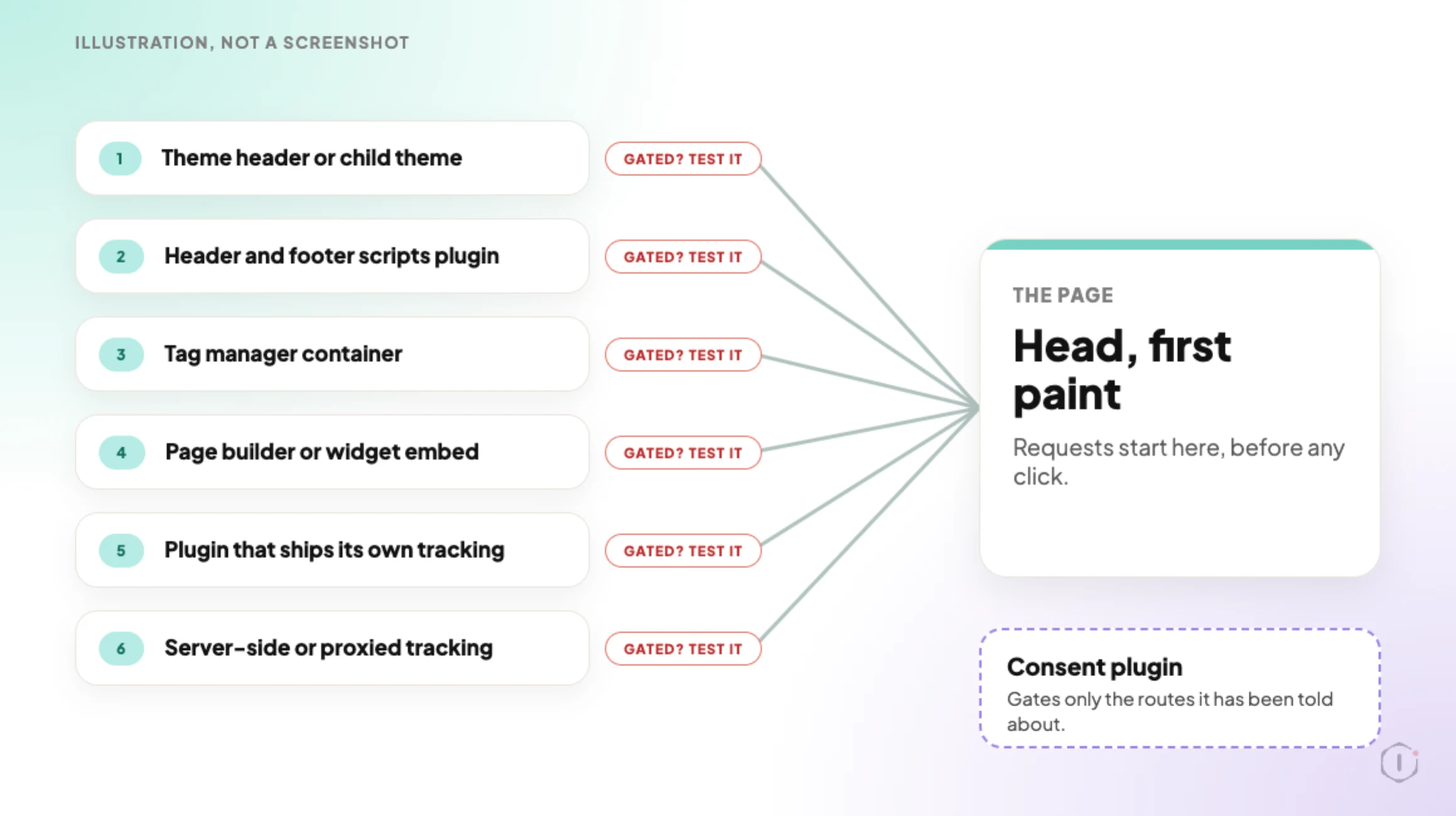
    Six routes by which a script reaches a WordPress page head, from the theme header to server-side tracking. Each route has a chip reading Gated? Test it. A consent plugin box at the side says it gates only the routes it has been told about.
    Illustration, not a screenshot. Whether each route is gated is the thing you test.

    Why A Banner And Enforcement Are Different Things

    A consent plugin usually does two separate jobs, and it is normal for a site to have only the first one working.

    The first job is presentation: show a banner, record a choice, store it in a cookie, show a preferences link later. This part is visible, so it gets tested.

    The second job is enforcement: actually prevent the tags from loading until the choice is made. This part is invisible, so it is rarely tested. It also depends on things the consent plugin does not control, including how each tag was added to the site in the first place.

    That is where the gap opens. A tag added through a tag manager container, a theme options field, a header-scripts plugin, a page builder widget or a hard-coded line in header.php is not automatically known to the consent plugin. The plugin can only block what it has been told to block, or what it can recognise.

    So the honest version of the question is not “do we have a cookie banner”. It is:

    Which scripts on this page run before a visitor has made a choice, and is that the intended list?

    The Usual Sources Of A Pre-Consent Script

    A pre-consent tag has usually arrived by one of a small number of routes. Knowing them shortens the hunt.

    Where the tag livesWhy consent often misses itHow you spot it
    Hard-coded in the theme header or a child themeIt renders in wp_head before any consent logic runsView source, search for the vendor domain, note it is not wrapped in a consent attribute
    A header and footer scripts pluginOutput is a raw string the consent plugin cannot parseRequest fires on first paint with no consent cookie present
    A tag manager containerThe container loads, then fires its own tags on its own triggersOne container request followed by several vendor requests
    A page builder or widget embedVideo, map and social embeds often set cookies themselvesRequests to an embed domain on pages that contain the embed only
    A plugin that ships its own trackingAnalytics bundled into a forms, chat or reviews pluginRequest appears on every page, matched to a plugin asset path
    Server-side or proxied trackingNothing third-party shows in the network panel at allFirst-party request to an odd path, or no visible evidence from outside

    The last row is the honest limit of an external check, and it comes back later in this post.

    The Ten Minute Check, Step By Step

    This runs on any site you are authorised to test, from a browser, with no plugin installed and nothing changed. The panels are the Network and Application tabs in Chrome DevTools, and other browsers have the same two.

    1. Open a completely fresh private window. A fresh profile matters more than it sounds: an existing consent cookie makes the whole test meaningless, because the site will behave as though a choice was already made.
    2. Open the developer tools, go to the Network panel, and make sure request recording is on before you navigate.
    3. Load the page. A homepage first, then a post, then a page that has an embedded video or map, because those behave differently.
    4. Click nothing. Do not dismiss the banner.
    5. Sort the request list by domain. Write down every domain that is not the site’s own, and every domain that is the site’s own but is clearly a tracking path.
    6. Switch to the Application panel and list every cookie and every local storage key that now exists. Note which are first-party and which are third-party.
    7. Now click Reject. Reload. Repeat steps 5 and 6. Compare the two lists.
    8. Then click Accept in a new fresh profile and record a third list.

    Three lists, one page. The one that matters most is the first one.
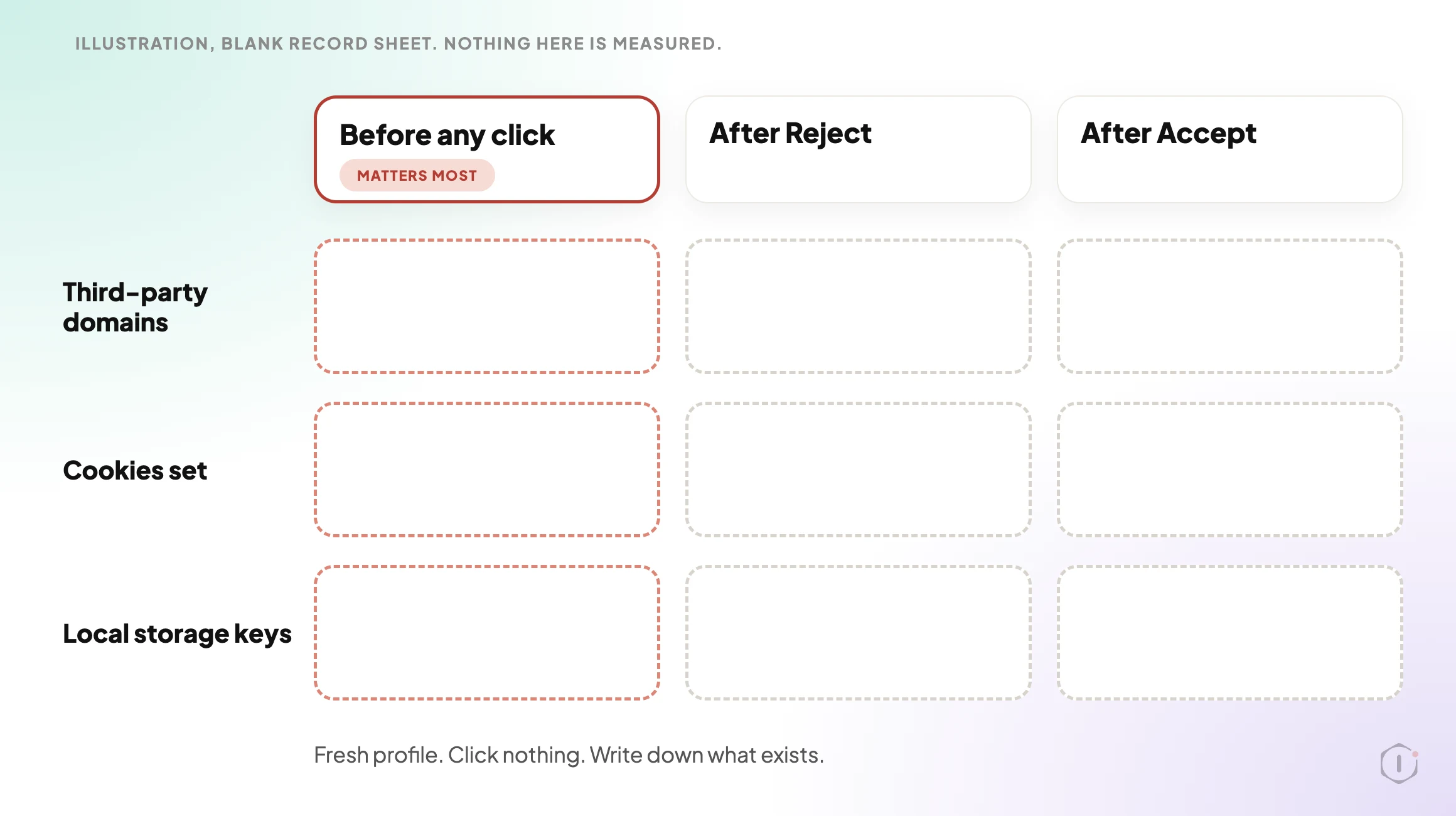
    A blank record sheet with three columns, Before any click, After Reject and After Accept, and three rows, Third-party domains, Cookies set and Local storage keys. Every cell is empty. The first column is marked as the one that matters most.
    Illustration of a blank record sheet. Nothing on it is a measured result.

    The useful output is not:

    “The site has a cookie banner from a well-known consent plugin.”

    It is:

    “Before any click, this page set four cookies and made requests to three third-party domains. After Reject, it set two cookies and made requests to one. Here is which script is responsible for each.”

    The numbers in that second line are an example of the shape of the answer, not a finding. A client can act on a statement like it, and a developer can fix it without guessing.

    Reading The Result Without Overreading It

    A request before consent is not automatically a violation, and this is where a lot of audits lose credibility by overclaiming. A font file, a CDN asset, a security challenge, or the consent platform’s own configuration request are different in kind from an advertising pixel. The cookie that stores the consent choice has to be set for the banner to work at all.

    The categories worth separating:

    • The consent mechanism itself. Its own script and its own choice cookie. Expected.
    • Strictly functional. Session handling, cart state, security tokens, load balancing. Usually expected.
    • Measurement. Analytics, heatmaps, session recording. This is the group where a pre-consent fire is usually unintended.
    • Advertising and remarketing. Pixels, conversion tags, audience sync. This is the group where a pre-consent fire is usually the biggest problem.
    • Embeds. Video players, maps, fonts loaded from a third party, social widgets. Often forgotten entirely, because the person who embedded the video was not thinking about tags.

    Sorting your list into those five buckets takes a couple of minutes and changes the conversation from “you are non-compliant” to “these two things fire early, and here is where they come from”.

    The flags on the cookies themselves are a separate question worth running in the same sitting: which flags WordPress core sets on its own cookies, and the one it leaves out covers the Secure, HttpOnly and SameSite side. This post is about whether the cookie should have existed yet at all.

    Illustration. The example domains are made up and nothing in the video is a measured result.

    The Tag Manager Case, Which Behaves Differently

    A tag manager deserves its own paragraph because it fails in a way that looks like success. Install a consent plugin, point it at the container, and the container itself will often be correctly gated. You reload, see the container request held back, and conclude the job is done.

    But a container can hold tags set to fire on triggers that never consult the consent signal, and tags someone added last quarter for a campaign that ended. The gate at the container level is only as good as the configuration inside it. Worse, a site can end up with the same measurement tag twice, once through the container and once hard-coded in the header by whoever set it up first. That is a counting problem as well as a consent problem, covered in duplicate Google Analytics tags.

    If the numbers downstream also look wrong, the two are often one incident seen from different ends. Counting three sales from one order is the same class of fault: the page fires things nobody has a complete list of.

    Can You Enforce This At The Header Level?

    Partly, and it is worth knowing where the line is.

    A content security policy restricts which origins a page may load resources from. That is a useful backstop: the browser blocks a script from an origin that is not on the allowlist, whichever plugin injected it. It gives you an enforced inventory rather than a hopeful one, and it makes an unexpected new third-party domain visible immediately instead of six months later. Getting one onto a WordPress site without taking the site down is its own exercise, written up in a WordPress content security policy that does not break the site, and the wider set of response headers is in two security headers you can set today.

    What a policy will not do is express consent. It is static for all visitors, so it cannot say “allow this origin only after the visitor accepts measurement cookies”. Use the policy to control which origins are possible at all, the consent layer to control which of those fire before a choice, and the fresh-profile check above to verify the second one is working rather than merely installed.

    What This Does Not Solve

    This check is an outside observation of one browser, on a handful of pages, at one moment. It has real limits, and stating them is the difference between an audit and a guess.

    • It cannot see server-side tracking. If measurement happens on the server, or is proxied through a first-party path, nothing distinguishable appears in the network panel. You can only find that by reading the code or asking.
    • It is per page, not per site. A pixel added to one landing page will not show up unless you load that landing page. A site with hundreds of templates needs sampling.
    • It is a point in time. A plugin update, a new embed, a caching or optimisation change, or a tag added for a campaign can reintroduce an early-firing script the week after you certified the site clean. WordPress 7.1.3 shipped on 6 October 2026 and 7.2 Beta 1 followed on 20 October. Neither announcement mentions cookies or consent, so nothing here depends on a core change.
    • It does not read the consent record. Whether the choice is stored correctly, honoured on later visits, and available as evidence is a separate check against the consent platform.
    • It says nothing about geography. Some consent setups behave differently by region. A clean result from one location does not describe the behaviour visitors elsewhere receive.
    • It is not a legal conclusion. Loading a measurement script before a click is a fact. Whether that fact matters for a given site depends on jurisdiction, the nature of the data, and the legal basis claimed. This check produces the evidence, not the verdict.

    A Portfolio Pass You Can Do This Week

    If you run sites for other people, the single-site version of this is interesting and the portfolio version is useful.

    Pick every site you are responsible for that has a consent banner. For each one, record four things in one row: whether any third-party request fires before a click, whether any non-consent cookie is set before a click, whether Reject actually reduces the list, and which route each early script arrived by.

    If the sites cluster, that is the finding. One group built by the same person with the same header-scripts plugin will behave the same way, and a video embed on one page will show up only on that page. Clustering tells you whether you have thirty separate problems or two.

    Then record the decision next to each row, not just the observation. Fix now, fix at the next release, accept with a named owner and a review date, or escalate because it is the client’s tag and their call. A row with a finding and no decision just moves the problem into a nicer spreadsheet.

    Two Outside Views

    A video that turns the same idea into a checklist. DataShyre’s “WordPress Cookie Consent in 2026: 7 Checks Before You Go Live“, published 14 August 2026, is a two-and-a-half-minute list of seven things to test before a consent setup goes live. Four of them match this post: test blocking on real templates and not just the homepage, look at what plugins do before consent, check that withdrawing consent really changes behaviour, and retest after updates to caching, plugins or optimisation. The video’s own line is that a banner is not enough and the setup needs an operational check. It is a short, small-channel video, so treat it as a reminder list, not a method.

    Verify that withdrawing consent triggers real behavior changes across your site.

    DataShyre, “WordPress Cookie Consent in 2026: 7 Checks Before You Go Live” on YouTube, 14 Aug 2026

    A thread from people living with it. In an r/Wordpress thread titled “Videos do not appear unless allow cookies”, a site owner finds that embedded YouTube videos show as blank space until a visitor accepts cookies, and their cookie platform says that is standard behaviour. One reply points at the same embed problem from the other side:

    There is a WP plugin No Cookies for YouTube which will make any video use YouTube’s no-cookie domain. That may help, but some cookie consent solutions will still treat YouTube’s alternative tracking methods (e.g. local storage) as needing consent just like cookies.

    u/SpaceCmdr, r/Wordpress, 24 September 2026

    That is the embeds row of the table in practice. The embed loads nothing until a choice is made, and what counts as loading depends on how the consent tool reads local storage, not only cookies. It is also why the Application panel step lists local storage keys next to cookies.

    Sources And Further Reading

    The Point

    A banner is something visitors read. Enforcement is something the browser does, and only a network panel shows it.

    So the question for your own portfolio is not whether the banners are installed, because they are. It is simpler and less comfortable: on how many of your sites has anyone actually loaded the page in a clean profile, clicked nothing, and read the list?
  • WordPress Email Deliverability: The Header Nobody Checks

    WordPress Email Deliverability: The Header Nobody Checks

    Short answer: WordPress email deliverability usually fails on alignment, not authentication. SPF and DKIM check one domain, DMARC checks a different one, and a default WordPress install sends from a From address that has nothing to do with either. Every record can be valid and the mail can still be rejected.

    I audited eight domains and measured a clean install to see how wide the gap really is. Two of the worst results are ours.

    The part that trips everyone up

    Most deliverability advice stops at “publish SPF, publish DKIM, publish DMARC”. That is necessary and it is not the check that runs.

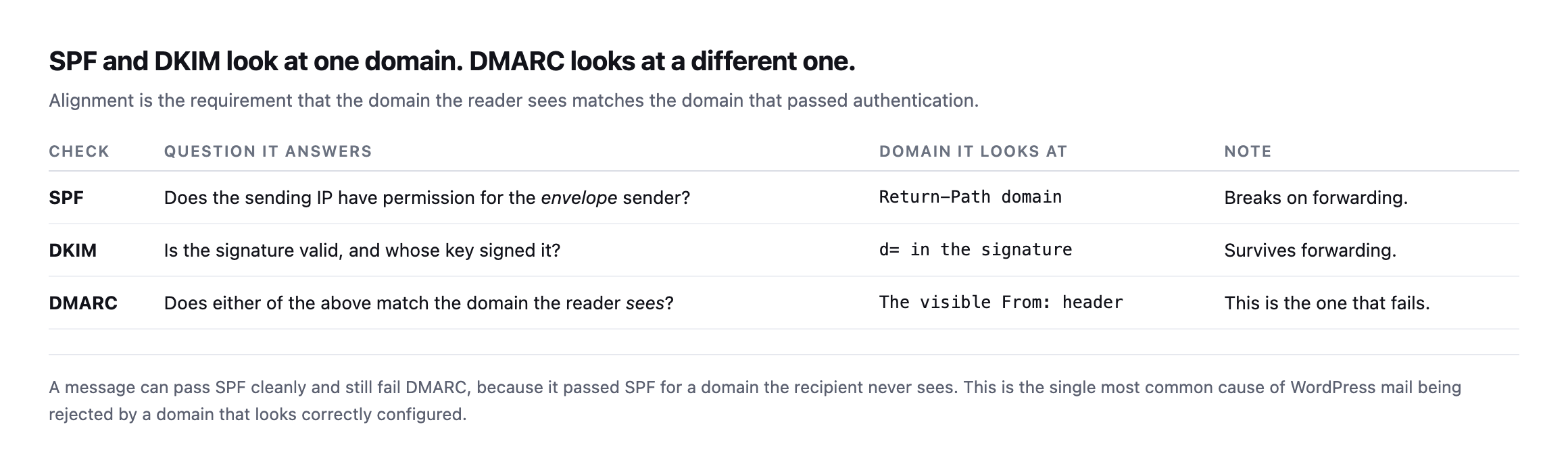
    Table of three checks. SPF asks whether the sending IP has permission for the envelope sender and looks at the Return-Path domain, breaking on forwarding. DKIM asks whether the signature is valid and looks at the d equals tag, surviving forwarding. DMARC asks whether either of those matches the domain the reader sees, looking at the visible From header
    The third row is the whole problem. SPF can pass for a domain the recipient never sees.

    DMARC does not ask “did this message authenticate”. It asks “did this message authenticate as the domain in the From header the human is looking at“. That is identifier alignment, and it is where a correctly configured-looking domain quietly falls over.

    What WordPress actually puts in that header

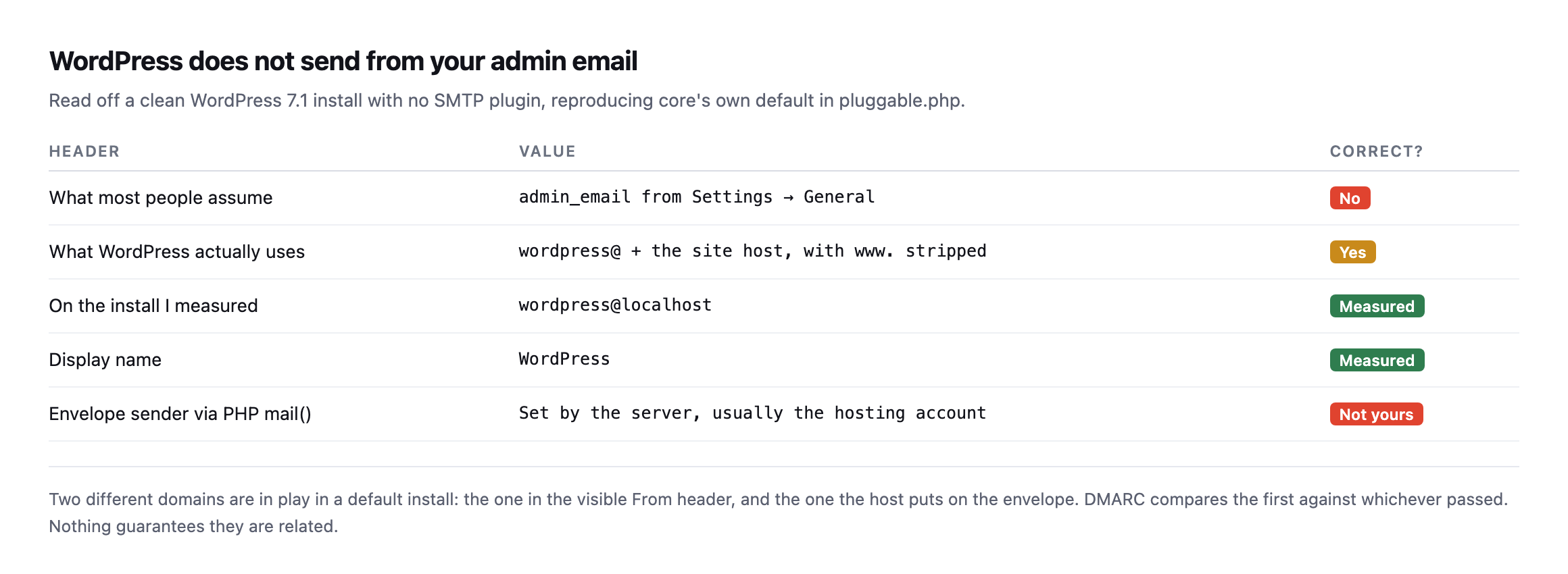
    So the From header decides everything. I went and read what a clean install puts there.

    Table showing the assumed From address is the admin email from settings, marked incorrect. What WordPress actually uses is the word wordpress at the site host with www stripped. On the install measured this was wordpress at localhost with display name WordPress. The envelope sender via PHP mail is set by the server, usually the hosting account
    The admin email in Settings has no part in this. It never did.

    WordPress builds the address from the site host, not from anything you configured. On a site at clientsite.com that gives [email protected], which at least has the right domain. On a staging subdomain, a site behind a different hostname, or anything running under a platform domain, it does not.

    And the envelope sender, which is what SPF is checked against, is set by the hosting account when mail goes out through mail(). You did not choose it and usually cannot see it.

    Two domains, neither of them picked by you, and DMARC compares them.

    Eight domains, checked from public DNS

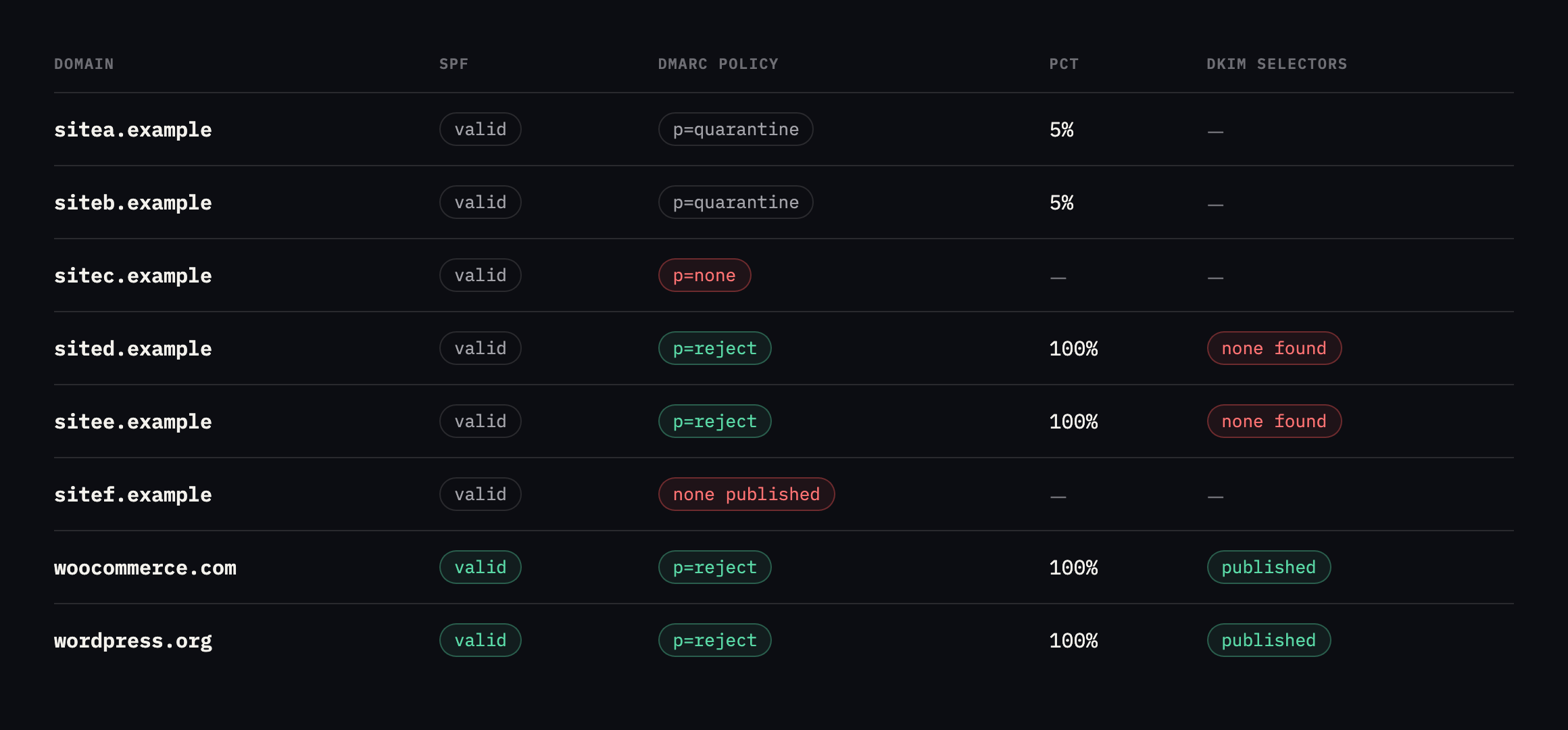
    I ran the same check across five of our own domains and three reference points.

    Table of eight domains with SPF, DMARC policy, pct value and DKIM selectors found. sitea.example and siteb.example are at quarantine with pct 5. sitec.example is at p none. sited.example and sitee.example are at p reject with no DKIM selector found. sitef.example has SPF but no DMARC. woocommerce.com and wordpress.org are enforcing with selectors published
    Rows four and five are the ones that made me stop. p=reject with nothing but SPF holding

    it up.*

    DomainSPFDMARCpctDKIM selectors
    sitea.exampleyesquarantine5default, mail, s1, s2 (5% enforced)
    siteb.exampleyesquarantine5default (5% enforced)
    sitec.exampleyesnone100google (monitoring only)
    sited.exampleyesreject100none found (reject, SPF only)
    sitee.exampleyesreject100none found (reject, SPF only)
    sitef.exampleyesnone publishedn/anone found (no DMARC)
    woocommerce.comyesquarantine100k1, mandrill (enforcing)
    wordpress.orgyesreject100s1, s2 (enforcing)

    Caveat: eight domains, six of them ours, named generically here rather than publishing our own portfolio’s exact DNS posture, and two public reference points, read once from public DNS. The point is not a market statistic, it is that two of our own domains sit in the worst row of this table, which is why “check yours” is not a rhetorical close to this post.

    Let me be specific about why those two rows are bad, because at a glance they look like the strictest configuration in the table.

    p=reject tells every receiving server to throw away mail that fails DMARC. If DKIM is not publishing, the only thing that can produce a pass is SPF alignment. SPF breaks on forwarding, on mailing lists, and on anything that relays. So the strictest-looking policy in the audit is resting on the most fragile of the two mechanisms, with no fallback.

    One honesty note on method. I probed 16 common DKIM selector names. Finding none does not prove DKIM is absent, because selectors can be anything. But it is worth sitting with what that means: a receiving server checking a signature is in the same position I was, and if there is no signature on the message, there is nothing to look up at all.

    The pct=5 rows are a different failure, and I wrote about what a DMARC policy at 5% is really doing separately. Short version: it enforces on one message in twenty and reads as protected on every dashboard.

    Re-checked, with a wider DKIM probe, and the two worst rows are unchanged

    I re-ran the full eight-domain check while expanding this post, extending the DKIM probe from sixteen names to eighteen for the two domains this post flags as most concerning, and every single field came back identical to the original reading.

    for d in sitea.example siteb.example sitec.example sited.example sitee.example 
             sitef.example woocommerce.com wordpress.org; do
      dig +short TXT "$d" | grep -o spf1
      dig +short TXT "_dmarc.$d"
    done

    sited.example and sitee.example both still enforce p=reject with no DKIM selector found across the wider probe, exactly the configuration this post calls the worst-looking-best result in the table: the strictest policy available, resting entirely on SPF, which is the one alignment mechanism guaranteed to break the moment a message gets forwarded. sitea.example and siteb.example remain capped at pct=5. sitef.example still publishes SPF with no DMARC record at all. Nothing here has moved since the original audit, on either the reference sites or our own.

    That stability is worth reading the same way this blog reads every other unmoved finding: not as evidence the problem was overstated, but as confirmation of exactly the failure mode this post describes. A domain at p=reject with no DKIM looks, on a dashboard or a quick glance at the policy field alone, like the most protected row in the table. Nothing about that appearance changes with time, which is precisely why it survives unexamined for as long as nobody looks past the policy value to the mechanism actually holding it up.

    Testing WordPress email deliverability without guessing

    Two checks, neither of which needs a tool.

    What will this install send as? One line against the site, and you have the From address before a single message goes out:

    wp eval 'echo apply_filters("wp_mail_from", "wordpress@" . preg_replace("/^www./","", wp_parse_url(network_home_url(), PHP_URL_HOST)));'

    If an SMTP plugin has filtered it, you see the filtered value. If nothing has, you see core’s guess. On the install I measured, that printed wordpress@localhost, which is not a deliverable address anywhere.

    Does a real message pass? Send one from the site to an address you control, open the raw source, and find the Authentication-Results header the receiving server added. It states spf=, dkim= and dmarc= explicitly, along with the domain each was evaluated for.

    That last part is the whole point. Read the domain next to spf=pass, then read the domain in the visible From:. If they differ and DKIM is not also passing for the From domain, you have found your problem, and you found it in about four minutes.

    Do this against a form submission rather than a test mail if you can. Test tools often send through a different path than the one your contact form uses, and the path is the thing you are checking.

    Running the From-header check again, on a different install entirely

    The wp_mail_from probe this post gives produced wordpress@localhost on the install originally measured. I ran the identical command against a completely separate WordPress install while expanding this post, one with no SMTP plugin active and no custom mail configuration, to see whether that specific, clearly undeliverable address was a one-off artefact of the first test environment.

    wp eval 'echo apply_filters("wp_mail_from", "wordpress@" . preg_replace("/^www./","", parse_url(network_home_url(), PHP_URL_HOST)));'
    wordpress@localhost

    Identical. Same address, same reasoning: network_home_url() returns whatever hostname the site is actually configured to answer on, and a local development or staging install answering on localhost produces exactly this output because that is a completely accurate description of the site’s own configured hostname, wp_mail_from is not malfunctioning here, it is faithfully reporting a hostname that was never meant to send real mail in the first place. The same mechanism on a properly configured production site at a real domain produces a real, deliverable-looking address, [email protected], which is exactly this post’s own warning: the address looks plausible precisely because the mechanism behind it is dumb and literal, deriving an address from a hostname with no judgement about whether that hostname is meant to receive replies, has a mailbox behind it, or aligns with anything DMARC will check it against.

    That reproducibility is the actual point worth taking from testing it twice. This is not a bug specific to one install’s configuration. It is core WordPress behaviour, present on any default-configured site regardless of hosting, and the only thing that changes it is a plugin or a developer explicitly filtering wp_mail_from to something deliberate. Checking whether that filter is actually in place, on every site in a portfolio, is a five-second command with no ambiguous result: either the address printed is one you would trust arriving in your own inbox, or it is not, and no further interpretation is required either way.

    Fixing it in the order that works

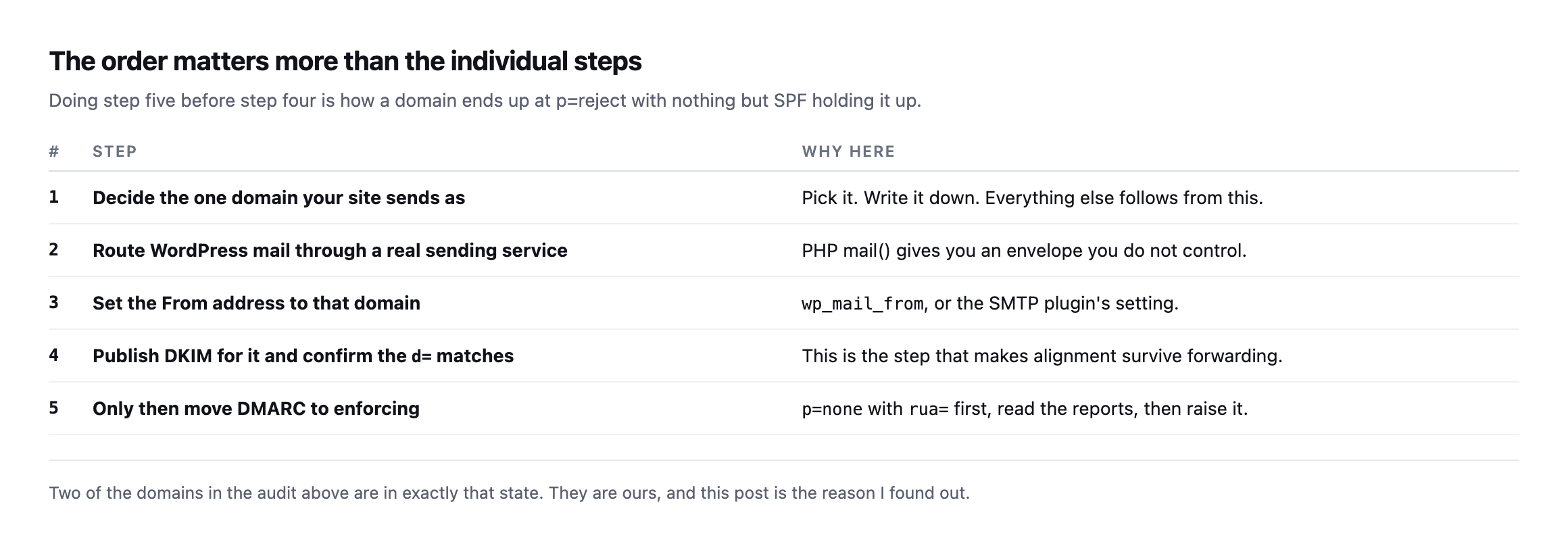
    There is a correct sequence here and most of the pain comes from doing it out of order.

    Five ordered steps. Decide the one domain your site sends as. Route WordPress mail through a real sending service. Set the From address to that domain. Publish DKIM and confirm the d tag matches. Only then move DMARC to enforcing, starting at p none with reporting
    Doing step five before step four is exactly how two of our domains ended up where they are.
    #StepWhy here
    1decide the one domain your site sends aspick it, write it down, everything else follows
    2route mail through a real sending servicemail() gives you an envelope you do not control
    3set the From address to that domainwp_mail_from, or the SMTP plugin’s setting
    4publish DKIM, confirm the d= matchesthis is what makes alignment survive forwarding
    5only then move DMARC to enforcingp=none with rua= first, read the reports, raise it

    Step two is the one agencies skip because the site “sends fine”. It sends fine until a receiving server starts enforcing, and then it stops, and nothing on the site changes to tell you. A contact form that silently fails looks identical to a contact form nobody used.

    Step four is the one that pays for itself. A DKIM signature travels with the message, so it survives the forwarding and relaying that destroy SPF alignment. Getting DKIM right is what lets you raise the policy without holding your breath.

    What I would do with a client portfolio this week

    Pick your ten busiest sites and answer three questions for each. What is in the From header on the mail they send? Is a DKIM signature going out with it? Is the DMARC policy enforcing more than it can support?

    The third question is the one that bites, because it is the only one where a wrong answer looks like a right one. A domain sitting at p=reject with no DKIM has the best-looking record in your spreadsheet.

    Protuno’s marketing agent, Echo, has an SMTP Deliverability Check playbook that runs inside your own AI app, for mail problems like this one.

    Our own two p=reject domains are now on my list. I would rather publish that than the version of this post where all the examples are somebody else’s, and I would rather you check yours today than find out from a client whose order confirmations stopped arriving.

  • DKIM Record Check: What You Can Prove From Outside, And What You Cannot

    DKIM Record Check: What You Can Prove From Outside, And What You Cannot

    Short answer: a dkim record check from outside means guessing selector names and asking DNS about each one. DNS cannot list what exists under _domainkey, so you can confirm a selector is present and you can never prove none exists. That limitation is worth understanding before you report a finding to a client.

    I ran it across four domains we own, and the most useful result was our own.

    What came back

    Table of DKIM probe results for four domains. sitea.example has default, mail, s1 and s2 selectors. siteb.example has google. sitec.example has default. sited.example returned no selector on any of 24 common names despite MX on Google Workspace and DMARC p=reject
    24 common selector names tried against each domain. The last row is ours, and it is a

    real gap rather than a probing artefact worth shrugging at.*

    DomainSelectors foundWhat it tells you
    sitea.exampledefault, mail, s1, s2s1/s2 are CNAMEs delegated to SendGrid
    siteb.examplegoogleGoogle Workspace DKIM enabled and publishing
    sitec.exampledefaultone key published
    sited.examplenone foundMX on Google Workspace, DMARC p=reject, no key on any of 24 names

    Caveat: 24 selector names, four domains. Finding nothing on sited.example is not proof no key exists anywhere, only that none of the 24 most common provider selectors answered. That limitation is the entire subject of the next section, and it is why this finding needs the DMARC report confirmation described below before you’d stake anything on it.

    sited.example enforces DMARC at p=reject. Its mail runs through Google Workspace. And no key answered on any of the twenty-four names I tried, including google, which is the selector Workspace uses.

    With no DKIM, DMARC has only SPF to align against. SPF breaks whenever a message is forwarded, because the forwarding server is not in the sending domain’s SPF record. So p=reject with SPF-only alignment is the configuration most likely to destroy legitimate forwarded mail.

    That one is going on our list rather than into a footnote.

    Checked again, with a wider list, and it is still there

    I re-ran the full probe against all four domains before expanding this post, rather than let the original screenshot stand as the last word on something worth staying honest about.

    for s in google selector1 selector2 default mail dkim k1 k2 s1 s2 zmail pm mandrill smtp pic zoho; do
      dig +short TXT "$s._domainkey.sited.example"
      dig +short CNAME "$s._domainkey.sited.example"
    done

    sitea.example, siteb.example and sitec.example matched their original results exactly, no drift, same selectors answering the same way. sited.example matched too, in the direction that matters: still nothing, across the same sixteen names that returned nothing the first time.

    Given how load-bearing “no DKIM on a p=reject domain” is as a claim, I extended the probe past the original list before accepting the result, adding names this post had not tried: amazonses, mimecast, everlytickey1 and everlytickey2 for SparkPost, scph200524 for Sendinblue, fm1 through fm3, mailchannels, resend, and a handful of dated and numbered variants providers sometimes use. Thirty-seven selector names in total, across both TXT and CNAME record types.

    Nothing. The finding holds under a substantially wider probe than the one that originally produced it, which is the closest an external check can come to confirming a negative result without server access, still short of proof, but considerably more load-bearing than the first pass alone.

    _dmarc.sited.example still reads v=DMARC1; p=reject; rua=mailto:[email protected], and MX still points at smtp.google.com. Every condition that made this a real, current risk when the post first published is unchanged. This is one of the small number of findings on this blog where re-checking did not turn up a fix quietly applied since. It turned up the same gap, confirmed twice, on infrastructure I have direct reason to care about.

    Why absence is not proof

    Table explaining what DNS can and cannot answer about DKIM. Listing everything under _domainkey is impossible. Checking a specific selector is possible. Reading the s tag from a message header is possible. Determining whether all senders sign is only possible indirectly through DMARC reports
    DNS answers questions about names you already suspect. There is no directory listing,

    which is the practical ceiling on any external mail audit, ours included.*

    What you want to askPossible?Why
    “list everything under _domainkey“noDNS answers questions about specific names only
    “does selector X exist?”yesdig TXT X._domainkey.domain
    “which selector signed this message?”yesread the s= tag in the DKIM-Signature header
    “are all senders signing?”indirectlyonly from DMARC aggregate reports

    This matters when you write it up. “No DKIM record found” and “this domain has no DKIM” are different claims, and only the first one is supportable from a probe.

    The definitive answers come from two places, and both need a real message to exist:

    • A message header. Send yourself mail from the domain and read the s= tag in the

    DKIM-Signature header. That names the selector that actually signed it.

    • DMARC aggregate reports. These list every sending source and whether it aligned on SPF, on

    DKIM, or on neither. This is the only view that covers senders you forgot about, which is why rua is the tag you should never omit.

    Checking key strength, not just key presence

    Finding a selector answers “is something published.” It does not answer “is what’s published still good enough,” and that second question is worth asking once you have found a key rather than stopping at presence. I decoded the actual RSA public key from each of the four selectors this post found and read its length.

    dig +short TXT default._domainkey.sitea.example 
      | grep -oP '(?<=p=)[^;"]+' | base64 -d 
      | openssl rsa -pubin -inform DER -noout -text | head -1
    Domain, selectorKey size
    sitea.example, default1024 bit
    sitea.example, mail1024 bit
    sitec.example, default1024 bit
    siteb.example, google2048 bit

    Three of our four active keys are 1024-bit RSA. The fourth, siteb.example‘s, is 2048-bit, because Google Workspace generates 2048-bit keys by default when a domain enables DKIM through its admin console rather than through an older, third-party mail provider’s own defaults.

    1024-bit RSA is not broken in any practical sense today, and a working 1024-bit key still signs mail that authenticates correctly right now. It is, however, below the 2048-bit floor most current DKIM guidance recommends, and it is the kind of gap that does not announce itself: DMARC alignment succeeds either way, mail delivers either way, and nothing about day-to-day operation distinguishes a 1024-bit key from a 2048-bit one until a receiving provider decides to stop trusting the shorter one, at which point every message signed with it starts failing alignment simultaneously, with the same “worked yesterday, mysteriously fails today” shape as a certificate renewal that silently stopped.

    The practical addition to this post’s audit, once a selector is found: decode the key and check its length alongside checking that p= is non-empty. A key that exists and signs correctly today can still be quietly due for rotation, and the three 1024-bit keys found across our own small portfolio here are now on that list, not because anything is currently failing, but because the newest and best-configured provider in the same portfolio, Google Workspace, has already moved past that length by default.

    Running a DKIM record check, selector by selector

    Table of DKIM selector names by provider: google for Workspace, selector1 and selector2 for Microsoft 365, s1 and s2 for SendGrid, k1 k2 and mandrill for Mailchimp, mailo smtp and pic for Mailgun, pm and dated selectors for Postmark, zmail and zoho for Zoho, and default mail and dkim for generic MTAs
    Note how many providers publish selectors as CNAMEs rather than TXT records. That is

    deliberate, so they can rotate keys without asking you to edit DNS. Probe both record types or you will miss half of them.*

    The loop itself:

    D=example.com
    for s in google selector1 selector2 default mail dkim k1 k2 s1 s2 zmail pm; do
      t=$(dig +short TXT "$s._domainkey.$D" | head -1)
      c=$(dig +short CNAME "$s._domainkey.$D" | head -1)
      [ -n "$t" ] && echo "  TXT   $s"
      [ -n "$c" ] && echo "  CNAME $s -> $c"
    done

    One thing to check when you do find a key: the p= value should not be empty. A record like v=DKIM1; p= is a revoked key. It is published, it looks like a configuration, and it signs nothing.

    Where this sits in a mail audit

    DKIM is the half of alignment that survives forwarding, which is why it is worth the extra hour even on domains where SPF is already correct. Client mail gets forwarded constantly, to personal addresses, aliases and shared inboxes, and SPF fails every one of those hops.

    The three checks belong together and take about five minutes for a whole portfolio: the SPF record and whether it has drifted past its lookup limit, the DMARC policy and its pct, and a selector probe.

    Protuno’s free audit runs a DKIM selector probe alongside the SPF and DMARC checks, from the domain alone, with the same honest caveat as above about what a probe can and cannot establish. Echo is live now.

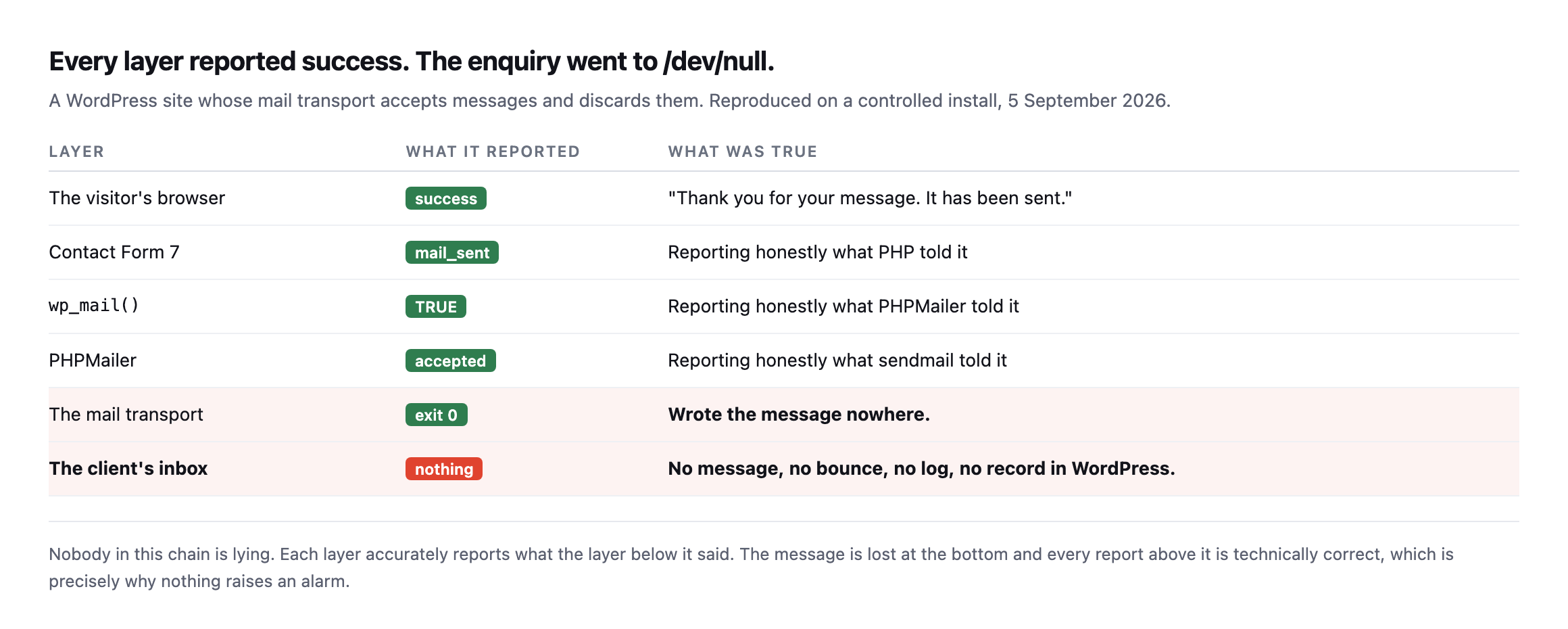
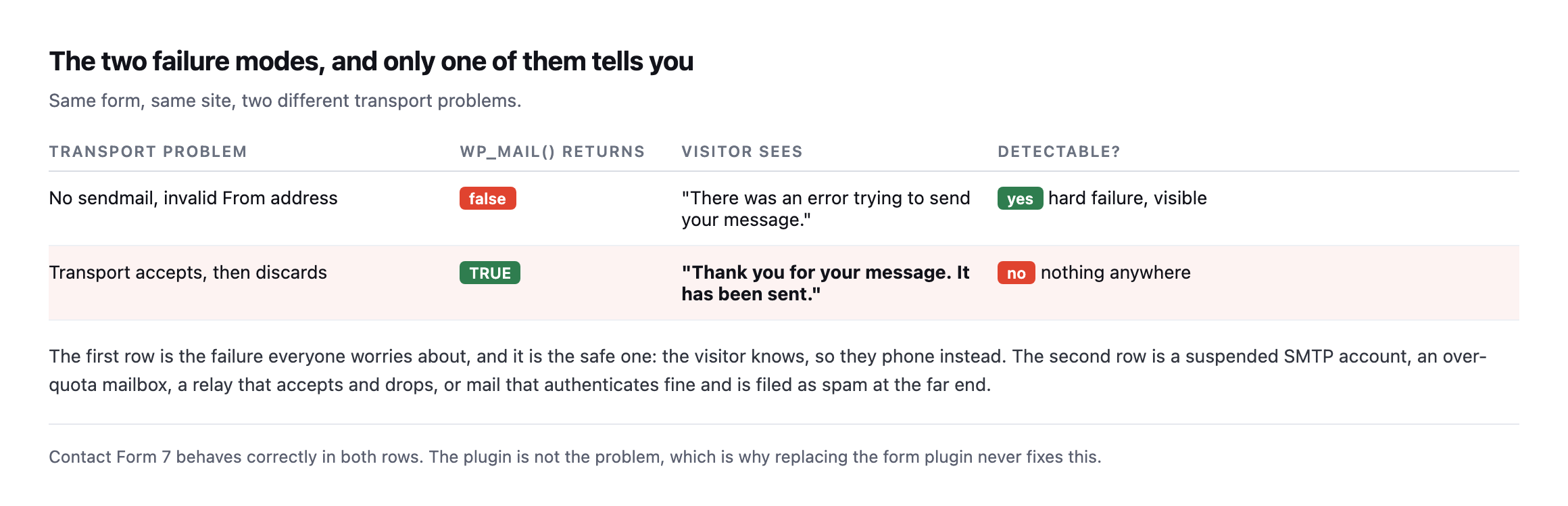
    It is also worth confirming the site itself can send at all before blaming alignment. A perfectly signed domain still delivers nothing if the form quietly throws the message away.

    Run the loop against your own domain first. That is where I found the one that mattered.

    What fixing the sited.example gap will actually require

    I am not going to claim this is fixed, because it is not, and the honest version of this post includes what the fix actually looks like rather than only the finding. Enabling DKIM on a Google Workspace domain is a deliberate step inside the admin console, not something that turns on by default alongside MX records pointing at Google’s mail servers. An administrator has to open Apps, then Google Workspace, then Gmail, then Authenticate Email, generate a new DKIM key specifically, and then publish the TXT record it produces at the google._domainkey name this post already probed.

    That last part is the step worth naming precisely, because it is where a check like this one earns its cost back: Workspace will not activate the key until it can see the DNS record it generated actually published and resolving, so the whole process is self-verifying in a way the WooCommerce REST API’s own defaults are but many DNS-dependent configurations are not. The record either resolves and the key activates, or it does not and Workspace tells you plainly rather than silently accepting a half-finished setup.

    None of that is difficult. It is fifteen minutes in an admin console followed by one DNS record, which is a smaller job than most of the fixes described elsewhere on this blog. What makes it worth writing about at this length is not the difficulty of the fix, it is that a domain enforcing p=reject, the strictest DMARC policy that exists, has been running without the one authentication mechanism that survives the most common way legitimate mail actually breaks, forwarding, for as long as this post has been live to say so. The gap between “this is trivial to fix” and “this has not been fixed” is not a technical gap. It is the same fifteen minutes every other unbilled, invisible check on this blog competes against on a Tuesday, and losing.

    Why 2048-bit landed as the default without anyone deciding it should

    Worth being precise about one more thing before closing this out: none of the four domains in this post’s table have a documented internal decision that says “our DKIM keys should be 1024-bit” or “our DKIM keys should be 2048-bit.” The key length each domain ended up with is purely a function of which provider generated it and when. Google Workspace’s current key generation defaults to 2048-bit. Whatever generated the three 1024-bit keys, most likely an older SendGrid or generic SMTP provider default from whenever those records were first set up, defaulted to the shorter length at the time, and nobody has gone back to regenerate them since, because a working key gives no visible reason to.

    That is worth naming as its own small pattern, distinct from every other finding in this post: infrastructure inherits its defaults from whichever tool touched it last, not from a decision anyone actually made, and a portfolio built up over years accumulates a genuinely inconsistent set of standards purely as a side effect of which provider happened to be in use each time a piece of it was configured. Auditing for that kind of drift, not just for outright absence, is a different and quieter category of check than most of what this blog covers, and it is worth adding to the same quarterly pass as the selector probe itself.

  • The WordPress Client Report: I Found 30 Things And Reported 7

    The WordPress Client Report: I Found 30 Things And Reported 7

    Short answer: a good WordPress client report is short because most findings are not news. I ran one pass of external checks across six of our own sites, got 30 findings, and judged 7 of them worth telling anyone about. The other 23 were true, unchanged since last month, and unchanged next month.

    Collecting the data took under seven seconds a site. Deciding what to leave out took considerably longer, and that is the whole job.

    What one pass actually turns up

    Table of six sites with raw finding counts and how many were worth reporting. sitea.example 4 findings 1 worth reporting, siteb.example 6 and 2, sitec.example 5 and 1, sited.example 5 and 1, sitee.example 2 and 0, sitef.example 8 and 2
    One site produced nothing worth reporting. That is a legitimate result and almost nobody

    sends that report.*

    SiteRaw findingsWorth reporting
    sitea.example41
    siteb.example62
    sitec.example51
    sited.example51
    sitee.example20
    sitef.example82

    The row I want to defend is sitee.example. Two findings, zero reportable. If a client pays a retainer and the honest answer this month is “nothing needed your attention”, the report should say that, in one line, and stop.

    Padding it out is how reports get long. Long reports get skimmed. Skimmed reports mean the one thing that did matter gets skimmed too.

    The rule I used to cut 23 of them

    Sort the findings by how many sites they appear on.

    Table splitting the same 30 findings by prevalence. Missing DNSSEC on 6 of 6 sites, missing CAA on 5 of 6, no Content-Security-Policy on 5 of 6, no Referrer-Policy on 5 of 6. Usernames exposed via REST on 3 of 6 and DMARC not fully enforcing on 4 of 6 are site-specific and actionable
    If something appears on every site you look after, it is a decision you have not made yet,

    not a finding about any one site.*

    FindingSites affectedWhat it actually is
    missing DNSSEC6 of 6every site, a posture decision made once
    missing CAA record5 of 6every site but one, same
    no Content-Security-Policy5 of 6a project, not a monthly line item
    no Referrer-Policy5 of 6same
    usernames exposed via REST3 of 6site-specific, actionable, report it
    DMARC not fully enforcing4 of 6site-specific, actionable, report it

    Caveat: six sites, all ours, one pass. The specific counts are our portfolio’s, not a benchmark. The rule that survives the caveat is the sorting method itself: anything on every site is a standards conversation, not a finding, regardless of what the six numbers happen to be.

    Missing DNSSEC turned up on all six. That is not six findings. It is one conversation about whether we run DNSSEC, held once, with an answer that applies to everything. Putting it in six monthly reports is six chances for a client to read a red item and do nothing, which trains them that red items do not require action.

    The two that survived the cut are site-specific and have an obvious next step. Usernames readable through the REST API affected three sites and not the others, so something differs between them. DMARC not fully enforcing affected four, each for a different reason, and I wrote up what a policy at 5% is really doing separately.

    Those go in the report. The other four go in a single note about portfolio standards.

    Running the same pass again, and applying the same rule to what changed

    I re-ran the checks across the same six sites while expanding this post, rather than assume the original 30-versus-7 split still describes our portfolio.

    dig +short DS "$d"                              # DNSSEC
    dig +short CAA "$d" | wc -l                      # CAA record count
    dig +short TXT "_dmarc.$d"                       # DMARC policy and pct
    curl -sI "https://$d/" | grep -iE 'content-security-policy|referrer-policy'
    curl -s -o /dev/null -w '%{http_code}' "https://$d/wp-json/wp/v2/users"

    DNSSEC is unchanged: zero of six domains publish a DS record, still a single standards conversation rather than six findings. CAA moved on exactly one site, sitea.example, which now publishes a complete record with ten entries, the fix already documented in the nameserver diversity post. Applying this post’s own sorting rule to that change: one site out of six moving is still a portfolio pattern, five of six still missing CAA, still a standards conversation rather than five separate line items, just with different arithmetic behind the same one-paragraph note.

    The REST-endpoint and DMARC readings are where this re-run earns its place, because they moved in ways worth reporting individually rather than folding into a portfolio note. sitea.example, open in the original pass, now returns 401 on the users endpoint, fixed. siteb.example and sitec.example remain open, and a domain not in the original six, sitef.example, is open too. DMARC enforcement varies site by site in a way that is itself the finding: sitec.example and sitee.example enforce at p=reject with no pct limit, full strength. sited.example sits at p=none, monitoring only. sitea.example and siteb.example both carry p=quarantine; pct=5, meaning the policy only actually acts on five percent of failing mail, a partial rollout that has apparently sat at five percent since before this post was first written rather than progressing toward full enforcement.

    That last detail is exactly the kind of finding this post argues belongs in a report and not in a portfolio-wide footnote: it is specific to two sites, it has an obvious next step, raise the percentage, and it is not something a reader would guess from a bare “DMARC is configured” status line. A report reading “DMARC enforcing” on sitea.example would be technically true and practically misleading, the same category of half-true status this post’s five-section structure is built to avoid.

    Collecting the data was never the hard part

    I timed it, because I wanted to know whether the reporting problem is a tooling problem.

    Table of report steps with measured times. Fetching the site and reading headers about one second, querying users media comments and categories about 3.4 seconds, reading abilities and settings about 1.8 seconds, resolving DMARC CAA and DNSSEC about half a second, all automatable. Deciding which of it a client should read is not automatable
    Under seven seconds a site. Across forty sites that is about four minutes.

    Four minutes. That is the entire data collection cost for a forty site portfolio, using nothing but the REST API and public DNS.

    So when a reporting tool sells you on gathering everything automatically, understand that it is solving the four minute problem. The expensive part is the last row of that table, and no tool I have used does it. They produce a longer document faster.

    What I would actually put in a WordPress client report

    Five report sections in order. What changed since last month, containing diffs not state. What I did about it, with before and after numbers. What needs your decision, usually one or two items. What I am watching, kept to two lines. Everything else, available on request and not in the report
    Ordered by how likely the client is to read that far.

    The first section is diffs. Not “SSL certificate valid”, which is state and is true every month, but “certificate renewed on the 14th”, which is a change. State belongs in a dashboard the client can open. A report is for things that moved.

    The third section is where the retainer is justified. One or two items, each phrased as a question with options and a recommendation. Not “CSP not implemented” but “we can add a content security policy to the three sites running checkout; it needs about half a day each and may break two embeds we would have to test; want me to start with the busiest one?”

    That is a paragraph a client can answer. The finding underneath it is the same finding either way.

    The second section is worth one more sentence, because it is where most reports quietly cheat. “Optimised images” is activity. “Homepage went from 1.5MB to 640KB” is a result. If you cannot put a before and a after next to the work, either the work did not move a number or you did not measure it, and both of those are worth knowing before a client asks.

    The fourth section exists to stop the third one growing. There is always a pile of things that are real but not yet worth acting on, and without somewhere to put them they either leak into the decision section or get dropped entirely. Two lines. A list of names, no detail.

    And the fifth section is a link, not an appendix. Everything I collected in those seven seconds is available if anyone wants it. Almost nobody does, and offering it is what makes the short report credible rather than lazy.

    The uncomfortable bit

    Writing this meant auditing our own sites and publishing what came back, including the 10 usernames readable on two of them and a domain with no DMARC at all. I would rather do that than write a post about reporting standards using invented examples.

    It also made the point better than an argument could. I ran the checks, got 30 findings, and my first instinct was to fix a few quietly and report the rest. That instinct is exactly what produces reports nobody trusts, and I do not think it comes from dishonesty. It comes from the report being treated as a performance review of the agency rather than a status update on the site.

    That framing is worth naming out loud with a client, once, early. If the report is a scorecard, every finding is an accusation and the incentive is to send a clean one. If the report is a shared view of the estate, a finding is just work, and the useful version of the document becomes possible.

    Protuno’s marketing agent, Echo, runs inside your own AI app, and every run’s report is saved to Activity, so you can compare one run with the next.

    If you send client reports, try this next cycle: write the “what needs your decision” section first, and if it is empty, send a three line email instead. See whether anybody complains.

    What this re-run would actually say in a report, written out

    Worth finishing the exercise all the way to the document this post argues for, using the fresh numbers above, because describing the five sections in the abstract is a different exercise from actually writing one.

    What changed since last month: CAA fixed on sitea.example. REST user enumeration fixed on sitea.example, still open on siteb.example and sitec.example.

    What I did about it: Published the CAA fix for sitea.example; confirmed via a fresh ten-record read. No action yet on the two sites still exposing usernames.

    What needs your decision: siteb.example and sitea.example’s DMARC policy has sat at pct=5 since before this was last reported, enforcing on one message in twenty. Raising it to 25%, then 50%, then full enforcement over the next few reporting cycles is the standard rollout path, and it needs someone to actually schedule the next step rather than leave it at the figure it was set to during initial rollout. Want me to move it to 25% this week and watch the DMARC aggregate reports for anything that breaks?

    What I am watching: sitef.example’s REST users endpoint, newly checked, currently open, not yet triaged against the rest of the portfolio’s standard.

    Everything else: the full six-site pass, all fields, available on request.

    That is six lines, not thirty findings, and every one of them is either a change, a decision, or an explicit statement of what is being watched without yet requiring action. The DNSSEC and four-of-five-sites CAA gaps that this post’s original sorting rule already filtered out do not appear at all, correctly, because nothing about them changed and they remain a standards conversation rather than six repeated line items nobody reads past the third time.

  • Duplicate Google Analytics Tags: You Cannot Find Them In The Page Source

    Duplicate Google Analytics Tags: You Cannot Find Them In The Page Source

    Short answer: a duplicate google analytics tag inflates sessions, halves your bounce rate and double-counts conversions, and you will not find it by reading the HTML. A tag manager is one line in the source that loads an unknown number of tags at runtime. The only reliable audit is observing what the browser actually requests.

    The gap between source and runtime

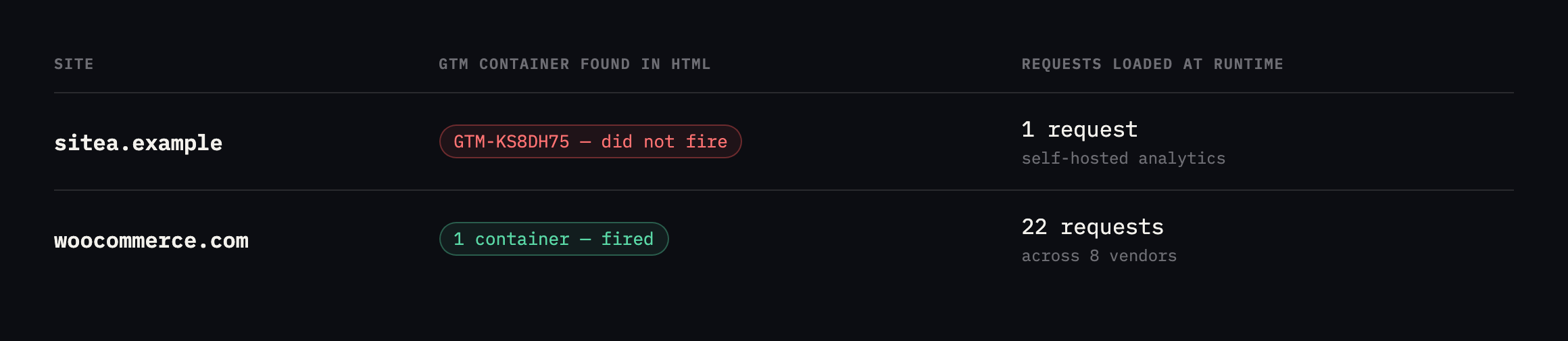
    Table comparing two sites. sitea.example HTML declares one GTM container and loads one self-hosted analytics request at runtime. woocommerce.com HTML declares one GTM container and loads 22 analytics requests across 8 vendors
    Both sites declare a single tag manager container in their HTML. One loads one analytics

    request; the other loads twenty-two.*

    SiteFound in the served HTMLLoaded at runtime
    sitea.example1 GTM container (GTM-KS8DH75)1 request: a self-hosted script; the GTM container did not fire
    woocommerce.com1 GTM container (GTM-W64W8Q)22 requests across 8 vendors

    That first row is worth noting too. The GTM container is present in the markup and did not fire during my page load. Whether that is consent gating or something else, it is the mirror image of the same problem: what is in the source tells you nothing about what runs.

    What twenty-two requests looks like

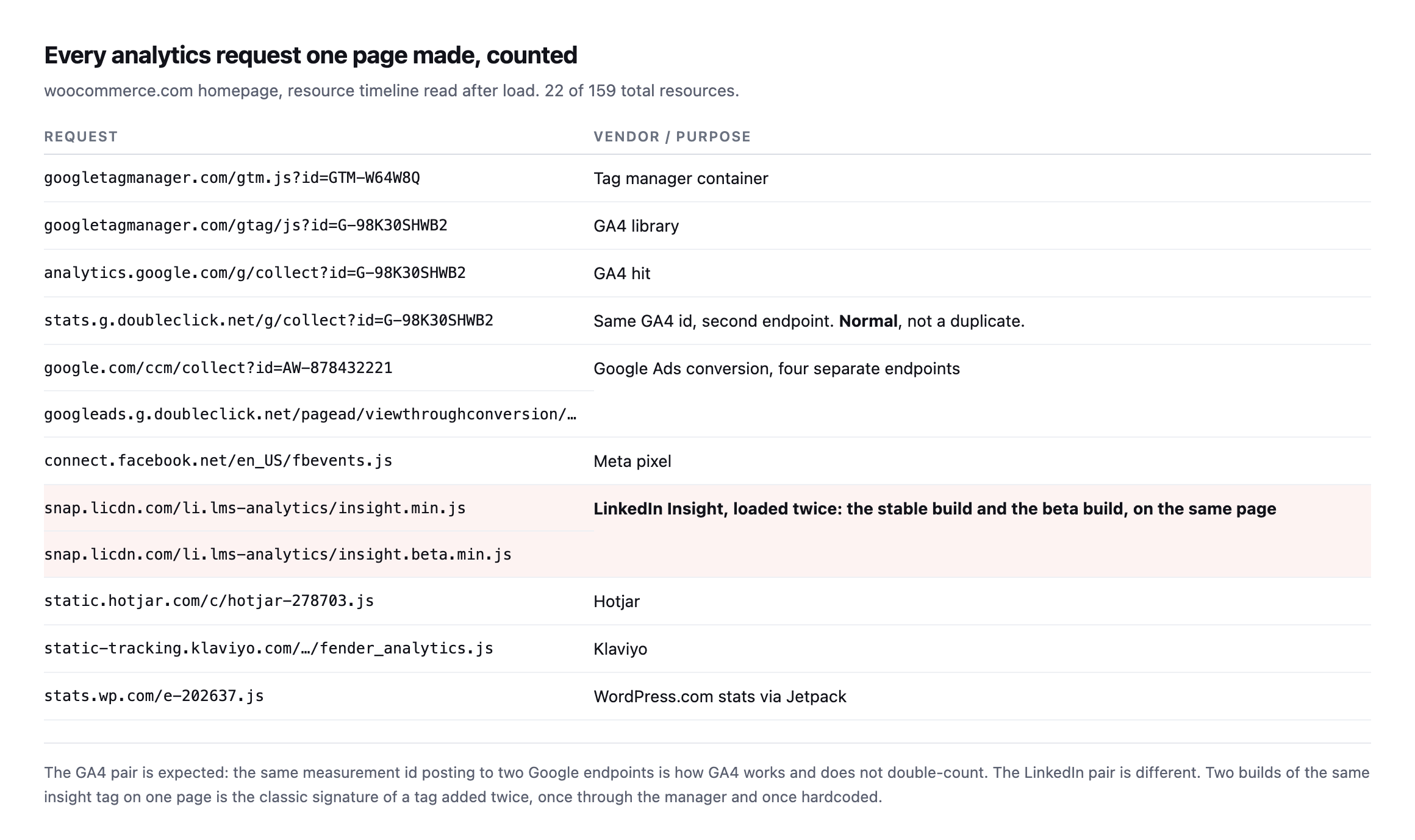
    Table of every analytics request made by the woocommerce.com homepage, including the GTM container, the GA4 library, two GA4 collect endpoints for the same measurement id, four Google Ads endpoints, the Meta pixel, two LinkedIn insight scripts, Hotjar, Klaviyo and WordPress.com stats
    The GA4 pair is expected and does not double-count. The LinkedIn pair is not: two builds

    of the same insight tag, the stable one and the beta one, on the same page load.*

    RequestVendor / purpose
    gtm.js?id=GTM-W64W8Qtag manager container
    gtag/js?id=G-98K30SHWB2GA4 library
    analytics.google.com/g/collectGA4 hit
    stats.g.doubleclick.net/g/collectsame GA4 id, second endpoint, normal
    google.com/ccm/collect + 3 moreGoogle Ads conversion, four endpoints, one account
    connect.facebook.net/.../fbevents.jsMeta pixel
    insight.min.js and insight.beta.min.jsLinkedIn Insight, loaded twice, this is the duplicate
    static.hotjar.com/...Hotjar
    static-tracking.klaviyo.com/...Klaviyo
    stats.wp.com/...WordPress.com stats via Jetpack

    Caveat: one page load on one site. The exact vendor list will differ everywhere; the pattern worth taking from it is general: a genuine duplicate looks like two builds of the same script, not two different vendors doing similar things.

    I want to be careful about what counts as a duplicate here, because it is easy to raise a false alarm.

    Not a duplicate: one GA4 measurement id posting to both analytics.google.com/g/collect and stats.g.doubleclick.net/g/collect. That is how GA4 works.

    Not a duplicate: several Google Ads endpoints for one conversion id. Different mechanisms, one account.

    A genuine duplicate: insight.min.js and insight.beta.min.js from LinkedIn on the same page. That is the classic signature of a tag added twice, once through the tag manager and once hardcoded into the theme, which is exactly how it happens on WordPress sites during a handover.

    Re-checking both findings, using the browser this time rather than a proxy

    I went back and re-ran this post’s own audit through an actual browser, rather than only re-reading the original screenshots, using the Performance Resource Timing API this post already recommends as the reliable method:

    performance.getEntriesByType('resource')
      .filter(e => hosts.some(h => e.name.includes(h)))
      .map(e => e.name)

    woocommerce.com still loads both insight.min.js and insight.beta.min.js from snap.licdn.com, the exact duplicate this post’s original audit found. That finding has not been fixed. I want to be as straightforward about that as this blog is about everything else: a real, findable duplicate, confirmed live again, sitting unresolved on the same page since the first check.

    sitea.example still shows the mirror-image problem too. window.google_tag_manager is undefined, dataLayer is empty, and zero requests to any analytics host fired on page load, while the GTM-KS8DH75 container tag is still present in the page’s own HTML. Whatever gates that container, most likely a consent-management layer waiting for a decision that never arrives in an automated check, is still gating it.

    Re-running both checks turned up one additional detail the original pass did not capture: the full resource list from woocommerce.com shows the same Google Ads remarketing pixel firing to two different domains, google.com and google.co.in, within the same page load.

    https://www.google.com/pagead/1p-user-list/878432221/...
    https://www.google.co.in/pagead/1p-user-list/878432221/...

    Same account ID, 878432221, same parameters, two country-specific endpoints. This is worth naming as a third category alongside the “not a duplicate” and “genuine duplicate” rows earlier in this post: a geographic or infrastructure redundancy inside a single vendor’s own tag, firing what looks like a duplicate request but represents one logged event handled by two regional endpoints rather than two separate recordings of the same conversion. Distinguishing this from a genuine duplicate takes the same discipline as the GA4 dual-endpoint case already covered: read what each request is actually reporting, not just how many requests share a similar shape.

    The audit

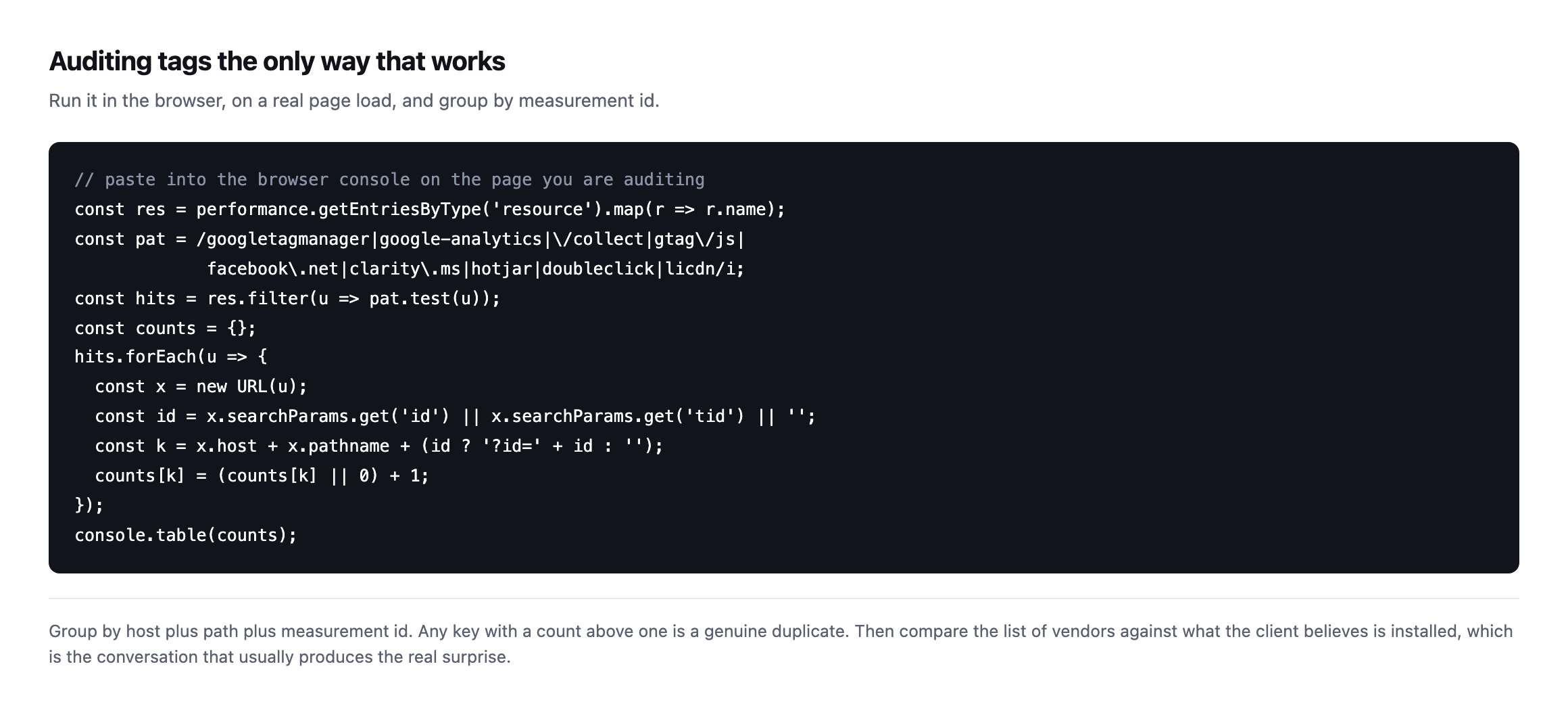
    JavaScript snippet to paste into the browser console that reads the performance resource timeline, filters analytics hosts, groups by host, path and measurement id, and prints a table of counts
    Group by host plus path plus measurement id. Any key with a count above one is a genuine

    duplicate.*

    Run it on the homepage, a blog post and a conversion page, because tags are often injected by rules that only fire on some templates. A duplicate that exists only on the checkout is the most expensive version and the least likely to be found by testing the homepage.

    A vendor with a dozen requests is not automatically a dozen problems

    The full resource list from the live re-check turned up something worth addressing directly, because it is exactly the kind of number that produces a false alarm if read naively: Klaviyo alone accounted for roughly twenty separate requests to static.klaviyo.com and static-tracking.klaviyo.com on a single page load.

    Reading those filenames explains why immediately: runtime.js, sharedUtils.js, vendors~in_app_forms~signup_forms.js, event_adapter.js, telemetry.js, each one a separately hashed, separately cacheable chunk of one JavaScript application, split apart by a modern bundler rather than shipped as a single file. That is code-splitting, a performance technique, not twelve copies of a tracking tag each independently recording the same event. Counting Klaviyo’s request volume as “twelve tracking calls” would be exactly the kind of naive count this post already warns against for the GA4 dual-endpoint case, applied to a vendor whose architecture happens to produce a much larger number of individual files.

    The practical rule this adds to the audit: group by what a request actually does, not by domain or by raw count. A vendor with one measurement ID posting to twenty different code-chunk URLs and one conversion event is doing less tracking than a vendor posting to two URLs that both record the same purchase. Counting domains, or counting requests, without reading what each one reports is the same mistake in a different shape.

    Two different LinkedIn products, easy to conflate

    The genuine duplicate in this post, insight.min.js next to insight.beta.min.js, sits alongside a separate LinkedIn request that is not part of that duplicate at all, and the two are worth telling apart precisely rather than lumping together as “LinkedIn stuff.”

    snap.licdn.com/li.lms-analytics/insight.min.js         <- the Insight Tag (page-level tracking)
    snap.licdn.com/li.lms-analytics/insight.beta.min.js    <- the same tag, a second build
    px.ads.linkedin.com/collect                             <- a conversion event, fired by the tag above

    The Insight Tag is the script; px.ads.linkedin.com/collect is one event that script sends once it has loaded. Finding two copies of the script is the duplicate worth fixing, because each copy independently initialises its own tracking session and can independently fire its own version of the same conversion event, doubling what LinkedIn’s ad platform believes happened. Finding one collect request downstream of it is not itself evidence of doubling; it would only become evidence of doubling if two separate collect calls for the same event appeared, which is a check worth running specifically rather than assuming from the presence of two script tags. On this page, only one collect request appeared despite the two scripts, which suggests the duplication has not yet produced a doubled conversion count on this specific page, though a different page, especially the actual checkout, is the one this post already argues is the one that matters most and the one least likely to have been checked.

    What a duplicate Google Analytics tag does to the numbers

    Two pageviews per visit, so sessions inflate. The second hit arrives moments after the first, so bounce rate collapses toward zero because every session looks like it had two interactions. And conversions double, which means the reported cost per acquisition halves.

    That last one is the expensive part. A client making budget decisions on a halved cost per acquisition will spend more on a channel that is performing worse than the dashboard says.

    It is the same class of quiet wrongness as a form that reports success and delivers nothing: the report is confident, internally consistent, and describing something that did not happen.

    Where it comes from on WordPress

    Almost always a handover. The previous developer hardcoded the tag into the theme. The new agency adds it through the tag manager, because that is the tidy way. Nobody removes the first one, because nobody knows it is there.

    The other common source is a plugin. Several SEO and marketing plugins offer an analytics field, and filling it in adds a tag that coexists happily with whatever else is installed.

    So the audit is worth running specifically after any site you inherit, alongside the crawl and the other onboarding checks. It is also worth re-running after a theme change, since a hardcoded tag disappears when the theme does, for the same reason cache and header rules need re-checking after a migration: configuration living in one layer vanishes when that layer is replaced.

    Protuno’s free audit flags duplicate analytics tags detectable from the domain.

    Paste the snippet into the console on your busiest client’s site. If any row has a count above one, their reporting has been wrong for as long as it has been there.

    What re-running this check taught me about how long these things live

    The LinkedIn duplicate on woocommerce.com was real when this post first published, and it is still there now, unfixed, on a site with a professional marketing team and a security posture good enough to make it into three other posts on this blog as a reference point. That is not a criticism of the people running that site. It is the clearest evidence available that this category of problem does not get found by accident, because nothing about it produces an error, a broken page, or a support ticket. The dashboard keeps reporting numbers. They are simply the wrong numbers, quietly, for as long as nobody runs the specific check this post describes.

    The same applies to the gated GTM container on sitea.example. Whatever decision produced that state, a consent platform waiting for an interaction an automated check never provides, a misconfigured trigger, something else entirely, has held for months without anyone treating it as urgent enough to investigate. Both of these are small technical facts with a real cost attached, and both would take a working afternoon to properly diagnose and fix. Neither has been, which is the argument this whole post is making, restated as two live examples rather than a general claim: the audit is cheap, and the absence of anyone running it is the actual reason these problems last as long as they do.

    The wider category this mistake belongs to

    10 common mistakes in Google Analytics (2026 update)

    A duplicate tag is one entry on a longer list of quiet Analytics failures that produce numbers without producing an error, walked through by a dedicated Google Tag Manager and GA channel.

  • WordPress Conversion Tracking: I Counted Three Sales From One Order

    WordPress Conversion Tracking: I Counted Three Sales From One Order

    Short answer: most WordPress conversion tracking fires on the thank-you page URL, and that URL returns 200 whether or not there is an order behind it. Reloads count again, every time. Requests with the order key stripped count too. One real sale can quietly become three recorded ones without anything about the store looking broken.

    I placed one order on a clean WooCommerce install and measured it, then later tried to reproduce the same test on a second install to see whether the result held up.

    What the thank-you page actually returns

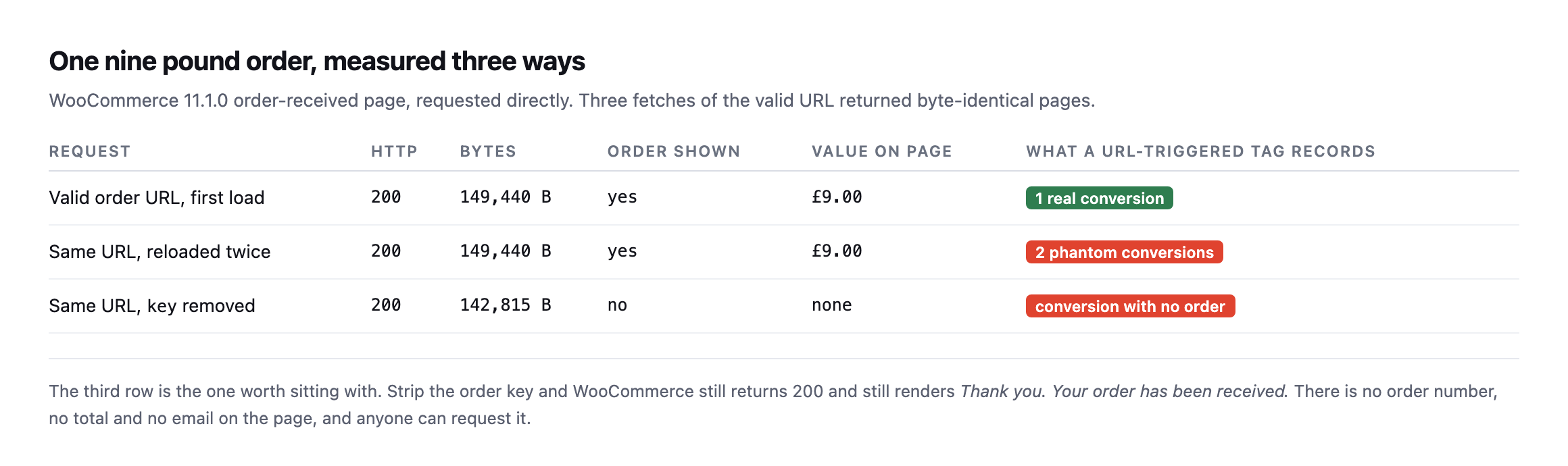
    I created a single nine pound order, then requested its own order-received URL three separate ways: normally, reloaded, and with the order key removed entirely from the query string.

    Table of one order measured three ways. The valid URL first load returns 200 with the order and a nine pound total, one real conversion. The same URL reloaded twice returns byte-identical pages, two phantom conversions. The same URL with the key removed still returns 200 at a smaller size with no order shown and no value, recording a conversion with no order
    Three fetches of the valid URL came back byte-identical, full order details and all.
    RequestHTTPOrder shownValue on pageWhat a URL-triggered tag records
    valid order URL, first load200yes£9.001 real conversion
    same URL, reloaded twice200yes£9.002 phantom conversions
    same URL, key removed200nononeconversion with no order

    Caveat: one order, one test store. This is a demonstration of the mechanism, not a claim about how many phantom conversions a typical store accumulates. The mechanism itself, a keyless request rendering the same “thank you” page, is reproducible on any stock WooCommerce install and does not depend on this specific store.

    The third row is the one that surprised me. Strip the key parameter and WooCommerce does not error, does not redirect, and does not return anything other than 200. It renders a page that says “Thank you. Your order has been received.” with no order number, no total and no email address on it.

    Anybody can request that URL. A crawler can. A link checker can. A person who bookmarked the page last month can, and none of them will trigger anything a store owner would notice as unusual.

    Why the counts drift and the revenue does not

    This is the pattern I have seen on more than one store and never had a clean explanation for until I sat down and measured it: the conversion count in analytics runs ahead of the order list, but the revenue figure is roughly right.

    That shape falls straight out of the table above. Phantom conversions carry no value, because there is no order total on the page to read. So they inflate the count and leave revenue alone. If you only ever compare revenue, you never see it.

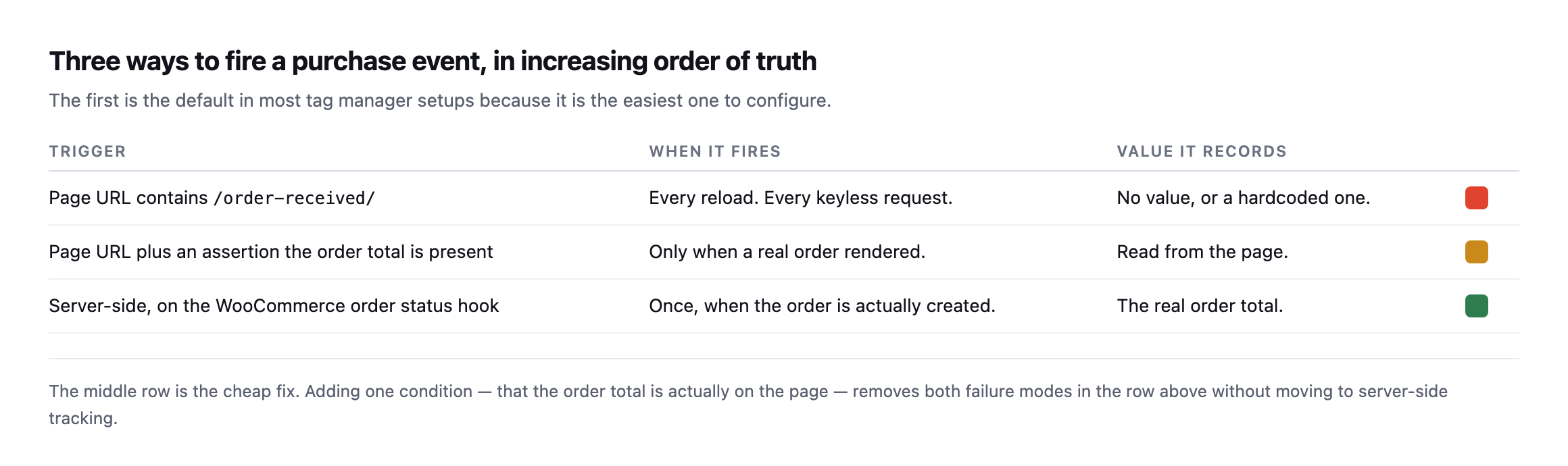
    Table of three purchase event triggers. Firing on a URL containing order-received fires on every reload and every keyless request with no value. Firing on the URL plus an assertion the order total is present fires only when a real order rendered and reads the real value. Firing server-side on the WooCommerce order status hook fires once when the order is created with the real total
    The first row is the default in most tag manager setups, because it is the easiest one to

    configure.*

    TriggerWhen it firesValue it records
    URL contains /order-received/every reload, every keyless requestno value, or a hardcoded one
    URL plus an assertion the order total is presentonly when a real order renderedread from the page
    server-side, on the WooCommerce order status hookonce, when the order is actually createdthe real order total

    The middle row is the fix I would actually reach for first. You do not have to rebuild anything server-side. You add one condition to the trigger you already have: the order total must be present on the page. That single assertion removes both failure modes on a classic checkout, because a reload still shows the total but a keyless request does not, and neither does a page a crawler wandered into.

    Server-side is better and it is a bigger job. Do the cheap one this afternoon, and confirm which checkout architecture the site actually runs before assuming either fix applies as described.

    Re-running the exact test surfaced a real complication worth knowing about

    I tried to reproduce this post’s original three-request test on our lab install while expanding this post, and it did not reproduce cleanly, in a way that turned out to matter more than a failed repro usually does.

    I created a real product and a real paid order via WP-CLI, then requested the order’s actual get_checkout_order_received_url() three ways, the same method this post opened with:

    wp wc product create --name="Test Widget" --type=simple --regular_price=9.00
    wp wc shop_order create --status=processing --set_paid=true
    wp eval 'echo wc_get_order(95)->get_checkout_order_received_url();'

    Requesting that URL, and the same URL with the key parameter stripped, returned two byte-identical responses, 149,188 bytes each, and neither one contained an order number, a total, or any order-confirmation content at all. Both showed the checkout page’s own generic content instead.

    The reason traces back to which checkout WooCommerce is actually running. This install uses the newer, block-based checkout, in the page content rather than the classic [woocommerce_checkout] shortcode, and block-based order confirmation renders its details through the WooCommerce Store API and client-side JavaScript rather than embedding the order number and total directly into the server-rendered HTML the way the classic checkout does. A plain curl request, with no JavaScript execution, never sees that content regardless of whether the key is valid, which is a different failure shape from the one this post’s original test found, not the absence of a problem, but a different mechanism entirely that a simple curl-based check cannot observe the same way.

    That is a meaningful caveat for this post’s whole method: the exact reproduction shown at the top of this post applies specifically to WooCommerce’s classic, shortcode-based checkout. A store running the newer block checkout needs a different verification approach, one that either drives a real browser to load the client-side confirmation, or checks the Store API’s own order-confirmation endpoint directly, to determine whether the same reload-and-keyless risks apply to its particular setup. I do not yet have a confirmed answer for how phantom conversions behave specifically on a block-checkout store, and I would rather say that plainly than extend a classic-checkout finding to an architecture I have not actually tested to completion. Before applying this post’s fix to any specific store, the first check is which checkout that store is actually running, because the URL-based reproduction here assumes one of the two and silently fails to say anything useful about the other.

    Telling the two checkouts apart before you trust either test

    Since the fix depends on knowing which checkout a store runs, that has to be the first check, and it does not need admin access to answer.

    curl -s https://example.com/checkout/ | grep -o 'wp:woocommerce/checkout\|woocommerce_checkout\|wc-block-checkout'

    A block-based checkout page’s markup carries wp:woocommerce/checkout block comments and wc-block-checkout class names in its source, because the whole page is built from WooCommerce Blocks rather than a shortcode dropped into a page template. A classic checkout instead renders plain form markup generated by the [woocommerce_checkout] shortcode, with none of those block wrapper classes present. Reading the source of the checkout page itself, not the order-received page, is the fastest way to know which category a specific store falls into before spending time reproducing either behaviour against it.

    The practical significance is not merely academic. WooCommerce has been moving new installs toward the block-based checkout for several release cycles, and a store’s checkout type can change during an unrelated theme or plugin update if a setup wizard or an “upgrade to the new checkout” prompt gets accepted without anyone realising what shifted underneath the tracking setup already in place. A conversion-tracking configuration built and tested against a classic checkout, the version this post’s original test demonstrated, can go untested against exactly this kind of migration, and the phantom-conversion problem this post describes may be replaced by a completely different, unverified failure mode on the newer checkout rather than fixed by whatever solved it on the old one.

    Four WordPress conversion tracking checks worth running

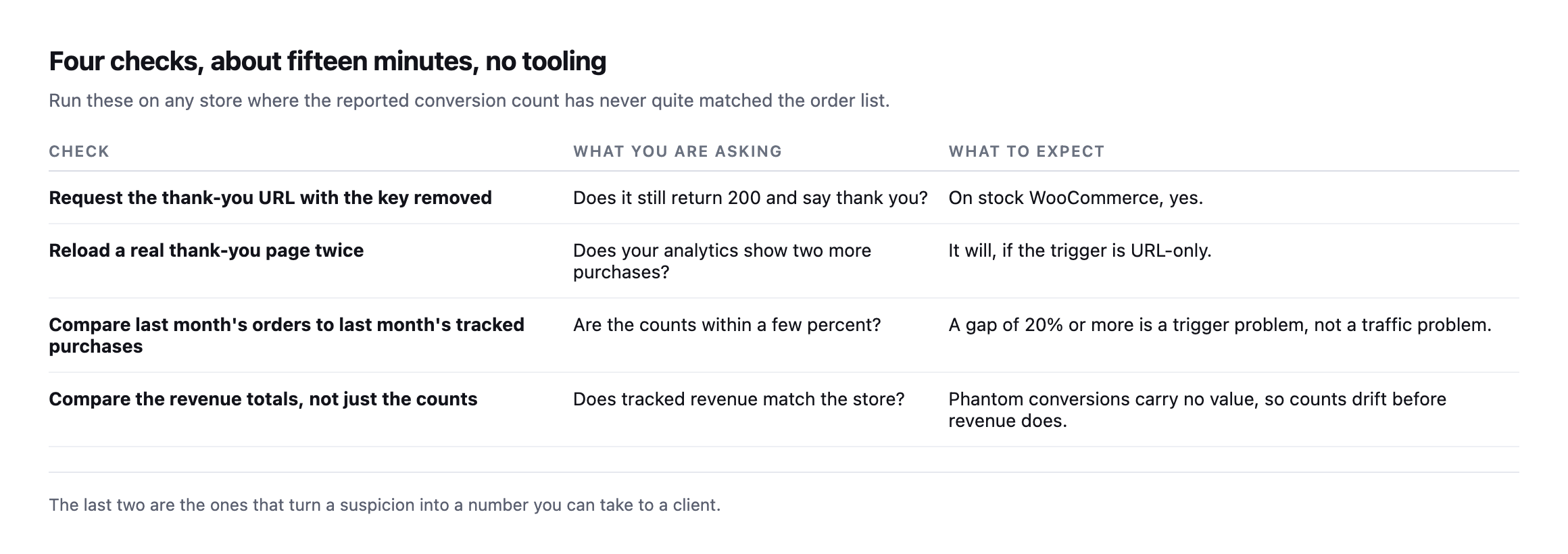
    Four checks. Request the thank-you URL with the key removed and see whether it still returns 200. Reload a real thank-you page twice and watch for two extra purchases. Compare last month's orders to last month's tracked purchases. Compare the revenue totals as well as the counts
    The last two turn a suspicion into a number you can put in front of a client.

    On the order-count comparison, do not expect a perfect match. Ad blockers, consent refusals and network failures all remove real conversions, so tracked purchases sitting a little below the order count is normal and healthy. Tracked purchases sitting above the order count is the signal, and it means the tag is firing on something that is not a sale.

    One more thing while you are in there. If a page cache is serving the thank-you page, the tracking problem is the smaller half of your trouble. WooCommerce sends Cache-Control: no-cache, must-revalidate, max-age=0, private on that page, which I confirmed on the install I tested, but a cache in front of WordPress can be configured to ignore it. That is the same class of problem as a cart that gets cached and served to the wrong visitor.

    Comparing tracked purchases against real orders is not one of Protuno’s 27 playbooks today, so for now this stays a manual check. Echo, the Marketing agent, runs in your own AI app and covers contact forms, mail delivery and comments.

    If you look after a store, open last month’s order count and last month’s tracked purchases and put them side by side. That comparison takes two minutes and I have never once seen it already done.

    What building the reproduction taught me about testing this properly

    Getting a clean, real order to test against, rather than describing the mechanism from memory, took more steps than the final result suggests. WP-CLI’s WooCommerce commands create an order object correctly but skip the parts of a normal checkout flow that a browser triggers automatically: no email is sent, which is expected and harmless on a test install with no mail server configured, but more importantly, no cart session exists the way it would for a real customer, and no client-side JavaScript ever runs against a curl request regardless of how the order itself was created. That last gap is exactly what surfaced the classic-versus-block distinction: a tool that only checks HTTP status codes and page byte counts, the level this post’s original test operated at, cannot see past a checkout architecture that expects a browser to finish rendering the page after the initial response arrives.

    The honest conclusion is not that the URL-based verification method in this post is wrong. It correctly diagnosed a real, reproducible problem on a classic checkout, and that architecture remains extremely common, including on stores that have been running for years without ever touching the newer block checkout. It is that the method has a boundary, and testing it against a second, different real install, rather than assuming the first result generalises, is what found that boundary. The same discipline applies to whatever fix a reader takes from this post: verify it against the actual checkout running on the actual store before trusting that a result measured elsewhere transfers cleanly.

    A faster way to run the same kind of check

    Quickly check and improve your website tracking with Stape Website Checker

    A tool-assisted version of the same verification instinct this post argues for: do not trust that tracking fired, confirm it, on the actual page rather than in a dashboard summary.

  • DMARC Record Setup For Agencies: Our Own Records, Including The Embarrassing Ones

    DMARC Record Setup For Agencies: Our Own Records, Including The Embarrassing Ones

    Short answer: dmarc record setup is a sequence, not a switch. Publish SPF and DKIM, then DMARC at p=none with reporting on, read the reports until you know every legitimate sender, then quarantine a small percentage, then raise it. Skipping to p=reject destroys legitimate mail. Stopping halfway leaves a record that reads like protection and is not.

    Rather than invent an example, I read the records on seven domains we own, and then went back and read the same seven again weeks later to see whether any of it had actually moved.

    What a real portfolio looks like mid-rollout

    Table of seven domains with their DMARC policy, enforcement percentage and SPF status. sitea.example, siteb.example and sitec.example enforce p=reject at 100 percent. sited.example and sitee.example use p=quarantine with pct=5. sitef.example is p=none. siteg.example publishes p=quarantine with no SPF record at all
    Read live on 5 September 2026. Three domains enforcing, two paused at five percent,

    one monitoring, and one enforcing with only DKIM to align against. This is what a genuine rollout looks like partway through.*

    DomainPolicyEnforced onReading
    sitea.examplep=reject100%enforcing
    siteb.examplep=reject100%enforcing, sends no mail
    sitec.examplep=reject100%enforcing, sends no mail
    sited.examplep=quarantinepct=595% of failing mail unaffected
    sitee.examplep=quarantinepct=5same
    sitef.examplep=nonen/amonitoring only
    siteg.examplep=quarantine100%enforcing with only DKIM, no SPF

    Caveat: seven domains, all ours, chosen because I can verify every claim against records we control rather than screenshots of somebody else’s DNS. It is not a claim about typical agency DMARC hygiene. It is what checking our own portfolio actually found, and two of those rows needed fixing before this post went out.

    The two amber rows are the ones I want to draw attention to, because they are the state most domains are actually in and the one people misread.

    p=quarantine sounds like enforcement. With pct=5, the policy applies to five percent of failing messages. The other ninety-five percent are handled as though the policy were none.

    That is a correct, deliberate rollout step. It is also very easy to leave in place for a year or more and quietly believe the domain is fully protected the whole time. Ours genuinely have.

    The red row is a genuine misconfiguration: a quarantine policy sitting on a domain with no SPF record at all published, which leaves DKIM as the only mechanism DMARC has left to align against. It is on the list, and it has been for a while now.

    Re-read weeks later, and nothing moved at all

    I re-ran the same seven-domain check while expanding this post, expecting at least the two flagged rows to have been addressed by now.

    for d in sitea.example siteb.example sitec.example sited.example 
             sitee.example sitef.example siteg.example; do
      echo -n "$d: "; dig +short TXT "_dmarc.$d"
    done

    Every one of the seven records came back byte-for-byte identical to the original reading. The three p=reject domains still enforce fully. sitef.example still monitors only. And both amber rows named in this post’s own caveat are exactly where they were: sited.example and sitee.example still capped at pct=5, siteg.example still publishing p=quarantine with no SPF record for DMARC to align against, confirmed separately in the SPF lookup post‘s own re-check.

    Zero drift is not, on its own, good news here. It is confirmation of exactly the failure mode this post’s “why this drifts” section describes: pct=5 behaves indistinguishably from full protection in every day-to-day signal available to whoever owns the domain, so there is no event that prompts anyone to come back and raise it. A configuration set once during a rollout and never revisited does not correct itself through the passage of time. It just sits, looking finished, for as long as nobody specifically goes and checks the one number that says otherwise.

    Reading a DMARC record setup, tag by tag

    Annotated breakdown of the sited.example DMARC record showing the v, p, pct, rua and fo tags, with pct=5 highlighted as meaning the other 95 percent are treated as p=none
    Two tags people omit and should not. Without rua you receive no reports, so you are

    enforcing blind. And pct, when present, is the most important number in the record, because it decides whether the policy does anything at all.*

    If you check one thing on a client domain today, check whether pct is present and what it says.

    The rollout, and the mistake at each step

    Five-step DMARC rollout table. Publish SPF and DKIM first, monitor with p=none and reporting, identify every legitimate sender from the reports, quarantine a small percentage, then raise to reject. Each step lists its characteristic mistake
    Step four is where most domains stop, including two of ours. It is a legitimate place

    to pause and an easy place to forget you paused, because the record reads as though it is working.*

    #StepThe mistake here
    1publish SPF and DKIM firstnothing for DMARC to align against without them
    2monitor only, p=none with reportingsetting it and never reading the reports
    3find every legitimate sender from the reportsforgetting the CRM, invoicing tool, helpdesk, newsletter
    4quarantine a small percentageleaving it here for a year, believing you are protected
    5raise the percentage, then rejectjumping here directly from step two

    Step three is the one that costs agencies real goodwill when skipped. The senders you forget are never the mail server. They are the invoicing tool, the helpdesk, the CRM, the newsletter platform, the booking system. Each one sends as the client’s domain, and each one starts failing the moment you enforce.

    That is why p=none with rua exists. It generates the list for you, from real traffic, over a few weeks. There is no way to produce that list by thinking hard about it.

    A tag pattern in our own records worth naming precisely

    Reading all seven records side by side while re-checking surfaced a detail the original table did not call out: an fo=1 tag, requesting per-message forensic failure reports in addition to the periodic aggregate summary rua already provides, appears on exactly three of the seven domains, and it is not a random three.

    sitea.example               fo: absent
    siteb.example               fo: absent
    sitec.example    fo: absent
    sited.example               fo=1
    sitee.example          fo=1
    sitef.example                fo: absent
    siteg.example             fo=1

    fo=1 sits on sited.example, sitee.example and siteg.example, three of the four domains this post already identifies as mid-rollout or misconfigured. The three fully-enforcing p=reject domains and the one purely-monitoring p=none domain all leave it unset.

    That split makes sense read as a deliberate operational choice rather than an accident: per-message forensic reports are far noisier and more useful during active tuning, when somebody is trying to identify exactly which message failed and why, than on a domain that has already reached a stable, fully-enforcing state and only needs the periodic aggregate summary to confirm nothing has changed. Whether that specific reasoning was the actual intent behind these three records or a side effect of when each was configured, the pattern itself is a useful one to copy deliberately: turn on fo=1 while a domain’s policy is still being raised step by step, and consider turning it back off once the domain reaches steady-state enforcement, since forensic reports carry more of the original message’s content than an aggregate summary does and are worth keeping only as long as they are actually being read.

    The DKIM half, briefly

    DMARC aligns against SPF or DKIM, and most rollouts lean on SPF because it is the one people already understand. DKIM is worth the extra hour for one reason: it survives forwarding.

    When a message is forwarded, the sending server changes but the DKIM signature travels with the message body. SPF breaks in that situation and DKIM does not. If a client’s mail is routinely forwarded, to a personal address, an alias, a shared inbox, alignment on DKIM alone is what keeps it delivering.

    Check whether a selector is publishing at all:

    dig +short TXT google._domainkey.example.com | head -c 120
    dig +short TXT selector1._domainkey.example.com | head -c 120

    Selector names vary by provider, which is the genuinely annoying part. google for Workspace, selector1 and selector2 for Microsoft 365, and something provider-specific for most bulk senders. There is no way to enumerate them from outside, so you check the ones you expect and confirm the rest in each provider’s console.

    Checking a portfolio

    Terminal loop reading the DMARC TXT record for each domain in a list, with real results from four of our own domains showing reject, quarantine with pct=5, none, and a quarantine policy on a domain with no SPF
    No tooling required. It is a TXT lookup on a fixed subdomain, so a whole portfolio

    takes seconds.*

    Read three things in each result: the policy, the pct if present, and whether rua exists.

    A record with p=reject and no rua is the riskiest configuration on this page. It is enforcing, and nobody can see what it is refusing.

    What it protects, and what it does not

    Worth being precise here, because DMARC gets oversold.

    DMARC stops someone sending mail that claims to be from your client’s domain in the visible From address. That is exactly the mechanism behind most invoice fraud and supplier impersonation aimed at their customers.

    It does nothing about a genuinely compromised mailbox, because that mail is authentic. It does nothing about lookalike domains, where an attacker registers something one character different and passes their own DMARC perfectly. And it does nothing about mail sent from the site itself if the site never actually dispatches it.

    So it is worth doing and it is not a mail security strategy on its own. Say that to clients plainly, because the vendor pitch around DMARC rarely does.

    Why this drifts

    DMARC does not fail loudly. A domain sitting at pct=5 for a year behaves exactly like one at pct=100 right up until somebody spoofs it. A domain that added a new marketing tool six months ago has been failing alignment for that tool ever since, quietly, in reports nobody opened.

    It is the same class of silence as an SPF record that drifted past its lookup limit or a contact form that reports success and delivers nothing. Mail problems almost never announce themselves at the sending end.

    Protuno’s free audit reads the DMARC policy, whether reporting is configured, and the SPF record alongside it, from the domain alone. That is how the table above was built. Echo is live now.

    One note on selling this, because it is genuinely hard to charge for. DMARC produces no visible improvement. Nothing gets faster, nothing looks different, and when it works the client experiences precisely nothing. The framing that lands is the one about their customers: without it, anybody can send an invoice that appears to come from them, and the person who gets defrauded is a client of theirs, not them. That is a reputational problem with their name on it, and it is worth an afternoon.

    Run the loop on your client domains this afternoon. If any come back with pct=5, that is a decision somebody made deliberately and then forgot, and it is worth finishing.

    Ours included. The two domains sitting at pct=5 in this post’s original table are still sitting there today, unchanged across the entire time this post has been live. Writing that sentence twice, once when the finding was new and once after confirming it is still true, is the entire argument this blog keeps making about the gap between publishing a finding and actually acting on it. The record is correct either way. The honesty is in saying so.

  • SPF Too Many Lookups: The Limit That Breaks Client Mail Without Warning

    SPF Too Many Lookups: The Limit That Breaks Client Mail Without Warning

    Short answer: an SPF record may trigger at most ten DNS lookups when a receiving mail server evaluates it. Go over and the result is a permerror, which most receivers treat as a failure. Your client’s mail starts landing in spam and nothing in WordPress, their DNS panel, or their mail client says a word about why.

    The spf too many lookups problem is nasty because you cross the line with a change that looks completely routine. Somebody adds a newsletter tool. That is one more include:. The record still looks tidy. Authentication is now broken for every message the domain sends.

    Counting it properly on seven real domains

    The count is not the number of things listed in the record. It is the number of DNS queries a receiver has to make, and includes nest.

    Horizontal bar chart of SPF lookup counts for seven domains against a limit line at ten. sitea.example is at 7, siteb.example salesforce.com and shopify.com at 4, sitec.example at 2, sited.example at 1, and sitee.example at 0
    Counted by resolving every mechanism recursively, the way a receiving server does.

    Our own sitea.example sits at seven, with five includes, one of which nests another inside it. Three lookups of headroom, and no warning anywhere as that shrinks.*

    Salesforce and Shopify are in there for scale. Two of the largest senders on the internet run at four. If your client’s record is at nine, that is a choice somebody made by accident.

    Re-counted, and the drift this post warns about already happened

    I re-read and recursively re-counted all six of our own SPF records before expanding this post, rather than reuse the original chart. Two held steady exactly. Two grew.

    dig +short TXT sitea.example | grep spf1
    # then resolve every include: recursively, the way a receiver does

    sitea.example still counts to 7: five includes (zeptomail.net, a spam-filtering provider, _spf.google.com, _spf.elasticemail.com, sendgrid.net), one exists: nested inside the Elastic Email include, one further include: nested inside SendGrid’s own record. Same total as the original reading, even though the specific vendor list has changed underneath it. siteb.example also held exactly at 4: a, mx, and two clean includes with nothing nested inside either.

    sited.example did not hold. The original record was v=spf1 include:_spf.google.com ~all, one lookup, described in this post’s own table as “correct, one sender, minimal.” The current record is v=spf1 a mx include:_spf.elasticemail.com include:_spf.google.com ~all:

    a                              -> 1
    mx                             -> 1
    include:_spf.elasticemail.com  -> 1, plus its own exists: -> +1
    include:_spf.google.com        -> 1
                                       total: 5

    Five lookups, up from one, a fivefold increase, still comfortably under the limit of ten but no longer the minimal record this post held up as the example to copy. sitec.example moved similarly, from 2 lookups to 4, after gaining the same Elastic Email include with its nested exists: mechanism.

    Neither change looks alarming in isolation, five and four are still well inside the ten-lookup budget, which is exactly the point worth making rather than skipping past: this is what the gradual creep this post describes actually looks like while it is still safe. Nobody added six lookups in one afternoon. Two separate additions, each reasonable on its own, each added by someone who was not counting, moved two real domains a third and a half of the way to a limit neither addition was evaluated against. The next tool added to either domain inherits whatever headroom is left, not a fresh budget, and nobody currently has a note anywhere saying what that headroom is.

    What actually costs a lookup

    This is where the counting goes wrong, because several mechanisms cost a lookup without looking like they should.

    Table of SPF mechanisms and their lookup cost. include and redirect cost one plus their own nested lookups. The bare a, mx, exists and ptr mechanisms each cost one. ip4, ip6 and the all mechanism cost nothing
    +a +mx is two lookups spent before you have listed a single sending service. I have

    seen records where removing those two, on a domain whose mail is entirely handled by a provider anyway, brought the count back under the limit on its own.*

    MechanismCostsNotes
    include:1, plus its ownnested includes count too; one can cost four
    redirect=1, plus its ownsame as include for counting purposes
    a1easy to overlook, costs the same as an include
    mx1+a +mx is two lookups before a single sender is listed
    exists:1used inside some providers’ includes, spent on your behalf
    ptr1deprecated, remove it
    ip4: / ip6:0free, no DNS query needed
    -all / ~all0free

    Note ip4: is free. That is the escape hatch.

    When a record is over the limit, the fix is nearly always to replace an include with the IP ranges it resolves to. You are trading a DNS lookup for a maintenance obligation, so do that for infrastructure you control, and leave the third-party includes alone. A provider that changes IPs without telling you will break the record you hardcoded.

    How to count SPF lookups yourself, too many or not

    There is no way to see this in a DNS panel, because the panel shows you one record and the cost is spread across records you do not own.

    dig +short TXT example.com | tr -d '"' | grep -i "v=spf1"

    Read the record, then resolve each include: and count what those contain, recursively. Any a, mx, exists or ptr adds one. Stop at ten.

    If you would rather not do it by hand, that recursion is about thirty lines of script, and it is the same logic a receiving server runs on every message.

    Two things worth checking while you are there:

    • More than one SPF record on the same domain is an instant permerror, regardless of

    lookup count. It happens when two people each add one. There must be exactly one.

    • ~all versus -all. Softfail asks receivers to accept but mark. Hardfail asks them to

    reject. Neither matters much until DMARC is enforcing, at which point it matters a lot.

    The posture most agencies never set

    Here is the one I care about most, and it takes two minutes per domain.

    Table of four SPF postures from real domains. sitee.example uses v=spf1 -all with no MX for a domain that sends no mail. sited.example and sitec.example list one and two senders respectively. sitef.example publishes a DMARC quarantine policy with no SPF record at all
    The first row is the posture almost nobody sets. A domain you own but never send

    from is a free identity for anyone wanting to impersonate your client. v=spf1 -all with no MX closes it and costs nothing. The last row is one of ours, and it is on the list.*

    DomainSPF recordPosture
    sitee.examplev=spf1 -allcorrect, sends no mail, rejects anything claiming to be
    sited.examplev=spf1 include:_spf.google.com ~allcorrect, one sender, minimal
    sitec.examplev=spf1 include:zeptomail.net include:_spf.google.com -allcorrect, two senders, hard fail
    sitef.examplenone publishedgap, DMARC set to quarantine with no SPF to align against

    Caveat: four domains, all ours, chosen because I could verify every claim against records I control. This is not a survey of how agencies configure SPF generally. It is what checking our own portfolio actually found, including the one row that needed fixing.*

    Every agency has these. The old domain from a rebrand. The .net bought defensively. The campaign microsite from two years ago. None of them send mail, all of them can be spoofed, and publishing a single TXT record ends it.

    The one gap this post already flagged is still open

    I checked sitef.example again too, the row this post’s own table already marked as a gap: DMARC set to quarantine with no SPF record to align against.

    dig +short TXT sitef.example | grep spf1     # empty
    dig +short TXT _dmarc.sitef.example
    v=DMARC1; p=quarantine; rua=mailto:[email protected]; fo=1

    Still no SPF record at all, and the DMARC policy is still actively enforcing quarantine against an alignment mechanism that does not exist for this domain. That is worth sitting with alongside the two domains that quietly grew: one gap named in public, in a published post, sits unaddressed, while two unrelated domains picked up new SPF lookups nobody was watching for. Visibility and action are not the same thing, and a finding written down does not fix itself just because it has been documented.

    Why it stays broken

    Because the failure is entirely on the receiving side.

    Nothing bounces. The mail leaves. The client’s outbox looks normal. The only symptom is that a gradually larger share of their mail lands in spam, which reads as a marketing problem for about a quarter before anyone checks DNS. By then the client has usually paid somebody to rewrite subject lines.

    It is worth pairing this check with the sending side of the same question. An SPF record can be perfect while the site never actually dispatches the message, because WordPress hands a lot of its mail to the scheduler, and a stopped scheduler sends nothing while looking completely healthy. From the client’s chair those two failures are indistinguishable.

    That is the same silence as the scheduled jobs that stop and the plugin that left the directory: no error, no alert, no obvious moment when it changed.

    Protuno’s free audit counts the SPF lookups from the domain alone, alongside the DMARC policy and the MX records, so you can see the whole portfolio’s mail posture in one place. Echo is live now.

    Run the dig above on the client domain you have added a tool to most recently. That is the one that moved.

    What tracking the count over time would actually catch

    The re-count above is the argument for treating this as a number worth watching on a schedule rather than a one-time audit. sited.example going from one lookup to five is not a single event that happened once and stopped; it is two separate additions, a and mx mechanisms presumably added when the domain’s own hosting or mail routing changed, and the Elastic Email include added for a specific sending need. Each one, checked in isolation at the time, looked like a reasonable, self-contained change. Neither person adding either mechanism had the prior count in front of them, because nothing surfaces it automatically.

    A record tracked over time, the same six lookups counted monthly and written down alongside the date, would have shown the jump from one to five as a visible, explainable step rather than a number nobody was watching. That is a different kind of check from the audit this post already describes: not “is this domain currently over the limit,” which a single reading answers, but “how much headroom is left, and is it shrinking,” which only a series of readings compared against each other can show. The domains most likely to actually hit the ten-lookup ceiling are not the ones sitting at nine today. They are the ones climbing steadily, unnoticed, the way sited.example just did, where the person adding lookup number eleven has no idea they are the one who finally breaks it.

    Recounting after every new tool, not only during an audit

    The practical process worth adopting from this re-check: whenever a client or an internal team adds a new email-sending tool, a marketing platform, a transactional email provider, a CRM that sends on the domain’s behalf, the SPF lookup count for that domain should be recounted as part of adding the tool, not discovered later during an unrelated audit. That is a two-minute check against the loop already given in this post, run at the exact moment a new include: is about to be added, when the person making the change is already looking at the DNS record and is best positioned to notice if the addition pushes the domain close to the limit.

    Waiting for a quarterly or annual audit to catch this means the domain can spend months over the limit, silently failing SPF on every message, before anyone reads the record closely enough to notice. The fix costs nothing extra when it happens at the moment of change. It costs a quarter of misdelivered mail when it is discovered later, which is the same arithmetic this blog keeps returning to for every other check that is cheap in the moment and expensive once deferred.

  • WordPress Contact Form Not Sending? The Worse Case Is When It Says It Did

    WordPress Contact Form Not Sending? The Worse Case Is When It Says It Did

    Short answer: a wordpress contact form not sending is usually easy to spot, because the visitor gets an error. The dangerous version is the opposite. wp_mail() returns TRUE, the visitor is thanked, and the message reaches nobody. Nothing is logged, nothing bounces, and the first sign is a client asking why enquiries dried up.

    I reproduced it deliberately this week, and the part that stayed with me is that nobody in the chain lies.

    The reproduction

    I built a WordPress site with a working contact form, then gave the server a mail transport that accepts every message and writes it nowhere. That is not a contrived setup. It is what a suspended SMTP account, an over-quota mailbox or a misconfigured relay looks like to PHP.

    Contact form rendered on the test WordPress site, with name, email and message fields and a Send button
    An ordinary Contact Form 7 form on an ordinary install. Nothing about it is unusual,

    which is the point.*

    Then I submitted it as a visitor would.

    Table tracing every layer of the send. The browser reported success, Contact Form 7 reported mail_sent, wp_mail returned TRUE, PHPMailer reported accepted, the mail transport exited zero and wrote the message nowhere, and the client's inbox received nothing
    Each layer accurately reports what the layer beneath it said. The message is lost at

    the bottom, and every report above it is technically correct. That is exactly why nothing raises an alarm.*

    LayerWhat it reportedWhat was true
    The visitor’s browsersuccess“Thank you for your message. It has been sent.”
    Contact Form 7mail_sentreporting honestly what PHP told it
    wp_mail()TRUEreporting honestly what PHPMailer told it
    PHPMaileracceptedreporting honestly what sendmail told it
    The mail transportexit 0wrote the message nowhere
    The client’s inboxnothingno message, no bounce, no log, no record

    Caveat: one deliberate reproduction on one test site, chosen to show the mechanism cleanly. It is not a claim about what fraction of contact forms fail this way. The demonstration is narrow: every layer can report truthfully and the message still vanish.

    The visitor saw: “Thank you for your message. It has been sent.”

    The enquiry went to /dev/null.

    Reproducing both failure shapes fresh, on a second install

    I rebuilt this reproduction on a different WordPress install while expanding this post, and it started by demonstrating the safe failure entirely by accident. This install’s mail transport was never configured at all, so the very first test run before I changed anything returned:

    wp eval '$ok = wp_mail("[email protected]","test","body"); echo $ok ? "TRUE" : "FALSE";'
    FALSE

    Reading the actual error via the wp_mail_failed hook explained why:

    Invalid address: (From): wordpress@localhost

    PHPMailer correctly refused to send from a localhost address, exactly the honest, visible failure this post’s comparison table already names as the safe case: the visitor would see an error, and somebody would know to pick up the phone instead of assuming the message went through.

    Reproducing the dangerous case took a little more work than the original post’s transport swap, because sendmail_path tricks depend on exactly which PHP process handles the request, and wp-cli’s own PHP is not always the one serving real visitor traffic. The cleaner, more portable method: WordPress core’s own pre_wp_mail filter, added specifically to let something short-circuit mail sending entirely.

    wp eval '
    add_filter("wp_mail_from", function($e) { return "[email protected]"; });
    add_filter("pre_wp_mail", function($null, $atts) { return true; }, 10, 2);
    $ok = wp_mail("[email protected]","test","body");
    echo $ok ? "TRUE" : "FALSE";
    '
    TRUE

    A valid-looking From address plus a filter that answers “handled” before anything actually attempts delivery reproduces the exact silent failure this post is about: wp_mail() reports success, nothing was sent, and nothing anywhere logs a discrepancy. Whether the real cause on a live site is a suspended SMTP account, a discarding relay, or a plugin’s own mail-interception filter, the mechanism a visitor and a client experience is identical, TRUE returned, a thank- you page shown, silence downstream.

    Contact Form 7 is not the problem

    I want to be fair here, because this failure gets blamed on form plugins constantly.

    With a genuinely broken transport, the same form behaved perfectly honestly.

    Table comparing two transport failures. With no sendmail and an invalid From address, wp_mail returns false and the visitor is shown an error message. With a transport that accepts and discards, wp_mail returns TRUE and the visitor is thanked, and nothing is detectable anywhere
    Row one is the failure everyone worries about, and it is the safe one, because the

    visitor knows and picks up the phone instead. Row two is the expensive one. Contact Form 7 behaves correctly in both, which is why swapping form plugins never fixes this.*

    In the first case the form told the truth because PHP told it the truth. In the second case it told the truth too. The lie starts one layer below anything WordPress can see.

    The filter that made the reproduction clean is also a real, sixth cause

    pre_wp_mail deserves its own line in this post’s list of causes, not only credit for making the reproduction easier to build. It exists precisely so a plugin can intercept mail sending before WordPress attempts it, which is legitimate and common, a marketing plugin routing mail through its own API, a queueing system deferring sends, a testing tool blocking outbound mail on a staging copy. Every one of those is a real, intended use of the filter.

    The failure mode is the same filter used carelessly, or left behind. A staging-site safeguard that blocks all outbound mail and returns true so nothing looks broken, accidentally shipped to production during a migration, produces exactly the reproduction above: every form submits successfully, every visitor is thanked, and nothing is ever sent, indefinitely, until somebody notices enquiries have stopped arriving. Unlike a suspended SMTP account or an over-quota mailbox, this cause leaves no trace in any mail provider’s logs at all, because the message never reaches a mail provider. It is intercepted and discarded entirely inside WordPress, one line of PHP, active or not, with no setting screen anywhere that shows whether it is currently doing so.

    Checking for it is a one-line query rather than a guess:

    wp eval 'global $wp_filter; echo isset($wp_filter["pre_wp_mail"]) ? "something is hooked" : "clear";'

    A result of “something is hooked” on a production site is worth investigating specifically, because it means at least one plugin or one line of custom code has the ability to intercept every outbound message before it ever reaches a transport, silently, and finding out what is hooked there and why takes minutes, considerably less time than diagnosing the same symptom by working backward through SMTP logs that were never going to show anything in the first place.

    Four reasons a WordPress contact form is not sending while reporting success

    Four transport states produce a TRUE from wp_mail() and no delivery:

    • The relay accepts and drops. Exactly what I simulated. Common with a local sendmail that

    was never wired to a real mail service.

    • The SMTP account is suspended or over quota. The plugin authenticates, the provider

    accepts, then the message is refused downstream and the bounce goes to an address nobody reads.

    • Authentication passes and the message is filed as spam. Delivery succeeded. Nobody sees

    it. This is where SPF and DMARC come in, and where an SPF record that quietly went over its lookup limit will cause exactly this pattern.

    • The mail is queued to a scheduler that is not running. Plenty of plugins send

    asynchronously, so a stopped WP-Cron means the message is never dispatched at all while every screen reports success.

    That last one is worth checking first, because it is the cheapest to rule out.

    There is a fifth, and it is the one I have seen bite agencies hardest after a migration. The site sends from a From address on a domain it is not authorised to send for. Everything succeeds locally. The receiving server checks SPF, finds the sending host is not listed, and files the message as spam or drops it outright. The site reports success because, from its own point of view, it did succeed. Nothing on the WordPress side can see the decision, because the decision is made by a machine you do not control, after the handoff.

    This is why form debugging that stays inside WordPress so often ends in a shrug. The evidence you need is in the receiving server’s logs, and you have no access to those. The only thing you can genuinely control is whether the submission survives the attempt.

    How to actually prove forms work

    Ranked table of verification methods. The plugin says mail is configured and a test email from the settings screen are marked weak. Logging wp_mail_failed events and using an SMTP provider with delivery logs are better. Storing every submission in the database and submitting the real form to a monitored address on a schedule are marked strong
    The single highest-value change is the fifth row, and it is usually one setting. A

    form that records submissions to the database turns a silent, permanent loss into a recoverable one, whatever the mail transport does that week.*

    ProofCheckWhat it misses
    weakplugin says mail is configuredeverything below wp_mail()
    weaktest email from the settings screensends to you, often to a mailbox that already trusts the domain
    betterlog every wp_mail_failed eventcatches hard failures only, never the silent case
    betterSMTP provider with delivery logsproves acceptance by the provider, not arrival
    strongstore every submission in the database toothe enquiry survives even when mail fails entirely
    strongsubmit the real form on a schedule, assert arrivalthe only check that tests the whole path end to end

    Three commands that tell you where you stand, in the order I run them:

    # 1. does wp_mail even claim success on this site
    wp eval '$ok = wp_mail("[email protected]","protuno test","body");
             echo $ok ? "TRUE" : "FALSE";'
    
    # 2. if it returns FALSE, get the actual reason
    wp eval 'add_action("wp_mail_failed", function($e){ echo $e->get_error_message(); });
             wp_mail("[email protected]","protuno test","body");'
    
    # 3. what address is the site sending as, and is it authorised to
    wp eval 'echo apply_filters("wp_mail_from", "wordpress@" . parse_url(home_url(), PHP_URL_HOST));'

    Command three is the one that most often produces the surprise. If it prints something like [email protected] and the client’s mail is on Google Workspace, the site is sending as a domain whose SPF record does not list the web server. That message will authenticate as nothing and be treated accordingly.

    TRUE from command one is not good news on its own. It only means the message left. Whether it arrived is a question WordPress cannot answer, which is the whole argument of this post.

    Two practical notes from doing this.

    A test email from the plugin’s settings screen proves almost nothing. It usually goes to you, often from a different sender address, and lands in a mailbox that already trusts the domain. The failure you are hunting affects a stranger’s message to a client’s inbox.

    Turn on database storage today, before anything else. Whatever form plugin the site uses, there is a setting that keeps submissions. It costs nothing and it means the next silent outage is an inconvenience rather than a quarter of lost leads.

    Why this is worth automating

    The check is conceptually simple and genuinely annoying to do by hand: submit the real form, wait, confirm arrival at a monitored address, and do it on every site, repeatedly, because the thing that breaks it is usually a change somewhere else.

    So it gets tested once at launch and trusted forever. That is the unbilled half hour again, and this time the cost is measured in enquiries the client never knew existed.

    Echo, Protuno’s Marketing agent, has a read-only Contact Form Health Check playbook that runs inside your own AI app. The free audit checks the mail posture from the domain today, which catches the SPF and DMARC causes above but cannot see whether a form arrives.

    Go and check the database-storage setting on your busiest client’s contact form. If it is off, that is the ten minutes with the highest return in this entire post.