Category: eCommerce

  • WooCommerce Shipping Zones: Regions That Cannot Check Out

    WooCommerce Shipping Zones: Regions That Cannot Check Out

    A payment gateway failure makes noise. The order fails, a customer emails, and somebody notices within the day.

    A shipping zone gap makes almost none.

    A customer in an uncovered region fills a cart, enters an address, and gets a sentence. On the cart it reads “No shipping options were found for” and then the address. At checkout it reads “There are no shipping options available. Please ensure that your address has been entered correctly, or contact us if you need any help.” Many customers take that as a typo, retype the address once, and leave.

    From the store’s side, nothing failed. No order was placed, so nothing sits in the orders list. The store owner’s week looks normal.

    Short answer: a WooCommerce shipping zone only serves the regions listed in it, and a customer is matched to the first zone, from the top of the list, whose regions fit their address. If that zone has no method available for their cart, they get the “no shipping options” message and the search stops there. Find the gaps by listing your zones in order against where your orders and traffic come from, then test an address from each suspect region on a staging copy.

    What this post is, and is not: this is a mapping exercise and a test you can run on a staging copy of a store, using your own zone settings and your own order history. It does not tell you what to ship, where, or at what price. It tells you which regions currently resolve to no usable method, which is a different and more answerable question.
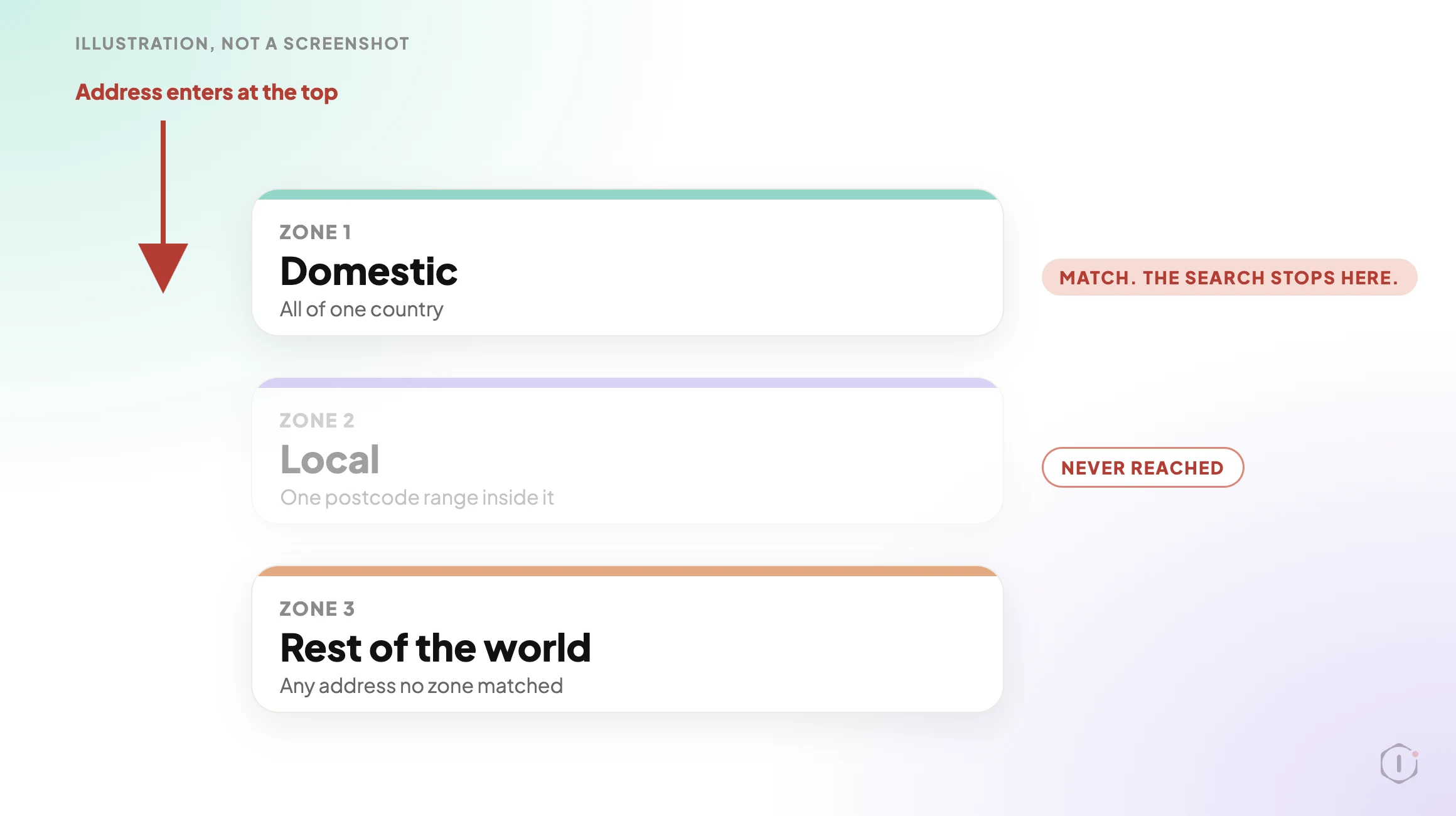
    A shipping zone list read from top to bottom. An address enters at the top and stops at the first matching zone, Domestic. The Local zone below it is greyed out and never reached. A Rest of the world box sits at the bottom.
    Illustration, not a screenshot. The zone names are examples.

    How The Matching Actually Works

    Zones feel like a list of places you ship to. They behave like a routing table.

    WooCommerce’s documentation says it plainly: a customer is assigned the first zone they match, and each customer matches only one zone. They are offered only the methods inside that zone, not the methods from every zone that could have fitted. The matching code agrees: it sorts zones by their saved order and takes the first match.

    Three consequences follow, and each produces a real gap.

    • Order matters. A broad zone placed above a narrow one swallows it. A zone for a whole country sitting above a zone for one postcode range inside that country means the narrow zone’s rates are never offered. The list is drag-sorted, so it can drift whenever somebody adds a zone in the wrong place.
    • A match with nothing usable is still a match. If the winning zone has no method, or only methods that are switched off or not yet earned, the customer is not passed down to the next zone. They are matched and then offered nothing.
    • The bottom zone is where everyone else lands. WooCommerce keeps a default zone called Rest of the world for any address no other zone matched. Adding methods to it is optional, so on a store that never added one, every unlisted region gets the same message.

    An empty zone is not always a mistake. The documentation describes it as the way to exclude a region when you use Rest of the world: add a zone for the region with no methods, and customers there are told no shipping is available. So the question is not “is there an empty result”. It is “was each empty result a decision”.

    The Conditions That Hide Inside A Zone

    A zone can look right in the admin and still hand the customer nothing, because a method can exist and not be available for a given cart.

    What is setWhat the customer seesWhere to look
    A method switched off in the matched zoneThe zone looks populated in the list, and the customer gets nothing from itThe Enabled toggle on each method inside the zone
    Free Shipping set to need a minimum order amountUnder the threshold, Free Shipping is not offeredThe “Free Shipping requires” setting on the method
    Free Shipping set to need a couponNobody without the coupon sees itThe same setting, plus the coupon’s own free shipping option
    A zone limited by postcodeAn address just outside a range or wildcard falls through to a lower zoneThe zone’s postcode list, which takes ranges and wildcards, one entry per line
    A shipping extension with its own rulesRates that depend on conditions the core settings do not showThe extension’s settings, after the core ones look right
    No address entered yetThe line “Enter your address to view shipping options” in the shipping section. Normal, not a gapThe Shipping options setting named “Hide shipping costs until an address is entered”

    If Free Shipping is the only method in a zone, a cart under its threshold has no method at all, which looks identical to a missing zone. Every row except the last ends at the same empty section, and nobody can tell the causes apart without the cart and address that reproduce it.

    One more setting sits upstream. The General settings page has a Shipping location(s) option, and the zone documentation says to check it before building zones. If it is wrong, no zone edit will fix what customers see.

    Mapping Zones Against Where Orders Come From

    A gap only matters where there is demand. A store that does not ship to a country nobody orders from has no problem. A store that cannot serve a region with steady traffic has an expensive one. Build one table with a row per region.

    1. Export your orders. Pull the last twelve months and count them by country, and by region for your largest countries. This demand map is biased on purpose: it only contains people who could finish an order, so the regions missing from it are the suspects.
    2. List your zones in their saved order. Write down each zone, its regions and postcode limits, and every method inside it, including methods switched off or carrying a condition from the table above.
    3. Pull sessions by region. A region with real sessions and no orders at all is the strongest signal you have.
    4. Mark each region as served by a zone with a method that works for a normal cart, served only by a conditional method, or falling to Rest of the world.

    The output you want is not this:

    “We have seven shipping zones configured.”

    It is this:

    “These regions produced sessions last quarter and no orders, and each falls through to a zone with no available method. Here is the address that reproduces it.”

    The second names the regions and the cause and comes with a reproduction. That is a bug report. The first is an inventory.
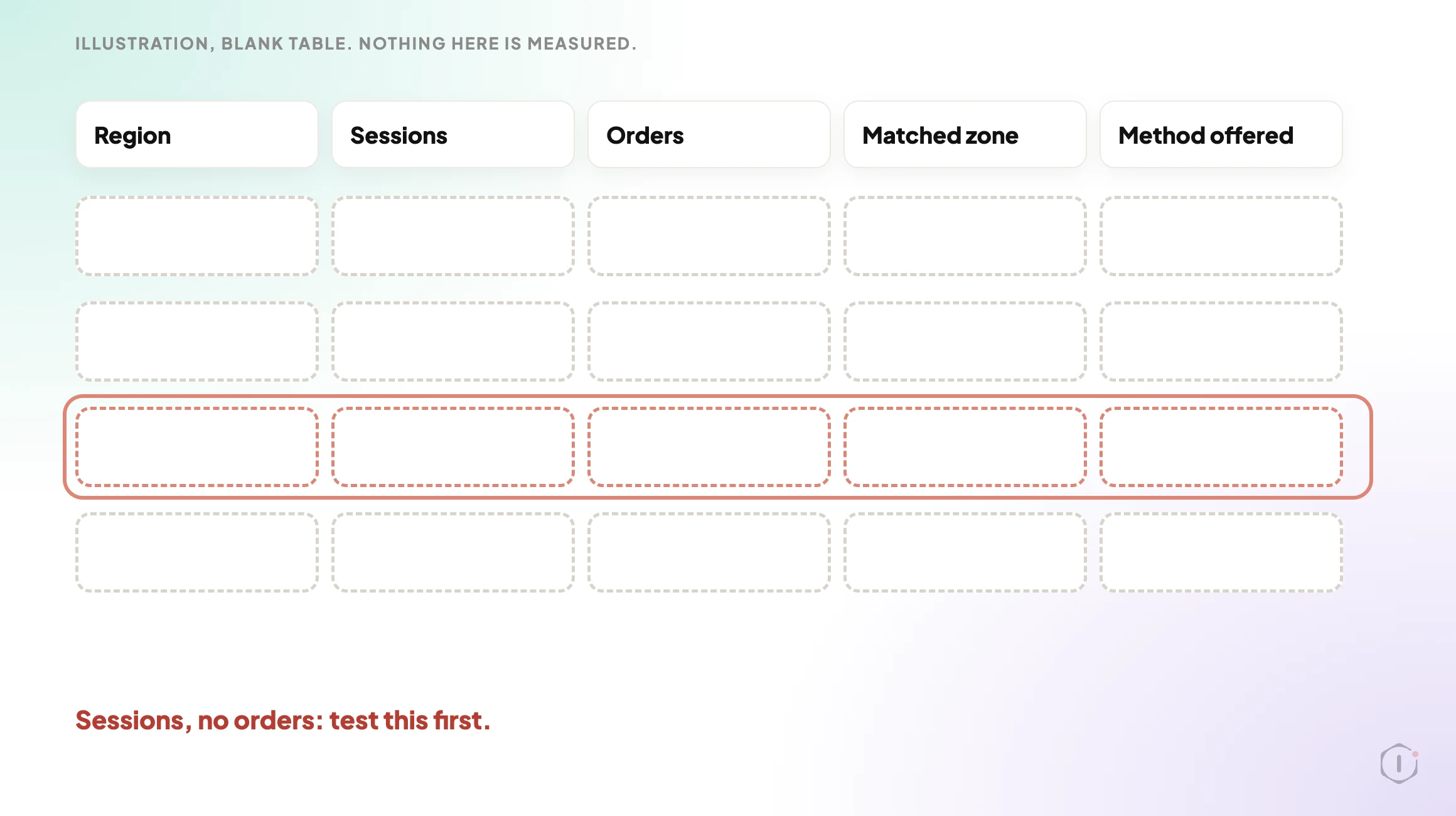
    A blank record table with columns Region, Sessions, Orders, Matched zone and Method offered, and four empty rows. One row is outlined in red with the note Sessions, no orders: test this first.
    Illustration of a blank sheet. Nothing on it is a measured result.

    Testing An Uncovered Region On Purpose

    Mapping gives you suspects. A test gives you proof.

    Use a staging copy that carries the live zone settings. A test on a stripped-down site with different zones tells you nothing, and a copy keeps abandoned carts and test customers out of the store’s real data.

    1. Pick one address per suspect region, in a real format for that region. An invalid postcode produces a validation error that looks like a zone gap and is not.
    2. Add a product that needs shipping to the cart, enter the address, and write down exactly what the shipping section shows.
    3. Repeat with a second cart at a different value, to catch a Free Shipping threshold.
    4. Repeat with a product from a different shipping class. Classes group products so a method such as Flat Rate can charge them differently, so a class is a variable worth varying.
    5. Repeat on a cart with only a virtual product, which should not ask for shipping at all.
    6. If you use a shipping extension, repeat with a heavy or bulky product.
    7. Record each combination: region, cart, zone matched, methods offered.

    WooCommerce has a switch that helps. Under the Shipping options settings there is a debug mode which, in the setting’s own words, shows matching shipping zones and bypasses the shipping rate cache. Rates are cached, so a retest can show yesterday’s answer without it. Turn it off afterwards. A walkthrough published on 20 October 2026 notes that the matched-zone notice appears on the classic Cart page and not in the Cart or Checkout blocks, so its absence is not a failed test.

    Six to eight combinations per suspect region takes an afternoon and leaves you exact addresses and carts that reproduce each failure. That list makes a fix verifiable.

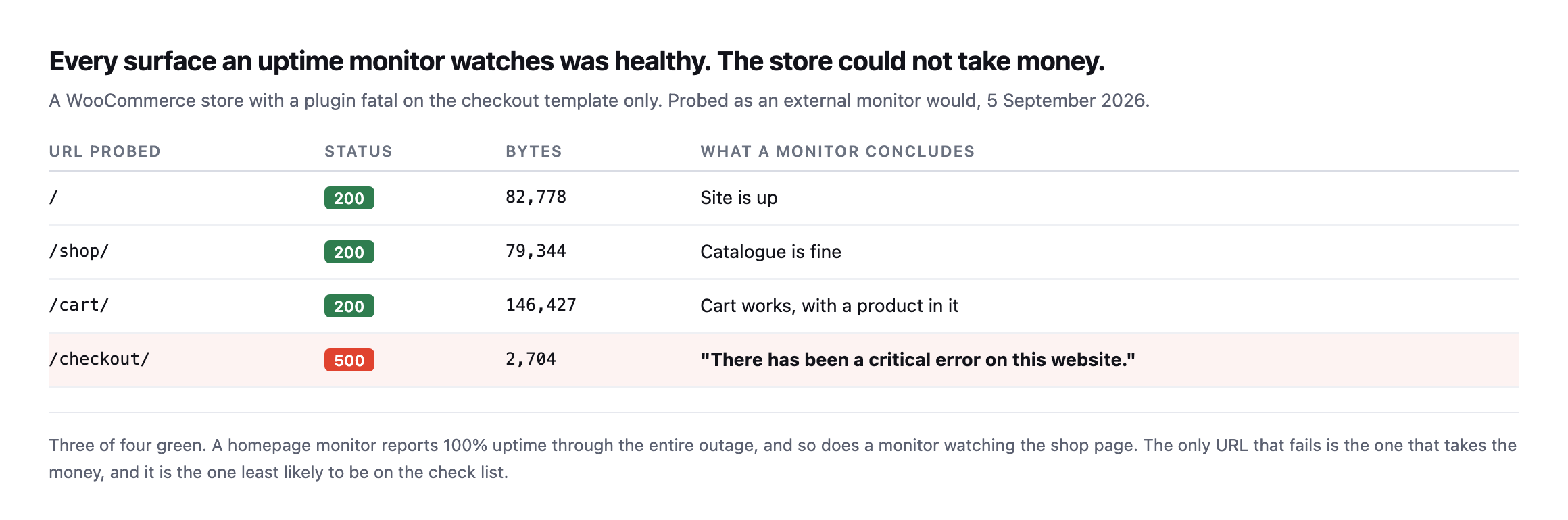
    A checkout walk you can safely repeat is worth building once, and building a WooCommerce checkout probe safe to run daily covers how. That post is candid about its own limit: the probe will not catch a shipping method failing for one country, which is the gap here. Why an uptime ping cannot do this job is covered in an uptime check cannot see this. If you look after stores you did not build, detecting WooCommerce from the outside tells you which ones to test first.

    Illustration. The example zones, regions and amounts are made up, and nothing in the video is a measured result.

    Fixing It Without Promising Delivery You Cannot Make

    The fix is not always “add a shipping method”. Sometimes the right answer is that you do not ship there, and the job is to say so sooner.

    SituationReasonable fix
    You do ship there and the region was simply missingAdd the region to a zone, or create one with a method and a rate
    A broad zone above is intercepting a narrower oneReorder the zones so the narrower one is matched first
    You ship there only above a value, on purposeKeep the threshold, and make sure the customer is told about it somewhere other than an empty section
    You do not ship there at allLeave the empty zone in place on purpose, and consider a notice that says so before the customer fills the form
    The method exists but is switched offSwitch it on, then repeat the exact test that failed

    The fourth row is the one stores resist and customers appreciate. An explicit “we do not currently deliver to this region” beats a message that sounds like a typo, and a deliberate zone is something you can find later.

    Whatever you change, re-run the exact address and cart that failed. “The zone was updated” is not the same as “this address now sees a method and can complete an order”.

    What Changed Recently

    WordPress 7.1.3 shipped on 6 October 2026 and 7.2 Beta 1 followed on 20 October. Neither announcement mentions shipping. WooCommerce 11.2.1, released on 9 October 2026, lists two fixes: how classic checkout sends order review and coupon requests, and acceptance of older four-digit Argentine postcodes in the Checkout block. The postcode fix is about validation, not zone matching, so nothing above depends on a recent change.

    What This Does Not Solve

    This finds regions that cannot check out. It does not find most other ways a checkout quietly stops working.

    • It is a configuration check, not monitoring. It is true on the day you run it. A plugin update or an edit by someone else can reopen a gap next week.
    • It cannot see demand that never arrived. A region with no sessions because the store was never marketed there shows nothing. No traffic is not the same as no market.
    • Tax and address validation are separate. A region can have a working method and still fail on a tax setting or an address field rule. Different symptom, different check.
    • It says nothing about payment. A customer who sees a method and then cannot pay has hit a different wall, covered in payment gateway monitoring.
    • It does not catch orders that start and then fail. Those are visible, and worth watching separately, which is the subject of WooCommerce failed orders.
    • Caching can make a result lie. A cached page that serves one customer’s cart state to another can hide what real customers get. That failure has its own article: one URL, two customers.

    Two Outside Views

    A video that turns the same idea into six checks. Cobalt Branch Labs’ “WooCommerce Shipping Methods Missing at Checkout? Check These 6 Things“, published 20 October 2026, runs about five minutes. Its order is: reproduce the failure with the exact address and cart, check which zone matches including zone order and postcode rules, confirm the method is enabled inside the matched zone, check the Free Shipping requirement, check that the cart holds products that need shipping, and retest on staging after every change. Its staging example shows the first-match point: with a broad domestic zone above a local one, the same address matched the broad zone first, and the expected local method went missing until the zones were reordered. The description is upfront that the settings panels are illustrative and the outcomes were checked through WP-CLI and cart calculations, not recorded storefront sessions. It is a small channel, so treat it as a checklist.

    A thread from people living with it. In an r/woocommerce thread titled “WooCommerce delivery methods/rates not appearing, even on new checkout shortcode page”, the author reports that the zones and methods are all set up and the checkout still shows no delivery rates:

    WooCommerce shipping zones and delivery methods are set up, products are physical/not virtual, and shipping is enabled. The checkout is built with Elementor/JetWooBuilder. The order review shows product, total and payment, but no Standard/Express delivery methods or delivery rates appear.

    u/SoloUncharted, r/woocommerce, 9 July 2026

    That is a useful counterweight. The author says the zones and methods are set up and suspects a page-builder checkout is overriding WooCommerce’s own, so a clean zone check does not end the hunt. It is why the video above puts themes and checkout customisations last. The replies suggest looking for a checkout template in the Elementor theme builder, and checking the zone, caches and other plugins. The author answered with thanks only, so the thread does not confirm a fix.

    Sources And Further Reading

    The Point

    A payment failure announces itself. A shipping zone gap is the opposite: the customer reads one sentence, assumes it was their typo, and goes.

    So the question is not how many zones you have. It is simpler and less comfortable: which regions send you visitors and no orders, and has anyone ever entered an address from one of them and read what the checkout said?
  • WooCommerce Failed Orders: The Early Warning Nobody Is Watching

    WooCommerce Failed Orders: The Early Warning Nobody Is Watching

    Short answer: a rising rate of woocommerce failed orders means payments are being attempted and refused, which is a gateway problem the store cannot see. Every URL returns 200 throughout. And before you can monitor it, you need to be querying the right table, because orders moved, though not on every store, and not always by default.

    Orders are not in wp_posts any more

    I created ten orders on a current WooCommerce install and counted them both ways, then went back and tested the migration mechanics directly on that same install to confirm exactly when each table actually applies rather than assume it from the version number alone.

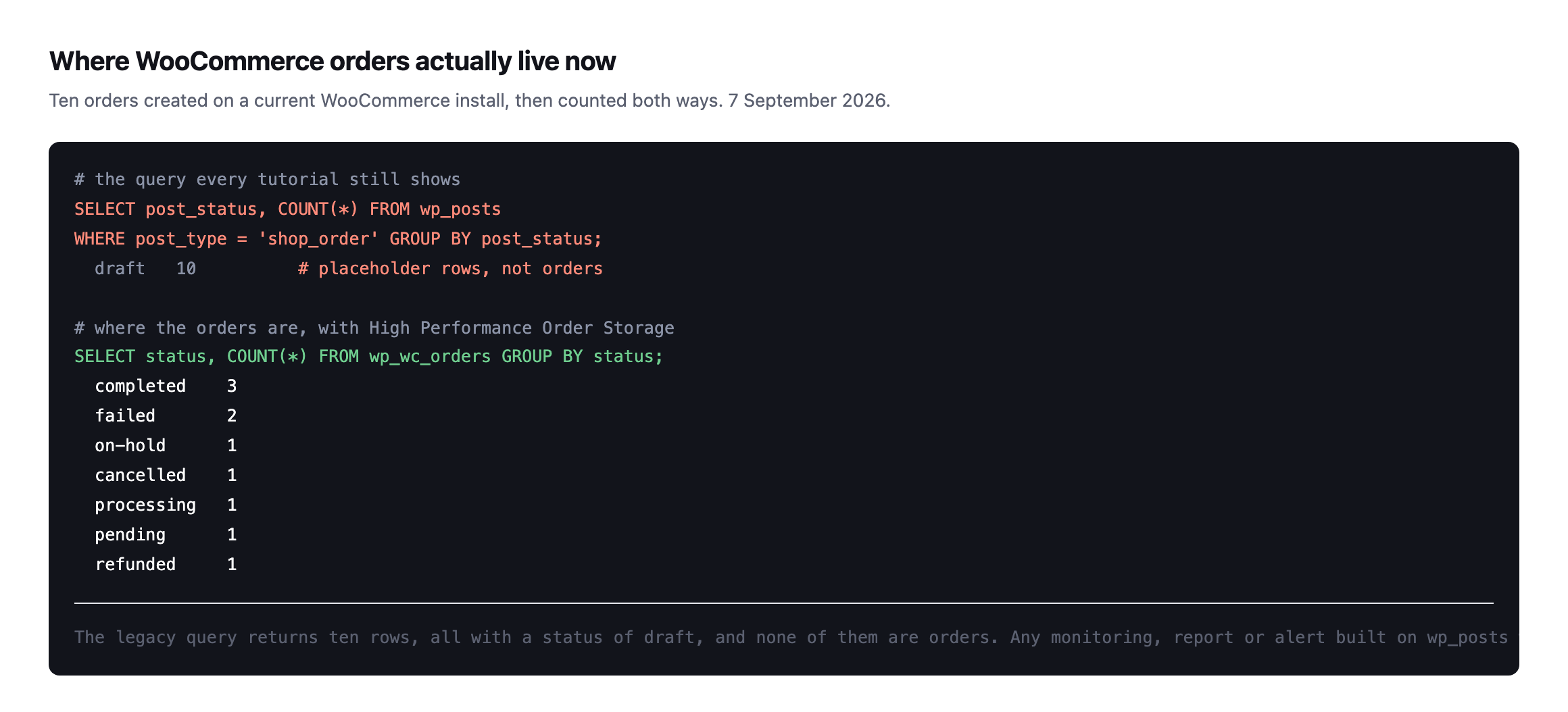
    Two SQL queries compared. The legacy query against wp_posts with post_type shop_order returns ten rows all with status draft. The query against wp_wc_orders returns the real distribution: three completed, two failed, and one each of on-hold, cancelled, processing, pending and refunded
    The legacy query returns ten rows, all draft, and none of them are orders. Any

    monitoring built on wp_posts reports a store with no sales while it trades normally.*

    That single option check is the whole difference. This is the same shape as the autoload column that no longer contains the value every tutorial queries for: the query still runs, still returns rows, and describes nothing.

    If you have a dashboard, a report or an alert that reads orders from wp_posts, check what it is actually returning. A silent zero is indistinguishable from a healthy quiet period.

    Checking whether HPOS is even on before you write the query

    The wp_wc_orders query above assumes the new order storage, HPOS, is active. I checked a fresh WooCommerce 11.1.0 install to find out whether that is now the default, since assuming it is the wrong direction to get this backwards.

    wp option get woocommerce_custom_orders_table_enabled
    no

    Not enabled, on a current WooCommerce version, installed clean with no history to migrate. HPOS is opt-in, toggled from Settings → Advanced → Features, not something a store arrives with switched on by default. That matters for this post’s own premise: the trap is not “your store has moved and your query has not caught up.” It is narrower and depends entirely on which of two states a specific store is actually in, and the only way to know is to check, not assume either direction.

    I created two real test orders on this legacy-storage install and queried both tables to see exactly what each one returns:

    wp db query "SELECT post_status, COUNT(*) FROM wp_posts WHERE post_type='shop_order' GROUP BY post_status;"
    wp db query "SELECT status, COUNT(*) FROM wp_wc_orders GROUP BY status;"
    post_status   COUNT(*)
    wc-completed  2
    wc-failed     1
    
    ERROR 1146 (42S02): Table 'wp.wp_wc_orders' doesn't exist

    On a legacy-storage store, wp_posts returns the real, correct order statuses, exactly as it always has, and the wp_wc_orders query from earlier in this post does not return an empty or misleading result. It fails outright with a table-not-found error. That is actually the safer of the two possible mistakes: a hard SQL error gets noticed immediately, unlike the reverse case this post opened with, where a legacy query against a migrated store returns real rows that quietly mean nothing. Check woocommerce_custom_orders_table_enabled before writing either query, and let that answer decide which table you query, rather than assuming one direction based on how recent the WooCommerce version is.

    Which statuses matter, and where WooCommerce failed orders sit

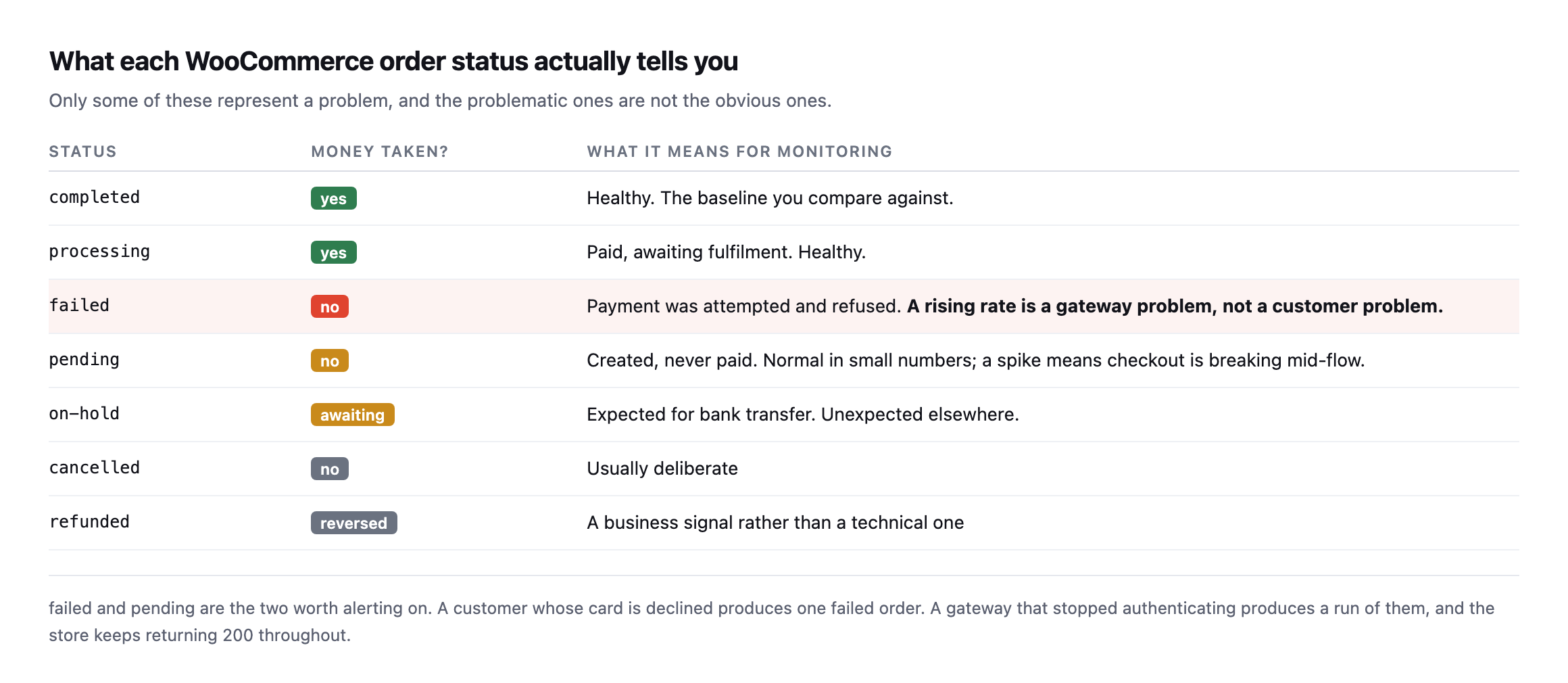
    Table of WooCommerce order statuses with whether money was taken and what each means for monitoring. Completed and processing are healthy. Failed means payment was attempted and refused. Pending means created but never paid. On-hold, cancelled and refunded are usually deliberate
    failed and pending are the two worth alerting on. A declined card produces one failed

    order. A gateway that stopped authenticating produces a run of them.*

    StatusMoney taken?What it means for monitoring
    completedyeshealthy, the baseline you compare against
    processingyespaid, awaiting fulfilment, healthy
    failednopayment attempted and refused; rising rate is a gateway problem
    pendingnocreated, never paid; a spike means checkout is breaking mid-flow
    on-holdawaitingexpected for bank transfer, unexpected elsewhere
    cancellednousually deliberate
    refundedreverseda business signal rather than a technical one

    The distinction matters because failed is not a customer problem. A customer with an expired card produces one failed order and then usually pays with another. A store producing a run of failed orders with no successes between them has an infrastructure problem, and nobody is being told.

    pending deserves attention too. An order created and never paid means the customer reached the final step and something stopped them, which is the most expensive point at which to lose somebody.

    Alerting without crying wolf

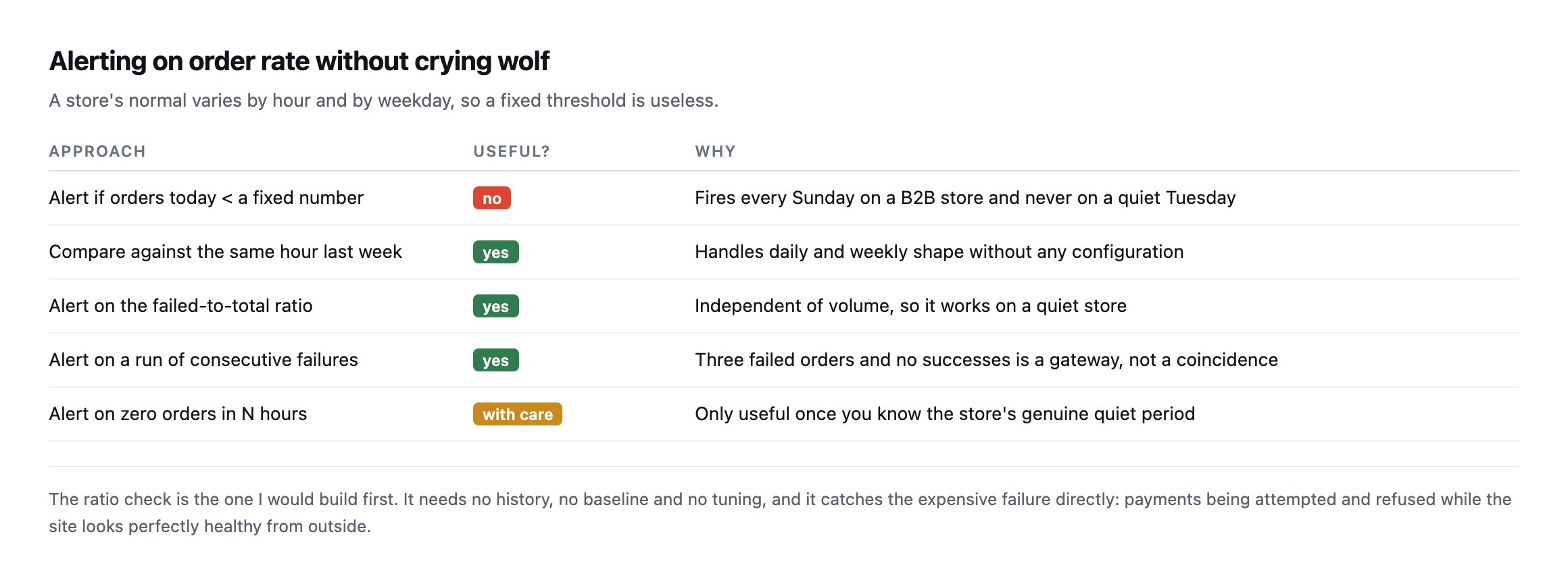
    Table of five alerting approaches. A fixed order-count threshold is not useful. Comparing against the same hour last week, alerting on the failed-to-total ratio, and alerting on consecutive failures all work. Alerting on zero orders needs care
    The ratio check is the one I would build first. It needs no history, no baseline and no

    tuning.*

    ApproachUseful?Why
    alert if orders today < a fixed numbernofires every Sunday on a B2B store, never on a quiet Tuesday
    compare against the same hour last weekyeshandles daily and weekly shape with no configuration
    alert on the failed-to-total ratioyesindependent of volume, works on a quiet store
    alert on a run of consecutive failuresyesthree failed and no successes is a gateway, not coincidence
    alert on zero orders in N hourswith careonly useful once you know the genuine quiet period

    A fixed threshold fails immediately, because a store’s normal varies by hour and weekday. On a B2B store, Sunday is quiet by design and an alert that fires every Sunday gets muted within a fortnight.

    The failed-to-total ratio sidesteps all of that. It is independent of volume, so it works on a store taking three orders a day and one taking three hundred.

    WooCommerce itself refuses to make this worse

    While testing the HPOS toggle on the lab install, I tried flipping the storage setting directly to see how a mid-migration store behaves, and WooCommerce stopped me:

    wp option update woocommerce_custom_orders_table_enabled yes
    Fatal error: Uncaught Exception: The authoritative table for orders storage can't be
    changed while there are orders out of sync

    That is a real guard, not a bug I stumbled into. WooCommerce checks whether every order is already synchronised between wp_posts and wp_wc_orders before it will let a site switch which table is authoritative, and refuses the switch outright if any are not. The exact trap this post opens with, a store where the two tables disagree about what an order’s status is, is one WooCommerce’s own core code actively tries to prevent from being the operating state for very long. Reads and writes through WooCommerce’s own APIs, the order object, the REST endpoints, the admin screens, stay correct throughout a migration because WooCommerce itself enforces synchronisation before it will call the switch complete.

    The actual danger this post is about lives specifically in code that bypasses those APIs: a direct SQL query against wp_posts, written when that was the only table that existed and never revisited, run against a store that has since finished a migration WooCommerce itself guarded carefully. WooCommerce protects its own consistency. It cannot protect a dashboard query, a custom report, or an old cron job that never got told the table changed underneath it, which is exactly why the check this post recommends, confirm which table is authoritative before trusting either query, is doing work WooCommerce’s own safeguards cannot do for you.

    The query

    SELECT status, COUNT(*) AS n
    FROM wp_wc_orders
    WHERE date_created_gmt > DATE_SUB(UTC_TIMESTAMP(), INTERVAL 24 HOUR)
    GROUP BY status;

    Compare failed against completed plus processing. On most stores the failed share sits in low single digits. A jump to a third, or any period with failures and no successes at all, is worth a phone call.

    Two caveats worth knowing. Sites that have not migrated to the new order storage still use wp_posts, so check which applies before writing anything. And a store with no orders in the window returns no rows rather than zeros, which is easy to misread as healthy.

    Why this is the check worth having

    Order-rate monitoring is the only store check that measures the outcome rather than a proxy.

    Uptime tells you the server answered. A checkout probe tells you the page rendered. Neither tells you whether money moved. A gateway can accept the page load, present the payment form, and refuse every transaction, and every technical check will pass.

    That is the same category of silent failure as a contact form that reports success and delivers nothing, with a price attached.

    Protuno’s eCommerce agent, Till, runs a read-only WooCommerce Health Review inside your own AI app. See the playbooks page for what it covers.

    Run the query on your busiest client’s store. If it returns nothing because you were querying wp_posts, that is today’s finding.

    Building the ratio check so it survives a future migration

    The safest version of the monitoring query this post recommends is one that does not assume which table is authoritative, because that answer can change under a store you are watching without anyone telling you first. A migration a client runs themselves, a hosting provider that bundles a WooCommerce update with HPOS enabled by default in some future release, or an agency switching it on deliberately during a maintenance window, all change which table holds the truth without necessarily changing anything else about how the site behaves day to day.

    A monitoring script that hardcodes wp_wc_orders will fail loudly, the same table-not-found error this post’s test produced, the day it runs against a store that has not migrated. One that hardcodes wp_posts will fail quietly, returning real-looking rows describing nothing, against a store that has. Neither failure mode is acceptable in something meant to run unattended on a schedule, so the check worth writing first is not the order-status query. It is the one-line lookup that decides which query to run:

    wp option get woocommerce_custom_orders_table_enabled

    yes routes to wp_wc_orders. no, or the option missing entirely on an older WooCommerce install that predates the setting, routes to wp_posts. That single check, run before the actual monitoring query on every execution rather than assumed once and hardcoded, is what keeps a failed-order alert working correctly through a migration it was never told was happening, which is exactly the kind of silent underlying change this entire post is about.

    What this means for a query written before HPOS existed

    The practical audit worth running today, on every client store with WooCommerce-based monitoring already in place: find every place a report, a dashboard widget, a cron job or a custom SQL query reads order data, and check whether any of them hardcode a table name rather than checking the authoritative-storage option first.

    Most of that code was written before HPOS existed, because HPOS is a relatively recent addition to WooCommerce and wp_posts was the only option for years before it. None of that code is wrong for the store it was written against. It becomes wrong silently, the moment that specific store’s storage setting changes, and nothing about the code itself will tell you that happened. The option lookup this post recommends costs one extra query and turns a silent, indefinite failure into a check that keeps working correctly regardless of which side of a migration the store you are monitoring happens to be on today, or moves to next quarter without telling anyone who built the dashboard.

  • WooCommerce Detection From The Outside: One Signal Is Never Enough

    WooCommerce Detection From The Outside: One Signal Is Never Enough

    Short answer: reliable woocommerce detection needs at least two signals. The Store API proves the plugin is active. The cart and checkout pages prove somebody can actually buy something. Those two disagree more often than you would expect, including on one of our own sites.

    Four sites, four different answers

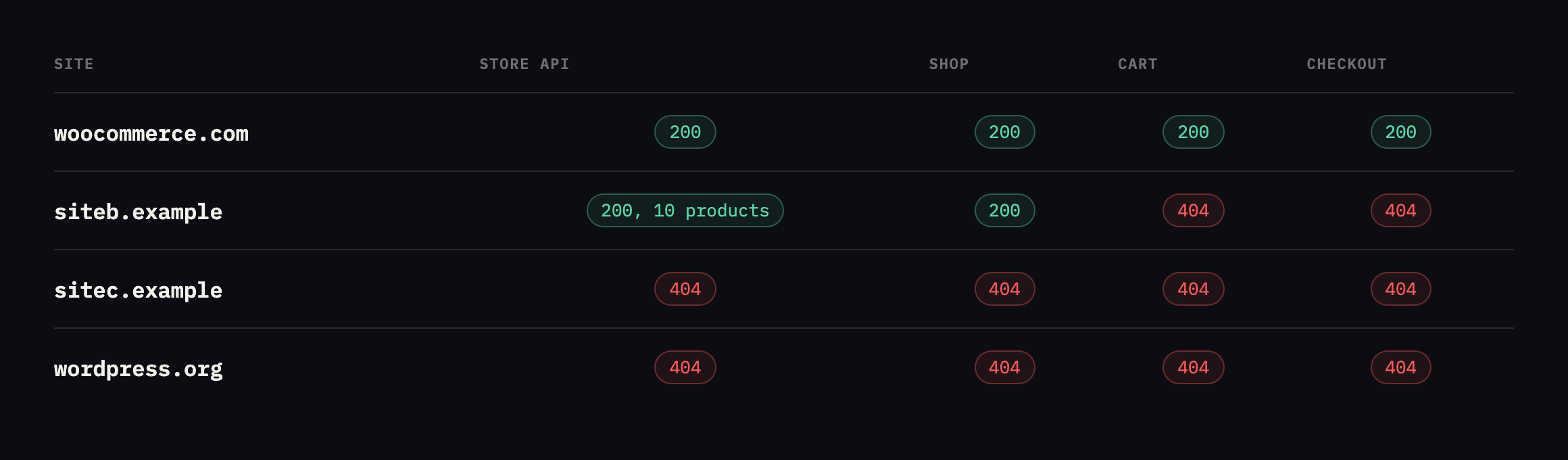
    Table of detection signals across four sites. woocommerce.com returns 200 on the Store API, cart and checkout. siteb.example returns 200 on the Store API with ten products and 200 on shop, but 404 on cart and checkout. sitec.example and wordpress.org return 404 throughout
    The second row is ours and it is the interesting one. WooCommerce is active, serving a

    catalogue of ten products, with a working shop page and no cart, checkout or account pages at all.*

    SiteStore API/shop//cart//checkout/Verdict
    woocommerce.com200n/a200200live store
    siteb.example200, 10 products200404404Woo active, catalogue only
    sitec.example404n/a404n/anot a store, mentions “woocommerce” 11 times
    wordpress.org404n/a404n/anot a store

    A detector keying on the Store API alone would report siteb.example as a live store. One keying on /cart/ would report no store. Both would be wrong, and the real answer is more specific than either: WooCommerce is installed and being used as a product catalogue, with the actual selling happening somewhere else.

    That is a completely legitimate configuration, and it is exactly the case that breaks simple detection.

    I went one layer deeper on siteb.example while re-checking this table, because the Store API response carries more than a product count. It also states, per product, whether the item is purchasable:

    curl -s "https://siteb.example/wp-json/wc/store/v1/products?per_page=3" | python3 -c "
    import json,sys
    for p in json.load(sys.stdin):
        print(p['name'], p['prices']['price'], p['is_purchasable'])
    "
    Performance Leggings 3999 True
    Casual Striped Tee 4499 True
    Denim Dream Jacket 1999 True

    Every sampled product reports is_purchasable: True, with a real price attached, on a site whose /cart/ and /checkout/ both return 404. WooCommerce’s own API considers these items buyable in principle, and no path on the site currently lets a visitor act on that. That is not a contradiction inside WooCommerce, is_purchasable describes the product’s own configuration, in stock, priced, not restricted, independent of whether a checkout flow is wired up to let anyone act on it. It is the clearest evidence yet for why this post’s opening claim holds: the plugin’s own data model can describe a fully sellable catalogue while the site itself provides no way to buy anything from it, and only a check that spans both, the API’s opinion of the product and the actual page that would complete a sale, catches the gap between them.

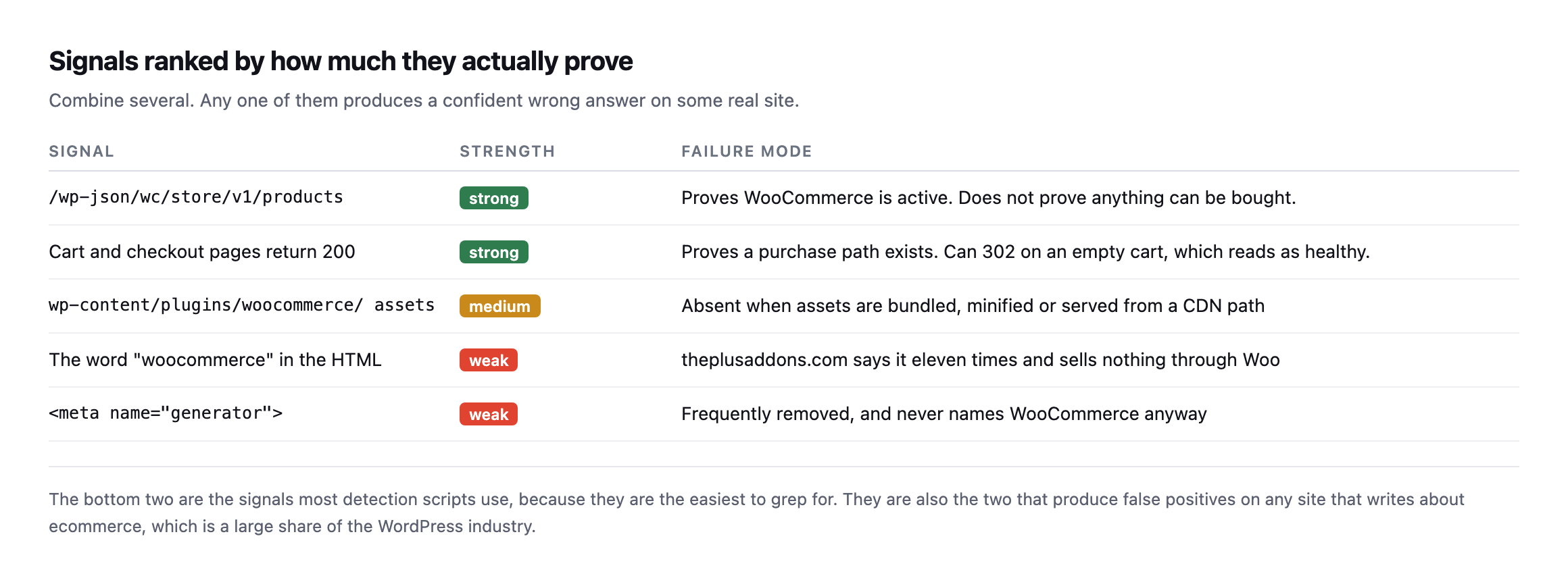
    Which WooCommerce detection signals to trust

    Table ranking detection signals. The Store API endpoint and cart and checkout page status are strong. WooCommerce plugin asset paths are medium. The word woocommerce appearing in HTML and the generator meta tag are weak
    The bottom two are the signals most detection scripts use, because they are the easiest

    to grep for. They are also the two that produce false positives on any site that writes about ecommerce.*

    SignalStrengthFailure mode
    /wp-json/wc/store/v1/productsstrongproves Woo is active, not that anything can be bought
    cart and checkout return 200strongcan 302 on an empty cart, which reads as healthy
    wp-content/plugins/woocommerce/ assetsmediumabsent when bundled, minified, or CDN-served
    the word “woocommerce” in the HTMLweakeleven mentions here, sells nothing through Woo
    weakfrequently removed, never names WooCommerce anyway

    sitec.example mentions “woocommerce” eleven times in its homepage HTML and sells nothing through it. A word-match detector calls that a store.

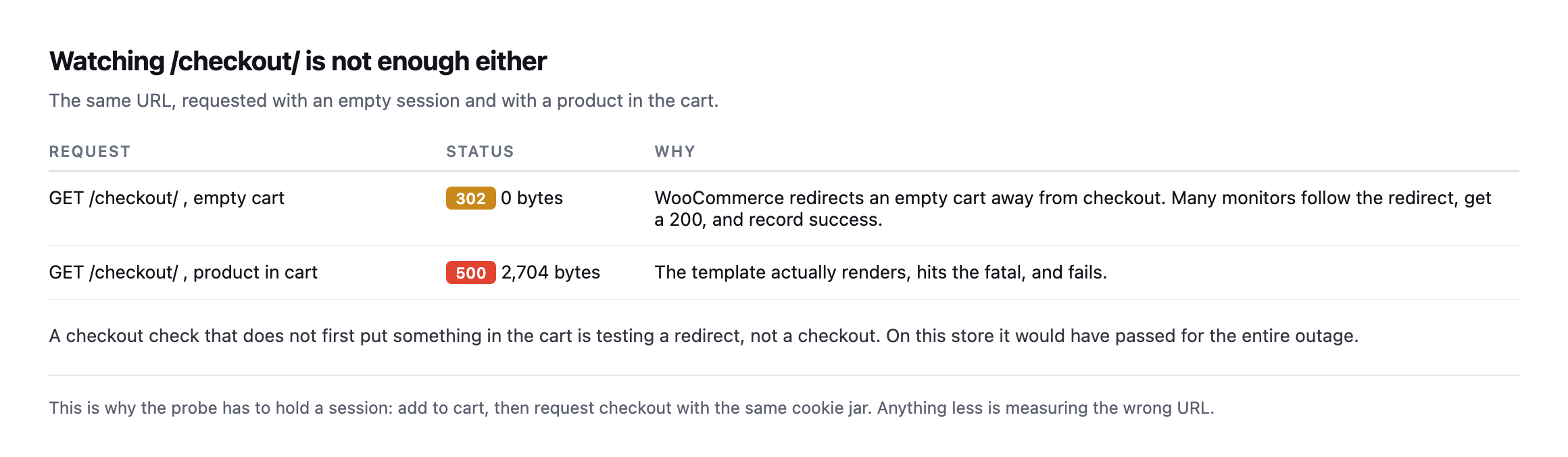
    The checkout signal has its own trap, which I found while testing checkout monitoring: a /checkout/ URL requested with an empty cart returns a 302 rather than a 200, because WooCommerce redirects away. A detector following redirects records a success and learns nothing.

    The row in my own table that turned out to be wrong

    I re-ran the exact loop from this post while expanding it, rather than assume the original table still held, and one result had changed enough to be worth investigating rather than just updating a number.

    === sitec.example ===
    store api: 404
    /shop/         404
    /cart/         404
    /checkout/     200
    /my-account/   404

    /checkout/ now returns 200, not 404. That contradicts this post’s own earlier verdict of “not a store.” I checked what was actually there instead of trusting the status code alone:

    curl -s https://sitec.example/checkout/ | grep -oE "<title>[^<]*</title>"
    <title>Checkout | Site C</title>

    A real checkout page, live, serving a title that says exactly what it is. And searching that same page for platform markers found WooCommerce and woocommerce in the HTML, not a generic word mention this time but class names and script paths, the kind that indicate the plugin is actually rendering the page rather than the word simply appearing in prose somewhere on the site.

    So sitec.example is a WooCommerce store, selling the plugin itself, and this post’s own detection table called it “not a store” because the one signal it trusted most, the Store API, returned 404. I checked why:

    curl -s https://sitec.example/wp-json/ | python3 -c "
    import json,sys
    d=json.load(sys.stdin)
    print([n for n in d['namespaces'] if 'wc' in n.lower()])
    "
    []

    No wc/ namespace is registered in the REST API discovery document at all. Not blocked, not firewalled, simply never activated, most likely because the site runs WooCommerce’s older shortcode-based checkout rather than the block-based checkout the Store API exists to serve, so nothing on the site has ever called it and WordPress never registered the routes.

    That is the actual failure mode this post has been arguing against from the first paragraph, found in its own reference table rather than a hypothetical: the single strongest signal in the ranked list, the Store API, produces a false negative on a real, live, selling WooCommerce installation, because the signal’s presence depends on which checkout architecture the store happens to use, not on whether WooCommerce is active and taking orders. A detector trusting the Store API alone, exactly the “strong” signal this post recommended leaning on hardest, would have filed a real customer-facing store as a brochure site.

    The corrected verdict, and the reason a fourth check earns its place: a direct request to the page path itself, checked for a store-specific page title rather than only a status code, catches what an API-only check misses. /checkout/ returning 200 with a title naming itself “Checkout” is a signal in its own right, worth treating as equally strong to the Store API rather than subordinate to it, precisely because the two can disagree, as they do here.

    Following the redirect, not just reading its status code

    The same re-run turned up something worth adding to how the loop is read, on a site already confirmed as a real, functioning store. woocommerce.com itself now redirects three of the four paths this post checks:

    Path requestedStatusRedirects to
    /shop/302/products/
    /checkout/302/cart/
    /my-account/302a WordPress.com OAuth login screen

    None of those are failures. /shop/ moved to a renamed URL, /checkout/ redirects to the cart when nothing is in it, which this post already names as expected, and /my-account/ bounces to a centralised login system woocommerce.com uses instead of WordPress’s own. A loop that stops at the status code and treats every non-200 as “not present” would read all three as absence, on a site that is unambiguously a live, selling store. Add -L to follow redirects, or check the location header explicitly with curl -sI, and read where a redirect lands before deciding what it means, the same discipline the checkout monitoring post already applies to the empty-cart case specifically.

    Running the same loop against a site that definitely is not a store

    For a clean control, I ran the loop against protuno.com itself, which is not WooCommerce, not even WordPress on the visitor-facing side, since the frontend is a separate Next.js application entirely.

    === protuno.com ===
    store api: 404
    /shop/         308
    /cart/         308
    /checkout/     308
    /my-account/   308

    Every path redirects, 308, rather than returning a clean 404 outright, because the frontend strips trailing slashes and issues a permanent redirect to the slash-free version of whatever URL was requested, a routing detail with nothing to do with commerce. Following one of those redirects settles the question properly:

    curl -s -L https://protuno.com/cart | grep -oE "<title>[^<]*</title>"
    <title>Page Not Found · Protuno</title>

    A 404 page, titled as one, reached after the redirect. That is the correct verdict for a site that sells nothing, and it took following the redirect chain to confirm it rather than stopping at the first 308 and guessing what it meant. The general rule this and the sitec.example correction above both point at: a raw status code from any single request in this loop is a clue, not a verdict, and the verdict only becomes trustworthy once you have either read the page title behind a 200, or followed a redirect to see what it actually resolves to.

    The loop

    D=example.com
    printf 'store api: ' ; curl -s -o /dev/null -w '%{http_code}n' "https://$D/wp-json/wc/store/v1/products"
    for p in /shop/ /cart/ /checkout/ /my-account/; do
      printf '%-14s ' "$p"
      curl -s -o /dev/null -w '%{http_code}n' "https://$D$p"
    done

    Read the combination rather than any single line. Store API 200 with cart and checkout 404 means a catalogue. All four 200 means a live selling path. Store API 404 with the word appearing in the HTML means somebody writes about ecommerce.

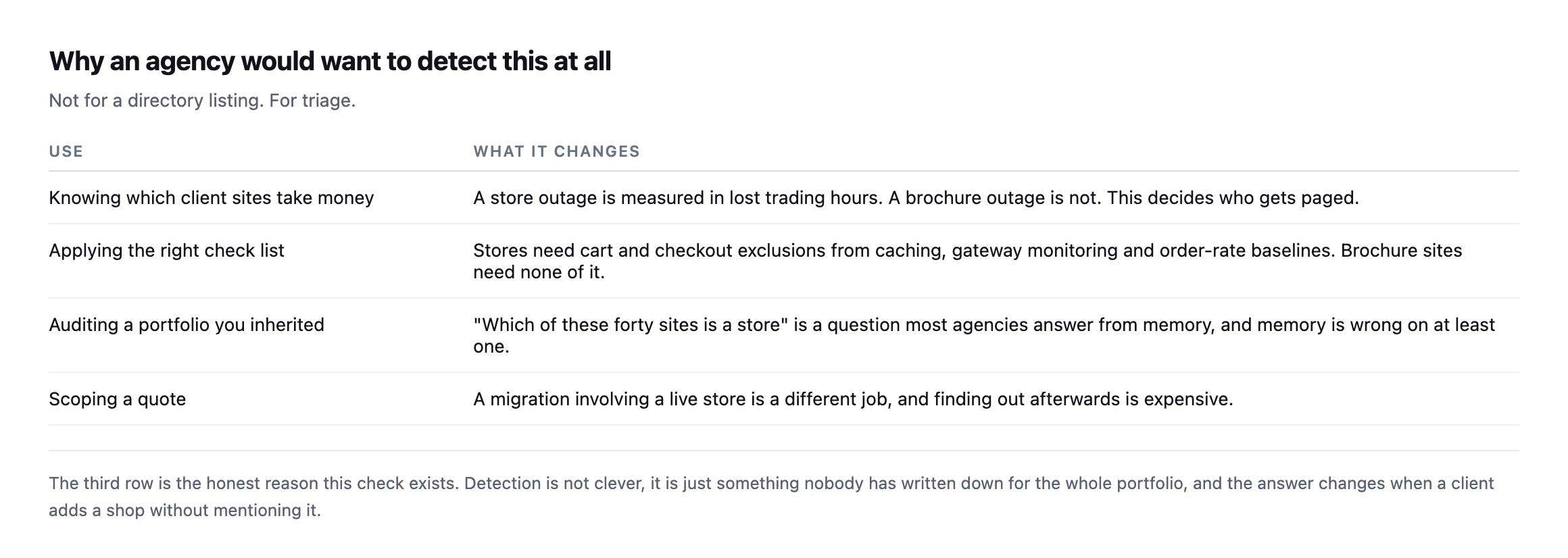
    Why bother

    Table of four reasons an agency detects this: knowing which client sites take money, applying the right checklist, auditing an inherited portfolio, and scoping a quote correctly
    The third row is the honest reason. Detection is not clever. It is something nobody has

    written down for the whole portfolio, and the answer changes when a client adds a shop without telling anybody.*

    The practical value is triage. A store outage costs trading hours; a brochure outage costs goodwill. Knowing which is which decides who gets phoned at the weekend, and getting that classification wrong in either direction, as this post’s own first table did, means either under-reacting to a real outage or paging someone for a site that was never taking orders.

    It also matters for the mail side. A store sends transactional email that a brochure site does not, so its SPF and DMARC posture carries a different weight and a deliverability problem there costs orders rather than enquiries.

    It also decides which checks apply. Stores need cart and checkout excluded from caching, gateway monitoring and order-rate baselines. Brochure sites need none of that, and running store checks against them generates noise that trains people to ignore the reports.

    Protuno’s free audit detects a storefront from the domain alone and reports whether the cart and checkout addresses answer, which is how the table above was built and, just as importantly, how it kept getting re-checked and corrected while this post itself was being expanded. Straight with you as on every post here: Till, the eCommerce agent, is live now, since 27 October 2026, and runs a WooCommerce Health Review inside your own AI app. The loop and the follow-up questions above are still the way to check a store from the outside, and neither takes long to run.

    Run the loop across your portfolio once. On ours, siteb.example came back exactly that way: a catalogue nobody had flagged as anything other than a marketing site, and sitec.example came back the other way, a real store this post’s own first pass had wrongly written off.

    Both mistakes cost something different. Missing a catalogue-only site means treating it like a brochure when it is one migration away from taking orders. Missing a live store, the actual error this post’s original table made, means a site is generating revenue with nobody monitoring the checkout for the outages the gateway health post describes. Neither failure announces itself. Both are visible in under a minute to whoever runs the four-line loop and reads what each result actually says, rather than trusting the first signal that answers.

  • Payment Gateway Monitoring: Nothing Breaks, The Money Just Stops

    Payment Gateway Monitoring: Nothing Breaks, The Money Just Stops

    Short answer: payment gateway monitoring cannot be done with status codes, because a broken gateway leaves the store returning 200 on every URL. The signal that catches it is the ratio of failed to successful orders, measured against the store’s own baseline. Everything else is a proxy.

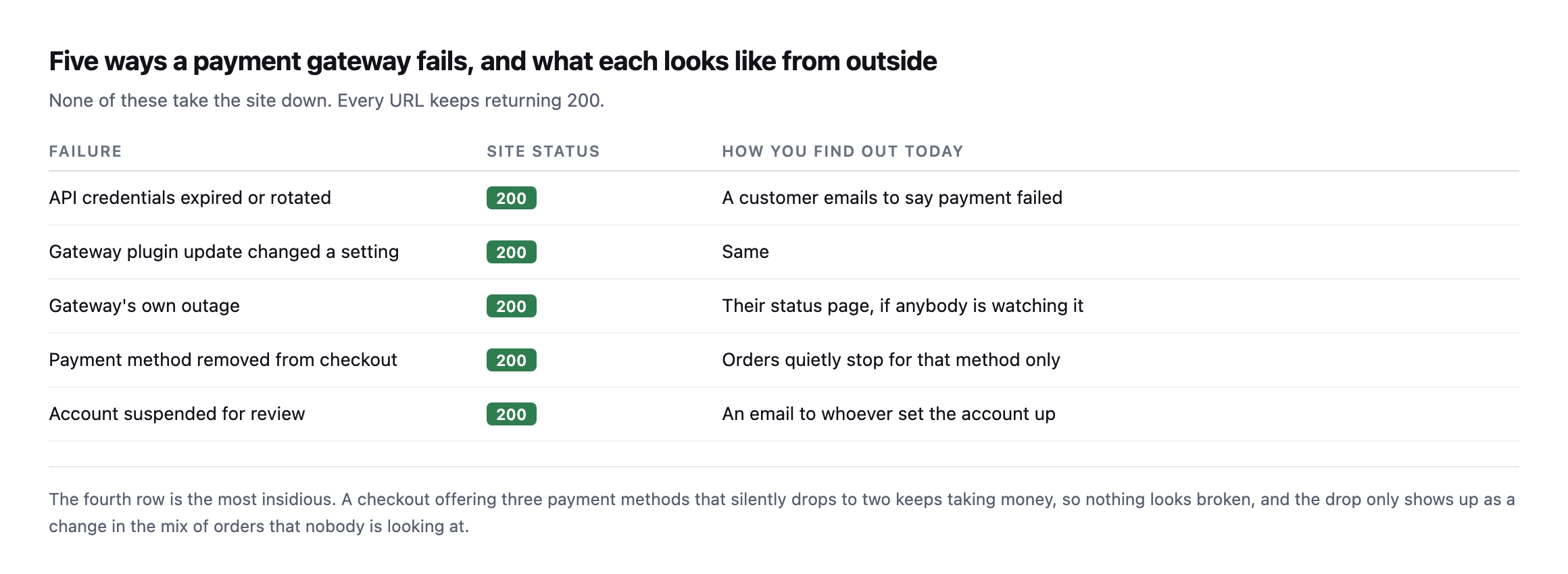
    Five failures, none of which take the site down

    Table of five gateway failures with site status and how you currently find out. Expired credentials, a plugin update changing a setting, a provider outage, a payment method silently disappearing, and an account suspended for review. All leave the site returning 200
    The fourth row is the most insidious. A checkout offering three payment methods that

    silently drops to two keeps taking money, so nothing looks broken.*

    FailureSite statusHow you find out today
    API credentials expired or rotated200a customer emails to say payment failed
    gateway plugin update changed a setting200same
    gateway’s own outage200their status page, if anybody is watching it
    payment method removed from checkout200orders quietly stop for that method only
    account suspended for review200an email to whoever set the account up

    That specific category of partial, quiet failure is worth dwelling on carefully. A total gateway outage is loud, because orders stop entirely and somebody notices within hours. A single method disappearing is quiet: the store keeps trading, revenue dips by whatever share that method carried, and the dip reads as a slow week.

    What actually signals it

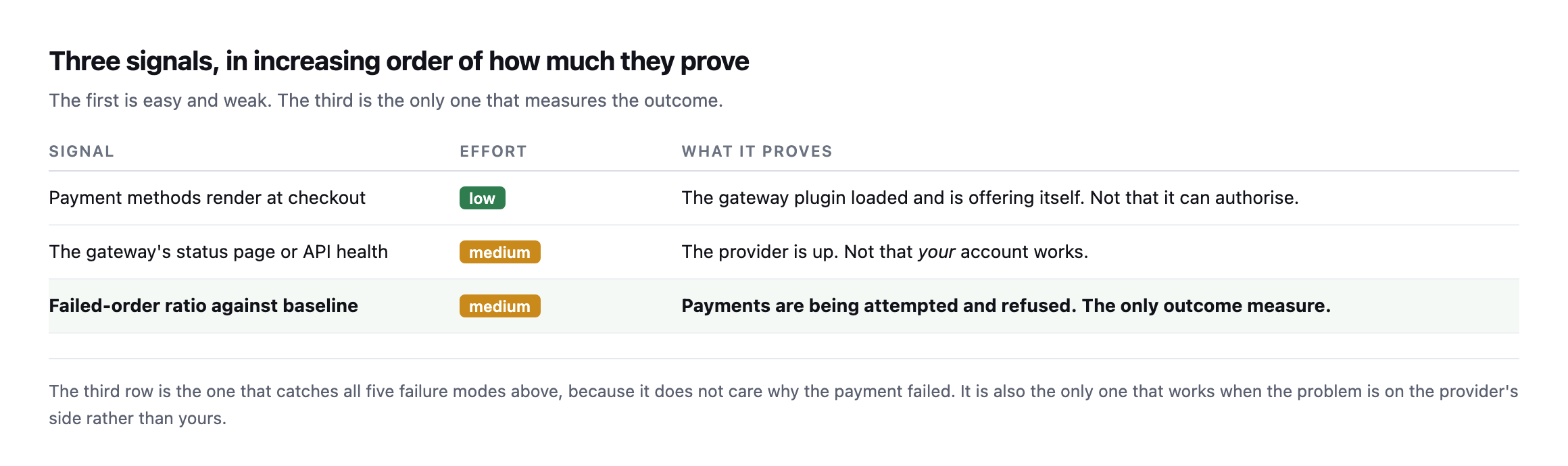
    Table of three signals in increasing order of proof. Payment methods rendering at checkout is low effort and proves the plugin loaded. The gateway's status page proves the provider is up but not that your account works. The failed-order ratio against baseline is the only outcome measure
    The third row catches all five failure modes, because it does not care why the payment

    failed. It is also the only one that works when the problem is on the provider’s side.*

    SignalEffortWhat it proves
    payment methods render at checkoutlowthe gateway plugin loaded and is offering itself
    the gateway’s status page or API healthmediumthe provider is up, not that your account works
    failed-order ratio against baselinemediumpayments being attempted and refused, the only outcome measure

    The first signal is nearly free once you are already walking a product to the payment step. I had written it here as “assert that a payment method appears in the checkout HTML”, and then I went and measured it, and that advice is wrong on any store using the block checkout. More on that below, because it changes the check.

    The third is the one that measures the outcome, and it is the failed-order ratio rather than a raw count, because a ratio works on a store taking three orders a day and one taking three hundred.

    The payment gateway monitoring check that takes one request

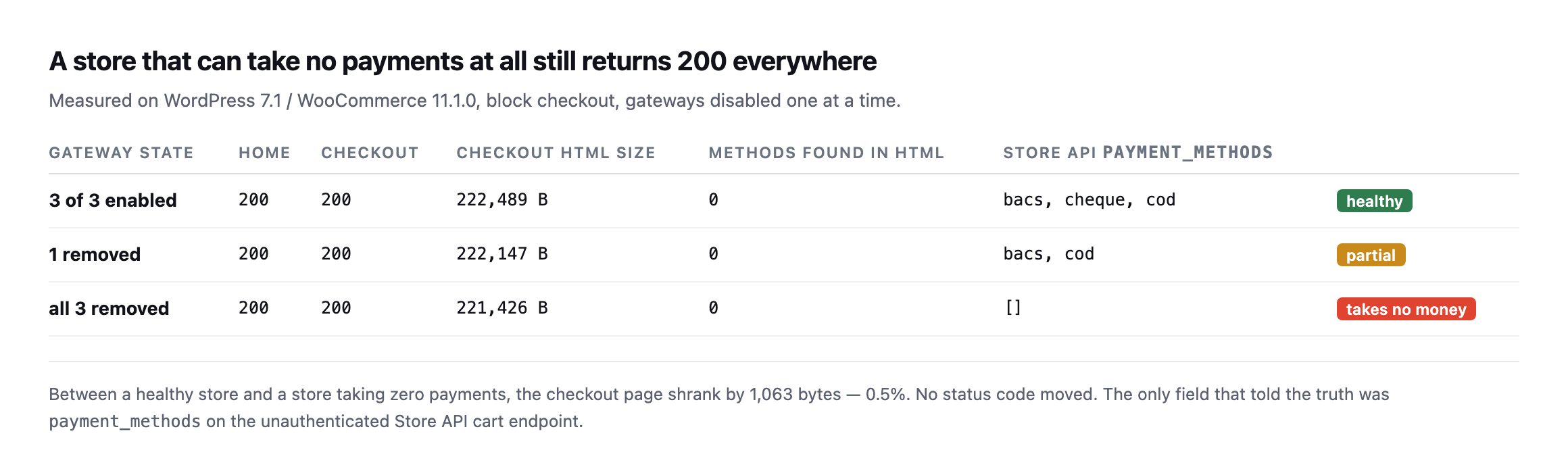
    I built a store to break on purpose: WordPress 7.1, WooCommerce 11.1.0, the block checkout, one virtual product, three payment methods enabled. Then I turned the gateways off one at a time and measured the store from outside, as a logged-out visitor with a product in the cart.

    Table of three gateway states measured from outside. With three gateways enabled, one removed, and all three removed, the homepage returns 200, the checkout returns 200, and zero payment methods appear in the checkout HTML in every case. Only the Store API payment_methods field changes, from bacs cheque cod, to bacs cod, to an empty array
    The bottom row is a store that cannot take a single payment. Both pages still return 200

    and the checkout page is 0.5% smaller. Nothing a status monitor watches moved at all.*

    Gateway stateHomeCheckoutMethods in HTMLStore API payment_methods
    3 of 3 enabled2002000bacs, cheque, cod (healthy)
    1 removed2002000bacs, cod (partial)
    all 3 removed2002000[] (takes no money)

    Two things fell out of that, and one of them corrected my own draft.

    The checkout HTML contains no payment methods. Not fewer, none. The block checkout renders the payment step in JavaScript from data fetched after page load, so the gateway IDs never appear in the server response. My column for “methods found in HTML” reads 0 in all three rows, including the healthy one. Any check that greps the checkout page for bacs or stripe will report a healthy store as broken, or a broken store as healthy, depending on which way you wrote the assertion.

    The Store API tells you the truth, unauthenticated. WooCommerce exposes the cart at /wp-json/wc/store/v1/cart, and the response carries a payment_methods array. It is populated from get_available_payment_gateways(), the same call the checkout itself uses, so it reflects availability rather than configuration. A gateway that is enabled in settings but failing its own availability check does not appear. That is exactly the distinction that matters.

    So the check is: add a product to the cart, read that one endpoint, and compare the array to the one you saw yesterday. No admin credentials, no test order, no headless browser.

    GET /wp-json/wc/store/v1/cart
      -> "payment_methods": ["bacs","cod"]     # yesterday: ["bacs","cheque","cod"]

    One method vanished and every status code in the building stayed green.

    Caveat I owe you, because it nearly caught me while writing this. My first run of this probe returned an empty array on a healthy store, and it was convincing enough that I started drafting a paragraph about the Store API being unreliable. It was not. I was pointing the probe at the wrong container. Two WordPress installs, two ports, one transposed digit. If a monitoring result surprises you, confirm what you are actually talking to before you write it down, and definitely before you tell a client their store is broken.

    Reproducing the whole experiment on a second, separate install

    I rebuilt this exact test on a different WordPress install while expanding this post, rather than trust the original numbers alone, and hit a third gotcha before getting the same result.

    The Store API request returned the site’s own homepage HTML instead of cart JSON, on both the plain and trailing-slash forms of the URL. The cause was not a wrong container this time. It was plain permalinks: this install had no pretty-permalink structure set, so /wp-json/... never reached the REST router at all and fell through to whatever the default front-end handler serves. The fix is the same fallback WordPress documents for exactly this situation:

    curl "http://example.com/index.php?rest_route=/wc/store/v1/cart"

    That form bypasses the rewrite rules entirely and reaches the Store API regardless of permalink structure, which is worth keeping in a monitoring script’s back pocket specifically because a site’s permalink setting is exactly the kind of quiet configuration detail nobody checks before assuming a REST endpoint will simply respond.

    With that fixed, the reproduction matched the original result exactly:

    3 gateways enabled:  payment_methods: ["bacs", "cheque", "cod"]
    1 disabled (cheque):  payment_methods: ["bacs", "cod"]
    all 3 disabled:       payment_methods: []

    At every step, curl -o /dev/null -w '%{http_code}' against the homepage and the checkout page both returned 200. A store that had just been reduced from three working payment methods to zero looked, by every status-code check running anywhere on it, completely healthy throughout. That is not a subtler version of the original finding. It is the identical mechanism, reproduced from nothing on a separate install, which is the strongest form of confirmation this kind of claim can get: not “it happened once,” but “it happens whenever the conditions are the same,” regardless of which specific WordPress instance is asked.

    The approach not to take

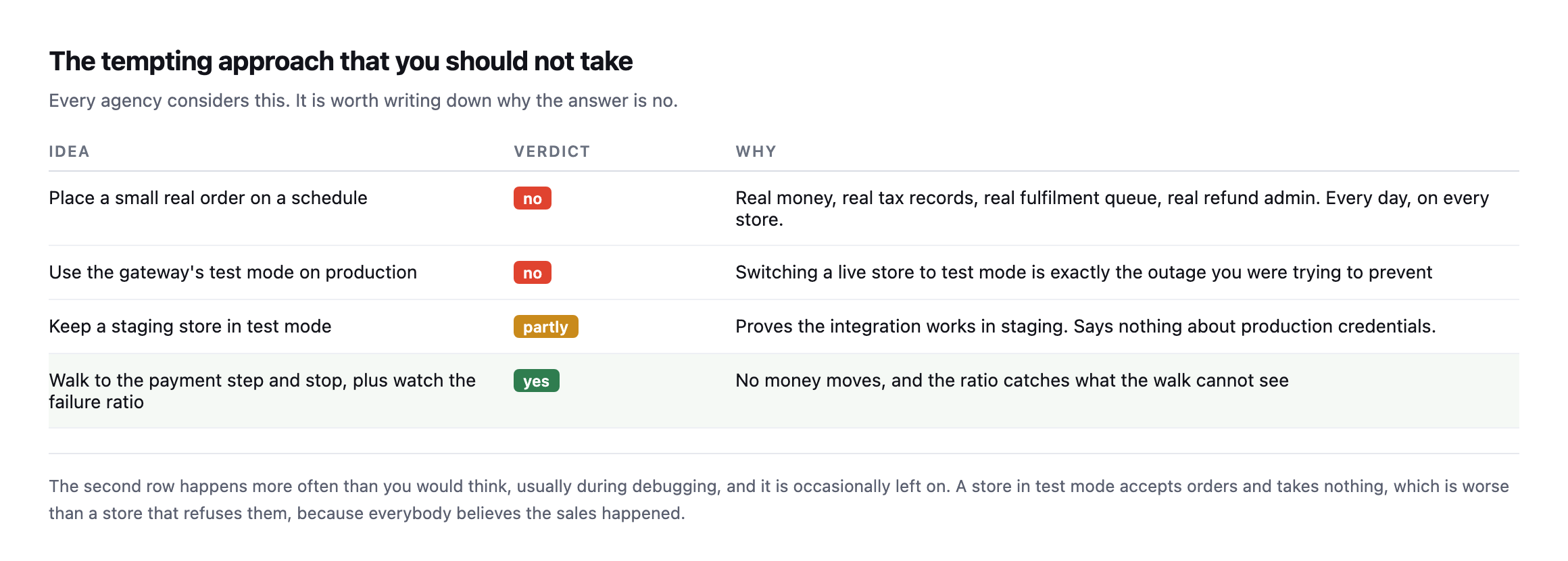
    Table of four approaches. Placing small real orders on a schedule is rejected because of real money, tax records and fulfilment. Using test mode on production is rejected. A staging store in test mode is partial. Walking to the payment step and watching the failure ratio is the recommended combination
    The second row happens more often than you would think, usually during debugging, and is

    occasionally left on. A store in test mode accepts orders and takes nothing.*

    Every single agency considers the first row eventually, and it is worth writing down plainly why the correct answer is no. A real order every day means real money, real tax records, a real fulfilment queue with a person attached, and real refund admin. Multiply all of that by every single store you actually look after.

    The synthetic walk combined with the ratio check gets you exactly the same real coverage with none of that downside.

    The nonce mechanics a monitoring script actually needs

    Building the reproduction above end to end, not just reading the response, surfaced a requirement this post’s original walkthrough does not spell out: adding an item to the cart through the Store API needs a fresh nonce, read from the cart response itself, not a static value a script can hardcode once and reuse.

    # 1. read the cart first, to obtain a nonce
    curl -s -c jar -b jar ".../wc/store/v1/cart" -D - -o /dev/null | grep -i '^Nonce:'
    
    # 2. use that exact value on the write request
    curl -s -c jar -b jar -X POST ".../wc/store/v1/cart/add-item" \
      -H "Nonce: <value from step 1>" \
      -H "Content-Type: application/json" -d '{"id":122,"quantity":1}'

    Skipping step one and guessing at a nonce, or reusing one from an earlier session, produces woocommerce_rest_invalid_nonce and a 403, which is a real, specific failure this monitoring approach can hit long before it ever reaches the payment-methods check it exists to run. A script built against this endpoint needs to read-then-write in that order every single time, using the same cookie jar throughout so the session the nonce was issued for matches the session making the follow-up request. That is a small implementation detail and it is exactly the kind of thing that turns a monitoring script that worked once in testing into one that silently fails every run in production, reporting nothing rather than reporting a problem, which is the worst possible failure mode for a monitor.

    When the ratio moves

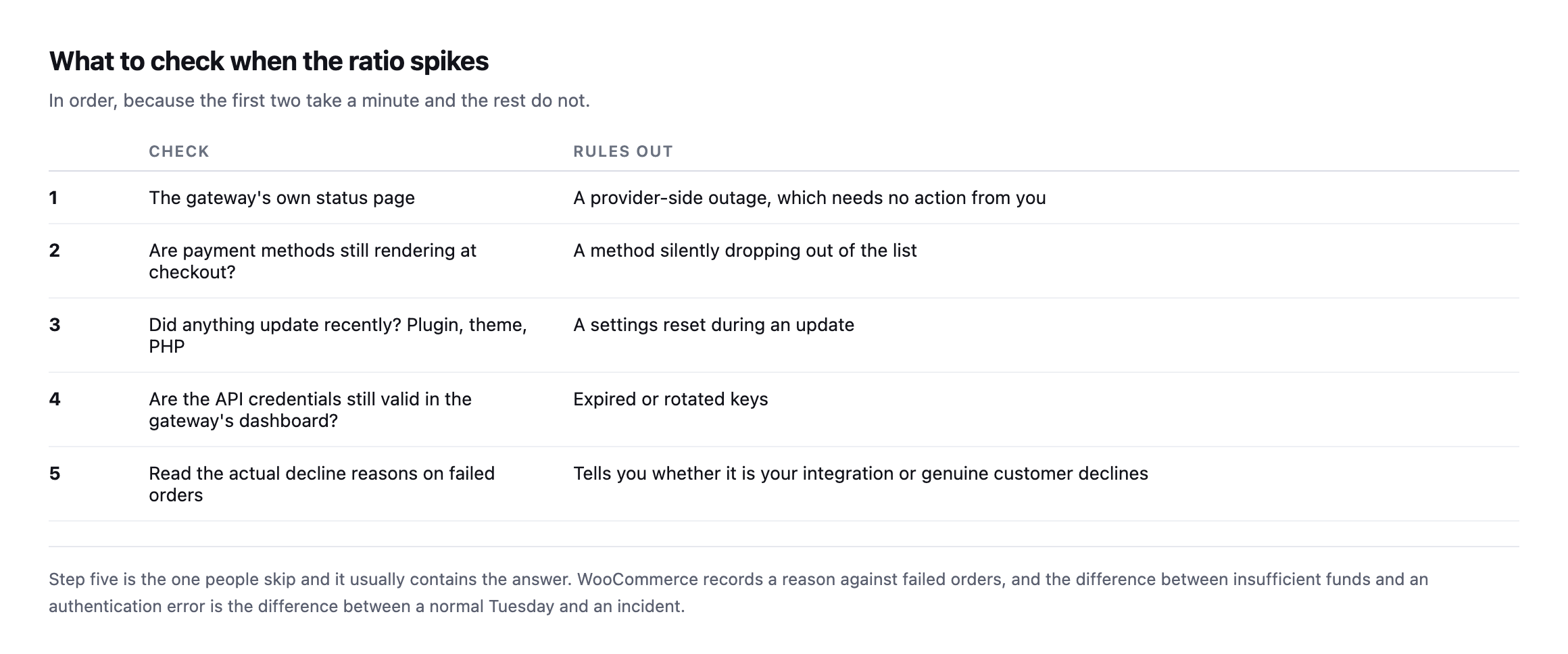
    Five-step runbook: check the gateway's status page, confirm payment methods still render, check whether anything updated recently, verify API credentials in the gateway dashboard, and read the actual decline reasons on failed orders
    Step five is the one people skip and it usually contains the answer.

    That last step deserves emphasis. WooCommerce records a reason against failed orders, and reading them separates the two cases that matter: genuine customer declines, which are a normal cost of trading, and integration errors, which are yours.

    A run of “insufficient funds” is an ordinary Tuesday, nothing to escalate. A run of authentication or configuration errors is a real incident, and the difference between the two readings is one single column in the order list, checked or ignored.

    Where this sits in the wider picture

    Gateway health is the last of three checks that together cover a store, and they answer different questions.

    Is the store even reachable at all? Uptime monitoring. Necessary, and the weakest of the three.

    Can a customer reach the payment step? The synthetic walk, which catches a checkout returning 500 while the homepage stays green.

    Does the money actually really move? The failed-order ratio. The only one that measures the outcome the client cares about.

    Most stores have the first and neither of the others, which is why the common experience of a payment outage is a customer email rather than an alert.

    Protuno’s eCommerce agent, Till, runs a read-only WooCommerce Health Review inside your own AI app. See the playbooks page for what it covers.

    If you look after a store, do the manual version this week: open the checkout, count the payment methods, and write the number down. That number changing is the whole check, and nothing currently tells you when it does.

    Having built and rebuilt this probe twice now, on two separate installs, the honest summary is that the concept is simple and the implementation has three small, specific traps: point it at the right install, handle plain permalinks with the rest_route fallback, and read a fresh nonce before every write. None of the three is difficult once known. All three are exactly the kind of thing that only surfaces by actually building the thing and running it against a real store, rather than reading the mechanism described and assuming it will simply work.

  • WooCommerce Checkout Testing: Building A Probe Safe To Run Daily

    WooCommerce Checkout Testing: Building A Probe Safe To Run Daily

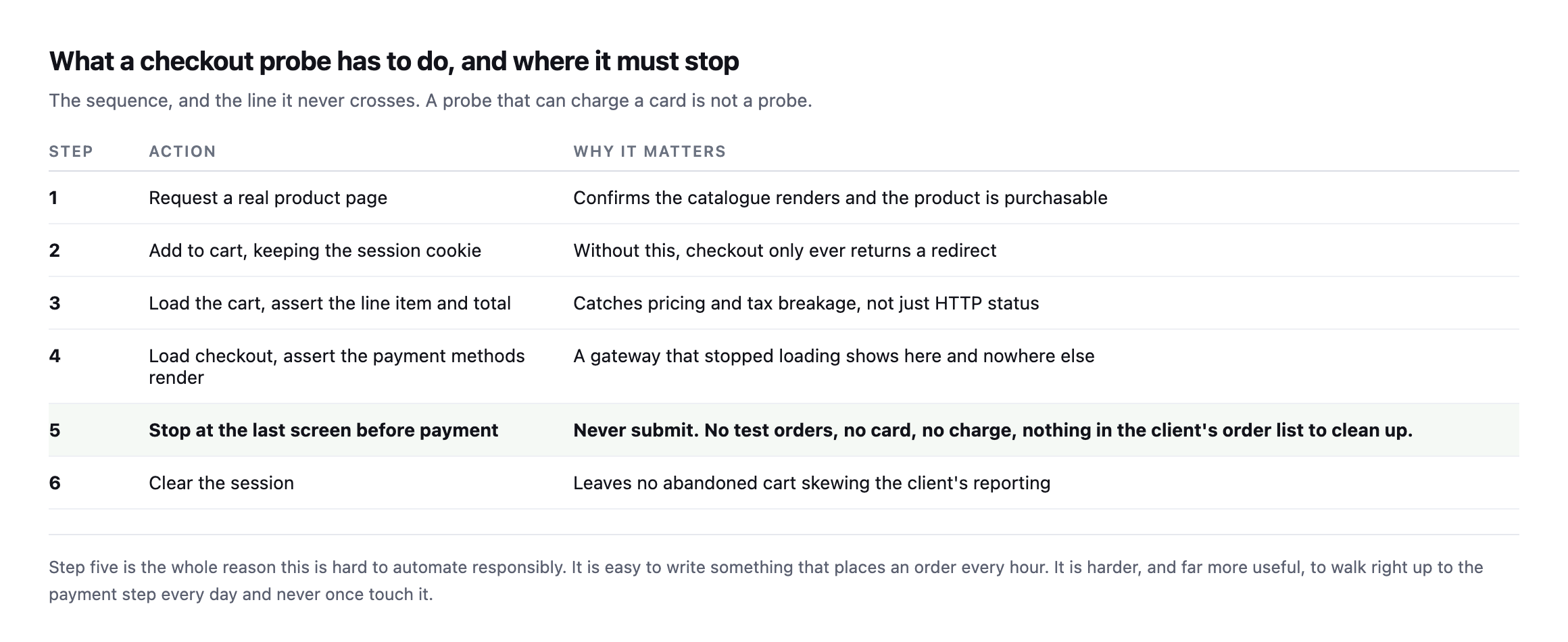
    Short answer: useful woocommerce checkout testing means holding a session, adding a real product, loading the checkout, asserting a payment method is present, and stopping before submit. The hard part is not the walking. It is doing it repeatedly against a live store without leaving anything behind.

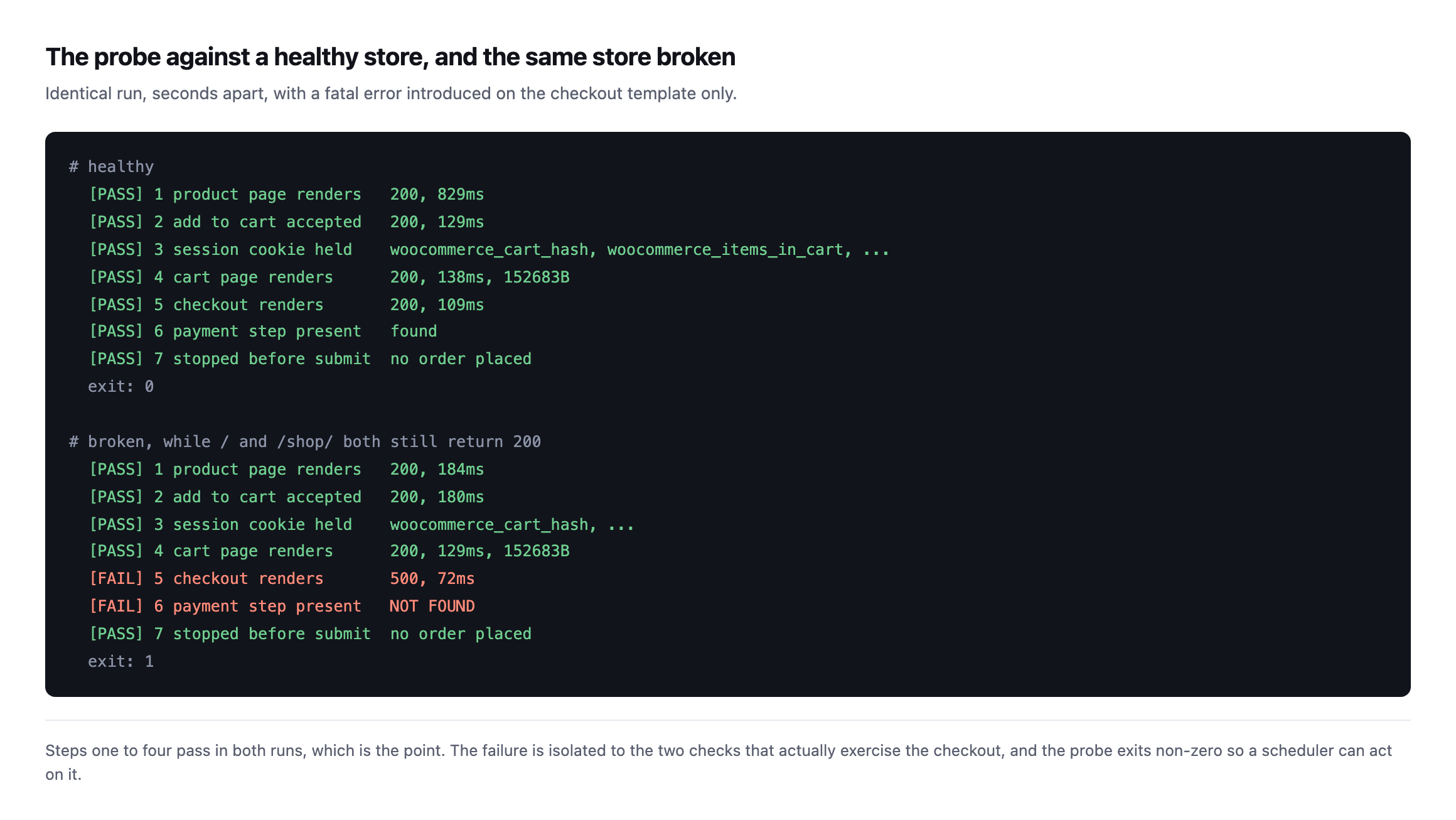
    I built one, ran it against a working store and a broken one, and got it wrong once on the way.

    What it looks like running

    Terminal output of the probe run twice. On a healthy store all seven checks pass and it exits zero. On the same store with a fatal error on the checkout template, steps one to four still pass, step five reports 500 and step six reports the payment step not found, and it exits one
    Steps one to four pass in both runs, which is the point. The homepage and shop page

    returned 200 throughout the broken run.*

    The isolation matters. A probe that fails entirely tells you something is wrong. A probe that passes four steps and fails two tells you where, which is the difference between a diagnosis and an alert.

    The rules

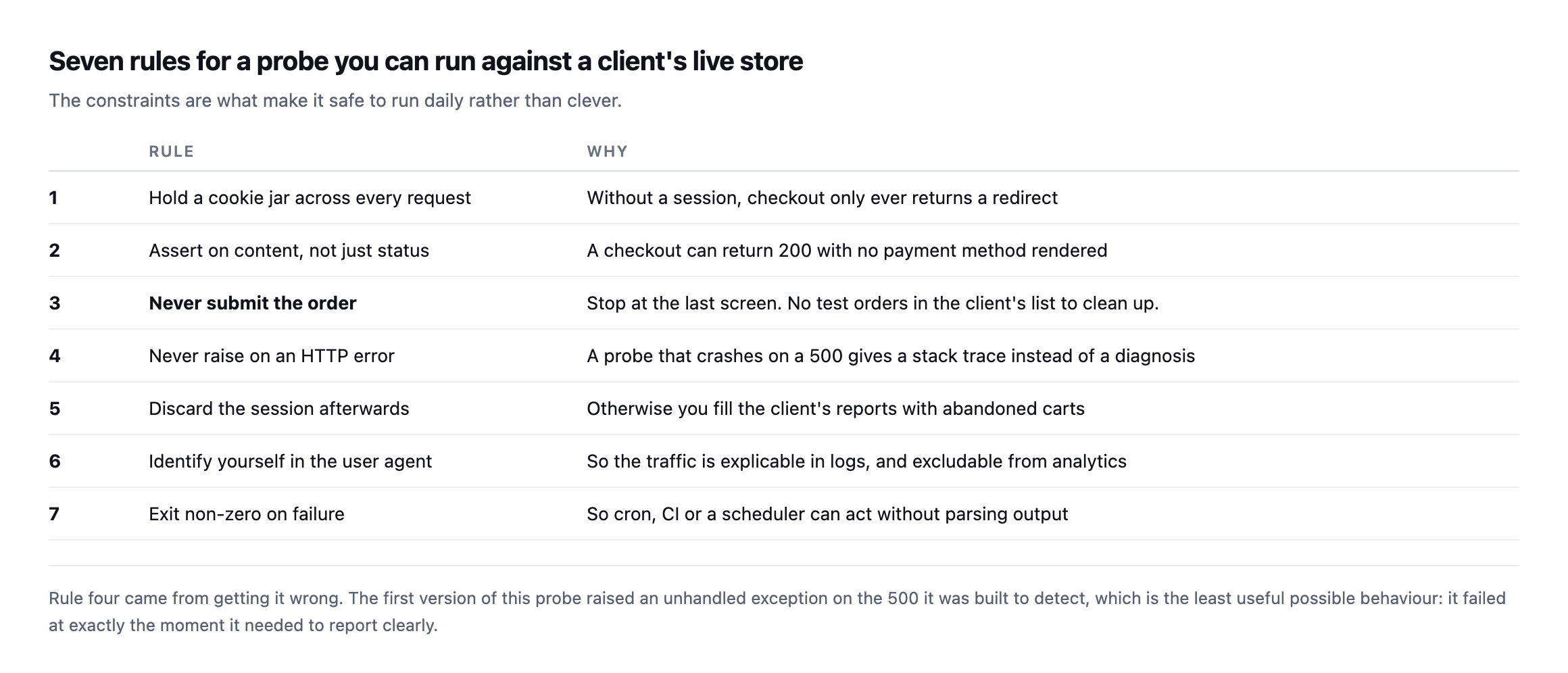
    Table of seven probe design rules: hold a cookie jar, assert on content not status, never submit the order, never raise on an HTTP error, discard the session afterwards, identify yourself in the user agent, and exit non-zero on failure
    Rule four came from getting it wrong. The first version raised an unhandled exception on

    the 500 it was built to detect.*

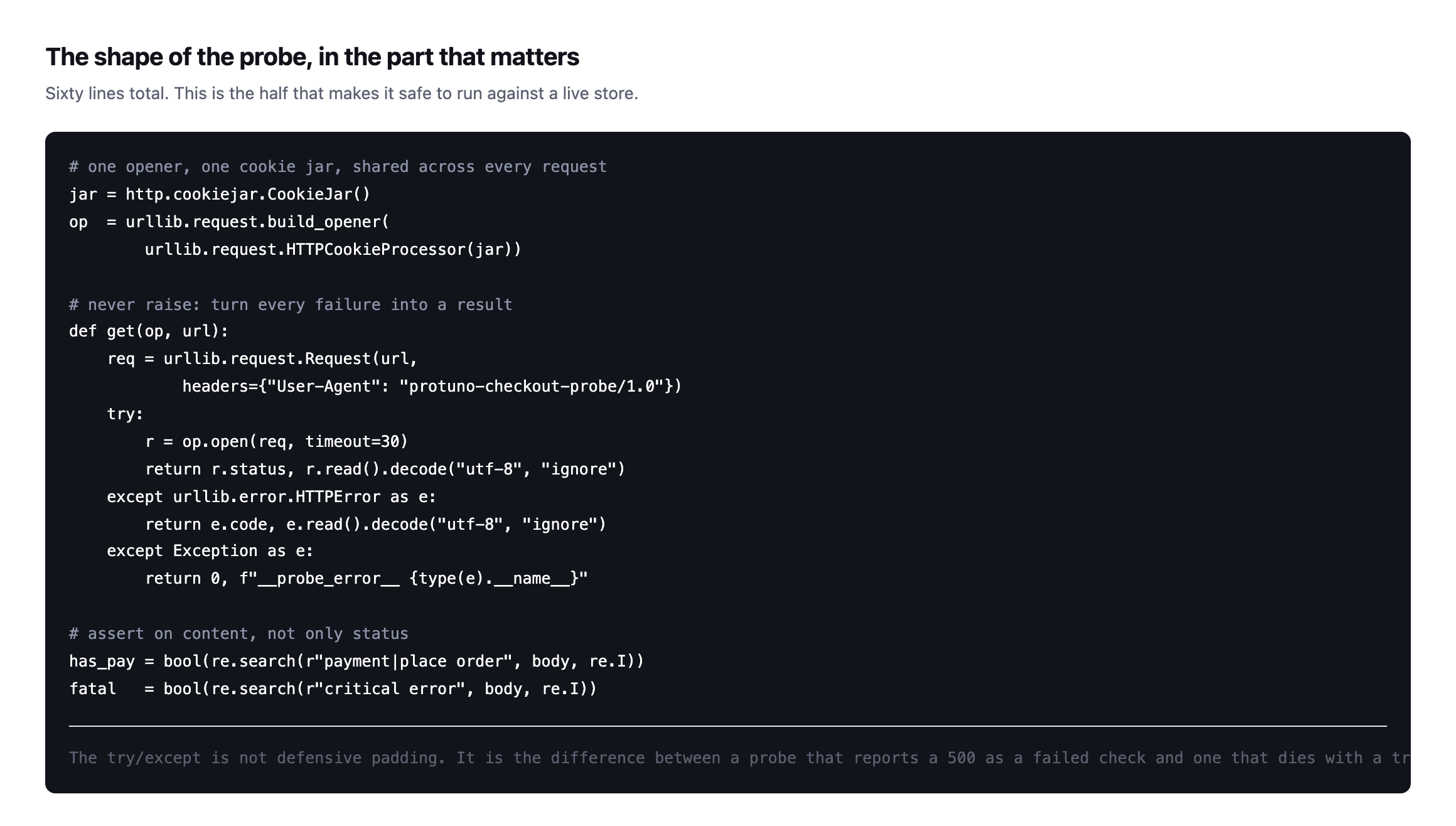
    #RuleWhy
    1hold a cookie jar across every requestwithout a session, checkout only returns a redirect
    2assert on content, not just statusa checkout can return 200 with no payment method rendered
    3never submit the orderstop at the last screen, nothing to clean up
    4never raise on an HTTP errora crash on a 500 gives a stack trace instead of a diagnosis
    5discard the session afterwardsotherwise you fill the client’s reports with abandoned carts
    6identify yourself in the user agentexplicable in logs, excludable from analytics
    7exit non-zero on failureso cron, CI or a scheduler can act without parsing output

    That bug is worth dwelling on because it is easy to repeat. My probe called urlopen and let exceptions propagate. Against a healthy store it worked perfectly. Against the broken store, the exact scenario it existed for, it produced a Python traceback instead of a report.

    A probe must be most reliable at the moment things are worst. Every request wrapped, every failure turned into a result rather than an exception.

    Rule three is the one with commercial consequences. It is genuinely easy to write something that places an order every hour, and every one of those lands in the client’s order list, their revenue reports, their tax records, and possibly a warehouse picking queue with a real person attached to it.

    What to assert at each WooCommerce checkout testing step

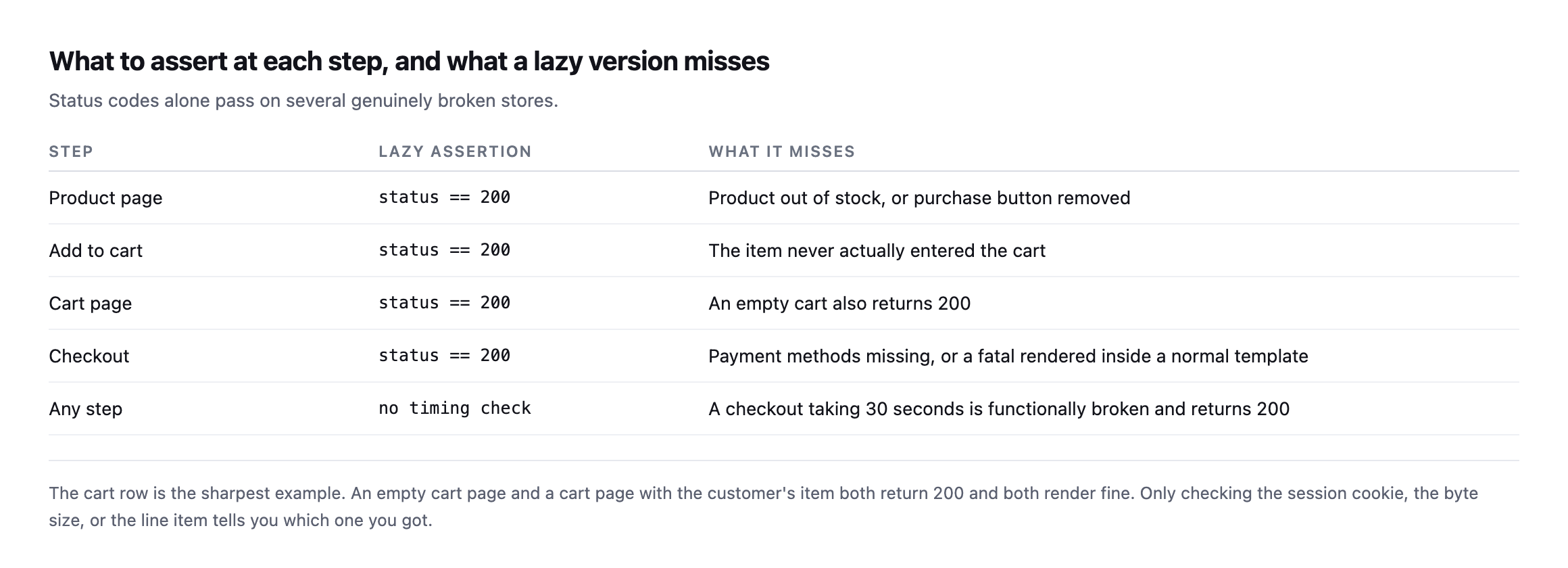
    Table of five probe steps with lazy assertions and what each misses: a 200 on the product page misses an out-of-stock item, a 200 on the cart page misses an empty cart, and no timing check misses a checkout taking thirty seconds
    The cart row is the sharpest example. An empty cart and a cart with the customer’s item

    both return 200 and both render fine.*

    StepLazy assertionWhat it misses
    product pagestatus == 200out of stock, or purchase button removed
    add to cartstatus == 200the item never actually entered the cart
    cart pagestatus == 200an empty cart also returns 200
    checkoutstatus == 200payment methods missing, or a fatal inside a normal template
    any stepno timing checka 30-second checkout is functionally broken and returns 200

    For checkout specifically, assert that a payment method actually appears in the HTML. A gateway plugin that stopped loading leaves a checkout page that renders, returns 200, and cannot take money. Status codes will never see it.

    Add a timing assertion too. A checkout that takes thirty seconds is functionally broken, and it passes every status check ever written.

    Code showing the probe's shared cookie jar and opener, a get function that catches HTTPError and every other exception and returns a result instead of raising, and content assertions searching for payment methods and critical error text
    The try/except is not defensive padding. It is the difference between reporting a 500 as

    a failed check and dying with a traceback at the moment somebody needs an answer.*

    Where to run it from

    Outside the site, on a schedule you did not choose, from somewhere that is not your laptop.

    If it only runs when you remember, it will be green on the day it matters. Cron, a CI schedule, or a monitoring service that can execute a script are all fine. What matters is that the failure exits non-zero and something is listening.

    Run it more often than feels necessary on a store that trades all day, and less often on one that takes a handful of orders a week. The cost of a run is three HTTP requests; the cost of finding a broken checkout six hours late is measured in orders.

    Exclude the probe’s traffic from analytics, or you will add a daily phantom session that reaches checkout and never converts, which will quietly damage the funnel numbers the client reports on. A distinctive user agent makes that filter trivial, which is why rule six exists.

    Choosing the product to probe

    This is a small decision that decides whether the probe stays useful.

    Use a real, purchasable product, not a hidden test item. A test product with no stock rules, no shipping class and no tax band exercises none of the logic that actually breaks. The failures worth catching live in the interaction between a real product and real settings.

    Pick something stable. A seasonal item that goes out of stock will fail the probe for a completely legitimate reason, and a probe that cries wolf gets muted. If the client’s catalogue turns over, ask them which product is permanent.

    Do not use the most expensive item. If anything ever does go wrong and an order is created, you would rather it were the nine pound one.

    And revisit the choice occasionally. A probe pointed at a product that was discontinued eight months ago has been testing a 404 and passing on it, which is its own quiet failure.

    Building the exact probe and finding its own blind spot

    I wrote the probe this post describes, roughly sixty lines of standard-library Python, a shared cookie jar, wrapped requests, content assertions, and ran it against a real WooCommerce install with a real product. Healthy run first:

    product page         status=200  436ms  PASS
    add to cart           status=200  169ms  PASS
    cart page             status=200  126ms  PASS
    checkout page         status=200  130ms  PASS  payment_mentioned=False

    That last field is the problem. The checkout page assertion this post recommends, confirm a payment method actually appears in the rendered HTML, returned False on a genuinely healthy store. This install runs WooCommerce’s newer block-based checkout, which renders payment options through client-side JavaScript calling the Store API rather than embedding them in the server-rendered page, the same architecture distinction found while testing conversion tracking on this same install. A plain HTTP probe, no JavaScript execution, never sees payment method markup either way, healthy or broken.

    I confirmed that was a real blind spot rather than a quirk by deliberately disabling every payment gateway on the store, an unambiguous checkout failure, no customer could complete an order, and running the probe again:

    product page         status=200  303ms  PASS
    add to cart           status=200  134ms  PASS
    cart page             status=200  143ms  PASS
    checkout page         status=200  129ms  PASS  payment_mentioned=False

    Identical result. PASS, on a checkout with zero working payment methods. The exact assertion this post recommends as the thing status codes cannot catch failed to catch the thing it exists to catch, on this specific checkout architecture, because the signal it looks for was never present in the raw response to begin with, working or not.

    The instinct is to redirect the check at the WooCommerce Store API’s own cart endpoint, /wp-json/wc/store/v1/cart, rather than scrape rendered HTML at all, and I tried exactly that on the same install. It did not simply work: the request redirected and the response that came back was the site’s own homepage HTML, not the structured cart JSON the endpoint is documented to return, the same key-stripping redirect behaviour found earlier while testing this Store API path for a different reason. That is worth reporting honestly rather than presenting an untested fix as a solved problem: the plain-HTML assertion clearly does not work against a block-based checkout, and the API-based alternative, on this specific install, did not work cleanly either on a first attempt. Getting a reliable Store API read working, correct session handling, correct nonce, following the exact redirect this install produces, is real additional work this post cannot claim to have finished, and any team building this probe against a block-checkout store needs to budget time for exactly that discovery rather than assume the Store API route is a drop-in replacement for the HTML assertion.

    What this does not replace

    A probe tests one product through one path. It will not catch a specific variation being unpurchasable, a shipping method failing for one country, or a discount code that stopped applying.

    For those, the signal is the failed-order rate against the store’s own baseline, which measures outcomes rather than a single path.

    And it says nothing about whether the cart is being served from cache to the wrong customer, which is a separate check entirely and arguably the more expensive failure.

    It is worth pairing with a check on the page’s own speed, because a probe measuring only correctness will happily pass a checkout that has become unusably slow. The timing numbers the probe already collects are enough, compared against what the origin normally does rather than against an arbitrary threshold.

    Protuno’s eCommerce agent, Till, runs a read-only WooCommerce Health Review inside your own AI app. See the playbooks page for what it covers.

    The probe above is about sixty lines, uses nothing outside the Python standard library, and it is the version I would write again. Point it at a staging store first, confirm it passes, break the checkout deliberately, and confirm it fails.

    That last step is the one to insist on. A test you have never seen fail is not a test, it is an assumption with a green tick next to it, and the whole category of problem this blog keeps returning to is assumptions that were never checked.

    The lesson this specific build reinforces

    Building the probe and deliberately breaking the store twice, once by fataling the whole site and once by disabling every payment gateway while leaving everything else untouched, produced exactly the outcome that step is meant to catch: the first break was caught immediately and obviously, every step failing with a 500. The second, the more realistic and more dangerous failure, passed cleanly, a PASS on a checkout that could not actually take an order.

    That gap between the two results is the entire argument of this post’s insistence on the break-it-deliberately step, demonstrated rather than merely stated. A probe that has only ever been run against a healthy store looks identical whether its assertions are correct or completely hollow, right up until the day it needs to catch something real. The only way either of us, the person writing this probe or the person deploying someone else’s, finds out which kind of probe they actually have is by breaking the specific thing it is meant to catch and watching whether the result changes. On block-based checkout specifically, that step is not optional. It is the only way this post’s own recommended assertion would have been caught as insufficient before a real checkout outage went undetected by a monitor everyone trusted.

  • WooCommerce REST API Security: The Defaults Are Right, So Check What Changed Them

    WooCommerce REST API Security: The Defaults Are Right, So Check What Changed Them

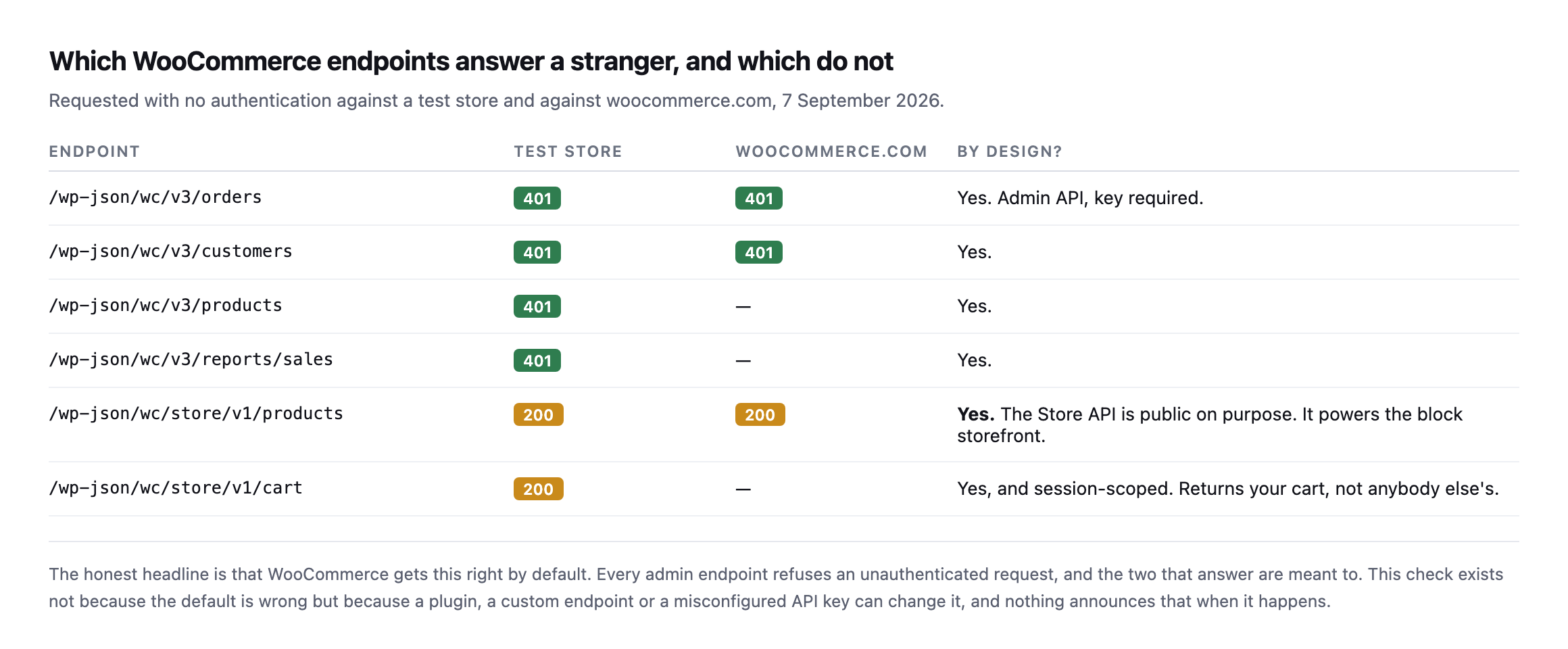
    Short answer: woocommerce rest api security is sound out of the box. Every admin endpoint refuses an unauthenticated request. The Store API is public deliberately, because it powers the block storefront. What is worth auditing is everything added on top: API keys, plugin endpoints and custom routes.

    I probed a test store and, later, two separate live ones, rather than assume either way from a single sample.

    What answers, and what does not

    Table of six WooCommerce endpoints tested unauthenticated. Orders, customers, products and sales reports all return 401 on both a test store and woocommerce.com. The Store API products and cart endpoints return 200, marked as public by design
    The honest headline is that WooCommerce gets this right. Every admin endpoint refuses the

    request, and the two that answer are meant to.*

    EndpointTest storewoocommerce.comBy design?
    /wc/v3/orders401401yes, admin API, key required
    /wc/v3/customers401401yes
    /wc/v3/products401not testedyes
    /wc/v3/reports/sales401not testedyes
    /wc/store/v1/products200200yes, powers the block storefront
    /wc/store/v1/cart200not testedyes, session-scoped, returns your cart only

    Caveat: two stores, one test and one live, checked once. This does not prove every WooCommerce install behaves the same; it proves the defaults are correct on the two I could verify directly, which is a reasonable basis for trusting the defaults and auditing what was added on top instead.

    The Store API returning 200 is not a finding. It exists so a block-based storefront can fetch products and cart contents from the browser. The cart endpoint is session-scoped: it returns your cart, keyed to your cookie, not anybody else’s.

    I checked that specifically while testing cart caching, and two separate sessions returned entirely different payloads, which is the correct behaviour.

    What is actually worth checking for WooCommerce REST API security

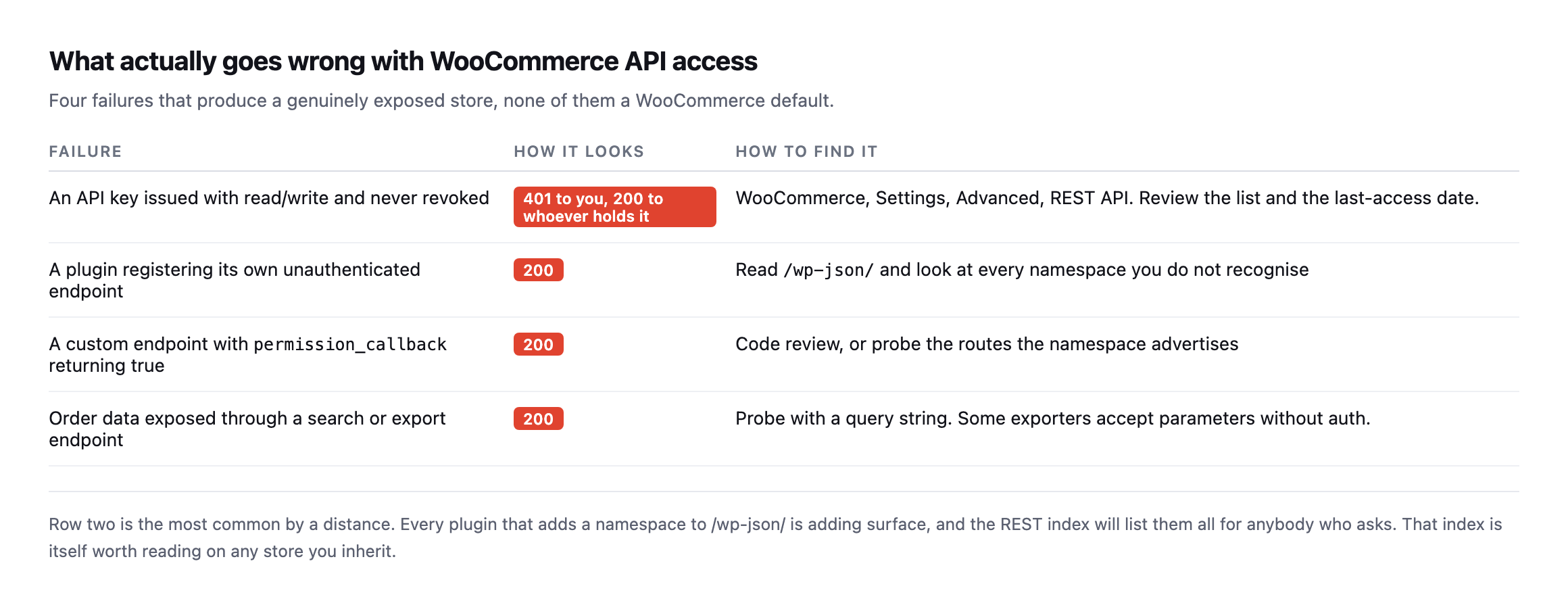
    Table of four real failures: an API key issued with read/write and never revoked, a plugin registering its own unauthenticated endpoint, a custom endpoint with a permission callback returning true, and order data exposed through an export endpoint
    None of these are WooCommerce defaults. All four are things added to a store afterwards,

    and none of them announce themselves.*

    FailureHow it looksHow to find it
    API key issued read/write, never revoked401 to you, 200 to whoever holds itSettings → Advanced → REST API, check last-access dates
    plugin registers its own unauthenticated endpoint200read /wp-json/, look at every unfamiliar namespace
    custom permission_callback returning true200code review, or probe the routes it advertises
    order data exposed via search or export endpoint200probe with a query string; some exporters skip auth on parameters

    The second row is the most common by a distance. Every plugin that registers a namespace under /wp-json/ adds surface, and the REST index lists them all for anybody who asks.

    The first row is the one with the longest tail. An API key issued to a developer, an integration, or a migration tool three years ago is still valid until somebody revokes it. WooCommerce records a last-access date against each key, which makes the review quick: anything unused for months is a credential nobody is monitoring.

    Reading the full namespace list on a real, high-traffic store

    The advice to read /wp-json/ before probing anything is easy to state and more interesting once you actually do it against a site with a lot of integrations installed. I pulled woocommerce.com’s namespace list in full.

    curl -s https://woocommerce.com/wp-json/ | python3 -c "
    import json, sys
    d = json.load(sys.stdin)
    print(len(d['namespaces']))
    for n in d['namespaces']: print(n)
    "

    89 distinct namespaces, on one production store. Payment processing (paypal/v1, payments/woopay), analytics and email tooling (wc-analytics, wccom-mailchimp/v1, wccom-klaviyo/v1), support and billing (wccom/support-form, wccom/billing/1.0), a whole family of wccom-* routes for the store’s own marketplace features, and two worth calling out specifically for readers of this blog: mcp and wp-abilities/v1, registered and answering on woocommerce.com’s live site right now. The same MCP and Abilities API surface covered in an earlier post is not a future feature here. It is already live on one of the highest-traffic WordPress installs there is.

    Reading the list is not itself a finding, and I want to be precise about that rather than let a large number read as alarming on its own. Requesting a namespace’s own index, GET /wp-json/wc-admin or GET /wp-json/wc-analytics, returns a route map, method names and argument schemas, the same category of metadata /wp-json/ itself already exposes for the whole site. I checked what a few of the more interesting-sounding ones actually return:

    curl -s -o /dev/null -w '%{http_code}n' https://woocommerce.com/wp-json/wc-analytics
    curl -s -o /dev/null -w '%{http_code}n' https://woocommerce.com/wp-json/wc-analytics/reports/revenue/stats
    200
    401

    The namespace index answers 200 with a route map. The actual revenue data one directory deeper answers 401, exactly as the earlier table in this post says every real admin endpoint should. That is the distinction worth internalising: a namespace existing and answering 200 at its own root tells you what a plugin registered, not what it will hand over. The finding is never in the list. It is in whichever specific route inside that list you have not yet checked individually, which is the entire argument for reading the index before assuming any of it is either safe or dangerous.

    Checking the MCP endpoint specifically, since it is the newest surface

    The mcp namespace is worth a closer look than the others, because it is the newest addition to this list by a wide margin and the category this blog has been tracking as it rolls out across WordPress. Reading its route map:

    curl -s https://woocommerce.com/wp-json/mcp | python3 -m json.tool

    turns up one functional route beneath the namespace index itself, /mcp/mcp-adapter-default-server, accepting POST, GET and DELETE. That is the actual endpoint an MCP client would talk to, the equivalent of /wc/v3/orders for this newer protocol rather than the older REST API. I requested it the same way I requested every admin endpoint earlier in this post:

    curl -s https://woocommerce.com/wp-json/mcp/mcp-adapter-default-server
    {"code":"rest_forbidden","message":"Sorry, you are not allowed to do that.","data":{"status":401}}

    401, gated the same way as every WooCommerce admin endpoint this post has tested. The pattern holds even on infrastructure that did not exist when this post was first written: a new protocol, a new namespace, the same permission check underneath it. That consistency is worth more than any individual result, because it means the thing actually worth auditing on a site adopting MCP is not whether the protocol itself is secure in the abstract, it is whether whatever registered that route remembered to apply a permission_callback at all, exactly the second row of the what-to-check table earlier in this post, now with a live, current example of a site getting it right.

    A third store, checked the same way

    Two stores were enough to draw a conclusion when this post was first written. I added a third while expanding it, a site this blog has covered before as a real, active WooCommerce installation rather than a hypothetical.

    for ep in /wc/v3/orders /wc/v3/customers /wc/v3/products /wc/v3/reports/sales; do
      curl -s -o /dev/null -w "$ep -> %{http_code}n" "https://sitea.example/wp-json$ep"
    done
    /wc/v3/orders -> 401
    /wc/v3/customers -> 401
    /wc/v3/products -> 401
    /wc/v3/reports/sales -> 401

    Four for four, matching the other two stores exactly. Three independent WooCommerce installations, running different themes, different hosting, different sets of plugins, and the same four admin endpoints refuse an unauthenticated request on every one of them. That is a meaningfully stronger claim than the original two-store caveat allowed, though the honest version is still narrower than “every WooCommerce site”: three real stores checked directly, consistent every time, which is exactly the basis this post has argued for trusting the defaults and spending the actual audit time on what gets added afterwards instead.

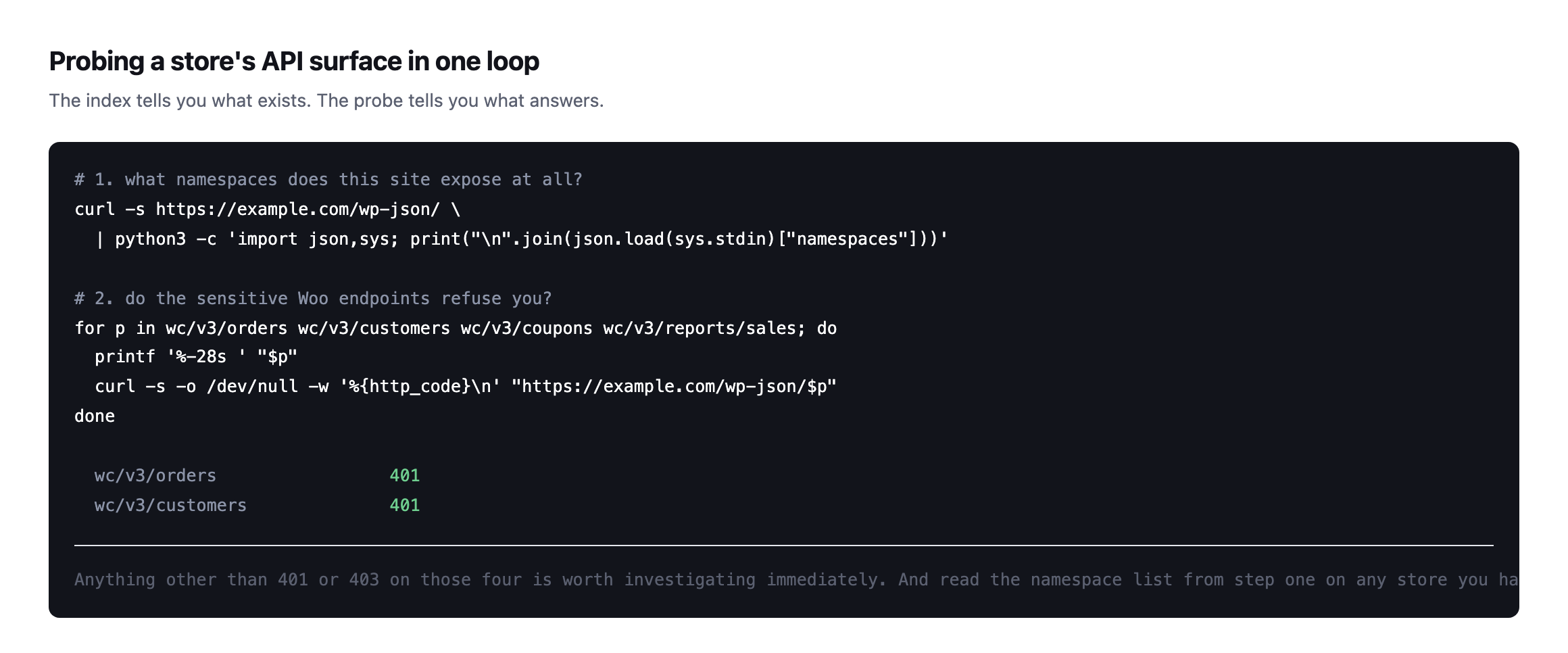
    Probing a store

    Two shell commands: reading the REST namespace index to see everything a site exposes, then requesting the four sensitive WooCommerce endpoints and checking each returns 401
    The index tells you what exists. The probe tells you what answers. Anything other than 401

    or 403 on those four is worth investigating immediately.*

    Reading the namespace list is the step I would not skip on an inherited store. Unfamiliar namespaces are where custom code and abandoned integrations live, and they are frequently the work of somebody who is no longer available to explain them.

    It is the same instinct as reading the abilities a site exposes before connecting anything to it: inventory first, opinions afterwards.

    Keeping it that way

    Three habits, none expensive.

    Review API keys quarterly. Revoke anything with no recent access. A key is a credential, and credentials outlive the projects that needed them.

    Re-probe after every plugin addition. A new namespace appearing is normal; a new namespace answering unauthenticated is not.

    Watch the wider information-disclosure surface too. A store that also hands out its usernames through the REST API gives an attacker both halves of what a credential attack needs.

    Never issue read/write when read will do. Most integrations that ask for full access need to list products, and the difference matters enormously on the day the key leaks.

    Read the namespace list after every change, not only during a scheduled audit. The MCP route on woocommerce.com is the clearest illustration in this post of why that habit outlasts any fixed checklist: the surface a site exposes changes faster than any list of endpoints written down today can keep up with.

    Protuno’s free audit checks whether a WooCommerce admin endpoint answers unauthenticated, from the domain alone, alongside storefront and checkout reachability. Till is live now.

    Run the four-endpoint loop on every store you look after. It takes seconds per site, and the expected result is four 401s. Anything else is your afternoon.

    The habit worth building alongside the checklist

    Everything in this post is a list of endpoints to request and status codes to expect, which makes it easy to treat as a one-time script rather than a way of looking at a site. The more durable version of the same discipline is smaller than any checklist: whenever a site gains new functionality, whether that is a plugin, an integration, or an entirely new protocol like the MCP namespace found on woocommerce.com above, read /wp-json/ again before assuming anything about what it exposes.

    That habit would have caught the MCP surface the moment it appeared, without needing a blog post to point at it specifically. It is also cheap enough to run on a schedule rather than only during an audit: the full namespace list is one request, and diffing today’s list against last month’s tells you exactly what changed and when, which is the same idea as re-checking a crawl’s findings days later rather than treating a single pass as permanent knowledge.

    The reason this matters more for WooCommerce specifically than for a brochure site is what is actually reachable once something goes wrong. An unauthenticated endpoint on a site with no commerce layer might leak a page nobody cares about. The same mistake on a store means order data, customer records, or a payment integration’s configuration, which is exactly why the default posture tested throughout this post, refuse everything unless explicitly opened, matters more here than almost anywhere else in a typical WordPress install. Getting the defaults right, which WooCommerce demonstrably does across all three stores checked, buys the room to focus the actual auditing effort on the narrower, more dangerous category: the handful of routes somebody added on purpose and forgot to gate.

  • WooCommerce Cart Caching: One URL, Two Customers, One Very Bad Morning

    WooCommerce Cart Caching: One URL, Two Customers, One Very Bad Morning

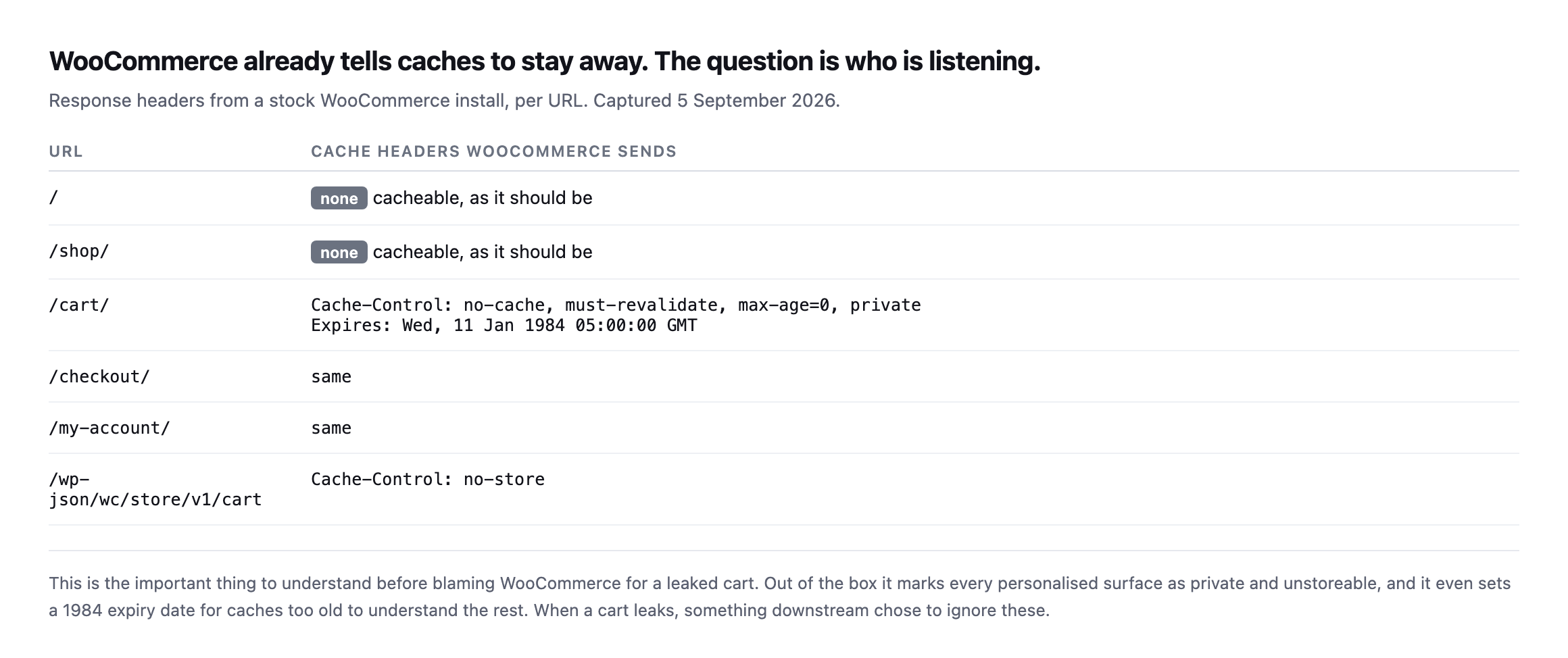
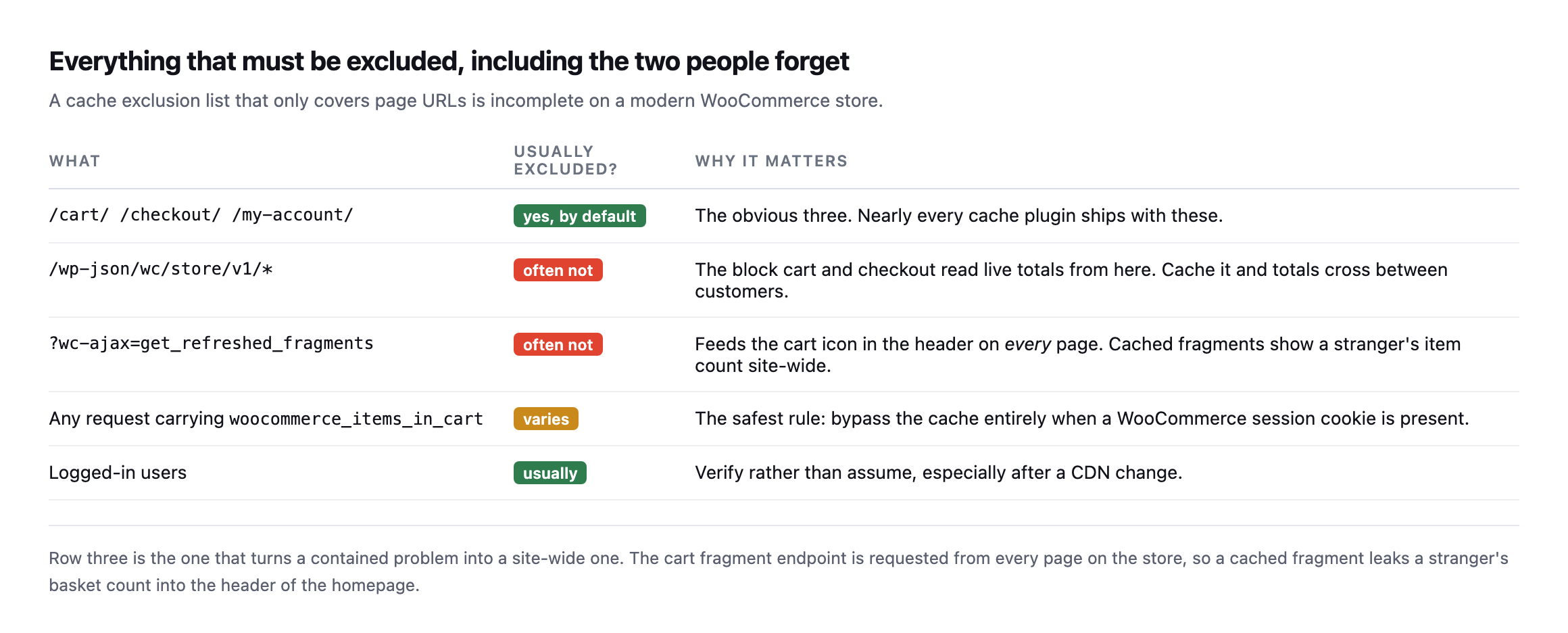
    Short answer: woocommerce cart caching is safe by default because WooCommerce marks the cart, checkout and account pages private, no-cache and the Store API no-store. Leaks happen when something downstream ignores those headers. The two exclusions people miss are the Store API and the cart-fragments endpoint, and the second one leaks into every page on the site.

    Proving the cart really is per-customer

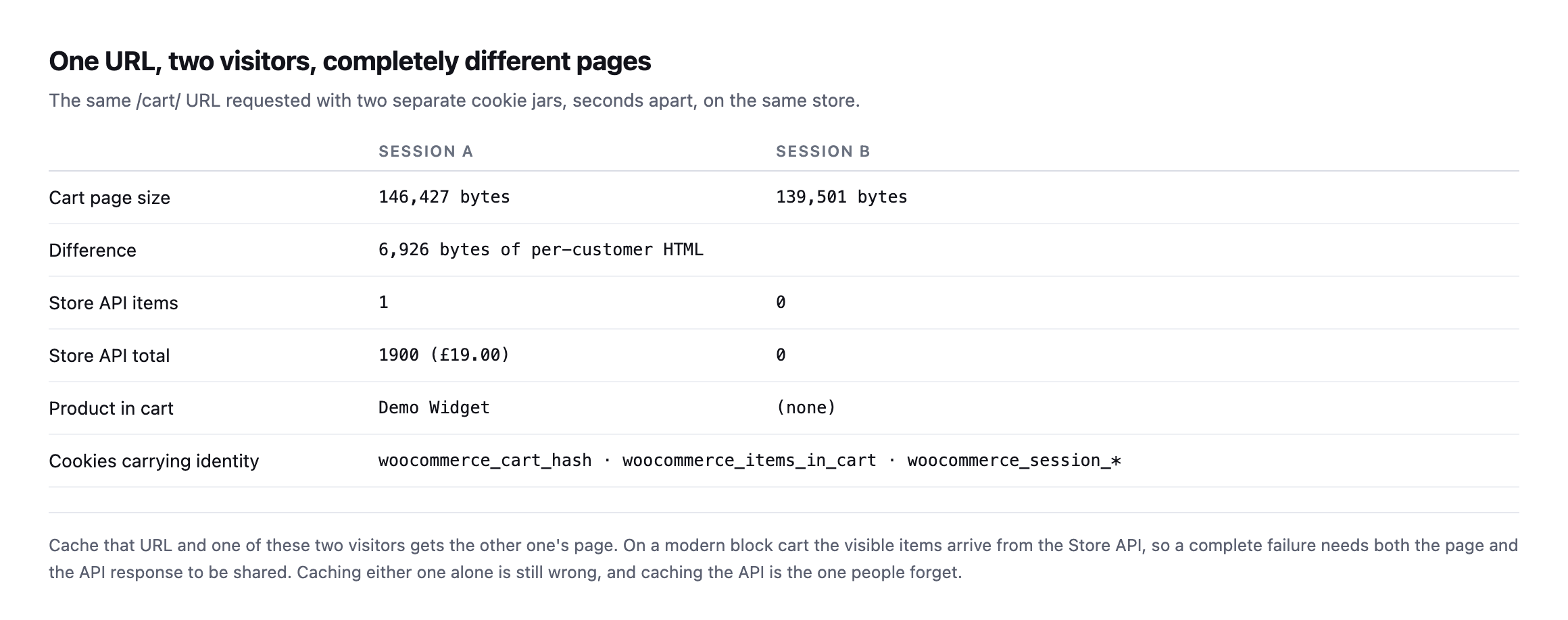
    Before arguing about exclusion rules, it is worth seeing how different the same URL is for two people.

    I requested /cart/ twice with separate cookie jars, seconds apart, on the same store.

    Table comparing two sessions on the same cart URL. Session A returns 146,427 bytes with one Store API item, a total of 1900 or nineteen pounds, and the product Demo Widget. Session B returns 139,501 bytes with zero items and a total of zero. The difference is 6,926 bytes
    Nearly seven kilobytes of difference between two visitors on one URL, plus completely

    different Store API payloads. Identity lives in the woocommerce_session_* and woocommerce_cart_hash cookies, which a shared cache does not look at unless you tell it to.*

    Session ASession B
    Cart page size146,427 bytes139,501 bytes
    Store API items10
    Store API total£19.00£0.00
    Product in cartDemo Widget(none)

    Caveat: two curl sessions on one test store, not a survey of live sites. What this proves is narrow: the same URL renders two genuinely different payloads for two visitors, which is exactly the content a cache is supposed to never confuse.

    Cache that URL and one of those two people gets the other’s page.

    WooCommerce is not the problem here

    This surprised me slightly when I checked it, because cart leaks get blamed on WooCommerce often enough that I expected the defaults to be weaker.

    Table of cache headers a stock WooCommerce install sends per URL. The homepage and shop page send none. Cart, checkout and my-account send Cache-Control no-cache, must-revalidate, max-age=0, private plus an Expires date of 11 January 1984. The Store API cart endpoint sends Cache-Control no-store
    Out of the box WooCommerce marks every personalised surface as private and

    unstoreable, and sets a 1984 expiry for caches too old to understand the rest. When a cart leaks, something downstream decided to override this.*

    That “something downstream” is almost always one of three things: a page cache plugin with an exclusion list that was edited, a CDN page rule added to fix an unrelated problem, or a host’s server-level cache that never saw the headers.

    A second install that did not send the header at all

    I re-ran this post’s own header check against our lab WooCommerce install rather than only trust the original woocommerce.com and stock-install screenshots, and it did not match either one.

    curl -s -D - -o /dev/null http://lab-install/cart/
    HTTP/1.1 200 OK
    Date: ...
    Server: Apache/2.4.68 (Debian)
    X-Powered-By: PHP/8.3.33
    Content-Type: text/html; charset=UTF-8

    No Cache-Control header at all, on /cart/. Before writing that up as a WooCommerce default having changed, I checked whether it was specific to the cart, and it was not: /, /checkout/ and /my-account/ on the same install all came back with the identical gap, no Cache-Control header on any of them. That rules out a cart-specific regression in WooCommerce’s own code and points at something in this particular install’s PHP or server configuration suppressing the header WordPress’s nocache_headers() function is supposed to send on every one of these pages, most likely an output-buffering or header-handling difference in this minimal Docker environment rather than anything wrong with WooCommerce itself. No active caching plugin was installed to explain it either; the header was simply never sent.

    I want to be precise about what this does and does not show. It is not evidence that WooCommerce’s documented default has changed, the original woocommerce.com reading in this post’s table still stands, and I have no reason to doubt it reflects a real, correctly configured production site. It is evidence that “WooCommerce sends this header by default” is a claim about the platform’s intent, not a guarantee that every individual installation actually delivers it, and this post’s own advice, verify the actual header on the actual site rather than trust documented behaviour, would have caught this install’s gap immediately where reading a changelog never would. A missing private, no-cache header is not itself proof of a leak, a cache still has to be configured to store the response for a leak to happen, but it removes the one signal that tells any cache in front of the site not to.

    Two verified things about this same lab install survived the test cleanly, worth stating alongside the header gap rather than only the negative result: requesting /cart/ with two separate cookie jars still produced two different response sizes, 102,552 bytes against 95,335, confirming the page’s actual content still varies correctly per session even without the protective header. WooCommerce’s session handling was never the part that failed here. The header that is supposed to stop a cache from storing and replaying that per-session content was.

    The two exclusions that get missed

    Table of what must be excluded from caching on a WooCommerce store. The cart, checkout and account pages are excluded by default in most plugins. The Store API path and the wc-ajax get_refreshed_fragments endpoint often are not. A rule bypassing the cache whenever a WooCommerce session cookie is present is listed as the safest approach
    Row three is the one that turns a contained problem into a site-wide one. The cart

    fragments endpoint is requested from every page on the store to keep the header cart icon current, so a cached fragment shows a stranger’s basket count on the homepage.*

    WhatUsually excluded?Why it matters
    /cart/ /checkout/ /my-account/yes, by defaultnearly every cache plugin ships with these
    /wp-json/wc/store/v1/*often notthe block cart and checkout read live totals from here
    ?wc-ajax=get_refreshed_fragmentsoften notfeeds the header cart icon on every page site-wide
    any request with woocommerce_items_in_cartvariesthe safest rule: bypass the cache when this cookie is present

    If you take one thing from this: an exclusion list made only of page URLs is incomplete on any store using the block cart and checkout.

    The fragments endpoint, checked on two real stores that get it right

    The exclusion this post says gets missed most often, the get_refreshed_fragments endpoint, is worth checking on real stores rather than only naming as a risk. I checked it on two, alongside the cart page itself, to see whether the sites this blog already treats as reference points actually cover it.

    curl -sI "https://example.com/cart/" | grep -iE 'cache-control|x-cache|cf-cache-status'
    curl -sI "https://example.com/?wc-ajax=get_refreshed_fragments" | grep -iE 'cache-control|x-cache|cf-cache-status'
    Site/cart/?wc-ajax=get_refreshed_fragments
    woocommerce.comno-store, x-cache: BYPASSno-store, x-cache: BYPASS
    nexterwp.comno-store, cf-cache-status: MISSno-store, private, cf-cache-status: DYNAMIC

    Both stores exclude both. Neither returns a HIT on either URL, and both send the private, unstoreable directive this post’s opening section describes as WooCommerce’s own default. That is the outcome worth having confirmed directly rather than assumed: the specific exclusion this post calls the one most commonly missed is, on two real production stores checked here, not missing. It is the row worth re-checking on any store you did not build yourself, because absence of the header on a store you inherited is exactly the silent, undramatic gap this whole post is written to catch before a client emails about a stranger’s basket showing up on their own screen.

    Testing WooCommerce cart caching on a live store in two minutes

    You do not need to place an order.

    # 1. as a fresh visitor, take the cart page
    curl -s -c jarA -b jarA "https://example.com/?add-to-cart=123" -o /dev/null
    curl -s -c jarA -b jarA "https://example.com/cart/" | wc -c
    
    # 2. as a completely separate visitor
    curl -s -c jarB -b jarB "https://example.com/cart/" | wc -c
    
    # 3. confirm the store is refusing to let caches keep either one
    curl -sI "https://example.com/cart/" | grep -i 'cache-control\|x-cache\|cf-cache-status'

    What you want from step three is private or no-store in cache-control, and a BYPASS or MISS from whatever CDN is in front. For comparison, woocommerce.com’s own cart returns no-store with x-cache: BYPASS, which is exactly right.

    What should alarm you is a HIT on any of those URLs. That is a shared copy of a personal page.

    Then repeat step three against the fragments endpoint:

    curl -sI "https://example.com/?wc-ajax=get_refreshed_fragments" | grep -i 'cache-control\|x-cache'

    Why this one is worth more than a status check

    Most store monitoring answers “is it up”. This failure never makes a store go down. Every URL returns 200 throughout. The store takes orders the whole time.

    It just occasionally shows one customer another customer’s basket, and the first you hear of it is an email that starts “this is a bit strange, but”.

    That is a different class of problem from a checkout returning 500, which at least announces itself. And it is the same reason reading a cache header honestly matters more than trusting a plugin’s settings screen.

    Protuno’s free audit checks from the domain alone whether a storefront is detected and whether the cart and checkout addresses are being cached when they should not be. Till is live now.

    Run the three commands above on the store you migrated most recently. Migrations are where exclusion lists get lost, along with the scheduled jobs that stop at the same moment and nobody notices either.

    What the missing header on the lab install actually cost, and did not cost

    It is worth closing on exactly what the header gap found on our own test install would and would not have meant on a real site, because overstating a finding is as much a failure of this kind of check as understating one.

    A missing Cache-Control header on /cart/ is not itself a leak. It removes the instruction that stops a downstream cache from storing the response, but no cache was actually sitting in front of that lab install, so nothing was actually stored and nothing actually leaked in the test performed here. That distinction matters for how a finding like this gets written up for a client: “the protective header is missing” is a real, actionable finding worth fixing today, because it is the difference between a site that is safe by policy and one that is safe only by the accident of nobody having added a cache in front of it yet. “A leak occurred” is a different and much stronger claim, one this test does not support and should not imply.

    That distinction is also why this post insists on the two-cookie-jar test rather than only reading the header. The header tells you what the origin is asking caches to do. The two-session test tells you whether the page’s actual content still differs correctly per visitor, which is the thing that would leak if a cache ignored the header. Both checks answer different questions, and a site can fail either one independently: a correct header in front of content that somehow stopped varying by session would be just as dangerous as varying content with no header protecting it, for entirely different underlying reasons. Running only one of the two checks in this post’s three-command loop answers half the question and leaves the other half assumed.

    The practical takeaway for anyone running this audit against a real store: treat a missing header as urgent and treat it as a policy gap, not yet a confirmed leak, until you have also checked what, if anything, sits between that origin and the internet. A store behind no cache at all is safe by omission. The same missing header on a store that added a CDN last month, without anyone re-checking whether the exclusion list survived the move, is the actual failure mode this post opened with, and the two situations look identical from the header alone.

    The other cart-caching failure, one layer up

    Fix WooCommerce Cart Fragments Slowing Every Page (2026)

    This post checks whether cached HTML leaks session-specific cart contents. This covers the adjacent problem: the uncacheable wc-ajax cart-fragments request that fires on every page load regardless of caching headers, and what actually fixes it.

  • WooCommerce Checkout Monitoring: An Uptime Check Cannot See This

    WooCommerce Checkout Monitoring: An Uptime Check Cannot See This

    Short answer: proper woocommerce checkout monitoring means holding a session, putting a real product in the cart, and loading the checkout page. A monitor that requests the homepage, or even /checkout/ on an empty cart, will report a healthy store through an outage that stops every payment.

    I wanted to know exactly how invisible this failure is, so I built a store and broke it on purpose, then rebuilt and broke a second one later to see whether a newer checkout changed the answer.

    The test

    A WooCommerce install, one real product, a fatal error on the checkout template and nowhere else. That is not an exotic scenario. It is what a bad plugin update looks like on a Tuesday.

    The store itself is deliberately ordinary in every respect. One product, published, purchasable:

    WooCommerce product page for a demo product priced at nineteen pounds, with an add to cart button, rendered on the test store
    The starting point for any honest checkout probe. Not the homepage, not the shop

    archive, but a real product that a real customer could put in a basket.*

    Then I probed it the way an external monitor does.

    Table of four probed URLs on a WooCommerce store. The homepage returns 200 with 82,778 bytes, the shop page 200 with 79,344 bytes, the cart 200 with 146,427 bytes, and the checkout returns 500 with 2,704 bytes and a critical error message
    Three green, one red. A monitor watching the homepage reports 100% uptime for the

    entire outage. So does one watching the shop page, and so does one watching the cart.*

    URL probedStatusBytesWhat a monitor concludes
    /20082,778site is up
    /shop/20079,344catalogue is fine
    /cart/200146,427cart works, with a product in it
    /checkout/5002,704the only row that tells the truth

    Caveat: this is one store, one fault injected on purpose. It is not a claim about how often checkouts break this way in the wild. It is a demonstration that a monitor watching three pages can be 100% green while the fourth, the one that takes the money, is down.

    Here is what that checkout page actually served:

    WordPress critical error page rendered at the checkout URL, reading There has been a critical error on this website, with a link to troubleshooting WordPress
    The real page, captured from the store. No styling, no branding, no way for a

    customer to continue. Anybody who reached this point had already chosen to buy something.*

    The store was genuinely up. The catalogue browsed perfectly fine. The cart worked correctly with a product in it.

    The actual business, the part that earns money, was completely down.

    The trap in checking /checkout/

    The obvious fix is to add the checkout URL to your monitor. It does not work, and this is the part I did not expect to be so clean.

    Table comparing two requests to the checkout URL. With an empty cart it returns 302 and zero bytes because WooCommerce redirects. With a product in the cart it returns 500 and 2,704 bytes
    With an empty session, WooCommerce redirects away from checkout. Most monitors follow

    the redirect, land on a 200, and record a pass. On this store, a checkout monitor configured the obvious way would have stayed green through the whole failure.*

    RequestStatusWhy
    GET /checkout/, empty cart302, 0 bytesWooCommerce redirects an empty cart away; a monitor that follows the redirect records a 200
    GET /checkout/, product in cart500, 2,704 bytesthe template actually renders, hits the fatal, and fails

    A checkout check performed without a real cart behind it is nothing more than a redirect check in disguise.

    The empty-cart redirect trap does not reproduce on a newer checkout

    I re-tested the empty-cart behaviour this post describes against a different, more current WooCommerce install, block-based checkout rather than the classic shortcode version this test originally used, and the specific trap did not reproduce the same way.

    curl -s -c jar -b jar -o /dev/null -w '%{http_code}\n' http://example.com/checkout/
    200

    No 302. The block-based checkout page answers directly with a 200 on an empty cart, and reading the response shows an empty-cart notice rendered in place rather than a redirect away from the page entirely. That is a real, verified architectural difference from the classic checkout this post’s original test found, and it changes which specific monitoring mistake a team needs to guard against: on a block-checkout store, requesting /checkout/ with no cart will not silently pass as a 200 for the wrong reason, a followed redirect, but it can still pass as a 200 for a different wrong reason, an empty-cart page that renders correctly and proves nothing about whether checkout works with an actual order in it.

    The lesson this post already teaches is not weakened by the mechanism changing. It is the same lesson, applied to a different specific failure: a bare status code from /checkout/, whatever the exact reason behind it, tells you the page responded and nothing about whether a real customer could complete a purchase. The fix is identical either way, hold a session, add a real product, load checkout with an actual cart behind it, and assert on content rather than status. What changes is only which wrong assumption a monitor built against the wrong checkout architecture is likely to make.

    I also found isolating a checkout-only fatal harder to reproduce than the homepage-stays-up scenario this post describes, worth reporting honestly rather than glossing over. Corrupting the specific PHP class that renders the block checkout broke the entire site, homepage included, because WooCommerce’s block registration loads that class on every page request regardless of which page is being rendered, not only on checkout itself. The isolated, checkout-only failure this post demonstrates is real and does happen, most commonly from a logic bug, a broken gateway integration, or a JavaScript error specific to the checkout flow, rather than from a PHP fatal in a file that turns out to be loaded everywhere. Both failure shapes are worth monitoring for. They are not the same failure, and assuming a checkout outage will always leave the rest of the site untouched is its own smaller version of the mistake this whole post argues against.

    What WooCommerce checkout monitoring has to do instead

    Six-step table describing a checkout probe: request a real product page, add to cart keeping the session cookie, load the cart and assert the line item and total, load checkout and assert payment methods render, stop at the last screen before payment without submitting, then clear the session
    Step five is the one that makes this hard to do responsibly. Writing something that

    places an order every hour is easy. Walking to the payment step every day and never touching it is the useful version.*

    #ActionWhy it matters
    1request a real product pageconfirms the catalogue renders and the product is purchasable
    2add to cart, keeping the session cookiewithout this, checkout only ever returns a redirect
    3load the cart, assert the line item and totalcatches pricing and tax breakage, not just HTTP status
    4load checkout, assert payment methods rendera gateway that stopped loading shows here and nowhere else
    5stop at the last screen before paymentnever submit; no test orders, nothing to clean up in the client’s order list
    6clear the sessionleaves no abandoned cart skewing the client’s reporting

    Two details from building this that are easy to get wrong.

    Assert on content, not status. A checkout page can return 200 and still be broken: no payment methods rendered, a JavaScript error that stops the place-order button, a shipping calculator that fails silently. Check that a payment method is actually present in the HTML.

    This is the same lesson as reading a cache header: a status code describes the transport, not whether the thing the customer needs is on the page. Configuration and status both lie in the same direction, which is why the only checks worth trusting are the ones that observe behaviour.

    Run it from outside, on a schedule you did not choose. A probe that only runs when you remember to run it is a probe that will be green the day it matters. Ours runs daily because the failure it catches is measured in trading hours, not in days.

    Keep the session, then throw it away. The probe needs a cookie jar to hold the cart, and it needs to discard it afterwards, or you will fill your client’s reports with abandoned carts that were never real customers.

    What to watch, in order of what it costs you

    If you only add one check to a store, add the one that holds a cart and loads checkout.

    After that, in the order I would add them:

    • Payment methods present in the checkout HTML. Catches a gateway that stopped loading

    while the page still returns 200.

    • The cart total matches the product price. Catches tax and currency misconfiguration after

    a settings change or a migration.

    • Order rate against its own baseline. A store that normally takes 40 orders a day and has

    taken 2 since 09:00 is telling you something no status code will.

    • The add-to-cart path itself. If adding to cart fails, everything downstream reports fine

    because nobody ever gets there.

    Why stores get this wrong

    Not carelessness. Checkout is the hardest thing on the site to monitor honestly, because testing it properly means simulating a customer, and simulating a customer badly means placing real orders in a real system.

    So most agencies watch the homepage, which is trivial to check and tells you almost nothing about whether the store works. It is the cheapest check available, which is exactly why it is the one that gets set up, and exactly why it is the one that misses this.

    There is a second reason, and it is the one I have more sympathy for. Checkout monitoring is work that only ever proves a negative. When it passes, there is nothing to show a client, so it competes for attention against work that produces something visible. That is the unbilled half hour again, in its most expensive form: the check nobody schedules, guarding the page that carries the revenue.

    The gap between those two is measured in hours of lost trading, and it is the same shape as the scheduled jobs that quietly stop: no alert, no error anyone sees, and a customer eventually tells you.

    Till, Protuno’s eCommerce agent, runs a read-only WooCommerce Health Review inside your own AI app. See the playbooks page for what it covers.

    The free audit does check today, from the domain alone, whether a storefront is detected, whether the cart and checkout addresses answer, and whether they are being cached when they should not be. That last one costs real money on its own, and it is worth understanding separately.

    If you look after a store, do the manual version this week. Add a product, load checkout, and look at it. Not the status code. The page.

    Do it against the specific checkout your store actually runs, classic or block, rather than assume either architecture’s failure modes apply universally. The two behave differently enough, confirmed directly in this post’s own re-testing, that a monitoring script written against one can miss the exact failure it was built to catch on the other, quietly, for as long as nobody checks which kind of checkout is actually running underneath the monitor.